
For over a decade, cloud practitioners have faced the same recurring challenge: when disaster strikes, most recovery plans fall apart. Whether it's an accidental deletion in production, a regional outage, or a configuration that drifts from what's documented, the gap between your DR plan and reality becomes painfully clear when downtime costs hit you.
Traditional backup solutions promise resilience but deliver fragmented coverage. They capture point-in-time snapshots of individual resources while missing the relationships, dependencies, and configurations that make those resources actually work.
The result? When you need to recover, you discover that your backup is incomplete, your runbooks are outdated, and your team is scrambling to reconstruct infrastructure from memory while users wait.
The Firefly Difference: A Fresh Approach to Modern Disaster Recovery
With real-time visibility across AWS, Azure, GCP, Kubernetes, and 14+ SaaS applications, automated codification of your entire cloud footprint, and one-click restoration through Infrastructure-as-Code, Firefly ensures you can recover from any disruption-fast, consistently, and with complete auditability.
Recognized by Gartner as the leading Cloud Application Infrastructure Recovery Solution (CAIRS), Firefly transforms disaster recovery from reactive chaos into predictable, tested process, and solves a long-standing problem many teams who think they’re disaster-ready aren’t even aware of.
Real-Time Detection: Know What Changed, When It Changed, and Why
Most disaster recovery failures start with a simple problem: by the time you realize something's wrong, you've already lost visibility into what changed.
Firefly's Event Center captures every change to your infrastructure in real time. When an asset is deleted, modified, or experiences drift, Firefly records the event instantly: including who made the change, when it happened, and the full configuration before and after.
When disaster strikes, this real-time awareness means you can trace exactly what happened, identify the root cause, and roll back to a known-good configuration: all through auditable pull requests into your Git repositories.
Deleted Asset Recovery: Nothing Truly Disappears
When a resource gets deleted (whether that’s through an accidental console click, an overly aggressive automation script, or a deployment gone wrong), it doesn't vanish from Firefly.
Within the Deleted Assets tab, you can still see the resource with complete context:
- Full metadata and configuration details
- Lifecycle timeline showing when it was created, modified, and deleted
- Relationships to other assets (security groups, load balancers, databases)
- Previous IaC linkage, if the resource was codified

Recovery is immediate and precise:
1. Identify the deleted resource using Firefly's filters by region, resource type, tag, or owner.
2. Click Codify on the resource. Firefly automatically generates production-ready IaC (Terraform, CloudFormation, Pulumi, or Helm) that recreates the resource exactly as it was, with all dependencies and configurations intact.
3. Review the pull request that Firefly opens directly into your Git workflow.
4. Merge and apply. The resource is restored within seconds, fully versioned and traceable.
Combined with real-time alerts from Firefly Notifications, you can react to unexpected deletions before they cause user-facing downtime: turning potential disasters into minor operational hiccups.
Cross-Cloud Migration: Failover Across Providers, Not Just Regions
Firefly's Codify engine does more than restore deleted assets. It enables true multi-cloud portability by translating resources between cloud providers.
With a few clicks, you can migrate existing infrastructure to equivalent services across AWS, Azure, or GCP:
- Move an AWS S3 Bucket to Azure Blob Storage or GCP Cloud Storage
- Shift a GKE Cluster to EKS or AKS with full configuration context
- Translate IaC definitions between clouds using Firefly's mapping engine
This cross-cloud capability transforms disaster recovery from single-region redundancy to provider-level resilience. If AWS experiences a large-scale outage (as happened with the UniSuper incident), you can trigger fast failover by re-codifying critical workloads and deploying them to GCP or Azure.
Because Firefly maintains centralized definitions of your infrastructure, your workloads aren't locked to a single vendor. You have the flexibility to move between clouds based on availability, cost, or strategic priorities: all with the confidence that dependencies and configurations will translate correctly.
Variable-Driven Failover: Switch Regions in Minutes
For regional disasters, Firefly's Workflows enable parameterized failover that removes manual coordination from the equation.
The pattern is straightforward:
1. Define a region variable in your workflow
2. Create a parallel failover workflow where you change the variable to whichever region is healthy
3. Trigger the workflow. Firefly applies your IaC stack to the new region, leveraging the same definitions that power your primary environment.

Because Firefly tracks all assets (including drift, ghost resources, unmanaged infrastructure, and code links) centrally in its inventory, the regional switch is transparent and fast. Your team isn't hunting through consoles or trying to remember which security groups attach to which load balancers. Everything is documented, codified, and ready to deploy.
Proactive Prevention Through Governance
The best disaster recovery strategy is preventing disasters before they happen. Firefly's governance engine enforces policies that catch misconfigurations during normal operations. before they cause outages.
Built-in and custom policies ensure infrastructure meets resilience requirements:
- RDS instances must be Multi-AZ for automatic failover
- DynamoDB tables must have point-in-time recovery enabled
- S3 buckets without versioning must be flagged for backup gaps
- Kubernetes workloads must define resource limits to prevent cascading failures
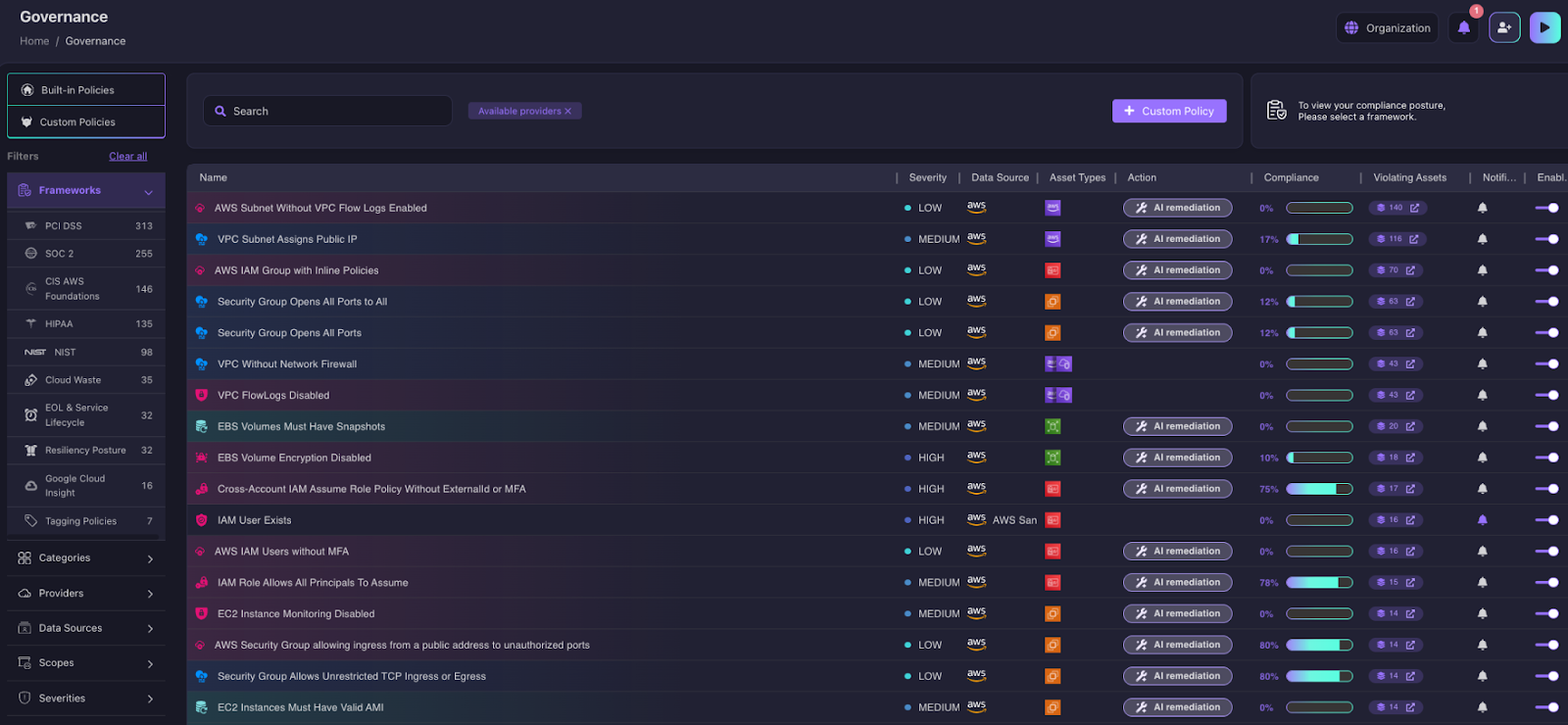
When violations occur, Firefly Notifications alert your team in real time via Slack, Teams, email, or ServiceNow. Instead of discovering problems during an outage, you're fixing them during regular operations when they're trivial to address.
This shift from reactive to proactive fundamentally changes how teams think about disaster recovery. Rather than hoping your DR plan works when tested quarterly, you're continuously validating and improving resilience as part of day-to-day infrastructure management.
Comprehensive Coverage: No Blind Spots
One of the most common disaster recovery failures happens with resources that were never included in the plan. ClickOps-created assets, shadow IT services, legacy systems, and SaaS configurations like Okta, Datadog, or MongoDB often fall outside formal backup coverage.
Firefly's unified inventory eliminates these blind spots with complete visibility across:
- Cloud providers: AWS, Azure, GCP with multi-account and multi-region support
- Container orchestration: Kubernetes, EKS, GKE, AKS
- IaC frameworks: Terraform, CloudFormation, Pulumi, Helm, Argo, Kustomize
- SaaS applications: Okta, Datadog, New Relic, Cloudflare, MongoDB, and more
Firefly automatically identifies "unmanaged" resources, or those created outside IaC, as well as those assets that exist in your cloud but no longer serve a purpose. With one click, you can codify these resources and bring them under version control, ensuring they're included in your disaster recovery scope.
This comprehensive coverage means when disaster strikes, you're not discovering critical dependencies in real-time. You already know what needs to be recovered, you have the code to restore it, and you can prove it works through regular testing.
Automated Recovery with the DR AI Agent
For complex, multi-tier applications, even IaC-based recovery can be time-consuming. You need to redeploy services in the correct order, wait for health checks to pass, update DNS records, and verify that dependencies are satisfied.
Firefly's DR AI Agent (launching soon!) automates this entire orchestration:
- Analyzes full application topology to identify all required resources and dependencies
- Generates sequenced recovery plans that account for startup order and health validation
- Executes automated deployment across regions or clouds
- Validates service health before proceeding to dependent components
- Updates routing and DNS to direct traffic to recovered infrastructure
It’ll transform what would normally take hours of manual coordination into minutes of automated, reliable recovery: eliminating the human error that creeps in during high-pressure incidents when teams are rushing to restore service.
5 Steps: Getting Started with Firefly Disaster Recovery
To operationalize disaster recovery with Firefly:
- Navigate to Inventory → Deleted Assets. Filter by region, resource type, or tag to understand what's been removed from your environment and what's available for recovery.
- Click any deleted asset, then hit Codify. Review the generated IaC pull request, merge it into your Git repository, and apply. The resource is restored with full configuration, dependencies, and version control.
- Create failover workflows in Firefly's workflow library where region or cloud variables are parameterized. Test these workflows in non-production environments to validate they work under pressure.
- Set up governance policies for backup requirements, Multi-AZ configurations, and point-in-time recovery. Configure Firefly Notifications to alert your team when policies are violated.
- Make recovery drills part of your platform engineering cadence. Simulate asset deletion, test cross-region restore, practice IaC rollback. Validate that you can recover within your RTO/RPO targets without relying on tribal knowledge or outdated runbooks.
By making disaster recovery a continuous practice rather than a quarterly fire drill, you build organizational muscle memory that pays off during real incidents. It’s that simple; with Firefly, you’ve gone from reactive chaos to repeatable processes, without the headaches.
To see Firefly at work firsthand, try it out for yourself or request a demo.
For a deep dive to Firefly’s disaster recovery capabilities, watch our latest on-demand webinar.

.avif)
.avif)
.webp)


.webp)












