TL;DR
- Enterprise AI at scale introduces infrastructure complexity; teams must manage thousands of IaC resources, GPU fleets, and data pipelines across multi-cloud, multi-project environments.
- Treat infrastructure, data, and models as code to ensure reproducibility, compliance, and consistent deployments.
- Run both app and model workflows through one GitOps-driven automation layer with reconciliation loops that detect and clean up unmanaged resources.
- Use policy-as-code (OPA, Sentinel, AWS Config) to prevent overspend and enforce standards (e.g., “no A100 GPUs in non-prod,” “training data must be encrypted”).
- Firefly simplifies governance at scale by unifying IaC visibility, detecting drift, enforcing policies, and mapping multi-cloud AI infrastructure, enabling enterprises to run auditable, cost-efficient, and self-healing AI systems.
AI workflow automation connects every stage of the ML lifecycle, from data ingestion to model training, deployment, and governance, into a continuous, auditable pipeline that turns raw data into real-time decisions.
With the rise of LLMs and cloud-native ML tooling, AI systems have become distributed and multi-cloud. Today, AI agents can act directly on infrastructure, for example, scaling a GKE node pool when an inference queue spikes. Without guardrails, though, these agents can trigger cost explosions, config drift, or security violations across environments.
According to Deloitte, 83% of enterprises now view automation as essential to scaling AI. In reality, that means platform teams are wrangling thousands of IaC resources, GPU fleets, and models across multi-account, multi-project cloud sprawl, all needing compliance, reproducibility, and cost control.
Enterprises are moving toward agentic, self-healing AI workflows that automate not just model operations but also detect drift, enforce policies, and optimize infrastructure autonomously. In the sections ahead, we’ll look at how enterprises build automated, auditable AI workflows end-to-end, and why platforms that unify infrastructure, policy, and observability, such as Firefly, are becoming critical to making them scale safely.
The Modern Enterprise AI Workflow: From Data to Decisions
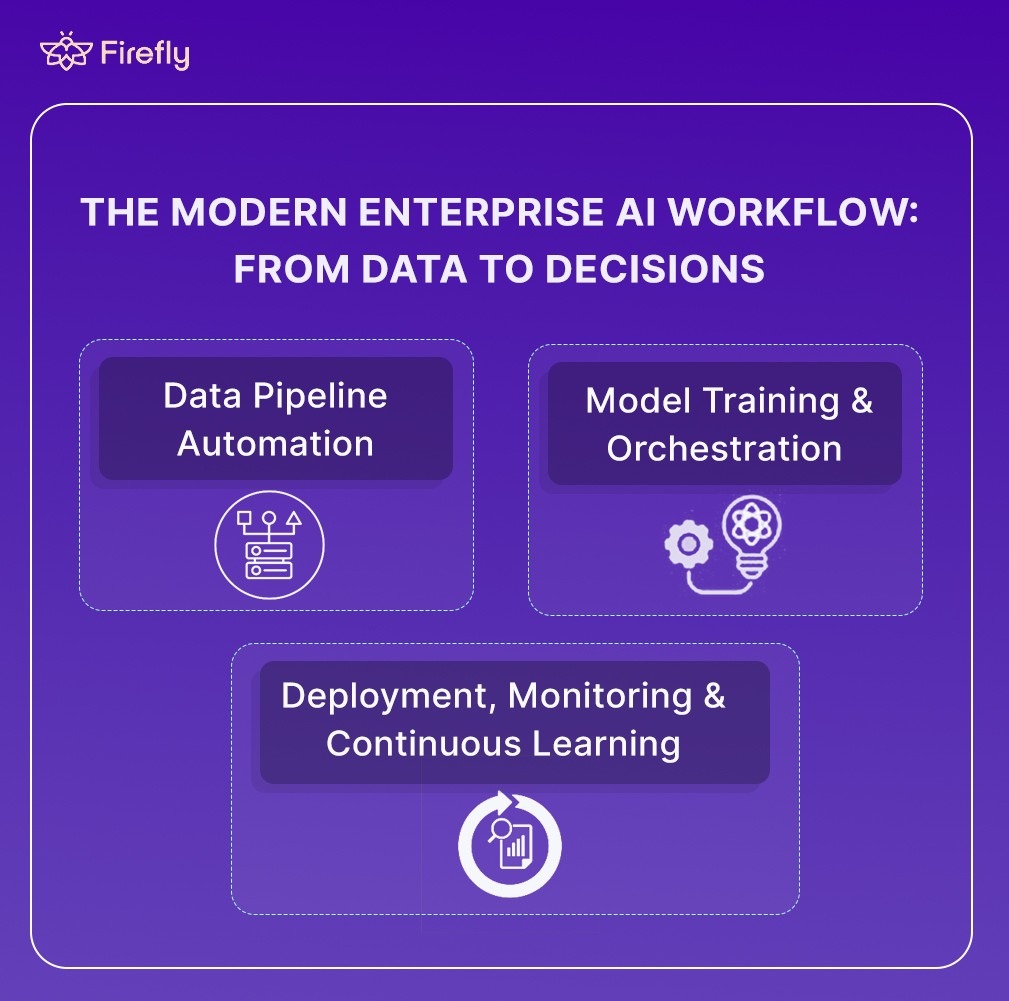
Enterprise AI operates as an automated, version-controlled system connecting data ingestion, model training, deployment, and monitoring across clouds. Every stage is governed by infrastructure-as-code, observability, and compliance, ensuring reliability and traceability at scale. The following stages outline how enterprise AI systems transform data into decisions:
1. Data Pipeline Automation
Enterprise data is distributed across clouds and on-prem systems, making automation essential for consistency. Orchestrators like Airflow, Databricks Workflows, and AWS Glue manage ETL processes, while built-in validation gates detect schema drift, missing data, and quality issues before ingestion.
Feature stores such as Feast or Tecton maintain alignment between training and production datasets. Metadata catalogs (DataHub, Amundsen) and versioning systems (LakeFS, DVC) ensure data lineage and reproducibility across environments.
Pipelines are designed and managed like code, fully versioned, tested, and monitored, reducing downstream drift and maintaining data integrity across the AI lifecycle.
2. Model Training & Orchestration
Training of ML workloads in enterprise AI runs as an infrastructure-managed workflow, not a manual process. Distributed GPU and TPU clusters are provisioned dynamically through Kubernetes and Terraform, with each workload containerized and isolated for reproducibility.
Experiment tracking platforms like MLflow or Kubeflow log parameters, runs, and artifacts. Compute resources are ephemeral, provisioned on demand, and automatically torn down after completion, optimizing both cost and utilization.
Access policies, quotas, and tagging enforce governance, while AIOps systems continuously monitor utilization, node health, and performance, automating recovery when failures occur. This design delivers scalable, cost-efficient, and reliable training across hybrid or multi-cloud environments.
3. Deployment, Monitoring & Continuous Learning
Model deployment is automated through CI/CD and GitOps practices using Argo CD or Spinnaker, ensuring that both model versions and infrastructure configurations remain synchronized. Canary and shadow deployments validate performance safely before full rollout.
Once in production, observability pipelines track system and model health using Prometheus, Grafana, or Datadog. Monitoring extends beyond technical metrics to include business KPIs, such as decision latency, accuracy impact, and cost per inference, ensuring model performance aligns with business outcomes.
Continuous learning closes the loop. When drift or KPI deviations are detected, retraining pipelines automatically pull validated data, retrain the model, and redeploy it, maintaining model freshness and performance without manual intervention.
A modern enterprise AI workflow is automated, auditable, and adaptive. Data pipelines, model training, deployment, and monitoring operate as a unified system, versioned, observable, and policy-driven. This integration transforms AI from isolated experimentation into a continuous, production-grade process that scales securely and delivers consistent business value.
Lessons from Enterprises Scaling AI Workflows
As enterprises operationalize RAG pipelines, LLM fine-tuning, and GenAI services in production, consistent architectural and operational patterns emerge across GPU-heavy, high-availability environments.
Enterprise AI Deployment Case Studies
- Systalyze + Google Cloud: Systalyze’s platform achieved up to 90% reduction in AI deployment costs while improving runtime performance. They leveraged Google Kubernetes Engine, optimized GPU usage, and maintained enterprise-grade data privacy.
- LTIMindtree – US Utility Cloud Platform: Working with a large US electric utility, LTIMindtree built end‑to‑end automated ML pipelines (training, inference, deployment, monitoring) and unified frameworks for logging, error‑handling, and drift detection. They reported ~40% faster time‑to‑market and ~50% automation in deployment steps.
- Logic20/20 – Utility Asset Risk Prediction: Logic20/20 migrated a utility’s on‑prem model stack to AWS serverless architecture, built feature ETL, versioning, audit trails, and cost tracking. One aim is to enable emergency decision-making (wildfire/asset failure risk) with real-time data.
Operational Insights for Enterprise AI
- Infrastructure and cost optimization are foundational: At enterprise scale, inefficient GPU/TPU usage, unoptimized clusters, and idle resources quickly become cost sinks. Systalyze’s ~90% cost reduction shows how addressing infrastructure layers delivers immediate ROI.
- Standardized, reusable pipelines enable scale: With many use‑cases across an organization (e.g., forecasting, failure detection, personalization), building each pipeline afresh is unsustainable. LTIMindtree’s use of pre‑built templates, unified logging, and monitoring frameworks allowed multiple models to be spun up faster and more reliably.
- Production‑grade MLOps is non‑negotiable: It’s not enough to train a model. You must automate its lifecycle, data ingestion, training, validation, deployment, monitoring, and retraining. Logic20/20 demonstrates how migrating to the cloud, building versioning/data pipelines, and shifting to real‑time inference are critical for mission‑critical AI.
- Governance, reproducibility, and auditing are essential: If you can’t trace which dataset version, code commit, or infrastructure configuration produced a model, you’re exposed to drift, audit failures, and regulatory risk. In enterprise AI, this traceability extends to linking each model artifact back to its exact Git commit and Terraform plan ID, ensuring full visibility into the code, data, and infrastructure that shaped the model. These practices enable reliable audit trails and verifiable lineage across datasets, model versions, and infrastructure configurations.
- Link AI to business outcomes and operational workflows: Models matter only if they deliver decisions, speed, cost savings, and risk reduction. For example, the utility use‑case turned ML into actionable decisions in emergency scenarios rather than theoretical models. Monitoring must include business KPIs (e.g., decision time, cost per inference, risk mitigation), not just accuracy or latency.
- Architecture must support elasticity, real‑time, and hybrid demands: Especially in industries like utilities or finance, models must scale, respond to real‑time data, and operate across cloud/hybrid environments. Using cloud/serverless architectures, ephemeral and versioned resources, and auto‑scaling clusters are not optional; they are mandatory.
These case studies reflect that scaling AI workflows at the enterprise level involves building a robust, automated pipeline that integrates infrastructure, governance, and business outcomes. Enterprises that succeed do so by prioritizing repeatable, standardized processes, ensuring their AI systems are reproducible, auditable, and continuously learning.
Before scaling automation across enterprise environments, it’s worth grounding the concept with something tangible, a single, reproducible AI workflow.
The following hands-on example walks through how a simple Terraform + PowerShell setup can automatically deploy, train, monitor, and clean up an ML environment on Google Cloud, the same foundational pattern that scales to enterprise-grade AI workflows.
Automating an AI Training Workflow on GCP
Before you build large-scale, multi-team automation, it’s useful to start with something small that actually runs from start to finish without manual steps.
This example (GitHub repo) demonstrates how to deploy a short-lived machine learning training environment on Google Cloud using Terraform and a PowerShell launcher.
It provisions the infrastructure, runs the training job, pushes logs and results to storage, monitors the process, and then cleans up automatically.
How ML Teams Usually Handle This (and the Problems It Creates)
Running the PowerShell launcher below spins up the full environment, runs the training job, monitors it, and destroys everything after a set duration:
Terraform provisions:
| Component | Purpose | Why It’s Needed |
|---|---|---|
| Compute VM (e2-medium) | Runs the training job | Provides an isolated machine to execute the training script. You can replace this with GPU instances in production. |
| GCS Bucket | Stores datasets, logs, and results | Keeps data and outputs separate from the compute layer. The bucket persists even after the VM is deleted. |
| Service Account with IAM Roles | Handles permissions for automation | Allows Terraform and the VM to access GCS securely without using personal credentials. |
| Remote Terraform State (in GCS) | Maintains infrastructure state in the cloud | Keeps Terraform state consistent between runs or engineers. |
| Auto-Cleanup Timer | Tears down resources after workflow completion | Prevents idle resources from running after the job is done and keeps the environment cost-efficient. |
How the Workflow Executes
When the VM boots up, a startup script (startup-script.sh) takes over. It installs dependencies, pulls data from GCS, trains a small Random Forest model, uploads the results, and starts a background monitor.
Here’s the core logic simplified:
Here’s what happens:
- The VM installs dependencies and sets up a Python environment.
- It downloads training data from the GCS bucket.
- The model training script runs (a small Random Forest example).
- Results and logs are uploaded back to the bucket.
- After the runtime limit (default two hours), the workflow triggers cleanup and destroys all resources automatically.
Sample log output:
This script-driven workflow works for one engineer and one model, but it doesn’t hold up in a real team or production setup.
- Static config: VM specs, regions, and dataset paths are hardcoded. Any change means editing files and redeploying manually.
- No retraining triggers: There’s no way to kick off jobs automatically when data or code changes.
- No observability: Logs sit in GCS, but there’s no centralized monitoring, metrics, or failure alerts.
- State and drift issues: When multiple people run Terraform locally, resource drift and inconsistent IAM configs appear quickly.
- No guardrails: Nothing enforces cost limits, tagging, or resource policies.
- Weak cleanup: The auto-destroy timer helps, but it can still leave behind resources or partial state.
In short, it’s a repeatable demo, not a scalable system. ML workloads require controlled provisioning, periodic retraining, centralized monitoring, and automated policy enforcement..
Firefly’s Role: Automating Infrastructure for Scalable AI Workflows
As AI adoption scales, the complexity isn’t in building the models; it’s in managing the infrastructure that runs them. Most enterprises already use Infrastructure-as-Code (IaC) to define environments, but in practice, every team ends up maintaining its own stack, Terraform, Pulumi, OpenTofu, or CloudFormation, with different modules, naming conventions, and policies.
This fragmentation creates real problems at scale: duplicated resources, inconsistent IAM roles, drift across environments, and limited visibility into cost or compliance. A single GPU misconfiguration or untagged resource can easily translate into wasted spend or failed training jobs.
That’s where Firefly comes in. It automates how AI infrastructure is codified, deployed, and governed across multiple clouds. Instead of managing dozens of disjointed IaC stacks manually, Firefly provides a unified control layer that standardizes provisioning, detects drift, enforces policy-as-code, and tracks usage and cost across all environments.
AI-driven workloads are expected to grow by over 20% in the next year across public cloud, private cloud, and edge environments (Deloitte). For large enterprises running multiple ML and LLM pipelines, this growth amplifies the challenge of maintaining infrastructure that is reproducible, compliant, and cost-efficient. Firefly addresses this by managing the entire IaC lifecycle end-to-end, from discovery to governance, without requiring teams to abandon their existing tools or workflows.
How Firefly Simplifies Enterprise AI Workflow Automation
| AI Workflow Stage | What Firefly Automates | Outcome |
|---|---|---|
| Discovery & Codify | Scans existing environments and auto-generates Terraform/OpenTofu configurations. | Eliminates manual IaC authoring and ensures consistent infrastructure baselines for AI workloads. Prevents failures like copy-pasting infra from console exports that lead to misconfigured GPU clusters. |
| Provision & Orchestration | Automates plan/apply workflows from Git through Firefly Runners or CI/CD integration. | Enables consistent, repeatable deployments for every training or inference environment. Prevents inconsistent configs between teams that cause model training jobs to fail or underutilize GPUs. |
| Guardrails & Governance | Enforces Policy-as-Code for cost, security, and tagging using Firefly Guardrails. | Ensures compliant, cost-efficient infrastructure. Stops a rogue job from spinning up 100 A100 GPUs unintentionally, avoiding runaway costs. |
| FinOps & Visibility | Tracks per-workspace resource usage and cost across clouds. | Provides unified visibility into GPU and compute utilization, improving AI spend efficiency. Surfaces per-workspace GPU cost in one dashboard that engineers actually see, preventing hidden overruns. |
Enabling Governed and Reproducible AI Environments with Firefly
- Unified Governance Across Teams: Firefly’s Inventory dashboard provides a real-time, unified view of every resource across cloud and IaC systems — from compute and storage to service accounts and networking assets. It classifies resources as codified, drifted, or unmanaged, allowing teams to prioritize remediation and IaC adoption.
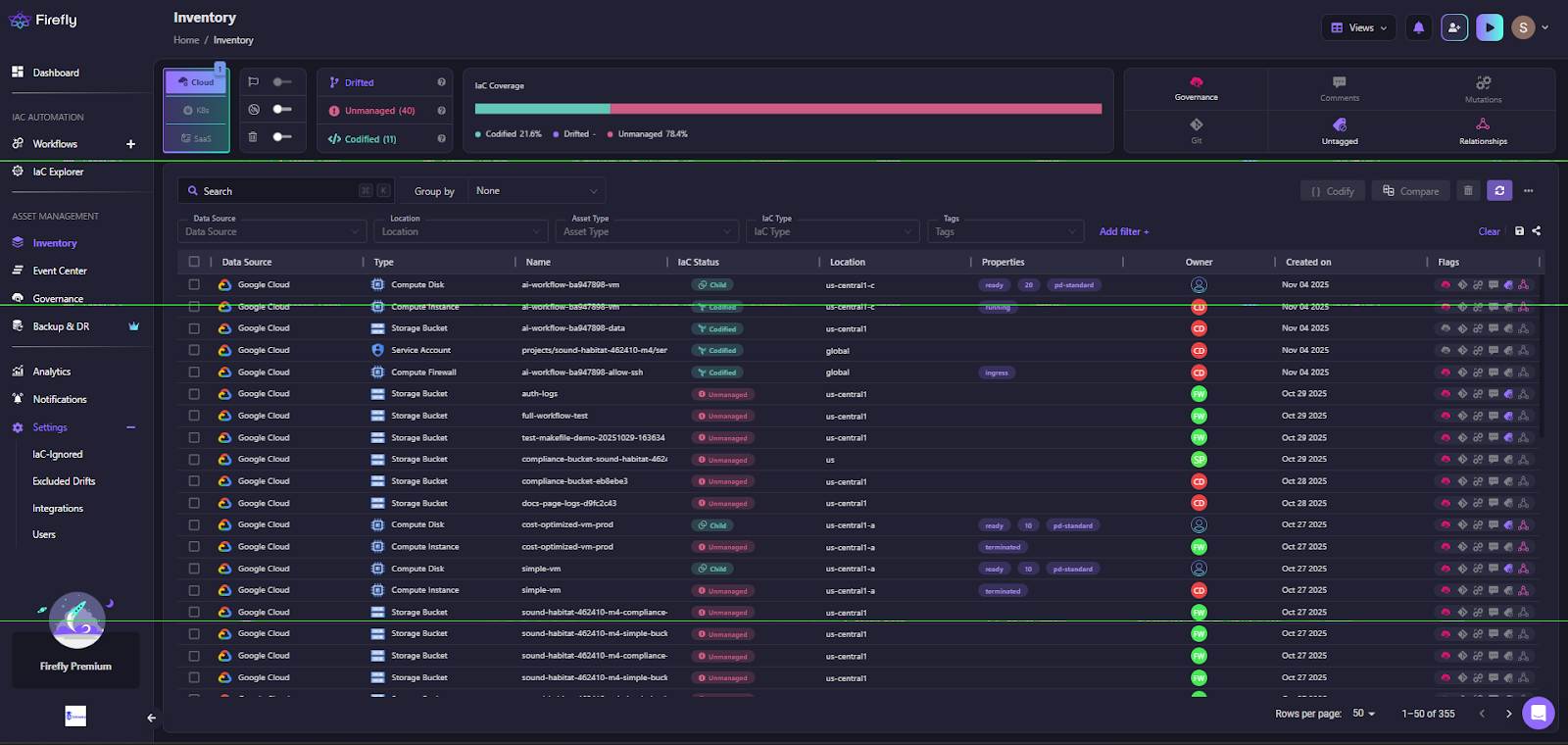
This interface helps platform teams track IaC coverage across environments. Each asset, whether a GCP VM, S3 bucket, or Kubernetes cluster, is mapped to its configuration state and ownership metadata, ensuring full visibility across managed and unmanaged infrastructure.
- Deep Resource Context and Governance Insights: Clicking into an individual resource (such as a GCP compute instance) reveals its complete IaC lineage, owner, and associated governance policies. This helps teams instantly trace configuration sources, detect drift, and apply AI-driven remediation.
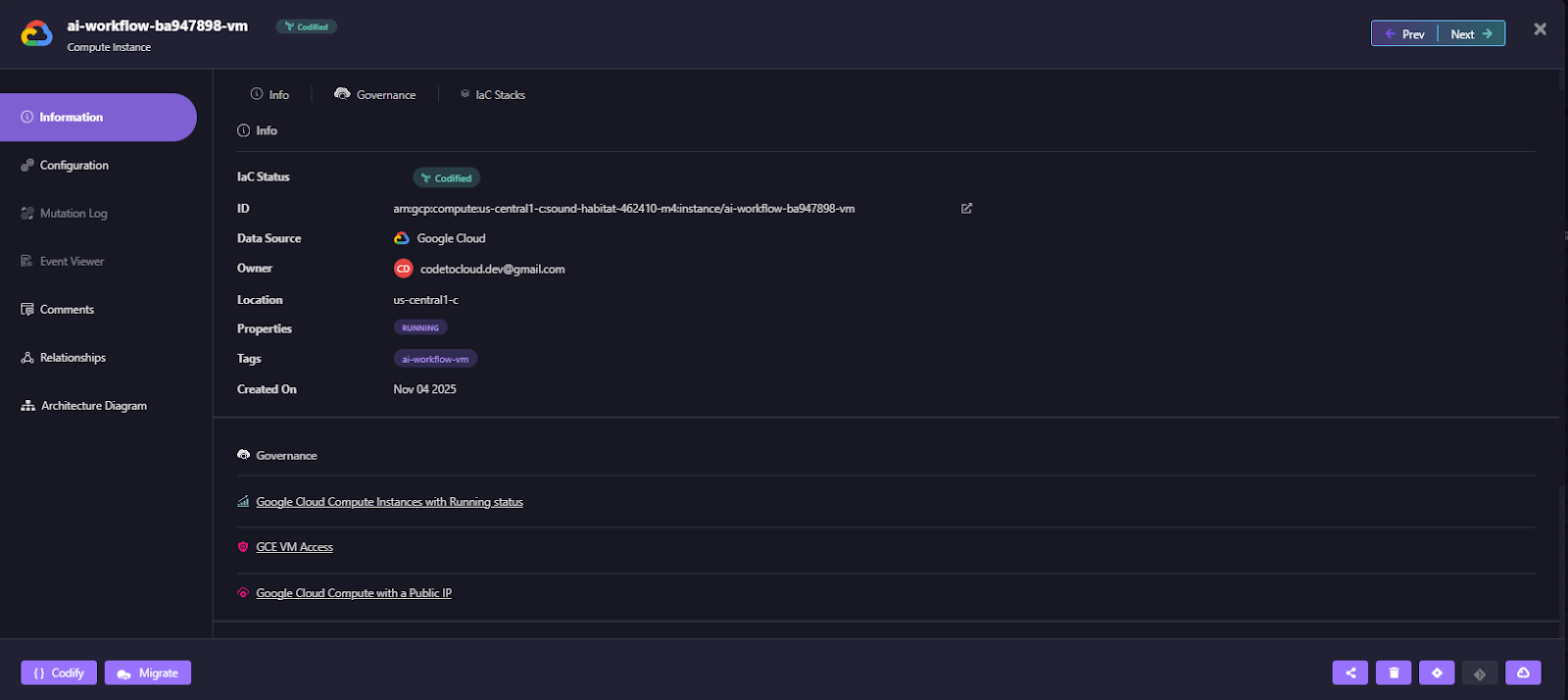
Each asset view includes details such as:
- IaC Source & Ownership: Identifies the Terraform module, owner, and environment location.
- Policy Links: Shows applied compliance or optimization rules.
- AI Remediation Actions: Suggests remediation, such as shutting down idle compute instances.
- Embedded Cost and Policy Controls: Firefly enforces compliance via Governance, written as code. These policies automatically monitor configurations and apply remediations for violations like idle VMs, untagged resources, or public endpoints.
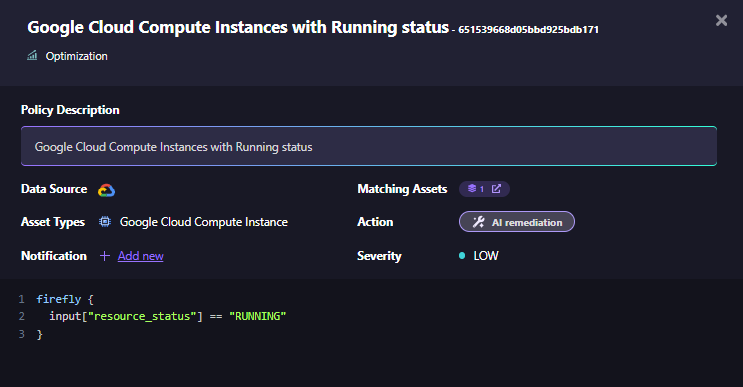
This example demonstrates a Firefly’s optimization policy that identifies and remediates Google Cloud instances left in an unnecessary running state, directly tied to AI infrastructure optimization.
- Integration with Existing Toolchains: Firefly can run workflows through its managed runners or integrate with existing CI/CD systems (GitHub Actions, Jenkins, GitLab). This allows platform teams to automate IaC without re-architecting pipelines, and guardrails add validation for changes such as required tags, cost controls, and other policy checks.
Scaling Multi-Team LLM Workflows: IaC Visibility and Architecture Mapping AI Workflows
AI workflows span multiple Terraform stacks, multiple cloud providers, and distinct ML teams, each managing their own infrastructure definitions. This distributed reality creates silos, drift, and compliance blind spots, making governance nearly impossible at scale.
Firefly solves this by combining two powerful capabilities, IaC state aggregation and automated architecture mapping, into a single, governed control plane built for enterprise AI environments.
Enterprise-Scale IaC Orchestration and Drift Management
Firefly’s IaC Explorer unifies Terraform, OpenTofu, and other IaC state files from across clouds and projects into one consistent view, as shown below:
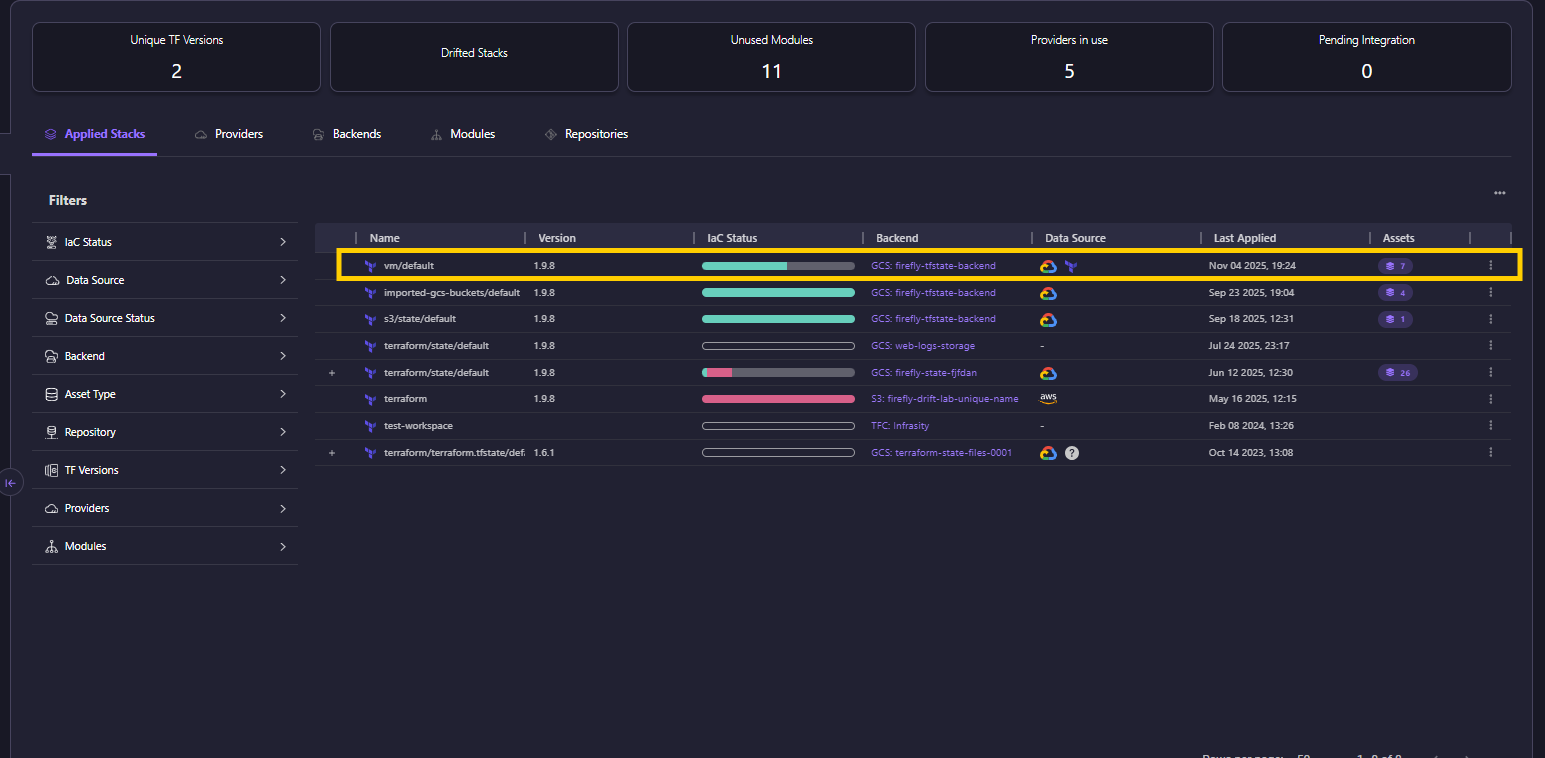
For enterprise AI platforms managing dozens of ML pipelines or LLM environments, this delivers operational clarity that manual IaC management simply can’t achieve. It enables teams to visualize and govern:
- Drifted vs. codified stacks across environments
- Backend storage integrations (GCS, S3, Terraform Cloud)
- Versioned modules and applied states for reproducibility
- Cross-provider coverage across AWS, Azure, and GCP
By consolidating these states, Firefly eliminates configuration drift, standardizes compliance checks, and ensures that every model-training or inference environment runs on verified, reproducible infrastructure, a cornerstone for enterprise AI reliability.
Architecture-as-Code for Auditability and Compliance
Beyond state aggregation, Firefly automatically maps IaC resources to live cloud infrastructure, producing real-time, auto-generated architecture diagrams for each Terraform state file.
This is crucial for enterprises where every AI workflow must be auditable, compliant, and reconstructable on demand. Each resource, from GPU instances to storage buckets, is visually connected to its Terraform origin, enabling:
- Instant audit readiness through live topology visualization
- Policy traceability between IaC states and resource ownership
- Operational insight into dependencies across compute, data, and network layers
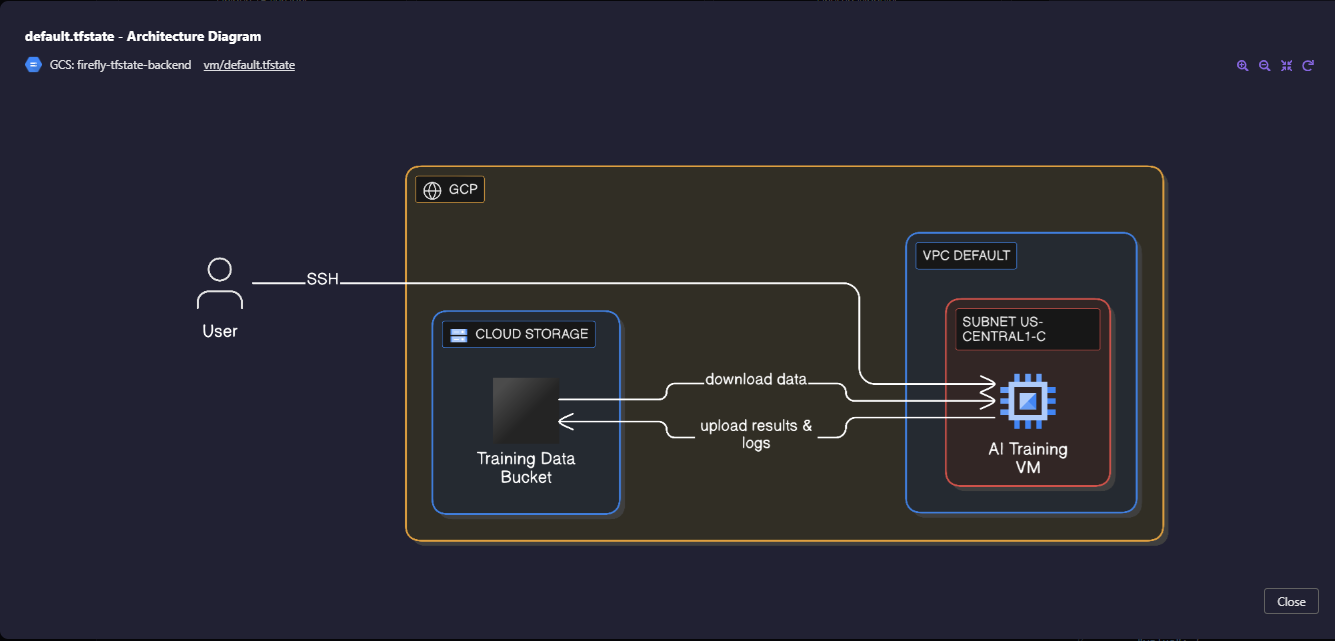
The example above shows a GCP-based AI training workflow, mapped directly from its Terraform state (vm/default.tfstate). It connects compute, networking, and storage resources into a single topology, ensuring that every model training run is fully traceable, from provisioning to cleanup.
Together, the IaC Explorer and auto-generated architecture diagrams provide enterprise teams with a single pane of glass to manage multi-state, multi-cloud AI infrastructure, bridging the gap between code, cloud, and compliance.
Best Practices for Automating AI Workflows at Scale
Automating AI workflows goes beyond model deployment. It’s about making the pipeline consistent, versioned, and easy to reproduce. The goal is to run data, training, and deployment under one controlled automation layer that connects DataOps, MLOps, and (if needed) GenAIOps.
1. Codify Before You Automate
Start with infrastructure-as-code (IaC) by defining compute, storage, networks, and security with tools like Terraform, Pulumi, or CloudFormation. Apply the same principle to data and ML artifacts, datasets, models, and configurations should all be versioned and traceable.
For example, a simple Terraform setup might define both data storage and a training job:
Once codified, integrate it with CI/CD (e.g., GitHub Actions or Jenkins) to automatically apply changes and trigger retraining when new model versions are committed. This keeps environments consistent and removes the need for manual provisioning scripts.
2. Unify DevOps and MLOps Pipelines
Don’t maintain separate automation stacks for application and model workflows. Utilize GitOps practices (Argo CD, Flux, Jenkins X) to manage both software and ML lifecycle stages through a unified process. This ensures the same IaC templates and CI/CD patterns handle data processing, training, and deployment. It reduces drift between environments and simplifies rollbacks.
Once workflows are codified, it’s equally important to define how unmanaged resources are handled. Reconciliation loops should regularly compare live infrastructure against the declared IaC state, detecting and optionally deleting anything that isn’t represented in code. This prevents configuration drift, stale resources, and hidden costs, ensuring that your automated pipelines stay clean, consistent, and fully governed.
3. Enforce Governance Through Policy-as-Code
Governance and guardrails for security and cost control should be built into the workflow, not handled manually after deployment. Utilize policy-as-code frameworks such as Open Policy Agent (OPA), HashiCorp Sentinel, or AWS Config Rules to enforce tagging, access control, and budget policies directly within your CI/CD and IaC pipelines.
Add automated teardown and tagging mechanisms to track ownership, environment, and spend across all resources. This keeps compliance and accountability consistent across teams and environments.
Example policies might include:
- “No GPU larger than A100-40GB may be provisioned in non-production environments.”
- “All buckets containing training data must have encryption enabled and lifecycle rules configured for automatic archival.”
Embedding such policies early ensures that AI infrastructure remains secure, cost-efficient, and compliant, without slowing down delivery or relying on manual reviews.
4. Automate Drift Detection
Model and data drift will happen. Monitor input data quality and distribution, as well as model performance metrics. Tools like Evidently AI, SageMaker Model Monitor, or MLflow Model Monitoring can automate the detection process. When drift crosses a set threshold, trigger retraining or alert engineering. Keep every version of data, models, and configs to support rollback and audit trails.
5. Integrate AI Workflows into CI/CD
Treat model code and deployment the same way as application code.
A typical flow:
- CI validates data schemas, unit tests, and model performance.
- CD promotes validated artifacts to staging and production.
- GitOps keeps environments synchronized automatically.
This alignment prevents issues common in AI infrastructure, such as shared Kubernetes clusters, unexpected network egress costs, cross-region latency, or unclear RBAC regarding who can trigger retrains.
Track both data/model drift (feature shifts, accuracy decay) and infrastructure drift (Terraform state diverging from real cloud resources). Unified CI/CD keeps code, data, and infrastructure consistent, auditable, and production-ready.
6. Align Models with Business Metrics
Track the metrics that matter to the business, not just accuracy. For example: fraud detection rate, false-positive ratio, or transaction latency. Connecting operational metrics to business KPIs makes it easier to justify retraining or scaling decisions and shows impact beyond technical performance.
7. Build Shared Observability
Expose infrastructure, data, and model metrics in one place so teams can debug together. Use Prometheus and Grafana for metrics, and OpenTelemetry or Grafana Loki for logs and tracing. Alerting should cover both model health (accuracy, latency) and system reliability (resource usage, failures). Everyone should see the same data.
8. Operationalize Generative AI (GenAIOps)
For generative models, manage prompts, fine-tuning, and retrieval pipelines as code. Automate RAG (Retrieval-Augmented Generation) flows using vector databases like Pinecone, Weaviate, or FAISS. Track prompt versions and feedback results, then feed them into regular CI/CD cycles to improve performance without manual tuning.
9. Close the Loop with Continuous Learning
Automate data and feedback collection for retraining, but keep guardrails. Retraining jobs should run automatically, pass validation tests, and only deploy after policy checks. This keeps models up to date while maintaining control and compliance.
Automating AI workflows at scale means treating infrastructure, data, models, and prompts as code. Use IaC for consistency, GitOps for delivery, policy-as-code for governance, and automated monitoring for drift and observability. When all components share the same automation and governance layer, AI systems remain reproducible, compliant, and scalable.
FAQs
1. How to integrate AI into workflow?
AI can be integrated by identifying repetitive or data-intensive tasks, automating them using AI tools, and connecting these tools to existing business systems. This may involve using APIs, RPA (Robotic Process Automation), or AI-powered analytics to enhance efficiency and decision-making.
2. What are the examples of AI workflow automation?
Examples include automated customer support chatbots, AI-driven document review, predictive maintenance in manufacturing, fraud detection in finance, and smart scheduling or HR screening systems.
3. What is enterprise data science?
Enterprise data science is the large-scale application of data analysis, AI, and machine learning within organizations to derive insights, improve decision-making, and create data-driven business strategies.
4. What MLOps principles should an enterprise consider while building ML-based software apart from deployment and monitoring?
Enterprises should focus on model versioning, reproducibility, data governance, scalability, testing and validation, security, and collaboration between data science and IT teams to ensure long-term reliability and compliance.

.avif)
.avif)
.webp)

.webp)












