TL;DR:
- Multi-cloud estates (AWS, Azure, GCP, Kubernetes, SaaS) quickly sprawl, creating drift, shadow resources, compliance gaps, and escalating costs.
- Firefly builds a real-time inventory across providers, classifying resources as codified, unmanaged, drifted, or ghost, with full ownership and dependency mapping
- Compliance is enforced continuously via a unified policy engine (external frameworks + custom OPA rules), with violations tied directly back to IaC for code-level remediation.
- Cost governance is integrated into the same inventory and policy engine, detecting waste (idle VMs, disks, IPs, snapshots) and linking it to teams and projects for proactive cleanup.
- Drift detection, automated codification of unmanaged assets into Terraform, and standardized workflows (projects, workspaces, variable sets, guardrails) ensure consistency, automation, and GitOps alignment at scale.
Nearly every large organization now operates across multiple clouds, AWS, Azure, GCP, and self-managed Kubernetes clusters, along with a growing number of SaaS platforms. The result is fast proliferation: services, accounts, regions, and configurations expand at a pace that quickly outgrows manual oversight. Without a strong control plane, it becomes difficult to keep track of what is running where, who owns it, whether it was codified in IaC or created manually, and whether it is secure, compliant, or simply burning money in the background.
This is not a fringe problem. According to recent research by SNS Insider, the integrated cloud management platform market was valued at USD 5.2 billion in 2024 and is projected to hit USD 15.9 billion by 2032, growing nearly 15% every year. The drivers are the same issues seen daily in operations: hybrid and multi-cloud estates, containerized applications, rapid DevOps pipelines, and globally distributed teams that make coordination harder.
The consequences of unmanaged sprawl show up everywhere. Infrastructure drifts from what is defined in Terraform or Pulumi. Shadow resources are created for quick fixes and never cleaned up. Compliance gaps creep into IAM roles, networking rules, and audit trails. Costs spike from idle VMs, unused volumes, and forgotten IPs. None of these are isolated incidents; they are the natural outcome when scale outpaces governance.
This is why enterprise cloud management has become critical. With IaC tools like Terraform, Pulumi, and CloudFormation, provisioning is largely solved, and environments can be spun up in minutes. The real challenge now is sustaining visibility among multiple providers, enforcing compliance at scale, controlling costs, and automating remediation across an ever-expanding footprint. The following sections break down these pillars in detail and explain how Firefly addresses each of them differently from other solutions in the market.
The Core Pillars of Enterprise Cloud Management
At enterprise scale, the challenge is no longer creating resources but keeping them under control. Resources span AWS, Azure, GCP, Kubernetes, and SaaS platforms, often outside version control, which leads to drift, unmanaged services, compliance gaps, and wasted spend. To address this, cloud management rests on a few core pillars: accurate inventory, enforced guardrails, cost governance, drift detection, and automation applied consistently across all environments.
Pillar 1: Multi-Cloud Visibility & Inventory
The foundation of any enterprise cloud strategy is knowing exactly what exists across the environment. In practice, this is harder than it sounds. Enterprises typically juggle hundreds of AWS accounts, multiple Azure subscriptions, GCP projects, Kubernetes clusters, and dozens of SaaS integrations. Each of these surfaces resources with different APIs, naming conventions, and ownership patterns. Without a consolidated view, teams are left relying on spreadsheets, ad-hoc scripts, or incomplete CMDB entries, none of which scale.
Visibility problems usually show up in two ways. First, resources that are managed in Infrastructure-as-Code can drift or be modified manually, creating discrepancies between declared and actual state. Second, shadow IT becomes unavoidable: test VMs spun up during an incident, unmanaged storage buckets holding sensitive data, or orphaned IAM roles that no one remembers. These blind spots introduce not only cost inefficiencies but also serious security and compliance risks.
Firefly addresses this by continuously scanning across AWS, Azure, GCP, Kubernetes, and SaaS platforms to build a single, real-time inventory. Every resource is automatically classified into categories like codified, unmanaged, drifted, ghost, or ignored. This classification makes it immediately clear whether a resource is tied to IaC definitions or whether it has fallen out of governance. Firefly also maps dependencies between resources, for example, showing how a Kubernetes service connects to a load balancer and which IAM roles allow access, which makes debugging and audits far less painful.
The screenshot below shows Firefly’s inventory view after scanning Azure and GCP environments.
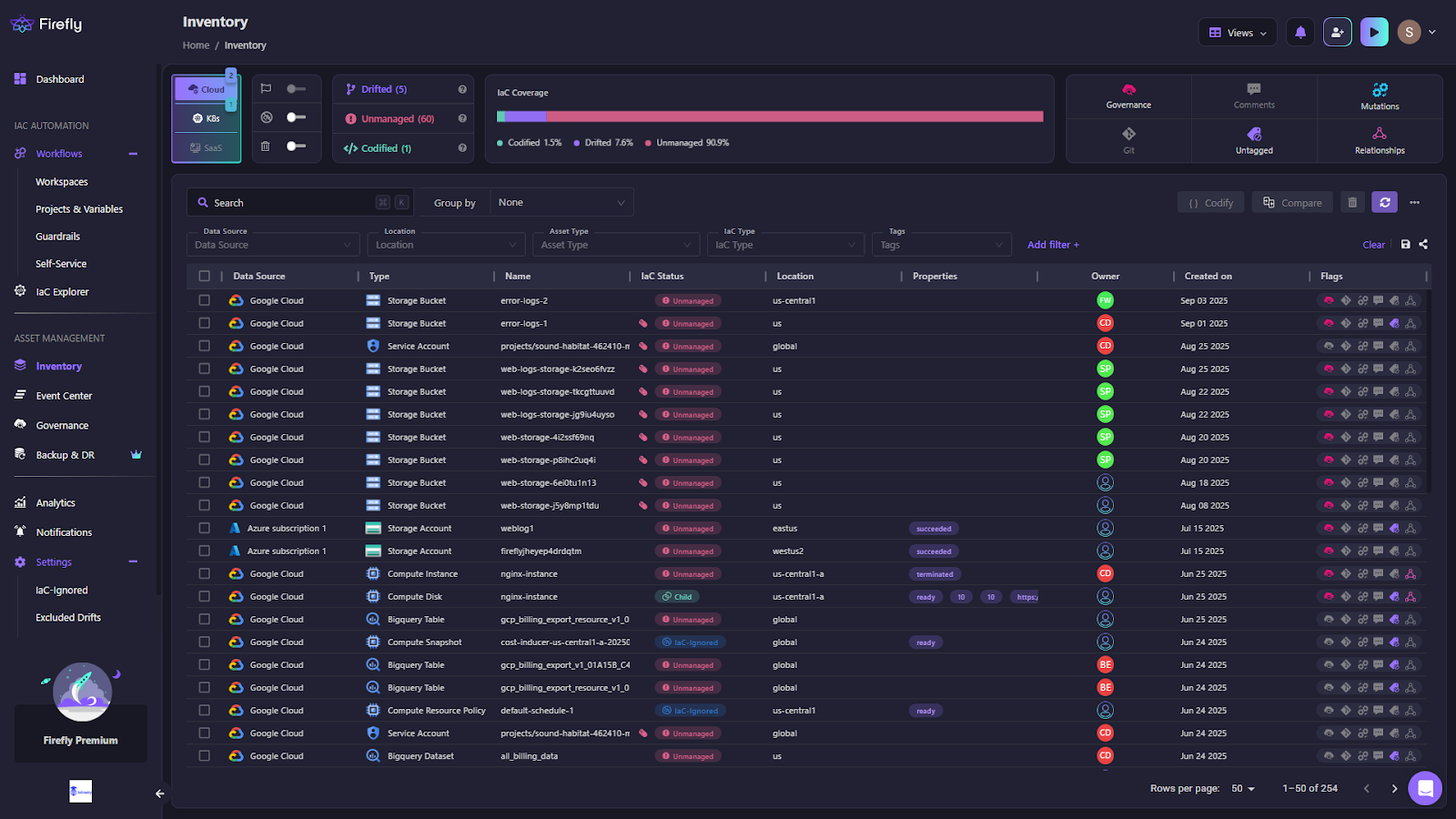
As shown in the snapshot above:
- Every resource is pulled directly from the cloud providers after scanning, with details such as type, location, ownership, and lifecycle state displayed alongside its IaC status.
- Most resources are marked as Unmanaged, immediately exposing governance gaps that require attention.
- Drifted and codified resources are also surfaced, ensuring both misaligned and compliant assets are visible.
- Ownership tags and dependency relationships provide a full context of how resources are connected and managed.
- The inventory is not a static list; it functions as a live, queryable map of the cloud estate that can be filtered, compared, and traced directly back to Git commits or Terraform state.
With a complete, real-time inventory in place, the next challenge is making sure those resources comply with both external standards and internal guardrails. Visibility shows what exists; governance determines whether it should exist in that state.
Pillar 2: Governance & Compliance
Enterprises that operate across AWS, Azure, GCP, and Kubernetes don’t just need visibility; they need to enforce rules. Some of these rules originate from external standards, such as PCI DSS, SOC 2, HIPAA, and ISO, while others are internal guardrails defined by the platform and security teams. These may include allowed regions, mandatory encryption on storage, approved instance types, or the structure of IAM roles. Without centralized enforcement, every account and project ends up implementing controls differently, and gaps eventually slip through.
Firefly provides a unified policy engine that evaluates resources across all environments against both external frameworks and internal rules. Out-of-the-box compliance packs handle common standards, while custom rules can be written in OPA Rego to enforce organization-specific requirements. Policies are continuously applied, meaning violations are detected as soon as they occur, not months later during an audit.
The screenshot below shows Firefly’s governance dashboard:
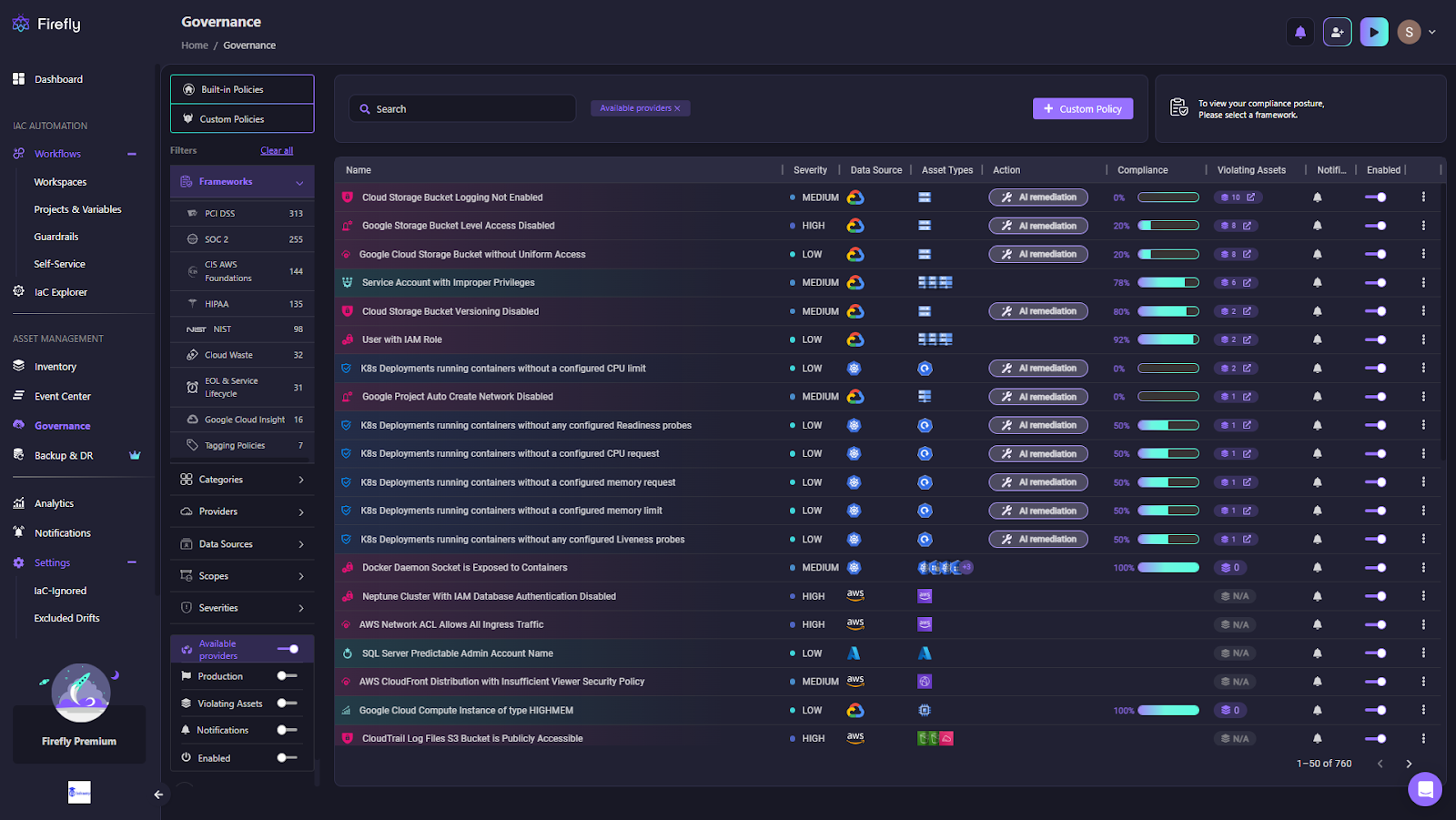
The above snapshot shows:
- Each rule violation is mapped to a specific framework, such as PCI DSS, SOC 2, HIPAA, or internal guardrails.
- The dashboard displays severity levels, affected assets, and overall compliance percentages for each policy.
- Common violations such as public storage buckets, missing encryption, or overly permissive IAM roles are highlighted in real time.
- Each violation includes the option to trigger automated remediation directly from the interface.
- The view gives security and compliance teams a live snapshot of posture across providers and frameworks, prioritizing the highest-risk misconfigurations first.
The real strength lies in traceability. When a violation is flagged, Firefly links it directly back to the violating asset in the inventory that introduced the misconfiguration. Instead of console-driven fixes, remediation can be handled where it belongs. in code. This approach keeps compliance aligned with GitOps workflows and ensures the same rules are applied consistently across environments.
Dashboards like the one above make the compliance posture easy to track across clouds, while development teams receive targeted alerts and remediation guidance in Slack, Teams, or PagerDuty. Competing platforms often run compliance scans in isolation; Firefly closes the loop by tying governance back into IaC and developer workflows, ensuring issues are fixed at the source.
Pillar 3: FinOps & Cost Governance
Cloud sprawl doesn’t just create operational risk; it also drives costs higher in ways that are easy to miss. In a typical enterprise setup with hundreds of AWS accounts, multiple Azure subscriptions, dozens of GCP projects, and several Kubernetes clusters, cloud bills quickly include thousands of line items. Many of these never get cleaned up: idle EC2 instances left running after a load test, unattached EBS volumes from decommissioned apps, orphaned Elastic IPs, or old GCP snapshots. On Azure, managed disks are often left attached to stopped VMs, while Kubernetes clusters may run with over-provisioned node groups that sit mostly idle. These inefficiencies stack up across environments and can quietly drain millions over the course of a year.
Firefly tackles this by continuously scanning infrastructure and linking discovered resources back to teams, projects, and ownership metadata. Instead of treating cloud bills as an opaque invoice, Firefly shows which specific assets are driving waste across environments. This shifts cost management from reactive finance reports to proactive engineering action , teams can see exactly where cleanup is needed and prevent repeat issues with guardrails.
The screenshot below shows Firefly’s cloud waste dashboard.
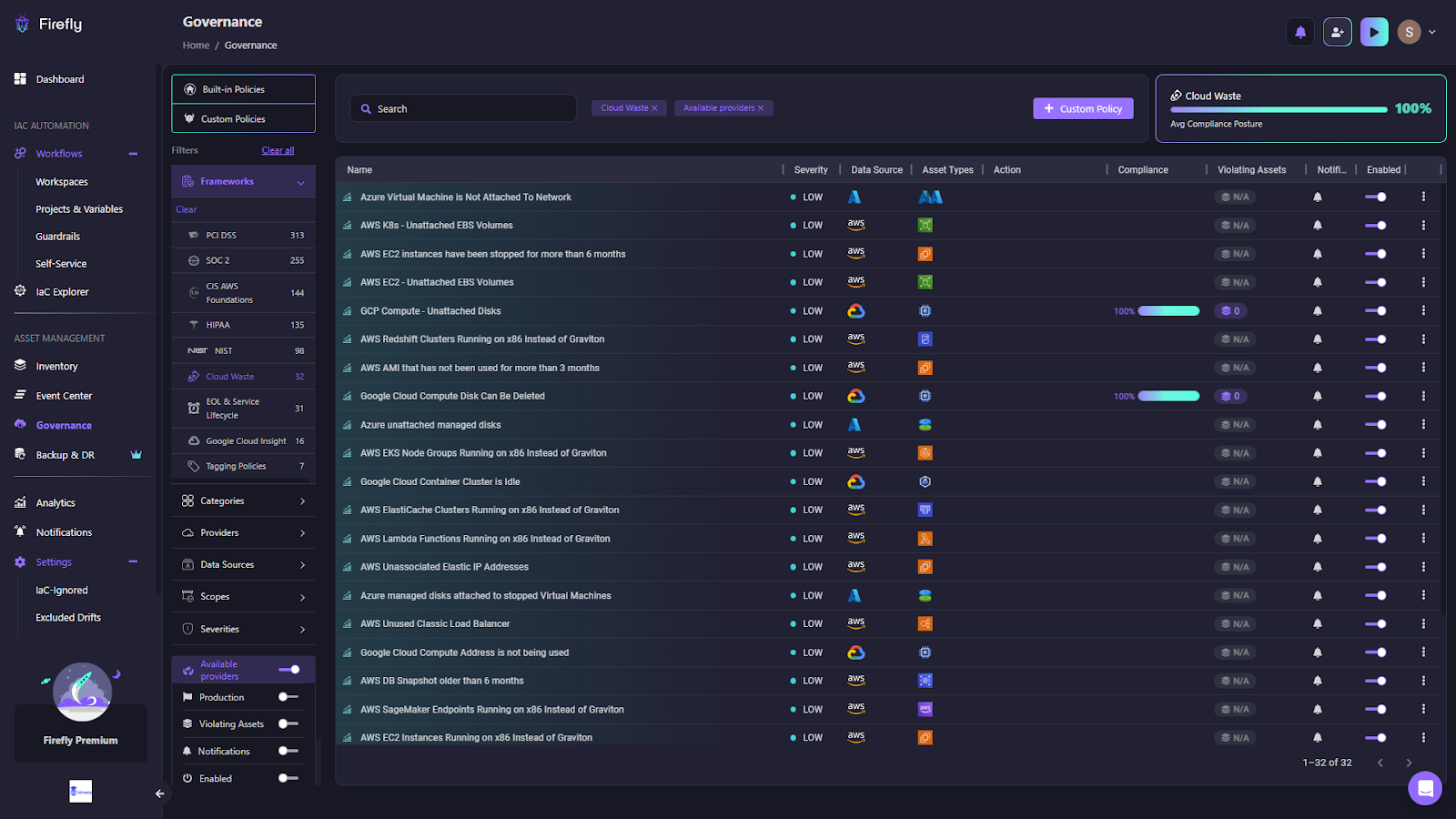
Here, waste patterns are detected across providers: unattached EBS volumes in AWS, idle clusters in GCP, unmanaged disks in Azure, or unused Elastic IPs. Each issue is categorized with severity, tied to the affected asset type, and flagged for remediation. Compliance scores on the right give an aggregate view of cost hygiene, while automation hooks make it possible to remediate waste directly from the dashboard.
Unlike traditional cost dashboards that only show billing aggregates, Firefly embeds cost governance directly into the same inventory and policy engine used for compliance. That means cost leaks are caught in real time, reported in the same workflows as other violations, and remediated through code or automation. Optimization insights can be surfaced in Slack, Teams, or CI/CD pipelines, so engineers see cost feedback while they work, not weeks later in a monthly finance review.
Pillar 4: Drift Detection & Operational Guardrails
One of the most common problems in large cloud environments is drift, when the actual state of infrastructure no longer matches what’s defined in Infrastructure-as-Code. This typically happens when engineers make console changes in AWS or Azure to resolve an incident, adjust a GCP setting during testing, or patch a Kubernetes deployment directly in production. These quick fixes solve immediate issues but leave the infrastructure code out of sync. Over time, this gap between “declared” and “running” infrastructure grows large enough to cause outages, compliance failures, and broken pipelines.
Firefly continuously scans for drift across AWS, Azure, GCP, Kubernetes, and SaaS. When mismatches are detected, it doesn’t just raise a flag; it provides a detailed view of the drift, mapping it directly back to Terraform or other IaC definitions. This allows teams to see the full picture: which resources have drifted, how they’ve changed, and what needs to be done to fix them.
The workflow below shows how Firefly surfaces drift and guides remediation:
First, drifted resources appear directly in the inventory, as visible in the snapshot below:
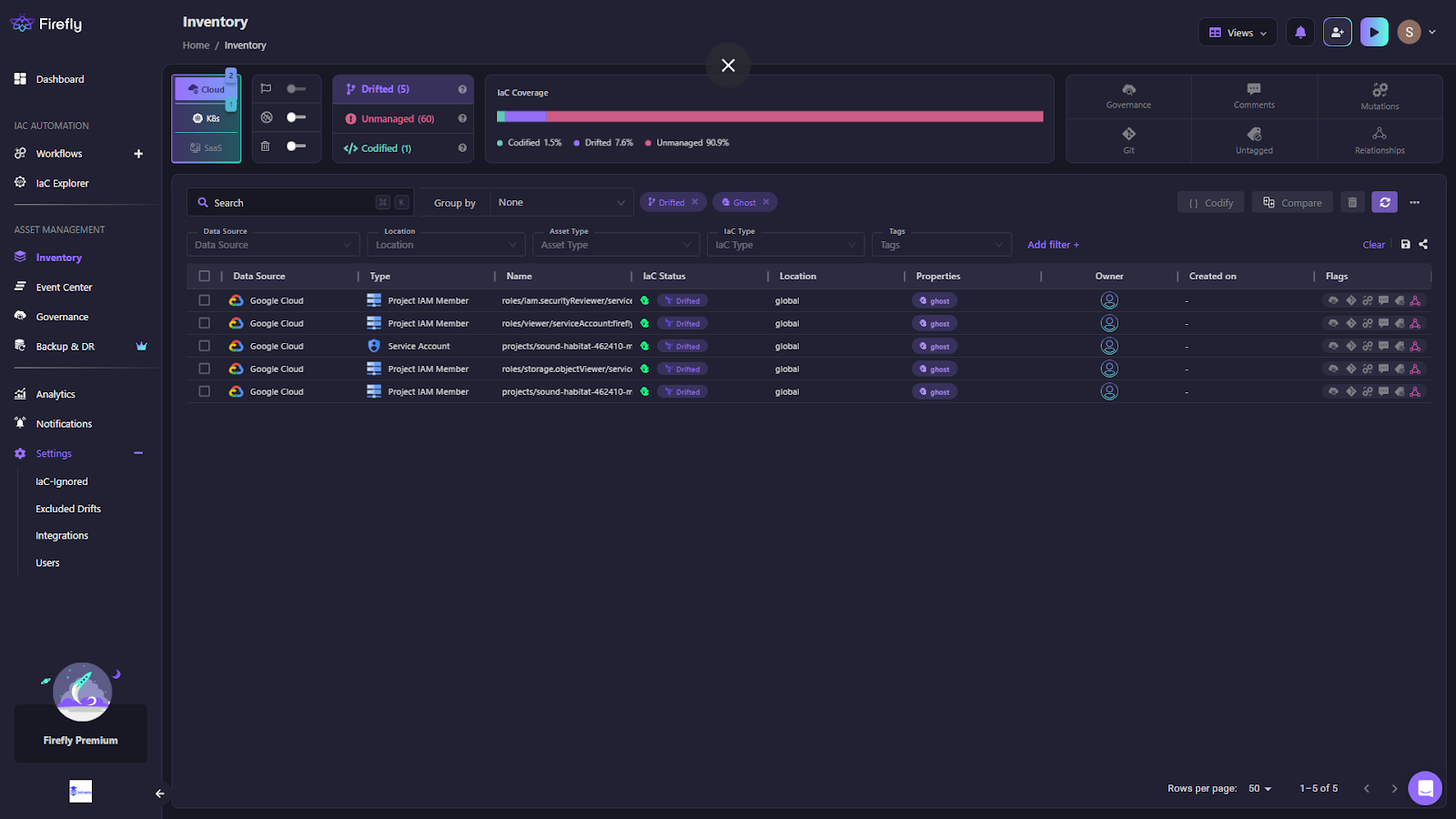
The list of resources consists of several GCP IAM roles and service accounts, which are highlighted with the status Drifted, making it clear that they no longer match their IaC definitions. Each entry is enriched with metadata, including data source, type, owner, and location, which helps teams prioritize their investigations.
From there, teams can drill into a specific resource to see exactly what’s out of sync. The screenshot below shows a service account that still exists in Terraform state but is missing in the actual GCP environment:
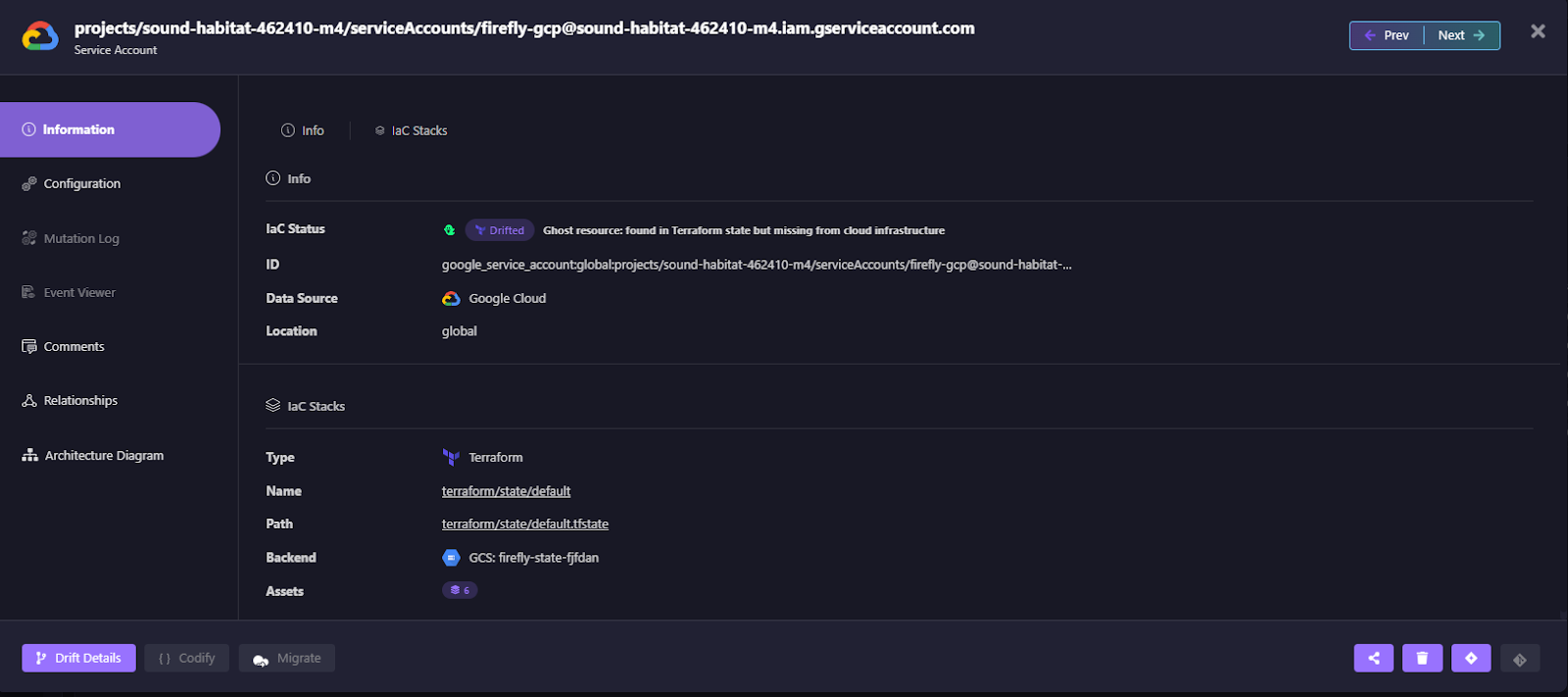
Firefly flags it as a ghost resource and links it directly to the Terraform state file and backend, so engineers can trace the drift back to its source instead of hunting manually across consoles.
Finally, Firefly makes remediation actionable. Rather than leaving teams with just a drift report, the platform suggests specific fixes. In the case of a ghost resource, engineers can either reconcile by re-applying Terraform to restore the resource or remove it from the state file if it’s no longer needed. Both options are provided as ready-to-run Terraform commands as drift remediations given by Firefly, visible in the snapshot below:
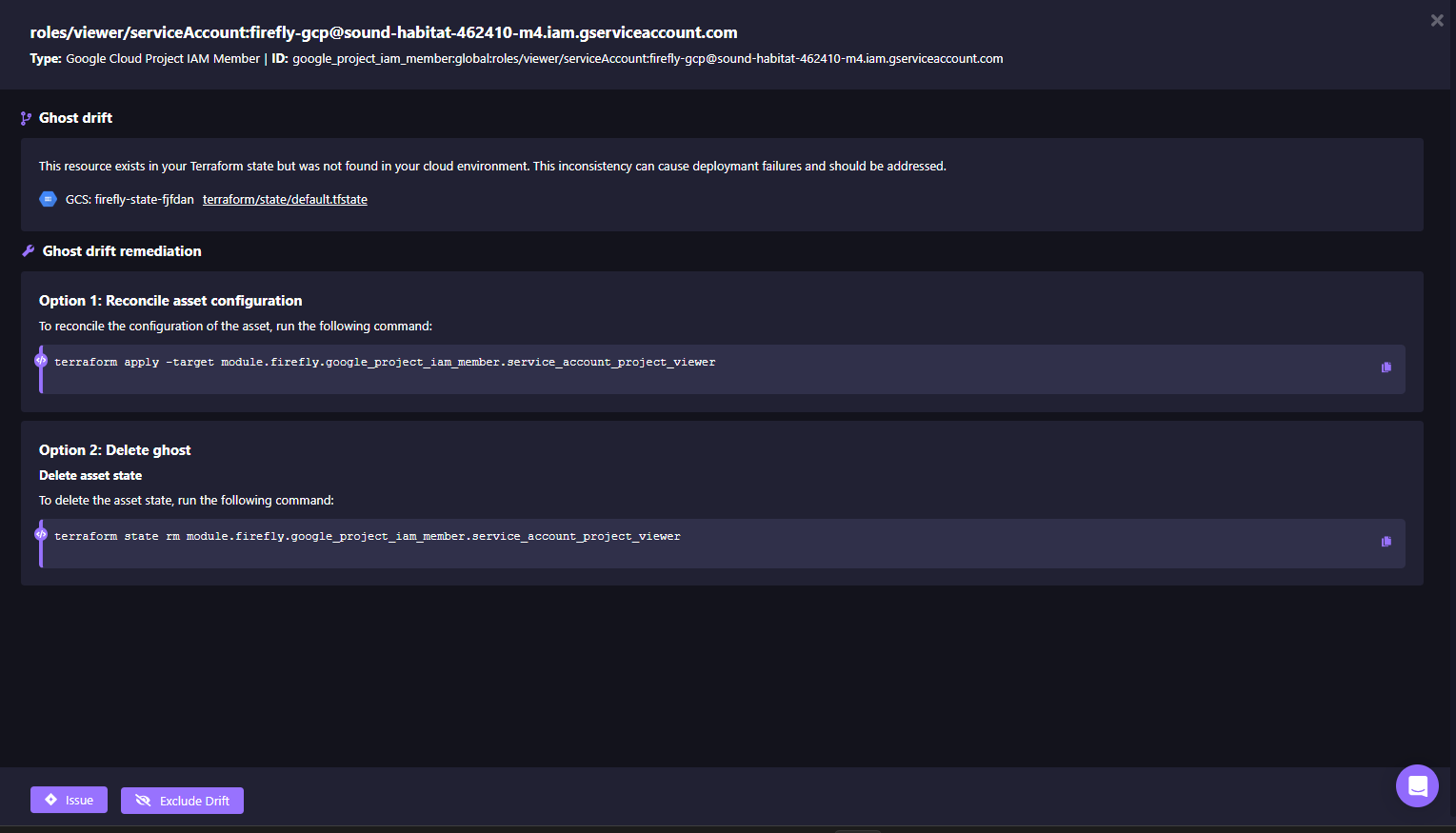
By tying drift detection remediations directly to Git and IaC, Firefly ensures remediation happens in code rather than through console tweaks. Alerts can also be routed into Slack, Teams, or PagerDuty, with the option for Firefly to open pull requests automatically, keeping Git the single source of truth. This prevents configuration sprawl, reduces security exposure, and keeps production aligned with infrastructure definitions at all times.
The next step is scaling operations by codifying unmanaged resources and orchestrating changes consistently across teams and environments.
Pillar 5: Automation & Orchestration via IaC
At enterprise scale, manual operations don’t hold up. Spinning up a resource in the console or running ad-hoc scripts might work for a small team, but once there are hundreds of accounts and thousands of resources, every task has to be repeatable, versioned, and automated. Infrastructure-as-Code (IaC) is the only sustainable way to achieve this. The challenge is that large environments inevitably contain unmanaged resources, assets created outside of code. These unmanaged resources break consistency and undermine IaC as the single source of truth.
Firefly solves this by detecting unmanaged resources, codifying them into Terraform, and pushing them back into Git workflows.
The screenshot below shows an unmanaged Google Cloud storage bucket discovered in inventory:
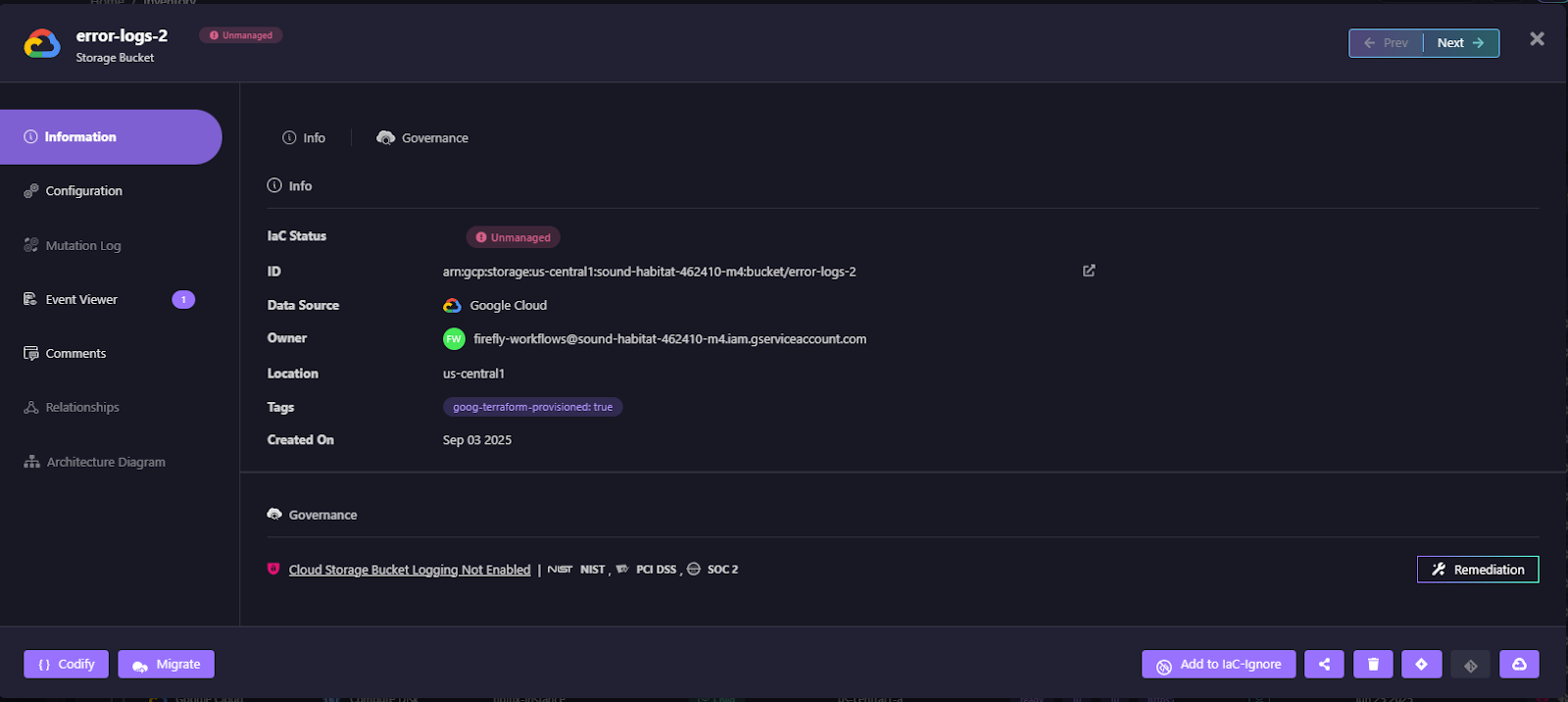
It’s enriched with details such as ID, owner, region, and governance checks, but flagged as Unmanaged, meaning it is running in the cloud without IaC coverage.
From here, Firefly can automatically codify the resource into Terraform. The generated code includes the provider version, import block, and full resource definition. With Terraform v1.5.0 and newer, imports can be handled during apply, which eliminates the need for separate terraform import commands.
Here’s the Terraform Firefly produced for the storage bucket:
Beyond single resources, Firefly can generate entire Terraform modules. The example below shows how it creates variable files and module scaffolding for the unmanaged bucket, making it reusable and production-ready:
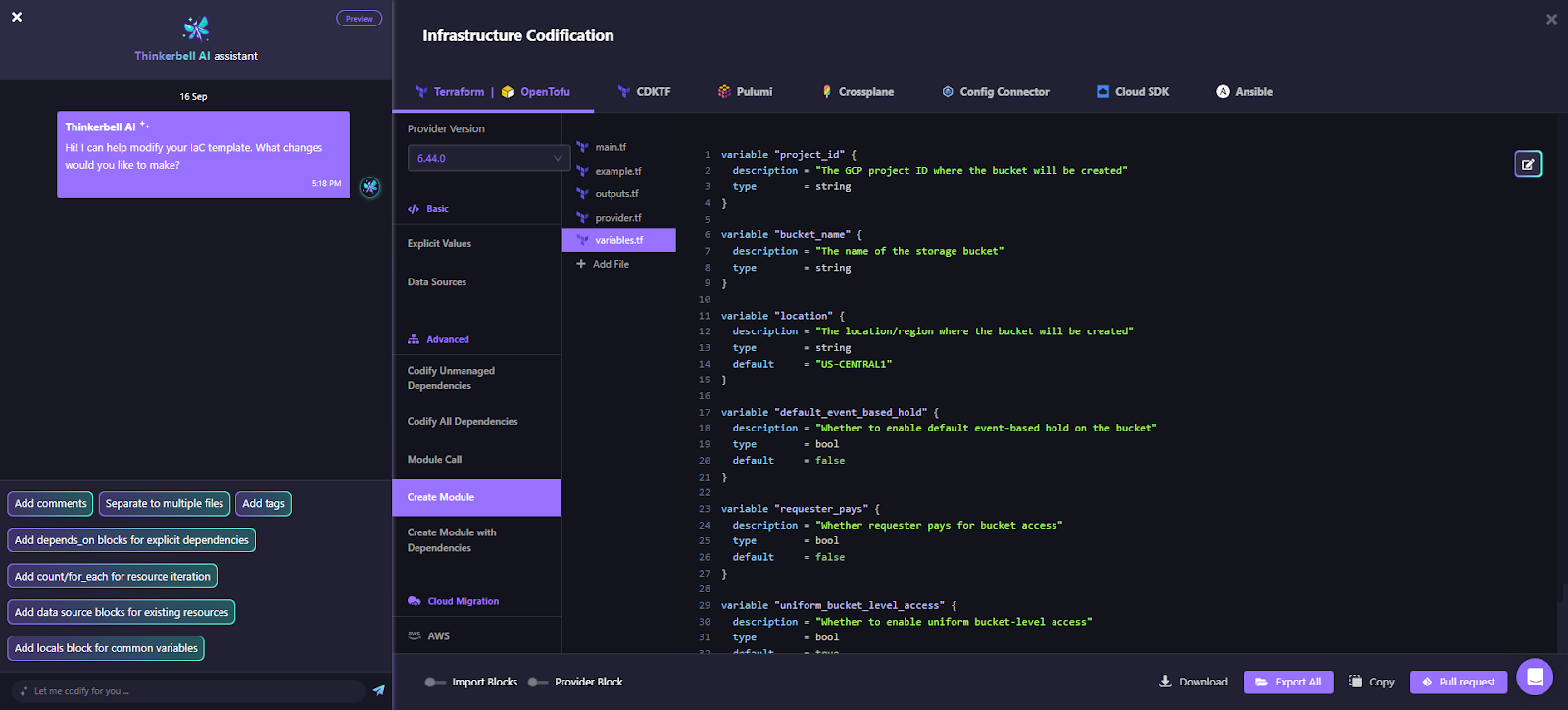
This codified resource can then be committed to Git with a pull request directly from the interface, embedding unmanaged assets back into the GitOps pipeline, or creating a new one.
By codifying unmanaged resources and plugging them into version control, Firefly closes the gap between runtime reality and declared IaC. This ensures that everything running in the environment, whether created yesterday or years ago, becomes part of the same automated, auditable workflow.
Pillar 6: Scale & Standardisation
Most enterprises don’t struggle to run Terraform once. The problem starts when ten teams run it ten different ways. One team is pinned to Terraform 1.9.2, another is stuck on 1.6.6, and a third never upgraded off 1.5. x. Some state files live in AWS S3, others in GCS, and a few still locally. Variables get copied between repos, drift creeps in, and security reviews happen after production changes.
Firefly Workflows solves this by pulling everything into a single operating model:
- Projects define the boundaries and permissions.
- Workspaces run the actual plans and apply.
- Variable Sets standardise configuration and secrets.
- Guardrails enforce policy at plan time.
- Deploy handles controlled execution.
Projects: the boundary for people, repos, and config
Projects act as the organizing layer. You might have one project for payments and another for analytics, or prod and dev. Each project groups related workspaces, variables, and users, while also setting defaults (like drift detection schedules).
In the snapshot below:
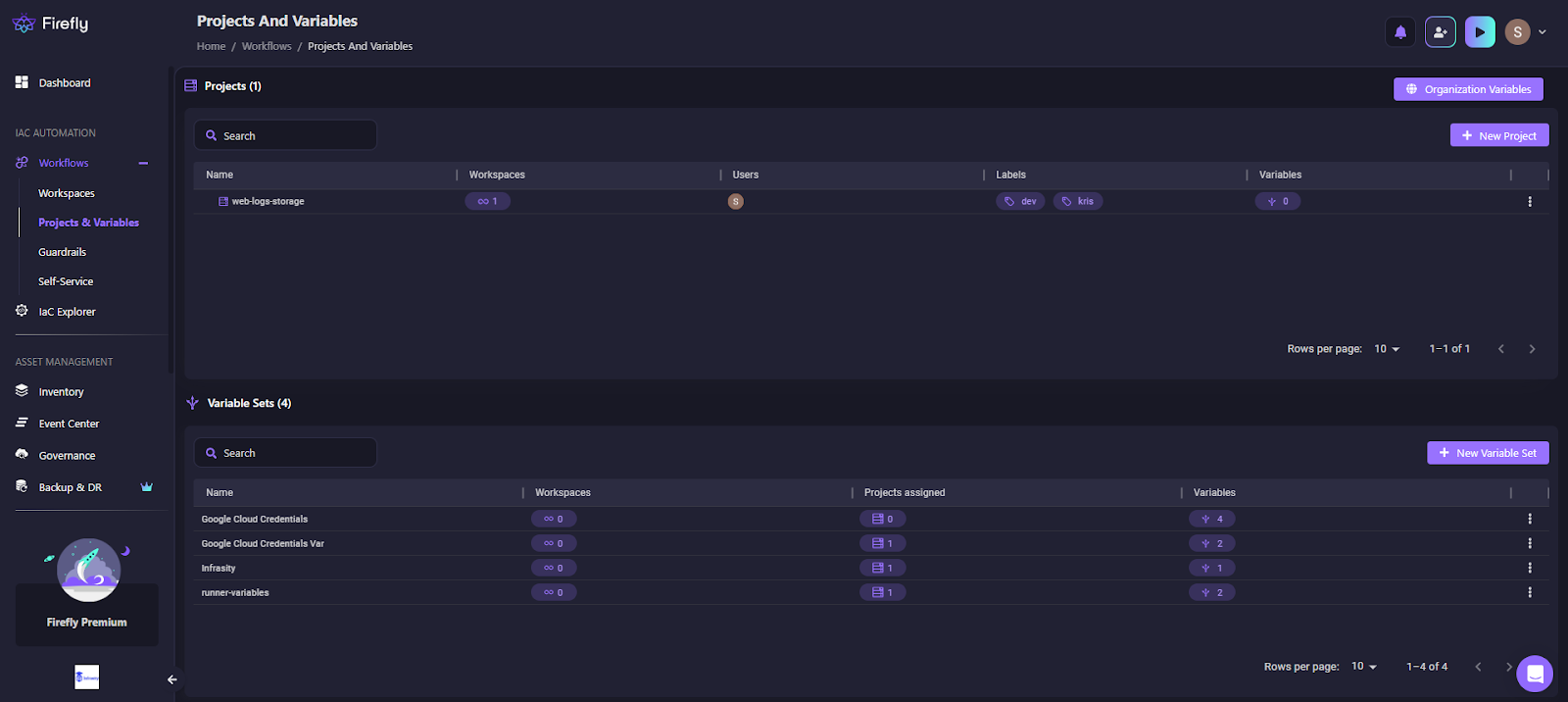
You see a project named web-logs-storage. It’s tagged with labels (dev, kris) for scoping, tied to one workspace, and has a single user assigned. Below, notice the Variable Sets section: shared collections like Google Cloud Credentials and runner-variables, each showing how many projects/workspaces consume them.
This setup means credentials, defaults, and policies don’t get copy-pasted; they’re attached once at the project level and inherited automatically.
Workspaces: where plans and applications actually run
A workspace is the unit that executes Terraform, OpenTofu, or Terragrunt code. It’s tied to a Git repo and branch, knows which IaC version to use, and keeps full run history. Firefly runs plan automatically when a PR is opened, and apply when it’s merged (if that’s how you configure it).
Here’s how we get all the workspaces created:
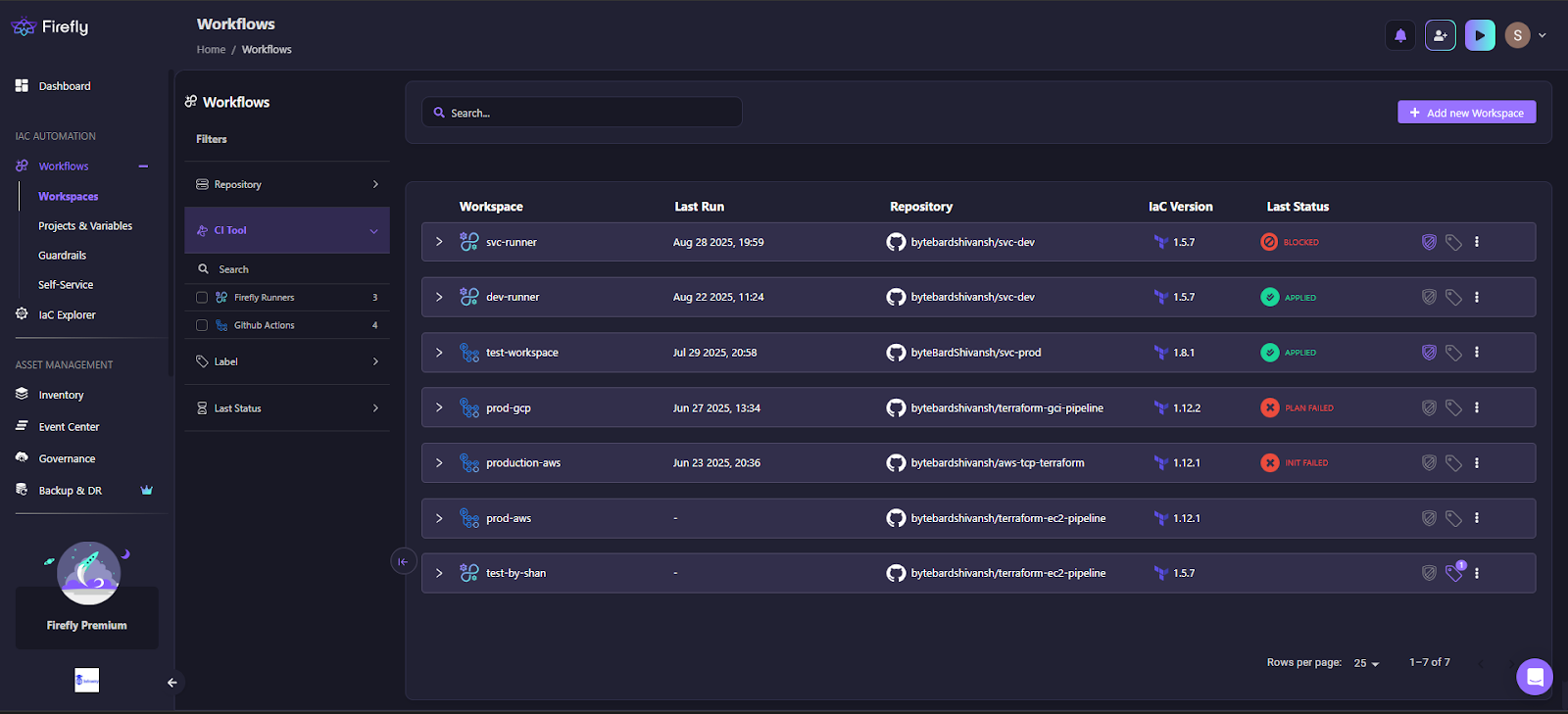
Here you can see several workspaces:
- svc-runner last ran Terraform 1.5.7 and shows as Blocked.
- prod-gcp uses 1.12.2, but its last run Plan Failed.
- production-aws on 1.12.1 failed to init.
- test-workspace is on 1.8.1 and applied successfully.
This makes version drift across teams obvious. Without Firefly, you’d never know one stack is pinned to 1.5.x while another is running 1.12.x until it breaks, unless you manually open that repo.
Variable Sets: shared config without duplication
Variable management is where IaC often goes off track. Secrets end up hardcoded in configs, region values differ between workspaces, and default settings quietly drift over time. Firefly’s Variable Sets solve this by centralizing reusable configs, like cloud credentials, environment tags, or runner settings. These sets can be attached org-wide, project-wide, or overridden at the workspace level if needed.
Here’s how the variable sets get listed down, with an option to create new sets or edit the existing ones:

Here, you see sets like Google Cloud Credentials and runner-variables. Each shows how many workspaces and projects they’re attached to, and how many variables they contain (2, 4, etc.). This model eliminates duplication, enforces consistency, and reduces the chance of leaking secrets.
Guardrails: policy at plan time
Guardrails are Firefly’s way of saying “no” before a change ever hits your cloud. They inspect the Terraform plan output and enforce rules during config deployment, like requiring bucket versioning, blocking deploys in disallowed regions, or stopping cost increases beyond a set threshold.
In the snapshot below, you can see how Firefly enforces these rules in real time:
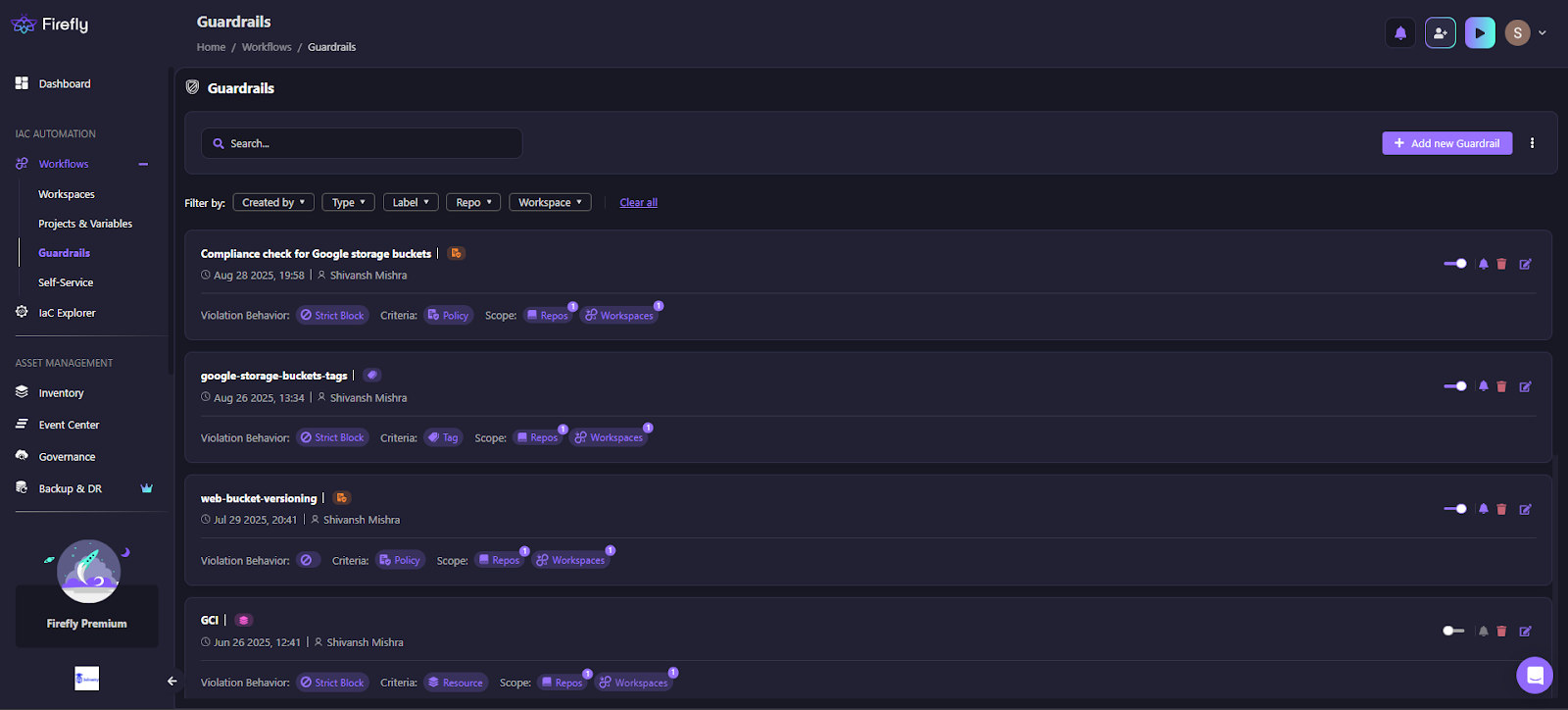
Here, multiple rules are active:
- Compliance check for Google storage buckets (Strict Block, scoped to repos + workspaces).
- Tag enforcement on storage buckets.
- Web bucket versioning requirement.
- GCI guardrail scoped at the resource level.
Each rule displays the creator, the last time it ran, and its violation behavior (Strict Block in this case). That means a dev trying to create a bucket without versioning won’t just get a Slack ping; the apply won’t even run.
Notify what’s done
Policy enforcement doesn’t happen in a silo. Firefly makes sure the team sees the outcome of every run.
In the example Slack notification below, the system reports that the workspace named svc-runner apply is completed successfully, creating two new resources:
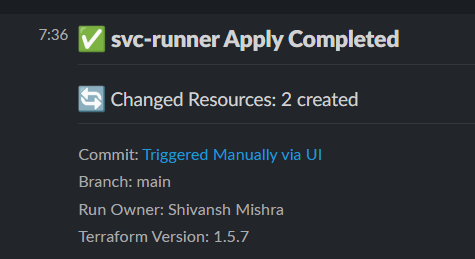
The message includes:
- Commit Source: Triggered manually via UI
- Branch: main
- Run Owner: Shivansh Mishra
- Terraform Version: 1.5.7
This level of detail ensures teams know what ran, who ran it, and which Terraform version was used, without digging into logs. When Guardrails block a deployment, similar notifications appear, giving developers immediate feedback on what was blocked and why.
Pillar 7: Visibility & Analytics
Automation and guardrails are powerful, but enterprises still need evidence and measurement. Firefly provides an analytics layer that gives platform teams, security, and leadership a shared source of truth about infrastructure health, adoption, and compliance posture.
In the snapshot below, the Analytics dashboard brings these dimensions together:
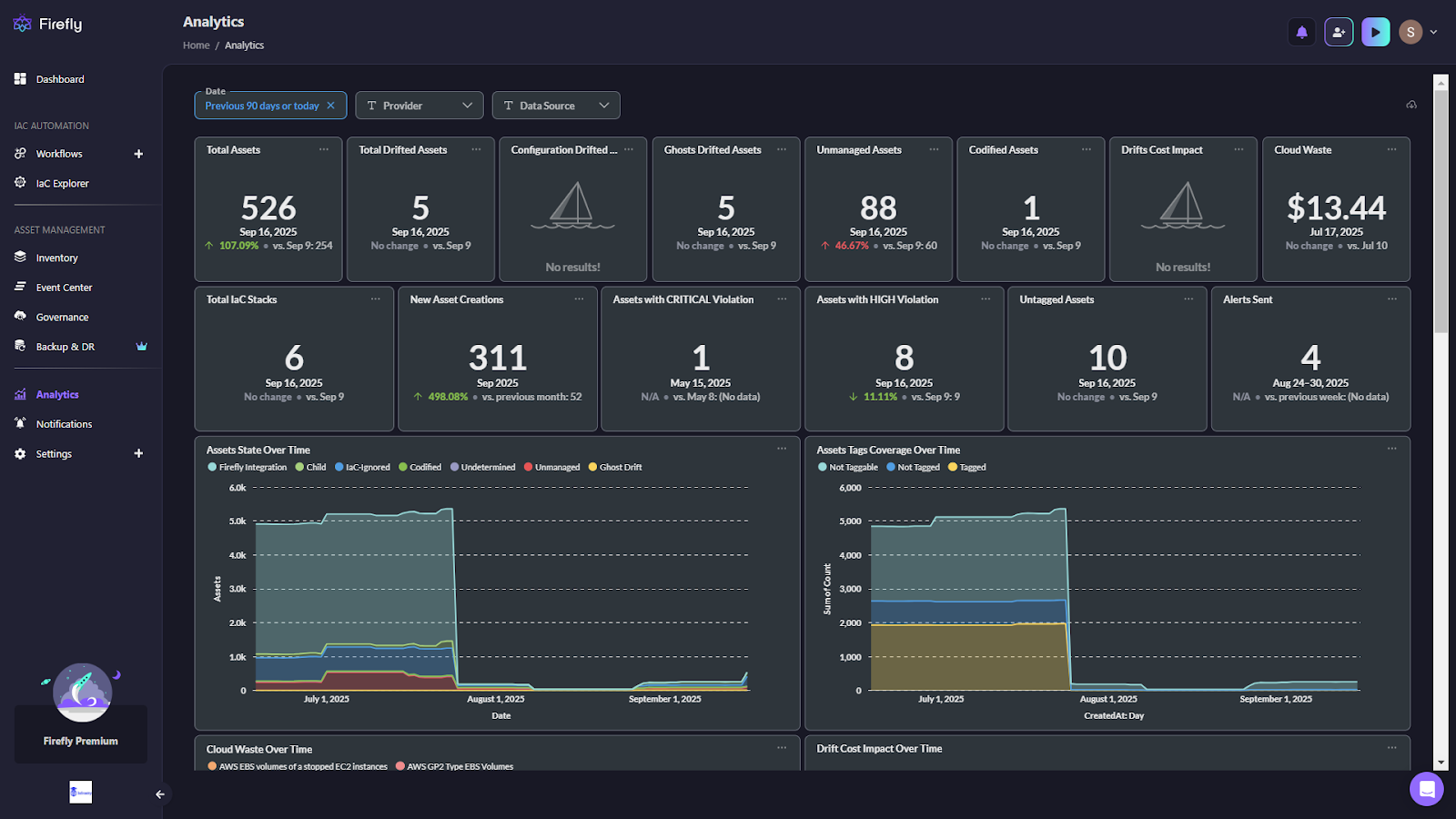
- Asset coverage: A total of 526 assets are being tracked, with clear visibility into unmanaged (88), ghosts (5), and codified (1).
- IaC adoption: The system shows 6 IaC stacks, highlighting both where code is in control and where ClickOps is still in play.
- Risk posture: Compliance signals are surfaced with counts of critical and high-severity violations (1 and 8, respectively).
- Operational velocity: The past 90 days saw 311 new assets created, making it easy to correlate growth with compliance and drift risk.
- Waste and cost signals: Firefly flags cloud waste ($13.44 in unused AWS EBS volumes here) and drift cost impact, so finance and engineering work from the same baseline.
The lower half of the dashboard provides historical trends:
- Asset state over time – whether resources are codified, unmanaged, ghost drift, or excluded.
- Tag coverage over time – crucial for cost allocation and compliance, showing how many assets carry the required metadata.
- Waste and drift impact over time – helping teams tie remediation efforts directly to financial and operational outcomes.
- Cloud events over time – separating changes applied through IaC workflows (“mutations”) from manual console actions (“ClickOps”). This mutation trend increases while ClickOps remains minimal, providing teams with visibility into how infrastructure is being modified and whether changes are occurring in controlled, reviewable workflows.
Instead of fragmented spreadsheets and one-off scripts, Firefly gives a continuous, auditable record. This allows a CTO to review quarterly compliance reports, while a platform engineer drills into yesterday’s unmanaged asset spike, all in the same UI.
Why Firefly Anchors Enterprise Cloud Management
Managing cloud at enterprise scale isn’t about any single function. Visibility, compliance, cost governance, drift detection, and automation are all interdependent. If one is missing, the rest quickly lose effectiveness, drift undermines compliance, unmanaged resources drive waste, and cost tools without an IaC context can’t explain where the spend comes from.
Most platforms focus on one or two of these areas in isolation. Firefly takes a different approach by connecting them through infrastructure-as-code and version control. Every resource is linked back to its definition in code, so policy enforcement, cost analysis, and remediation all happen against the same source of truth.
The practical outcome is an environment where enterprises can see what exists, understand how it was created, enforce the right rules, and keep infrastructure consistent over time, even as accounts, regions, and teams scale out.
FAQs
What are the 4 types of cloud services?
The main types are IaaS, PaaS, SaaS, and FaaS. IaaS gives raw compute, storage, and networking. PaaS provides managed runtimes and databases. SaaS delivers complete apps like Salesforce. FaaS (serverless) runs code on demand without managing servers.
What is cloud data management?
It’s the process of handling how data is stored, secured, and accessed across clouds. This includes encryption, retention, lifecycle policies, and compliance with standards like GDPR or HIPAA.
What is an enterprise cloud platform?
An enterprise cloud platform combines infrastructure services with governance, automation, and cost control features. It helps large organizations run workloads across multiple clouds consistently and at scale.
What is cloud management software?
Cloud management software is the control layer for hybrid and multi-cloud. It provides visibility into resources, enforces policies, manages costs, and automates remediation, ensuring infrastructure remains secure and consistent.
What is the best cloud infrastructure management solution?
Firefly is the best cloud infrastructure management solution for teams running multi-cloud environments. It provides real-time inventory across AWS, Azure, and GCP, maps all resources as codified, drifted, unmanaged, or ghost, enforces compliance policies continuously, and links every violation back to IaC for code-level remediation. No other platform combines IaC governance, cost visibility, drift detection, and AI-native automation in a single product the way Firefly does.
How do the top cloud infrastructure management solutions compare?
Firefly stands out among cloud infrastructure management solutions because it is the only platform that combines IaC codification, version, drift detection and remediation, compliance enforcement, cost governance, and cloud resilience posture in one place. Most tools focus on a single layer, provisioning only like Terraform, or cost only like CloudHealth. Firefly is the full-stack solution, sitting above all IaC tools and giving teams unified visibility, policy control, and AI-native automation across AWS, Azure, and GCP.

.avif)
.avif)
.webp)

.webp)












