
TL;DR
- Terraform Actions let you invoke a Lambda, rotate a credential, or restart a service directly from Terraform without touching state. They close the gap between "infra changed" and "operation that depends on that change."
- Actions solve single-step execution. They don't solve sequencing, approvals, or visibility across runs. The moment a workflow needs more than one step, you're back to stitching things together with scripts.
- Lifecycle-triggered actions wire to after_create and after_update events, so post-deploy steps run as part of the same apply. The after_update event fires on both config changes and drift corrections, making it a deployment hook and a drift-response hook at once.
- Firefly extends Terraform's day-2 story by adding the coordination layer on top: continuous drift monitoring, policy guardrails, approval gates, and a centralized audit trail across environments. It doesn't replace Terraform. It builds around it.
Most teams using Terraform in production have the provisioning story figured out. Define infra in code, run the plan, review the diff, and apply. VPCs, compute, databases, predictable, versioned, tracked in state. That part works.
The gap shows up the moment you need to do something to that infrastructure after it exists. Run a DB migration after a deployment. Rotate a credential without recreating the resource. Restart a service during an incident. Invalidate a cache after a release. Trigger a downstream pipeline after infra changes. None of this fits Terraform's resource model, so teams handle it the same way they always have: scripts in CI/CD pipelines loosely coupled to apply runs, commands run manually from the AWS console, null_resource hacks with provisioners, shell scripts glued to the end of apply via local-exec.
The infrastructure is tracked in Terraform. The operations are tracked nowhere. Over time, actual behavior diverges from what anyone expected. You end up with two sources of truth, and neither is fully right.
Terraform Actions are the native answer to that problem. This blog covers how they work, what they're actually good for, where they run out of road, and how Firefly handles the coordination layer that Actions don't provide.
What Is a Terraform Action (And What It Is Not)
An action is a provider-backed operation that Terraform executes without modifying infrastructure state. It's not a resource. It doesn't create, update, or destroy anything tracked in state. It runs a side effect, invoking a function, triggering a process, signaling an external system, within the same execution context as Terraform. That distinction is worth keeping straight, since running terraform destroy is the one operation actions are explicitly not - it deletes what's in state, in reverse dependency order, and nothing about that changes once actions enter the picture.
The mental model: Terraform defines what infrastructure should exist. Actions define what should happen around it.
Actions run inside the Terraform execution context, same credentials, same environment, same dependency graph. They can reference resource attributes, outputs, and variables, giving them a full context of the infrastructure they're operating on.
What they cannot do: generate meta-argument blocks like lifecycle and provisioner (Terraform processes those before it's safe to evaluate expressions), appear in Terraform state, affect drift detection, or change anything Terraform tracks. Requires Terraform v1.14.0+ and a provider that implements the action schema.
How to Define and Invoke a Terraform Action
An action block looks similar to a resource block, but with no state representation:
The config block contains the input parameters the provider needs to execute the operation. The action type (aws_lambda_invoke) must be supported by the provider; check the provider's registry documentation for available action types.
To invoke it manually from the CLI without touching any resources:
Windows PowerShell note: Wrap the -invoke flag in quotes as shown above. Without quotes, PowerShell misparses the = character, and you'll get Error: Invalid target "action".
How to Trigger an Action Automatically on Resource Lifecycle Events
Actions can be wired to resource lifecycle events, so they run automatically as part of an apply. The action_trigger block lives inside the lifecycle block of a resource:
When the resource is created or updated, the action runs immediately afterward, in the same apply, with no separate pipeline step or manual trigger.
The after_update event fires in two situations worth understanding:
- Config change: You modify the .tf config, Terraform updates the resource, and the action fires as part of the same apply.
- Drift correction: Someone manually changes the resource outside Terraform. On the next Terraform apply, Terraform detects and corrects the drift (updating the resource), and the action fires, even though you changed nothing in your config. The action is not just a deployment hook. It's also a drift-response hook.
- Current limitation: The action_trigger and the action block must be defined at the same level in your configuration. Actions defined inside a module cannot be invoked via CLI from the root. For the CLI invoke to work, define the action block at the root level.
Hands-On: Terraform Actions with AWS Lambda and SQS
Here's what Terraform Actions look like end-to-end in practice.
What We're Building
Three AWS resources:
- Lambda: a Python function that receives a payload and writes a message to a queue
- SQS Queues: store whatever the Lambda sends to it
- API Gateway: an HTTP endpoint, so you can also trigger the Lambda over the internet via curl
The action sits on top of this stack. Every time Terraform creates or updates the Lambda, it automatically invokes it with a test payload. That payload travels through the Lambda into SQS. You read the SQS queue at the end to confirm the full chain worked. Terraform is running a smoke test as part of the deployment itself; no separate test step is required.
Folder Structure
The Lambda Resource with Lifecycle Trigger
The Action Block
The action block declares what to do. The action_trigger inside the lifecycle declares when to do it.
The Lambda Function Code
lambda/index.py:
Running It: Two Trigger Paths
Path 1- Automatic via lifecycle trigger:
When the Lambda is created for the first time, after_create fires, and the action runs as part of the same apply:
Path 2- Manual via CLI:
# Linux / macOS
# Windows PowerShell
The logs tell you exactly how the action was triggered. Lifecycle trigger says triggered by aws_lambda_function.api_handler. CLI says triggered by CLI. Same action, two entry points, unambiguous history.
What Drift Looks Like in Practice
The after_update trigger fires not just on config changes but also when Terraform detects and corrects drift. During this hands-on, the SQS queue was deleted directly in AWS. On the next Terraform apply, Terraform detected the gap:
Note: Objects have changed outside of Terraform
Terraform recreated the SQS queue, updated the Lambda's QUEUE_URL environment variable to point to the new queue, and because the Lambda was updated, after_update fired automatically:
No config change was made. The action was fired purely because a drift was detected and corrected. This is what the Terraform documentation means when it says the after_update event fires "even without changes to the configuration, when it detects drift in the resource."
Expected output:
Each message in the queue represents one action invocation. The message body is exactly what the Lambda received from the action payload, confirming the full chain: Terraform action triggered Lambda, Lambda wrote to SQS.
More Production Use Cases for Terraform Actions
The Lambda and SQS smoke test is one of them. Beyond that, here are the operational tasks teams stop handling with scripts and null_resource workarounds once Actions are available.
Post-Deploy Database Migrations
Terraform creates or updates a database. The application expects a schema change. Without Actions, the migration runs in a separate CI step loosely coupled to the infra change. If the apply fails halfway through, the migration may or may not have run, and nobody's sure. With a lifecycle-triggered action, the migration runs immediately after the database resource is ready, in the same apply, with a clear record attached to the same change that required it. Fixing the migration's coupling problem doesn't fix the pipeline it runs inside, the apply that triggers the action still needs to come from a properly gated Terraform CI/CD pipeline, with plan-on-PR, review, and apply-on-merge, before any of this is safe in production.
Credential Rotation Without Resource Recreation
Rotating a database password or API key doesn't require rebuilding the resource. With an action, you trigger the rotation logic directly, update the secret, notify dependent systems, without Terraform deciding to destroy and recreate the database because a password attribute changed.
Incident Response
During an incident, restart a service, flush a queue, or trigger a recovery job from the CLI with a controlled, logged execution path. No logging into consoles. No ad-hoc commands that nobody recorded
Triggering External Systems After Infra Changes
A Terraform apply needs to signal something downstream: a webhook to CI/CD, a notification to another service, or a trigger for a downstream pipeline. Actions let you call external endpoints with the connection to the infra change preserved in the same apply log.
Terraform Handles the Operation. It Doesn't Handle Everything Around It.
By the end of this hands-on, Terraform is doing something genuinely useful. It deployed infrastructure, detected when it changed, and automatically ran an operation against it, all in one apply.
But look at what you still had to do manually: check the terminal to confirm the action ran, poll SQS yourself to verify the message landed, notice the drift only because you ran terraform apply, and have no record of which actions ran across your environments last week.
This is not a criticism of Terraform Actions; they solved the execution problem cleanly. Execution is one part of the operating infrastructure. The rest of it, knowing when something drifted before you run apply, alerting your team when it happens, enforcing policies before a change reaches production, keeping a history of every action invoked across every environment, none of that is in Terraform's scope. That's the gap Firefly fills. That shift, from executing Terraform correctly to governing everything that happens around it, is the same ground we cover in our guide to scaling Terraform automation, from provisioning through policy enforcement and drift remediation.
Why Firefly Is an Extension of Terraform Day-2, Not a Replacement
Firefly doesn't replace Terraform. Terraform remains the engine; it owns drift detection, resource lifecycle, state management, and action execution. Firefly is the layer built on top that adds what Terraform was never designed to provide.
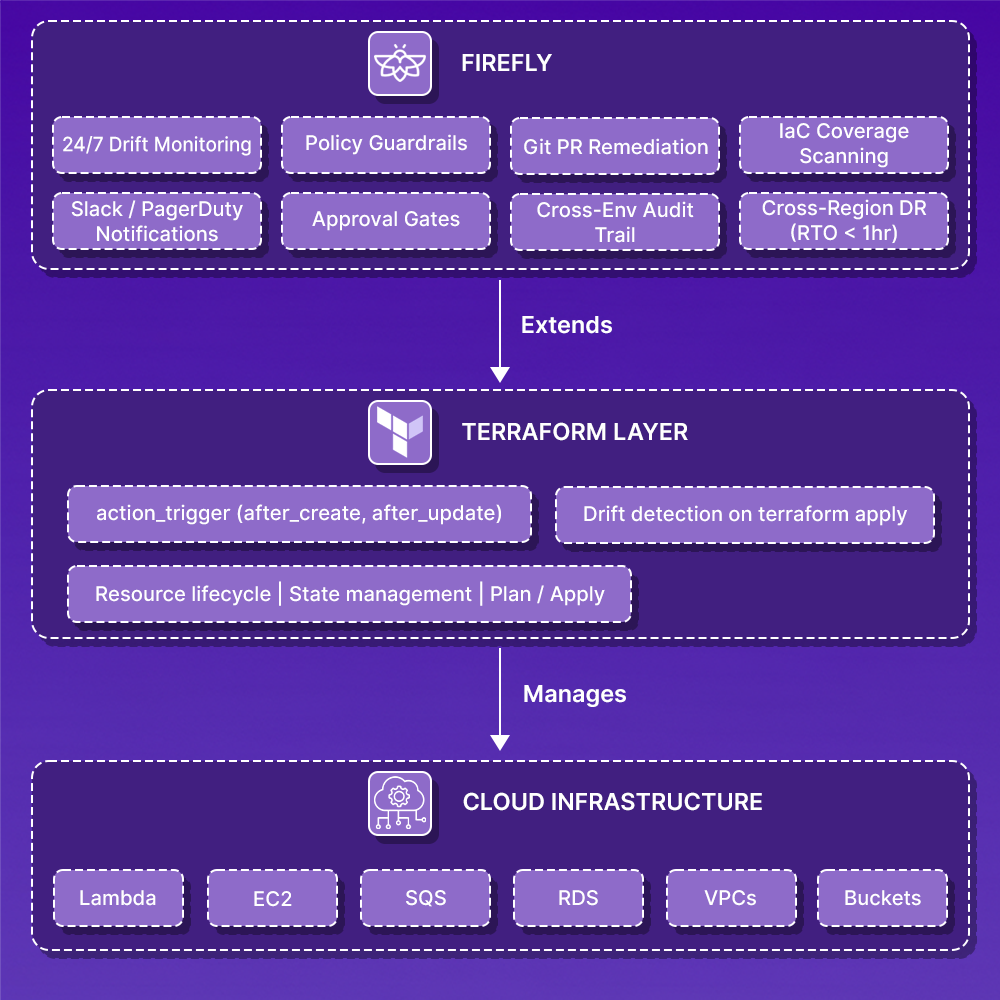
Here's exactly where each layer starts and stops:
Terraform is the engine. Firefly is the dashboard, guardrails, and GPS built around it. You don't replace your engine with a GPS. You add the GPS so you can see where you are, get alerted when something goes wrong, and know the fastest path to recovery.
Firefly's Inventory gives you the full picture of IaC coverage across every resource in your environment, what's codified, what's drifted, and what Terraform doesn't know about at all. In the example below, 91.2% of resources are unmanaged, meaning Terraform's action triggers cover only a fraction of the actual infrastructure.

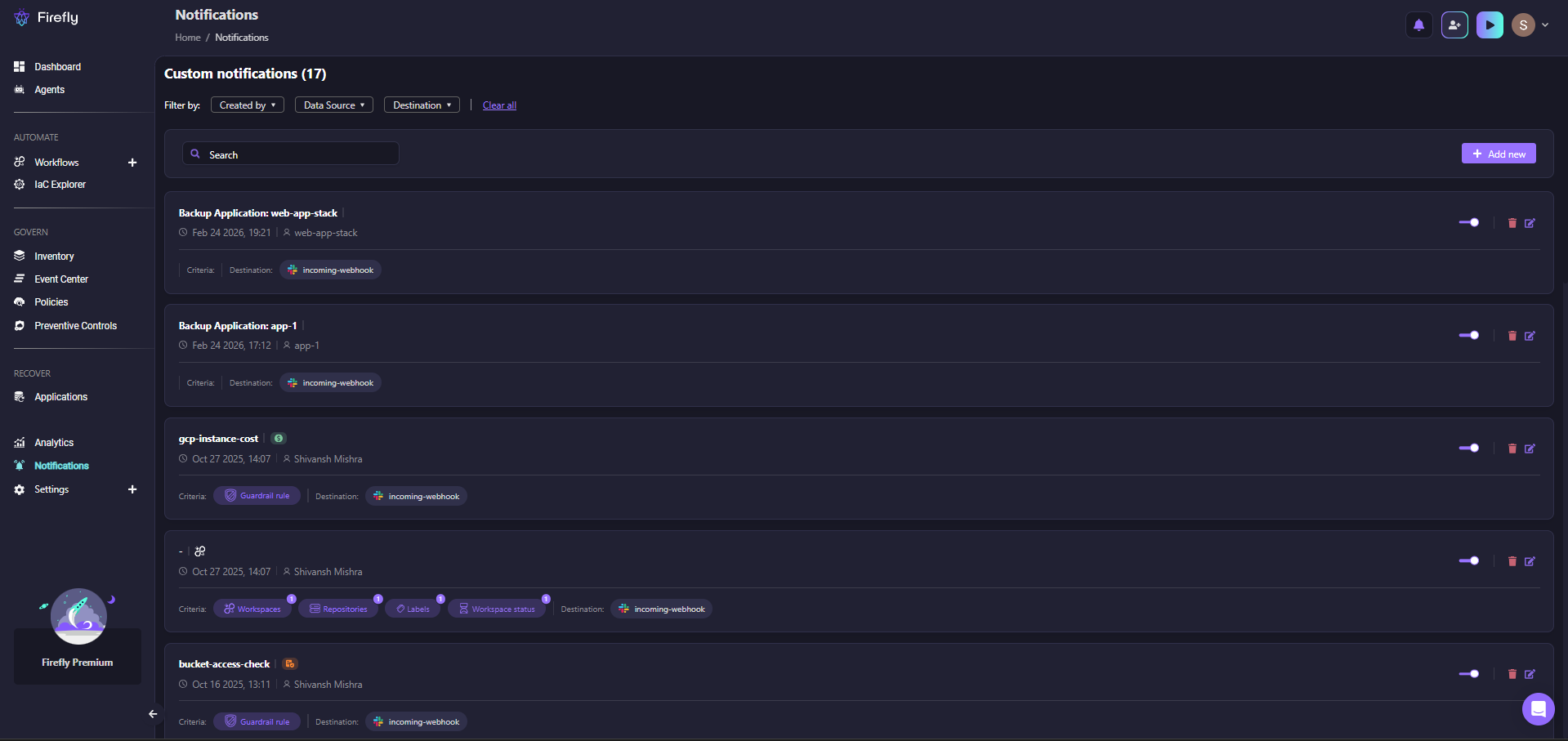
When drift is detected or an action fires, Firefly's notification system routes the event to wherever your team is, Slack, PagerDuty, or a webhook, based on rules you define per application, workspace, or guardrail violation.
Before any of that reaches production, Firefly's Governance layer runs policy checks across 776 built-in rules covering CIS, SOC 2, HIPAA, NIST, and PCI DSS. As shown in the governance dashboard below:
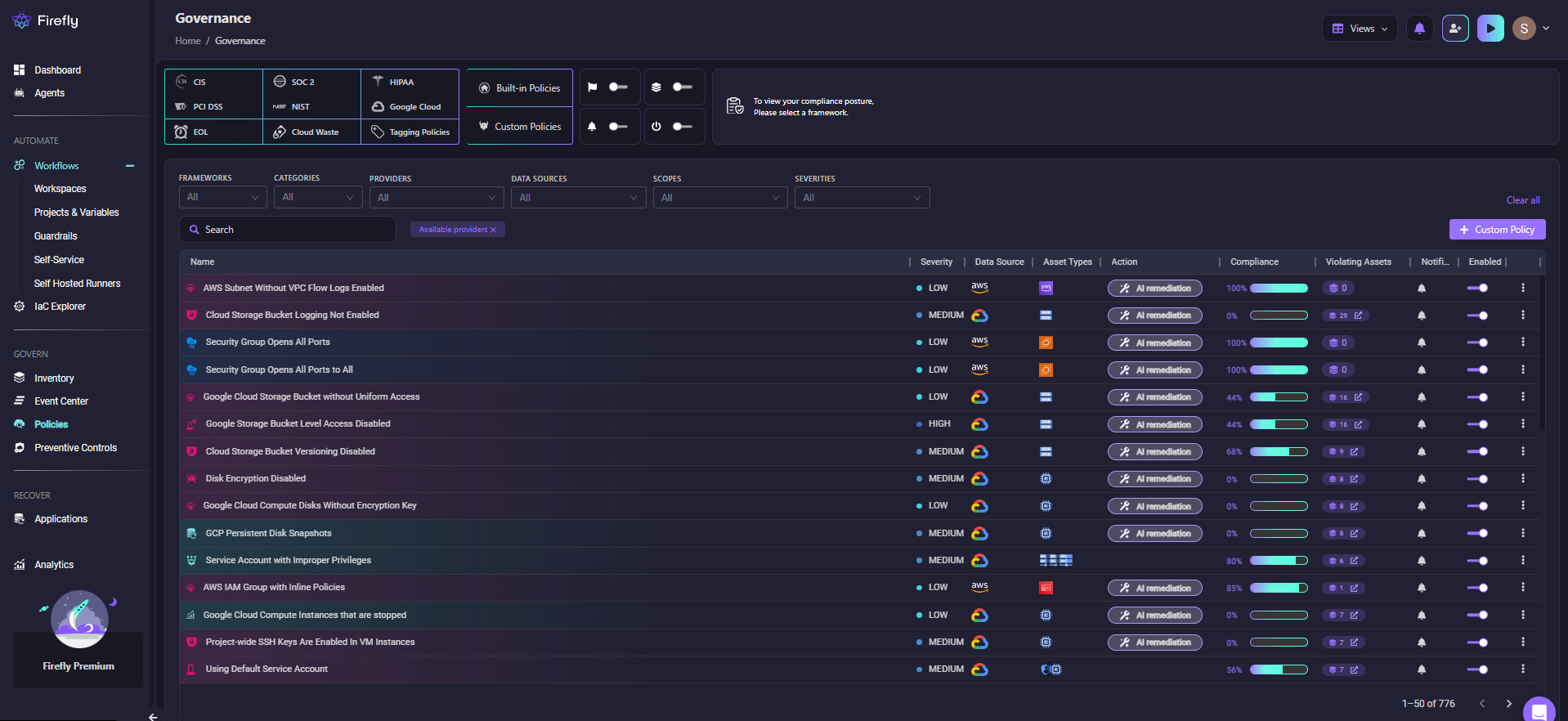
Each policy shows severity, compliance percentage, the number of violating assets, and an AI remediation option, so the team knows what's wrong and how to fix it before running apply.
Frequently Asked Questions
Can Terraform Actions replace CI/CD pipelines?
No. Actions handle operational tasks that depend on infrastructure state, migrations, rotations, and restarts. CI/CD pipelines handle build, test, and deployment orchestration. They solve different problems. Actions reduce the number of post-apply steps you need to manage in your pipeline, but they don't eliminate the pipeline.
Do I need Terraform v1.14 for this to work?
Yes. The action block and -invoke flag were introduced in Terraform v1.14.0. Check your version with terraform version. The AWS provider also needs to be v6. x or higher for aws_lambda_invoke action support.
Why does -invoke fail in PowerShell with "Invalid target action"?
PowerShell misparses the = in -invoke=action... and strips the value. Wrap the entire flag in quotes: terraform apply "-invoke=action.aws_lambda_invoke.api_handler".
What's the difference between a lifecycle-triggered action and a null_resource with a provisioner?
A null_resource with a provisioner creates an actual resource in state, it has a lifecycle, it can be tainted, and it shows up in plan output. An action has no state representation. It runs in a defined provider context rather than as raw shell execution, which means better error handling, typed inputs, and explicit provider support. The null_resource pattern was a workaround. Actions are a first-class construct.

.avif)
.avif)
.webp)

.webp)












