TL;DR:
- Terraform handles provisioning, not governance. Running plan and apply works fine at a small scale, but it doesn’t handle when to run, who approves, or what happens if something drifts outside the code.
- CI pipelines automate execution, not the lifecycle. CI can trigger Terraform runs, but it can’t detect out-of-band changes, enforce policies globally, or manage complex apply workflows across teams and environments.
- Terraform automation includes drift detection, approvals, policies, and fixes. At scale, teams need visibility into what changed, apply gating, policy enforcement during plans, and Git-based remediation, not manual patching.
- Firefly adds IaC governance around your existing workflows. It codifies unmanaged resources, detects drift in real time, blocks non-compliant changes, and opens PRs to fix issues, without changing your CI or Terraform code.
- You keep Terraform, Firefly extends it. Firefly doesn’t replace your tooling. It plugs into what you already have and makes it safe to scale Terraform across clouds, teams, and environments.
"Terraform automation" means different things to different teams. For some, it’s as simple as running terraform plan and terraform apply in CI. And while that’s a good start, it barely scratches the surface of what automation actually involves when you're operating at enterprise scale.
When you’re managing infrastructure across dozens of teams, environments, and cloud accounts, automation isn't just about triggering Terraform; it’s about controlling the entire lifecycle around it: how changes are proposed, validated, approved, executed, monitored, and eventually reconciled if something drifts.
Interestingly, even HashiCorp has started leaning into this broader interpretation. In their recent preview of Project Infragraph (IBM Newsroom, Sept 2025), they talked about Terraform’s evolution toward agentic, event-driven infrastructure, one that continuously responds to change, enforces rules, and reconciles drift without direct human intervention. The takeaway? Even Terraform’s creators are acknowledging that infrastructure management needs to evolve from static provisioning to something much more dynamic and automated.
This post focuses on what that evolution looks like today, how teams are building real, production-grade Terraform automation systems. It breaks down the full automation lifecycle, outlines where Terraform and CI fall short, and shows what modern platform teams are putting in place to close the gap.
What Terraform Automation Actually Involves
Terraform is used to provision infrastructure. You write your configuration in HCL, and when you run terraform apply, it creates or updates cloud resources to match what you’ve defined. That includes things like:
- Compute resources (e.g., EC2, GKE, AKS)
- Networking (VPCs, subnets, gateways, load balancers)
- Storage and databases
- IAM roles, policies, service accounts
- Other managed services across AWS, Azure, GCP, etc.
It also manages a state file, which tracks the current known state of each resource, including dependencies and values returned from the provider APIs.
But that’s all Terraform does: it plans and applies changes, and maintains state. It does not handle when changes should run, who should approve them, whether they follow security or cost policies, or how to detect if something has drifted away from the expected configuration.
In practice, teams need more than just provisioning. They need to automate the entire lifecycle around Terraform, including:
- Triggering Terraform runs based on Git activity (e.g., a pull request is merged)
- Making sure every plan goes through policy checks (e.g., no public S3 buckets)
- Requiring approvals before applies, especially for production
- Running applies in isolated environments with scoped credentials
- Detecting if someone made manual changes in the cloud console that Terraform doesn’t know about
- Creating pull requests automatically to fix drift or enforce tagging/security rules
This is what we mean when we talk about Terraform automation. It’s not about replacing Terraform; it's about building the workflows and controls around it, so that infrastructure changes happen:
- In a controlled, auditable way
- Through Git, not ad-hoc CLI runs
- With policies enforced before anything reaches production
- And with real-time detection and correction of misconfigurations
So, to put it simply:
Terraform provisions infrastructure. Automation governs how and when that provisioning happens, and what ensures it stays correct over time.
This distinction becomes essential once multiple teams, environments, and cloud accounts are involved, or when infrastructure starts to impact uptime, security, and compliance.
End-to-End Terraform Automation Lifecycle
In a simpler config, one cloud account, a few stacks, and a small team, it’s possible to run Terraform safely using just Git and CI. A simple workflow where terraform plan runs on pull requests and terraform apply runs on merge can work fine early on.
But this starts to break down quickly when you introduce:
- Multiple environments (dev, staging, prod)
- Separate cloud accounts with different access controls
- Shared infrastructure like VPCs, IAM roles, or DNS zones
- More teams are managing separate Terraform repos
- Security, audit, and compliance requirements
- The risk of manual changes outside Terraform (e.g., via cloud consoles)
At that point, plain CI pipelines and CLI usage don’t provide enough structure or control. Terraform still handles provisioning, but you need automation around it to govern when it runs, how it’s validated, who can apply it, and how you keep infrastructure consistent over time.
Here’s what a complete Terraform automation lifecycle looks like in production environments:
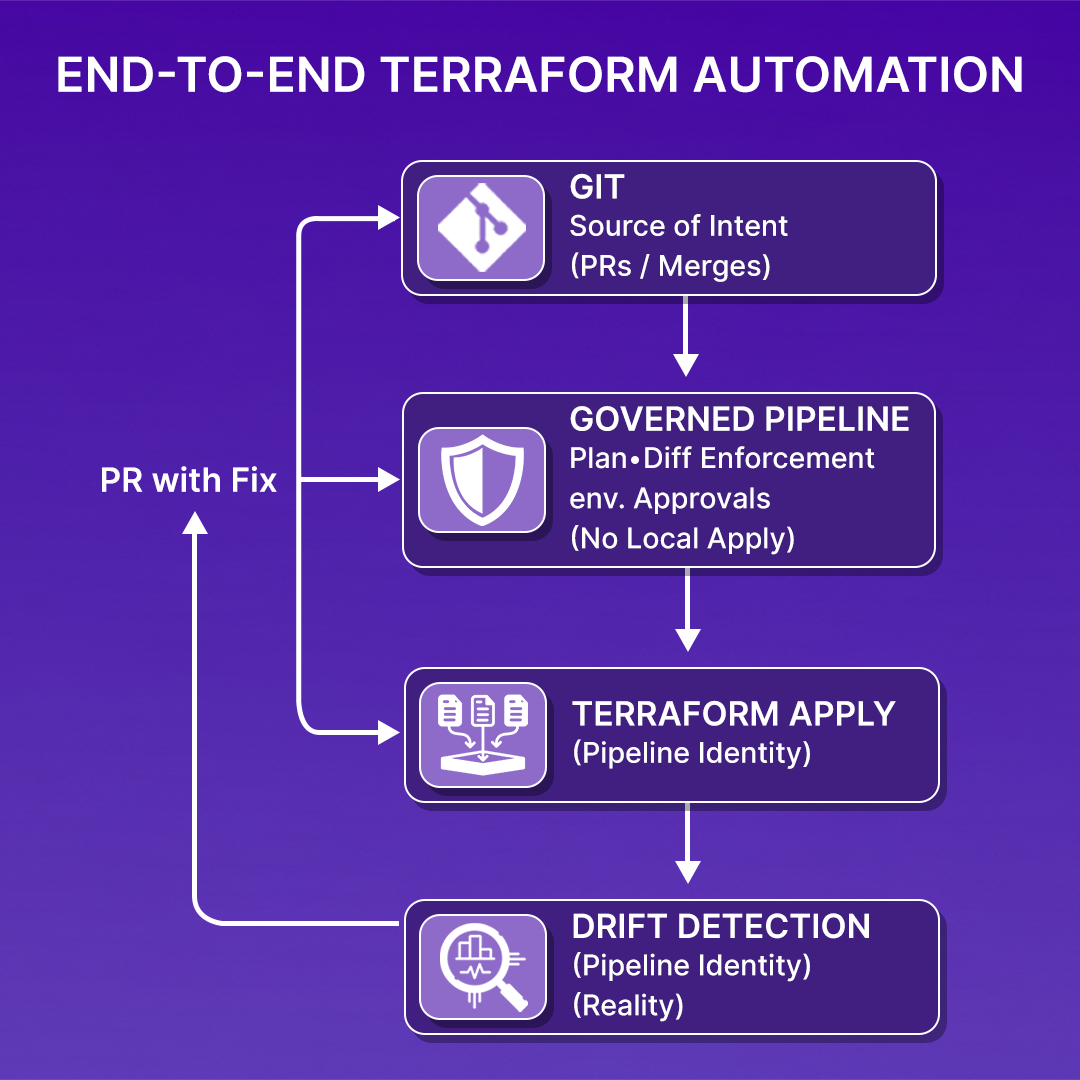
1. Automating Execution (When and How Terraform Runs)
Terraform runs should be initiated automatically based on Git events:
- A pull request opens or updates, terraform plan runs
- A pull request is merged, terraform apply is triggered (only if conditions are met)
Terraform should not be run locally against shared or production infrastructure. Applies should happen from a controlled execution environment with:
- A managed runner (e.g., CI worker or automation agent)
- Short-lived credentials (e.g., assumed IAM roles or workload identities)
- Versioned workflows with logging and audit trail
This prevents accidental applies, removes long-lived credentials, and makes every infrastructure change traceable and reproducible.
2. Plan Visibility and Change Awareness
Every terraform plan output should be:
- Rendered clearly in the pull request for reviewers
- Exported to structured JSON (terraform show -json)
- Archived in a central system for future analysis
By default, Terraform diffs exist only in CI logs and are lost once the job completes. Without capturing plans:
- You can’t audit what changes were proposed
- You can’t compare planned vs actual changes after incidents
- You lose visibility into change history across environments
Treating plans as first-class artifacts, not just transient logs, gives you the ability to analyze and review infrastructure changes at any time.
3. Policy Validation and Enforcement
Every plan must be evaluated against policy rules before it's allowed to apply. These rules should cover:
- Security (e.g., no open ports, encryption required)
- Cost (e.g., block large instance types without justification)
- Tagging and ownership (e.g., all resources must include cost center and team tags)
These checks should run automatically on every plan.json, across all teams and repos — not manually during code review, and not selectively.
When policies fail, applies are blocked, and a clear reason is shown in the pull request. This shifts enforcement from best-effort to guaranteed.
4. Controlled Apply Workflows
Terraform apply must follow strict rules based on environment, resource type, or business risk:
- Production applies require approval from designated reviewers
- Shared infra (like VPCs or IAM roles) must be applied in isolation
- Sensitive changes may require sequencing (e.g., networking before compute)
Applies should always happen in automated environments, using temporary credentials, with logs captured and approvals recorded.
Automation doesn’t mean everything is auto-applied; it means applies happen only when the correct preconditions are met, and always through a controlled process.
5. Continuous Drift Detection and Remediation
Terraform doesn't detect drift unless someone runs terraform plan, and in most teams, that only happens during a deploy.
This leaves a large blind spot: changes made directly in the cloud (e.g., via the console or API) don’t show up until the next plan, if there is one.
A proper automation layer should continuously:
- Scan cloud APIs for actual resource config
- Compare that against the latest Terraform state
- Detect and classify drift
- Trigger a Git-based remediation flow
For example, if a security group is edited to allow 0.0.0.0/0 in production, the system should detect it, generate the correct HCL change, and open a pull request to restore the intended config.
That’s how infrastructure stays aligned with declared state, without manual checks or ad hoc hotfixes.
Now, to sum up, a complete Terraform automation lifecycle includes:
- Triggering Terraform plans and applies through Git
- Archiving and inspecting plan outputs
- Enforcing policies automatically and consistently
- Gating applies based on the environment and approvals
- Detecting drift continuously
- Generating fixes and pushing them through Git
This turns infrastructure change into a controlled system, not a series of manual commands or loosely connected scripts. It gives you confidence that what’s defined in code is what actually exists in production, and that every change is reviewable, auditable, and safe.
Example: Terraform CI Workflow with Drift Guard and Apply Controls
This is a production-safe Terraform workflow used in a GCP environment. It runs on every push or pull request and is designed with infrastructure safety, drift awareness, and change control in mind. All changes go through Git, applies are scoped to main, and the pipeline includes built-in logic to detect and block drift before anything is deployed.
Repo and Directory Layout
- envs/prod: environment-specific Terraform configuration for production
- modules/vm: reusable compute modules
- .github/workflows/terraform.yaml: GitHub Actions workflow that runs Terraform with execution and drift controls
GCP Auth and Terraform Setup
The job authenticates to GCP using OIDC via the google-github-actions/auth@v2 action, consuming credentials stored as GitHub Secrets. This avoids long-lived credentials or static keys.
Terraform CLI is installed using setup-terraform to a specific version (v1.6.6), ensuring consistent behavior across runs.
Validation and Pre-Checks
The pipeline validates that the Terraform code is properly formatted and syntactically correct before planning anything. This prevents format drift and basic syntax errors from leaking into the plan or apply stages.
Running Terraform Plan with Exit Code Routing
Terraform plan is executed with -detailed-exitcode and written to a file:
This gives a clear signal separation:
- 0: No changes
- 2: Changes present
- 1: Error occurred
The exit code is captured for conditional logic in later steps. If the plan fails, the workflow exits immediately. If changes are detected, the pipeline proceeds to drift inspection.
Drift Detection Based on Plan Diffs
The compiled plan is converted to JSON:
We then inspect the JSON to count how many resources are going to be updated or deleted:
We’re not counting create actions. This drift detection logic is focused specifically on destructive or mutation-level changes, the type most likely caused by out-of-band edits made directly in the cloud provider or by other tools.
Blocking Deployment if Drift Is Found
If drift is detected (DRIFT_COUNT > 0), the apply step is blocked:
This ensures Terraform never applies changes that result from an infrastructure state mismatch. If something changed manually, we want to investigate and correct it through Git, not risk wiping it out blindly during apply.
Controlled Apply Logic
Applies only happen on a direct push to main. This guarantees that infrastructure changes are reviewed, merged, and traceable:
- PRs only run the plan
- Only merged code gets deployed
- All applies happen in CI with scoped cloud credentials
This eliminates local applies entirely and ensures consistent execution paths for every deployment.
CI Execution Observability
As shown in the snapshot below:
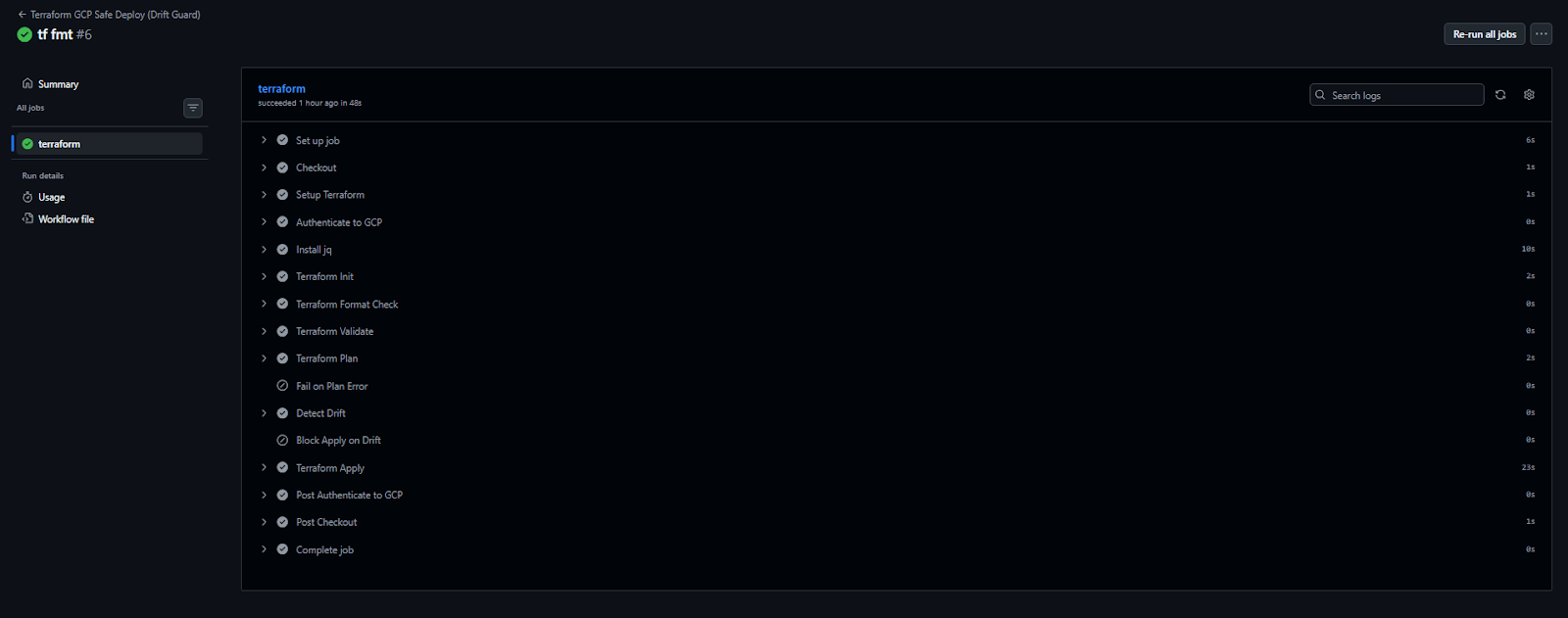
In the GitHub Actions UI, every job step is logged:
- Plan output is captured and visible
- Exit codes are shown per step
- Drift count is recorded and used to apply decisions
- Errors are surfaced clearly and early
Each run serves as an auditable record of what changed, what was detected, and what was blocked or applied, mapped to a specific Git commit.
Why CI Pipelines and Native Terraform Aren’t Enough
Running Terraform through CI helps automate execution. You can validate configs, generate plans, and apply infrastructure changes based on Git activity. That’s useful — and it’s where most teams start.
But automating execution is only one part of Terraform automation. At scale, you also need to automate how changes are approved, validated against policy, reconciled with reality, and tracked over time. CI pipelines don’t cover those parts — and that’s where the gaps show up.
- Drift isn’t continuously monitored: Terraform only knows something changed when you run plan. CI won’t catch drift unless someone pushes code. That leaves manual changes in production undetected for days or weeks.
- No historical view of what changed: Terraform plans and apply live in logs or PR comments. There’s no structured history. You can’t trace who approved a change, what was in the plan, or why it was applied.
- Policy checks are inconsistent: Some repos use tflint, some don’t. One team might check tags, another might skip cost rules. There's no central policy engine, and no enforcement at Terraform apply time.
- No visibility across environments: Each repo runs in isolation. You can’t answer:
- What infrastructure do we have across teams?
- What’s out of sync with the code?
- Where is Terraform drifting?
- terraform apply aren’t controlled: In many configurations, someone can still run terraform apply locally. In others, CI auto-applies everything without approval gates. There’s no consistent Terraform apply workflow.
- It doesn’t automate the full lifecycle: CI runs Terraform. That’s it. It doesn’t detect drift, enforce policy org-wide, or fix misaligned resources. You need something more than pipelines to keep infrastructure reliable over time.
These aren’t problems with Terraform, and they’re not CI’s fault either. They’re just signs that executing Terraform and automating Terraform are two different things.
What Enterprise Teams Actually Need
CI pipelines can automate how Terraform is run, but running terraform plan or apply is only a small part of managing or automating infrastructure at scale. In enterprise environments, you’re not just deploying a few resources; you’re managing infrastructure across hundreds of accounts, regions, environments, and teams. And that requires more than just execution logic.
To safely automate infrastructure at this scale, teams need a full Infrastructure-as-Code (IaC) orchestration platform, one that supports execution, policy enforcement, remediation, and visibility across everything deployed.
Here’s what that looks like:
- Drift detection and remediation for out-of-band changes: Changes made directly in the cloud console, by scripts outside Git, or by other automation tools often go unnoticed. These are out-of-band changes, and if you’re not monitoring for them continuously, your infrastructure will drift away from your code. Example: a developer manually opens a security group to 0.0.0.0/0 in the cloud console. This change bypasses Terraform and may go undetected until the next plan, which could be weeks later.
- Policy enforcement across all infrastructure: Security, compliance, and operational rules need to be enforced not just during plan, but continuously.
Examples include:
- Preventing public S3 buckets
- Enforcing encryption on all storage
- Blocking cost-heavy resource types in dev environments
These policies must be applied uniformly across teams, repos, and environments, not defined separately in every CI job.
- Unified visibility across cloud accounts and IaC workspaces: Teams need a way to answer:
- What infrastructure do we have across all cloud providers?
- What’s managed by Terraform, and what isn’t?
- Which environments are drifting or out of compliance?
Without a shared dashboard or inventory, teams operate in silos and lose context.
- Git-based remediation, not console fixes: When a policy is violated or drift is detected, the fix should be made in code, not directly in the cloud. That means opening a pull request to correct the issue in Terraform, rather than patching the live infrastructure by hand. This keeps all changes auditable and version-controlled.
- Apply workflows that are gated and controlled: Not every terraform apply should run automatically. Enterprises need rules for when and how changes are allowed to reach production, with approval gates, environment promotion flows, and scoped permissions to reduce risk.
- Support for self-service infrastructure within guardrails: Developers should be able to deploy infrastructure safely without waiting on platform teams. But they must operate within predefined templates, environments, and policies, so the infrastructure remains secure and cost-controlled.
- Disaster recovery readiness built into the process: Since everything is declared as code and tracked in version control, your infrastructure should always be reproducible. This makes disaster recovery faster and more predictable, assuming drift and misconfigurations are detected and fixed proactively.
All of this goes beyond what native Terraform and CI can handle on their own. Terraform is great at provisioning. CI is good at running workflows. But orchestrating infrastructure across a real enterprise requires something built for the full lifecycle.
That’s where Firefly comes in, providing a multi-cloud IaC orchestration platform to automate, manage, and govern infrastructure across your entire cloud footprint.
Firefly: Automating What Happens Around Terraform
Firefly keeps your existing workflows, modules, and pipelines intact, and fills in the gaps that Terraform and CI don’t cover.
Here’s what Firefly automates for platform and DevOps teams:
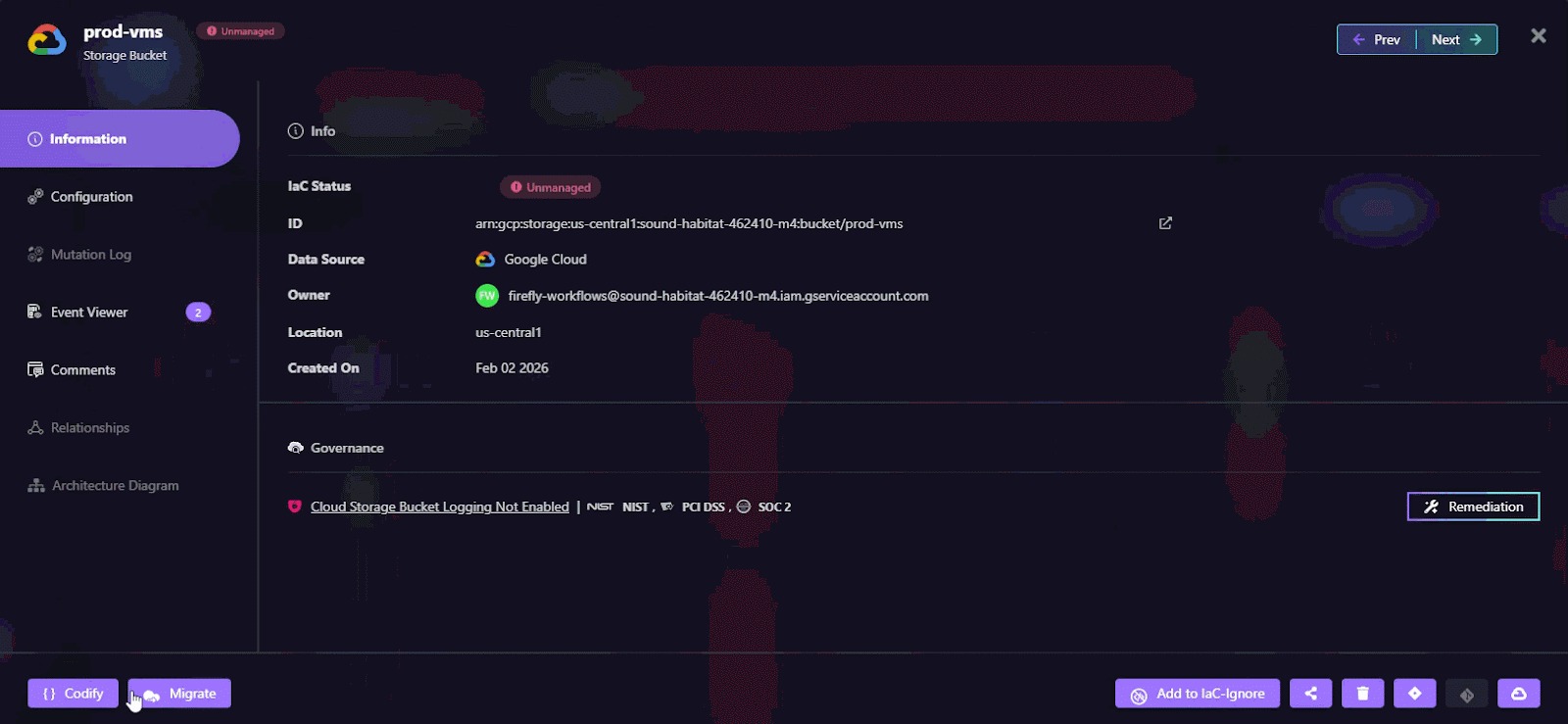
- Codification of unmanaged resources: Firefly scans your cloud environments, identifies resources not managed by Terraform, and generates IaC code to bring them under version control, making brownfield environments manageable again. As shown in the codification of a GCS bucket in the workflow below:
- Real-time drift detection: It monitors your infrastructure continuously, not just during CI runs. If something changes outside of Terraform, a deleted subnet, a modified IAM policy, Firefly flags it immediately.
- Centralized policy enforcement: Policies like “no public S3 buckets” or “all disks must be encrypted” can be defined once and enforced across all workspaces and environments, during plan, apply, and runtime.
- Git-based remediation: When drift or a policy violation is detected, Firefly doesn’t just raise an alert. It can generate a pull request with the fix, aligning infrastructure with the code without any manual console edits.
- Visibility into all Terraform deployments: Firefly gives you a single place to see:
- Which resources are deployed and where
- Which workspaces are drifting
- What changes are waiting to be applied
- Who made what change, and when
- CI/CD integration without lock-in: It works with existing pipelines, whether you use GitHub Actions, GitLab, or something else, and adds visibility and governance without forcing you to change how Terraform apply or plan are triggered.
With Firefly, Terraform stays your execution engine. You keep your code, your modules, your state files. What Firefly adds is the automation layer that makes Terraform safe to scale across clouds, teams, and environments, with real governance and visibility.
Enforcing Policies with Firefly Guardrails
Here’s a look at how Firefly enforces policy and provides insight during a Terraform plan run:
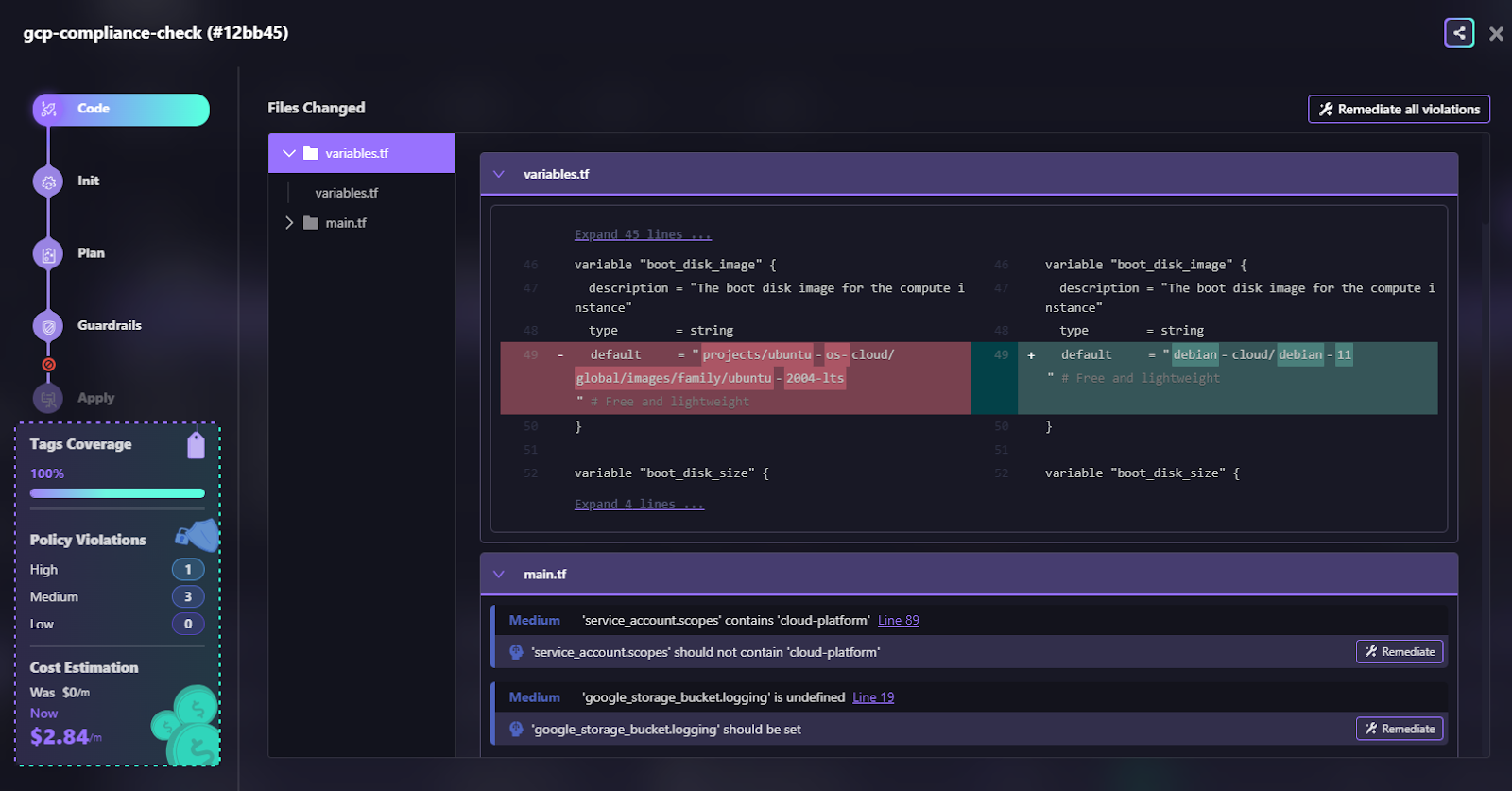
In a GCP workspace, a developer updates a compute instance to use a new image family (debian-11 instead of ubuntu-2004-lts). Firefly detects the change, analyzes the plan, and identifies several issues:
- Policy violations:
- Using a high-permission service account (cloud-platform)
- Unset logging for the Google Cloud Storage bucket
- Cost Guardrail:
- The expected cost increase exceeded the allowed threshold (+$2.84/month vs +$1) as shown in the snapshot below:
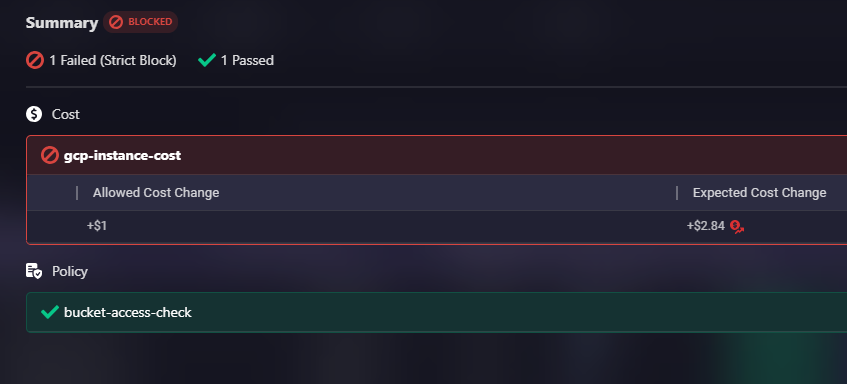
These violations are caught before apply. The apply step is blocked automatically because of strict cost guardrails.
Firefly automates key operations around your Terraform pipelines, not by replacing Terraform, but by extending what gets automated beyond plan and apply.
Here’s what it actively automates in the context of Terraform execution:
- Change diffs with context: Automatically generates a visual diff of what changed in the Terraform code and which cloud resources will be affected.
- Resource relationship mapping: Builds a real-time graph of dependent resources for every plan, helping teams understand blast radius before apply.
- Tag compliance enforcement: Automatically validates tag coverage against org-wide standards (e.g., Environment, CostCenter) before changes are applied.
- Policy checks and blocking: Runs security, compliance, cost, and tagging policies at plan time, and blocks terraform apply if violations are found.
- Auto-suggested remediations: For violations, Firefly suggests Terraform-native fixes directly in the pull request so developers can correct issues before merging.
This is done without writing custom CI scripts, adding wrappers, or touching your Terraform state. Firefly integrates natively with your CI/CD pipelines and pulls the necessary metadata (plans, diffs, tags) from the workflow runs.
By automating governance steps early, during code review and running Terraform plan, Firefly moves policy enforcement into the Terraform automation lifecycle itself. Teams catch risky or non-compliant infrastructure before it’s deployed, ensuring Terraform apply is clean, reviewed, and traceable.
FAQs
Is Terraform used for automation?
Yes. Terraform automates the provisioning and management of cloud infrastructure using code. It ensures consistent deployment of resources across environments by applying declarative configurations.
What is Automation Cloud?
Automation Cloud is a SaaS platform (e.g., by HashiCorp) that provides a managed environment for running Terraform workflows. It handles state management, secret storage, remote execution, and policy enforcement as a service.
What are the 4 steps of Terraform?
- Write: Define infrastructure as code using .tf files
- Init: Set up the working directory and provider plugins.
- Plan: Preview changes Terraform will make.
- Apply: Execute the changes to create/update infrastructure.
What is IaC automation?
Infrastructure as Code (IaC) automation involves managing infrastructure through version-controlled code and automated workflows to provision, update, and validate resources, eliminating manual configuration and reducing drift.

.avif)
.avif)
.webp)

.webp)












