TL;DR
- Terraform Cloud is HashiCorp’s managed platform for running Terraform with remote state, locking, policy enforcement, cost estimation, and audit logging, removing the need for local backends or custom pipelines.
- It standardizes IaC delivery through Git-driven, CLI, and API workflows, ensuring every plan and apply runs in a consistent, isolated environment.
- Its scope ends at Terraform-managed resources; it doesn’t track assets created manually or through other IaC frameworks like Pulumi, CloudFormation, or Kubernetes manifests.
- Firefly application extends this model by continuously scanning cloud accounts and IaC sources to build a unified inventory of codified, unmanaged, and drifted resources across AWS, Azure, GCP, and Kubernetes.
- It adds multi-IaC governance, drift detection, and policy enforcement (Guardrails) across all stacks, regardless of tool or cloud provider.
Over the last few years, Infrastructure-as-Code (IaC) has gone from a convenience to a core discipline in modern DevOps and platform engineering. Teams no longer just provision servers; they design entire cloud environments as code, with every VPC, subnet, IAM role, and Kubernetes cluster version-controlled and reproducible. Among the tools that made this possible, Terraform stands out for unifying how infrastructure is defined across clouds and providers.
As organizations scaled IaC usage, managing Terraform runs, remote state, and team collaboration became more complex. Local state files led to drift, manual applies caused inconsistencies, and enforcing security or cost controls at scale grew painful. That’s where Terraform Cloud, HashiCorp’s managed Terraform service, comes in, simplifying and centralizing execution, state management, and governance so teams can deliver infrastructure changes safely.
The shift to Terraform Cloud hasn’t been without debate. Recent discussions on Reddit show mixed sentiment, while many engineers appreciate the managed workflow and state security, others are frustrated by the new pricing model. As one engineer put it:
“It seems Terraform Cloud is no longer viable … we were on the legacy pricing, not this ‘resources under-management per hour’ BS.” - r/devops, 2025
This article breaks down Terraform Cloud’s capabilities, workflows, and pricing model, and examines what happens when teams start to outgrow it. When infrastructure spreads across multiple clouds, tools, and unmanaged assets, platforms like Firefly extend visibility and governance across both code and cloud.
What Is Terraform Cloud?
Terraform Cloud (HCP Terraform) is HashiCorp’s managed service that runs Terraform in a consistent, secure, and auditable way. It uses the same Terraform CLI workflow engineers already know but adds collaboration, policy, and automation features so teams don’t have to maintain their own pipelines, state storage, or secrets.
Terraform Cloud executes Terraform runs on HashiCorp-managed infrastructure instead of your local machine. When you trigger a run, whether from a Git commit, a CLI command, or an API call, Terraform Cloud provisions an isolated worker, downloads your configuration, runs terraform plan and terraform apply, and saves the results remotely.
Compared with Terraform CLI: When you use the CLI, Terraform runs locally on your workstation or CI runner. Logs appear only in the terminal and disappear after execution unless you save them manually. The state file (terraform.tfstate) is stored locally by default, or you must configure your own remote backend (for example, S3 with DynamoDB for locking). Terraform Cloud removes that manual setup: every plan and apply is automatically logged, versioned, and linked to the workspace and user who triggered it. This provides full traceability, remote state storage, and built-in state locking without additional tooling.
Each workspace represents a single Terraform configuration, for example, a development VPC or a production EKS cluster. A workspace keeps its own state file, variables, and complete run history. Workspaces belong to projects, and projects belong to organizations, allowing you to group related environments and apply access controls cleanly.
Terraform Cloud also gives you:
- Remote state with locking and versioning: In Terraform CLI, you need to configure and maintain your own remote backend (S3, GCS, or Azure Blob) and a locking mechanism to avoid concurrent writes.
Terraform Cloud provides remote state storage automatically, with built-in encryption, locking, and version history. No separate setup or maintenance is required. - Variable sets for managing credentials and shared inputs: The CLI relies on .tfvars files or environment variables, which can become hard to manage and insecure at scale. Terraform Cloud stores variables centrally, supports secret masking, and allows variable sets to be shared across multiple workspaces.
- Private module and provider registry: With Terraform CLI, teams often publish internal modules through Git or self-hosted registries. Terraform Cloud includes a private registry so you can publish, version, and reuse approved modules and providers directly inside your organization.
- VCS integration (GitHub, GitLab, Bitbucket, Azure DevOps): In Terraform CLI, you must build and maintain your own CI/CD pipeline to trigger plans and apply from version control. Terraform Cloud connects directly to your repository: pull requests trigger speculative plans, merges trigger applies, and all runs are linked to commits automatically.
- Policy as Code using Sentinel or OPA: Enforcing guardrails in CLI setups usually requires custom scripts or manual review. Terraform Cloud evaluates Sentinel or OPA policies automatically between plan and apply, blocking or warning on non-compliant changes before they reach production.
- Run tasks and API integrations: In Terraform CLI, adding cost estimation or security checks means adding more CI stages. Terraform Cloud provides built-in hooks for these checks, with integrations for cost estimation, drift detection, and security scanning. Results are displayed directly in the run details.
Terraform Cloud runs Terraform remotely and manages state, variables, logging, and policy enforcement as part of a unified platform. Compared to Terraform CLI, which requires manual setup for backends, pipelines, and audit logs, Terraform Cloud delivers the same workflow in a managed, consistent, and traceable environment that scales across teams.
Supported Workflows & Architecture
Terraform Cloud follows the same Terraform CLI workflow that engineers already use, but shifts its execution, state management, variable handling, and policy evaluation into HashiCorp’s managed infrastructure. When a run starts, Terraform Cloud provisions an ephemeral execution environment on its own infrastructure, pulls the configuration from version control or an API upload, and executes terraform plan or terraform apply in that isolated environment.
During each run, Sentinel or OPA policies (if configured) are evaluated between plan and apply, and the resulting Terraform state is securely stored in Terraform Cloud’s remote backend. Each workspace maintains its own variables, credentials, and run history. All runs are logged, versioned, and tied to the triggering commit or API request, giving complete audit visibility. This managed execution model removes the need for local state files or self-hosted runners while ensuring consistent, reproducible results across teams and environments.
VCS-Driven Workflow (GitOps Flow)
Most teams run Terraform Cloud through Git integration, connecting workspaces to repositories on GitHub, GitLab, Bitbucket, or Azure DevOps. Each workspace is mapped to a specific branch, and Terraform Cloud automatically responds to commits and pull requests.
When a pull request opens, Terraform Cloud runs a speculative plan to preview the changes without modifying the live state. When that PR merges, Terraform Cloud performs a plan-and-apply in a managed environment. Every run is tied to a commit SHA, author, and workspace, with Sentinel or OPA policies enforcing compliance between plan and apply. Here’s how this looks in practice:
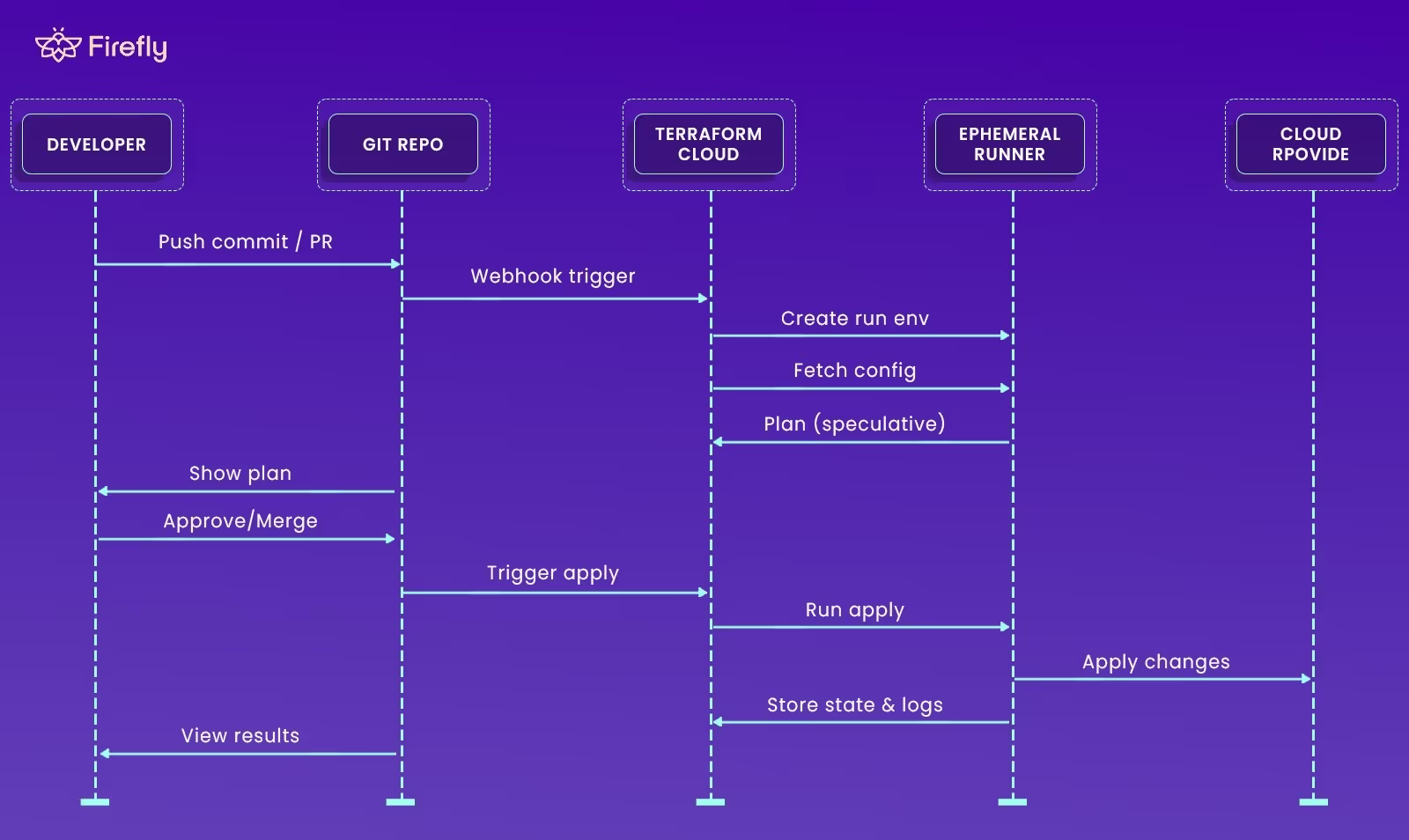
Explanation stepwise:
- A developer pushes a commit or opens a PR.
- The connected Git repo triggers Terraform Cloud via webhook.
- Terraform Cloud spins up an ephemeral runner, fetches the Terraform configuration, and performs a speculative plan.
- After approval or merge, the runner executes the apply to the target cloud provider.
- Terraform Cloud stores the resulting state and logs centrally for versioning and audit.
This GitOps workflow ensures infrastructure delivery is traceable and predictable. Every plan is visible, every apply is gated by review or policy, and every change is directly mapped to a commit. No local state files, no hidden runs, no guesswork.
CLI-Driven Workflow
For teams that prefer direct CLI interaction, Terraform Cloud can act as a remote backend. Adding a cloud block to your Terraform configuration tells the CLI to authenticate with Terraform Cloud and delegate the plan and apply steps to the remote environment. The engineer still runs terraform plan or terraform apply locally, but Terraform Cloud performs the execution remotely. Logs stream back in real time, and results are stored in the workspace for history and auditing. This approach lets you keep local workflows for development or testing while maintaining centralized state management, policy checks, and consistent backend behavior.
API & Automation Workflows
Terraform Cloud provides a full REST API that allows CI/CD systems or custom automation to manage workspaces and trigger runs programmatically. Typical automation patterns include:
- Uploading configuration bundles or selecting VCS commits for execution.
- Creating runs and monitoring their status from pipelines (e.g., Jenkins, GitHub Actions, GitLab CI).
- Fetching outputs or state for downstream deployment steps.
- Running Run Tasks, which act as pre- or post-run hooks for cost estimation, compliance scanning, or tagging validation.
The API-first design makes Terraform Cloud easy to integrate into existing DevOps automation, while preserving all governance and security controls.
Organizational Structure
Terraform Cloud uses a clear hierarchy to organize infrastructure across teams:
- Organization: the top-level container that defines users, teams, permissions, policies, and billing.
- Projects: logical groupings of related workspaces, such as all environments for a particular service.
- Workspaces: isolated execution units, each representing a single Terraform configuration. A workspace contains its own state file, variables, and run history.
This structure allows fine-grained access control. For example, developers might have write access to dev and staging workspaces but read-only visibility into prod.
Execution and State Management
Each Terraform Cloud run is executed in an ephemeral environment that’s created on demand and destroyed after completion. Key behaviors include:
- Remote state is stored securely in Terraform Cloud with built-in locking and versioning.
- State locking ensures only one write operation can modify the state at a time.
- Run queueing prevents conflicting applies and keeps order consistent.
- State versioning allows rollback or inspection of previous states, simplifying troubleshooting and drift analysis.
For environments with stricter security or network boundaries, teams can deploy self-hosted agents inside their own VPCs. These agents poll Terraform Cloud for work and execute runs locally, keeping sensitive endpoints private while still benefiting from Terraform Cloud’s orchestration, policy enforcement, and audit trail.
Terraform Cloud’s architecture ensures that, regardless of how runs are triggered, whether from Git commits, CLI commands, or automated pipelines, every plan and application is executed in a controlled, auditable environment. State is centralized, policies are enforced consistently, and execution is fully reproducible. That consistency and traceability are what allow DevOps teams to scale infrastructure management without sacrificing control or reliability.
Key Features for DevOps Teams
When teams adopt HCP Terraform and start using it routinely, the real value shows up in the controls, guardrails, and integrations that make infrastructure delivery repeatable and safe at scale. Without these features, DevOps teams typically spend hours building and maintaining custom CI pipelines, backend storage, locking logic, policy scripts, and audit workflows. Terraform Cloud provides all of that out of the box.
1. Remote State, Locking & Versioning
HCP Terraform hosts the state file remotely for each workspace and ensures no concurrent writes via automatic locking. Every run produces a state version you can inspect or roll back to. That means you no longer have to manage S3 buckets, DynamoDB tables or custom locking logic for team workflows.
2. Workspace + Project Structure
Organize your stacks clearly: each workspace holds its own state, variables, run history, and applies. Group workspaces under “projects” for logical domains (e.g., microservice, team, or application). And at the top is your organization setting teams, permissions, and shared services. This structure helps enforce isolation (dev vs prod), standardization (shared variable sets), and clear ownership of infrastructure components.
3. Module Registry & Reuse
Within your HCP Terraform organization, you can publish internal modules and custom providers to a private registry. Teams standardize on versioned building blocks (networks, IAM roles, clusters) rather than reinventing each time. Results: fewer errors, consistent tagging, consistent architecture across teams.
4. VCS Integration & Automated Runs
Connect a workspace directly to your Git repo. Changes to infrastructure code trigger speculative plans on pull requests, and on merge trigger plan+apply workflows. The logic is built into the platform, changes are traceable to commits, team reviews happen naturally, and “infrastructure drift” from manual apply is reduced.
5. Policy as Code (Sentinel / OPA)
Before an apply happens, HCP Terraform evaluates policy rules (via Sentinel or OPA) to gate changes. For example, you can enforce that new resources must have tags, instance types must not be too large, or regions must meet compliance. These guardrails embed best practices and compliance into your run workflows, not just in code reviews.
6. Cost Estimation
Before applying infrastructure changes, the platform can show you a cost estimate based on planned resource changes. This provides engineers with visibility into cost implications early, allowing them to avoid surprises and link infrastructure intent to budget outcomes.
7. Secure Variables & Secrets
Variables and secrets (API keys, credentials, SSH keys) are stored inside HCP Terraform in encrypted form. You can define variable sets at the org or project level and attach them to multiple workspaces. Secrets are masked in logs and protected from exposure in version control. This alleviates managing a separate secret store just for IaC credentials in simpler setups.
8. Drift Detection & Import Capabilities
HCP Terraform supports periodic checks for drift between actual deployed resources and the state it knows about. It can also import existing resources into the state so you can bring previously unmanaged (“ClickOps”) infrastructure under code. This lets platform teams gradually codify legacy resources rather than rewriting everything immediately.
9. Self-Hosted Agents & Run Tasks
For environments with strict isolation (on-prem, air-gapped, private VPCs), HCP Terraform supports self-hosted agents. These agents execute Terraform runs inside your controlled network while still reporting back to the platform. You also get “Run Tasks” custom hooks triggered at specific phases (pre-plan, post-apply) for things like security scans, tagging validation, or cost checks.
HCP Terraform serves as the central execution layer for Terraform operations. It runs every plan and apply inside an isolated environment, manages state remotely with locking and versioning, and enforces policies and access controls through a unified backend. Variables, credentials, and modules are stored securely and versioned across workspaces and projects, while all actions are logged and auditable.
For DevOps teams, this architecture removes the operational overhead of managing backends, pipelines, and state files. Infrastructure runs become consistent, traceable, and policy-compliant across all environments, from developer sandboxes to production systems.
Pricing & Cost Model
HCP Terraform (Terraform Cloud) pricing is based on the number of Managed Resources, which are every Terraform resource tracked in the workspace state where mode="managed". Resources like null_resource and terraform_data are excluded. Billing is calculated on the peak number of managed resources per hour across all workspaces within an organization.
Plans and Rates
- Essentials: $0.10 per resource per month (≈ $0.00013/hour). Suitable for small teams or individuals managing infrastructure as code.
- Standard: $0.47 per resource per month (≈ $0.00064/hour). Includes lifecycle management, enhanced automation, and governance controls.
- Premium: $0.99 per resource per month (≈ $0.00135/hour). Adds enterprise-grade features like advanced policy enforcement, SSO, audit logs, and self-service workflows. Each paid plan includes a $500 HCP trial credit for initial use.
Example Calculation
If you manage 1,000 resources on the Essentials plan:
1,000 × $0.10 = $100 per month. If your environment temporarily scales to 2,000 resources, billing for that hour is calculated at the 2,000-resource rate. HCP Terraform charges by hourly peak usage, not averages.
Cost Planning
- Track managed resource counts across all workspaces to forecast monthly spend.
- Clean up inactive or temporary workspaces to avoid counting unused resources.
- Review the HCP usage dashboard to identify peak hours and resource spikes.
- Larger organizations with steady high usage can contact HashiCorp for enterprise-level pricing or committed-use discounts.
Walking Through a Terraform Cloud Workspace
To clarify the process, let's walk through a Terraform Cloud setup that manages a single Google Cloud Storage bucket using the google_storage_bucket resource. Everything runs in one organization (Infrasity_Org) and one workspace (gcs-agent).
Workspace Dashboard: the control center
Terraform Cloud organizes everything under Organizations and Workspaces. The Workspaces page gives you a quick view of what’s running and its current state. Here, the gcs-agent workspace shows a run status of Applied, meaning the last execution finished successfully.
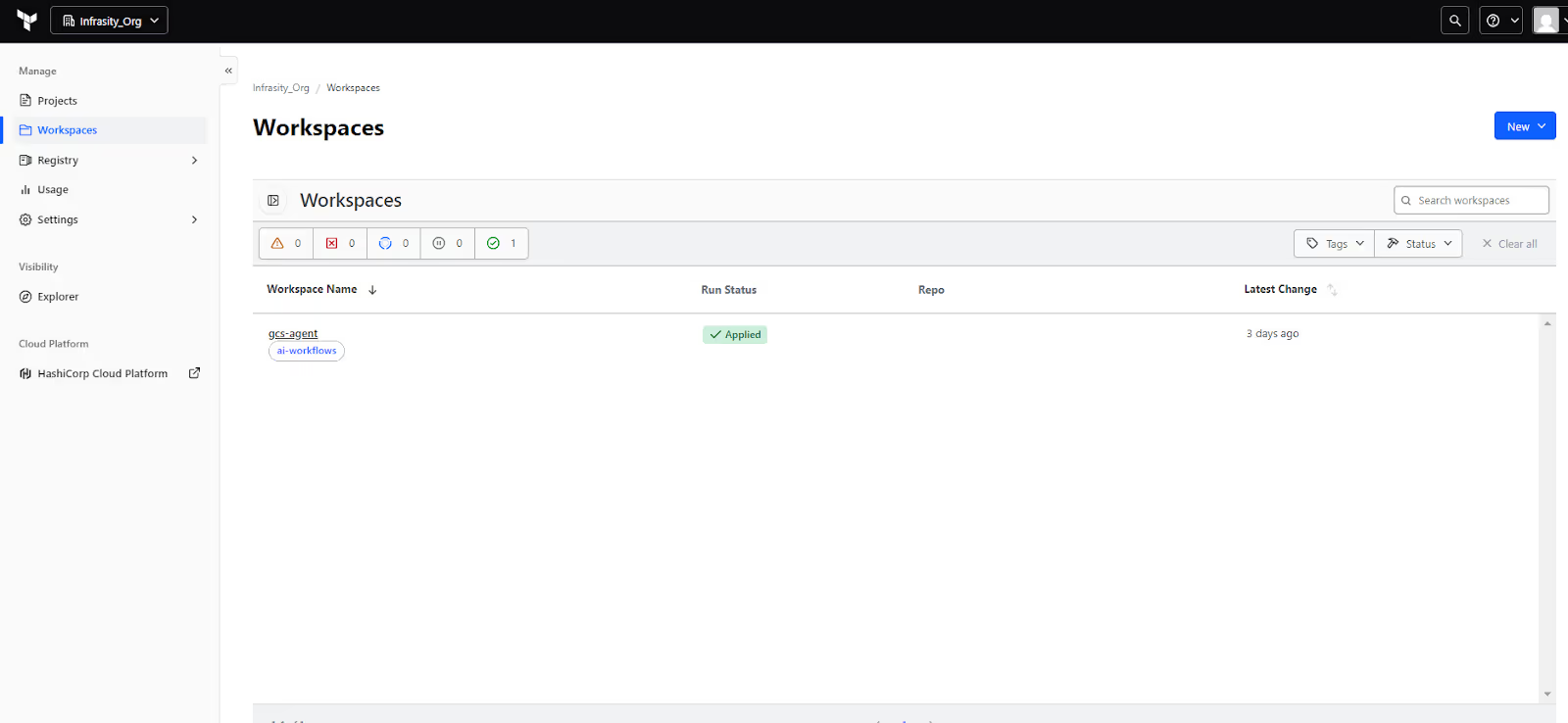
From this view, you can filter by tags or status, check the latest change timestamp, and open the workspace to dig deeper. This is where you spend most of your time checking whether a stack is healthy or waiting on a run.
Workspace overview: what this stack actually owns
Inside the workspace, you’ll see Terraform version (v1.13.5 here), execution mode (Remote), and the number of resources tracked in state (just one in this case). Remote execution means the plan and apply steps happen on Terraform Cloud’s managed runners, not on your laptop, ensuring state locking, version control, and consistent runs across users.
As shown in the snapshot below:
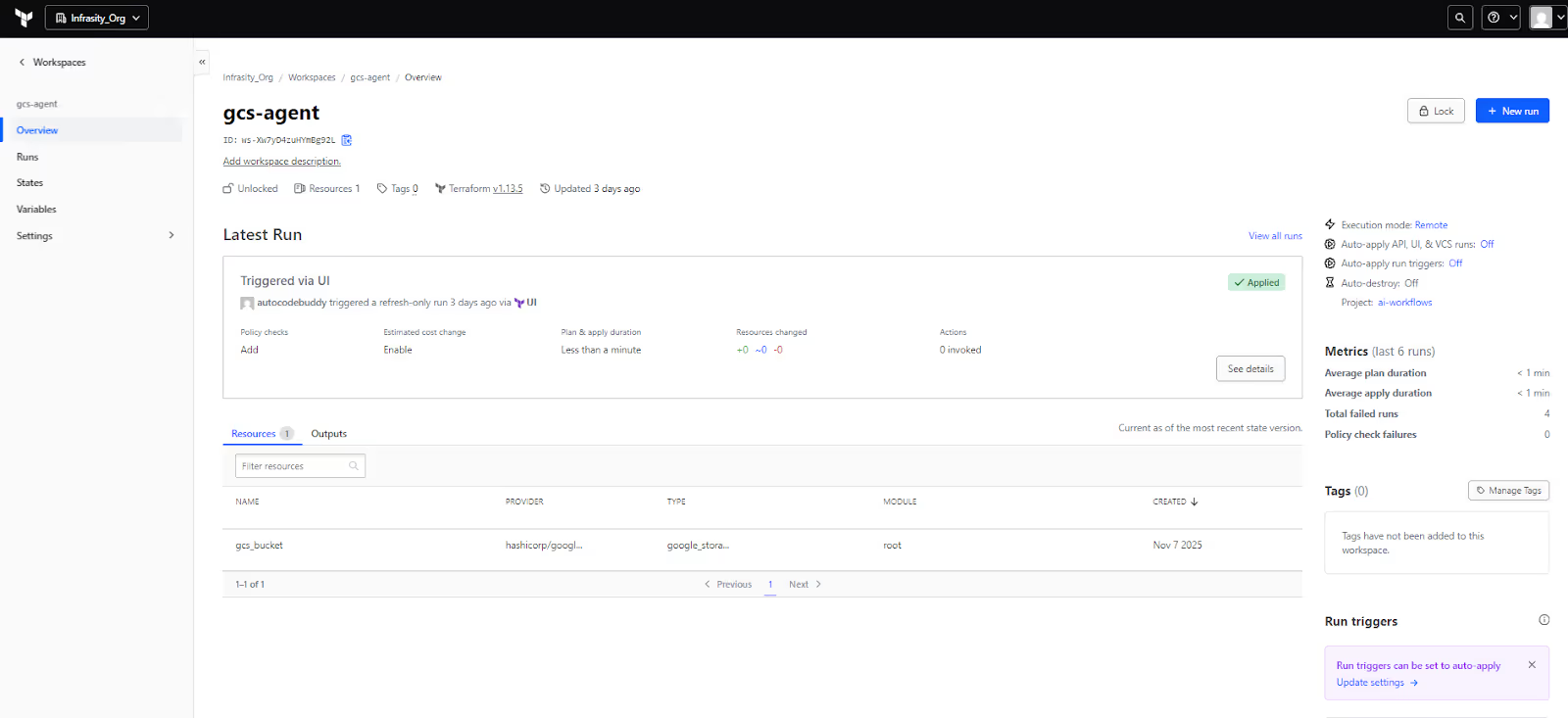
The Latest Run summary shows who triggered it (autocodebuddy via UI), how long it took, and whether there were changes. Below that, the Resources tab lists everything Terraform is managing. Here it’s a single resource:
- Name: gcs_bucket
- Provider: hashicorp/google
- Type: google_storage_bucket
This view instantly answers two key questions: what resources belong to this workspace, and what their last known state is.
Runs tab: history of every change
The Runs tab below displays how Terraform Cloud executed your code over time.
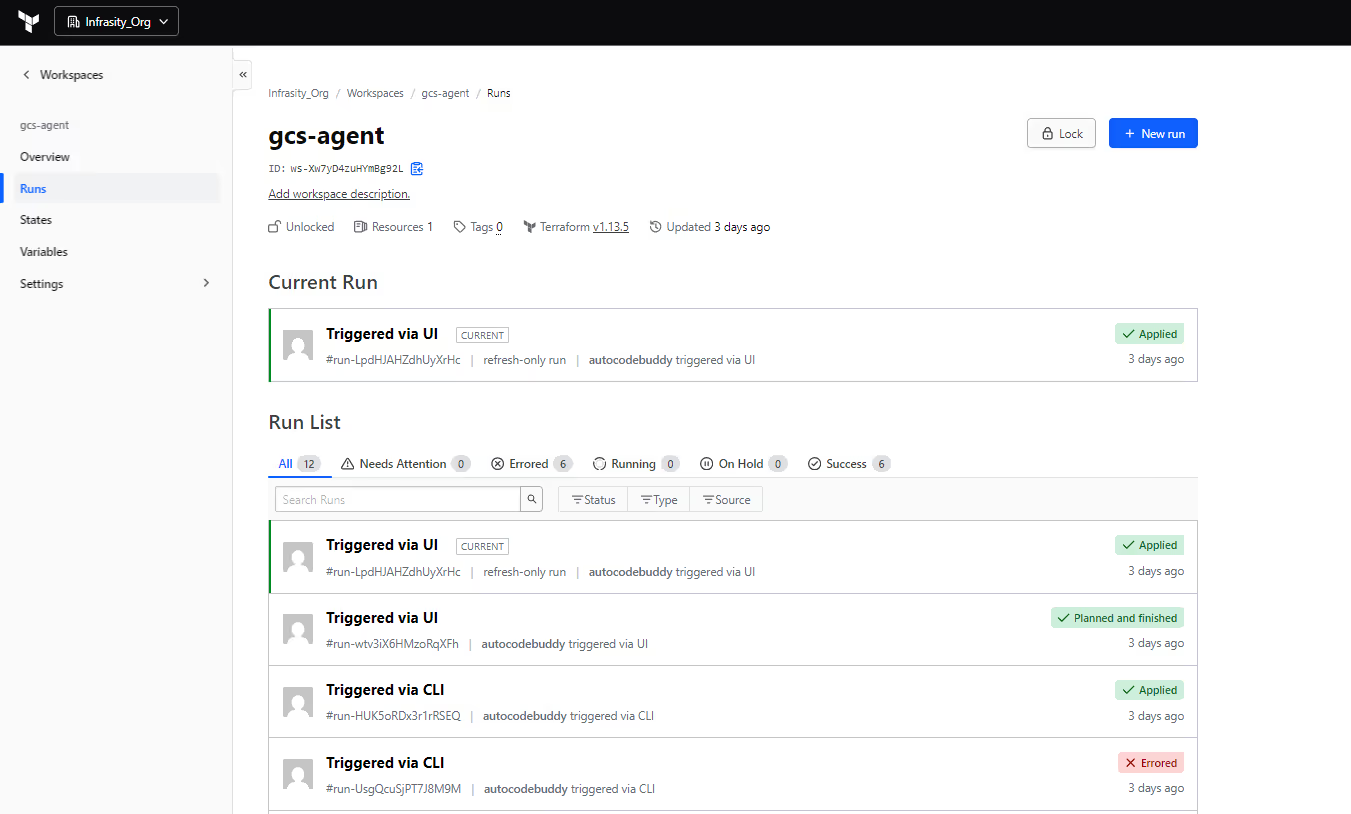
The screenshots here show a mixed history:
- Runs Triggered via CLI – initiated from local terraform plan/apply using the CLI-driven remote workflow.
- Runs Triggered via UI – started with the + New run button from the web interface.
- Statuses like Applied, Planned, and finished, and Errored, which map directly to Terraform Cloud’s run states and phases (plan, policy checks, apply).
Terraform Cloud processes these runs through a per-workspace queue, so only one 'apply' can modify the state at a time. New runs wait in Pending until the current one finishes
This provides an audit trail of who changed the bucket, how they triggered the change (CLI, UI, VCS, API), and the resulting outcome.
Run details: remote execution and refresh-only runs
Clicking into a single run opens the run details page:
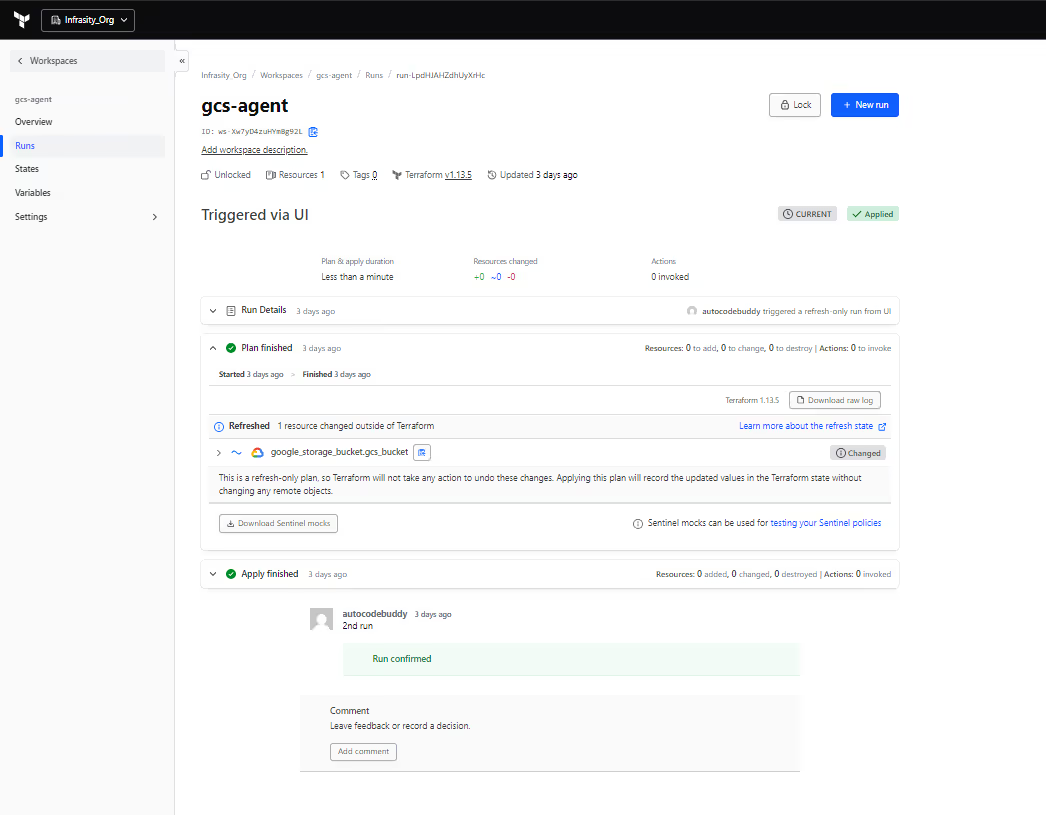
For the latest run in this workspace, you can see:
- Run type – “refresh-only run”, triggered via UI. That corresponds to a refresh_only operation in the Terraform Cloud runs API: Terraform refreshes state from the provider without creating, changing, or destroying resources.
- Plan summary – Resources: 0 to add, 0 to change, 0 to destroy.
- A banner saying “Refreshed 1 resource changed outside of Terraform” for google_storage_bucket.gcs_bucket.
That line is important: Terraform Cloud has polled Google Cloud, noticed that the bucket’s real properties no longer match what’s in state (some change was made outside Terraform), and flagged it as drift. Because this run is refresh-only, it only updates the state to reflect reality; it doesn’t try to fix the bucket.
Below the plan, you see the Apply finished section and any human comments (for example, “2nd run – Run confirmed”). If auto-apply is disabled, this is also where an engineer would have to confirm the apply step; otherwise, the run stays at “Plan finished” and never applies.
What this simple workspace shows
Even with just one GCS bucket, this Terraform Cloud workspace demonstrates the full lifecycle:
- A clear mapping from the workspace to resources under management.
- Runs triggered from both CLI and UI, all executed remotely on Terraform Cloud workers.
- A complete run history with statuses and sources (UI vs CLI).
- Drift detection via refresh-only runs when something changes outside Terraform.
This is the baseline experience you want to standardize across all teams: every change to cloud resources flows through workspaces and runs like this, with state stored remotely and execution isolated from individual laptops.
From here, it’s a short step into best practices: how to design workspace structure, policies, modules, and cost controls so this simple pattern still works when you have hundreds of workspaces and thousands of resources.
When Terraform Cloud Meets Its Limits
Terraform Cloud works best when your entire infrastructure is codified in Terraform and teams follow a consistent GitOps-style workflow. In that setup, it’s reliable, predictable, and scales cleanly. However, as real-world environments evolve, certain gaps begin to emerge, particularly in areas such as visibility, drift, and multi-tool operations.
Where Terraform Cloud Fits Best
Terraform Cloud is ideal when:
- Terraform is the only IaC tool in use across the org.
- Infrastructure is already fully codified, and teams rarely make manual changes.
- Governance needs are moderate, with some policy checks, cost controls, and basic SSO.
- The goal is workflow automation, not cloud inventory or runtime governance.
In this setup, Terraform Cloud gives you everything you need: remote execution, policy enforcement, cost visibility, and clean audit logs, all centered on Terraform state.
When Gaps Start Showing
Things change once your footprint expands across multiple clouds, tools, and pipelines. Common issues include:
- Unmanaged or ClickOps resources: Teams often spin up resources manually or through other automation tools. These don’t exist in Terraform state, so Terraform Cloud can’t track or control them. Drift detection only works for Terraform-managed resources.
- Multiple IaC frameworks: Enterprises frequently mix Terraform with CloudFormation, Pulumi, Helm, or raw Kubernetes manifests. Terraform Cloud doesn’t provide visibility or governance across those; each tool stays in its own silo.
- Large multi-cloud and multi-account estates: When infrastructure spans AWS, Azure, and GCP with hundreds of accounts and thousands of resources, you need full-asset inventory and drift detection across everything, not just what Terraform knows about.
- Runtime visibility and remediation: Terraform Cloud is great for infrastructure creation and change control, but it doesn’t continuously scan your live cloud environment. It can’t automatically flag or remediate misconfigurations outside the Terraform workflow.
- Drift and shadow infrastructure: As time passes, resources drift from code or appear outside managed IaC. Without continuous discovery, these become blind spots, affecting cost, compliance, and sometimes even the security posture.
In environments where teams manage hundreds of Terraform workspaces, thousands of cloud resources, and multiple accounts across AWS, Azure, and GCP, these gaps become hard to ignore. Terraform Cloud gives visibility only into resources that exist in Terraform state. Once resources start appearing outside that state or across other IaC systems, teams lose a unified view of what’s actually deployed. That’s when configuration drift, shadow infrastructure, and compliance blind spots start to surface.
When You Need Visibility and Governance Beyond Terraform Cloud
Terraform Cloud focuses on Infrastructure-as-Code automation, running plans, managing state, and enforcing policies. What it doesn’t do is act as a system of record for your cloud. It can’t scan your environment or show what’s running outside Terraform.
As teams scale multiple clouds like AWS, GCP, Azure, OCI, and tools, this becomes a blind spot: unmanaged resources, drift, and compliance gaps appear because Terraform Cloud only knows what’s in state, and when it comes to enterprises with multi-cloud visibility is what makes it easier to manage every event or any disaster smoothly.
At that point, you need a governance and visibility layer on top of Terraform, a platform that continuously inventories cloud resources, detects drift, and ensures everything in your environment is codified and compliant. Tools like Firefly fill that role, connecting live cloud data with IaC definitions to provide both automation and complete visibility.
Introducing Firefly: When Wider Scope Is Needed
Once you move beyond a “Terraform-only + Terraform Cloud” setup and start managing multiple clouds, multiple IaC frameworks, and manually created resources, you need visibility beyond what’s stored in .tfstate. That’s where Firefly fits in.
Firefly is a cloud asset management and IaC automation platform. It connects directly to your cloud accounts, Kubernetes clusters, and SaaS tools (like Datadog, GitHub, Okta), along with your IaC sources (Terraform, OpenTofu, Terragrunt, Pulumi, CloudFormation, and Kubernetes manifests). It builds a unified inventory of your entire infrastructure, identifying which resources are codified, unmanaged, drifted, or missing from the cloud.
How Firefly Integrates into a DevOps Workflow
Firefly gives DevOps and platform teams a single control plane for infrastructure discovery, IaC execution, and policy enforcement. It continuously maps real cloud resources against IaC definitions and manages them through consistent, Git-connected pipelines. Terraform Cloud manages what’s already defined as code. Firefly kicks in where Terraform Cloud taps out, by discovering what isn’t code yet.
Cloud and IaC Inventory
Firefly continuously scans all connected clouds and IaC repositories, classifying every resource as:
- Codified – managed through IaC.
- Unmanaged – created manually, not in code.
- Drifted – mismatched between IaC and live configuration.
- Ghost – exists in IaC but is missing from the cloud.
Here’s how Firefly presents that unified inventory view, showing codified, unmanaged, and drifted resources across Google Cloud, managed through multiple IaC frameworks:
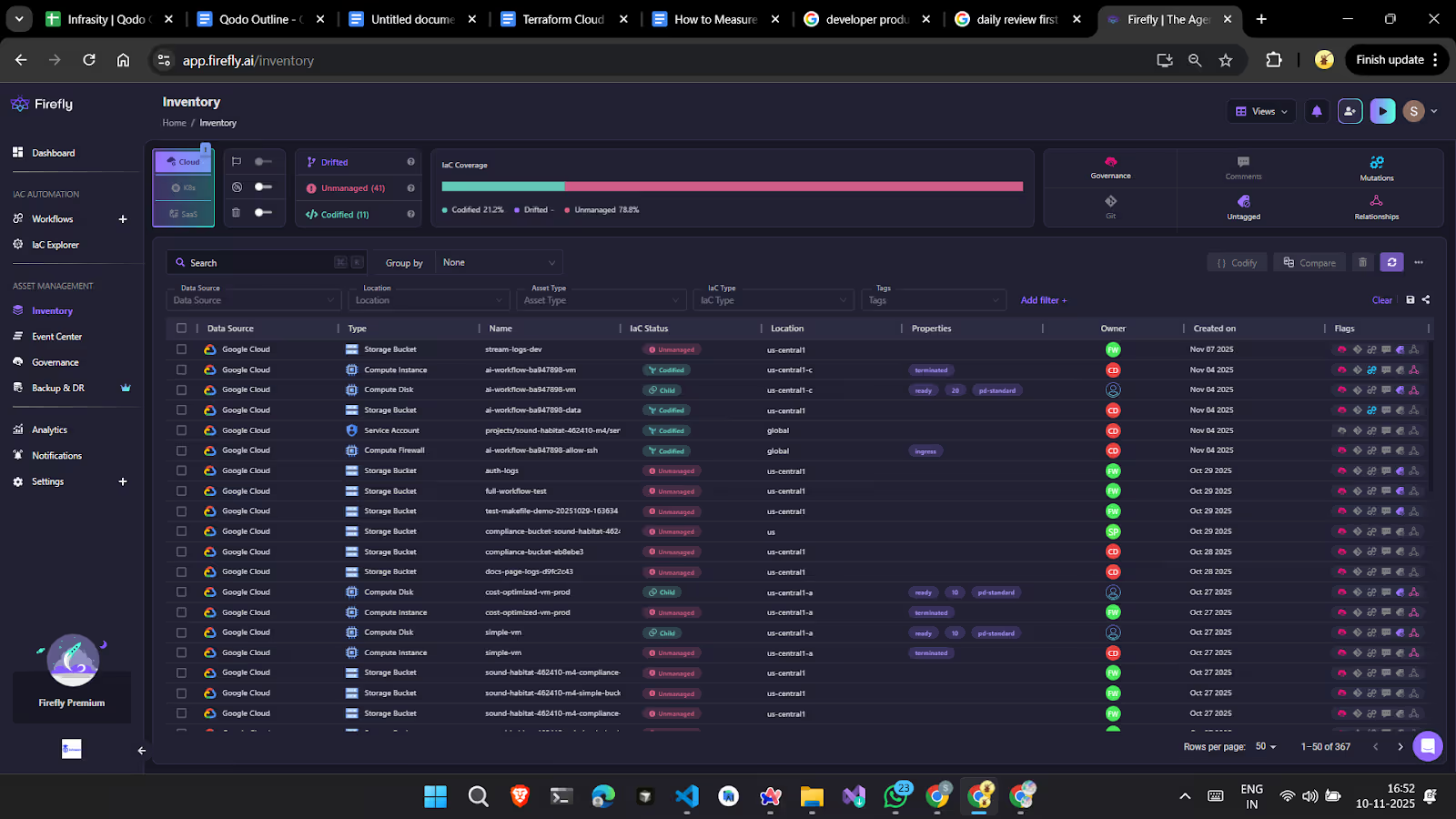
This dashboard provides a breakdown of IaC coverage, owner, cloud provider, and resource type, helping you identify misaligned or manually created resources that can later be codified. The IaC Explorer section provides deep visibility into your applied Terraform/OpenTofu/Terragrunt stacks and any other IaC backends. It lists unique Terraform versions, drifted stacks, unused modules, and connected providers, all in one place.
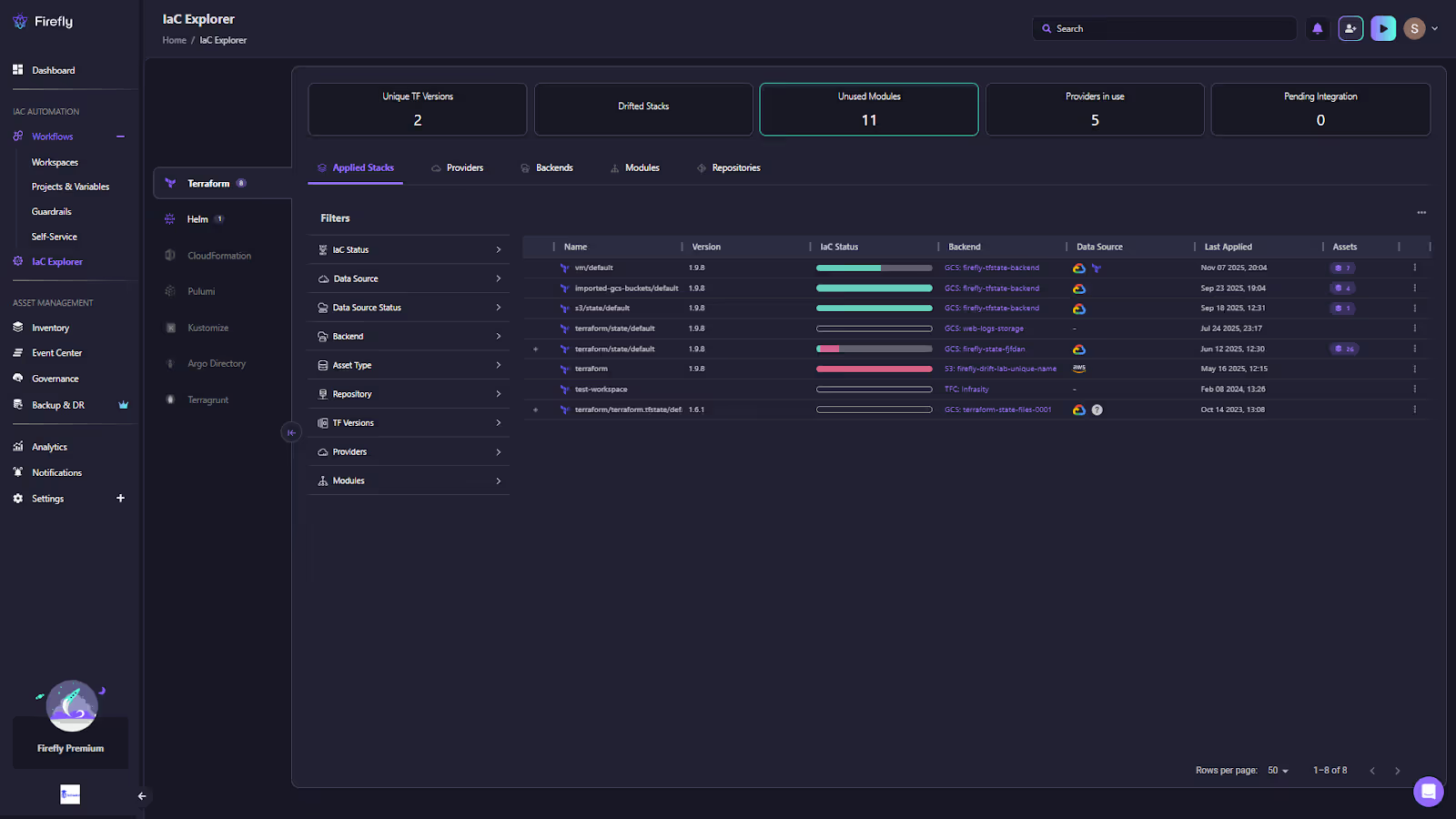
This view helps teams understand which IaC modules are in use, track backend state storage, and identify drifted configurations early, even across multiple clouds.
Workflows and IaC Stack Management (with Git Integration)
Firefly is built around scalable IaC execution and governance. Unlike Terraform Cloud, which manages runs within individual workspaces, Firefly introduces Workflows and IaC Stacks, a unified framework for running infrastructure automation across multiple clouds, repositories, and IaC frameworks. Each stack connects directly to a Git repository and tracks a specific environment or configuration set. When a pull request is opened, Firefly automatically triggers a plan; when it’s merged, it runs an apply, keeping every infrastructure change fully GitOps-driven, versioned, and auditable.
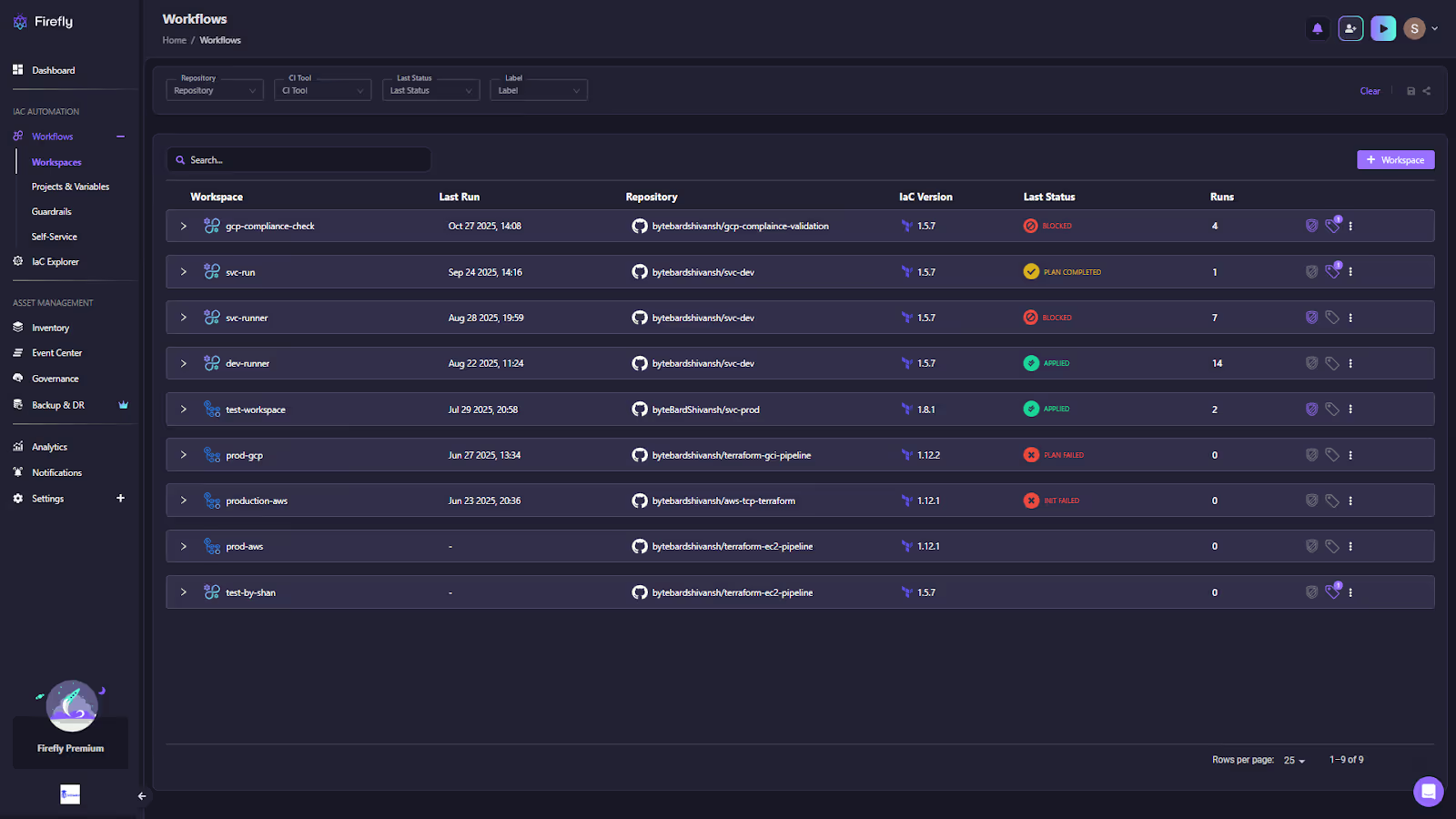
Each stack run provides a complete operational view with commit ID, branch, IaC version, cost estimate, tag coverage, and any policy violations detected through Guardrails. This visibility helps teams understand not just what ran, but also why and under what context, all from a centralized dashboard.
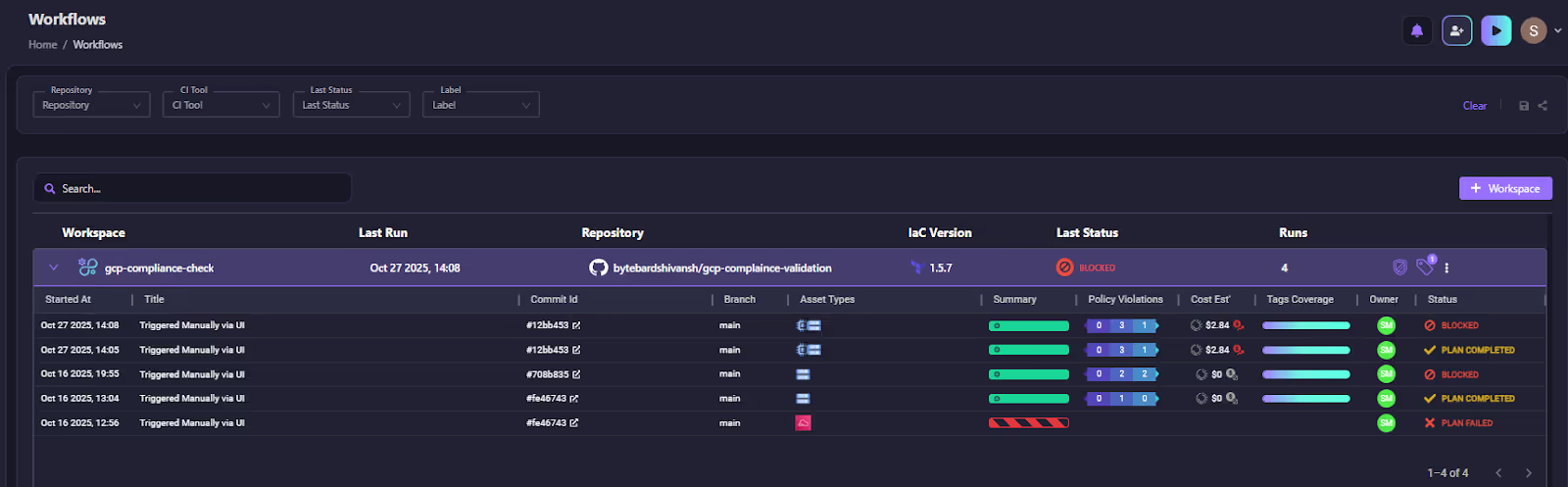
By treating IaC execution as a managed workflow rather than a per-tool operation, Firefly enables consistent automation and governance across Terraform, OpenTofu, Terragrunt, and other supported frameworks, integrating cost controls, drift checks, and compliance validation into every run.
Projects, Variable Sets, and Access Control
In most of the setups, variables and credentials often become fragmented among repositories or Terraform Cloud workspaces. Firefly solves this by introducing Projects and Variable Sets, creating a structured hierarchy for IaC configuration management.
The Projects group relates IaC stacks, defining shared access controls and policy boundaries. Variable Sets store reusable credentials or parameters, such as GCP service accounts, environment-specific variables, or runner configurations.
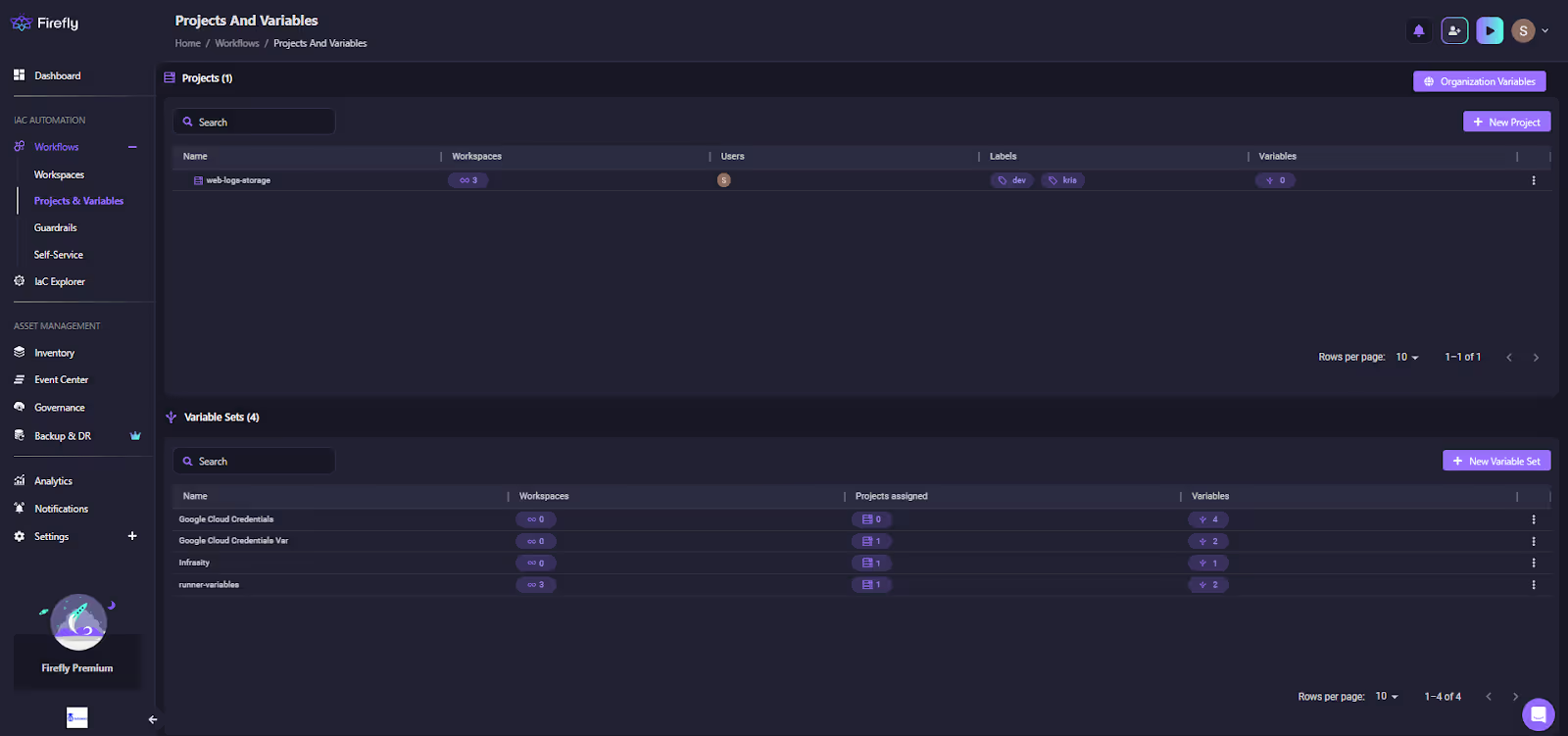
Variables follow a clear inheritance chain: organization, project, and workspaces, allowing centralized management without compromising isolation. This structure scales cleanly across environments and teams, especially when managing IaC for multiple clouds or compliance zones.
Guardrails (Policy and Cost Controls)
One of Firefly’s strongest differentiators is Guardrails, its native policy-as-code system. While Terraform Cloud provides Sentinel for basic policy control, Firefly extends this to enforce cost limits, security policies, and compliance rules across any IaC execution.
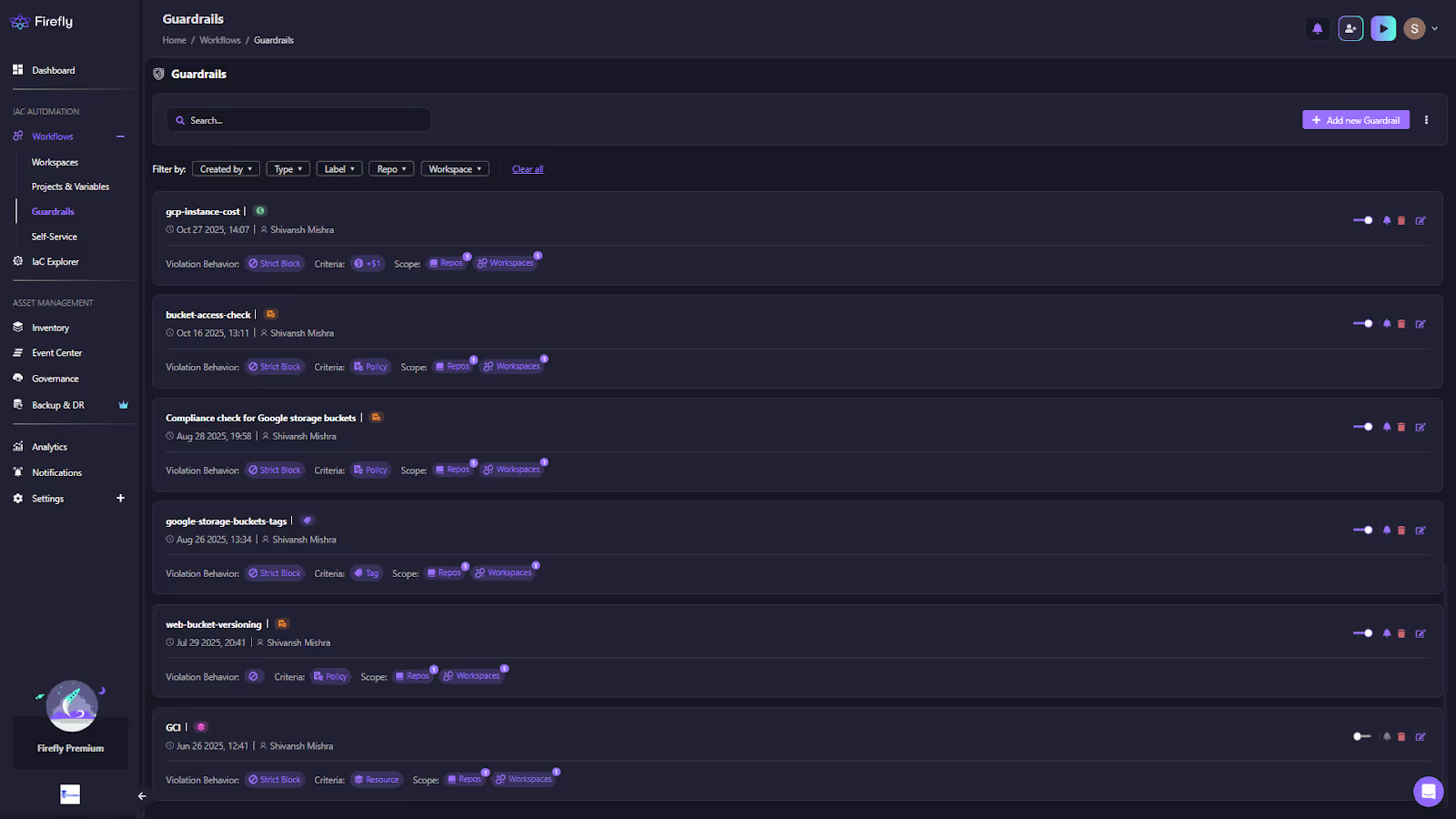
Guardrails analyze each IaC plan pre-deployment. They can block high-cost resources, enforce encryption or tagging standards, restrict public endpoints, or mandate compliance with internal benchmarks. Violations are surfaced directly in PR comments, Firefly dashboards, and notifications, ensuring every IaC change is validated before it hits production.
By embedding these checks into Firefly workflows, teams can maintain consistent governance while still moving fast across multiple clouds and IaC frameworks.
Drift Detection and Scheduled Monitoring
Firefly can automatically run periodic plan checks to detect configuration drift or failed deployments. You can schedule these checks hourly, daily, or on cron intervals to verify that live infrastructure still matches what’s defined in code.
Multi-IaC and Multi-Cloud Coverage
Firefly supports Terraform, OpenTofu, and Terragrunt out of the box and integrates with AWS, Azure, GCP, and Kubernetes environments. It treats IaC code, manually created resources, and SaaS configurations as part of the same system, allowing teams to view, govern, and remediate everything from a single dashboard.
Firefly extends the Terraform Cloud workflow model across tools, clouds, and unmanaged resources, providing platform teams with a complete, continuously synchronized view of their infrastructure and code.
FAQs
Where is Terraform Cloud hosted?
Terraform Cloud (also known as HCP Terraform) is hosted by HashiCorp on AWS infrastructure in the United States. There is no publicly documented option to select a different regional data center for the SaaS service.
What is Terraform Cloud and Terraform Enterprise?
Terraform Cloud is the SaaS version managed by HashiCorp, providing remote state, runs orchestration, VCS integration, policy enforcement, and team collaboration out of the box. Terraform Enterprise is the self-hosted version you install in your own infrastructure (on-premises or private cloud) when you need full control over data residency, network isolation, and operational ownership.
What is the limit of the Terraform Cloud Free tier?
The Free tier supports up to 500 managed resources (i.e., Terraform resources tracked in state) without charging. Once you surpass that threshold, you’ll need to move to a paid edition with per-resource billing and higher limits.
How does Terraform Cloud back up states?
Terraform Cloud stores state files in a remote backend with built-in versioning and locking. You can export specific state versions via the API (state-versions/<ID>/hosted_state) for backup or archival purposes.

.avif)
.avif)
.webp)

.webp)












