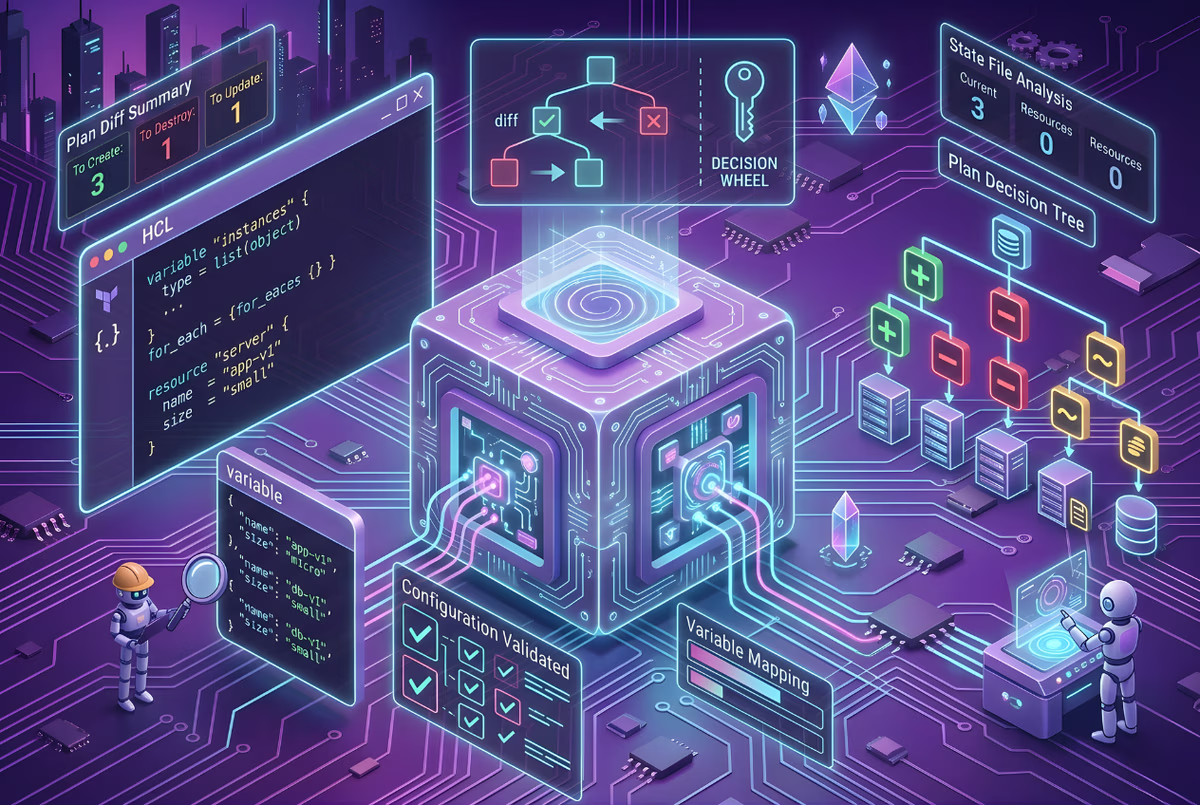
TL;DR
- terraform destroy only deletes what's in the state file, not random cloud resources. Terraform reads terraform.tfstate, maps resources to cloud infrastructure (like aws_instance.web:i-0abcd123), and deletes them in reverse dependency order (load balancer, EC2, subnet, VPC). Unmanaged resources created via console aren't touched.
- Terraform doesn't modify your code; it only deletes infrastructure. After terraform destroy, running terraform apply recreates everything because the resource definitions still exist in your .tf files. To permanently remove resources, delete them from the Terraform code first, then apply.
- Deletion happens in reverse dependency order to avoid errors. If you created VPC, Subnet, EC2, Load Balancer, Terraform destroys Load Balancer, EC2, Subnet, VPC. This prevents errors such as trying to delete a VPC while subnets still exist within it.
- Common use cases: ephemeral dev environments, CI/CD test infrastructure, experiments. Teams create temporary environments for PRs (terraform apply, run tests, terraform destroy), test new VPC layouts, or decommission end-of-life services. Without cleanup, temporary environments pile up, and costs grow.
A DevOps engineer once shared a story about running terraform destroy in the wrong workspace. They thought they were cleaning up a test environment, but they were still in a shared dev workspace. Within minutes, the networking was gone, the EC2 instances were gone, and the whole environment had to be rebuilt.
That kind of mistake is more common than people admit. Infrastructure as Code makes it easy to create environments quickly. A few Terraform files and a terraform apply can spin up networking, compute, and databases in minutes.
But the same automation makes destruction just as powerful.
terraform destroy
Run that command, and Terraform will start deleting every resource tracked in the current state.
Teams use it often for ephemeral environments, feature branches, CI/CD testing infrastructure, and cleanup of temporary deployments. The problem is that Terraform doesn't know whether an environment is temporary or critical. It only reads the state file and deletes whatever resources are listed there.
What Does Terraform Destroy Actually Do?
terraform destroy is the command Terraform uses to remove infrastructure that it manages. When you run the command, Terraform looks at the current state file and deletes every resource recorded there.
terraform destroy
Terraform does not randomly search your cloud account for resources. It only works with what is defined in two places: the Terraform configuration (.tf files) and the Terraform state file.
The state file maps Terraform resources to real cloud infrastructure. For example:
- aws_instance.web: i-0abcd123
- aws_vpc.main: vpc-9123
So when Terraform destroy runs, Terraform knows exactly which resources exist and which cloud provider APIs to call to remove them.
Before execution, Terraform prints the destroy plan so you can see exactly what will be removed:
Terraform will perform the following actions:
Nothing is deleted at this stage. Terraform waits for confirmation before starting the teardown.
Does Terraform destroy Delete My Terraform Code?
No. terraform destroy does not modify your Terraform code. It only deletes the infrastructure.
That means if you run terraform destroy and later run terraform apply, Terraform will recreate the infrastructure because the resources are still defined in the configuration files.
To permanently remove infrastructure, you need to:
- Remove the resource definitions from your .tf files
- Run terraform apply to reconcile the state
What Happens Step-by-Step When You Run terraform destroy?
When you run terraform destroy, Terraform doesn't immediately start deleting resources. It follows a sequence of steps to understand the infrastructure and remove it safely.
Let's walk through these steps using a real example: decommissioning a deprecated application, app-infra, that includes 35 resources spanning VPC, ECS, RDS, ALB, IAM, and networking.
Step 1: Load Terraform Configuration
Terraform first reads the configuration files in the current directory: *.tf, *.tfvars, and provider configuration. These files describe the infrastructure that includes VPCs, instances, databases, load balancers, and how they connect to each other.
In our example, the configuration includes:
- VPC and Networking: VPC, 4 subnets (2 public, 2 private), Internet Gateway, NAT Gateway, route tables
- Compute: ECS cluster, ECS service, ECS task definitions
- Database: RDS PostgreSQL instance, DB subnet group
- Load Balancing: Application Load Balancer, target groups, listeners
- Security: 3 security groups (ALB, ECS tasks, RDS)
- IAM: Task execution roles, task roles, policies
- Monitoring: CloudWatch log groups, autoscaling policies
Step 2: Read the Terraform State
Next, Terraform loads the state file (terraform.tfstate). The state file contains the mapping between Terraform resources and the real cloud resources.
For example:
- module.vpc.aws_vpc.this: vpc-0a0c0a950aca45c0e
- module.rds.aws_db_instance.this: db-O3V72NZET3QHVHFS6LBRPFRJKU
- module.alb.aws_lb.this: arn:aws:elasticloadbalancing:...
This mapping tells Terraform exactly which resources exist in the cloud and how they are related to the configuration.
Step 3: Refresh Infrastructure State
Terraform then checks the actual state of the infrastructure by querying the cloud provider APIs. Typical API calls include DescribeInstances, DescribeSubnets, and DescribeLoadBalancers.
This step ensures Terraform has an accurate view of what currently exists before generating the destroy plan.
Step 4: Build the Dependency Graph
Terraform constructs a dependency graph of the resources. Our app-infra example has dependencies like:

Terraform identifies dependencies based on references between resources, provider schemas, and module outputs.
Step 5: Reverse the Dependency Graph
Resources must be deleted in the correct order. If the environment was created with VPC, Subnet, EC2, Load Balancer, Terraform will destroy them in the opposite order: Load Balancer, EC2, Subnet, VPC.
This avoids dependency errors such as trying to delete a VPC while subnets still exist.
Step 6: Generate the Destroy Plan
Terraform then prints a destroy plan showing what will be removed:
At this point, nothing has been deleted yet. Terraform is only showing what it intends to remove. The plan includes every resource with its full configuration, IAM roles with ARNs and policies, RDS instances with engine versions and endpoints, security groups with ingress rules, and subnets with CIDR blocks.
Step 7: User Confirmation
Terraform asks for confirmation before proceeding:
This prompt is a safety check. In automated pipelines, the confirmation step is skipped using:
terraform destroy -auto-approve
Step 8: Execute Resource Deletion in Stages
After entering yes, Terraform begins deleting resources in reverse dependency order. Here's how the actual destruction unfolded for our 35-resource application:
Stage 1: Detach Dependencies (0-10 seconds)
Terraform starts by removing route table associations, IAM policy attachments, and load balancer listeners, things that reference other resources but don't have dependencies themselves.
Stage 2: Remove Application Layer (10-30 seconds)
Route tables, the ALB, ECS service, and NAT Gateway are destroyed. The NAT Gateway takes about 1 minute to fully remove.
Stage 3: Long-Running Deletions (30 seconds - 4 minutes)
The RDS instance takes the longest, nearly 4 minutes. The ECS service takes about 3.5 minutes as Terraform waits for tasks to drain and the service to fully deregister. This isn't a Terraform limitation; it's how long AWS takes to drain connections and clean up resources.
Stage 4: Cleanup Compute and Networking (3-4 minutes)
Once the service is gone, Terraform removes the ECS cluster, task definitions, Internet Gateway, Elastic IP, and public subnets.
Stage 5: Remove Database and Final Networking (4-5 minutes)
After the RDS instance is deleted, the DB subnet group and private subnets can be removed. Security groups are destroyed next.
Stage 6: Final Cleanup (5 minutes)
Finally, the remaining security groups and VPC are removed. Terraform destroyed resources in the exact reverse order they were created: VPC, subnets, security groups, ECS cluster, ECS service, load balancer.
Step 7: Update the State File
As each resource is destroyed, Terraform removes it from the state file. The state is updated continuously as resources are removed.
After completion, terraform.tfstate shows:
Step 8: Destroy Complete
Once all resources are removed, Terraform prints the final result:

Total time: approximately 5 minutes. At this point, everything Terraform was managing in that state has been deleted. The destroy operation also removed output values like the ALB DNS name and RDS endpoint, since the resources they referenced no longer existed.
What Happens If You Run terraform apply now?
Since the .tf configuration files still exist, running terraform apply would recreate all 35 resources with new IDs. The infrastructure would be rebuilt, but:
- The RDS database would be empty (data is lost)
- The ALB would have a new DNS name
- All resource IDs would be different
- Security group references would update automatically
To permanently remove infrastructure, you must delete the resource definitions from the Terraform code, not just run terraform destroy.
When Do Teams Actually Use Terraform Destroy?
Despite the risks, terraform destroy is used regularly in many engineering workflows. In the right situations, it's the cleanest way to remove infrastructure.
1. Ephemeral Development Environments
Many teams create temporary environments for feature branches or pull requests. A typical workflow:
- terraform apply
- Run integration tests
- terraform destroy
When a developer opens a PR, the CI pipeline spins up a full environment. Once tests finish or the PR is merged, the environment is destroyed so the infrastructure doesn't keep running. Without this cleanup step, temporary environments quickly pile up, and cloud costs grow.
2. CI/CD Test Infrastructure
Some tests require real infrastructure to run properly: databases for integration tests, networking for service communication, and compute resources for running workloads.
Instead of sharing a permanent test environment, pipelines often create infrastructure dynamically. After the tests are complete, terraform destroy removes everything, so the next pipeline starts with a clean setup.
3. Infrastructure Experiments
Platform engineers often test new infrastructure designs before rolling them out: trying different VPC layouts, testing autoscaling policies, experimenting with new load-balancing configurations.
Once the experiment is done, running terraform destroy removes the entire test environment in a predictable way.
4. Service Decommissioning
When an application or service reaches end-of-life, its infrastructure needs to be removed. Instead of manually deleting resources in the cloud console, Terraform can clean up everything defined in the configuration: compute instances, databases, load balancers, and networking components.
Using Terraform for teardown ensures the infrastructure is removed in the correct dependency order and nothing is left behind.
How Does Firefly Help Manage Destructive Operations More Safely?
Terraform is very good at executing infrastructure changes, but it assumes you already know exactly what infrastructure exists and how it is managed. In real environments, that assumption often breaks.
Over time, cloud environments accumulate resources from different sources: resources managed by Terraform, resources created manually in the cloud console, infrastructure that has drifted from its Terraform configuration, and resources that exist in Terraform code but no longer exist in the cloud.
When teams run destructive operations without full visibility, mistakes happen.
Firefly acts as a control layer on top of Infrastructure as Code and cloud environments, giving teams a clear view of what actually exists before running operations like terraform destroy.
Seeing the Full Infrastructure Inventory
Firefly continuously scans connected cloud accounts and builds a centralized inventory of infrastructure. Instead of relying solely on Terraform state, teams can see the full picture of their environment across multiple cloud providers, including AWS, GCP, and more, in a single view.
The inventory surface shows each resource's IaC status at a glance: Codified, Drifted, Unmanaged, or IaC-Ignored.
For example, in an environment (as in the snapshot below), you might see that only 27% of resources are fully codified, 3% have drifted from their Terraform configuration, and 70% are entirely unmanaged, created outside of IaC and invisible to terraform destroy. This breakdown helps engineers understand the true scope of their cloud footprint before running any destructive operation.

This visibility matters because terraform destroy only touches resources it knows about. Without this inventory view, teams may wrongly assume that running destroy cleaned up an entire environment, while dozens of unmanaged resources continue running and accruing cost.
Detecting and Remediating Drift Before Destruction
One of the most dangerous situations when running terraform destroy is infrastructure that has already drifted. If a resource was modified outside of Terraform, say, a compute instance was manually resized, the running configuration no longer matches the IaC definition. Destroying and recreating that resource means the manual change is silently lost.
Firefly surfaces these drift situations clearly. For a resource like prod-vm-1 (a Google Cloud Compute Instance), Firefly shows its IaC status as Drifted and surfaces exactly what changed: in this case, the machine_type was changed from e2-medium (the desired IaC configuration) to e2-micro (the running configuration) outside of Terraform.
From the Drift Details panel, engineers get two clear remediation paths:
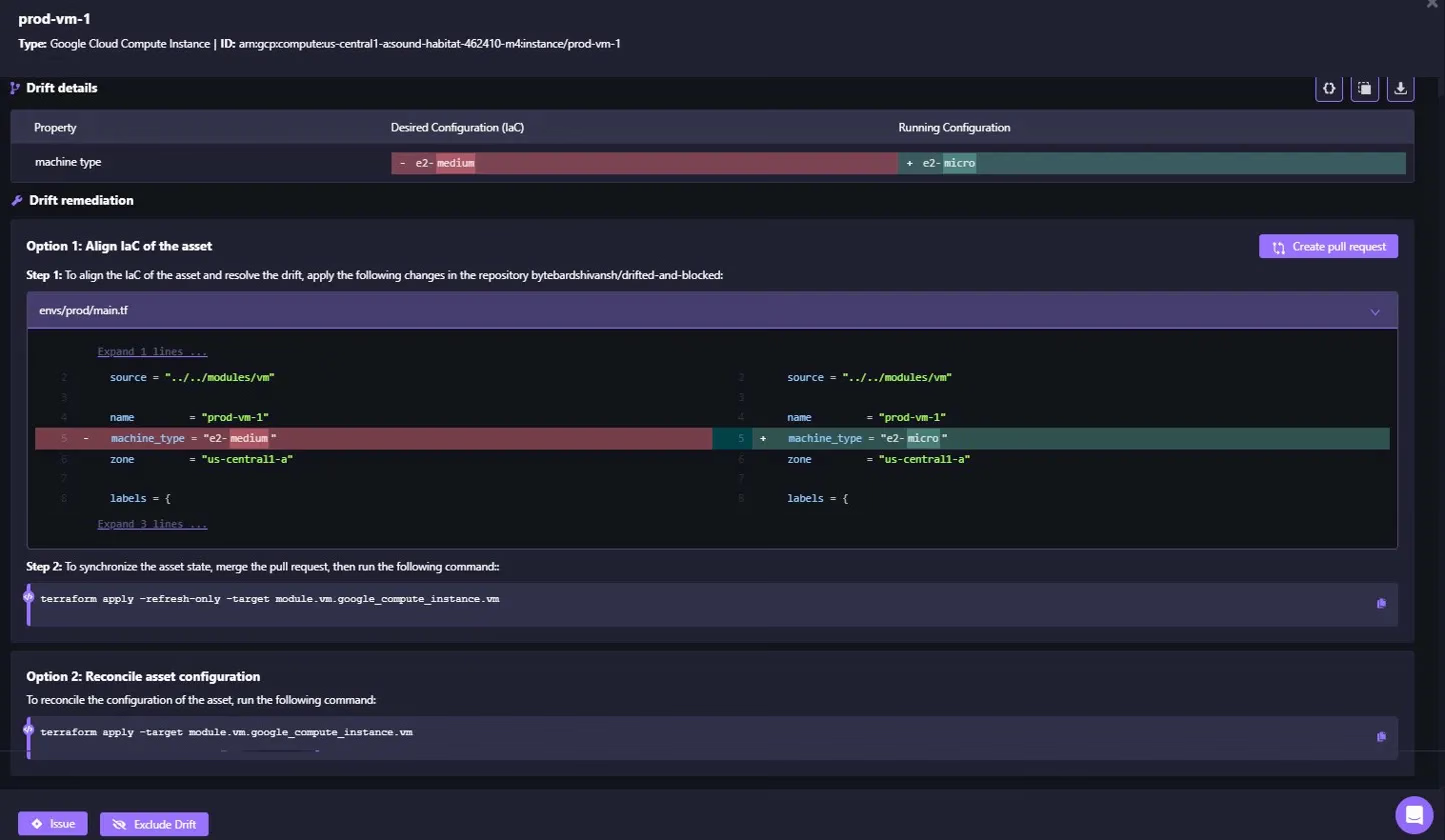
Option 1: Align IaC to the asset: If the manual change was intentional, Firefly generates the exact Terraform code update needed and opens a pull request in the connected repository (e.g., updating machine_type = "e2-medium" to machine_type = "e2-micro" in envs/prod/main.tf). Once merged, the state is synchronized:
terraform apply -refresh-only -target module.vm.google_compute_instance.vm
Option 2: Reconcile asset configuration: If the drift was unintentional and the IaC definition should win, Firefly provides the targeted apply command to push the desired configuration back to the resource:
terraform apply -target module.vm.google_compute_instance.vm
By resolving drift before a destroy-and-recreate cycle, teams avoid accidentally losing intentional configuration changes or triggering unexpected infrastructure behavior.
Surfacing Governance Violations Alongside Drift
Firefly doesn't just track configuration drift; it also surfaces governance policy violations on each resource. On the same prod-vm-1 resource marked as Drifted, Firefly shows active policy violations including missing tags (flagged against Tagging Policies), GCE VM access controls, project-wide SSH key exposure (flagged against NIST), and use of the default service account (flagged against PCI DSS).
This means teams aren't just running terraform destroy blindly; they can see which resources carry compliance risk, understand whether those violations are tied to infrastructure drift, and make a more informed decision about remediation versus teardown.
Determining How Resources Should Be Deleted
Firefly also helps determine how to delete a resource. Not every resource should be removed using Terraform.
For example, if Firefly detects an unused Classic Load Balancer that exists only in the cloud, never codified into Terraform, it flags it as a cost optimization opportunity and generates the exact AWS CLI command to remove it, along with the projected monthly savings:

This prevents teams from trying to delete resources through Terraform that Terraform does not actually manage, and helps surface wasteful infrastructure that would otherwise keep running silently after a terraform destroy of the surrounding environment.
Following IaC Workflows for Terraform-Managed Resources
For resources managed by Terraform, Firefly follows the standard Infrastructure as Code workflow. Instead of deleting the resource directly, Firefly proposes a change to the Terraform code.
The typical flow:
- Remove resource from Terraform code
- Create a pull request
- Review and approve the change
- Run terraform apply
When the updated configuration is applied, Terraform removes the resource as part of the normal infrastructure reconciliation process. This keeps the Terraform configuration, state, and cloud infrastructure aligned.
Providing Governance and Visibility
Firefly also provides additional controls around infrastructure changes: centralized infrastructure inventory, tracking of IaC changes, audit logs for infrastructure operations, and controlled workflows for destructive actions.
This gives teams more confidence when running operations like terraform destroy, especially in large environments where multiple engineers and pipelines interact with the same infrastructure.
FAQs
1. Does terraform destroy delete resources not managed by Terraform?
No. terraform destroy only deletes resources in the Terraform state file. Resources created manually via console, CloudFormation, or other tools are not affected. To delete unmanaged resources, use cloud provider CLI commands or the console.
2. Can I undo terraform destroy after running it?
No. Once resources are deleted, they cannot be recovered through Terraform. If your .tf files still define the infrastructure, running terraform apply recreates the resources with new IDs, but data and configurations are lost. Always verify the destruction plan before confirming.
3. How do I prevent accidental terraform destroy in production?
Use workspace-specific state files, require pull request reviews for Terraform changes, enable -auto-approve only in CI/CD with proper safeguards, and use tools like Firefly to detect drift and provide visibility before destructive operations. Also consider Terraform Cloud's remote state locking.


.webp)


.webp)












