
TL;DR
- A dynamic block generates repeated nested configuration blocks inside a single resource from a list or map input. It does not create multiple resources. That's what for_each at the resource level is for.
- Without dynamic blocks, a module that needs to support two ingress rules in dev and twelve in production requires someone to edit Terraform code for every environment. With dynamic blocks, only the input data changes.
- Dynamic blocks expand into standard nested blocks before Terraform builds the execution plan. There's no special runtime behavior, just programmatic config generation at plan time.
- Most environments have infrastructure that predates Terraform. Firefly scans existing cloud resources, generates Terraform configurations for them, and packages related resources into reusable modules so dynamic blocks can be applied to infrastructure that was never written as code in the first place.
If you've written Terraform for any real system, you've run into this: a resource needs the same configuration block repeated multiple times, and the number of those blocks changes depending on the environment or the service consuming the module.
An EC2 instance needs one extra EBS volume in dev, two in staging, and four in production. A security group needs two ingress rules for a small internal service and twelve for a production-facing API. An IAM policy needs three statements in one account and seven in another. If you hardcode those blocks, the module stops being a module. It becomes a specific configuration for a specific service, and every change means editing Terraform code instead of adjusting inputs.
Terraform dynamic blocks solve this by letting the configuration generate those repeated blocks from input data. This blog covers how dynamic blocks work, when to use them instead of for_each, how Terraform actually expands them at plan time, and where Firefly fits when the infrastructure you're trying to modularize was never written as code to begin with.
What Does a Terraform Dynamic Block Actually Do?
A dynamic block generates repeated nested configuration blocks inside a resource from a list or a map passed as input. A lot of AWS resources allow certain blocks to appear multiple times. An EC2 instance can have several ebs_block_device blocks, a security group can have multiple ingress rules, and an IAM policy can contain several statement blocks.
Without dynamic blocks, you write each of those by hand:
That works for a fixed storage layout. The moment a different service needs three volumes instead of two, you're back editing the resource definition, which means the module was never actually reusable to begin with.
A dynamic block removes that constraint:
Terraform reads var.volumes and generates one ebs_block_device block per item in that list. The resource definition stays the same regardless of how many volumes are needed. The storage layout is now an input, not something baked into the code.
When to Use for_each vs Dynamic Blocks
Both work with collections, and it's easy to reach for the wrong one. The distinction is simple once you think about what Terraform is actually creating.
for_each at the resource level creates multiple resources. Three services each needing their own EC2 instance:
Three entries in var.instances means three EC2 instances in state. Each gets its own resource address: aws_instance.app["service-a"], aws_instance.app["service-b"], and so on.
Dynamic blocks configure a single resource that needs repeated blocks inside it. One instance that needs multiple EBS volumes, depending on what's running on it:
One instance in state, however many volumes you passed in. for_each controls how many resources get created. Dynamic blocks control how one resource gets configured. Mixing them up means either creating extra resources you didn't intend to, or ending up with a single resource missing the configuration it needed, both of which are annoying to debug after the fact.
Building a Reusable Module with Dynamic Blocks
This is where dynamic blocks actually earn their place. A security group module shared across ten services can't hardcode ingress rules. One service needs HTTP and HTTPS, another needs those plus internal service traffic, monitoring traffic, and load balancer health check ranges. If the rules are hardcoded inside the resource, every new service needing a different rule set means a change to the module. That defeats the purpose.
The fix is to accept rules as structured input and generate the configuration from that:
Now the resource generates ingress rules from whatever gets passed in:
A dev environment passes 2 rules, a staging environment passes 5, and a production environment passes 12. The module code doesn't change across any of them; only the input data does. That's what actually makes a module reusable: the infrastructure layout lives in the inputs, not hardcoded inside the resource definitions.
Example: EC2 Instance with Dynamic EBS Volumes
Here's a full working configuration that provisions a single EC2 instance and attaches EBS volumes defined through input variables. Four files, nothing else needed.
variables.tf defines what the module expects:
terraform.tfvars holds the actual storage layout for this deployment:
main.tf is the EC2 resource with the dynamic block:
outputs.tf exposes the instance ID after deployment:
Run it:
terraform plan shows exactly what gets built:
One instance, two volumes, zero hardcoded blocks in the resource definition. To support a different storage layout for another service, update terraform.tfvars, and the resource definition doesn't get touched.
What Terraform Actually Generates Under the Hood
Dynamic blocks don't do anything special at runtime. Before Terraform builds the execution plan, it reads the collection in for_each and expands the dynamic block into regular nested blocks, exactly as if you'd written them by hand.
Given two items in var.ebs_volumes, this:
Expands internally to this before the plan runs:
Two things follow from that. Dynamic blocks don't change the resource count; they only generate configuration blocks inside one resource. And if the input list changes on the next apply, Terraform detects the difference and updates accordingly, the same way it handles any other config change. Dynamic blocks and template files solve similar problems differently, and using templatefile alongside dynamic blocks explains when to reach for each.
Worth knowing before you run this against production: adding or removing EBS volumes on an EC2 instance forces instance replacement because AWS doesn't support modifying block device mappings on a running instance. Security group rule changes, on the other hand, apply in-place. Check the provider docs for the specific resource before assuming an input change is non-destructive.
Firefly Codification: From Unmanaged AWS Resources to Terraform Modules
Before dynamic blocks can do anything useful, the infrastructure needs to be in Terraform. Most teams have a backlog of resources that were never codified: things built through the console, environments inherited with no IaC, CloudFormation stacks that never got migrated. Writing Terraform for those by hand means tracing every dependency, mapping every configuration, and hoping nothing was missed. For a large environment that's weeks of work.
Dependency-Aware Codification
Firefly scans your cloud environment and generates Terraform for the resources it finds. When it codifies a resource, it resolves the dependency chain automatically. Codifying an EC2 instance pulls in the VPC, subnets, security groups, and attached EBS volumes. Resources already under Terraform management get referenced via data blocks instead of being codified again, so there are no duplicates in state.
Mapping to an Existing Module
If your team already has modules like modules/vpc, modules/rds, or modules/ecs, Firefly generates a module call with the variable inputs populated directly from the live resource configuration. As shown in the Firefly UI below, Firefly reads the existing modules from your connected repo and populates the required variable inputs from the live resource:
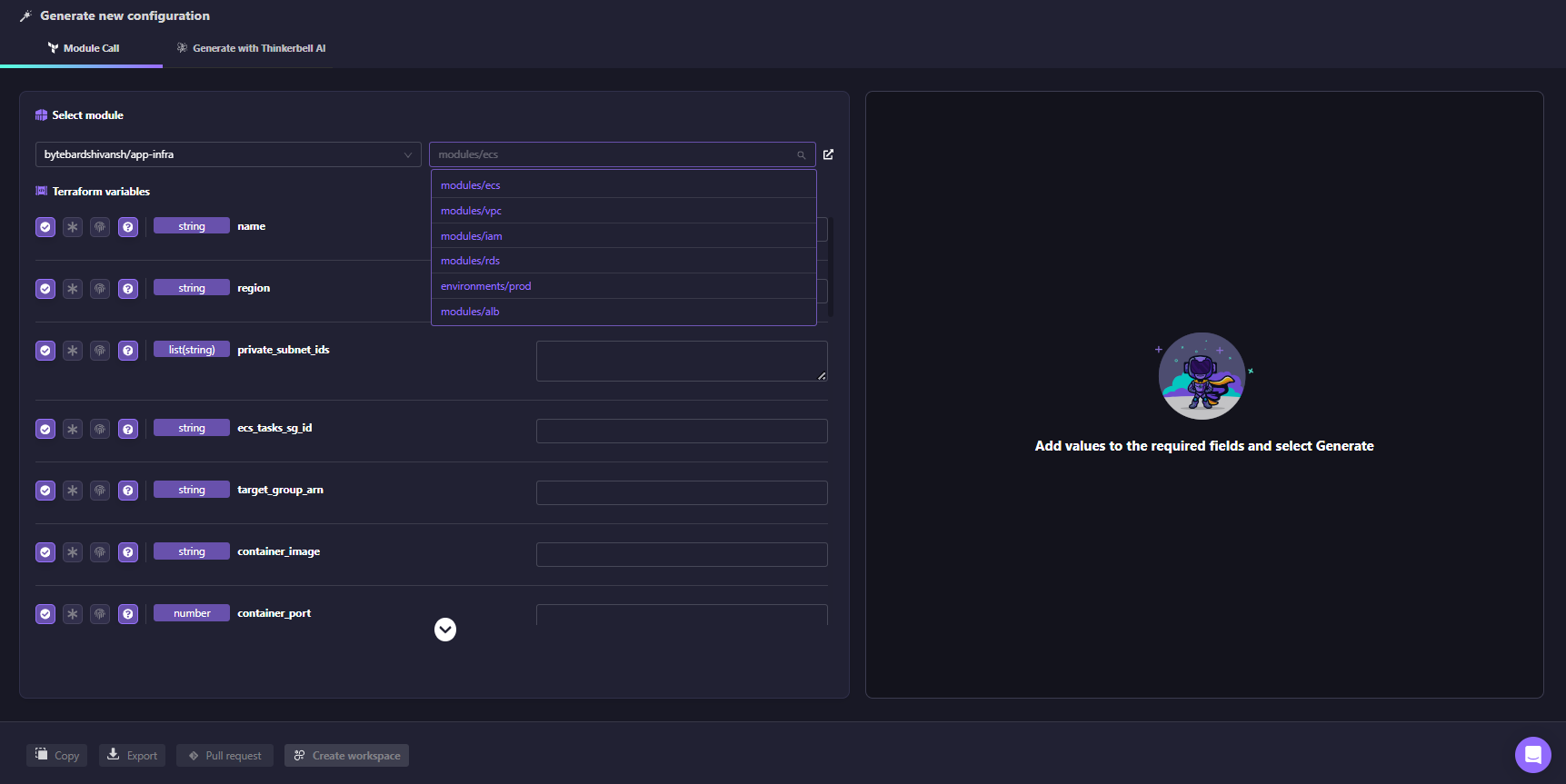
The generated code fits into your existing module structure without creating a parallel pattern or requiring any manual parameter mapping.
Context-Aware Codification
Even with modules in place, teams differ in naming conventions, file structure, and how code is organized.
When codifying resources, Firefly can use your existing repository as context. It analyzes your Terraform codebase to understand how modules are structured, how variables are defined, and how files are organized. The generated code follows these patterns instead of introducing a new structure.
The workflow is straightforward:
- Select the resources to codify
- Choose a module or repository path as context
- Firefly analyzes the existing codebase
- Generated code matches the structure and conventions already in use
- Review the diff, adjust if needed, and open a pull request
Below is an example of context-aware codification generating a module call based on an existing modules/vpc structure, with inputs populated from the live environment and aligned to the repository’s conventions:

In this case, the generated code does not introduce new patterns. It uses the existing module source, aligns variable names, and highlights differences such as additional resources, missing imports, and configuration mismatches directly in the interface.
Instead of producing generic Terraform, the output integrates into the existing repository layout, updates the appropriate files, and follows the same patterns used across the codebase.
Generating a Module from Scratch with Thinkerbell AI
If no existing module covers the resource, Firefly's Thinkerbell AI generates one from a plain-text prompt. Here’s how it happens, as in the snapshot below:

For example, generating an EC2 instance with dynamic EBS volumes produces:
- variables.tf
- main.tf
- outputs.tf
- terraform.tfvars
The generated module includes correctly typed inputs, such as:
This provides a usable starting point without writing the module from scratch.
From Codification to Pull Request
Once the code is generated, Firefly creates a pull request in your repository. The PR includes:
- Terraform configuration for the resource
- Import blocks to bring the existing resource into the state
After merging and running terraform apply, the resource is managed by Terraform without being recreated. From this point, changes such as introducing dynamic blocks become incremental refactors on top of accurate Terraform, rather than rebuilding infrastructure definitions manually
FAQs
Can you nest a dynamic block inside another dynamic block?
Yes. If a resource has a nested block that itself contains repeated blocks, you can nest dynamic blocks. The inner one references its own iterator, not the outer one. This comes up with IAM policy statements containing nested condition blocks, or ALB listener rules with nested conditions. Keep it to two levels max. Past that, the configuration becomes harder to read than the problem it's solving. At that point, a local value that pre-processes the input into a flatter structure usually cleans things up.
What happens if you pass an empty list to a dynamic block?
Terraform generates zero blocks, which is equivalent to omitting that configuration entirely from the resource. This is useful when a block is optional: pass an empty list to skip it, pass items to generate it. No extra conditional logic needed.
Does changing a dynamic block input always trigger resource replacement?
No, it depends on the resource and which block you're changing. EBS volumes on an EC2 instance force replacement because AWS doesn't support modifying block device mappings on a running instance. Security group ingress rules are in place. Always check the AWS provider docs for the specific resource before assuming a change is non-destructive, especially in production.
Why not just use count to handle different environments?
count creates indexed resources like aws_instance.app[0] and aws_instance.app[1]. Remove an item from the middle of the list, and Terraform destroys and recreates everything after it because the indexes shift. for_each with a map keys resources by name so removals are surgical. Dynamic blocks are a separate concern entirely. They don't control how many resources get created; they control how one resource is configured. Using count as a substitute for either gives you configurations that break in non-obvious ways when requirements change.

.avif)
.avif)
.webp)

.webp)












