.avif)
TL;DR
- Terraform fmt standardizes layout only; it doesn’t validate logic, providers, plans, or security.
- Real issues surface in CI due to three things: syntax errors, -check enforcement, and missing recursive scope.
- Run formatting first in the pipeline and treat it as a hard gate using terraform fmt -check -recursive.
- Keep Terraform versions aligned where formatting runs to avoid unnecessary churn in diffs.
- Firefly Self-Service (Module Call + Thinkerbell AI) and Codification generate already formatted Terraform, so CI fmt -check typically passes without cleanup.
- Net outcome: teams stop “remembering to run fmt”, formatted IaC becomes a built-in property of how code is generated and reviewed.
There’s a Terraform subreddit thread where someone asked what terraform fmt actually does. The answers were blunt: it rewrites files to match Terraform’s formatting rules and nothing more. It doesn’t validate configuration, it doesn’t evaluate providers, and it doesn’t affect how Terraform plans or applies infrastructure. That clarification matters because many teams implicitly assume formatting is tied to correctness, when it isn’t.
In practice, formatting issues don’t show up when Terraform usage is small. They surface when multiple engineers work on the same modules, when repositories grow over time, and when CI starts enforcing checks that local environments don’t mirror exactly. At that point, formatting differences stop being cosmetic and start affecting review quality and pipeline reliability.
What usually breaks first is the signal in pull requests. A small change, like adding a variable or updating a resource argument, is merged with unrelated layout changes. Reviewers have to mentally strip whitespace noise just to see what actually changed. Over time, reviews slow down, and mistakes slip through because attention is spent on diff cleanup instead of behavior.
The next failure shows up in automation. Code that passes locally fails in CI because terraform fmt -check runs against a different Terraform version or scans directories the developer didn’t format. The error doesn’t explain what changed, only that something is “wrong.” Engineers rerun fmt, push another commit, and move on without fixing the root cause.
Most teams try to manage this by asking developers to remember to run terraform fmt before committing. That works until Terraform versions drift, code is generated instead of written, or contributors come in through forks. At that scale, formatting stops being a habit and becomes an input that has to be enforced consistently.
If you don’t understand exactly what terraform fmt does and where it fits in the workflow, these problems keep repeating. Once formatting is treated as a guaranteed, deterministic step, not an optional one, the rest of the Terraform pipeline becomes easier to reason about.
What terraform fmt Actually Does
terraform fmt takes Terraform configuration files and rewrites them into a single, canonical format defined by Terraform itself. It applies consistent indentation, spacing, line breaks, and block layout across all .tf files it processes. The goal is simple: the same configuration should look the same everywhere, regardless of who wrote it or which editor they used.
The formatting rules are built into Terraform and are intentionally not configurable. You can’t tune indentation width, alignment, or block wrapping. That’s by design. If formatting were customizable, teams would still end up arguing over style, and diffs would remain inconsistent when code moves across repositories or teams. Terraform removes that entire class of problems by enforcing one format.
The example below makes this clearer.
Suppose you add a new IAM role for a service and write it quickly while iterating:
This configuration is valid. Terraform can plan and apply it without issues. But the structure is inconsistent: spacing is uneven, attributes aren’t aligned, and nested blocks are hard to scan during review.
Now you run terraform fmt.
Nothing about the behavior changed. The IAM role is identical. The policy document is the same. What changed is the structure: indentation is consistent, assignments are aligned, and nested objects are easier to read. When this lands in a pull request, reviewers can immediately see what the resource is doing without mentally reformatting it. That’s the entire responsibility of terraform fmt.
It’s equally important to understand what it does not do. It does not validate the IAM policy, check whether ECS is the right principal, or verify that the role is used anywhere. It doesn’t load providers, inspect schemas, or catch logical mistakes. Those concerns belong to validation, planning, and policy enforcement steps later in the pipeline.
This separation is intentional and useful. Formatting runs fast, doesn’t require credentials, doesn’t touch state, and doesn’t depend on providers. That makes it safe to run early and often, including on every commit and in every CI job. Validation and planning are heavier operations with more moving parts, and Terraform keeps those responsibilities separate.
By keeping terraform fmt focused purely on structure, Terraform ensures that everything downstream, reviews, diffs, validation, plans, and policy checks, operates on a stable, predictable input.
How terraform fmt Runs
When you run terraform fmt, Terraform rewrites configuration files to match its own formatting rules. It doesn’t try to be clever and it doesn’t preserve how the file was originally laid out. The output is whatever Terraform considers the correct structure for that version.
By default, the command only touches files in the directory you run it from. It won’t look inside subdirectories unless you tell it to. That detail is easy to miss and causes a lot of confusion in real projects. Repositories with modules under modules/ or environment folders often end up partially formatted because someone ran terraform fmt at the root and assumed everything was covered.
The formatter follows a fixed style. Spacing, indentation, alignment, and line breaks all come from Terraform itself. There are no flags to tweak the output. That’s intentional. Terraform doesn’t want teams inventing their own styles and then dealing with formatting noise every time code moves between repos or teams.
In CI, the behavior is usually different from local runs. Instead of rewriting files, teams use terraform fmt -check. That tells Terraform to look at the files and fail if anything isn’t already formatted. Adding -diff makes those failures easier to understand because it shows exactly what Terraform would change.
Formatting also depends on the Terraform version. The rules are bundled with the binary, and they do change over time. When a team upgrades Terraform, it’s normal to see formatting-only diffs even if no one touched the code. That’s expected and documented behavior, not a regression.
The key thing to understand is that formatting is deterministic only when the inputs are the same. Same Terraform version. Same directory scope. Same flags. If any of those differ between a developer’s machine and CI, you’ll see mismatches. Once teams line those up, formatting stops being a recurring problem and becomes a solved one.
Applying terraform fmt Across Terraform Repositories
Formatting problems usually start once Terraform code stops living in a single directory. Enterprise repositories almost always have shared modules, multiple environments, and a mix of root-level and nested configurations. Running terraform fmt without understanding how it scopes files creates a false sense of correctness.
Consider a realistic repository structure for an enterprise setup. A single repo contains global configuration, reusable modules, and environment-specific deployments:
This is a common layout: shared modules under modules/, environment isolation under environments/, and root-level configuration for providers, versions, and shared outputs. The infrastructure itself doesn’t matter here; even when using the null provider for local testing, formatting behavior is identical.
Now, when formatting is run from the repository root without recursion:
Terraform reports formatting issues only in the root module:

At this point, it’s easy to assume the repository is formatted. The command exited successfully and showed a short list of files. But nothing under modules/ or environments/ was touched.
Running the same command with recursion tells a very different story:
This time, Terraform reports formatting differences across the entire repository:
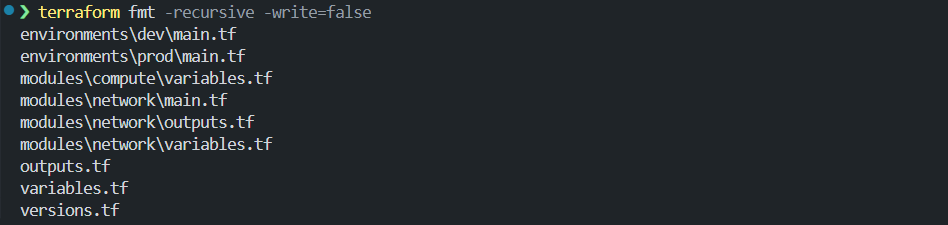
The root files are still there, but now you can see everything that was previously skipped. Both environment configurations and multiple module files were unformatted. If this repository had gone through code review or CI with only the non-recursive command, those files would have slipped through untouched.
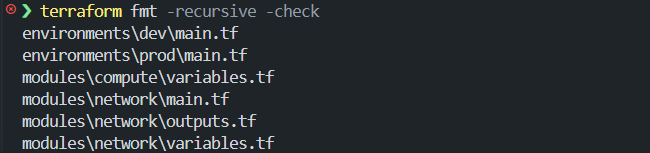
This is where most teams get burned. Developers run terraform fmt locally, CI runs terraform fmt -recursive -check, and the pipeline fails. From the developer’s point of view, they already ran fmt. From CI’s point of view, large parts of the repository were never formatted as shown in the snapshot below where on running terraform fmt -recursive -check, it flagged the files which were formatted:
The only reliable pattern across repositories is to treat formatting as a repository-wide operation. Run it from the root. Use -recursive. Use the same Terraform version locally and in CI. And in automation, rely on -check to enforce the result instead of mutating files silently. Once formatting is applied consistently across modules and environments, diffs become meaningful again. Reviews focus on behavior instead of layout, and CI failures point to real issues instead of incomplete formatting runs.
Common terraform fmt Failure Modes
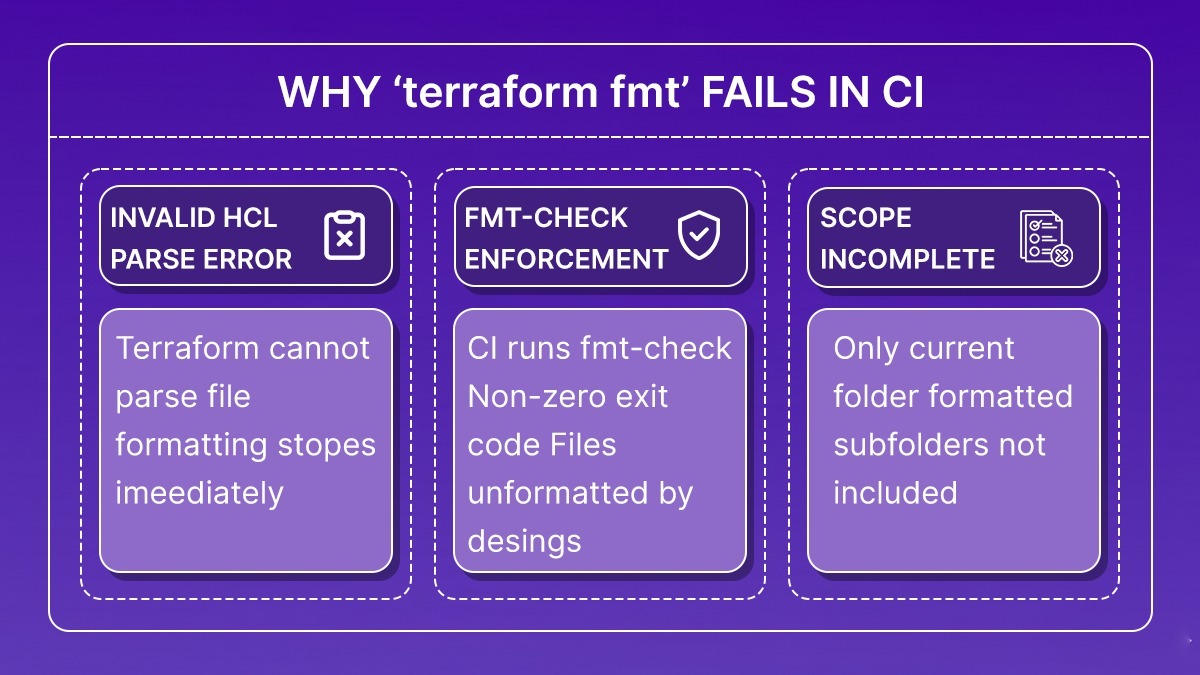
Once terraform fmt is enforced in CI, failures tend to fall into a small and well-defined set of conditions. These are not edge cases; they are the situations where the formatter is doing exactly what it is designed to do.
1. HCL Parse Errors Block Formatting
terraform fmt requires syntactically valid HCL. If Terraform cannot parse a file, formatting does not run.
Missing braces, malformed expressions, or invalid block structure cause terraform fmt to exit immediately with a parse error. No files are formatted, and the command fails fast.
In CI, this failure happens before validation or planning. The pipeline stops early, which is intentional: formatting cannot proceed without a valid configuration structure.
2. terraform fmt -check Enforces Formatting via Exit Codes
In automated pipelines, terraform fmt -check is used to verify formatting without modifying files. When any file is not formatted, Terraform exits with a non-zero status and prints the list of affected files.
This is enforcement, not an execution error. The failure indicates that formatting changes are required and must be committed before the pipeline can proceed.
Misinterpreting this as a CI failure rather than a formatting gate is a common source of confusion.
3. Incomplete Formatting Scope
By default, terraform fmt formats only the current directory. In repositories with nested modules or environment directories, this leaves large portions of the codebase untouched. Local runs appear successful because no error is raised. CI runs, which typically use terraform fmt -recursive -check, then fail when additional files are detected as unformatted.
This mismatch between local scope and CI scope is one of the most common and repeatable causes of formatting failures. All valid terraform fmt failures reduce to one of three conditions: the code cannot be parsed, formatting is intentionally enforced, or formatting scope is incomplete. The formatter itself is not ambiguous. When failures occur, they are signals that one of these conditions has been violated. Once teams align on syntax validity, scope, and enforcement semantics, terraform fmt stops being a recurring source of friction and becomes a predictable part of the Terraform workflow.
Opinionated Best Practices from Platform Teams
Teams that stop fighting Terraform formatting usually don’t treat it in isolation. They combine strict formatting enforcement with a few structural conventions that keep repositories readable and predictable as they grow.
- Run formatting first, always: terraform fmt should be the first step in the pipeline. It doesn’t need providers, credentials, or state. Failing early keeps formatting changes separate from validation, planning, and policy diffs. For a clean CI step, pairing terraform validate with fmt catches both style and syntax problems before a plan ever runs.
- Enforce formatting centrally: CI is the source of truth. Local runs are convenient, not enforcement. Use terraform fmt -check in automation and let it fail the build when files are unformatted.
- Format the entire repository, not individual modules: Run formatting from the repository root and use -recursive. Anything less guarantees partial formatting and CI failures later.
- Make formatting failures explicit: Pair -check with -diff. When formatting fails, engineers should see exactly what Terraform would change. Silent failures lead to blind reruns and ignored diffs.
- Align Terraform versions wherever formatting runs: The formatter ships with the Terraform binary. Pin the version locally and in CI so formatting output is deterministic.
Beyond formatting itself, teams that scale Terraform cleanly also follow a few structural rules that reduce noise before terraform fmt even runs:
- Use a consistent module layout. Each module should have a clear structure: main.tf, variables.tf, outputs.tf, and a README.md. Examples belong in an examples/ directory. This keeps formatting diffs localized and predictable.
- Keep files focused by purpose. Split large configurations by concern, networking, compute, and IAM, instead of dumping everything into a single file. Smaller files make formatting failures and syntax errors easier to isolate.
- Follow consistent naming conventions. Use snake_case for identifiers, avoid repeating resource types in names, and prefer singular resource names. Consistent naming reduces cognitive load and keeps diffs readable.
- Declare variables and outputs explicitly. Define variables in variables.tf with clear types and descriptions. Define outputs in outputs.tf and document them. Avoid passing outputs through variables when direct references work.
- Limit expression complexity. If a value requires multiple functions or conditionals, move it into locals. Formatting can’t save unreadable expressions.
Taken together, these practices keep formatting mechanically and boring, which is exactly what you want. When structure is consistent and formatting is enforced early, reviews focus on behavior, CI failures are actionable, and Terraform stops leaking friction into everyday workflows.
From “remember to run fmt” to “it’s already formatted”: Firefly in real workflows
Teams usually encounter terraform fmt when CI starts enforcing it. A small configuration change produces a large diff due to spacing or alignment. The pull request becomes noisy, reviewers focus on layout instead of behavior, and the pipeline fails on terraform fmt -check. The developer fixes formatting, pushes again, and continues. The issue is not Terraform itself; it is when formatting is applied in the workflow.
Now consider the same environment where most infrastructure code is generated through Firefly Self-Service instead of being hand-written. Users do not manually start with an empty editor or scaffold modules. They open Self-Service and choose one of two options:
- Module Call when they are using existing approved modules
- Generate with Thinkerbell AI when they want Firefly to generate IaC from a description
Both paths generate ready-to-use Terraform configuration, and the output is already formatted. There is no separate cleanup step required to satisfy terraform fmt.
Example: generating Terraform configuration with Thinkerbell AI
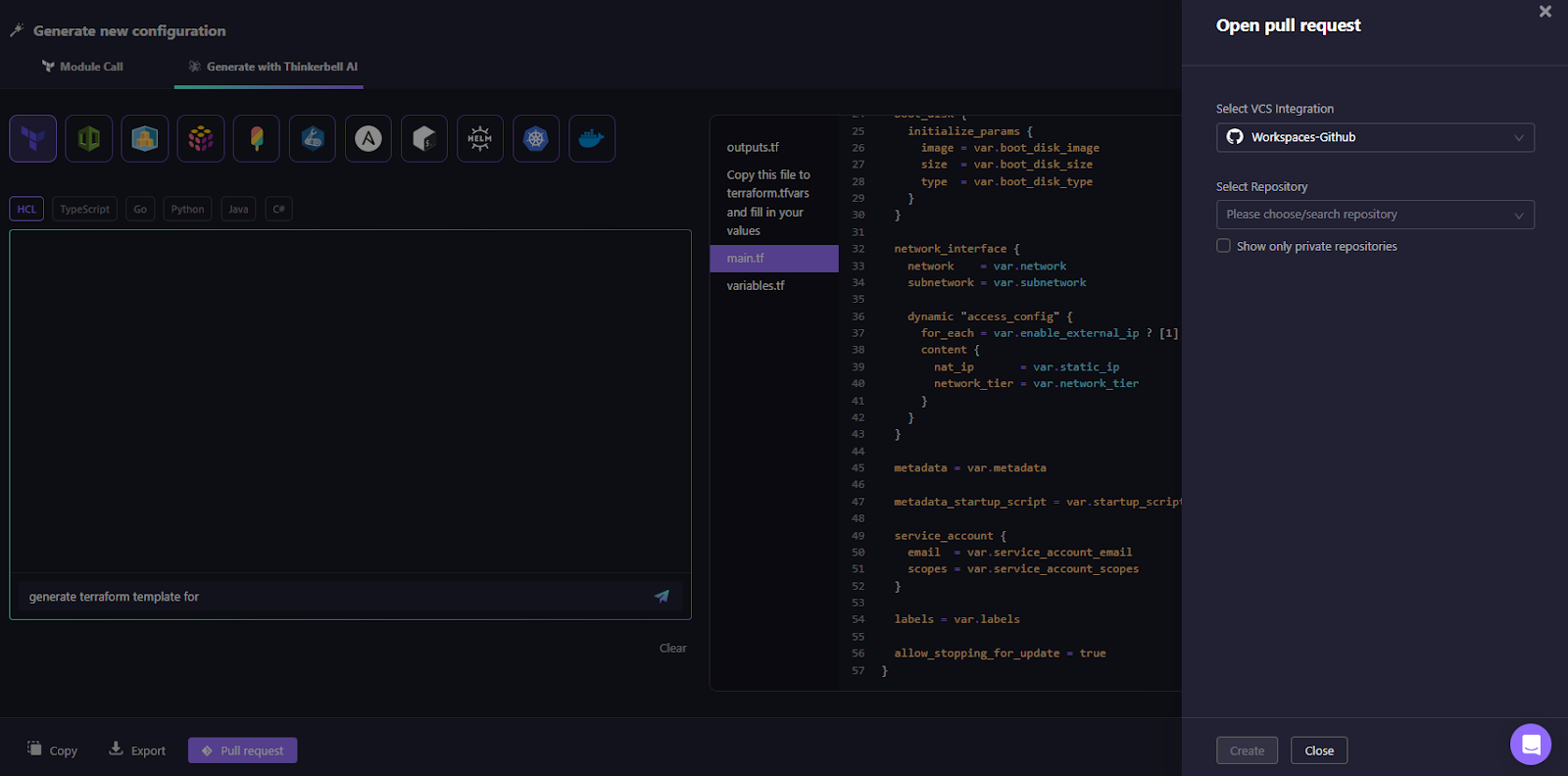
In Self-Service, we generate a configuration with Thinkerbell AI, and a user enters:
Generate Terraform template for E2 instance in GCP
As visible in the codification engine in Firefly:
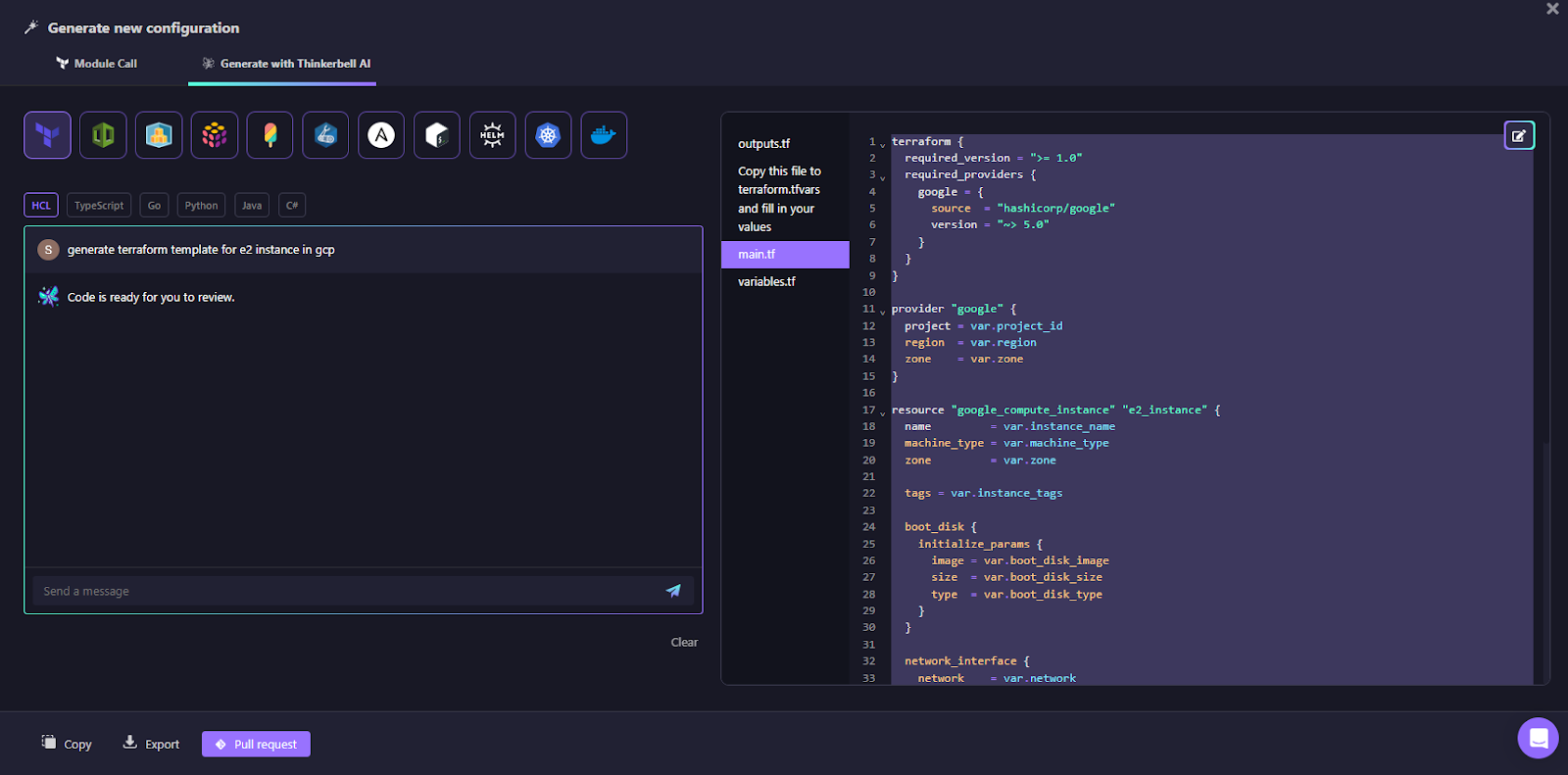
Thinkerbell AI generates:
- main.tf
- variables.tf
- outputs.tf
The generated configuration includes:
- provider blocks
- resources parameterized using variables
- consistent variable types and naming
- canonical Terraform formatting (indentation, spacing, and block layout)
The key characteristic is that this configuration is immediately deployable and preformatted. Running:
terraform fmt -check -recursive
would succeed without modification. The code does not depend on pre-existing resources and is generated deterministically.
Users can then export the code or open a pull request directly from Firefly, as shown in the snapshot below:
Module Call: same result without AI generation
When using Module Call, the experience is similar but based on existing modules. The user selects a module from a public or private registry. As shown in the example below:
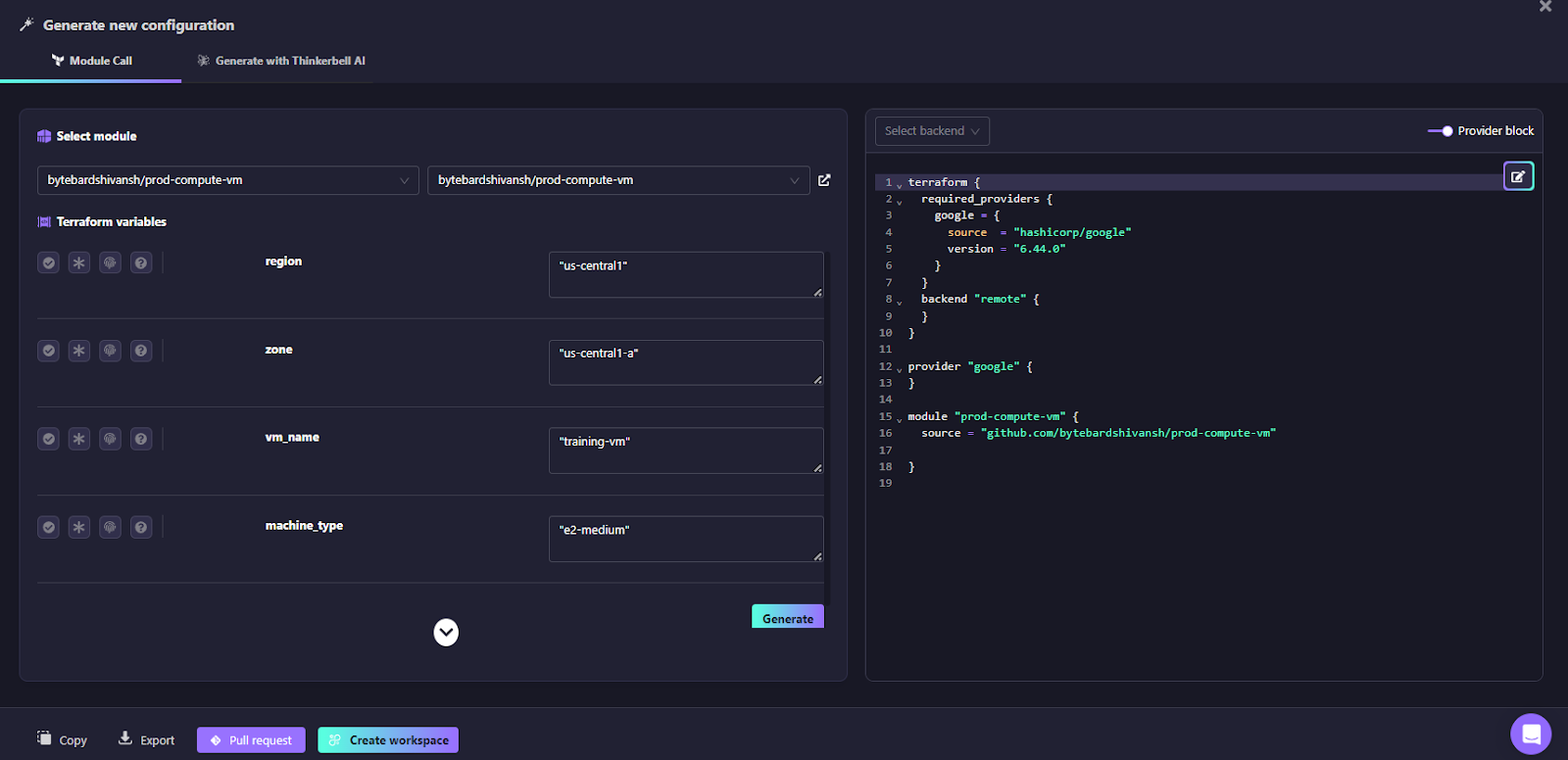
The above snapshot from Firefly’s Self Service UI:
- displays variables, including type, validation, sensitivity, and descriptions
- enforces required inputs
- generates the module call block
- outputs Terraform in canonical format
The result is again a pre-formatted configuration appropriate for version control and CI pipelines.
Pull requests without formatting noise
Both flows support creating pull requests directly into Git repositories. Because the generated IaC is already formatted, CI pipelines that run:
terraform fmt -check -recursive
do not typically surface formatting violations. Formatting becomes a property of the code generation process instead of a developer task.
Codification for existing resources
Firefly can codify existing infrastructure across multiple clouds and convert it into Infrastructure-as-Code. During codification, Firefly:
- discovers resources across AWS, Azure, GCP, and other supported clouds
- maps dependencies and current configuration state
- converts those resources into Terraform or OpenTofu configuration
- generates the required import mappings for each resource
- outputs IaC in a consistent, pre-formatted structure
Codification focuses on Terraform/OpenTofu because these formats support reliable resource import into state and accurate alignment between live infrastructure and IaC, which is essential when codifying existing multi-cloud environments.
Firefly also supports multiple IaC frameworks for new infrastructure generation through Self-Service. Using Module Call or Thinkerbell AI, users can generate:
- Terraform
- Pulumi
- CloudFormation
- and other supported IaC tools
So the split is explicit and straightforward:
- Existing resources are codified into Terraform (multi-cloud)
- New resources are generated in multiple IaC frameworks (multi-IaC)
In all cases, generated code is already formatted, so additional terraform fmt cleanup is not required before committing or opening a PR.
FAQs
What is fmt in Terraform?
terraform fmt reformats Terraform files into Terraform’s standard style. It fixes indentation, spacing, alignment, and block layout. It does not change resource behavior; it only rewrites file formatting.
How do I fix a Terraform fmt error?
Most errors happen because files aren’t formatted or HCL has syntax issues. Run terraform fmt -recursive from the repo root and commit the changes. If you see a parse error, fix the syntax before rerunning fmt.
What is the use of Terraform fmt?
It keeps Terraform code consistent across teams and repositories. It removes noisy whitespace diffs in PRs and makes reviews easier. It’s commonly enforced in CI using terraform fmt -check.
What is the difference between terraform fmt and terraform validate?
terraform fmt reformats code only. terraform validate checks whether the configuration is syntactically valid and internally consistent. fmt handles layout; validate checks structure and references; neither applies infrastructure.

.avif)
.avif)
.webp)

.webp)












