
TL;DR
- MCP servers are now standard for giving AI tools live, authoritative data. AWS’s MCP release made it clear that this model is becoming the norm for exposing real-time infrastructure context to automation.
- Terraform MCP provides the exact provider schemas, module metadata, and Terraform Cloud context that Terraform uses internally. This eliminates outdated arguments, invalid block structures, and mismatched module inputs.
- Terraform MCP does not expose deployed infrastructure. It can validate HCL but cannot list resources, inspect configurations, or codify existing environments.
- Firefly MCP fills that gap with live multi-cloud inventory and codification. It returns real resource configurations, supports filtering across accounts, and can generate Terraform (or Pulumi) plus import commands directly from deployed assets.
- Using both MCP servers together gives a complete workflow: discover the real resource, codify it, validate against the current provider schema, and plan in Terraform Cloud. This is what enables reliable AI-driven Terraform automation for platform teams.
MCP servers have been in use for a while now as a way for AI tools to pull live, authoritative data instead of relying on whatever they were trained on months earlier. AWS pushed this pattern further with the preview of the AWS MCP Server on November 30, 2025, giving AI agents direct access to up-to-date AWS service docs, guidance, and workflow helpers through a standard protocol. That announcement made it clear that MCP isn’t a niche experiment anymore; it’s becoming a normal part of how infrastructure platforms expose real-time context to automation.
Terraform has the same requirement. Provider schemas change constantly, modules evolve, and organization policies shift. Any AI generating or reviewing Terraform without fresh data tends to produce outdated attributes or incomplete resources. The Terraform MCP Server addresses that by exposing the exact registry metadata Terraform depends on, provider schemas, module interfaces, workspace details, variables, policies, and org-level settings.
This is what makes workflows like the GitHub Action example possible: every PR runs terraform plan, starts the Terraform MCP Server in Docker, and hands the plan to an AI for a detailed review. The AI can validate the change set against the real provider schema, flag security or config issues, and post the findings back on the PR. The accuracy comes from MCP, not from guessing.
With AWS, Terraform, and others providing MCP servers, platform teams now have a reliable way to give AI agents real, current infrastructure context. That foundation is what enables safe automation and meaningful AI assistance in Terraform workflows.
What Terraform MCP Server Actually Does
The Terraform MCP Server gives an external agent a clean, controlled way to query Terraform’s real registry and Terraform Cloud data without exposing provider credentials or state files. It surfaces the same metadata Terraform relies on internally, but through MCP tools that an AI or automation client can call. The goal is simple: whatever is generating or reviewing Terraform should use the actual provider and workspace definitions, not assumptions.
Provider schema (the most important part)
The server exposes the exact schema for every provider resource and data source: argument types, required/optional fields, nested block shapes, computed attributes, deprecated fields, and version-specific changes. This is pulled directly from the Terraform Registry schema endpoint, so the agent sees the same structure Terraform uses when validating HCL.
Effect: No guessing field names, no outdated arguments, no invalid block structures. Schema-level accuracy is guaranteed because the MCP server acts as a pass-through to the registry.
Module metadata
The MCP Server can return a module’s versions, inputs, outputs, variable constraints, and examples from the public registry. This is important when assembling module blocks, as many modules enforce types or expect specific nested structures. The MCP data prevents mismatches that normally appear during terraform plan.
Terraform Cloud / Enterprise context
Using the Terraform Cloud API under the hood, the server provides:
- Org and workspace listings
- Terraform variables, environment variables, and sensitive values (marked, not exposed)
- workspace settings and tags
- policy checks attached to a workspace
- recent run history
This allows a client to understand how a workspace is configured before generating or modifying Terraform. For example:
- knowing whether a workspace uses variable sets
- checking whether Sentinel policies will block a change
- Pulling workspace variables to construct a correct module invocation
Triggering plans and inspecting runs
The MCP Server can request a plan or fetch run details. It does not bypass Terraform Cloud; it calls the same TFC APIs with the same org/workspace permissions. Once a plan is produced, the tool can retrieve the JSON plan output so an agent can reason about diffs resource-by-resource.
This matters because proper review requires seeing what Terraform will actually do, not just reading the HCL.
How the agent interacts with it
The server publishes a tool manifest with all supported actions. An MCP client discovers the manifest and calls tools like:
- provider.getSchema
- module.get
- workspace.list
- run.plan
- run.get
Everything flows over either stdio (common for CI runners) or a local HTTP stream endpoint. The protocol keeps the boundary strict: the client doesn’t get Terraform Cloud credentials, doesn’t get raw state, and cannot perform arbitrary API calls.
Why this design works well in real workflows
- Schema comes from the authoritative source, the Terraform Registry JSON schema, not scraped docs.
- Workspace context reflects the current TFC configuration, so generated code aligns with existing variable sets and policies.
- Plans are executed in Terraform Cloud, meaning any evaluation is based on real provider plugins and versions.
- Scope is controlled, the MCP server acts as the broker; credentials never reach the client/AI.
This is the core reason MCP-driven Terraform automation works: the agent operates with the same facts Terraform itself uses, and nothing more.
What Enterprises Expect When They Adopt Terraform at Scale
Once Terraform starts getting used across multiple teams, the expectations shift quickly. It’s no longer about writing individual modules or plans; platform engineering needs consistency, guardrails, and visibility across the entire organization. The Terraform MCP Server fits into this environment because it exposes the same metadata and policies the platform team already enforces, but in a machine-readable way.
Accuracy
Large environments depend on the provider schema, not whatever was valid six months ago. Provider teams release changes constantly, and enterprise modules evolve just as fast. When automation or AI tools rely on live schema and module metadata, you avoid the classic “invalid argument” failures and reduce wasted cycles in CI. At scale, static documentation simply isn’t enough; the source of truth must come from the registry and Terraform Cloud directly.
Governance and policy enforcement
Enterprises usually run Sentinel or OPA-based checks on every workspace. Those policies aren’t optional; they encode everything from tag standards to network restrictions to budget limits. An AI or automation tool must be aware of these policies, or it will generate changes that get blocked later. Through MCP, clients can see which policies are attached to a workspace and understand the enforcement level before producing code.
This keeps reviews and generated changes aligned with the organization’s governance model rather than generic best-practice advice.
Multi-cloud organizational visibility
Most enterprise Terraform deployments aren’t single-cloud anymore. They span AWS, Azure, GCP, on-prem, and SaaS providers. Terraform Cloud stores the workspace structure, variable sets, provider configurations, run history, and tagging strategy. When an MCP client can query this, it gets a consistent view of how the organization is structured, which workspace owns which resources, how variable sets are shared, and which modules map to which environments.
This is crucial for platform teams building internal platforms, because decisions must be made with full context.
Security and scoped access
A central concern is not exposing cloud credentials. Enterprises need a strict separation between:
- who can read metadata
- who can see plan diffs
- who can trigger runs
- who can access the state
The MCP Server keeps this clean: the client only interacts with what the MCP exposes. Credentials stay with the server, and permissions follow the underlying Terraform Cloud role. This gives platform teams confidence that AI agents or automation tools can help without becoming a new attack surface.
Internal developer platforms without oversharing
In many organizations, developers shouldn’t have org-level visibility or access to sensitive variables. At the same time, platform teams want to offer self-service infrastructure. MCP provides a controlled way for tools to pull the exact schema, workspace variables, and module interfaces needed to generate correct Terraform, without handing developers or AI systems keys to the entire cloud estate.
What Using the Terraform MCP Server Looks Like in a Workflow
To get a sense of how the Terraform MCP Server behaves in a real workflow, here’s a straightforward example using an editor wired to an MCP server running locally in Docker.
The request was clear and simple: create an e2 instance in GCP. Here’s how the Terraform MCP server got triggered in the AI assistant in the editor:
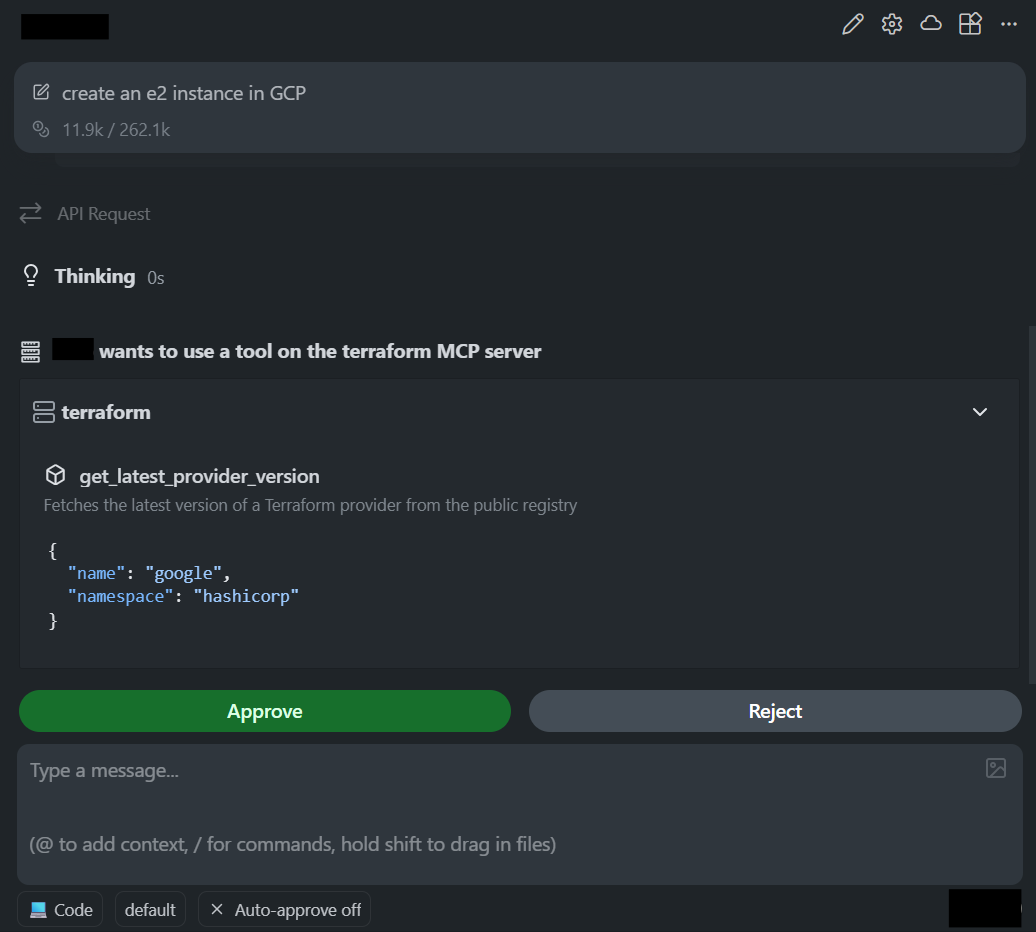
What’s interesting is how the editor integrated with Terraform MCP: every step depended on the MCP server for real metadata, rather than relying on templates or older provider docs.
1. Pulling the correct Google provider version
The first call the editor made was to the MCP tool that fetches the latest provider version:
This call reaches the MCP server, which queries the Terraform Registry and returns the current version. This matters because it prevents one of the most common issues in generated Terraform: outdated provider versions and arguments that no longer exist.
2. Generating HCL based on the live provider schema
As visible in the diff generated by the AI code assistant in the snapshot below:
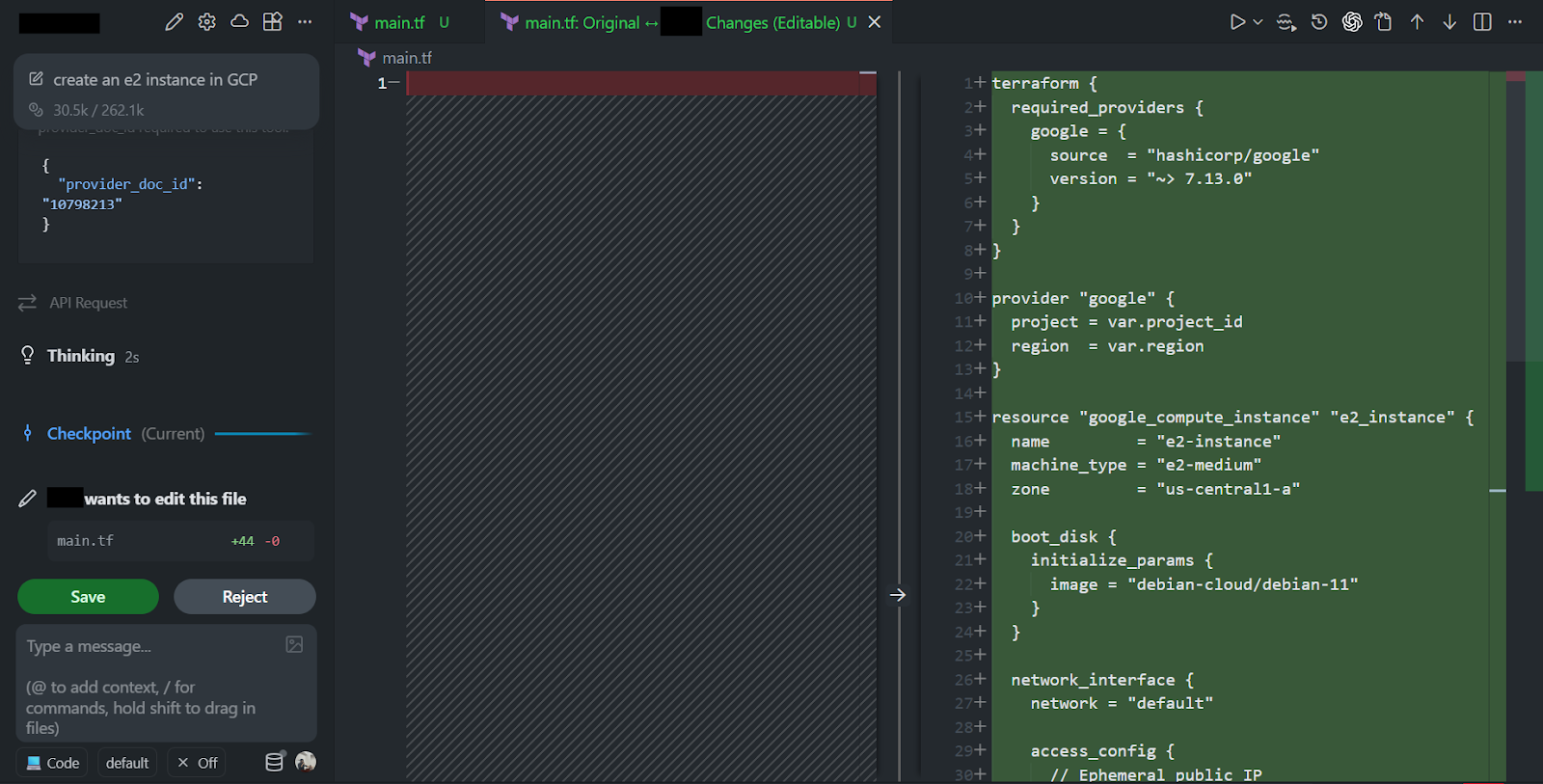
Using the version information and schema exposed by the MCP server, the editor produced the following main.tf:
A few technical points needed to be covered:
- The provider block is correct for the Google provider, including the right version constraint.
- The resource uses a valid google_compute_instance schema, a correct machine type, a correct boot_disk block structure, and correctly nested initialize_params.
- The network interface block is valid for default networking with an ephemeral IP.
- All required variables are declared, which avoids the usual “undefined variable” errors during the plan.
The reason the editor got the structure right is that it wasn’t improvising; it had the live provider schema from MCP.
3. Standard Terraform workflow afterwards
Once the file is written, the workflow is the same:
But when running inside an editor that uses MCP, the assistant can’t actually execute Terraform operations on your machine. MCP gives it the schema and module metadata, but it does not provide shell access or the ability to run the Terraform CLI. That’s why, when asked to run terraform init, plan, or apply, the editor simply adds it to a task list instead of executing it.
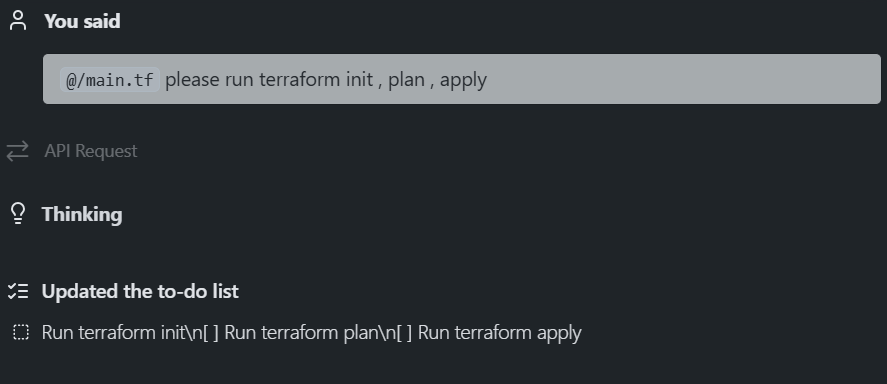
Even though the assistant can’t run Terraform, the important part is that the generated configuration is correct on the first attempt, with no missing fields, outdated arguments, or invalid block layouts. Without the MCP server, most autogenerated Terraform tends to drift into deprecated fields, unrecognized arguments, or missing nested blocks. The Google provider in particular changes its schema often, especially around compute resources, so relying on memorized patterns doesn’t hold up.
With MCP:
- The provider version comes from the registry, not memory.
- The schema matches the current provider release.
- The editor uses the field names and block structures.
- The output is something you can run immediately without cleanup.
This is precisely the kind of reliability you want if you’re planning to plug AI or automation into Terraform workflows at scale.
Terraform MCP’s scope when working with live infrastructure
Terraform MCP exposes Terraform-centric runtime metadata: provider/module versions and docs, provider capabilities and schemas, Terraform Cloud/Enterprise workspace and run surfaces, and related registry-level artifacts. That scope is intentionally focused on the Terraform model, the types, attributes, and workflows Terraform itself understands and validates.
Two practical gaps remain when the goal is “operate on real infrastructure” rather than only “author schema-correct HCL.” Below are the gaps explained in detail, followed by the Firefly MCP operations that address them:
1. No built-in cloud account inventory (instance-level state, ARNs, account filtering)
Terraform MCP returns Terraform-side metadata only. It does not query cloud APIs, list deployed resources, or return identifiers such as ARNs, instance IDs, bucket names, or project-scoped assets. You can see this limitation clearly when asking the MCP server a question that requires real infrastructure state.
In this example, the request was simple: “What resources currently exist in an AWS, Azure, or GCP account?” As visible in the snapshot below:
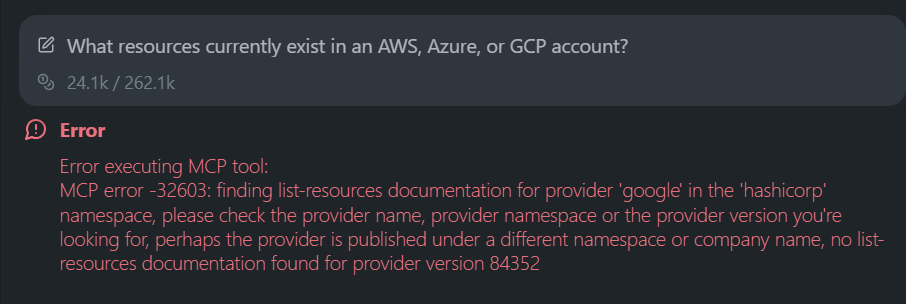
Terraform MCP can’t answer it because it doesn’t interact with the cloud providers. Instead, it tries to look for list-resources documentation inside the provider schema, fails to find it, and returns an MCP error. That’s expected since the Terraform Registry doesn’t publish runtime inventory endpoints, and Terraform MCP only exposes what the registry and Terraform Cloud already provide.
Because of this, Terraform MCP cannot answer questions like:
- What resources are deployed in a specific cloud account or project?
- Which workloads are unmanaged, drifted, or no longer present?
- What is the live configuration of a bucket, VM, subnet, or database?
Terraform MCP’s scope ends at schemas, docs, module metadata, and workspace details. It never exposes instance-level or account-level state, and that gap becomes obvious the moment you ask it for anything related to live infrastructure.
Firefly MCP provides instance-level asset discovery
The firefly_inventory tool exposes the real cloud inventory, with filtering capabilities that Terraform MCP cannot provide:
- assetTypes: filter by Terraform resource type (aws_s3_bucket, aws_ec2_instance, etc.)
- providerIds: filter by specific cloud accounts or projects
- assetState: managed, unmanaged, ghost, modified
- freeTextSearch: match across names, tags, and configuration fields
- includeConfiguration: return the live configuration of each asset
Example:
This gives the concrete deployed state that Terraform MCP does not expose, enabling workflows that depend on visibility into existing infrastructure.
2. No native reverse-codification from live resource to IaC
Terraform MCP provides module docs, provider capabilities, and schema-level info, but it cannot take a deployed resource and generate:
- Terraform HCL representing that resource
- import commands
- drift-aligned configuration
- Pulumi or other IaC tools.
Terraform MCP validates Terraform code; it does not create IaC from running infrastructure.
Firefly MCP performs resource-level codification
The firefly_codify tool generates IaC from a specific deployed resource:
- Reads the live configuration from Firefly’s asset inventory
- Maps those values to the correct Terraform attributes
- Produces the corresponding terraform import command
- Supports multiple IaC formats (terraform, pulumi, etc.)
Example:
Output includes an accurate Terraform resource block and the import command required to reconcile it with state.
How these gaps affect engineering workflows
Terraform MCP is strong at ensuring correctness within the Terraform ecosystem, schema, documentation, modules, provider capabilities, and workspace details. What it does not provide is visibility into actual cloud deployments or the ability to codify them into IaC. For platform teams dealing with mixed brownfield/greenfield environments, these two capabilities are important.
By combining:
- Terraform MCP for schema correctness, provider compatibility, and Terraform Cloud operations
- Firefly MCP for inventory, configuration extraction, and codification
You get a workflow that can both discover what is deployed and produce IaC that matches it, then validate that code using Terraform MCP before running a plan.
Auditing GCS Bucket Encryption with Firefly MCP
A common ask in large environments is to quickly check whether storage buckets meet encryption requirements. In many enterprises, platform teams need to confirm that buckets either use a customer-managed KMS key or meet internal compliance rules. Doing this manually across multiple projects is slow, and Terraform MCP alone can’t answer it because it doesn’t have access to deployed resources.
With Firefly MCP added to the editor, this becomes a direct prompt. First, the Firefly MCP server configuration was added:
Once the server was available, the prompt in the editor was:
“Can you show me all GCS buckets missing encryption?” As visible in the snapshot below:
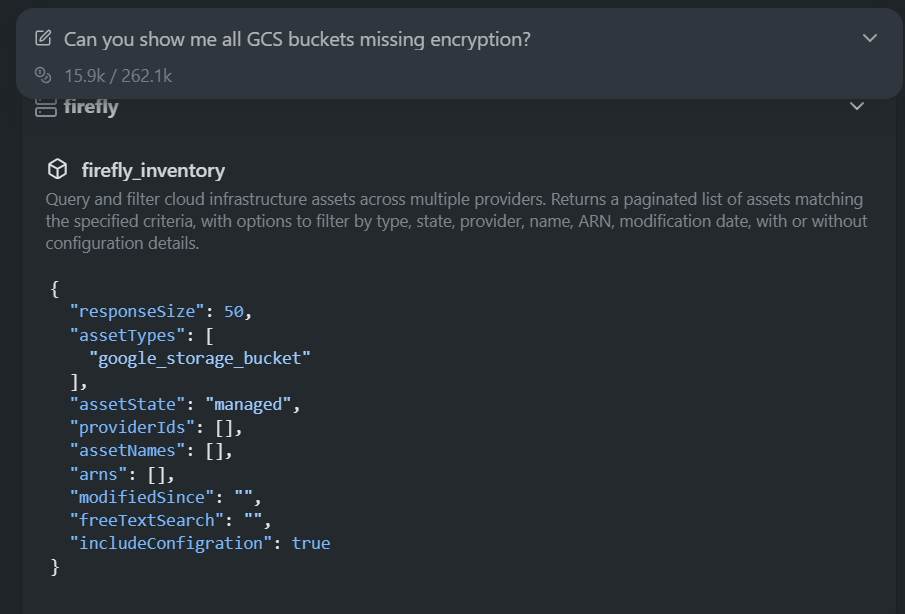
The assistant used the Firefly MCP tool firefly_inventory to query all GCS buckets with full configuration included:
Since Firefly maintains configuration details for each discovered bucket, the assistant could evaluate the bucket’s encryption settings directly from the returned data. Firefly MCP responded with a complete list of buckets that did not have a customer-managed KMS key configured. Here is how the Firefly MCP server responded:
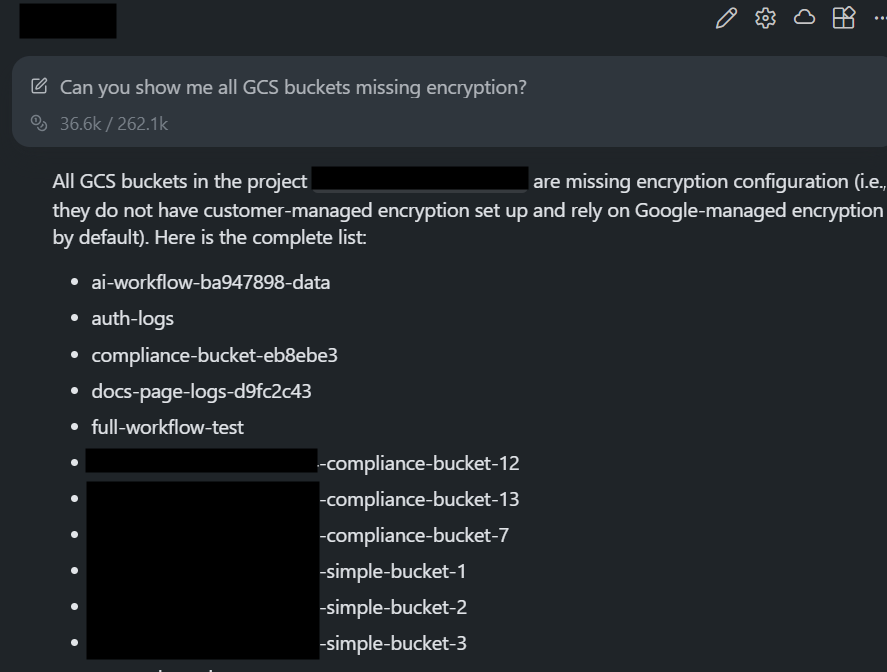
The respond was a clear output: 27 buckets missing explicit encryption, including examples like:
- ai-workflow-ba947898-data
- auth-logs
- full-workflow-test
- web-logs-storage-jshbe
- prod-logs
- wills-tfstate-backend
All were identified from the live configuration returned by the Firefly MCP.
This is exactly the kind of check that’s hard to perform using Terraform MCP alone. Terraform MCP understands the provider schema, but it can’t inspect deployed buckets or evaluate their encryption settings. Firefly MCP fills that gap by exposing the real asset data and configuration directly to the editor.
How Firefly provides the live inventory and config data
Firefly maintains a real-time inventory of cloud and SaaS resources across connected accounts, including type, provider, region, IaC status (managed, unmanaged, modified, ghost), and the live configuration discovered for each asset. The same dataset shown in the Inventory UI is exposed through the MCP server: when firefly_inventory is called with includeConfiguration=true, here is the Firefly inventory UI:
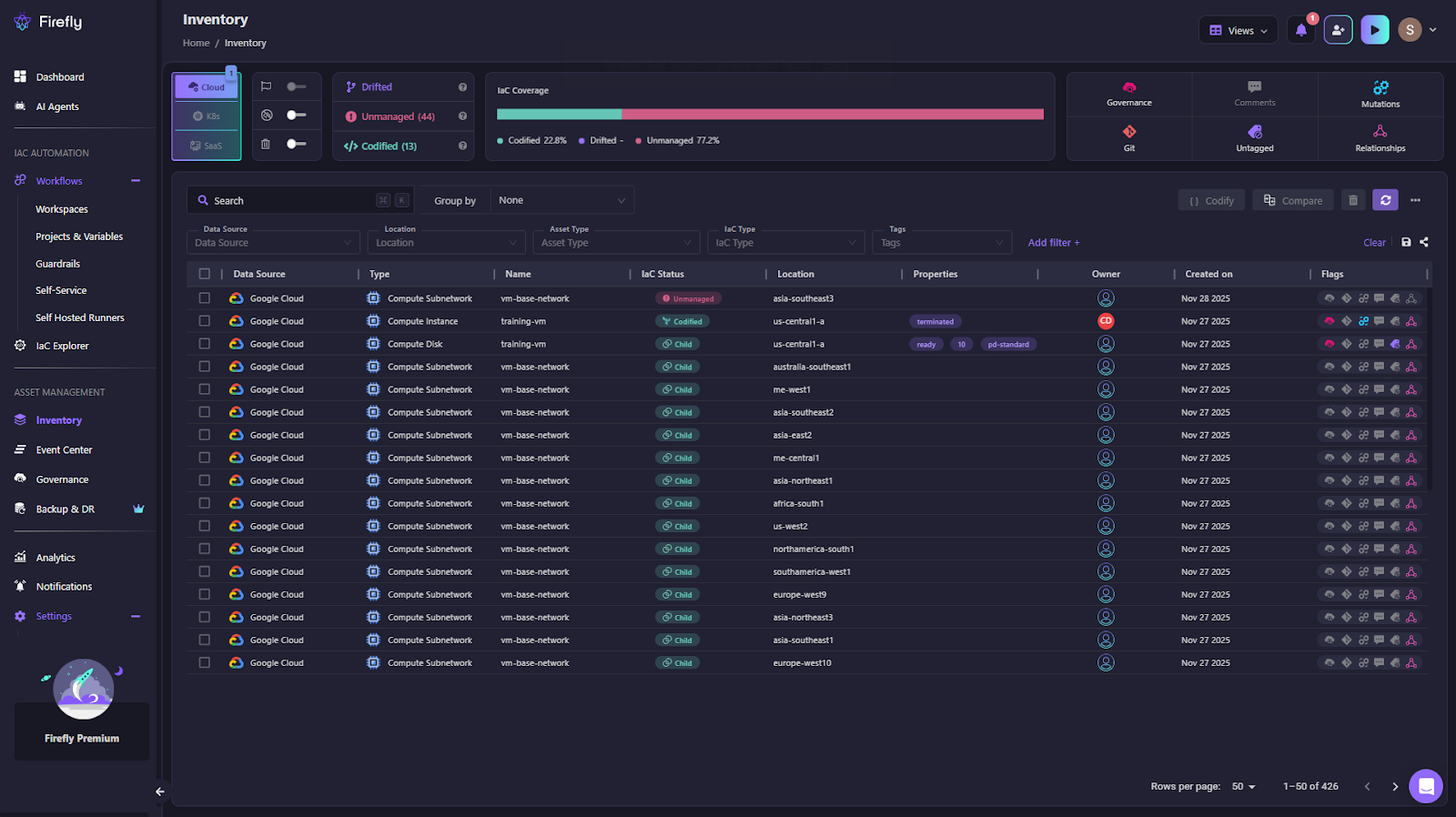
Firefly returns both the asset metadata and its actual configuration, which lets an assistant check properties like encryption, IAM settings, network layout, or storage policies without querying cloud APIs directly. This is why the GCS encryption audit works; the assistant is operating on Firefly’s live resource model rather than inferred or static information.
What Teams Gain When Live Inventory and Provider Schema Are Both in Scope
Platform teams spend most of their time trying to keep two things aligned: what developers request and what the infrastructure actually supports. Terraform MCP and Firefly MCP together reduce the friction between those two worlds.
Shorter delivery cycles
When an editor or automation tool can pull real resource data from Firefly and validate Terraform against the current provider schema through Terraform MCP, the back-and-forth usually required to fix invalid HCL disappears. Changes move from request, code, and plan much faster.
Fewer breakages caused by mismatched assumptions
Provider schemas change frequently. Developers don’t always know which fields are required or deprecated. Terraform MCP keeps generating or reviewing HCL aligned with the exact provider version in use, which avoids many of the failures that normally show up during plan.
Safer self-service for developers
Firefly MCP exposes only the information needed to build correct IaC, resource metadata, configuration, and codification, without exposing cloud credentials. Terraform MCP further keeps the HCL within Terraform’s boundaries. Developers get a smoother experience without being given more permissions than necessary.
Better control for platform teams
Codification, import commands, schema validation, and plan operations all go through controlled surfaces. Platform teams decide which accounts are visible, which resources can be codified, and how generated Terraform is validated. This keeps workflows predictable even when the initial request comes from an AI-driven assistant.
Clearer visibility when things change
With Firefly handling asset discovery and Terraform MCP validating the intended code, teams get both sides of the picture: the live configuration and the desired configuration. This helps with drift detection, cleanup of unmanaged assets, and consistent enforcement of tagging or structural standards.
FAQs
What is the Terraform MCP Server, and why is it important?
The Terraform MCP Server exposes provider schemas, module metadata, and Terraform Cloud workspace context through the Model Context Protocol (MCP). This allows AI tools and automation systems to generate Terraform configurations using real, up-to-date provider definitions instead of outdated documentation or memorized patterns.
How does Terraform MCP differ from the Terraform CLI or Terraform Cloud API?
Terraform MCP does not replace the CLI or Terraform Cloud. Instead, it provides a structured, schema-accurate interface that AI agents and editors can query. It returns provider schemas, module information, policy metadata, and workspace details without exposing state files or cloud credentials.
Can Terraform MCP inspect existing cloud resources?
No. Terraform MCP only exposes Terraform registry and Terraform Cloud metadata. It cannot list deployed resources, inspect configurations, or identify unmanaged infrastructure. You need a tool like Firefly MCP for live cloud inventory and configuration data.
What does Firefly MCP add on top of the Terraform MCP Server?
Firefly MCP provides live, multi-cloud inventory and configuration for deployed resources (AWS, Azure, GCP, Kubernetes, SaaS). It can codify any discovered resource into Terraform (or Pulumi) with import commands, which Terraform MCP cannot do.

.avif)
.avif)
.webp)

.webp)












