
TL;DR:
- Backups restore data, not systems. During the October 2025 AWS outage (11 million reports, 1000+ apps down), teams with RDS backups couldn't recover because VPCs, security groups, IAM roles, and load balancers weren't captured. An EBS snapshot gives you a volume, not the instance profile, autoscaling config, or DNS records that make it reachable.
- Infrastructure drifts from your Terraform during emergencies. A team added an IAM inline policy during an S3 access issue, then increased RDS max_connections under load, both via console. Weeks later, terraform apply reverted both fixes and broke production. The hotfixes that kept the system stable were never codified.
- Recovery must work the same way as deployment. If you deploy with Terraform, recovery should generate Terraform code, not manual console steps. Application DR means capturing the infrastructure graph (VPC, IAM, security groups, load balancers, dependencies) and rebuilding it declaratively in another region or account.
- Application-scoped snapshots capture working state, not just declared state. Firefly takes snapshots of tagged applications (all ECS services, IAM roles, networking, load balancers grouped together), including console changes and runtime configuration, not just what's in Git. Recovery becomes selecting a snapshot and running terraform apply, not reconstructing from memory.
During a recent AWS US-EAST-1 outage, many teams realized something uncomfortable: having backups is not the same as being able to restore production.
Most environments already had EBS snapshots scheduled, RDS automated backups enabled, and S3 versioning turned on. Some workloads were even spread across multiple availability zones. But when services went down, restoring individual resources did not automatically rebuild the application.
An EBS snapshot gives you a volume. It does not recreate the EC2 instance profile, IAM role attachments, security groups, load balancer registrations, autoscaling configuration, or DNS records that make the service reachable. An RDS restore gives you a database instance. It does not rewire application connectivity, subnet groups, parameter groups, or failover configuration.
You can recover data and still fail to recover the system.
What Is Application Disaster Recovery?
Application Disaster Recovery (ADR) means you can rebuild and restore your entire application stack to a consistent, working state after a failure, not just recover a few cloud resources.
Let's take an example. Suppose you run a SaaS application with the following setup in AWS:
- ECS cluster running your API and background workers
- RDS PostgreSQL as the primary database
- S3 for file storage
- Application Load Balancer (ALB) in front of ECS
- Route 53 manages DNS
- IAM roles for tasks and services
- VPC with private subnets, NAT gateways, and route tables
Now, assume the primary region goes down, or your production account is compromised, and critical resources are deleted.
What Does a Successful Application DR Look Like?
Application DR means you can:
- Recreate the VPC, subnets, route tables, and NAT gateways exactly as before
- Restore the RDS database to a consistent point in time that meets your RPO
- Recreate the ECS cluster with correct task definitions, IAM roles, and autoscaling settings
- Rebuild the ALB with the correct listeners, target groups, and health checks
- Reattach services to the correct security groups
- Restore DNS records so traffic routes to the new environment
- Validate that background jobs, queues, and external integrations work as expected
If any one of those steps fails or is done in the wrong order, the application does not recover, even if individual resources exist. This is the difference between restoring infrastructure and restoring a working system.
The October 2025 AWS Outage: When Backups Weren't Enough
As reported by the BBC, AWS said it had resolved a massive outage that knocked more than 1,000 apps and websites offline for much of the day. User reports of problems globally exceeded 11 million during the incident. Even after the underlying issue was fixed, experts noted that the outage highlighted the risks of so many companies relying on a single dominant provider.
The takeaway: If your recovery strategy depends on the provider being stable and your infrastructure being manually rebuilt under pressure, you don't have application-level disaster recovery. You are just relying on backups.
What Do I Actually Need to Recover My Application? (Not Just Backups)
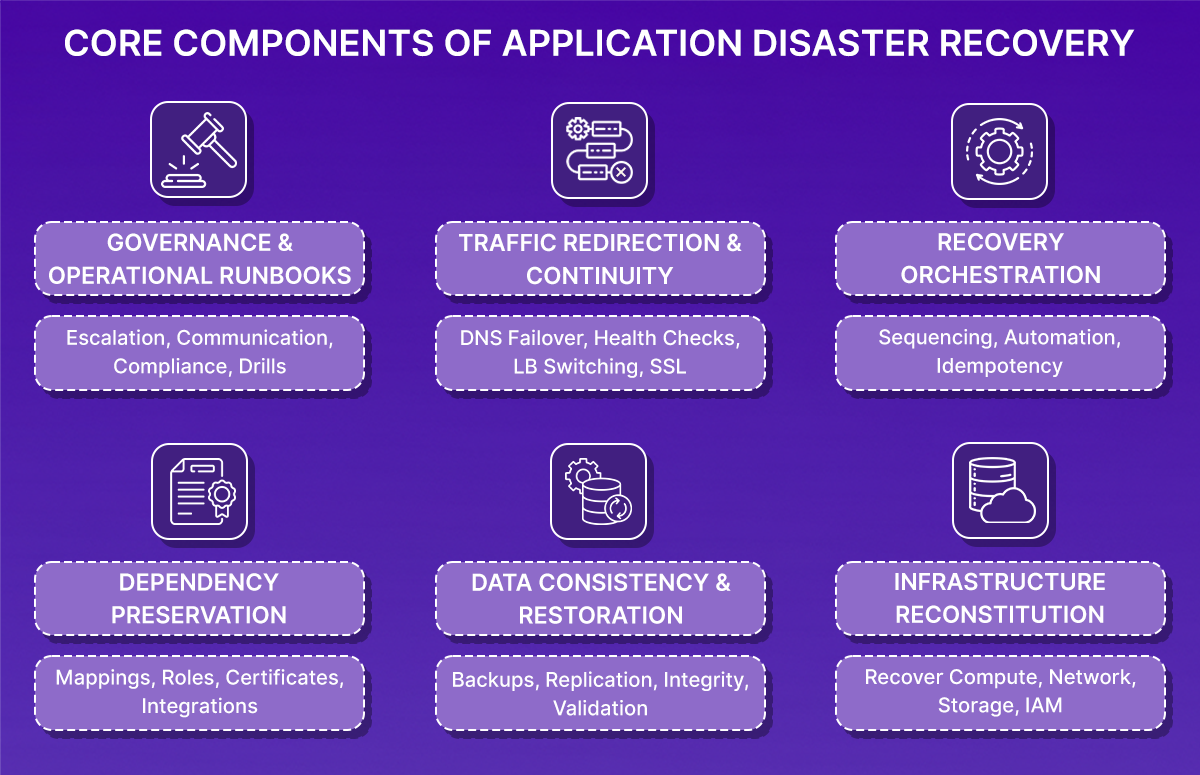
To understand what Application Disaster Recovery really requires, go back to the SaaS example: API running on ECS, PostgreSQL on RDS, S3 for storage, ALB in front, Route 53 for DNS, a VPC with subnets, and IAM roles controlling access.
If this environment is lost due to region failure, account compromise, or large-scale misconfiguration, restoring service requires rebuilding the entire system in a consistent state. That involves six coordinated components.
1. Can I Recreate My Infrastructure Exactly as It Was?
Infrastructure reconstitution means recreating the full cloud environment exactly as it existed before failure, including configuration, relationships, and security boundaries.
For AWS, that includes:
- VPC with the same CIDR blocks
- Subnets mapped to the same availability zones
- Route tables and subnet associations
- Internet Gateway and NAT Gateways
- Security groups with identical ingress and egress rules
- ECS clusters and services
- Task definitions referencing specific container image digests
- IAM roles and instance profiles
- Load balancer listeners and target groups
Recreating only part of this is insufficient. For example:
- If the application security group allowed inbound traffic only from the ALB security group, that reference must be preserved
- If ECS tasks depend on a specific IAM role with defined policy attachments, that role must exist with the same permissions and trust relationships
- If private subnets require NAT Gateway access for outbound calls, route table associations must match the original configuration
Infrastructure recovery must be deterministic and aligned with version-controlled Infrastructure-as-Code. Disaster recovery cannot rely on inference or manual console clicking.
2. Does My Database Backup Meet My RPO?
Restoring infrastructure without restoring consistent data does not restore the application. For a PostgreSQL database running on RDS, data recovery typically depends on:
- Automated backups enabled
- Point-in-Time Recovery (PITR) is available
- Defined retention period
- Optional cross-region read replica
If your RPO is five minutes, the database must support restoring to a timestamp no more than five minutes prior to failure. This usually requires continuous transaction log capture (WAL archiving) rather than periodic full snapshots.
A full snapshot taken once every 24 hours would expose the system to up to 24 hours of potential data loss, which would violate a five-minute RPO.
After restoration, validate:
- The database is restored to the correct timestamp
- The application schema version matches the deployed code
- No migrations were partially applied
- Background jobs resume safely
- Message queues do not reprocess or skip transactions
Backups must be both configured and regularly tested.
3. Will My Resources Connect to Each Other After Recovery?
Applications fail during recovery most often because resource relationships are not restored correctly. In the SaaS example, critical relationships include:
- ECS task role permissions allowing access to S3, Secrets Manager, and KMS
- Security group rules allowing traffic from ALB to application containers
- Database security group permitting connections only from application security groups
- Target groups are correctly attached to ECS services
- Route 53 DNS records are resolving to the correct load balancer
- ACM certificates attached to the load balancer in the correct region
If these relationships are broken:
- Containers may start but fail with AccessDenied errors
- Health checks may fail because security group references are incorrect
- HTTPS may fail because the certificate does not exist in the recovery region
- DNS may still resolve to the failed endpoint
Recovery must preserve not only resources but also the resource graph—the identifiers and references between components. Manual restore processes often create new resource identifiers, while dependent configurations still reference old ones. This is a common source of silent failure during recovery.
4. Can I Recover in the Right Order?
Even when infrastructure definitions and backups are correct, recovery can fail if executed in the wrong order. A stable recovery sequence must ensure that dependencies are satisfied before dependent services start.
For example:
- Networking must exist before compute instances are launched
- IAM roles and policies must exist before containers attempt to assume them
- The database must be restored and reachable before services establish connections
- Load balancer target groups must show healthy targets before DNS cutover
Recovery orchestration should be automated through repeatable pipelines rather than manual console actions. Each step should be idempotent so that re-running a failed step does not corrupt state or duplicate resources.
Without controlled sequencing and repeatability, recovery becomes error-prone under pressure.
5. How Do I Route Traffic to My Recovered Application?
Restoring the internal system does not immediately restore user access. Traffic redirection must be handled deliberately.
In AWS, this typically involves updating Route 53 records to point to the recovered load balancer. However, DNS behavior must be considered. DNS records include a Time-To-Live (TTL) value, which determines how long clients cache responses. If TTL is set to 3600 seconds, clients may continue resolving to the failed endpoint for up to one hour after a record change.
Certificates must also be present in the target region. ACM certificates are region-scoped. If recovery occurs in a different region and the certificate has not been provisioned and validated there, HTTPS connections will fail even if the application is functioning.
Traffic cutover should only occur after:
- Load balancer targets are healthy
- Application endpoints respond successfully
- Database connectivity is stable
- Background workers operate normally
User access should be restored only after internal validation confirms system stability.
6. Do We Know Who Does What During a Disaster?
Technical mechanisms alone do not guarantee successful recovery within RTO. Operational clarity is required. An effective disaster recovery program defines:
- Formal RTO and RPO targets
- Clear authority to declare a disaster
- Defined responsibility for executing recovery
- Validated ownership before traffic cutover
- Communication procedures for stakeholders
Runbooks should contain executable steps, not high-level descriptions. They should specify how to trigger recovery pipelines, how to select database restore timestamps, how to validate health checks, and how to revert if validation fails.
Regular disaster recovery drills are essential. Without end-to-end testing under controlled conditions, RTO and RPO targets remain unproven.
The Problem: My Infrastructure Drifted from Terraform
Everything described so far, infrastructure reconstitution, dependency preservation, IAM integrity, and parameter consistency, sounds structured and controlled.
But production systems rarely operate in a controlled environment, even when Infrastructure-as-Code is in place, which most organizations adopt. To understand where application recovery actually breaks, let's walkthrough the deployment below.
Example: When terraform apply, Broke Production
A small production-style application was deployed in AWS using Terraform. The repository followed a modular structure with VPC, ECS (Fargate), RDS, ALB, and IAM modules. Remote state in S3 with DynamoDB locking. Consistent tagging (Project=app-infra).
Deployment was executed with terraform apply. Output:
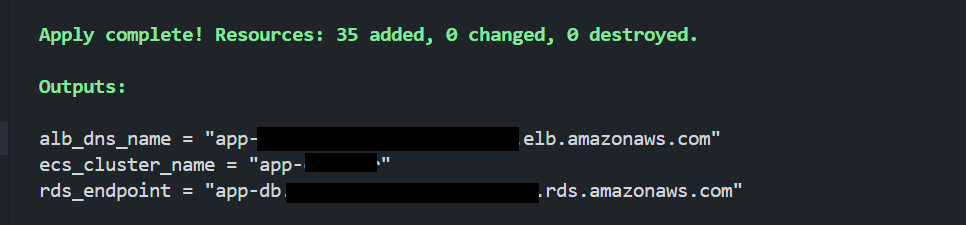
At this point:
- Git matched Terraform configuration
- Terraform state matched AWS runtime
- The application was healthy
- Infrastructure and declared state were aligned
This was the baseline.
What Happens During Emergency Fixes?
Now, while the emergency fixes are made directly in the console. Two changes were introduced; here they are:
Drift #1: IAM Inline Policy Hotfix
The application began failing when accessing S3. Logs showed: AccessDenied: s3:GetObject
Instead of modifying Terraform immediately, a quick fix was applied directly in AWS:
- IAM → ECS Task Role → Add Inline Policy
- Allowed s3:GetObject on all resources
- The error was corrected immediately
- Production stabilized
But this change was never committed to Git. Terraform configuration was not updated. The runtime state now differed from the declared state.
Drift #2: RDS Parameter Adjustment
Later, under load, the application began exhausting database connections. Errors appeared: too many connections
To stabilize the system, the RDS parameter group was modified directly:
- max_connections was increased
- Changes were applied
- Database performance normalized
Again: No Terraform update or Git commit. The runtime database configuration had diverged from the declared configuration.
The Critical Moment: Running terraform apply
Days later, during a routine infrastructure change, Terraform was executed again:
terraform apply
Terraform detected drift and corrected it. It:
- Removed the inline IAM policy
- Reverted the RDS parameter group to its declared value
- Reported: Apply complete!
From Terraform's perspective, everything was correct. The declared state had been enforced.
What Happened Next?
Within minutes, production symptoms reappeared:
IAM Policy Reversion
- ECS tasks lost s3:GetObject permission
- Application logs showed AccessDenied errors
- S3-dependent operations failed
RDS Parameter Reversion
- max_connections returned to the lower value
- Under load, database connections are saturated again
- Latency increased
- Request failures followed
The infrastructure was technically "correct" according to Git. But the application was degraded. The hotfixes that kept the system stable were erased because they were never codified.
Here, Terraform behaved exactly as designed. It enforced declared intent. The problem was that the runtime infrastructure state had evolved under operational pressure, and that evolved state was never captured.
In production environments:
- Emergency changes are common
- Console edits happen
- IAM policies evolve
- Database parameters are tuned live
- Not every change is back-ported immediately
Over time, the declared state and the working state diverge. When Terraform runs later, it restores declared state, not necessarily the configuration that made the system work.
This is not a data loss problem. It is a configuration state problem. And this is where traditional backup strategies offer no protection.
Why Can't I Just Restore Backups Manually in the Console During an Outage?
As more organizations manage production infrastructure entirely through Infrastructure-as-Code, disaster recovery cannot remain backup-centric.
Networking, IAM, load balancers, compute services, scaling policies—all are declared in Terraform or similar tools. The source of truth is not the cloud console. It is version-controlled code.
That changes what recovery means.
Recovery Is State Reconstruction, Not Resource Restoration
In an IaC-driven environment, recovery is not about restoring isolated resources. It is about reconstructing the declared architecture in a clean environment and converging it to a consistent state.
Traditional backup systems focus on data durability: snapshots, retention policies, and replication.
But resilience in cloud-native systems is not just about data. A failure event often involves:
- Infrastructure deletion
- Misconfiguration
- Regional failover
- Identity boundary disruption
- Drift between declared and actual state
A database snapshot does not restore IAM trust relationships. It does not recreate security group references. It does not reattach load balancer listeners. It does not rebuild subnet associations or DNS configuration.
Those elements are defined in code.
What's Missing from Most Recovery Strategies?
Many organizations already have:
- Automated database backups
- Snapshot retention policies
- Multi-region deployments
What they often lack is a codified way to reconstruct the application infrastructure graph.
That graph includes:
- Resource definitions
- Inter-resource references
- Identity bindings
- Region-scoped artifacts
- Environment-specific configuration
Without preserving and reconstructing that graph, recovery is partial. Resources may exist again, but the system may not function correctly.
If I Deploy with Terraform, Should I Recover with Terraform?
If infrastructure is deployed through code, recovery must also execute through code.
This requires:
- Capturing infrastructure state at the application level
- Preserving dependency relationships
- Generating reproducible Infrastructure-as-Code from that state
- Executing restoration through controlled pipelines
Recovery stops being a manual restoration process and becomes a controlled reapplication of the declared architecture.
This is the model that IaC orchestration platforms like Firefly align with. Instead of mutating infrastructure directly in the cloud during recovery, Firefly captures application-scoped infrastructure and its relationships, then generates Terraform that reconstructs that infrastructure through code.
How Does Firefly Capture Working Infrastructure State?
Once recovery is treated as state reconstruction rather than simple resource restoration, the question becomes: How do you capture and rebuild the full infrastructure graph of an application?
Traditional backup tools protect storage. Infrastructure-as-Code defines declared state in Git. Neither automatically preserves the working runtime configuration of a production system.
Firefly addresses this gap by capturing application-scoped infrastructure state and regenerating it as Terraform during recovery.
1. Application-Scoped Backup Policies
Firefly does not operate at the individual resource level. It defines recovery at the application boundary using tags.
Instead of thinking in terms of individual EC2 instances, load balancers, or IAM roles, Firefly groups resources logically.
Creating an Application:
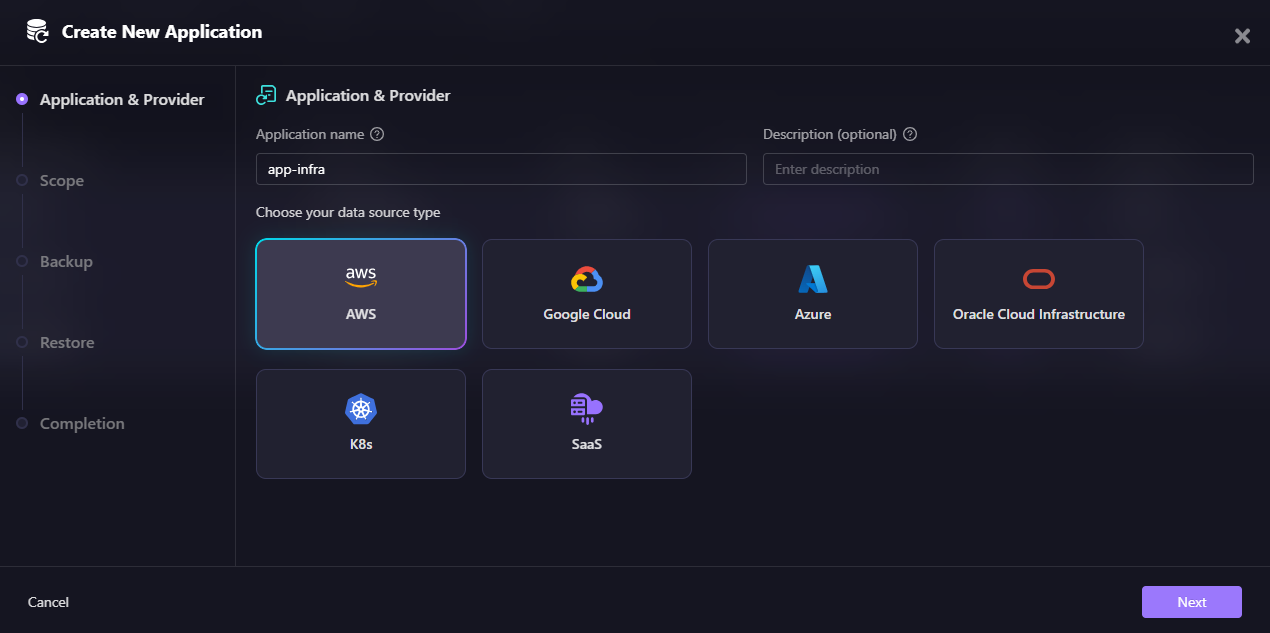
In Firefly's application creation flow, you first select your data source type: AWS, Google Cloud, Azure, Oracle Cloud Infrastructure, Kubernetes (K8s), or SaaS. This determines which cloud provider's resources will be included in the application scope.
Next, you define the backup scope using tags.
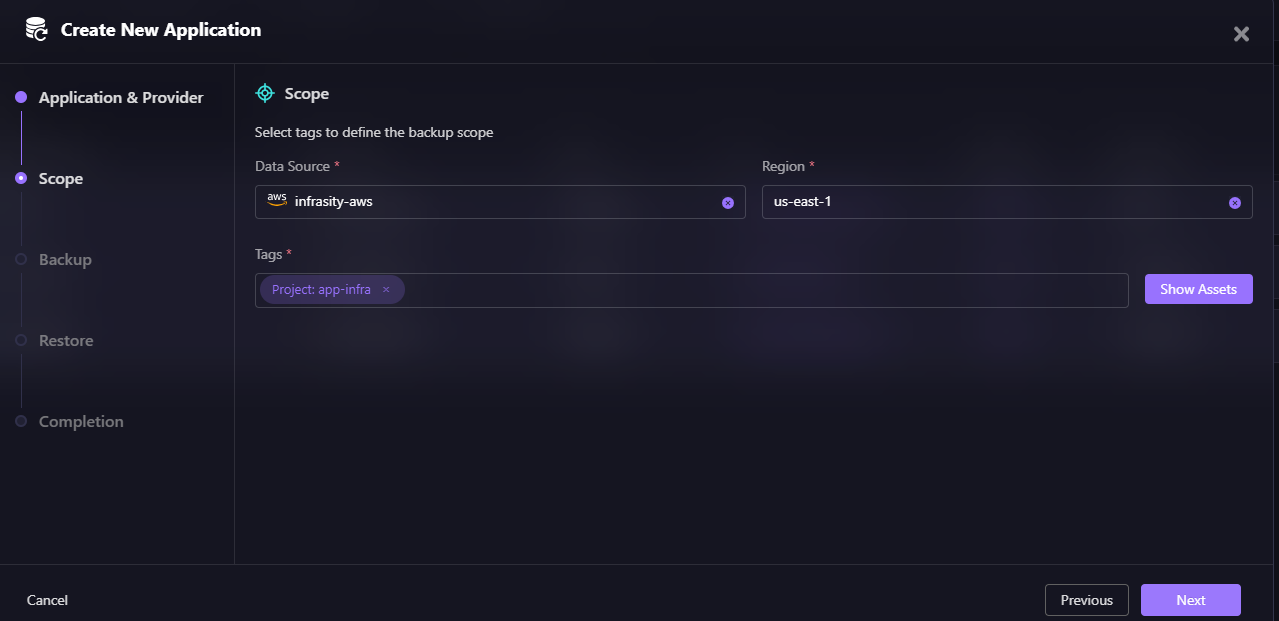
For example:
- Project: app-infra
- Environment: production
All resources matching those tags in the selected data source (e.g., infrasity-aws) and region (e.g., us-east-1) become part of the application scope.
After defining tags, Firefly shows you exactly which assets will be included in the application.
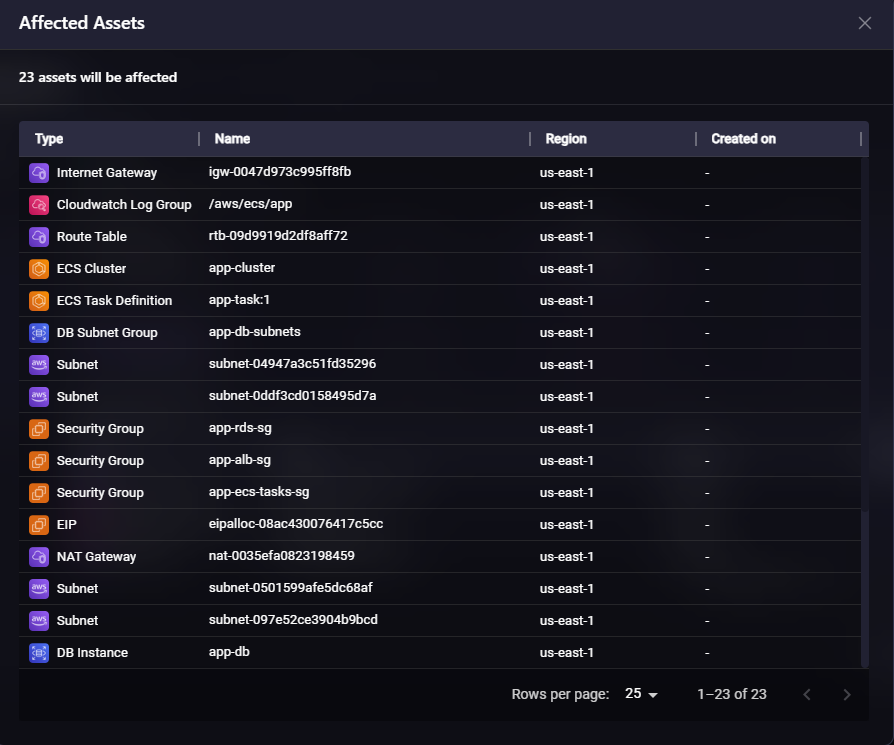
This view above displays 23 assets that will be affected, including:
- Internet Gateway (igw-0047d973c995ff8fb)
- CloudWatch Log Group (/aws/ecs/app)
- Route Table (rtb-09d9919d2df8aff72)
- ECS Cluster (app-cluster)
- ECS Task Definition (app-task:1)
- DB Subnet Group (app-db-subnets)
- Multiple Subnets across availability zones
- Security Groups (app-rds-sg, app-alb-sg, app-ecs-tasks-sg)
- EIP, NAT Gateway
- DB Instance (app-db)
That grouping includes compute (ECS, EC2, Lambda), networking (VPC, subnets, NAT), IAM roles and policies, load balancers and target groups, and supporting resources (log groups, subnet groups).
Recovery shifts from resource-level restoration to application-level reconstruction. This matters because outages rarely affect one resource in isolation. They affect systems.
2. Dependency-Aware Snapshot Capture
A common failure during recovery is missing dependencies. Restoring a service without restoring its security group references, IAM trust policies, subnet associations, or load balancer bindings results in partial recovery.
When Firefly takes an application snapshot, it captures not only tagged resources but also their relationships, including:
- VPC and subnet associations
- Security group references
- IAM instance profiles and trust policies
- Load balancer listeners and target group bindings
Configuring Backup Schedule:
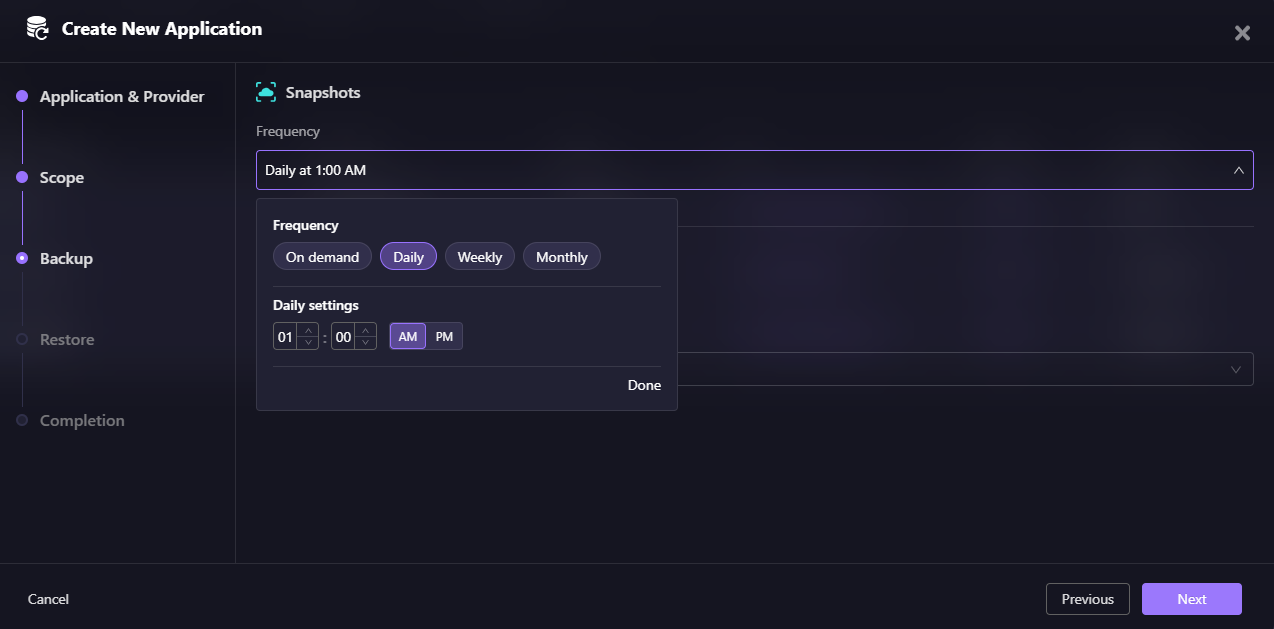
Firefly allows you to configure backup frequency for your application. You can choose:
- On demand - Manual snapshots triggered when needed
- Daily - Scheduled daily at a specific time (e.g., 01:00 AM)
- Weekly - Scheduled weekly backups
- Monthly - Scheduled monthly backups
In this example, the application is configured for daily backups at 1:00 AM, ensuring infrastructure state is captured automatically every day.
The goal is to preserve the infrastructure graph. This is critical because resource IDs frequently change during restoration. If relationships are not explicitly captured, recreated resources will not attach correctly.
3. Terraform-Based Infrastructure Restoration
During restore, Firefly does not directly mutate cloud resources through the console or API. Instead, it generates Terraform representing the captured application state.
Restore Workflow:
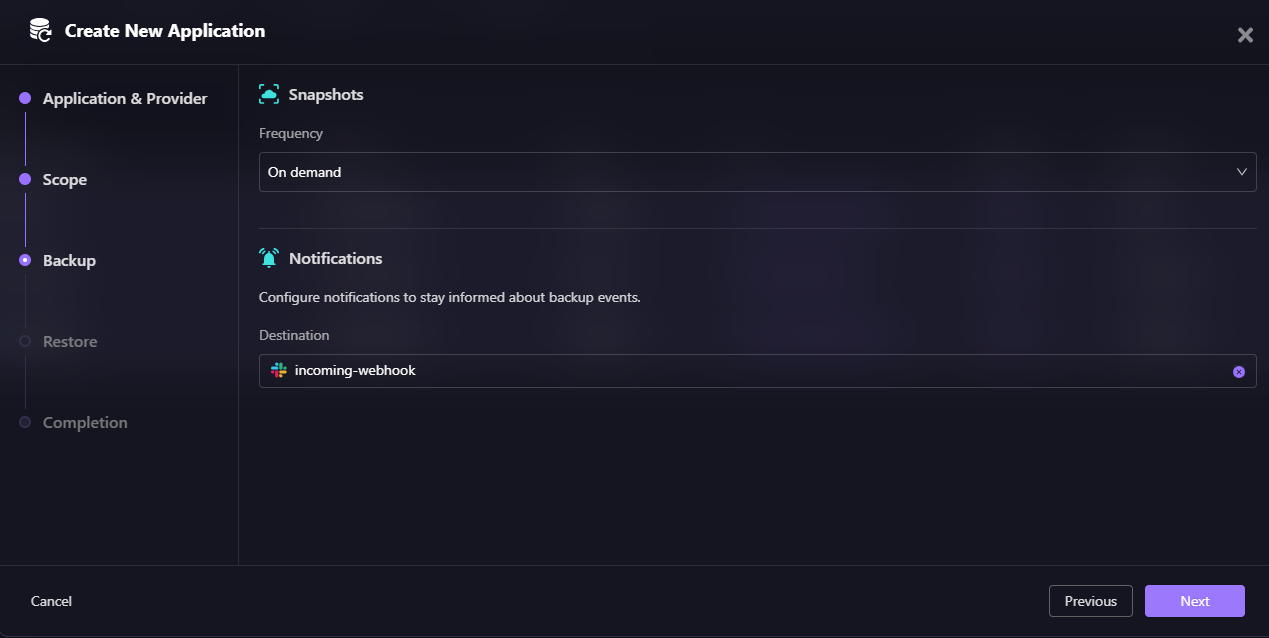
When restoring an application, Firefly provides options to integrate with your existing workflows:
- Workflow Project (Optional) - Select a project for workflow integration
- VCS Integration (Optional) - Connect to your version control system (GitHub, GitLab, etc.)
- Repository - Choose the repository where Terraform code will be committed
- AI Custom Instructions (Optional) - Provide guidance to help Firefly AI build a recovery Terraform module
That generated Terraform can be:
- Reviewed
- Applied through existing CI/CD pipelines
- Audited
- Version-controlled
This keeps disaster recovery aligned with Infrastructure-as-Code workflows. It avoids console-driven recovery, which often introduces further drift.
In environments already managed with Terraform, this ensures recovery follows the same operational model as day-to-day changes.
4. Selective Resource-Level Recovery
Not all failures require full-environment rebuilds. Sometimes the issue is isolated: a deleted ECS service, a misconfigured security group, an accidentally removed IAM role.
Firefly allows selective restore from a snapshot. This enables partial reconstruction, cross-region recreation, or account-level migration without impacting unrelated infrastructure.
Recovery becomes scoped and controlled instead of broad and disruptive.
How would Firefly have prevented Terraform apply Disaster?
Now return to the earlier hands-on example. We had:
- An IAM inline policy was added directly in production
- An RDS parameter adjustment was made under load
- Neither change was committed to Terraform
- Later, terraform apply reverted both hotfixes and degraded the application
Now, assume Firefly was configured before those changes were lost.
The Snapshot Captured Working State
The application was defined via tags:
- Project = app-infra
- Environment = production
A snapshot was taken while the system was healthy, after the IAM and RDS adjustments were in place.
That snapshot captured:
- The ECS task role, including the inline IAM policy
- The updated RDS parameter configuration
- The full application dependency graph
- All tagged infrastructure within the boundary
Recovery from Snapshot
Now repeat the failure: Terraform runs again. Declared state is enforced. Hotfixes are removed.
Instead of rediscovering fixes manually, recovery uses Firefly:
- Select restore from the snapshot
- Generate Terraform from the captured state
- Review differences
- Apply through the pipeline
The generated Terraform now reflects the working runtime configuration—not just the original declared intent.
- The IAM inline policy is preserved
- The RDS parameter changes are preserved
- The infrastructure graph is reconstructed consistently
The difference is not speed alone. The difference is that the working infrastructure state was captured before it was overwritten.
FAQs
What is application disaster recovery?
Application disaster recovery (ADR) means rebuilding your entire application stack—infrastructure, data, dependencies, and configurations—to a working state after a failure. This includes VPCs, IAM roles, security groups, load balancers, DNS, database connectivity, and background jobs, not just restoring individual backups.
What is the difference between backup and disaster recovery?
Backups protect data (database snapshots, file versioning, EBS volumes). Disaster recovery restores the entire system, including networking, identity, compute, and dependencies. You can have perfect backups and still fail to recover if VPCs, security groups, IAM roles, and load balancers aren't rebuilt correctly.
Why did my RDS backup not restore my application?
An RDS backup restores database data, but it doesn't recreate subnet groups, security group rules, parameter settings, IAM permissions, or application connectivity. If the VPC, security groups, or IAM roles don't exist in the recovery region, the database won't be reachable even if the data is restored.
How does Terraform help with disaster recovery?
If you deploy infrastructure with Terraform, recovery should also generate Terraform code. This ensures infrastructure is rebuilt declaratively with correct dependencies, security groups, IAM roles, and network configurations—not manually recreated in the console under pressure, which introduces errors and drift.

.avif)
.avif)
.webp)

.webp)












