
TL;DR
- Cloud disasters rarely start as disasters. Most outages begin with routine changes such as IAM updates, Terraform applies, and deleted resources that become critical when teams can’t restore service fast enough.
- Backups restore data, not applications. Recovery fails when networking, IAM, configuration, and service dependencies cannot be recreated, even though data snapshots are healthy.
- Disaster recovery is required when the environment itself can’t be trusted. High availability handles component failures, and backups handle data loss, but DR is needed when the infrastructure state is unknown, has drifted, or is unsafe to modify.
- Traditional cloud DR breaks because the infrastructure state isn’t captured or tested. Drift, console changes, control-plane outages, and unexercised restore paths turn recovery into guesswork during incidents.
- Effective cloud disaster recovery restores applications from a known infrastructure state. Firefly enables this by inventorying real cloud resources, tracking drift and mutations, snapshotting application-level infrastructure, and restoring it through code and Git rather than manual intervention.
Outages rarely start as “disasters.” In practice, they usually begin as small, routine changes that go wrong:
- A production S3 bucket was deleted during cleanup
- An IAM policy change that blocks a critical service
- A bad Terraform apply that partially updates networking
- A managed cloud service in one region is becoming unavailable
None of these looks like a disaster at the moment they happen. They become disasters when teams realize they cannot get the system back online fast enough.
If you want a practical, no-fluff example of the failure modes I describe below, see this short post from 4TC Services. It sums up the common gaps between having backups and being able to recover quickly, and it highlights the simple things teams forget that turn small incidents into long outages.
Most platform teams already have backups: databases are snapshotted, volumes are copied, and object storage has versioning. Yet recovery still takes hours or days. The gap is not data. The gap is everything around the data.
The real bottleneck during recovery is rebuilding infrastructure state: VPCs, subnets, routing tables, security groups, load balancers, IAM roles, service accounts, queue configurations, feature flags, and the orchestration that ties them together. When that state is missing, outdated, or undocumented, restores stall even when backups are healthy.
This post focuses on recovery mechanics, not DR theory. I’ll show how teams actually bring systems back online in cloud environments, the specific failure modes that slow recovery, and the preconditions you need so a recovery works under pressure.
What Cloud Disaster Recovery Means
In cloud systems, disaster recovery means restoring application availability after an event that makes the current production environment unusable or unsafe to operate.
This situation comes up when the problem is not a simple outage that can be fixed with a rollback or a restart. Instead, something has gone wrong at the infrastructure or configuration level, and continuing to change the live environment risks causing more damage.
Examples of these situations include:
- Infrastructure changes left the environment in an unknown state
- Critical cloud resources were deleted or altered
- Access controls prevent services from reaching data or secrets
- A cloud region or account is unavailable
- Engineers cannot determine what is safe to modify
At this point, disaster recovery is about restoring service, not debugging production.
What recovery looks like in the cloud
In practical terms, recovery means bringing the application up in a known-safe location and restoring the required data and configuration so it can serve traffic again.
That process typically involves:
- Creating required cloud resources using known definitions
- Restoring data from backups or replicas
- Reconnecting applications to their dependencies
- Validating that the system works end-to-end
- Redirecting user traffic once checks pass
The key requirement is that this can be done without relying on the damaged environment.
If recovery depends on inspecting the live system to understand how it was set up, the recovery process will slow down or fail during an incident.
Why is this different from normal operations?
During normal operations, teams make small, controlled changes to a running system. Disaster recovery happens when that model breaks.
In a recovery scenario:
- You cannot assume the current state is correct
- You cannot assume automation will safely converge
- You cannot assume past changes are fully documented
Disaster recovery works only when the system can be brought back using inputs that already exist: infrastructure definitions, configuration records, and backups that are known to be usable.
What disaster recovery guarantees
A workable disaster recovery approach guarantees that:
- Applications can be brought back online after severe failures
- Data loss stays within defined limits
- Recovery does not depend on specific individuals or memory
- The process is repeatable under pressure
Disaster recovery is not about avoiding outages. It is about having a reliable way to restore service when the current production environment cannot be trusted.
Disaster Recovery vs High Availability vs Backups
When production breaks, the first decision is understanding what kind of failure you’re dealing with. High availability, backups, and disaster recovery apply at different points in that decision tree.
Mixing them up is how outages drag on.
High Availability
High availability applies when an individual component fails, but the rest of the system is still healthy.
Example: A stateless API runs on Kubernetes across three availability zones. One node in us-east-1a fails due to an underlying host issue. The pods on that node are rescheduled to other nodes, and the load balancer removes the failed endpoint. Requests continue to succeed with minimal latency impact.
Nothing needs to be restored. No data is touched. The system heals itself because the failure is isolated.
High availability stops helping when the failure is caused by shared configuration or infrastructure that all instances depend on.
Backups
Backups apply when data is lost or corrupted, but the application and infrastructure are still usable.
Example: An engineer runs a cleanup script on the production PostgreSQL database and accidentally deletes rows from the orders table for the last two hours. The API and background workers are still running, but the customer order history is incomplete.
A point-in-time restore is used to recover the database state from before the script ran. Data loss is limited to the configured backup window, and the application resumes normal behavior.
Backups work here because the database service, networking, and permissions are all intact. If the database could not be created, accessed, or attached, the backup alone would not help.
Disaster Recovery
Disaster recovery applies when the environment itself cannot be safely fixed.
Example: A Terraform apply updates shared networking and IAM resources. The apply fails midway, deleting several subnets and replacing IAM roles. Some services still reference old resource IDs, others do not start at all, and the Terraform state no longer matches what exists in the cloud.
Engineers cannot safely rerun the apply or roll it back without risking more deletions. Recovery proceeds by bringing the application up in a clean region using known infrastructure definitions, restoring data from backups, and validating behavior before redirecting traffic.
The damaged environment is not used during recovery.
Cloud Disaster Recovery Strategies
Once a team accepts that disaster recovery is about restoring service after the environment is no longer safe to use, the next decision is how much of the system should already exist before an incident.
Every strategy is a trade-off between recovery time, cost, and operational complexity. In practice, these strategies describe how much infrastructure and state is kept ready when production fails.
Backup and Restore
This approach assumes that only data is preserved ahead of time. Infrastructure is expected to be recreated during the incident.
What teams typically have in place:
- Automated database snapshots or point-in-time recovery
- Object storage backups
- Infrastructure definitions stored in Git (Terraform, CloudFormation)
What they do not have:
- A running secondary environment
- Verified restore workflows
- Guaranteed infrastructure parity
How recovery actually happens: Engineers create a new environment by applying IaC, fix whatever breaks during deploy, then restore data from backups once the system is running.
Example: An internal analytics service runs in one AWS region. RDS snapshots run every hour. After a major outage, the team recreates the VPC and services using Terraform and restores the RDS snapshot from the last hour.
Implications:
- Recovery time depends on how clean the IaC is and how many manual fixes are needed
- Restoring order is often discovered during the incident
- Works only when downtime is acceptable
This is common for early-stage systems or services that are not customer-critical.
Pilot Light
Pilot light keeps the foundational infrastructure always present, but application capacity is kept minimal to reduce cost.
What teams keep running:
- VPCs, subnets, routing, security groups
- IAM roles and service identities
- Databases or replicated storage
What stays scaled down:
- Application compute
- Background workers
How recovery happens: During an incident, compute is scaled up, dependencies are verified, and traffic is enabled.
Example: A billing service maintains its networking, IAM, and database in a secondary region, but runs no application instances. When the primary region fails, application services are deployed and scaled in the secondary region.
Implications:
- Faster recovery than backup-only approaches
- Requires careful dependency ordering during scale-up
- Configuration drift between regions can silently break recovery
Pilot light reduces rebuild work but still requires active orchestration.
Warm Standby
Warm standby keeps a fully deployable environment running at reduced capacity.
What teams keep in sync:
- Infrastructure and service configurations
- Application versions
- Data replication with acceptable lag
How recovery happens: Traffic is shifted to the standby region, and capacity is increased.
Example: A customer-facing API runs at low traffic volume in a secondary region. When the primary region goes down, traffic routing is updated, and auto-scaling increases capacity.
Implications:
- Recovery time is predictable
- Costs are higher due to idle resources
- Requires continuous enforcement of configuration parity
Warm standby works well when recovery speed matters and the system can tolerate ongoing cost.
Active-Active / Multi-Region
Active-active runs production traffic in multiple regions simultaneously. This is not just an infrastructure choice. It requires application-level design to handle concurrency and failures.
What teams must solve:
- Data replication and consistency
- Request routing and failover logic
- Isolation between regional failures
Example: A global SaaS platform serves users from multiple regions at all times. Traffic is routed by latency and health checks, and data is partitioned or replicated across regions.
Implications:
- Minimal recovery time
- Significant operational and application complexity
- Harder incident diagnosis and testing
This approach is justified only when downtime has a strict business impact.
Strategy Comparison
Most platform teams do not adopt a single global strategy.
Common patterns:
- Customer-facing services use warm standby or active-active
- Internal tools rely on backup and restore
- Shared platforms use a pilot light
The correct strategy is the one that matches recovery goals and the team’s ability to execute it under pressure.
Why Traditional Cloud Disaster Recovery Approaches Fail
This section focuses on what actually goes wrong when you try to restore a system after declaring a disaster recovery event. Not theory, not architecture diagrams, this is what breaks when you are under time pressure and trying to make an application usable again.
In most incidents, teams already have backups, Infrastructure-as-Code, and some form of runbook. Recovery still fails because those inputs don’t represent how production really worked at the moment it went down.
Backups restore data, but not a runnable system
The first failure usually shows up right after the data is restored.
Database snapshots and object storage restores complete successfully, but applications fail to start or return errors immediately. Services can’t reach dependencies, permissions are missing, or load balancers never mark targets healthy.
The underlying issue is almost always the infrastructure context. Production networking and security rarely exist exactly as defined in code. Security groups are tweaked manually, listeners and target groups are adjusted over time, routes are added to support new services, and IAM policies are widened to unblock deploys. When those changes aren’t captured, restored data points to endpoints and permissions that no longer exist.
At that point, backups aren’t the problem. The environment they depend on is.
Infrastructure-as-Code does not match live production
Teams rely on Terraform or CloudFormation during recovery, assuming it reflects production. In practice, it often reflects an older version of the system.
During recovery, this shows up as large and unexpected diffs, forced resource replacements, or services that deploy cleanly but fail at runtime. The state file and the cloud environment no longer agree.
This drift comes from real operational behavior: hotfixes applied directly in the console, partial applies that were never reconciled, or provider-side changes that altered resource behavior over time. Recovery turns into debugging why the rebuilt environment behaves differently from the one users were running hours earlier.
Console changes create dependencies no one remembers
Every production environment contains console-driven changes. A firewall rule was added during an outage. An IAM policy was temporarily widened. A route updated to work around a provider issue.
These changes often become hard dependencies, but they are rarely documented and almost never codified. During recovery, they are invisible.
The result is a familiar pattern: recovery deploys succeed syntactically, but applications fail in subtle ways. Engineers are forced to inspect the broken environment to reverse-engineer what needs to be recreated. This slows recovery and increases risk at exactly the wrong moment.
Recovery automation assumes the cloud control plane is available
Most recovery workflows assume that provider APIs are fully functional. Applying Terraform, updating DNS, creating IAM roles, and scaling services all of these depend on the cloud control plane.
Recent AWS and Google Cloud outages showed that this assumption does not always hold. When management APIs return timeouts or 5xx errors, CI pipelines fail, Terraform cannot converge, and even basic visibility degrades.
If recovery depends on real-time control-plane access, automation becomes unusable precisely when it is needed most.
Traffic overwhelms the recovery environment after a failover
Even when infrastructure is restored correctly, systems often fail under real load.
Recovery environments are usually sized to keep data replicated or services warm, not to handle full production traffic. During failover, user traffic, service-to-service calls, background jobs, and admin access all shift at once. NAT gateways saturate. Load balancers throttle. VPN endpoints collapse.
At the same time, external dependencies break. Identity providers block new IP ranges. Payment gateways reject callbacks. Webhooks never arrive. The system appears “up,” but users can’t complete real workflows.
Identity and secrets failures surface late
Authentication problems usually appear after everything looks healthy.
Services start. Health checks pass. Traffic is enabled. Then requests fail with authorization or decryption errors. Secrets were rotated in production but not replicated. KMS keys are unavailable in the recovery region. Service-to-service trust relationships are missing.
These failures are slow to diagnose and rarely covered explicitly in disaster recovery plans.
DR testing does not keep pace with change
Most teams test disaster recovery quarterly or yearly. Their systems change weekly or daily.
Between tests, new services are added, permissions evolve, and dependencies shift. By the time a real recovery is needed, the tested plan no longer reflects production. The gaps only become visible when time is already tight.
Active-active shifts complexity instead of removing it
Active-active deployments are often treated as a default solution. In practice, they move complexity into data consistency, ordering, and failure isolation.
Without application-level support for conflict resolution or event sourcing, active-active setups introduce new recovery problems instead of solving existing ones. Many teams would recover faster with a well-tested warm standby or pilot-light approach.
The Common Pattern Behind Cloud DR Failures
When disaster recovery fails, it is almost never because snapshots were missing. It fails because the runtime environment, networking, IAM, keys, secrets, control-plane access, and third-party integrations cannot be recreated or relied on quickly enough.
Fixing this requires capturing real infrastructure state, continuously validating it against what is running, and rehearsing restores that include networking, identity, and external dependencies, not just data. This is the gap most platform teams run into in practice, and it is the gap Firefly is built to address.
How Firefly Helps Teams with Cloud Disaster Recovery
The failures discussed previously all come down to one problem: teams don’t have a reliable, current, and deployable view of their infrastructure when recovery starts. Firefly is designed to close that gap by focusing on infrastructure state rather than just backups or plans.
Instead of treating disaster recovery as a once-in-a-while event, Firefly treats it as a continuous discipline: capture what exists, track how it changes, and make it recoverable at any point.
Capturing the Infrastructure State of Multiple Clouds
A common recovery blocker is discovering that critical resources were never codified. Networking, IAM policies, load balancer listeners, or managed services exist in production, but not in source control.
flags resources that are not managed by Infrastructure-as-Code. These are typically resources created through the console, hotfixes applied during incidents, or legacy components that were never codified
Here is how Firefly maintains the inventory by continuously scanning all integrated cloud providers (support AWS, GCP, Azure, and OCI) and maintaining a live infrastructure inventory:
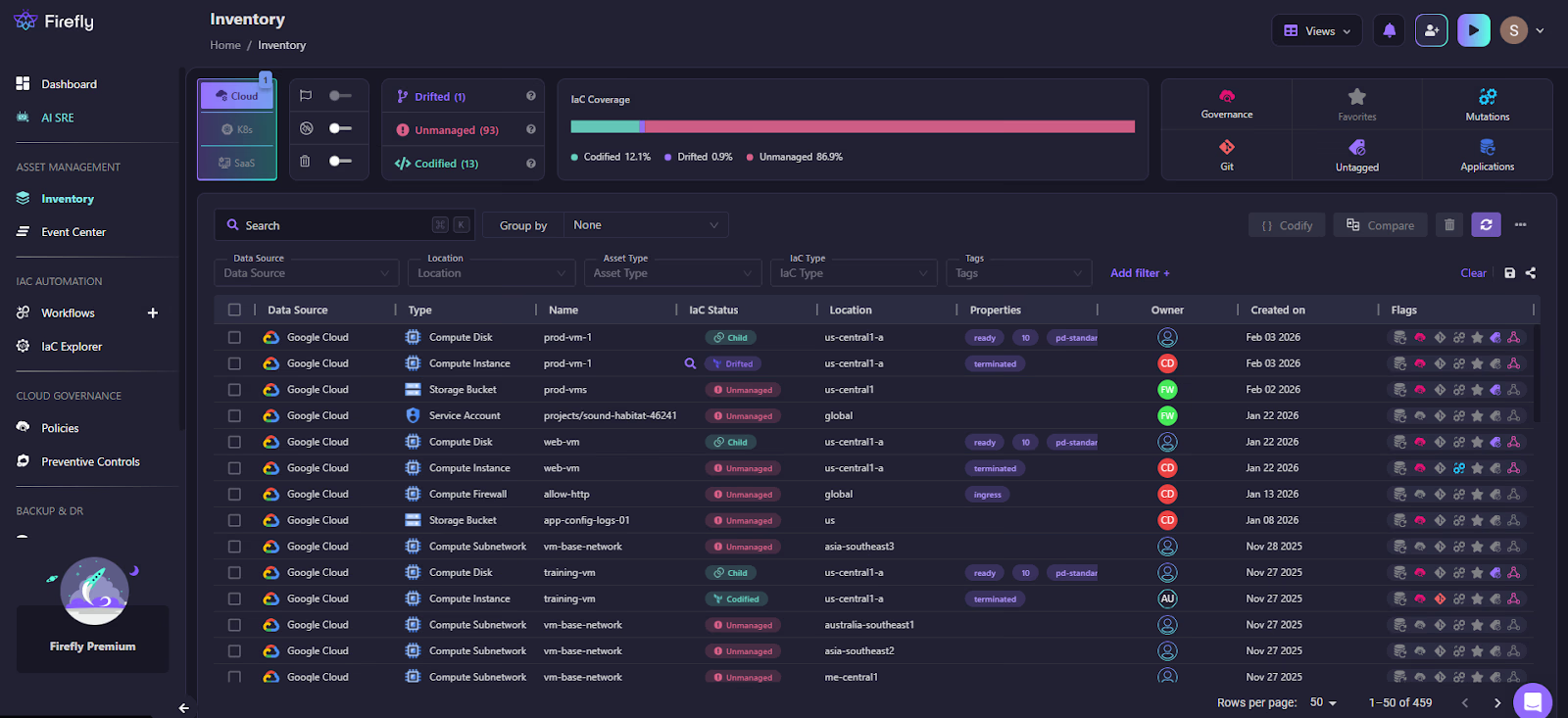
What changes during recovery:
- You are not guessing which resources existed
- You are not inspecting the broken environment to recreate it
- You can deploy the same infrastructure into a clean account or region
Recovery starts from a concrete, deployable snapshot of infrastructure state, not from memory.
Making Drift Visible Before It Breaks Recovery
Drift is usually invisible until recovery fails. Firefly continuously compares live infrastructure against its IaC definitions and flags differences as they happen.
This becomes important because recovery depends on predictability:
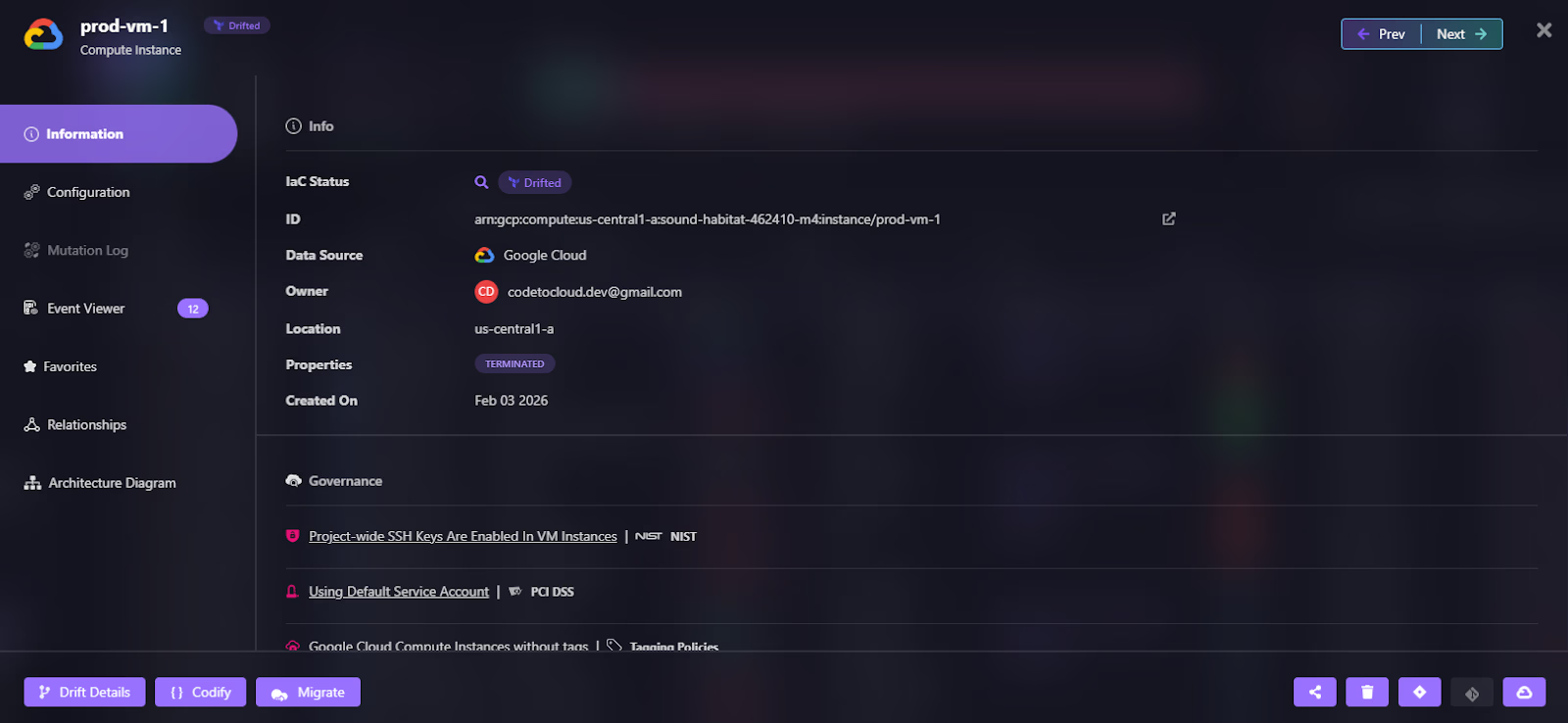
- If production drifted, Firefly shows you exactly where, as shown in the snapshot below, where a GCP Compute Engine instance (prod-vm-1) has drifted from its IaC definition:
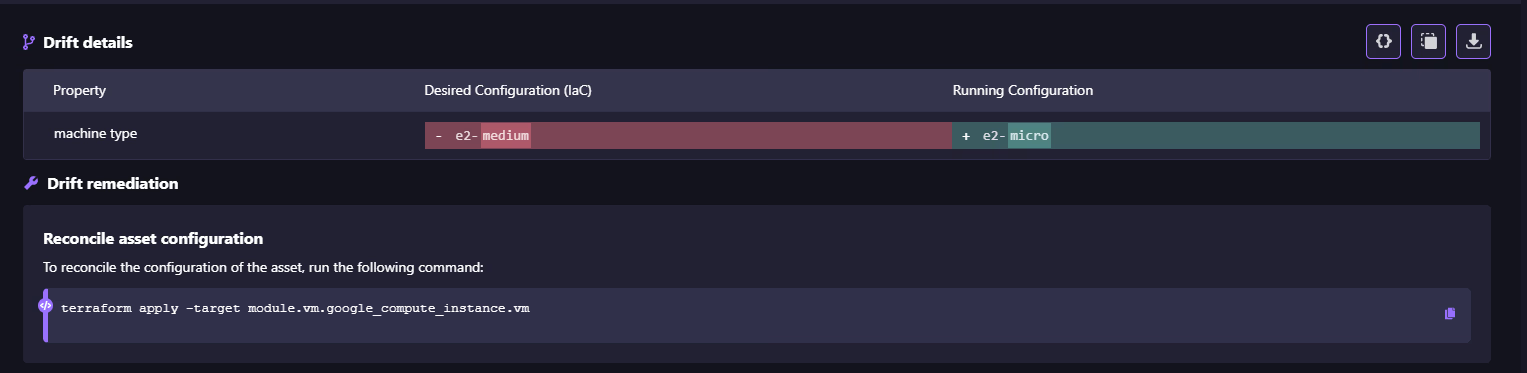
- You can decide whether to reconcile code or accept the live state as visible in the drift details:
- Recovery runs don’t surprise you with unexpected diffs
Instead of discovering drift during a DR event, teams address it while systems are healthy.
Turning ClickOps Into Auditable, Reversible Changes
Manual console changes are unavoidable in real operations. The problem is not that they happen, but that they disappear.
Firefly records mutation events and ClickOps activity, creating a timeline of what changed, when, and by whom. Any point in that timeline can be codified and restored.
During incidents, this enables:
- Fast root-cause analysis when the source of failure is unclear
- Reverting infrastructure to a known-good state using code
- Restoring deleted or misconfigured resources through GitOps
Recovery becomes a controlled revert, not an investigation.
Restoring Applications, Not Just Data
Most cloud disaster recovery efforts focus on restoring data first. Databases are recovered, buckets are restored, and snapshots are completed successfully. The failure shows up immediately after: the application still doesn’t work.
Applications depend on infrastructure, configuration, access, and service relationships. Firefly’s backup and disaster recovery workflow is designed to restore the entire application environment, not isolated resources.
Define the application as the recovery unit
Firefly starts by defining an application. An application is the set of cloud resources that must be recovered together for a workload to function.
This typically includes data stores, networking, and access configuration, and supporting services, as shown in the snapshot below:

Treating these as a single recovery unit removes the need to manually identify dependencies during an incident.
Capture infrastructure state, not just backups
When a backup runs, Firefly takes an infrastructure snapshot. Before doing that, it scans the connections between all resources in the application to understand what the application actually depends on to run.
This is important because not every dependency gets tagged or grouped under the application. A subnet a database sits in, a security group attached to a load balancer, an IAM role used by a compute instance; these are easy to miss, but the application breaks without them. Firefly picks them up automatically during the scan and includes them in the snapshot, even if they were never explicitly marked as part of the application.
The result is a snapshot that reflects what the application truly needs, not just what someone remembered to label. As we can see in the screenshot below:
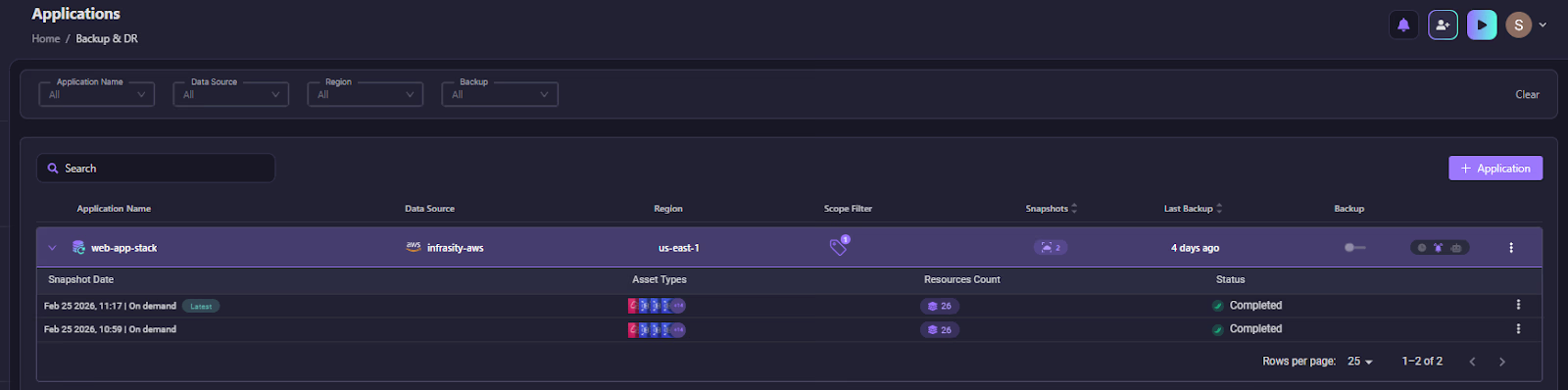
Each snapshot is timestamped and tied to a specific application, so teams always have a clear, reliable starting point for recovery.
Inspect what will be restored before restoring
Before initiating recovery, teams can inspect a snapshot. Firefly shows exactly which resources will be restored, across cloud providers and regions. This avoids discovering missing infrastructure halfway through a restore.
Restore infrastructure through code
When a restore is triggered, Firefly generates a Terraform module directly from the snapshot state and deploys it. The module includes all resource definitions, configuration values, and dependency ordering, everything needed to bring the application back up in a clean environment. Recovery becomes a controlled infrastructure change rather than emergency console actions.
Execute recovery through Git and CI/CD
Firefly restores infrastructure by opening a pull request in your Git repository. Changes are reviewed and applied through Firefly IaC orchestration. This keeps recovery auditable, repeatable, and aligned with normal engineering workflows. By restoring applications as complete systems, data, infrastructure, and configuration together, Firefly avoids the most common disaster recovery failures.
Teams don’t inspect broken environments, don’t recreate infrastructure from memory, and don’t rely on undocumented console changes. Recovery starts from a known state and executes through code. That is what makes cloud disaster recovery reliable in practice: restoring the application environment the system actually needs to run, not just the data it stores.
FAQs
What’s the difference between DRP and BCP?
A Disaster Recovery Plan (DRP) defines how IT systems, applications, and data are restored after a disruption. A Business Continuity Plan (BCP) covers how the organization continues operating during that disruption, including people, processes, facilities, and communication. DRP is a technical subset of the broader BCP.
How do cloud platforms improve disaster recovery?
Cloud platforms improve disaster recovery by providing built-in redundancy across Availability Zones and Regions. They enable automated backups, cross-region replication, infrastructure as Code, and rapid provisioning of new environments. This reduces hardware dependency and shortens recovery time compared to traditional on-premise setups.
What does cloud recovery do?
Cloud recovery restores workloads, infrastructure, and data using cloud-based backups and automation. It can recreate environments in the same region, another region, or even another account. The goal is to meet defined RTO and RPO targets with minimal manual intervention.
What is the 3-2-1 rule in backup strategy?
The 3-2-1 rule means: Keep 3 copies of your data, store them on 2 different media types, and keep 1 copy offsite. In cloud terms, this often translates to primary data, a local backup, and cross-region or cross-account backups to protect against regional failure.


.webp)


.webp)












