TL;DR
- DR means restoring VPCs, IAM, DNS, and load balancers, not just database snapshots. When AWS ECR went down, one team had perfect backups but couldn't deploy because container images were unreachable. Backups don't restore your networking or identity layer.
- Different tools recover differently. Firefly rebuilds infrastructure from Terraform. Druva/Veeam replicates VMs to other regions. Trilio handles Kubernetes namespaces. Rubrik manages policy-driven workload backups. Pick the tool that matches your architecture.
- Test recovery in another account or region. During the June 2025 Google Cloud outage, the us-central1 region took 2 hours and 40 minutes longer to recover due to Spanner overload. Regional failures happen. Run full restore drills quarterly and verify your app works after recovery.
- Terraform stacks need a different DR than VM environments. If your infrastructure is defined in code across multiple accounts, VM replication won't help. You need a solution that captures infrastructure state and rebuilds it declaratively, like running a deployment rather than restoring a backup.
About four months ago, a team posted on r/devops after an AWS disruption.
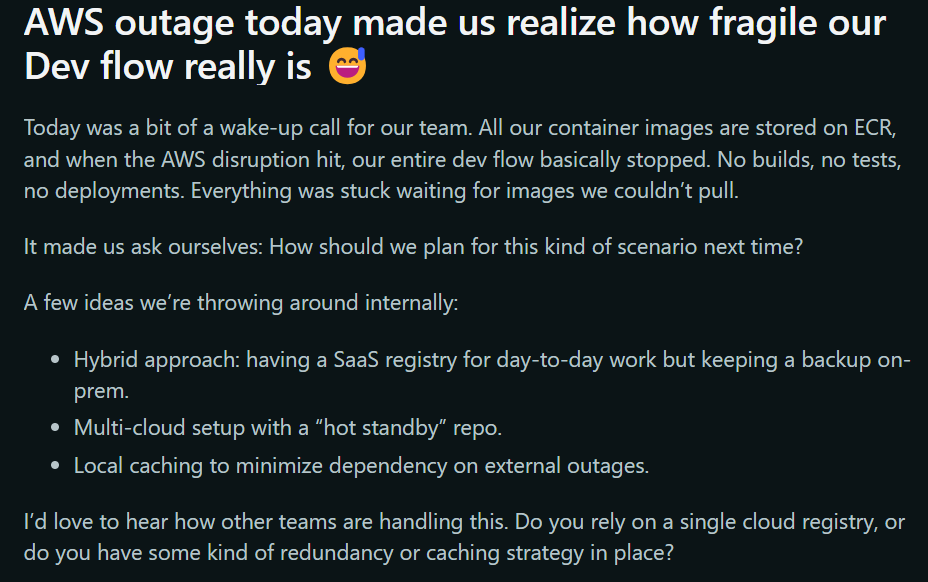
All their container images were in a single regional ECR. When the registry became unreachable:
- CI jobs could not pull base images
- Builds and integration tests stalled
- Deployments blocked because new pods couldn’t start
Their RDS database backups and S3 application data were safe, but the pipeline and deploy paths were unusable. Recreating images or restoring a DB would not have fixed the immediate problem: the runtime and CI dependencies were unavailable. This example shows the practical failure mode we see in cloud DR:
- DR is not only about data integrity. It’s about the whole runtime context: registries, IAM, DNS, network, certs, and CI/CD pipelines.
- Partial redundancy or single-service assumptions create single points of operational failure.
- You need repeatable, tested recovery workflows that re-create both infrastructure and operational paths, not only backups.
Below, we walk through solutions that address these gaps: SaaS-managed DR, hybrid and VM-focused DR, Kubernetes-native recovery, and infrastructure-first rebuild tools, and where each one fits in an ops playbook.
What Should I Actually Look For in a Cloud DR Solution?
Before comparing tools, define exactly what you need to recover. For example, imagine a production setup that includes Terraform-managed AWS infrastructure, an EKS cluster, an RDS database in private subnets, container images in ECR, traffic through an ALB, DNS in Route53, and IAM roles for service accounts. That entire system must come back online after a failure. A disaster recovery product should be evaluated against a real environment like this, not a simplified demo stack.
1. Can It Rebuild My Entire Infrastructure from Code After a Disaster?
A serious DR solution must generate the code to rebuild infrastructure, not just restore data. That includes VPCs, subnets, route tables, security groups, load balancers, DNS records, and IAM roles, all as Infrastructure-as-Code (Terraform, CloudFormation, Pulumi).
These components must be recreated in the correct order so workloads can attach and communicate properly. If networking or identity is wrong, the application will not function even if the database is restored.
When evaluating a tool, ask: Can it generate Terraform code to rebuild my stack in a clean account or in a different region? Then, verify that running that code actually makes the application reachable.
2. Does It Restore Data with Proper Context?
Restoring a database snapshot alone does not complete recovery. The restore must use the correct subnet group, security group, parameter settings, and encryption keys. In Kubernetes environments, persistent volumes must reattach correctly, and pods must start without manual fixes. Recovery should be validated at the application level. The application must connect to the database and serve requests successfully.
3. Can I Recover to a Different Region or Account?
Real incidents can involve a full region outage or a compromised cloud account. A DR solution must allow restoring workloads into a different region and preferably into a separate recovery account with isolated credentials. If recovery depends on the same production account being healthy, the system is not truly isolated from failure.
4. How Quickly Can I Redeploy My Applications After Recovery?
The system should capture cloud state and support declarative recreation with tools such as Terraform. Recovery should be via Terraform apply, not manual console clicks.
Measure your RTO: Time from disaster detection to application serving traffic. If recovery involves manual steps, your RTO is unpredictable.
5. How to know if the Application Actually Works After Recovery?
Recovery is not complete when resources exist. It is complete when the application works. Health checks should pass, APIs should respond correctly, background workers should process tasks, and autoscaling should behave as expected. The company providing the DR solution should demonstrate an end-to-end rebuild that results in a functioning application serving real traffic.
6. Security and Ransomware Protection
Restore points should be protected from deletion and usable in an isolated environment. The solution must handle encryption keys, secrets, and certificates correctly. If keys or secrets cannot be restored, the recovered environment will not function. In ransomware scenarios, the ability to roll back safely to an immutable snapshot is critical.
7. Can Recovery be Tested Before it Breaks Production
Recovery should be tested regularly. The solution should support drills in isolated accounts or regions and provide reports showing what was restored, how long it took, and whether validation checks passed. If the recovery process has never been executed end-to-end, it remains unverified.
These are the capabilities that separate simple backup tools from real disaster recovery systems. In the next section, we’ll evaluate specific cloud disaster recovery solutions and see how each one addresses these requirements in practice
Top Cloud Disaster Recovery Solutions for 2026
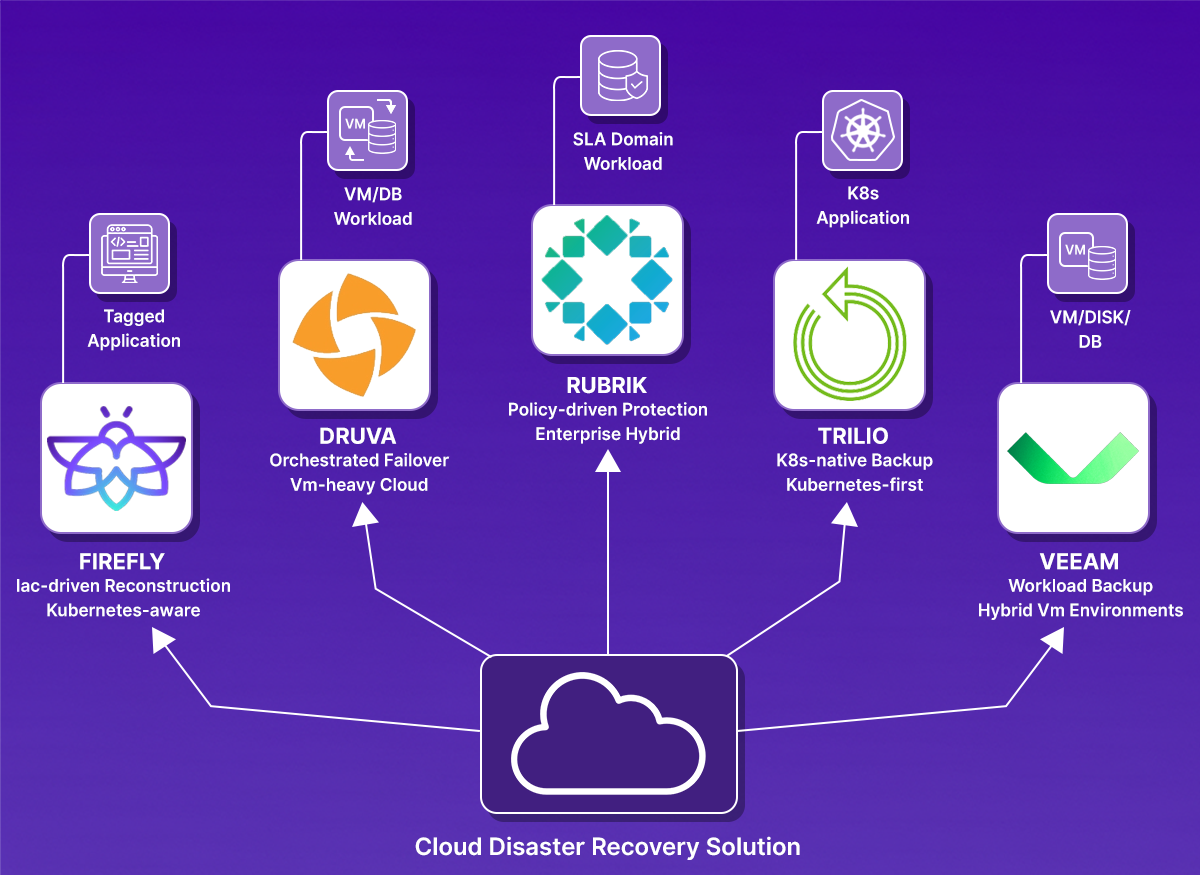
With the evaluation criteria clear, we can now look at how different cloud disaster recovery solutions approach the problem. Each of the tools below addresses recovery from a different angle: some focus on infrastructure rebuild, some on managed backup and failover, and others on Kubernetes-specific recovery.
We’ll start with infrastructure-first recovery.
1. Firefly
Category: Infrastructure-first disaster recovery
Firefly approaches disaster recovery from the infrastructure layer outward. Instead of focusing solely on data backup, it continuously captures the state of the cloud infrastructure and stores it in a deployment-ready form. The idea is simple: if you can reliably reconstruct infrastructure, you can rebuild environments cleanly in another region or account.
What's Included in Recovery?
Firefly targets cloud infrastructure and the applications running on top of it. That includes:
- VPCs, subnets, route tables, and networking components
- IAM roles and trust relationships
- Load balancers and DNS configuration
- Kubernetes clusters and associated resources
- Cloud services such as API Gateways and managed services
It focuses on capturing the structure and dependencies of these resources so they can be recreated.
How Recovery Works
Firefly continuously captures infrastructure state and stores it as application-level snapshots. Recovery is driven by these snapshots, not by individual resource restores. In the snapshot below:
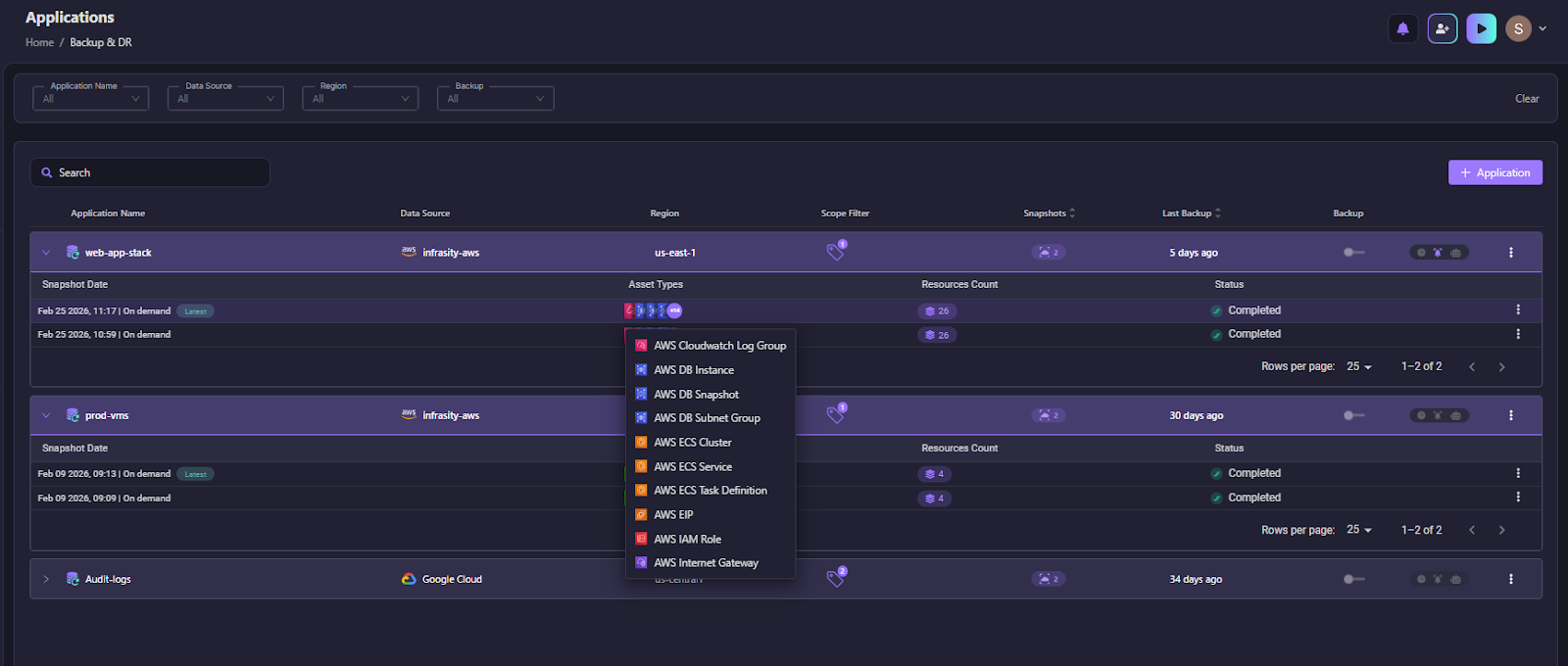
You can see the Snapshots dashboard grouped by Application name (for example, newcore-service1). Each snapshot is tied to a specific cloud environment, such as AWS Production, includes the region (e.g., us-east-1), and shows completion status.
The dropdown on the right lists resource types captured in the snapshot, including:
- ACM Certificates
- API Gateway resources
- CloudWatch rules and log groups
- ECR repositories
- ECS clusters and task definitions
This shows that Firefly captures the infrastructure configuration of an application, not just data. Each snapshot represents a point-in-time capture of networking, identity, compute definitions, and service configurations grouped under a single application boundary.
During recovery, Firefly uses this snapshot to rebuild the environment in the correct order, starting with foundational resources such as networking and IAM, then restoring service components and compute. Because resources are captured as part of a single application graph, rebuilds are structured rather than manual.
The scheduled snapshots visible in the UI indicate that infrastructure state is tracked continuously, which helps reduce drift and ensures rebuild artifacts are current.
In practice, this enables full-environment reconstruction in another region or account rather than restoring isolated components.
Best Fit
Firefly is strongest in scenarios where infrastructure is managed as code and environments are complex or multi-account. It is particularly suited for teams that:
- Rely heavily on Terraform or similar tools
- Operate across multiple regions or accounts
- Want the environment rebuilt rather than just data restored
- Need visibility into recovery gaps before an outage occurs
It is less about traditional backup and more about controlled reconstruction of cloud environments.
2. Druva
Category: SaaS-based cloud disaster recovery
Druva takes a different approach compared to infrastructure-first platforms. It operates as a SaaS-managed data protection and disaster recovery system. The focus is less on rebuilding infrastructure from the state and more on backing up workloads and orchestrating their recovery in the cloud.
What's Included in Recovery?
Druva protects:
- Cloud virtual machines (AWS, Azure, GCP)
- VMware environments
- Databases
- File systems
- Some SaaS applications
It captures workload-level backups and stores them in cloud object storage managed through its SaaS control plane.
How Recovery Works
Druva operates through a centralized DR plan model. Workloads such as virtual machines are backed up and associated with predefined disaster recovery plans that control replication frequency, region mapping, and failover behavior.
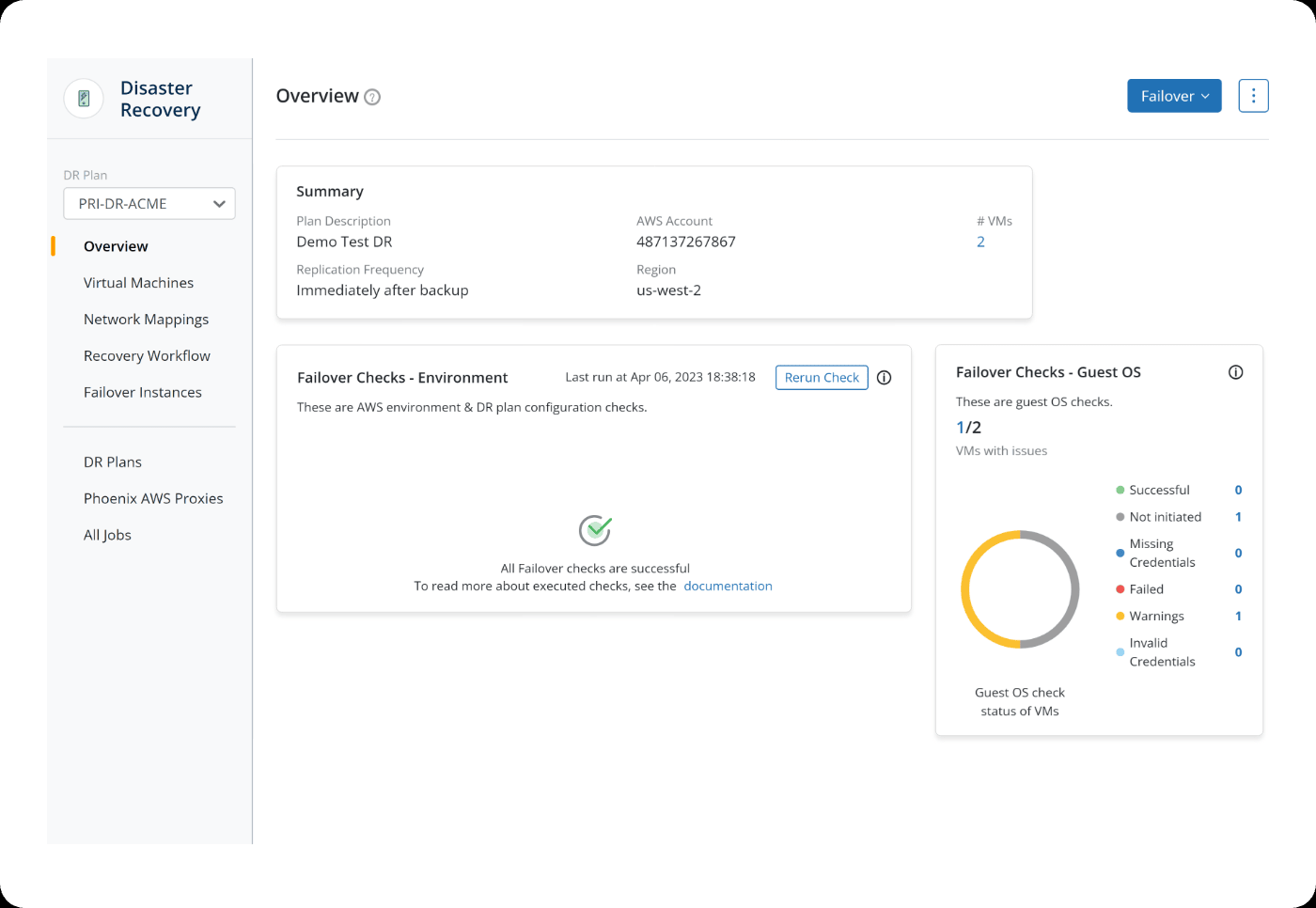
In the snapshot above, you can see a DR Plan (PRI-DR-ACME) selected in the left panel. The overview page shows:
- The AWS account associated with the DR plan
- The target recovery region (us-west-2)
- Replication frequency (“Immediately after backup”)
- The number of protected VMs under this plan
Below that, the interface displays Failover Checks, which validate whether the environment is ready for recovery. These checks include:
- Environment validation (AWS configuration and DR plan setup)
- Guest OS validation inside the protected VMs
The “Rerun Check” option allows administrators to verify readiness before triggering failover. The status indicators show whether VMs have configuration issues, missing credentials, warnings, or failures.
In the top-right of the snapshot above, the Failover button represents the execution step. When triggered, Druva brings up replicated VM instances in the target region using the predefined DR plan and network mappings.
This model focuses on workload-level replication and orchestrated VM failover rather than rebuilding infrastructure from scratch. Recovery is plan-driven: VMs are replicated, validated, and then started in the recovery region according to the defined policy.
In practical terms, Druva emphasizes:
- VM replication
- Predefined recovery plans
- Environment and guest OS validation before failover
- Controlled failover execution through a central console
Best Fit
Druva is well-suited for organizations that:
- Run VM-heavy or hybrid environments
- Prefer a fully managed DR platform
- Want built-in ransomware protection and immutability
- Need compliance-ready reporting
It is less focused on declarative infrastructure rebuild and more focused on workload-level backup and orchestrated recovery.
3. Rubrik
Category: Enterprise data management and cloud disaster recovery
Rubrik positions itself as a data management platform that extends into disaster recovery. The core focus is protecting workloads, managing backup policies, and enabling recovery across hybrid and cloud environments. Compared to infrastructure-first tools, Rubrik starts from the data layer and builds orchestration around it.
What's Included in Recovery?
Rubrik protects:
- Virtual machines (VMware, Hyper-V, cloud VMs)
- Cloud workloads in AWS, Azure, and GCP
- Databases (SQL, Oracle, etc.)
- File systems and object storage
- Kubernetes workloads (via integrations)
The protection model is policy-driven. Workloads are assigned SLA domains that define backup frequency, retention, and replication behavior.
How Recovery Works
Rubrik operates using a policy-driven protection model built around SLA Domains. Workloads such as VMs, databases, and cloud instances are assigned to an SLA Domain that defines how often snapshots are taken and how long they are retained. Snapshot frequency can be configured hourly, daily, monthly, or yearly, and retention policies determine how long those recovery points are kept. This creates a structured backup lifecycle tied to compliance and recovery objectives. As shown in the screenshot below:
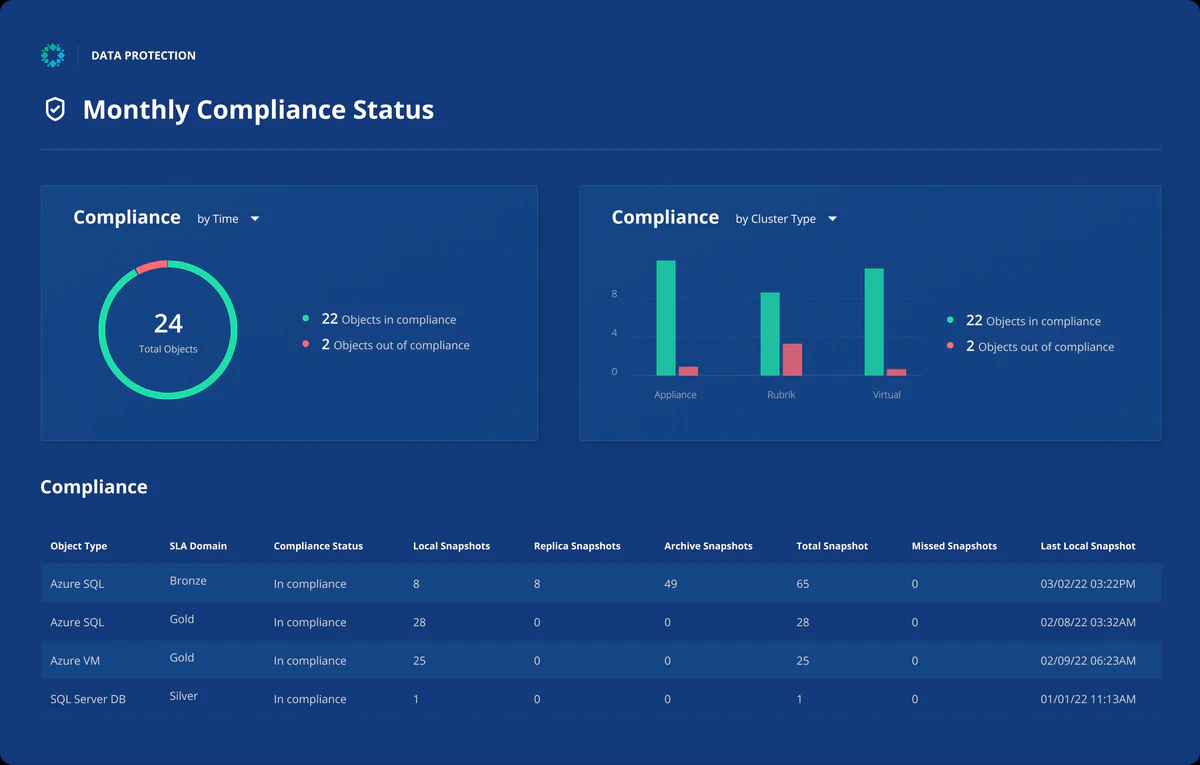
The dashboard above shows Rubrik’s compliance view tied to these SLA policies. You can see:
- Total protected objects
- Number of objects in compliance vs out of compliance
- Snapshot counts (local, replica, archive)
- Missed snapshots
- Last successful snapshot time
This dashboard gives operators visibility into whether workloads are meeting their defined backup and retention policies. If an object is out of compliance or has missed snapshots, that indicates a potential recovery gap.
Recovery in Rubrik typically involves restoring protected workloads into existing infrastructure. For example:
- Restoring a VM into a cloud region
- Mounting a database from a snapshot
- Recovering workloads using replica or archived copies
Because snapshots are tied to SLA Domains, recovery point selection is aligned with defined retention policies. The system ensures that backup copies exist across local, replicated, or archived storage based on policy configuration.
Rubrik’s model centers on workload-level recovery governed by compliance policies. It ensures data protection and recoverability through structured snapshot management and replication rather than rebuilding cloud infrastructure from scratch.
Where It Fits Best
Rubrik is well-suited for organizations that:
- Operate hybrid environments with on-prem and cloud workloads
- Need strong governance and compliance reporting
- Prioritize ransomware detection and immutable backups
- Want policy-driven workload protection
It is strongest at data protection and workload recovery, particularly in environments where the underlying infrastructure in the recovery region is already provisioned.
4. Trilio
Category: Kubernetes-native disaster recovery
Trilio is focused specifically on Kubernetes environments. Unlike VM-first platforms, Trilio is built around protecting cloud-native applications running on Kubernetes clusters.
What's Included in Recovery?
Trilio protects Kubernetes workloads at the application level. That includes:
- Namespaces
- Deployments and StatefulSets
- Persistent Volume Claims
- ConfigMaps and Secrets
- CRDs and operators
The protection model is application-aware, meaning related Kubernetes resources are grouped and backed up together.
How Recovery Works
Trilio operates directly inside the Kubernetes environment and manages backups at the application and namespace levels. Backup plans define how workloads are protected, and backups are stored in object storage targets configured for the cluster.
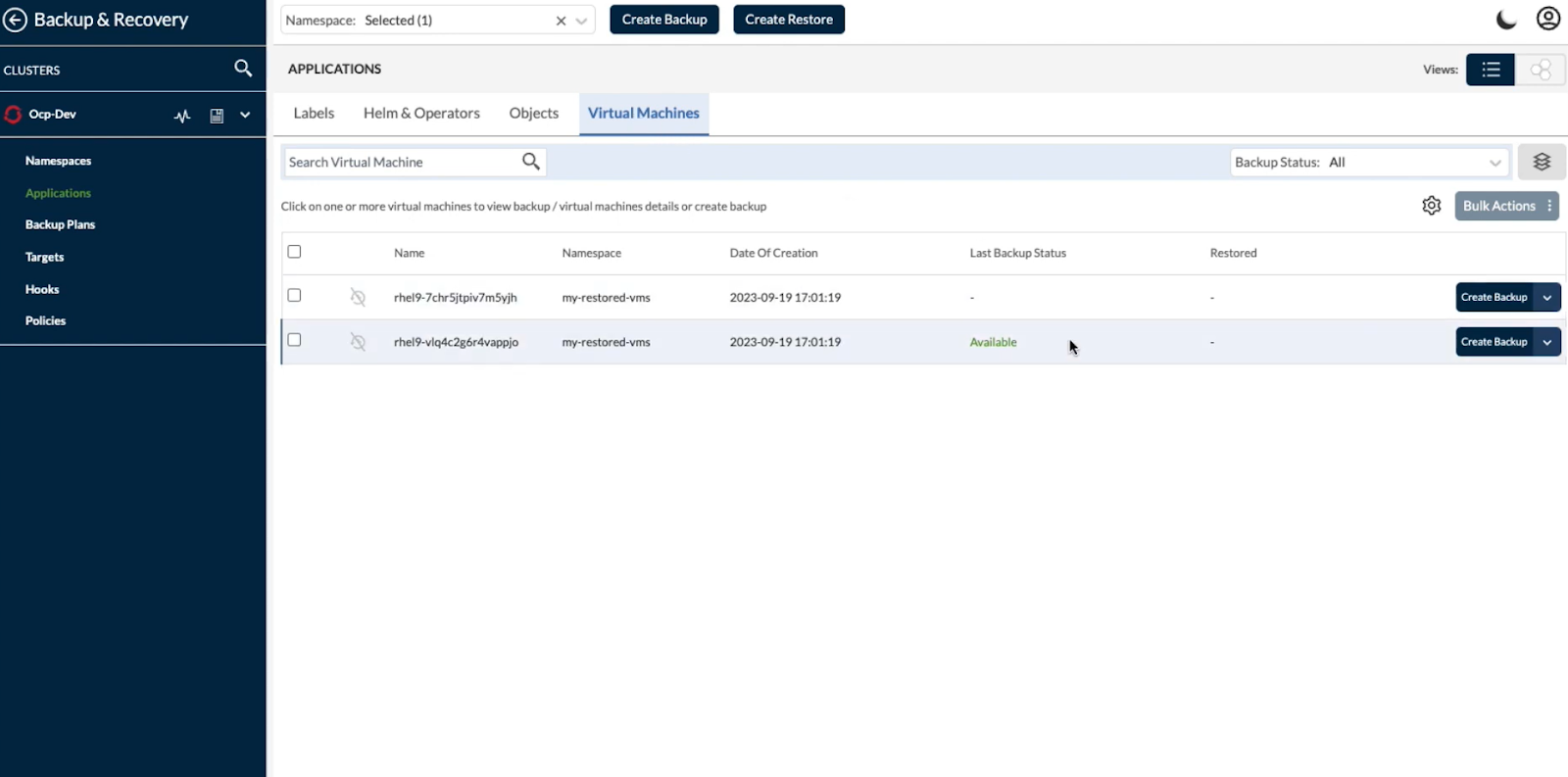
In the screenshot, you can see the Backup & Recovery dashboard within a Kubernetes cluster (Ocp-Dev). The interface shows:
- Selected namespace
- Virtual machines within that namespace
- Last backup status
- Restore options
- Backup plan and policy controls
This view makes it clear that Trilio treats workloads as Kubernetes-native objects. Backups are tied to namespaces and cluster context rather than external VM constructs. Administrators can create backups or initiate restores directly from this interface.
When a restore is triggered, Trilio brings back:
- Kubernetes resource definitions (Deployments, StatefulSets, etc.)
- Persistent Volume Claims and associated storage
- Application metadata
The restore can target the same cluster or a different cluster, depending on the configuration. Because Trilio understands Kubernetes objects and dependencies, it restores applications in a way that aligns with Kubernetes architecture rather than simply rehydrating disk snapshots.
In practice, recovery is namespace-aware and policy-driven, focused on restoring Kubernetes workloads consistently across clusters or regions.
Best Fits
Trilio is well-suited for teams that:
- Run production workloads primarily on Kubernetes
- Need namespace-level or application-level recovery
- Operate multi-cluster or multi-region Kubernetes setups
- Want Kubernetes-native backup and restore workflows
It is not focused on rebuilding a full cloud infrastructure outside Kubernetes. Its strength is application-consistent recovery within Kubernetes environments.
5. Veeam
Category: Hybrid cloud backup and replication
Veeam is traditionally known for VM backup and replication in on-prem environments, and over time, it has extended that capability into public cloud platforms. Its strength lies in protecting virtual machines and enabling replication-based disaster recovery across hybrid infrastructure.
What's Included in Recovery?
Veeam primarily protects:
- VMware and Hyper-V virtual machines
- AWS and Azure cloud VMs
- Physical servers
- Databases (through integrations)
- File systems and NAS
Its core model is workload-level backup and replication rather than infrastructure state capture.
How Recovery Works
Veeam Data Cloud for Microsoft Azure operates as a backup-as-a-service platform focused on protecting Azure workloads. Protection is policy-driven, meaning workloads are assigned to backup policies that define how and when data is captured. In the snapshot below, you can see the Policies section for Azure workloads.
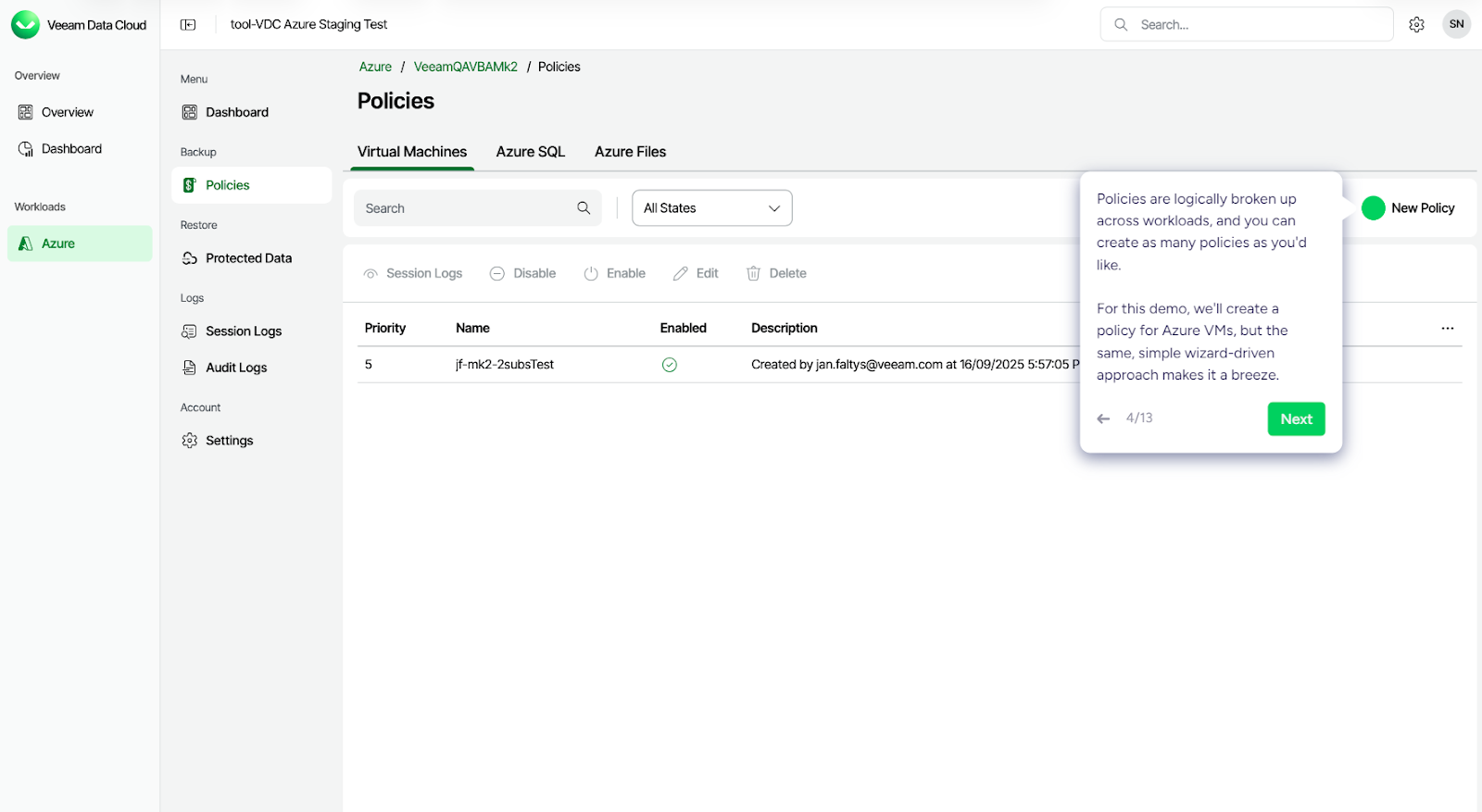
Policies are logically grouped by workload type, such as:
- Virtual Machines
- Azure SQL
- Azure Files
Each policy defines backup behavior and is applied to selected resources. The interface shows:
- Policy name and priority
- Whether the policy is enabled
- Workload type it applies to
This is how Veeam structures protection. Instead of rebuilding the infrastructure state, it protects individual workloads based on defined backup policies.
Using Veeam Data Cloud for Microsoft Azure, you can:
- Create image-level backups of Azure VMs
- Back up Azure VM disks
- Back up Azure SQL databases
- Create snapshots of Azure Files
During recovery, you can:
- Restore Azure VMs to the original location or a new location
- Restore VM disks with modified settings
- Restore Azure SQL databases
- Recover files from Azure file shares
Recovery is workload-focused. VMs, disks, databases, and file shares are restored into Azure environments based on the selected recovery point. The platform handles backup storage and orchestration, while infrastructure in the target Azure environment must already exist.
In practice, Veeam’s approach centers on policy-driven workload protection and restore workflows rather than full cloud infrastructure reconstruction.
Best Fit
Veeam is well-suited for organizations that:
- Run VM-heavy environments
- Operate hybrid data center and cloud setups
- Need replication-based DR
- Prefer mature VM-level tooling
It is strongest in environments where infrastructure at the recovery site already exists, and the primary requirement is to restore or fail over virtual machines.
Direct Comparison of Cloud Disaster Recovery Solutions
The key difference across these platforms is what they treat as the unit of recovery and how they bring systems back online.
| Solution | Primary Recovery Model | Unit of Protection | Infrastructure Rebuild | Kubernetes-Aware | SaaS-Managed | Best Fit |
|---|---|---|---|---|---|---|
| Firefly | Terraform-based reconstruction | Tagged application (infra graph) | Yes (via generated Terraform) | Yes (as infra + dependencies) | Yes | IaC-driven, multi-account cloud environments |
| Druva | Orchestrated workload failover | VM / DB workload | No (restores into infra) | Limited | Yes | VM-heavy cloud & hybrid setups |
| Rubrik | Policy-driven data protection | Workload via SLA Domain | No (workload restore) | Partial | Partial | Enterprise hybrid environments |
| Trilio | Kubernetes-native backup & restore | Namespace / K8s application | No (cluster-scoped restore) | Strong | No | Kubernetes-first platforms |
| Veeam | Policy-driven workload backup | VM / Disk / DB | No (workload restore) | Limited | Yes (Azure BaaS) | Hybrid VM environments |
Each of these tools solves disaster recovery from a different architectural starting point. Some reconstruct infrastructure from code, others restore workloads into existing environments, and some operate entirely within Kubernetes. The right choice depends on how your production environment is built and how you expect to recover it under real failure conditions.
Each of these tools solves disaster recovery from a different architectural starting point. Some reconstruct infrastructure from code, others restore workloads into existing environments, and some operate entirely within Kubernetes. The right choice depends on how your production environment is built and how you expect to recover it under real failure conditions.
How does Firefly's Infrastructure Backup Approach Differ from other existing DR solutions?
Most disaster recovery solutions focus on protecting workloads and data: backing up VMs, replicating databases, creating snapshots, and orchestrating failover. These are essential capabilities that protect what you've built.
Firefly focuses on a different layer: backing up and recovering your cloud infrastructure configurations.
The Problem: When Data Is Safe, But Infrastructure Isn't
As mentioned in the intro, when that r/devops team lost access to ECR, they had perfect RDS backups and S3 versioning enabled. But they couldn't deploy anything because:
- VPCs and security groups weren't captured
- IAM roles weren't part of the backup
- Container registries weren't replicated
- Load balancer configurations weren't stored
Their data was safe. The infrastructure configurations their applications needed to run weren't backed up.
Firefly continuously scans and backs up your entire cloud infrastructure, spanning multiple clouds and accounts, Kubernetes, and SaaS applications, storing configurations as Infrastructure-as-Code that can be restored declaratively.
How Firefly Handles Common Recovery Scenarios
Scenario 1: You Know What Was Deleted
Someone accidentally deletes a load balancer. Your application stops routing traffic.
Traditional approach: Log into the console, try to remember the configuration, manually recreate it, and hope you got all the settings right.
Firefly approach:
- Go to Inventory > Deleted
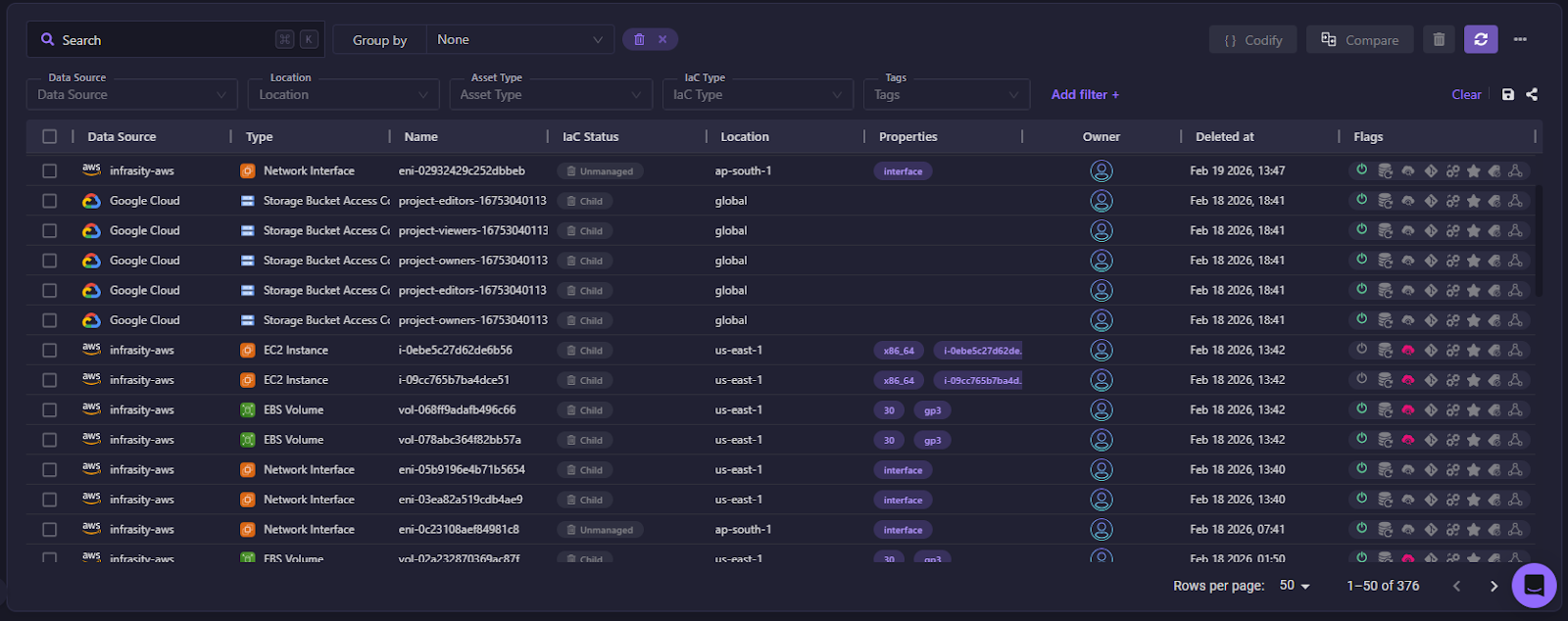
- Filter by time range to find the deleted load balancer
- Click Codify to generate the IaC template from the backup
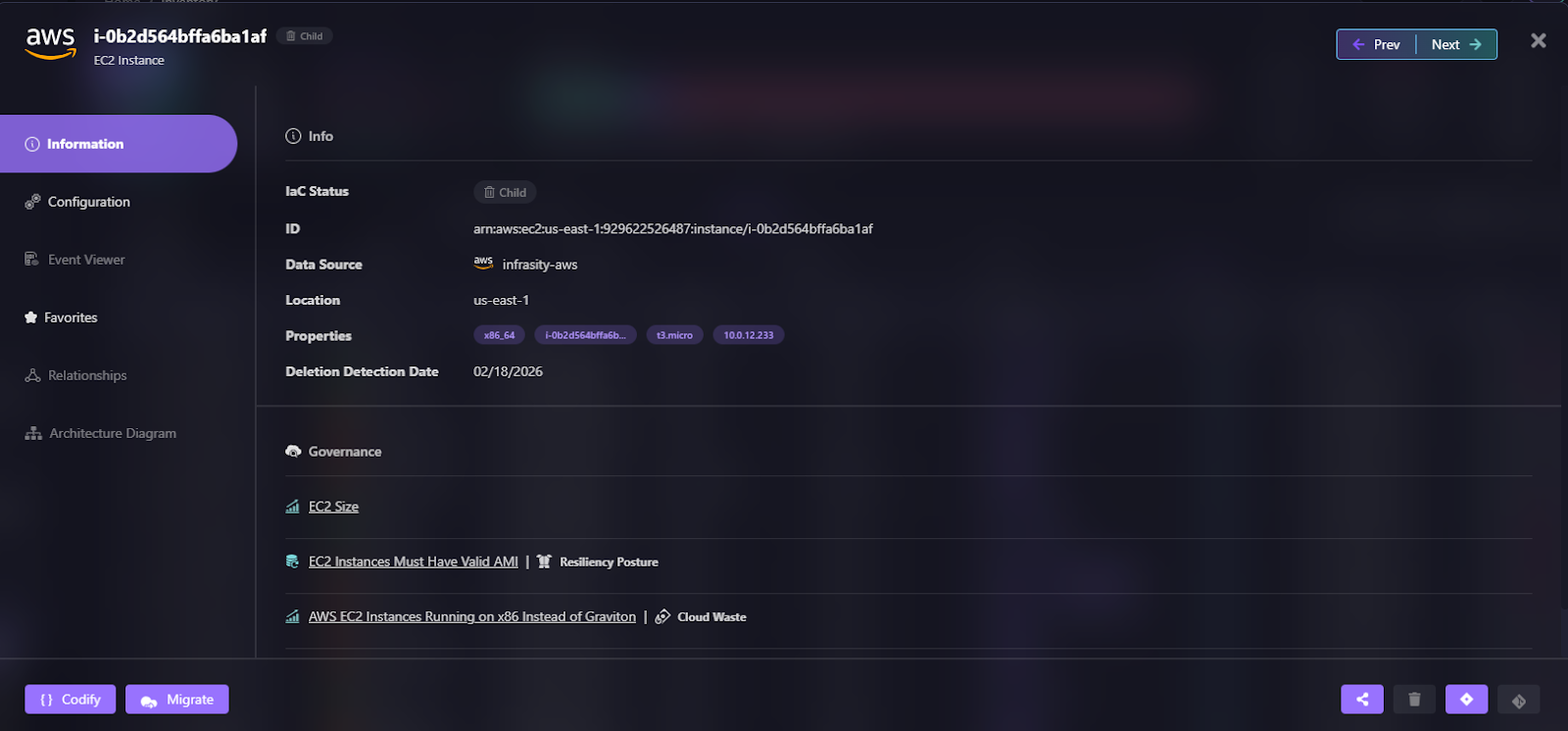
- Create a pull request to your GitOps repo
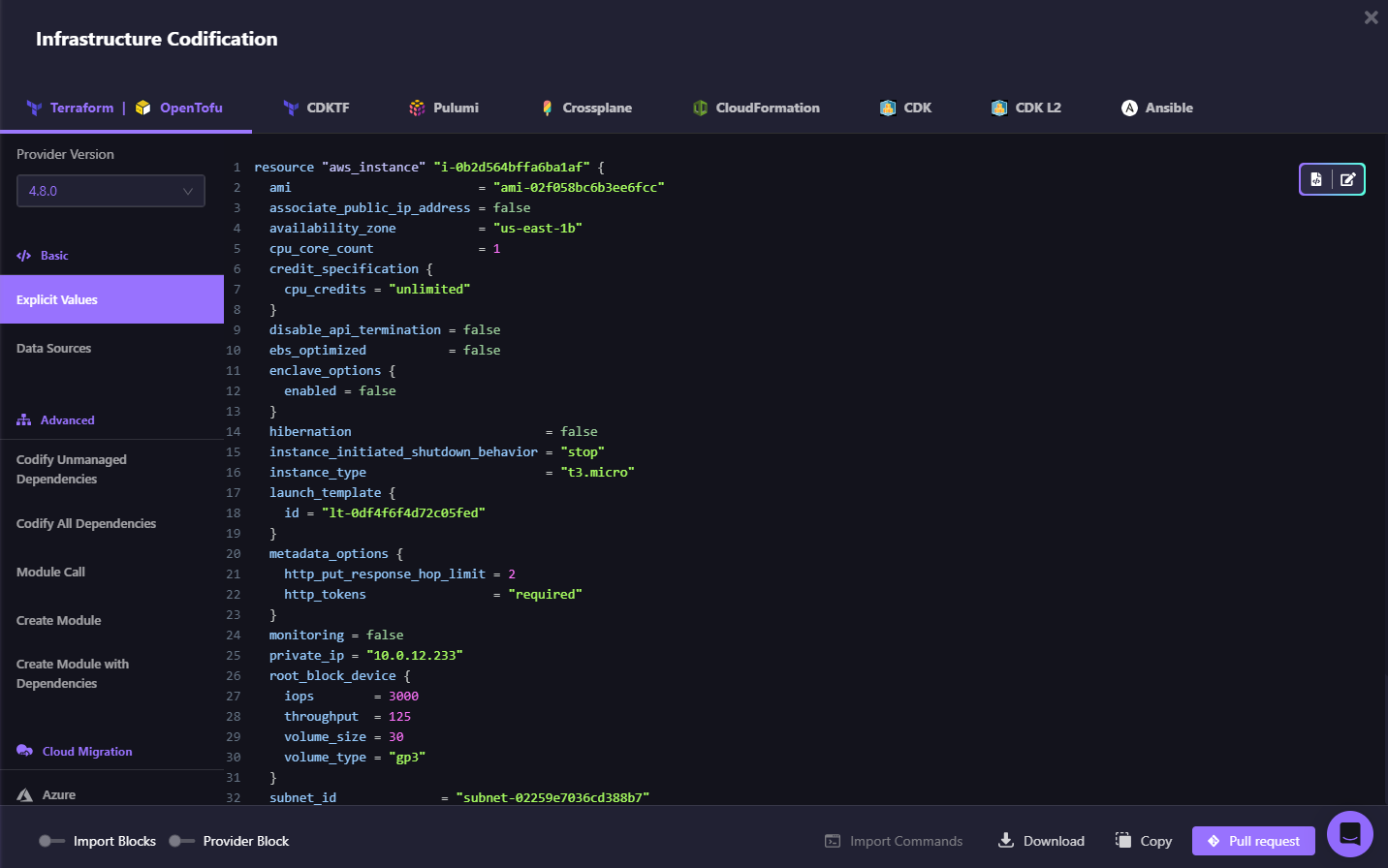
- Merge and let your CI/CD pipeline recreate the resource
Recovery becomes terraform apply instead of console clicking. The restored asset is now managed by code and backed up continuously.
Scenario 2: You Don't Know What Changed
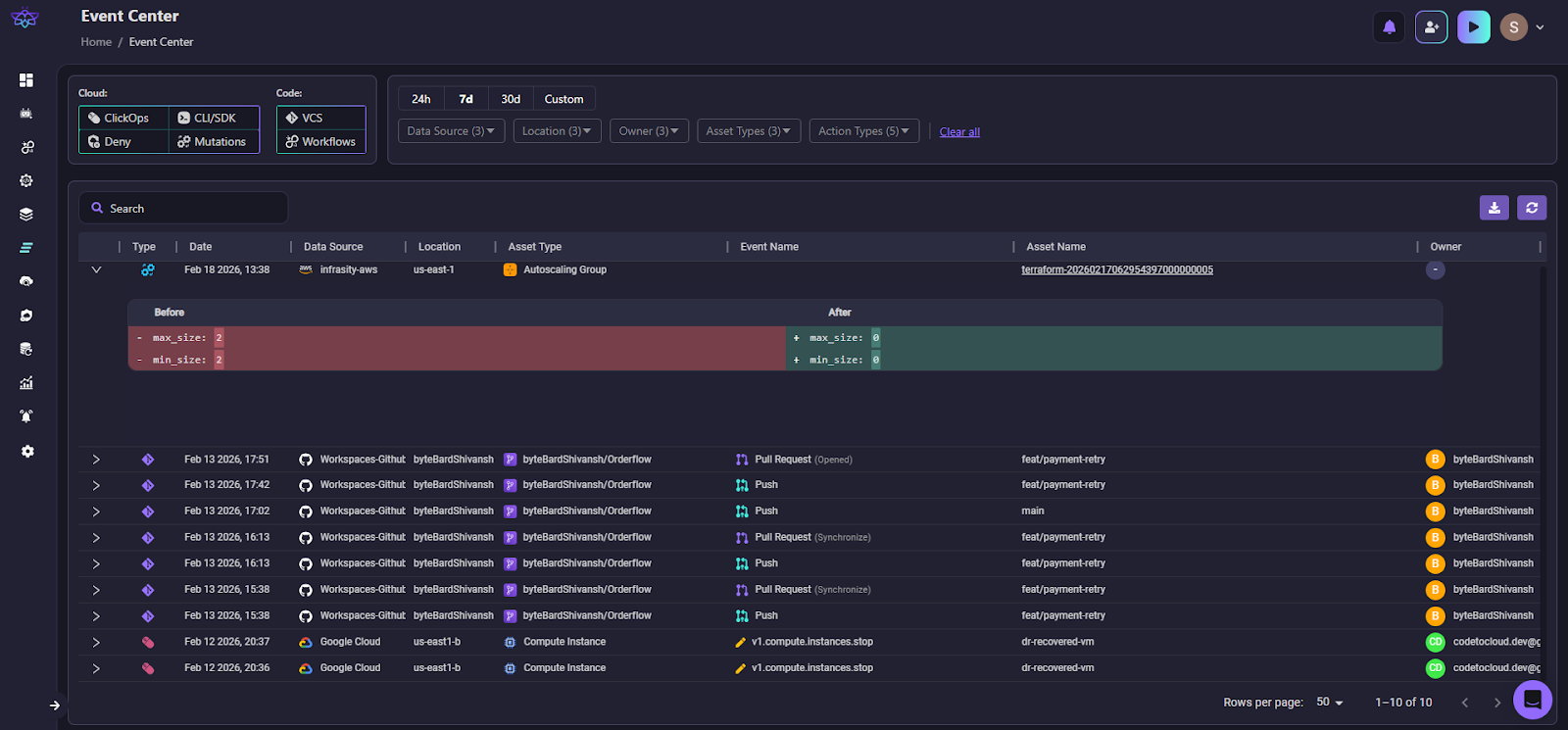
Your application starts throwing multiple errors. Something changed, but you don't know what.
Firefly approach:
- Go to the Event Center to view all recent infrastructure changes as shown in the snapshot below:
- Filter by data source, environment, account, and time range
- Review the change log to see configuration modifications (Firefly logs who made each change and when)
- Identify the problematic change (e.g., security group rule was modified)
- Use Codify Revision to generate IaC for the previous working state from the backup
- Submit a pull request to revert the change
Root cause analysis takes minutes instead of hours digging through CloudTrail logs.
Application-Level Recovery: Restoring Dependencies Together
As we discussed in the Firefly overview, the platform captures infrastructure as application-level snapshots, grouping resources within a single application boundary. Here's how that application-scoped backup translates into recovery.
Firefly's Applications Backup & DR goes beyond individual resource recovery. When you create an application backup policy (using tags to identify your application), Firefly automatically captures:
- The application components (EC2 instances, containers, databases)
- All infrastructure dependencies (VPCs, subnets, security groups, IAM roles)
- The relationships between them
During restoration:
- Select your application snapshot
- Choose which resources to restore (entire app or subset)
- Firefly generates Terraform code for the application AND its infrastructure
- Deploy via your IaC orchestration workflow
Example: Your payment service includes an EC2 instance, RDS database, Application Load Balancer, and specific security group rules. Traditional DR restores the EC2 and RDS separately; you manually recreate the load balancer and security groups. Firefly's application backup captures all of these together and restores them as a single IaC deployment.
FAQs
What is a DR solution?
A disaster recovery (DR) solution is a system or platform that helps you restore applications and infrastructure after an outage, data loss, or security incident. It can include backup, replication, failover orchestration, or full infrastructure rebuild capabilities. The goal is to reduce downtime and data loss while bringing systems back to a working state.
What is a disaster recovery plan in cloud computing?
A disaster recovery plan in cloud computing is a documented strategy that defines how workloads will be restored if a region, account, or critical service fails. It outlines backup frequency, replication setup, recovery steps, roles and responsibilities, and validation procedures. In modern cloud setups, it often includes cross-region deployment and Infrastructure-as-Code–based rebuild workflows.
Which AWS service is used for disaster recovery?
AWS does not have a single DR service. Disaster recovery is typically built using multiple services such as Amazon EC2, Amazon RDS, Amazon S3, AWS Backup, AWS Elastic Disaster Recovery (DRS), and cross-region replication features. The exact setup depends on whether you are replicating VMs, databases, or entire environments.
What is the difference between DR and DRaaS?
DR (Disaster Recovery) refers to the overall strategy and processes used to recover systems after failure. DRaaS (Disaster Recovery as a Service) is a managed offering where a third-party provider operates the backup, replication, and failover infrastructure for you. With DRaaS, the control plane and orchestration are handled by the provider rather than your internal team.

.avif)
.avif)
.webp)

.webp)












