
TL;DR
- Cloud Rewind protects full application environments across AWS, Azure, and GCP with point-in-time recovery. Teams running IaC workflows may need a tool that also produces Terraform output, covers Kubernetes, or includes governance alongside backup
- Firefly targets the application and infrastructure layer, recovery outputs real .tf files, rebuilds environments in dependency order, and includes drift remediation and compliance posture tracking alongside backup
- Cohesity DataProtect and Veeam sit at the database and VM layer, point-in-time DB restore, WORM immutability, and dependency-ordered failover, covering a different protection scope than Firefly or Cloud Rewind
- Druva and Acronis cover VMware, physical servers, and on-premises workloads that cloud-native tools don't reach; Acronis adds EDR in the same agent as backup and DR
- These tools cover different protection layers, making a complete cloud DR stack often combine an application-layer tool with one covering databases, VMs, or native server replication
Traditional backup tools protect data but ignore the infrastructure, configs, and dependency graphs that actually run your cloud native applications. Cloud Rewind addresses that gap by capturing the full application environment state, including compute, networking, IAM, and storage dependencies, and enabling point-in-time recovery across cloud regions without manual rebuild.
But when a platform engineer tries to recover a Terraform-managed environment using Cloud Rewind, the tool rebuilds it using its proprietary engine, producing no .tf files, no state, and nothing that can be committed back to the repo the team works from. Cloud Rewind has no Kubernetes coverage, no drift remediation, and no IaC codification. For teams where every resource is expected to live in code, Cloud Rewind runs as a parallel system that recovers an environment outside the governed codebase.
The six alternatives below are ranked for IaC-mature platform teams, each with a clear use case, confirmed capabilities, and the limitations worth knowing before you commit.
Why Platform Engineers Look for Cloud Rewind Alternatives
Cloud Rewind's gaps are specific to how platform engineering teams work. Here's where they surface:
1. No IaC output on recovery
Cloud Rewind rebuilds environments using its own proprietary Recovery-as-Code engine. You get a running environment, but no Terraform files, no state, nothing committable to version control. For teams where IaC is the source of truth, recovery produces a live environment that immediately falls outside the governed codebase.
2. Snapshot restores include existing drift
Cloud Rewind restores from a captured state, including any configuration drift, ungoverned ClickOps resources, or security misconfigurations that existed before the incident. Recovery doesn't clean the environment; it replicates whatever state existed.
3. No Kubernetes or SaaS coverage
Cloud Rewind supports AWS, Azure, and GCP compute and networking resources. Kubernetes workloads and SaaS services sit outside its protection boundary entirely.
4. Governance is DR-only
The Resilience Hub dashboard shows what's protected versus unprotected, and drift alerting exists, but there's no policy enforcement, no IaC coverage tracking, no automated remediation, and no compliance evidence generation.
5. No path toward IaC adoption
Teams with ungoverned resources created via ClickOps have no mechanism in Cloud Rewind to convert those into Terraform. The tool protects infrastructure as it exists but leaves governance posture unchanged.
5 Best Cloud Rewind Alternatives in 2026
Each alternative below addresses at least one of these gaps; some address all of them.
1. Firefly

Firefly is a cloud resilience platform where cloud recovery, drift remediation, IaC codification, and compliance posture tracking run from the same agent, no separate DR tool sitting alongside your Terraform workflows.
How it approaches backup and disaster recovery
Firefly's Backup & DR module continuously snapshots cloud application environments, their infrastructure, configurations, and dependency graphs, and stores them as deployment-ready IaC. When recovery is needed, Firefly generates actual Terraform files (locals.tf, main.tf, outputs.tf, provider.tf, variables.tf) and applies them via a standard plan/apply workflow.
Before any restore executes, engineers can browse, review, export, or copy the exact .tf files that will be applied to version control. Recovery produces a clean, correctly structured environment, not a snapshot of the state that existed before the incident, including any drift and misconfigurations.
Key capabilities:
- IaC-output recovery: Restores produce real Terraform files you can review in a PR, not a proprietary rebuild script you can't inspect
- Cloud Resilience Posture Management (CRPM): Real-time view of recovery readiness, unprotected resources, risky dependencies, and drift that weakens recovery sites before incidents happen
- Thinkerbell AI agents: Detect when a live resource diverges from its Terraform definition and open a remediation PR or apply the fix directly, depending on your configured policy
- IaC codification: Automatically converts ungoverned ClickOps resources into standardized Terraform or OpenTofu
- Built-in compliance frameworks: PCI DSS, SOC 2, ISO 27001, HIPAA, NIST, and DORA policies with continuous evidence generation and AI remediation suggestions
- Multi-cloud + Kubernetes + SaaS: Protects EKS clusters, GKE workloads, and SaaS services that Cloud Rewind leaves outside its protection boundary entirely
- Drift detection with remediation: Not just alerting; AI agents fix violations automatically
Gartner recognition: Named a leading Cloud Application Infrastructure Recovery Solution (CAIRS) in the 2025 Hype Cycle for Backup & Data Protection.
Hands-on: What a recovery actually looks like in Firefly
Here's the exact workflow an engineer runs when recovering an application after an incident.
Open the Applications dashboard and select the snapshot
The Backup & DR screen lists every protected application, name, data source (AWS account ID or GCP project), region, scope filter tags, number of stored snapshots, and last backup timestamp. Each application row expands to show its snapshot history, including the date, covered asset types, resource count, and completion status.
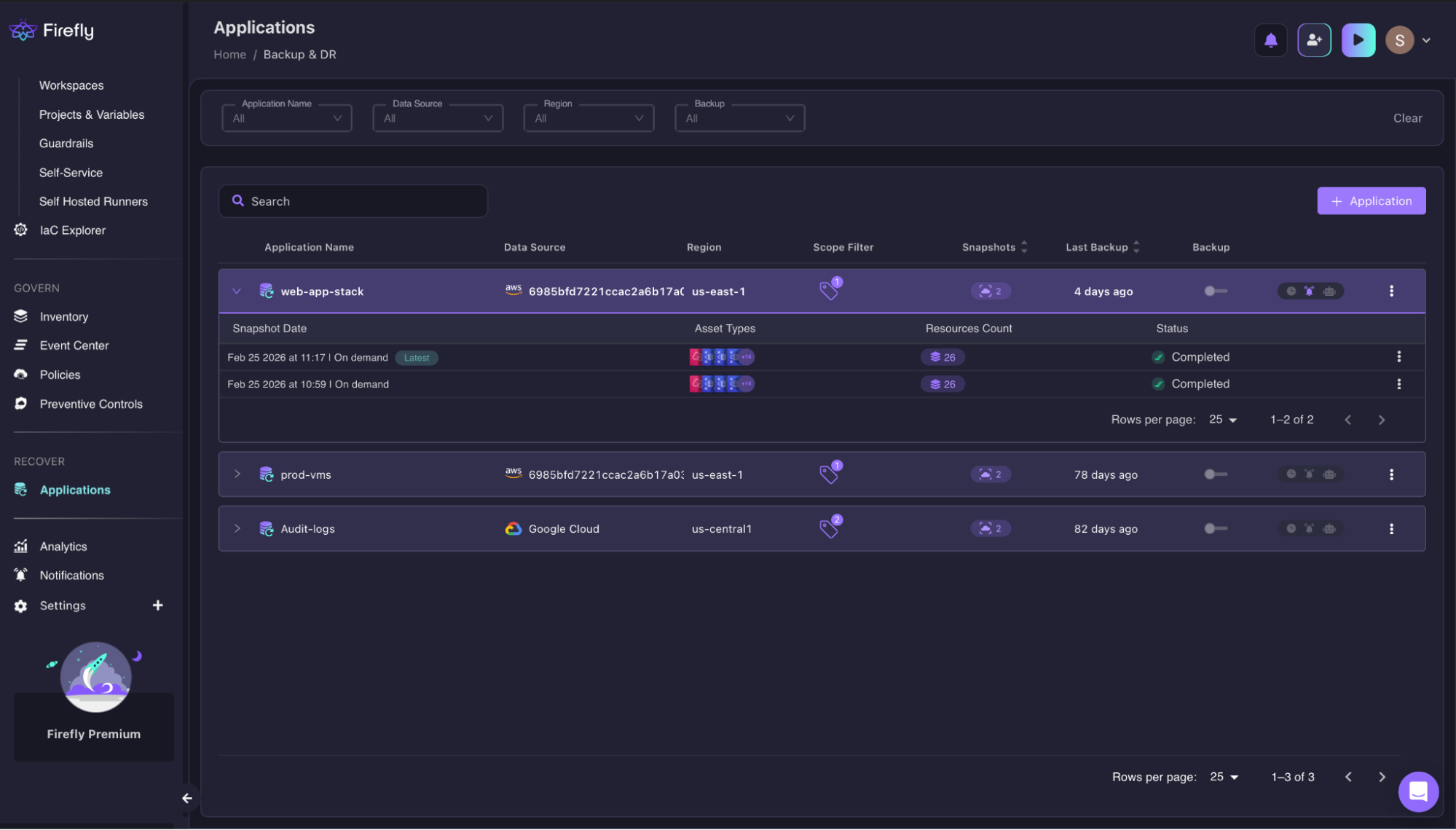
In this example, web-app-stack has two completed on-demand snapshots, each covering 26 resources across AWS us-east-1. The engineer selects the latest snapshot, timestamped Feb 25, 2026, at 11:17.
Review the exact assets captured in the snapshot.
Before triggering restore, Firefly shows every resource type captured inside that snapshot, grouped by asset type, searchable, and switchable between List and Graph view.

For web-app-stack, the 26 assets include:
- CloudWatch Log Group
- DB Instance, DB Snapshot, DB Subnet Group
- ECS Cluster, ECS Service, ECS Task Definition
- And additional networking, IAM, and compute resources
This is the full dependency graph, not just the primary resource. The engineer can verify every component that will be restored before clicking Restore.
Review the Terraform files before applying
After clicking Restore, Firefly generates the Terraform module for the snapshot and shows it in a file browser before executing anything. The engineer sees locals.tf, main.tf, outputs.tf, provider.tf, and variables.tf, real, production-grade Terraform with actual region logic, variable references, and dependency wiring. Each file is readable, copyable, and exportable via Export All.
Only after the engineer clicks Continue does the restore execute, asynchronously, so the window can be closed and the process runs in the background.
This is the difference in practice: Cloud Rewind executes the rebuild using its own engine and hands you a running environment. Firefly hands you the Terraform first, lets you verify it, and then executes. The output is a running environment and IaC, you can commit.
Best for: Platform engineering teams running Terraform who want the post-recovery environment to produce .tf files they can review in a PR, commit to the repo, and treat as the new IaC source of truth, not a live environment that exists outside version control.
Limitation to know: Snapshot frequency (daily + on-demand) is less granular than Cloud Rewind's 15-minute intervals. For workloads where RPO under 15 minutes is a hard requirement, evaluate whether daily snapshots meet your SLA before committing.
2. Cohesity DataProtect
Cohesity DataProtect is an enterprise data protection platform that unifies backup, recovery, and cyber resilience across on-premises, cloud, and SaaS workloads from a single management plane called Helios.
How it works: DataProtect captures workloads using immutable snapshots with global deduplication, stores them across on-premises and cloud targets, and enables recovery at scale. Its RecoveryAgent module provides automated DR orchestration with recovery blueprints that sequence workload recovery in dependency order.
Key capabilities:
- Near-zero RPO and near-instant RTO for supported workloads, including VMs, Oracle databases, and containers
- Immutable snapshots with WORM (Write Once Read Many) enforcement, backup data cannot be altered or deleted, even by attackers with account access.
- AI-powered threat detection, DataHawk scans for anomalies, malware, and ransomware indicators within backup data using Google threat intelligence and custom YARA rules.
- RecoveryAgent, automated recovery blueprints that run threat scans and rehearsal operations before restoring, so you don't reintroduce malware during recovery.y
- FortKnox, an immutable cyber vault for air-gapped data isolation
- Broad workload coverage, VMs, databases (Oracle, SQL, SAP, MongoDB, PostgreSQL, and more), containers, Kubernetes, NAS, Microsoft 365, Google Workspace, Salesforce, Slack, and cloud-native databases (RDS, Redshift, Azure SQL, BigQuery, AlloyDB)
- SiteContinuity automated failover and failback orchestration for mission-critical workloads
- Unified management via Helios, single pane across all deployments, on-premises, and multi-cloud
IDC recognition: Named a Leader in the 2025 IDC MarketScape for Worldwide Cyber-Recovery.
Hands-on: What the Sources view tells you before you trigger recovery
The Sources screen breaks down every connected AWS account by service tab, EC2, RDS, S3, and shows a live protected/unprotected split with exact GiB counts per tab, so the engineer can see data volume at risk without running a separate audit.
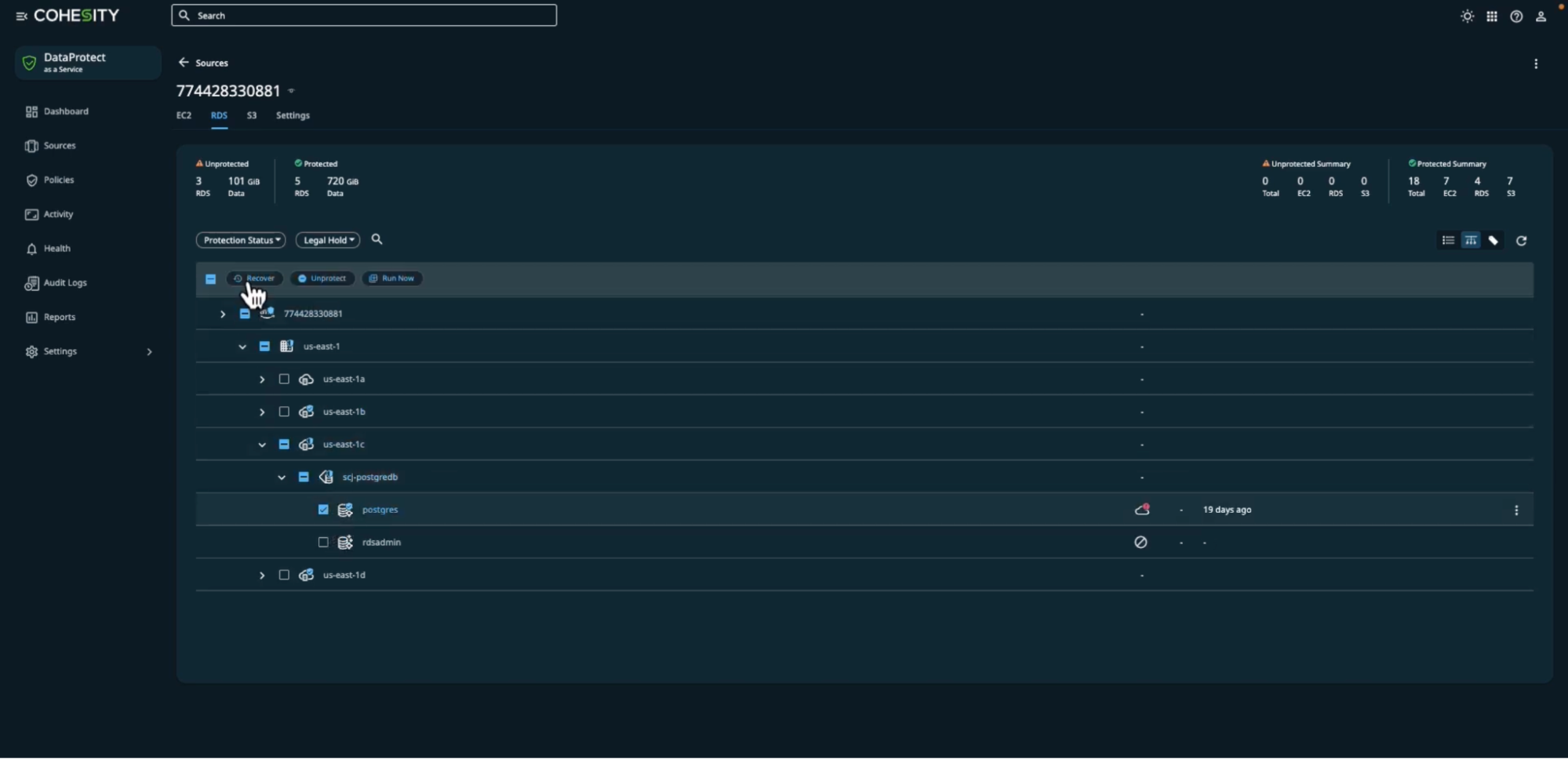
In this example, the account has 5 protected RDS instances covering 720 GiB, with 3 unprotected instances sitting on 101 GiB. Expanding scj-postgredb shows individual databases: postgres (7.7 MB, last backed up 19 days ago) and rdsadmin. The engineer selects the database, clicks Recover, and is taken directly to the recovery target configuration, choosing between Original Aurora PostgreSQL Cluster, a Known Cluster, or a Custom PostgreSQL Server, with region and instance selectors and an optional prefix rename (copy_) to avoid overwriting the live database during validation.
Clicking Recover opens the activity log, which streams each step in real time, cloning the backup view, fetching the view ID, provisioning the external disk, and starting the restore job, all timestamped and auditable inside the Helios console.
Cohesity's operational difference from Cloud Rewind is scope: protection status, recovery configuration, and execution logs for RDS, EC2, S3, VMs, and SaaS all live in the Helios console; Cloud Rewind requires a separate tool per workload type that falls outside its cloud-native boundary.
Best for: Large enterprises running complex, mixed environments, VMs, traditional databases, cloud-native workloads, and SaaS, who need a mature, AI-augmented data protection platform with proven cyber resilience at scale. Particularly strong for organizations with significant on-premises infrastructure alongside cloud.
Limitation to know: Some advanced cyber-recovery capabilities (DataHawk, curated recovery) are available only in higher subscription tiers or as add-ons. Smaller teams may find the platform more complex than their needs require.
3. Druva Data Security Cloud
Druva is a SaaS data protection platform with no hardware, no infrastructure, and no patching. It delivers backup, disaster recovery, and ransomware response from a single managed cloud service hosted on AWS.
How it works: Druva continuously backs up workloads to its air-gapped, immutable cloud infrastructure. For DR, it uses backup snapshots to launch recovery instances into a customer-owned AWS VPC; any number of VMs can be recovered in under 30 minutes. The platform supports RPO as low as one hour and RTO of minutes for VMware and AWS workloads.
Hands-on: What operational coverage looks like across a Druva deployment
The Druva dashboard shows protected data source count, total TB covered, backup success rate, active legal holds, compliance policy count, and live DR instance count, all on one screen, pulled from VMware, physical servers, cloud, and SaaS simultaneously.

In this example, the Phoenix module shows 77 out of 123 servers protected and 10 already configured for DR, surfacing the gap between what's backed up and what's actually ready to fail over. The inSync module covers 9,064 active devices and 4,245 active cloud apps side by side, with compliance policies and legal holds tracked in the same view.
To configure protection for a VMware workload, engineers select VMs from the All Virtual Machines list, which shows every VM discovered from the connected hypervisor, its configuration status, and any discovered applications like MS-SQL, then attach a backup policy defining start time, duration window, bandwidth cap, retry count, and schedule days. Once the policy is attached, Druva schedules the first backup, begins incremental transfers at the defined bandwidth cap, retries automatically on failure up to the configured max retry count, and stores each backup to its AWS-hosted cloud, no backup proxy setup, no storage target configuration, no manual scheduling required.
Druva's coverage boundary differs from Cloud Rewind's: Cloud Rewind protects resources that exist natively in AWS, Azure, or GCP. Druva covers VMware on-premises, physical servers, cloud workloads, and SaaS from the same console, making it a stronger fit for teams that haven't fully migrated to cloud-native infrastructure.
Key capabilities:
- 100% SaaS delivery, nothing to manage, no infrastructure, no patching; deploys in minutes
- Air-gapped immutable backups, backup infrastructure is fully isolated with dual-envelope encryption; ransomware cannot reach it
- Zero-trust architecture, SSH access to production nodes is eliminated; nothing executes on storage
- Cloud DR with AWS-native failover seamless failover of VMs into customer-owned Amazon VPC; failback to VMware Cloud on AWS or on-premises
- Broad workload support, VMware, Hyper-V, EC2, Azure VMs, Oracle, SQL Server, NAS, Microsoft 365, Salesforce, Google Workspace, and more
- AI copilot fixes backup issues, surfaces recommendations, and simplifies management
- $10M Data Resiliency Guarantee, industry-first financial commitment on recovery
- Compliance automation, GDPR, HIPAA, and other frameworks with built-in monitoring
Best for: Teams who want DR with no operational overhead, no backup servers, no hardware, no patching cycles. Strong for organizations where VMware workloads are central, and for teams that want to get protected quickly without deep configuration work.
Limitation to know: DR failover is AWS-centric (failover into customer-owned AWS VPC). Azure and GCP DR support exists, but is less mature. Not the right fit for Kubernetes-heavy or IaC-first platform engineering workflows.
4. Veeam Data Platform
Veeam Data Platform is the market-leading enterprise backup and recovery solution trusted by over 550,000 customers. It provides protection across physical, virtual, cloud, and SaaS workloads with deep orchestration capabilities through Veeam Recovery Orchestrator.
How it works: Veeam captures immutable, portable backups and provides orchestrated failover and failback across on-premises, cloud, and hybrid environments. Its v13 release introduced Instant Recovery to Azure, restoring workloads into a secure cleanroom environment in minutes, and Recon Scanner 3.0 for proactive threat detection within backup data.
Key capabilities:
- Instant Recovery to Azure, launch recovery instances in a secure cleanroom in minutes; validate before committing to production
- Veeam Recovery Orchestrator, automated recovery plans with dependency-ordered failover, non-disruptive DR testing, and dynamic documentation that stays current automatically
- Veeam Intelligence is an AI-powered assistant that surfaces anomalies, recommends clean restore points, and guides remediation without switching tools.
- Recon Scanner 3.0 (from the Coveware acquisition), proactive threat assessment, and YARA-based threat hunting within backup data
- Universal Hypervisor Integration API supports any hypervisor vendor natively; it eliminates lock-in and simplifies migration away from VMware.
- Portable, self-describing backup, recover anywhere across hypervisors, clouds, and platforms without vendor restrictions.
- Kubernetes, SaaS, cloud, on-premises, and identity workload support
- Built-in compliance view audit-ready dashboards aligned to Zero Trust
Hands-on: What a restore session looks like in Veeam
An engineer selects a backup job in the console, clicks Restore, and Veeam immediately opens the Restore Session panel, streaming a timestamped, line-by-line execution log rather than a progress bar, so every step is auditable during and after the restore.

In this example, a proxy workload backed up to AWS is restored via an AMI in 11 minutes end-to-end: the restore task starts, Veeam prepares the worker VM (1 min 24 sec), transfers 8.0 GB at 100% (6 min 10 sec), selects the correct AMI for the target instance, and completes the session. Status shows Success with start and end times logged. The left panel shows the full backup job tree, Production London, Oregon, Ohio, across multiple repositories, including AWS and Microsoft Azure, with job status (Success, Warning, Failed) visible without opening each job individually.
The Backup Tools ribbon at the top shows what recovery options are available per selected backup: Instant Recovery, Guest Files (Windows and Other), Application Items, Restore to Cloud (Amazon EC2 and Microsoft Azure), Export Backup, and Delete. An engineer recovering a cloud workload selects Restore to Cloud → Amazon EC2, and Veeam handles instance recreation using the stored AMI, no manual EC2 configuration required.
The restore log is where Veeam's audit depth becomes concrete: step name, duration, bytes transferred, AMI ID used, and session timestamps are all logged, the record a compliance team needs to verify what ran during recovery, and a level of granularity Cloud Rewind's proprietary rebuild engine doesn't expose.
Gartner recognition: Highest Ability to Execute in Enterprise Backup and Recovery Software Solutions for the 6th consecutive year; Leader for the 9th time.
Best for: Enterprises running complex hybrid environments, VMware (or post-VMware), on-premises infrastructure, and multiple clouds, who need proven, orchestrated recovery with strong ransomware detection and no tolerance for vendor lock-in. The gold standard for teams with extensive existing Veeam deployments.
Limitation to know: Veeam is a backup-first platform. Like Cloud Rewind, it has no IaC output, no drift remediation, and no governance layer for IaC coverage. Platform engineers who want recovery to produce auditable infrastructure code will need to look elsewhere. Licensing complexity across editions (Foundation, Advanced, Premium) can also be a friction point.
5. Acronis Cyber Protect Cloud
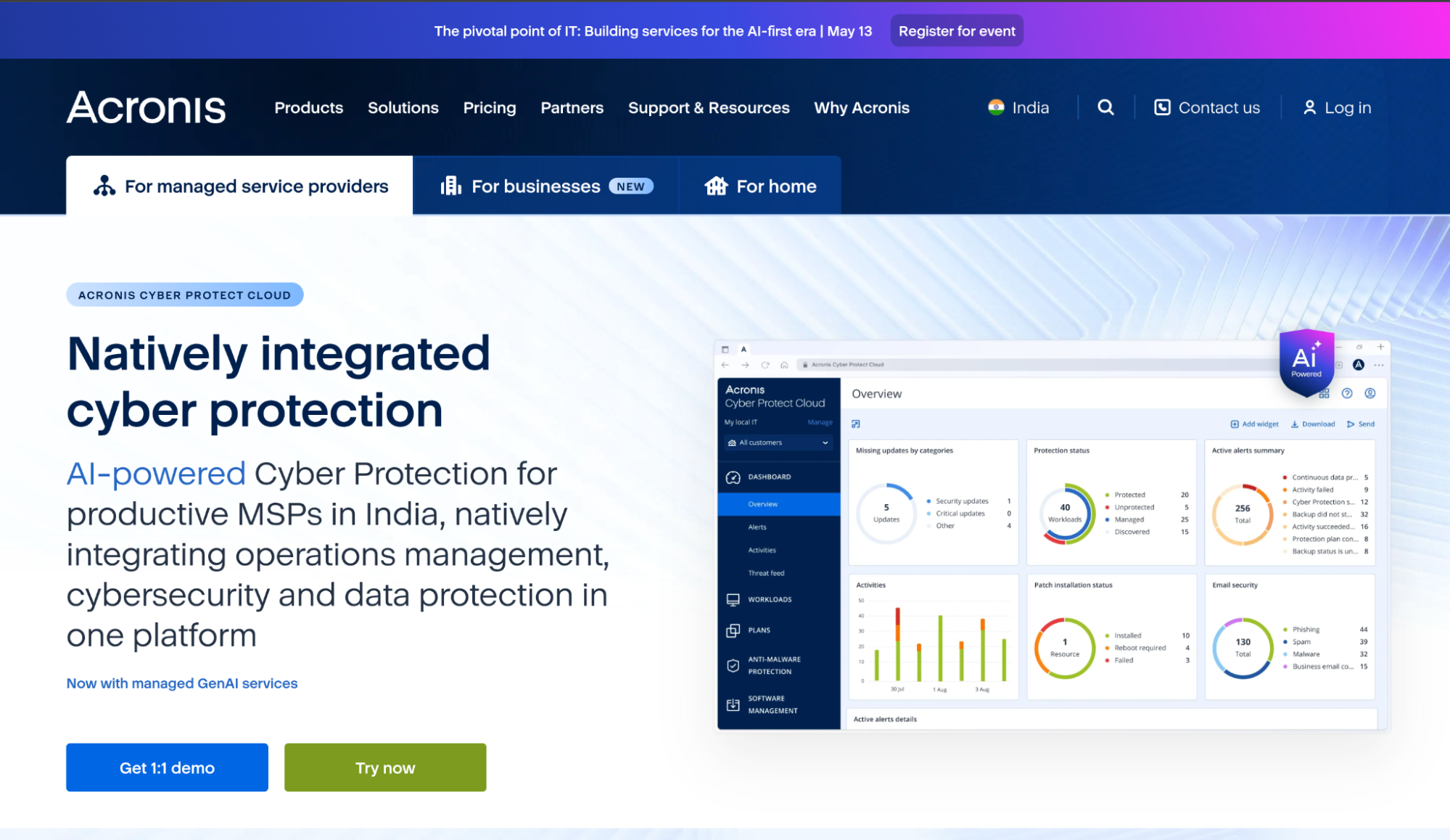
Acronis Cyber Protect Cloud is an integrated platform that combines backup, disaster recovery, cybersecurity (EDR/XDR), and endpoint management in a single console. It's primarily positioned for managed service providers (MSPs) but is used by enterprises that want backup and security converged.
How it works: Acronis DR uses its RunVM engine to spin up recovery servers in Acronis Cloud or Microsoft Azure in minutes. Orchestration runbooks define recovery sequencing across interdependent workloads, and automated failover/failback handles the full cycle. The platform achieves both RPO and RTO under 15 minutes.
Key capabilities:
- Integrated backup + DR + cybersecurity, single console eliminates tool sprawl; no separate agents per function
- RunVM engine, near-zero RTO failover for physical and virtual workloads into Acronis Cloud or Azure
- Runbook editor drag-and-drop orchestration defining recovery sequence across interdependent applications
- Automated failover testing, weekly or monthly schedules with execution history, and executive reporting
- AI-based anti-malware, proactive ransomware prevention; files impacted before an attack were deflected and are automatically restored.
- Universal Restor, inject correct storage and network drivers during failback to dissimilar hardware automatically.
- Broad hypervisor support, VMware, Hyper-V, Nutanix, Proxmox, and more; cross-platform migration included
- Native networking, extend local networks to cloud recovery site via secure VPN; work with existing VNETs, firewalls, and DNS.
Hands-on: What the DR Servers view looks like during a failover test
The Disaster Recovery, Servers screen lists every recovery server alongside its Status, State, and RPO compliance, so an engineer can confirm both servers in a failover pair are healthy and within threshold before triggering a drill, without clicking into each server individually. Engineers can toggle between Recovery Servers and Primary Servers tabs to see both sides of the failover pair without switching consoles.

In this example, two recovery servers, a SQL server and a PDC, are actively running a failover test, both showing Status OK. The "Testing failover" state means Acronis has spun up the recovery server in the cloud using a test IP address (10.14.194.29) separate from the production IP (10.14.194.53); traffic to the production address is unaffected while the recovery instance is validated. RPO compliance is configurable per server; when set, Acronis alerts if replication falls behind the defined threshold.
Setting up a recovery server requires defining the cloud network (e.g., 10.14.194.0/23), production IP address, optional test IP address for isolated drills, internet access toggle, and an optional RPO threshold, all in a single creation dialog. The server name follows a consistent convention (SPP-WS-1.spp.se - recovery), so the pairing between primary and recovery is immediately readable in the Servers list without expanding each row.
The left nav shows the full DR module structure, Servers, Connectivity, Runbooks, alongside Anti-Malware Protection and Software Management. DR orchestration, endpoint security, and software management are modules in the same sidebar, not separate products with separate logins; the architectural difference from Cloud Rewind is that here, DR is the entire product boundary.
Analyst recognition: Champion in the Canalys Cybersecurity Leadership Matrix 2025; Leader in Frost & Sullivan 2025 Endpoint Security Radar.
Best for: Teams delivered through MSPs, or organizations that want backup, DR, and endpoint security converged into a single platform. Strong for mixed hypervisor environments and teams managing a range of physical, virtual, and cloud workloads from a single pane.
Limitation to know: Acronis is built around an MSP delivery model. Direct enterprise buyers may find the platform oriented more toward service provider workflows than internal platform engineering ones. No IaC integration or governance layer exists.
6. AWS Elastic Disaster Recovery (AWS DRS)
AWS Elastic Disaster Recovery (AWS DRS) is AWS's native DR service that continuously replicates on-premises and cloud-based servers into AWS staging areas, enabling failover in minutes with seconds-level RPO and minutes-level RTO.
How it works: An AWS replication agent is installed on source servers and begins block-level data replication to a lightweight staging area subnet in your AWS account. During a drill or disaster, AWS DRS automatically converts source servers to run natively on EC2 within minutes. Post-launch actions and Systems Manager integration enable automated validation, configuration scripts, and connectivity checks immediately after instances launch. Pricing is $20/month per server plus staging and temporary failover costs, charged only when compute spins up.
Key capabilities:
- Seconds-level RPO, continuous block-level replication keeps the staging area near real-time
- Minutes-level RTO, recovery instances launch on EC2 automatically; no manual configuration required
- Point-in-time recovery to recover from specific snapshots for ransomware protection
- Network configuration replication, subnets, security groups, route tables, internet gateways, and network ACLs are replicated to the recovery region automatically.
- Post-launch automation defines custom AWS Systems Manager actions (CloudWatch agent install, volume validation, connectivity checks) that run automatically after recovery instances launch.
- Non-disruptive DR drills test recovery readiness at any time without impacting production.
- Failback support, native failback to the primary site once the issue is resolved, or choose to keep workloads on AWS permanently
- Pay-as-you-go, no standby infrastructure costs; pay only for staging storage and compute during actual drills or disasters
- Broad OS and database support, Windows and Linux; Oracle, MySQL, SQL Server, SAP
Hands-on: What the Source Servers view looks like immediately after agent install
AWS DRS is accessible directly from the AWS console under Services, no separate SaaS signup, no new credential set, no Terraform provider to configure before you can see your first source server. The left nav has four sections: Source servers, Recovery instances, Recovery job history, and Settings.
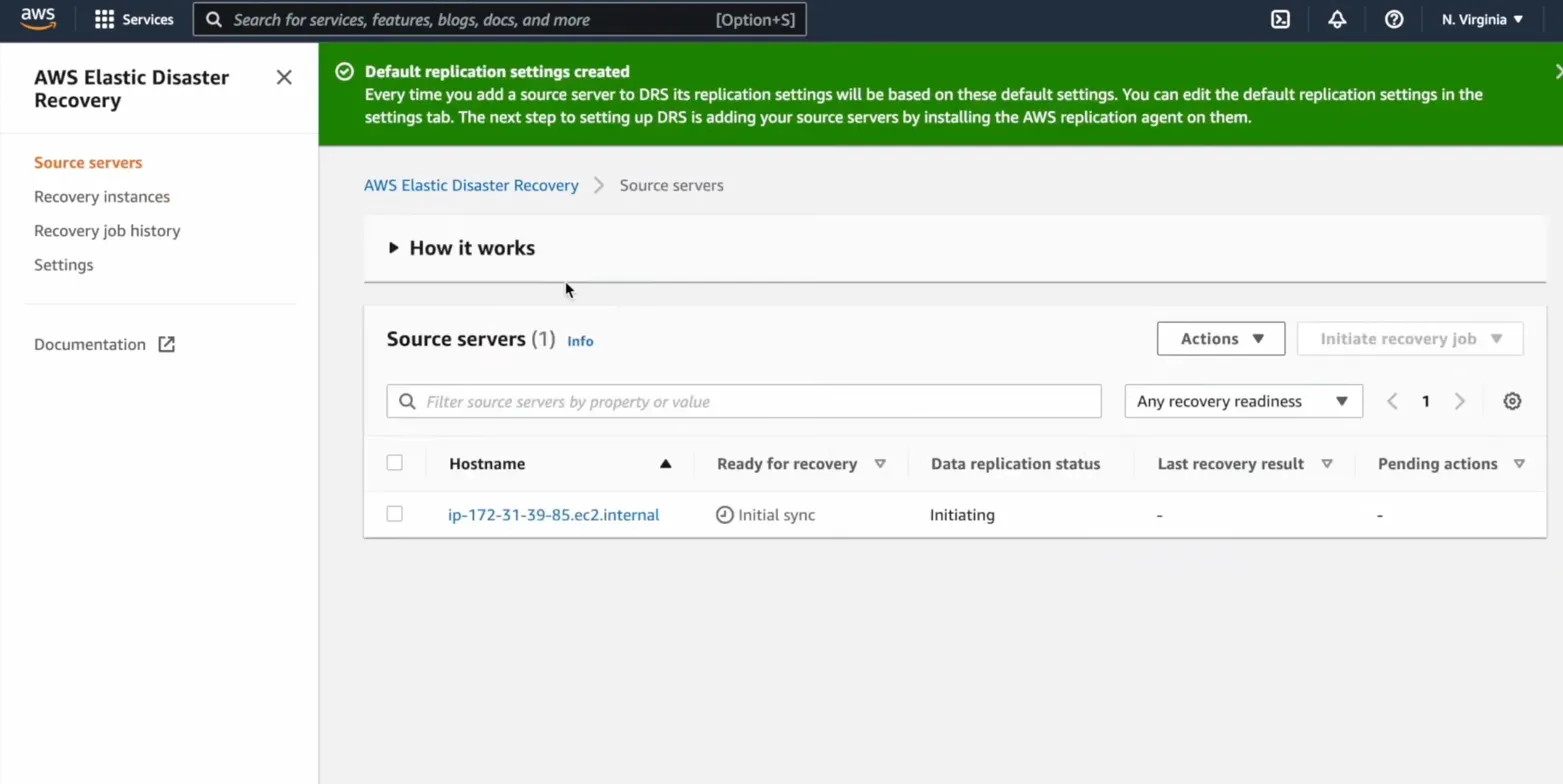
In this example, one source server (ip-172-31-39-85.ec2.internal) has just been added after installing the replication agent. The "Ready for recovery" column shows "Initial sync", meaning the first full block-level copy is in progress before continuous replication begins. Data replication status shows "Initiating." Once initial sync completes, this column changes to "Ready," and the Initiate recovery job button becomes active.
Four nav items are the entire surface area of AWS DR: Source servers, Recovery instances, Recovery job history, Settings, which reflects what the tool actually does: block-level replication per server and EC2 launch on failover, with no application topology awareness beyond that.
Default settings inheritance is the deliberate design choice: every server added to DRS uses the same replication settings automatically, with per-server overrides available in Settings for environments where bandwidth limits or staging subnet placement needs to differ.
For teams with straightforward server workloads on AWS, installing the replication agent is the only step between zero DR coverage and continuous block-level replication, with no protection scope to define, no storage target to provision. For teams where application topology matters, where the web tier, app tier, and database must recover in the correct sequence, AWS DRS has no mechanism for that ordering.
Best for: Teams already running on AWS who want native, low-cost DR for server workloads without a third-party tool. The simplest path to DR for AWS-centric environments, particularly for on-premises-to-AWS or cross-region AWS recovery. No new vendor relationship, no additional SaaS contract.
Limitation to know: AWS DRS is a server-level DR tool, not an application-environment recovery platform. It does not map application dependencies, does not capture infrastructure configuration as IaC, and does not support multi-cloud failover. Teams with complex application topologies spanning many resource types will outgrow it quickly. No governance, drift detection, or compliance capabilities.
Disaster Recovery Platforms Comparison: IaC Rebuild, Backup Models, and Recovery Depth
| Tool | Firefly | Cohesity DataProtect | Druva | Veeam Data Platform | Acronis Cyber Protect | AWS DRS |
|---|---|---|---|---|---|---|
| Recovery output | Real Terraform files | Proprietary snapshots | Proprietary snapshots | Portable backups | Proprietary snapshots | EC2 instances |
| IaC integration | Native | None | None | None | None | None |
| Kubernetes | Yes | Yes | Limited | Yes | Yes | No |
| SaaS coverage | Yes | Yes (M365, GDrive, Salesforce) | Yes (M365, Salesforce) | Yes | Limited | No |
| Drift remediation | AI auto-remediation | No | No | No | No | No |
| Compliance posture | Continuous (DORA, SOC2, ISO, PCI) | Audit logging + immutability | GDPR, HIPAA monitoring | Built-in compliance views | EDR/XDR compliance | None |
| Snapshot frequency | Daily + on-demand | Near-zero RPO | Hourly RPO | Continuous | <15 min RPO | Seconds RPO |
| Ransomware isolation | IaC clean rebuild | FortKnox + DataHawk | Air-gapped immutable | Recon Scanner + cleanroom | AI anti-malware | Point-in-time restore |
| On-premises workloads | No | Yes | Yes | Yes | Yes | Yes |
| Pricing model | Not public | Subscription/capacity | Subscription/SaaS | 3 editions | Per-workload | $20/server/month |
| Best for | IaC-native platform teams | Enterprise hybrid scale | Fully managed SaaS | Broad hybrid coverage | MSP / integrated security | AWS-only environments |
How These Six Tools Split Across Your Cloud Backup Stack
Most platform engineering teams don't run one backup tool. They run a stack, one tool per protection layer. The tools in this list aren't all competing for the same slot; most of them address different layers entirely.
Layer 1: Application and infrastructure recovery with Firefly
The hardest layer to protect: VPCs, IAM roles, ECS topology, dependency order, and all the IaC that defines how components relate to each other. Firefly continuously snapshots the full infrastructure graph per application, stores it as Terraform, and rebuilds the complete environment in dependency order on recovery. Drift remediation and compliance posture run alongside backup continuously. This is the layer Cloud Rewind also targets — but without IaC output, Kubernetes coverage, or a governance layer.
Layer 2: Database and structured data with Cohesity DataProtect or Veeam:
Point-in-time database recovery at transaction granularity covering RDS, Oracle, SQL Server, PostgreSQL, BigQuery. Cohesity adds WORM immutability, YARA malware scanning inside backups, and FortKnox vault isolation. Veeam adds dependency-ordered failover sequencing across hybrid environments. Both complement Firefly: Firefly rebuilds the infrastructure scaffold, and Cohesity or Veeam restores the database contents into it.
Layer 3: VM, endpoint, and on-premises servers with Druva or Acronis
Workloads that don't live natively in cloud infrastructure, covering VMware VMs, physical servers, and legacy Windows/Linux. Druva covers VMware as a 100% SaaS service with no hardware required. Acronis adds EDR/XDR to the same agent, backup, DR orchestration, and anti-malware under one policy set.
Layer 4: Native AWS server replication with AWS Elastic Disaster Recovery
Block-level replication for EC2 workloads at $20/server/month with seconds-level RPO. No standby infrastructure, no vendor contract. No application topology awareness, fits as a lightweight replication layer for simple server workloads alongside a broader stack.
| Stack | Tool | What it covers |
|---|---|---|
| Application + infrastructure | Firefly | IaC rebuild, dependency graph, networking, IAM, config |
| Database + structured data | Cohesity or Veeam | Point-in-time DB restore, WORM, malware-scanned recovery |
| VM + endpoint + on-premises | Druva or Acronis | VMware, Hyper-V, physical servers, SaaS apps |
| Native AWS server replication | AWS DRS | EC2 block-level replication, seconds RPO |
A cloud-native team on AWS with Terraform may need only Firefly and AWS DRS. An enterprise running VMware on-premises alongside AWS and Oracle databases may need all four layers. The stack scales to environment complexity, not to a vendor checklist.
Bottom Line: For Cloud Rewind Users
Commvault Cloud Rewind remains a capable tool for teams that want point-in-time cloud environment recovery without adopting IaC workflows. But it was designed around backup and recovery, not around how modern platform engineering teams build, govern, and operate infrastructure.
For teams where Terraform is the standard, recovery should produce Terraform. For teams managing Kubernetes alongside the cloud, the DR tool should cover both. For teams that need compliance evidence as a continuous output rather than a pre-audit scramble, the recovery platform should generate it automatically.
That's the gap the alternatives above are built to fill. Firefly addresses it most directly for IaC-mature platform teams. The others address it from different starting points, enterprise scale, SaaS simplicity, hybrid breadth, integrated security, or AWS nativity.
The right choice depends less on which product has the longest feature list and more on where your team is in its infrastructure maturity journey and what kind of recovery output you can actually use.
FAQs
Which resources does Cloud Rewind protect?
Cloud Rewind protects cloud-native resources across AWS, Azure, and GCP, including compute, storage, databases, networking, IAM, and serverless. It groups these into Cloud Assemblies to preserve full dependency graphs per application. This ensures recovery respects relationships like network, identity, and routing. It does not cover Kubernetes workloads, SaaS apps, or on-prem infrastructure.
What are the key steps in disaster recovery?
Start with risk assessment and BIA to define critical systems and set RTO/RPO targets. Then choose a recovery strategy, cold, warm, hot, or IaC rebuild, based on cost and downtime tolerance. Configure backups and replication with proper scope, retention, and isolation. Regularly test recovery to validate dependencies and timing. Finally, execute failover, validate systems, and refine the plan post-incident.
What are the main backup types?
Full backups capture everything and are the fastest to restore, but slow to run. Incremental backups capture only changes since the last backup, making them efficient but slower to restore. Differential backups track changes since the last full, offering a middle ground. Mirror backups replicate data in real time but provide no protection against corruption or ransomware. Cloud DR platforms extend beyond these by capturing infrastructure state and dependencies.
What makes a cloud backup reliable?
Reliability depends on restoring the full application environment, not just data, within defined RTO/RPO targets. Backups must be isolated in immutable, air-gapped storage to prevent tampering or ransomware spread. Coverage needs to include infrastructure configuration, IAM, and network dependencies. Recovery should produce a governed, auditable state rather than replicating existing misconfigurations. Advanced platforms achieve this by generating clean, reviewable IaC during recovery.

.avif)
.avif)
.webp)

.webp)












