
TL;DR
- Disaster recovery tools fall into five categories: backup and restore, replication and failover, Kubernetes recovery, DRaaS, and cloud-native recovery platforms. Each solves a different recovery problem.
- Backup and replication tools protect workloads and data. Kubernetes recovery tools restore cluster state and persistent volumes. Cloud-native recovery platforms rebuild infrastructure, IAM, networking, and application dependencies from Infrastructure-as-Code.
- The right DR tool depends on your architecture: VM-heavy environments prioritize backup and replication, while Kubernetes and IaC-driven environments require dependency-aware recovery and infrastructure reconstruction.
- When evaluating DR tools, focus on cross-account recovery, IAM and networking awareness, recovery testing, and whether applications actually become operational after failover, not just whether workloads restore successfully.
Disaster recovery has become significantly more complex in cloud-native environments. In a recent Reddit discussion titled “Help! I Have No Idea How to Make a DR Plan for a Single-Node K8s Cluster,” an engineer described being tasked with building disaster recovery procedures for Kubernetes workloads without relying on traditional backups or snapshots.
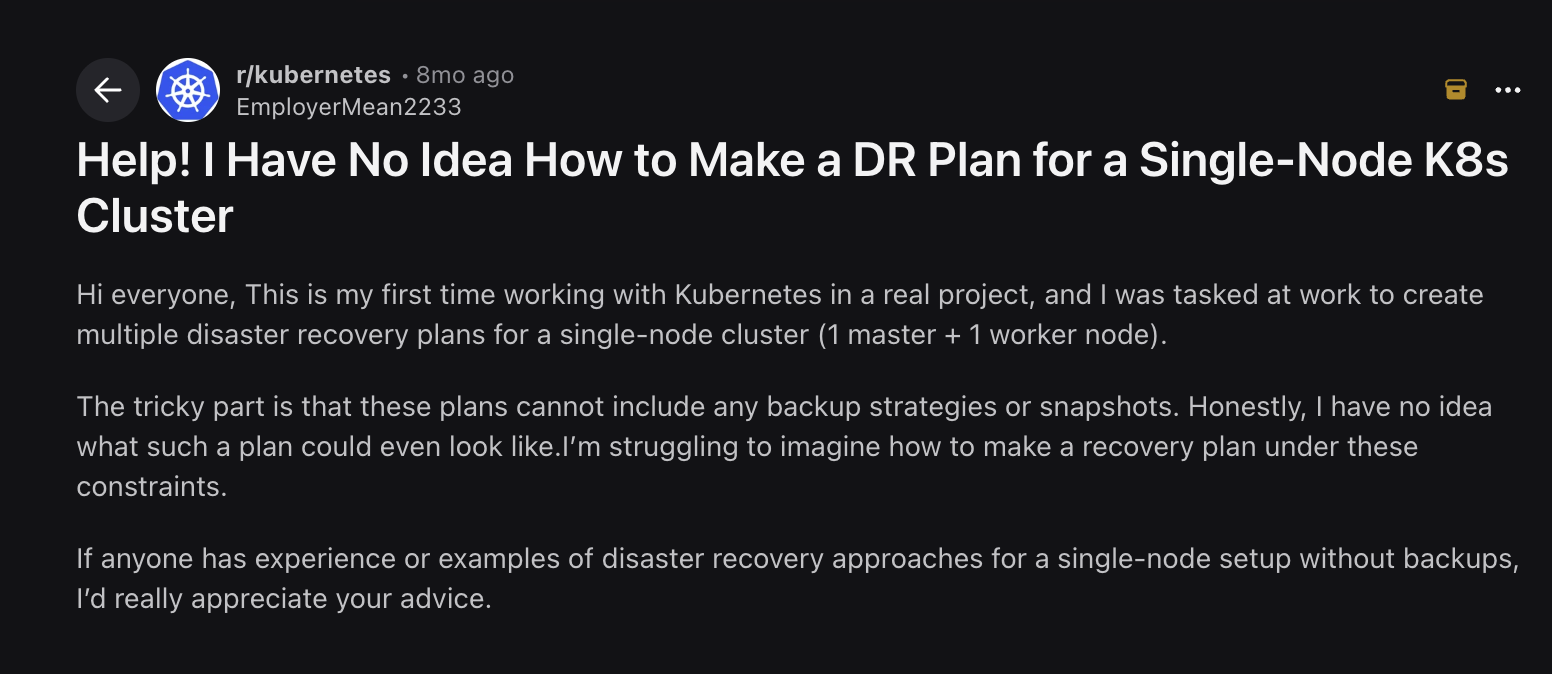
The challenge was not just restoring the VM; it was figuring out how to recover application dependencies, cluster state, and operational continuity under real production constraints.
That problem reflects a broader shift happening across infrastructure teams. Modern production environments now span Kubernetes clusters, IAM policies, Terraform-managed networking, managed databases, object storage, and services distributed across multiple regions and accounts. Recovering a VM or restoring a database snapshot no longer guarantees the application itself will function correctly after failover.
This is why disaster recovery tooling has expanded far beyond traditional backup platforms. Teams now evaluate DR tools based on Kubernetes recovery, infrastructure reconstruction, dependency sequencing, cross-account failover, and whether applications actually become operational after recovery, not just whether workloads restore successfully.
What Is a Disaster Recovery Tool and What Does It Recover?
A disaster recovery tool automates the process of restoring systems, data, and applications after an outage, whether that's a hardware failure, a ransomware attack, or an accidental deletion. The core job is getting your stack back to a known good state within a defined recovery time objective (RTO) and recovery point objective (RPO). How a tool does that and which parts of your stack it covers depends entirely on what it was built to protect.
Pick the wrong DR tool for your stack, and you'll restore every VM cleanly while your application stays down, because the IAM roles, ingress rules, and VPC configuration it depends on were never part of the recovery plan.
Backup-focused tools restore VMs, databases, and storage volumes to a pre-provisioned recovery site. If your infrastructure already exists at the failover target, hypervisor, networking, and storage, the recovery operation is a data transfer, not a rebuild.
Kubernetes workloads break that assumption. A failed-over namespace without its persistent volumes, secrets, and ingress rules produces an application that starts and immediately crashes. The workload is present; the dependencies that make it run are not. Kubernetes-native tools like Velero address this by snapshotting namespace definitions, secrets, and PVC contents together so the full cluster state can be recreated on a new control plane.
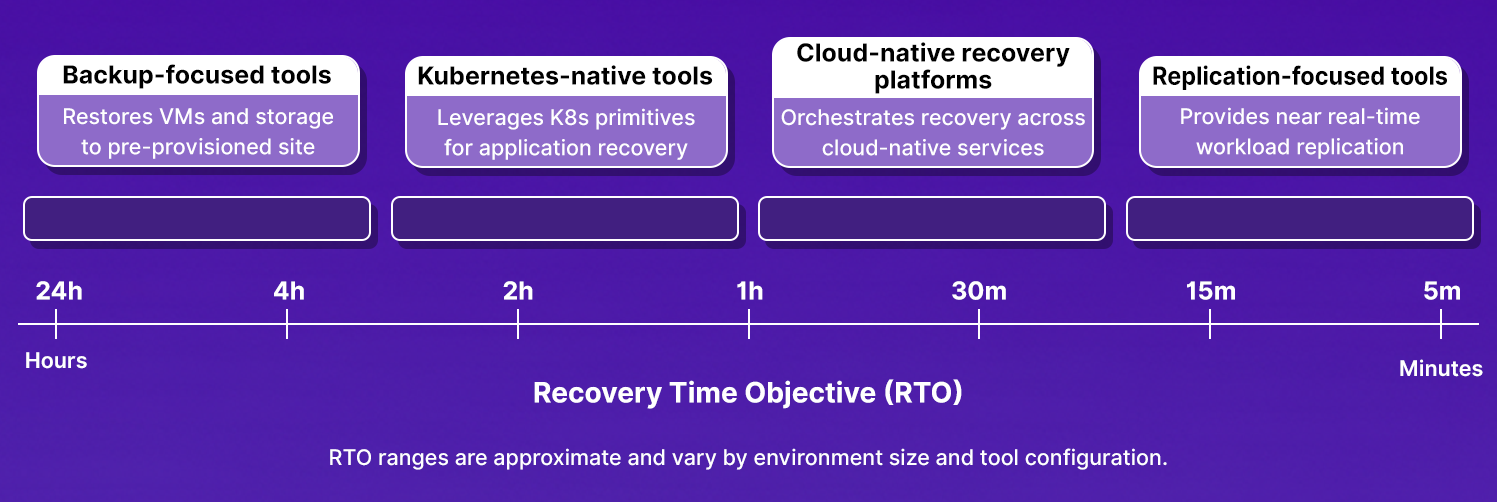
Not every tool category covers the same ground, and the gap between them shows up directly in how fast you recover. Here is how RTO varies across tool types:
IaC-managed infrastructure sits outside what most DR tools track entirely. VPCs, IAM roles, security groups, DNS records, and load balancers are defined in Terraform or Pulumi and stored in a remote backend, not in a backup snapshot. If those resources don't exist at the recovery site, workloads have nowhere to run. Re-provisioning them is a separate step: either a manual Terraform run against your remote backend, a pipeline trigger, or a runbook executed as part of failover.
Replication-focused tools sit at the far end of that spectrum: they continuously mirror block storage or database transactions to a standby site and trigger automated failover when the primary goes down, targeting RTO in minutes rather than hours.
Before picking a tool, identify which layers of your stack need to exist at the recovery site and check whether your current tool tracks each one or assumes it's already there.
5 Categories of Disaster Recovery Tools
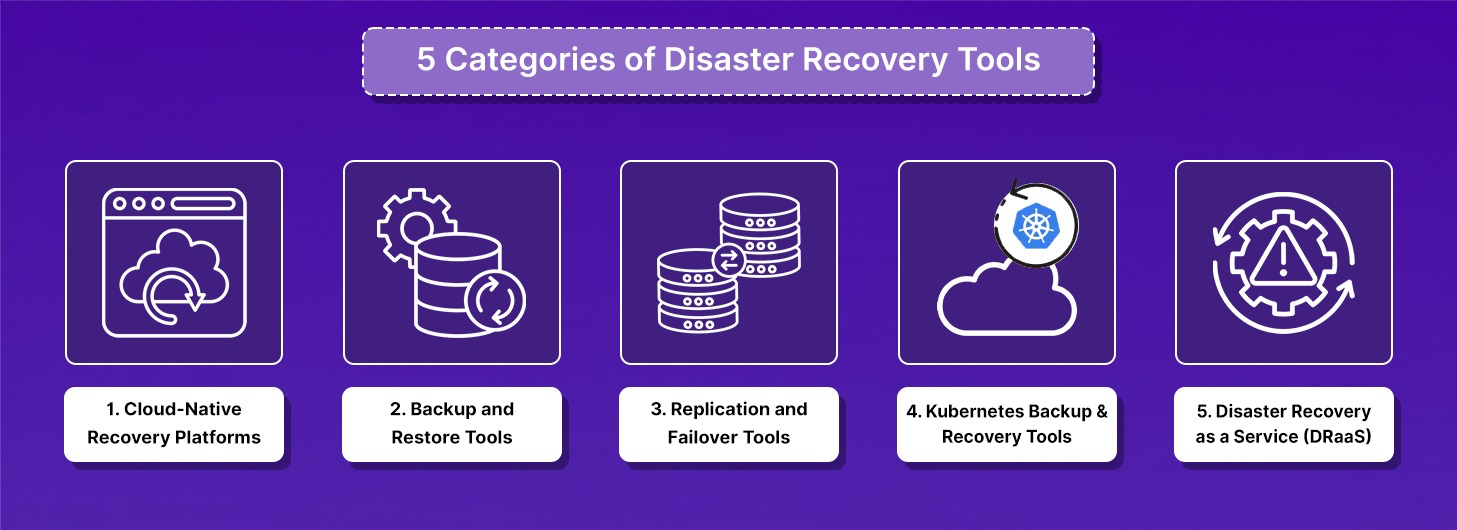
DR tools are split into five categories based on what they treat as the unit of recovery and how they bring systems back online. Most production environments use tools from more than one category.
1. Cloud-Native Recovery Platforms Rebuild Entire Environments from Infrastructure-as-Code, Not Snapshots
Cloud-native recovery platforms treat infrastructure configuration such as VPCs, IAM roles, security groups, Kubernetes state, load balancers, and DNS as the unit of recovery, not individual VMs or database snapshots.
The category emerged because traditional DR tools were designed for a different failure model. When the failure is a hardware crash, restoring a VM snapshot recovers the system. When the failure is a misconfigured IAM policy that blocks service-to-service authentication across four microservices, or a Kubernetes namespace deletion that removes all secret references the application fetches at startup, VM snapshot restoration brings the compute online but leaves the application broken.
What cloud-native recovery platforms protect:
- Full cloud environments: VPCs, subnets, route tables, security groups, load balancers, DNS
- IAM roles, cross-account trust policies, and service account bindings
- Kubernetes clusters, namespaces, deployments, StatefulSets, and persistent volumes
- The dependency relationships between these resources, which service depends on which database, which IAM role must be attached before which pod starts
Core capabilities:
- IaC-driven environment reconstruction: generates Terraform code to rebuild the full environment in a clean account or region, not console clicks
- Dependency-aware restore sequencing: networking and IAM restore before stateful services, stateful services restore before application pods, ingress enables only after readiness probes pass
- Drift detection before incidents: continuously scans production to flag resources that exist in the cloud but are absent from Terraform state, before those gaps become recovery failures
- Cross-region and cross-account recovery: restores into a separate AWS account with isolated credentials, not back into the same account that may be compromised
Where cloud-native recovery platforms fit: Engineering teams running IaC-managed infrastructure across multiple AWS accounts or regions, where the recovery requirement is rebuilding the environment, not restoring individual workloads into pre-existing infrastructure.
2. Backup and Restore Tools Protect Data and Workloads but Depend on Pre-Existing Infrastructure at the Recovery Site
Backup and restore tools capture point-in-time copies of workloads such as VMs, databases, file systems, and store them in a secondary location. Recovery means retrieving the backup copy and restoring the workload into an environment.
The key constraint: backup and restore tools restore workloads to an existing infrastructure. If the VPC, subnets, security groups, and IAM roles at the recovery site are not already provisioned, the restored VM has nowhere to attach, and the restored database has no network path to the application.
What backup and restore tools protect:
- Virtual machine disk images
- Database snapshots
- File systems and object storage
- Physical server backups
Core capabilities:
- Incremental backups that capture only changed blocks since the last snapshot
- File-level and VM-level recovery from a single interface
- Retention policies that define how long backup copies are kept
- Replication to secondary sites or cloud object storage
Where backup and restore tools fit: SMBs running VM-heavy environments, compliance use cases requiring long-term retention, and organizations that have pre-provisioned infrastructure at a secondary recovery site.
3. Replication and Failover Tools Maintain Live Standby Environments and Shift Traffic Automatically During Outages
Replication and failover tools continuously copy workloads from a primary environment to a standby environment. When the primary fails, traffic shifts to the standby automatically. The standby is not a backup copy retrieved during an incident; it is a continuously synchronized mirror that is ready to serve traffic within minutes of a failover trigger.
What replication and failover tools protect:
- Running VMs and their disk state
- Databases with near-zero RPO through journal-based replication
- Application workloads in hybrid cloud environments
Core capabilities:
- Continuous journal-based replication that captures every write, not periodic snapshots
- Automated failover that shifts traffic to the standby environment without manual intervention
- Failback workflows that resynchronize the primary site and return traffic after the incident resolves
- Cross-region replication between AWS, Azure, or GCP availability zones
Where replication and failover tools fit: Enterprise applications where an RTO measured in hours is unacceptable, hybrid cloud environments with on-prem primary sites and cloud standby environments, and organizations with contractual SLA commitments that require sub-hour recovery.
4. Kubernetes Backup and Recovery Tools Restore Namespace and Cluster State, but Do Not Restore the Cloud Infrastructure Those Workloads Depend On
Kubernetes backup and recovery tools operate inside the Kubernetes control plane. They back up resource definitions, Deployments, StatefulSets, PersistentVolumeClaims, ConfigMaps, Secrets, RBAC rules, and restore them to the same cluster or a different cluster.
The category boundary matters: Kubernetes backup tools restore what is inside the cluster. They do not restore the AWS VPC the cluster runs in, the IAM roles attached to the service accounts inside the cluster, or the security groups that control traffic between the cluster and its RDS database. After a Velero restore exits cleanly, PostgreSQL pods can remain in Pending because the EBS volume they need is in a different availability zone than the node the StatefulSet is scheduled onto. The Kubernetes resources are back. The application is not running.
What Kubernetes backup tools protect:
- Namespaces and all resources inside them
- PersistentVolumeClaims and the storage volumes they reference
- Cluster-scoped resources: RBAC, CRDs, operators
- Helm release state and values
Core capabilities:
- Namespace-level backup and restore as a single operation
- PVC snapshots that capture both the resource definition and the underlying storage
- Scheduled backups on configurable intervals
- Cross-cluster restore: back up from EKS us-east-1, restore to EKS us-west-2
Where Kubernetes backup tools fit: Teams running production workloads on EKS, AKS, or GKE who need namespace-level recovery and cluster migration capabilities, and whose cloud infrastructure at the recovery site is already provisioned or managed separately.
5. Disaster Recovery as a Service Providers Manage Backup, Replication, and Failover Infrastructure on Behalf of the Customer
DRaaS providers operate the replication infrastructure, storage, and failover orchestration on behalf of the customer. The customer defines RTO and RPO targets and chooses a delivery model; the provider handles the operational complexity of running DR infrastructure.
Delivery models:
- Self-service: the provider supplies the DR infrastructure; the internal team runs the DR plan. The team is responsible for execution when an incident fires at 2 AM.
- Assisted: an MSP helps design and test the DR plan and provides expert support during active incidents.
- Fully managed: the MSP owns DR end-to-end, from planning through execution. Right fit for teams without dedicated infrastructure staff.
Where DRaaS fits: Organizations without a dedicated DR team, hybrid cloud environments where managing DR infrastructure internally adds operational overhead, and teams whose primary requirement is failover orchestration rather than full environment reconstruction.
For a detailed breakdown of how DRaaS works, where DRaaS breaks in cloud-nat
ive environments with IAM drift and Kubernetes misconfigurations, and how to evaluate DRaaS providers against real RTO targets.
5 DR Tools That Represent Each Category
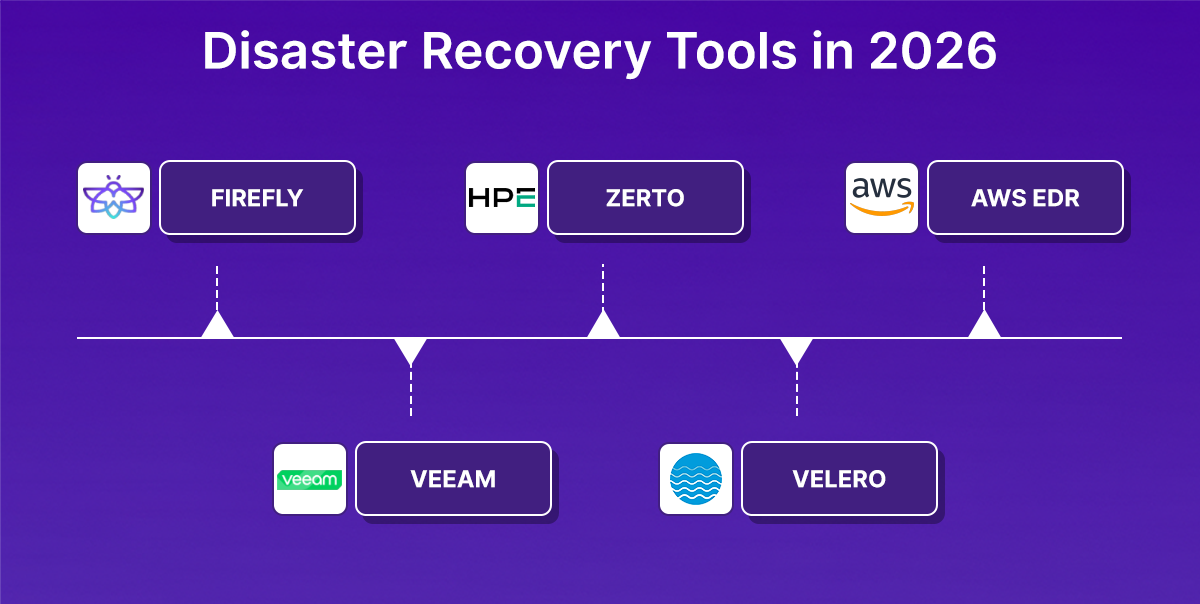
Each tool below is the most widely adopted or architecturally clearest representative of its category. For full side-by-side comparisons across more tools in each category.
1. Firefly
Firefly is a cloud-native recovery platform recognized by Gartner as a leading Cloud Application Infrastructure Recovery Solution (CAIRS). It approaches DR from the infrastructure layer outward: instead of backing up workloads and restoring them into a pre-existing environment, Firefly continuously captures the full cloud infrastructure state, compute, networking, IAM, Kubernetes, and the dependency relationships between them, and stores it as deployment-ready Infrastructure-as-Code. When recovery is triggered, Firefly generates Terraform code that rebuilds the entire environment in dependency order in a clean region or account, not back into the same environment that failed.
The second capability, Cloud Resilience Posture Management (CRPM), runs continuously before incidents. It scans production environments across AWS, Azure, GCP, OCI, and Kubernetes, flags resources that exist in the cloud but are absent from Terraform state, and generates per-resource remediation commands before those gaps cause recovery failures. An IAM role created manually in the console three months ago, a security group rule added via CLI during an incident, a subnet with no Terraform definition, CRPM surfaces these before the outage, not during it.
Key Capabilities
- Application-scoped snapshots: groups cloud resources by logical application boundary using tags, capturing compute, networking, IAM, and Kubernetes state together rather than as isolated resources
- IaC-driven environment reconstruction: generates Terraform code to rebuild the full environment in a clean account or region, not console clicks, not API mutations, but version-controlled, auditable code
- Dependency-aware restore sequencing: networking and IAM restore before stateful services, databases before application pods, ingress only after readiness probes pass
- Cross-region and cross-account recovery: restores into a separate AWS account with isolated credentials, providing actual isolation from a compromised or failed primary account
- Continuous drift detection: flags resources that exist in production but have no IaC definition, and generates remediation commands scoped to exact resource IDs before they become recovery failures
- Version control integration: automatically opens a pull request with the snapshot manifest to a connected GitHub repository on every backup, keeping the infrastructure state version-controlled continuously
- Audit-ready compliance: every recovery action is logged and traceable, supporting SOC 2, ISO 27001, GDPR, and DORA requirements
How Firefly Scopes, Discovers, and Configures Recovery in Four Steps
Firefly's application creation workflow runs in four steps, including Application Scope, Discovery, Resilience, and Completion. Each step builds on the previous one: scope defines what belongs to the application, discovery maps what it depends on, and resilience defines where and how fast it recovers.
Step 1: The application is scoped to Infrasity-AWS-prod in us-east-1 using tag-based filters, two Name: web-app-prod-pu... tags, plus five additional filters narrow exactly which resources are included.
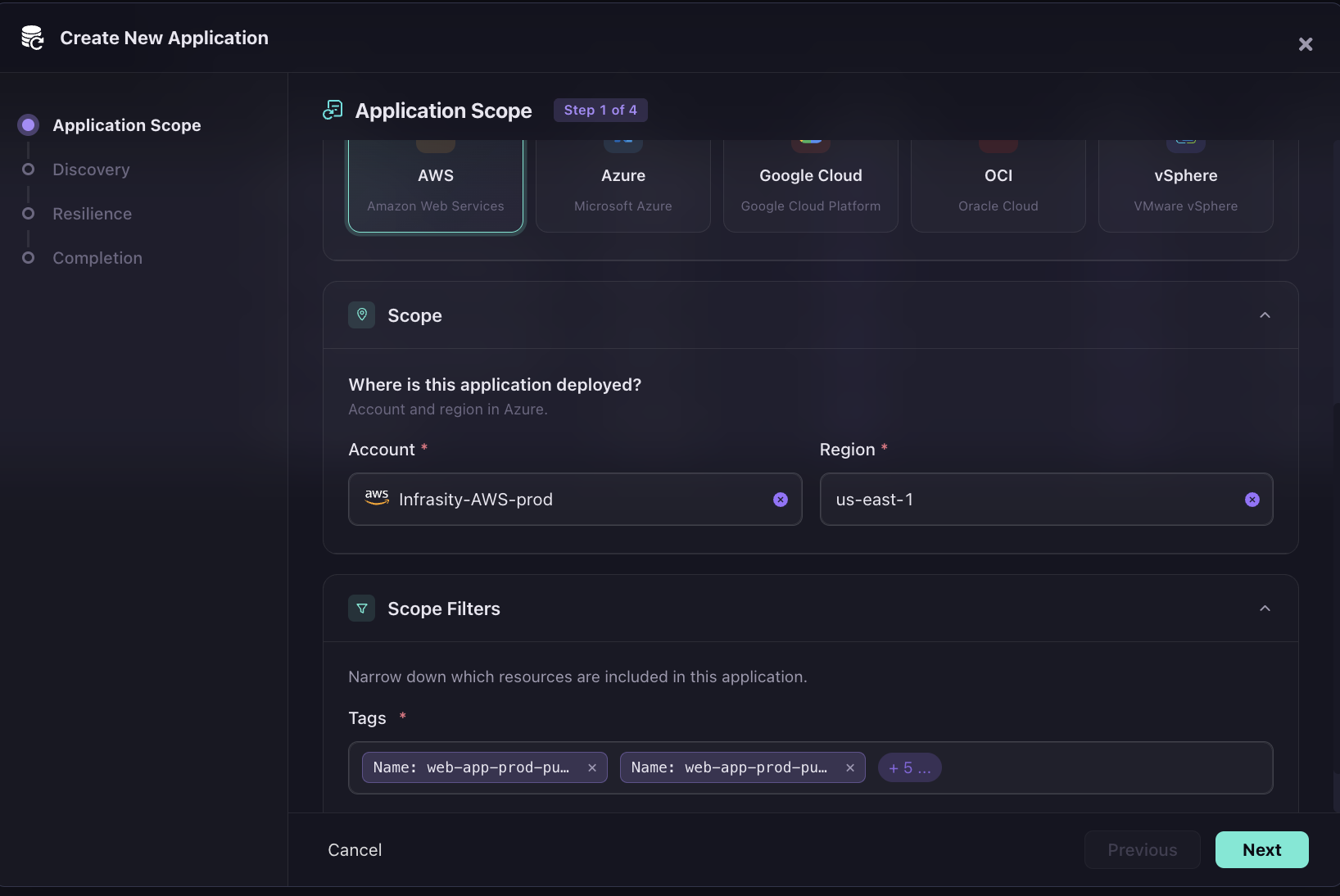
Every resource matching those tags is captured together as a single recoverable unit, not as isolated backups.
Step 2: Firefly automatically maps 12 dependencies from the production environment without the engineer manually listing them. As in the snapshot below, the list includes IAM Instance Profile, IAM Role, and KMS Key alongside AMI, EBS Volume, Key Pair, Route Table Association, S3 Bucket Ownership Controls, and Security Group Rules (3).
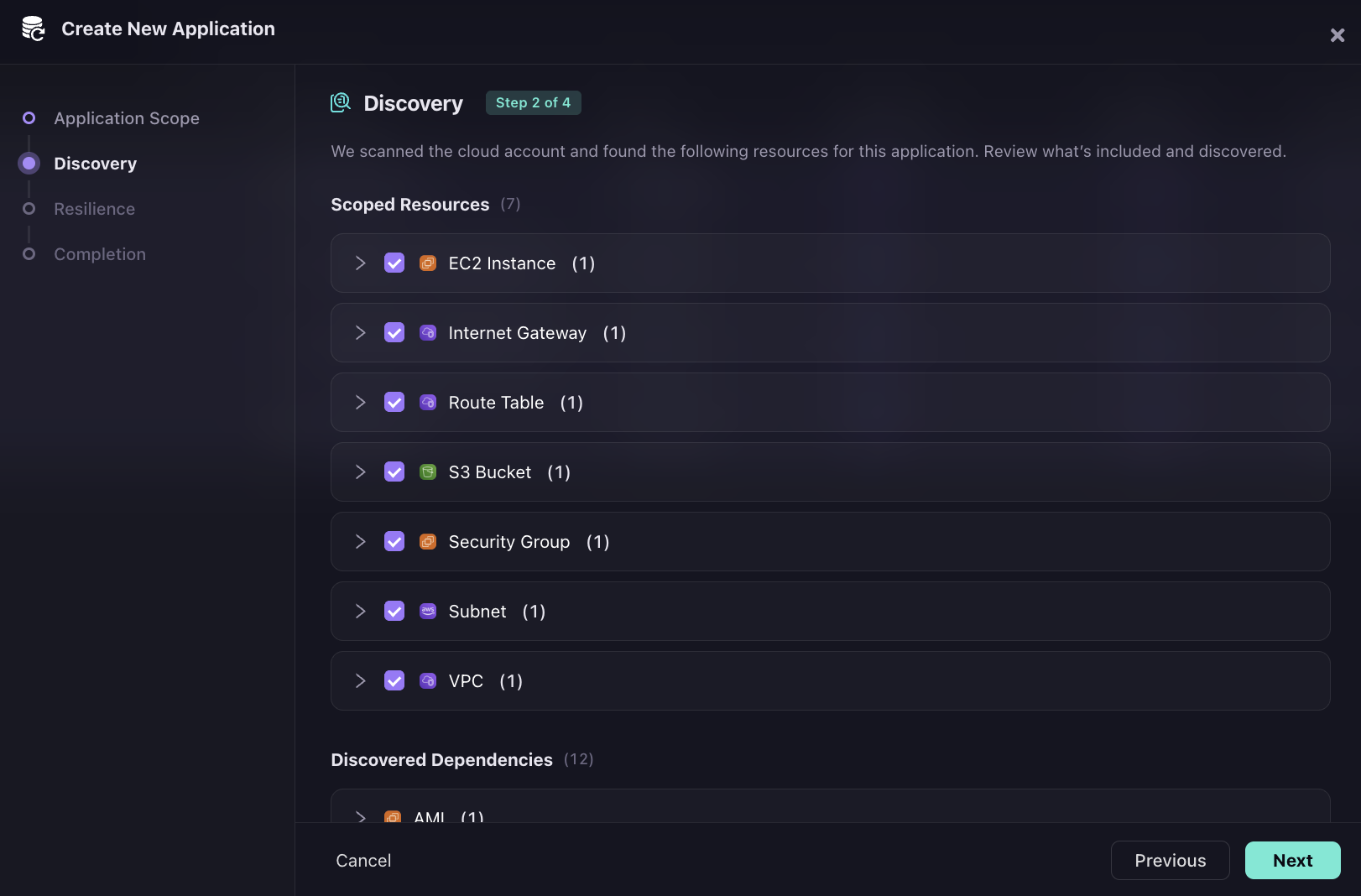
Those IAM and KMS entries are what a traditional VM backup misses entirely, the role the instance assumes at startup, the key that decrypts its EBS volume, and the security group rules that control traffic in and out. Without them, restored compute cannot authenticate or communicate.
Step 3: The RPO slider runs from 24 hours to 4 hours, with the snapshot frequency increasing as the slider moves right. The recovery target region is selected in the same step, in the snapshot below, us-west-2 is chosen from a dropdown covering eight AWS regions.
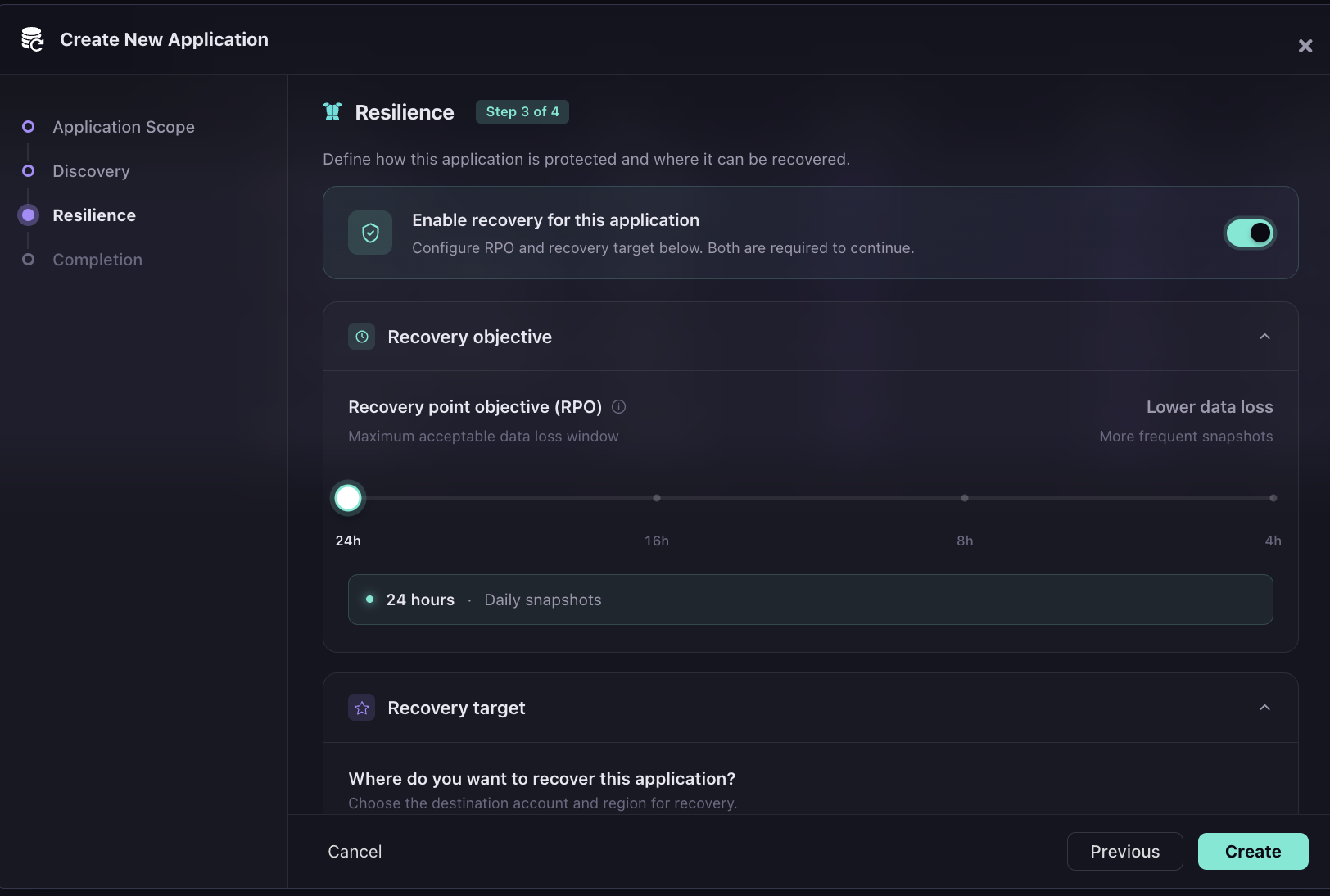
Cross-region recovery is configured at application setup time, not during an incident.
Version control and notifications: The same Resilience step shows "Automatically open a PR on every snapshot" toggled on, connected to Workspaces-Github and the bytebardshivansh/app-infra repository.
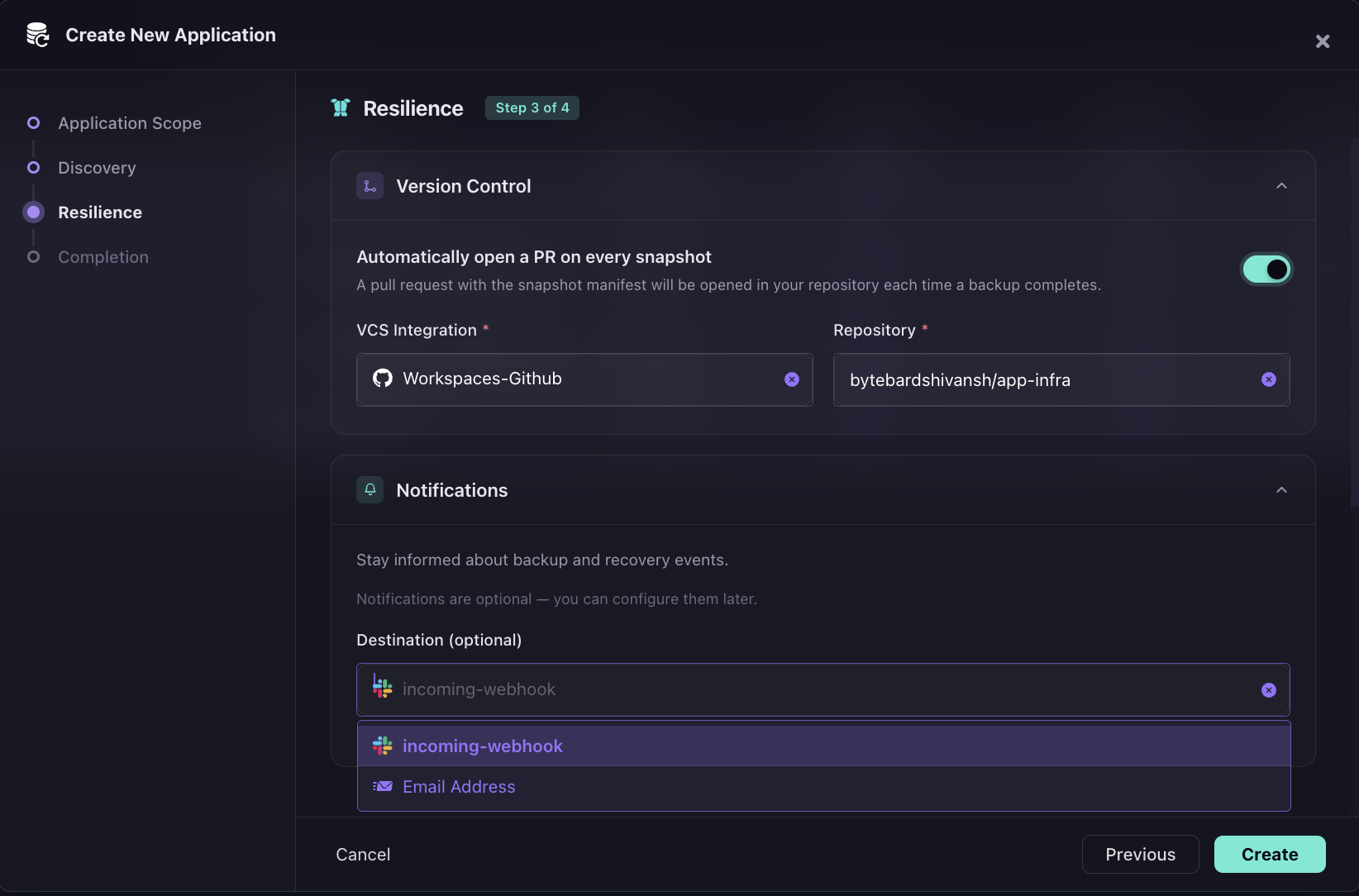
Every backup produces a pull request with the snapshot manifest; infrastructure state is version-controlled as an automatic output of each backup, not a manual export after the fact. Notifications route to a Slack incoming-webhook or Email Address.
Best fit: IaC-driven engineering teams running multi-account AWS, Azure, or GCP environments where the recovery requirement is rebuilding the full environment, compute, networking, IAM, Kubernetes state, and dependency relationships, not restoring individual workloads into pre-existing infrastructure.
2. Veeam: Backup and Restore
Veeam is a backup and restore platform that protects VMs, cloud instances, databases, and file systems across hybrid environments. It operates through a policy-driven model: workloads are assigned to backup policies that define capture frequency, retention periods, and replication targets. Recovery restores the selected workload into an existing environment at the original location or a different one. The key constraint is that Veeam restores workloads into infrastructure that already exists; it does not provision VPCs, IAM roles, or networking at the recovery site.
Key Capabilities
- Policy-driven workload protection: VMware, Hyper-V, AWS EC2, Azure VMs, SQL Server, Oracle, and NAS targets managed under a single policy interface with configurable backup frequency and retention
- Incremental block-level backups: capture only changed blocks since the last snapshot, reducing storage consumption and backup window duration
- Multi-site replication: copies backup data to secondary sites or cloud object storage for off-site protection
- Granular recovery: restores at the file level, VM level, or database level from a single recovery point without restoring the entire workload
- Component health monitoring: surfaces backup server, cloud gateway, repository, and WAN accelerator status in a single console view
Hands-On: Reading Pre-Incident Readiness from the Infrastructure Health Dashboard
The Veeam Service Provider Console gives operators a unified view across the full protection stack. The Infrastructure Health panel breaks down status by module; each component within Veeam Cloud Connect (backup server, cloud gateway, backup repository, cloud backup appliance) shows an individual health indicator rather than a single aggregate status. This matters during pre-incident readiness checks: a green aggregate status that masks a failing WAN accelerator is not useful; per-component visibility is. In the screenshot below:
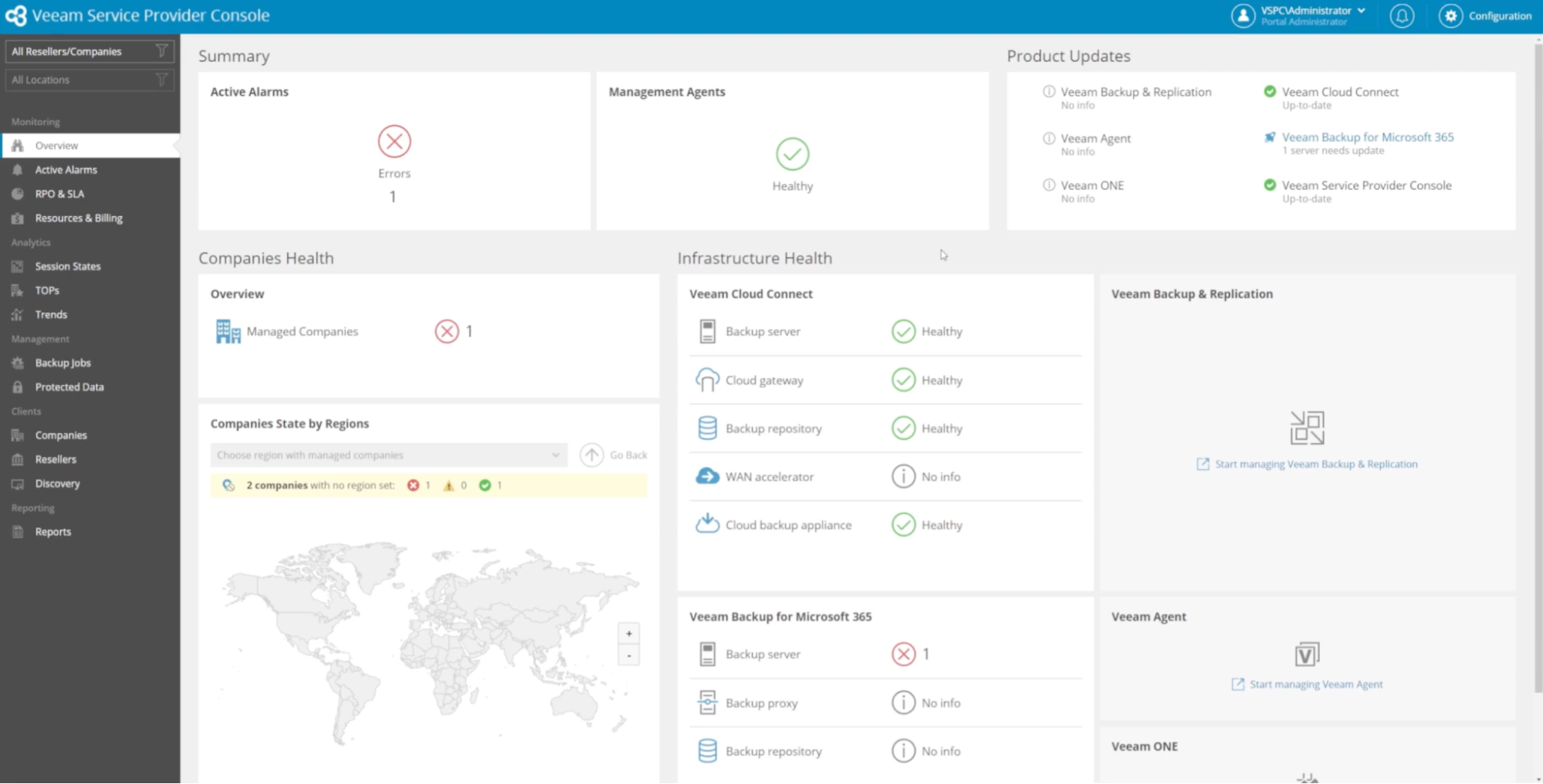
Veeam Cloud Connect shows all five components healthy, while Veeam Backup for Microsoft 365 shows a backup server error, surfacing exactly where intervention is needed without requiring the operator to open individual server consoles. The Product Updates panel in the top right flags that Veeam Backup for Microsoft 365 has one server needing an update, while other modules are current. Both panels together give the operator a complete pre-incident readiness picture in a single view.
Best fit: VM-heavy hybrid environments where the recovery site infrastructure is pre-provisioned, and the primary requirement is restoring workloads, not reconstructing the infrastructure they run on.
3. Zerto: Replication and Failover
Zerto is a continuous replication and failover platform built around the Virtual Protection Group (VPG), a logical grouping of VMs that are replicated and failed over together. Unlike snapshot-based tools that capture state at intervals, Zerto writes every change to a journal in real time, giving recovery points measured in seconds. When a failover is triggered, Zerto shifts traffic to the standby environment automatically and provides a controlled failback sequence to resynchronize and return traffic to the primary site after the incident resolves.
Key Capabilities
- Continuous journal-based replication: captures every write to the primary with sub-second granularity, eliminating the data loss window that exists between snapshots in backup-based tools
- VPG-level failover: groups related VMs into protection groups so dependent workloads fail over together in the correct sequence rather than independently
- Automated failover and failback: shifts traffic to the standby and returns it to the primary without manual intervention at each step
- Non-disruptive failover testing: runs failover tests in an isolated bubble without interrupting production replication or taking the primary offline
- Cross-site replication: supports on-prem to cloud, cloud to cloud, and multi-site topologies
Hands-On: Verifying Replication Health and RPO Status Before an Incident Fires
The Zerto dashboard gives a real-time view of replication health across all protected workloads. The summary bar at the top shows the numbers that matter operationally: 5 VPGs, 5 VMs, 79GB protected, 91% compression, and an average RPO of 6 seconds. The RPO figure is the one to watch, it is the gap between the last replicated write and the current moment. At 6 seconds, a failover triggered right now would lose at most 6 seconds of data.
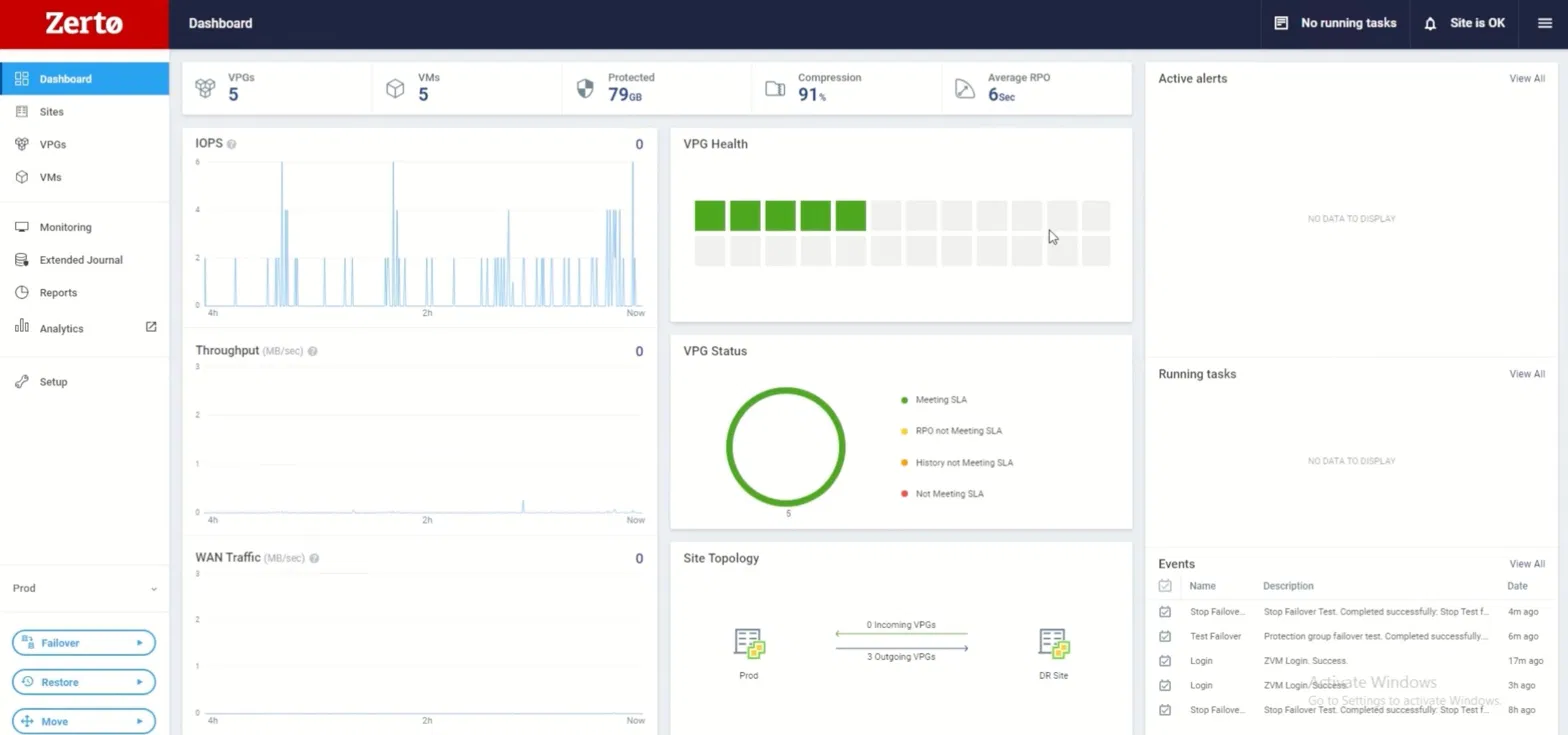
The VPG Status donut chart shows all five VPGs meeting SLA, no amber RPO violations, no red history gaps. The Site Topology panel confirms three outgoing VPGs are actively replicating from Prod to the DR Site. The Events panel on the right records the last several operations: two Stop Failover Tests completed successfully, one 6 minutes ago and another 8 hours ago. A DR plan that has been tested twice in the last 8 hours is a fundamentally different risk posture from one that was last tested at an annual review.
Best fit: Enterprise applications with contractual RTO requirements under one hour, hybrid cloud environments with on-prem primary and cloud standby, and organizations where the cost of downtime per hour exceeds the cost of maintaining a continuously synchronized standby.
4. Velero: Kubernetes Backup and Recovery
Velero is an open-source tool that runs inside a Kubernetes cluster and backs up resource definitions and persistent volume snapshots to object storage. A Velero backup of a namespace captures every Deployment, StatefulSet, Service, ConfigMap, Secret, and PVC in that namespace as a single backup object stored in S3 or GCS. Restore targets the same cluster or a different cluster, making cross-cluster migration a primary use case alongside disaster recovery. Velero handles the Kubernetes resource layer; the cloud infrastructure on which those workloads run must be provisioned separately.
Key Capabilities
- Namespace-scoped backups: capture all Kubernetes resources within a namespace as a single atomic backup object, including PVCs and their underlying storage snapshots
- Scheduled backup policies: run backups on configurable cron schedules with TTL-based expiration to manage retention automatically
- Cross-cluster restore: backs up from one cluster and restores to a different cluster in a different region or cloud provider
- Selective resource inclusion/exclusion: scopes backups to specific resource types or excludes cluster-scoped resources like VolumeSnapshotContents that should not be replicated
- Storage location flexibility: stores backup objects in any S3-compatible object storage such as AWS S3, GCS, Azure Blob, or self-hosted MinIO
What a PartiallyFailed Backup Looks Like and Why Post-Backup Validation Is Required
The snapshot below shows a Velero configuration in a live EKS environment. The velero-values.yaml file shows a daily backup schedule running every 6 hours (0 */6 * * *) with a 168-hour TTL, scoped to the dr-demo namespace with defaultVolumesToFsBackup: true. The terminal shows a kubectl describe pod postgres-0 output, the PostgreSQL StatefulSet running in the dr-demo namespace on node ip-10-40-0-13, controlled by a StatefulSet, with the postgres-data volume annotated for backup.
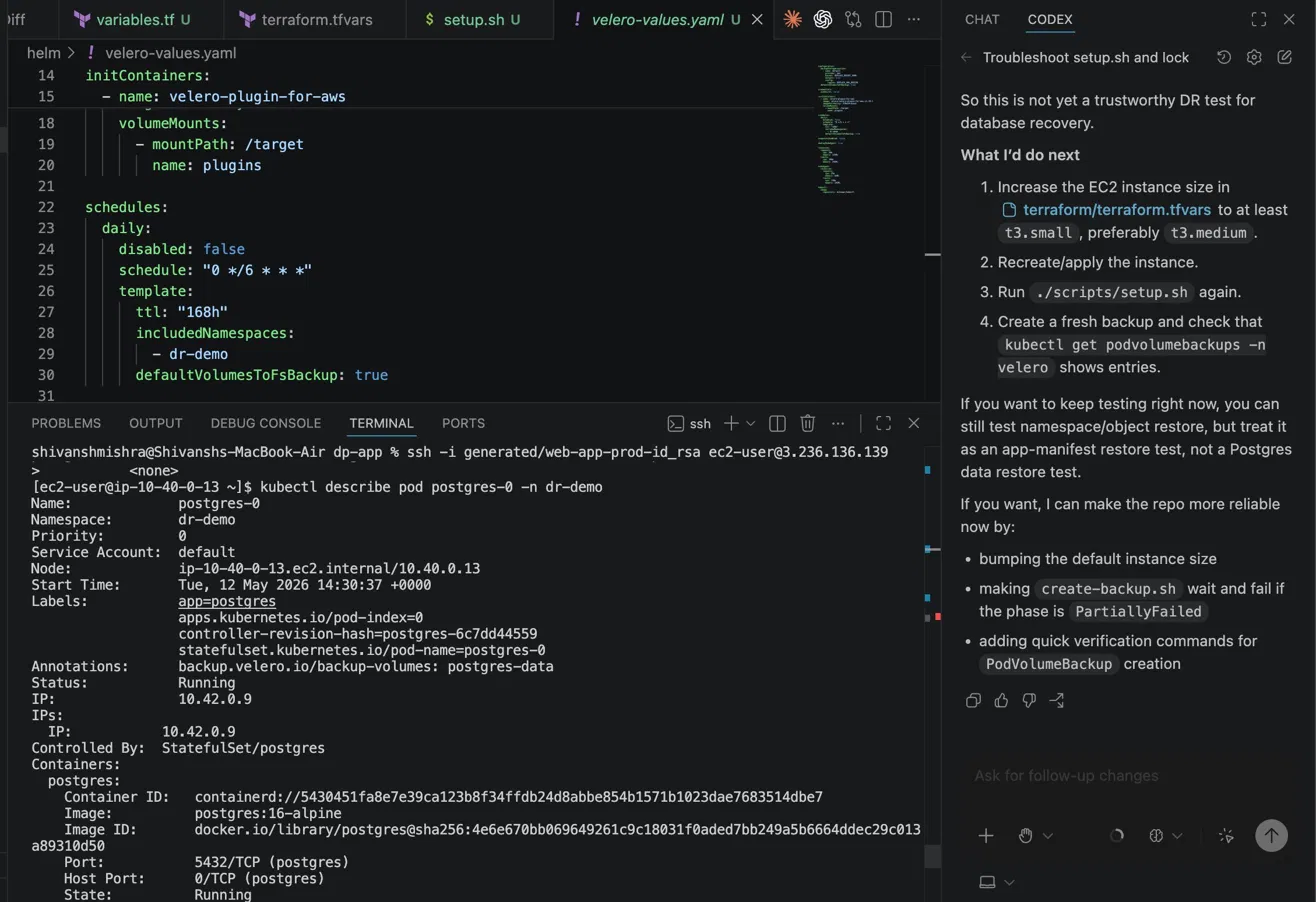
The backup describes output for dr-demo-manual-20260512200913 surfaces what production Velero operations actually look like: 36 items backed up, Phase: PartiallyFailed, 1 error, 1 warning. The backup completed, but not cleanly.
This is the operational reality of Velero in production. PVC snapshots can fail silently if the underlying storage driver does not support CSI snapshots correctly, and the namespace-level phase only shows PartiallyFailed rather than identifying which specific resource failed. Post-backup validation with kubectl get podvolumebackups -n velero is required to confirm that volume data was actually captured, not just the Kubernetes resource definitions.
Best fit: Teams running EKS, AKS, or GKE who need namespace-level recovery and cluster migration, and who manage cloud infrastructure separately through Terraform or another IaC tool.
5. AWS Elastic Disaster Recovery (DRaaS)
AWS Elastic Disaster Recovery (AWS EDR) replicates on-prem servers and cloud VMs into AWS at the block level. A lightweight agent installed on each source server streams block-level changes to a staging area in the target AWS region continuously.
When a failover is triggered, AWS EDR launches EC2 recovery instances from the replicated data at a selected point in time. Because it runs natively inside AWS, it requires no separate DR control plane or third-party SaaS subscription; teams already running workloads in AWS have the IAM, networking, and account structure needed to operate it.
Key Capabilities
- Continuous block-level replication: streams every disk write from source servers to a staging area in the target region, maintaining recovery points at 10-minute intervals
- Point-in-time recovery selection: retains multiple recovery points and lets engineers select the exact point in time to recover from, before a ransomware event, before a failed deployment, or at the most recent state
- Agent-based source coverage: protects physical servers, VMware VMs, and cloud VMs from any source environment, not just AWS workloads
- Native AWS integration: launches recovery instances as standard EC2 instances using existing VPC, subnet, and security group configurations in the target account
- Non-disruptive drills: run recovery drills by launching drill instances that do not affect production replication or source server operation
Hands-On: Selecting a Recovery Point and Understanding the 10-Minute RPO Tradeoff
The recovery job interface shows the point-in-time granularity AWS EDR provides. The screenshot below shows 22 recovery points available for a single source server, captured at 10-minute intervals from 8:06 AM through 3:36 PM on April 12, 2026. The default selection is "Use most recent data." Each row shows the timestamp, the number of servers included in that point in time (1/1), and the number of servers to be recovered (1/1).
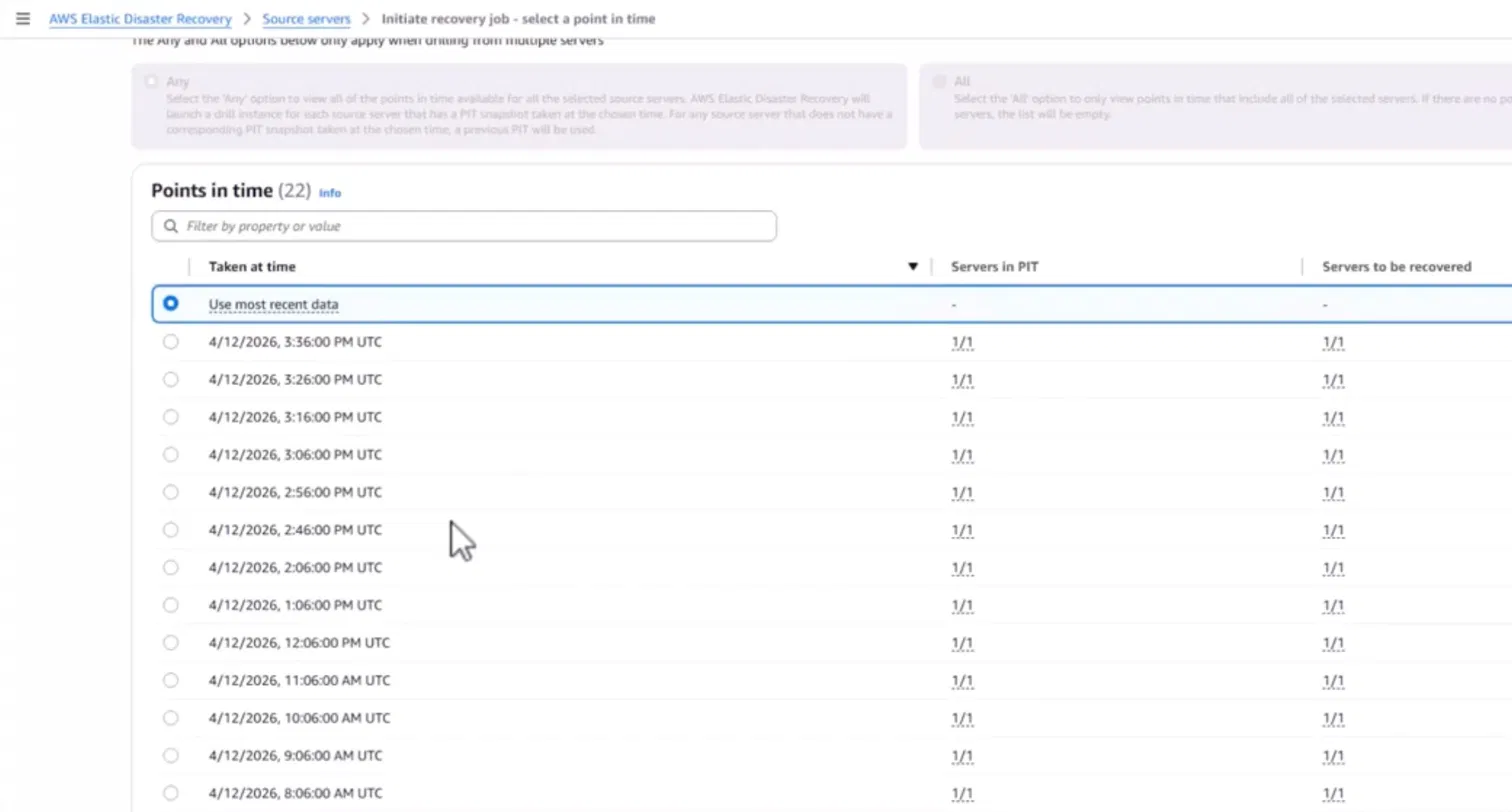
An engineer initiating recovery selects the point in time that predates the incident and launches instances from that snapshot. The 10-minute granularity means the maximum data loss window is 10 minutes, better than hourly snapshots in traditional backup tools, but not the sub-second RPO that continuous journal replication in tools like Zerto provides. The tradeoff is operational simplicity: AWS EDR requires no standby environment to maintain, no ongoing infrastructure cost for a hot standby, and no third-party control plane to operate.
Best fit: AWS-heavy teams migrating on-prem workloads to AWS or protecting EC2 workloads across regions, where the preference is a managed failover tool inside the AWS console rather than a third-party DR platform.
How to Evaluate Any DR Tool Against Your Architecture
The capabilities below apply across all five categories. Use them as the evaluation checklist when a vendor claims a specific RTO or demonstrates a recovery workflow against a reference architecture that does not match your environment.
Continuous replication vs snapshot-based recovery. Snapshot-based tools capture state at intervals, every hour, every four hours. If an incident fires 55 minutes after the last snapshot, the last 55 minutes of changes are gone. Continuous replication tools capture every write and give recovery points measured in seconds. The right choice depends on your RPO target. An RPO of four hours tolerates snapshots. An RPO of zero requires continuous replication.
What automated failover actually automates: Every DR vendor claims automated failover. The question is where automation stops and manual steps begin. Some tools automate the compute failover but require an engineer to manually update DNS records, re-attach IAM roles, and restart failed pods after the failover completes. Ask the vendor to walk through a complete failover drill, from incident detection to application serving traffic, and identify every step that requires human intervention.
Cross-region and cross-account recovery: A recovery plan that restores into the same AWS account that experienced the incident is not isolated from the failure. Ransomware that compromises the primary account can reach backup copies stored in the same account. Cross-account recovery, restoring into a separate AWS account with isolated credentials, is the architecture that provides actual isolation. Verify that the tool supports cross-account restore, not just cross-region.
Infrastructure and IAM awareness: Ask whether the tool captures IAM roles, trust policies, and service account bindings as part of its backup scope. A tool that backs up EC2 instances but not the IAM instance profiles attached to them restores compute that cannot authenticate to S3, Secrets Manager, or any AWS service the application calls at startup.
Dependency sequencing: Ask the vendor to demonstrate recovery of a multi-tier application: a PostgreSQL StatefulSet, an application deployment that connects to it at startup, and an ingress controller that routes external traffic to the application. The correct sequence is: database initializes and passes readiness checks, application pods start and connect successfully, ingress enables and routes traffic. Tools that start all components simultaneously produce CrashLoopBackOff on application pods because the database is not ready when the application attempts its first connection.
Recovery testing against production-equivalent environments A DR plan validated only against a simplified demo stack does not tell you whether your actual environment recovers correctly. Verify that the tool supports recovery drills in an isolated account or region, not in the production account, and that drill results include per-resource restore status, timing, and health check outcomes.
Comparison Table
Conclusion
The five DR tool categories each solve a different layer of the recovery problem. Backup and restore tools protect data. Replication and failover tools maintain live standbys. Kubernetes backup tools recover cluster state. DRaaS providers manage the DR infrastructure. Cloud-native recovery platforms rebuild full environments from IaC when the failure is in the configuration and operational-state layer, not the hardware.
Most production environments need more than one category. A common stack for an IaC-driven AWS environment: Velero for Kubernetes namespace recovery, Veeam for database and VM backups, and Firefly for full environment reconstruction when the failure requires rebuilding VPCs, IAM, and application dependency graphs from scratch.
The evaluation shift that matters in 2026: DR tools are no longer assessed only by how fast they restore data. They are assessed by whether the application works after recovery completes, IAM grants the right permissions, pods pass readiness probes, the database accepts connections before the application starts, and Terraform plan exits clean.
FAQs
1. What are disaster recovery tools?
Disaster recovery tools help organizations back up, replicate, and restore systems after outages or cyber incidents. They automate recovery workflows, reduce downtime, and minimize data loss. Popular tools include Veeam, Zerto, Amazon Web Services Backup, and Velero.
2. What is RTO, RPO, and MTD?
RTO (Recovery Time Objective) defines how quickly systems must be restored after a failure. RPO (Recovery Point Objective) measures the maximum acceptable amount of data loss in time. MTD (Maximum Tolerable Downtime) represents the total downtime a business can tolerate before serious operational impact occurs.
3. What are types of disaster recovery?
The main types of disaster recovery include backup and restore, pilot light, warm standby, hot standby, and cold site recovery. Each approach offers different levels of cost, recovery speed, and availability. Organizations choose a DR type based on business criticality, compliance needs, and acceptable downtime.
4. What are the methods of disaster recovery?
Disaster recovery methods include data backups, replication, snapshots, failover systems, and cloud-based DRaaS solutions. Modern environments also use Infrastructure as Code (IaC) tools like Terraform to rebuild infrastructure consistently. These methods help organizations achieve targeted RTO and RPO goals while improving resilience.

.avif)
.avif)
.webp)


.webp)












