TL;DR
- IaC tools cover the full infrastructure lifecycle, including provisioning, configuration, deployment, scaling, and governance, each handled by different tools.
- Terraform, Pulumi, and AWS CDK provision infrastructure; Ansible and Puppet configure systems; Helm manages Kubernetes deployments.
- Terragrunt structures Terraform across environments by managing remote state and reducing module duplication.
- Firefly maps cloud resources to IaC, detects drift, and evaluates policy violations across accounts.
- Most teams start with Terraform and Ansible, then add tools like Terragrunt, Helm, and Firefly as infrastructure grows.
Manual infrastructure management breaks as soon as multiple engineers start making changes in parallel. One engineer provisions resources in the cloud console, another configures them over SSH, and changes made during incidents never make it back to a shared definition. Over time, environments diverge because there is no single source of truth.
Infrastructure as Code (IaC) replaces that model by defining infrastructure in version-controlled files and applying changes through a pipeline. On platforms like Amazon Web Services, Microsoft Azure, and Google Cloud Platform, where autoscaling groups, managed services, and short-lived compute are standard, any change made outside that pipeline creates resources or configurations that are not tracked in code. New to the concept? Our primer on Infrastructure-as-Code covers the fundamentals before diving into how the tools below split up the work.
But IaC in 2026 is not just provisioning infrastructure with Terraform. Provisioning is one layer. Configuration, deployment, scaling, and governance introduce different problems, and each requires different tools.
This post maps those tools to each layer and shows how they fit together in a real infrastructure workflow.
IaC Workflow Explained: Configuration, State, and Change Execution
Infrastructure as Code means your infrastructure is defined in version-controlled files, and a tool reconciles actual cloud resources with that definition. Instead of creating resources manually, you define compute, networking, IAM, and services once and apply that definition. Tools like Terraform compare the current state of resources in Amazon Web Services or Google Cloud Platform with your configuration and apply only the required changes.
This declarative model makes it safe to re-run. The tool reads the current state, calculates the difference, and updates only what changed, so you don’t create duplicate resources and runs stay predictable.
In most of the teams, infrastructure doesn’t stay perfectly aligned with code. Manual console edits, incident fixes, or one-off changes introduce drift, where the actual infrastructure no longer matches the configuration. The next apply may overwrite those changes or fail due to conflicts.
As configurations grow across multiple environments and teams, this becomes harder to manage. IaC is no longer just about defining resources; it also involves coordinating how changes are applied, tracked, and controlled over time.
This is where additional tools and workflows come in, and where confusion starts to show up in real-world discussions.
In many Reddit threads and community conversations, the same question comes up: if all IaC tools follow the same model, why do teams use so many different ones in production?

The confusion comes from what happens after you write the code. Running IaC once is straightforward. But in real environments, that code has to be shared across teams, applied through deployment pipelines, and kept in sync with constantly changing infrastructure.
Different teams solve these problems in different ways; some focus on structuring code, others on managing deployments, and others on detecting drift or enforcing rules. Because of that, teams rarely rely on a single tool, and the ecosystem ends up feeling fragmented.
How Different IaC Tools Handle Different Parts of Infrastructure
Terraform provisions infrastructure, but configuration, application deployment, environment management, and recovery are handled by different tools. These are separate parts of the workflow, and each requires a different approach.
Here’s how the ecosystem breaks down:
- Provisioning: Creating resources like VPCs, subnets, EC2 instances, RDS databases, and IAM roles.
- Terraform
- Pulumi
- AWS CDK
- Configuration: Installing packages, configuring services, managing users, and setting runtime configuration on provisioned instances.
- Ansible
- Puppet
- SaltStack
- Deployment (Kubernetes): Managing application releases using charts, values files, and versioned rollouts.
- Helm
- Scaling and structure: Managing Terraform across environments, handling remote state (S3, GCS), and reducing module duplication.
- Terragrunt
- Governance and recovery: Detecting drift between deployed resources and IaC, mapping cloud resources to IaC coverage (codified vs unmanaged), enforcing policies across all resources, and rebuilding infrastructure using tracked state and dependencies.
- Firefly
No single tool covers all of these. Terraform provisions infrastructure, but it does not configure instances, manage Kubernetes deployments, detect changes made outside its state, or rebuild environments from tracked infrastructure state. As infrastructure grows across environments and teams, these tools are combined to cover the full workflow rather than forcing a single tool to handle everything.
Top 9 IaC Tools for the Infrastructure Lifecycle

1. Firefly (Visibility, IaC Coverage, and Recovery Across Your Cloud)
Infrastructure gets created and changed in multiple ways:
- Terraform applies to create VPCs, subnets, and EC2 instances
- Engineers update security groups or IAM roles directly in the cloud console
- Production debugging changes are not added back to Terraform
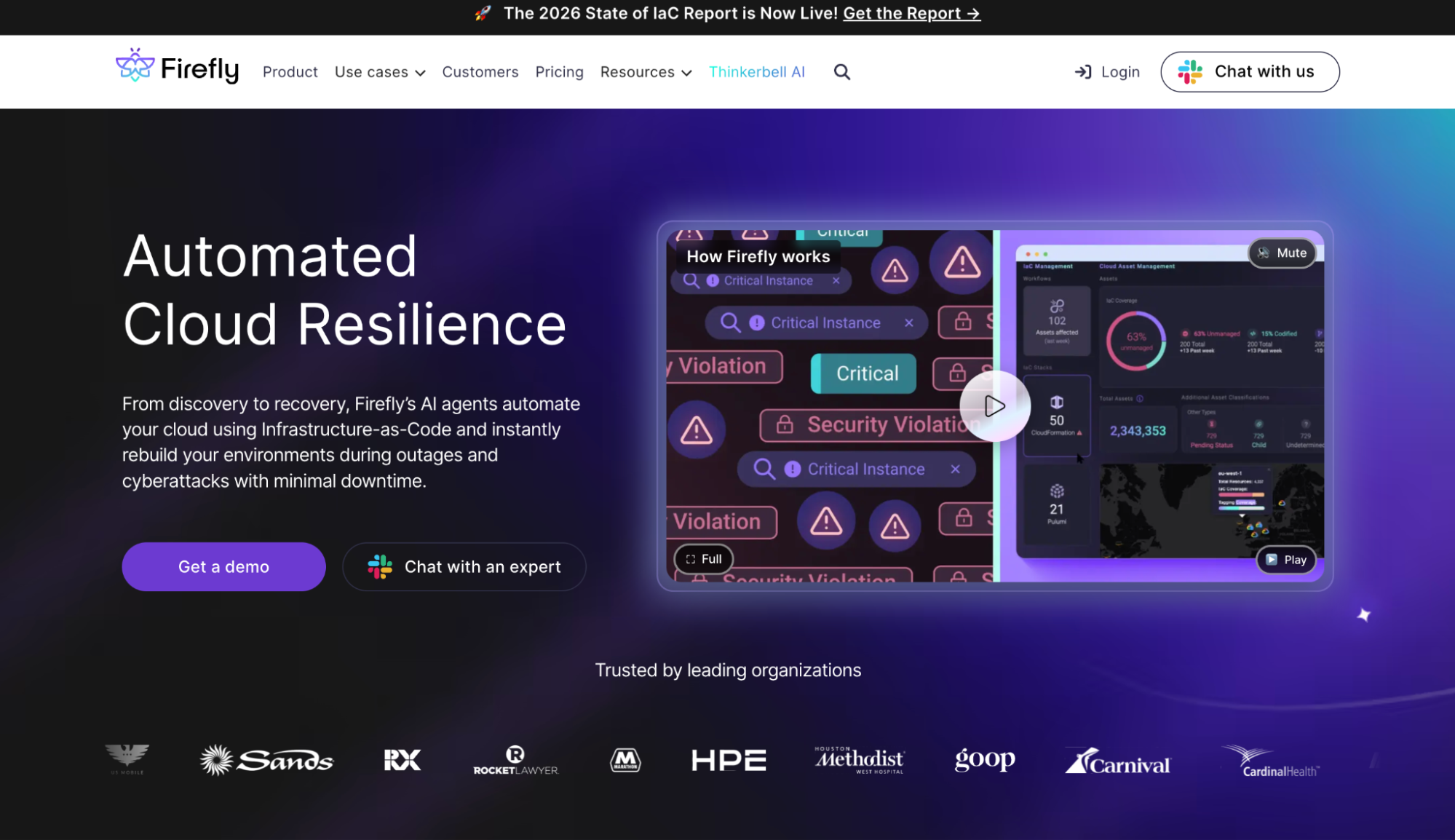
These changes create differences between what exists in cloud accounts and what is defined in Terraform configuration and state. Firefly connects to cloud accounts and builds an inventory of resources, including EC2 instances, S3 buckets, IAM roles, and Kubernetes objects. It maps each resource to the Terraform or Pulumi configuration that manages it.
- Resources with no mapping are flagged as: unmanaged
- Resources with configuration differences are mapped as: drifted
When a resource is changed outside Terraform, for example, a security group rule is added in the console, or an instance type is modified, Firefly detects the difference by comparing the live configuration with the IaC definition. Policies are evaluated across all resources, including those not managed by Terraform. This includes checks such as open ingress rules, missing encryption, or invalid configuration values.
For resources that exist only in the cloud, Firefly can generate Terraform or Opentofu configuration from the current state. This allows existing infrastructure to be brought under version control without recreating it. Because Firefly tracks resource dependencies, such as VPC, subnet, EC2, and security group, it can rebuild infrastructure from this captured state in another account or region.
Key capabilities:
- Infrastructure inventory: See every resource across accounts: managed, unmanaged, or drifted.
- Continuous drift detection; Catch changes the moment they happen outside your IaC workflow.
- Policy enforcement outside CI/CD: Flag misconfigurations even when changes bypass your pipeline.
- IaC codification: Export unmanaged resources as Terraform or Pulumi directly from the inventory.
- Environment recovery: Rebuild from dependency-aware tracked state, not runbooks.
Hands-on walkthrough
In most production accounts, the gap between what's running and what's in code is wider than teams expect. Resources get created manually during incidents, spun up by engineers who bypass the pipeline, and left behind after projects end.
Here's what that looks like in an AWS account scanned by Firefly:
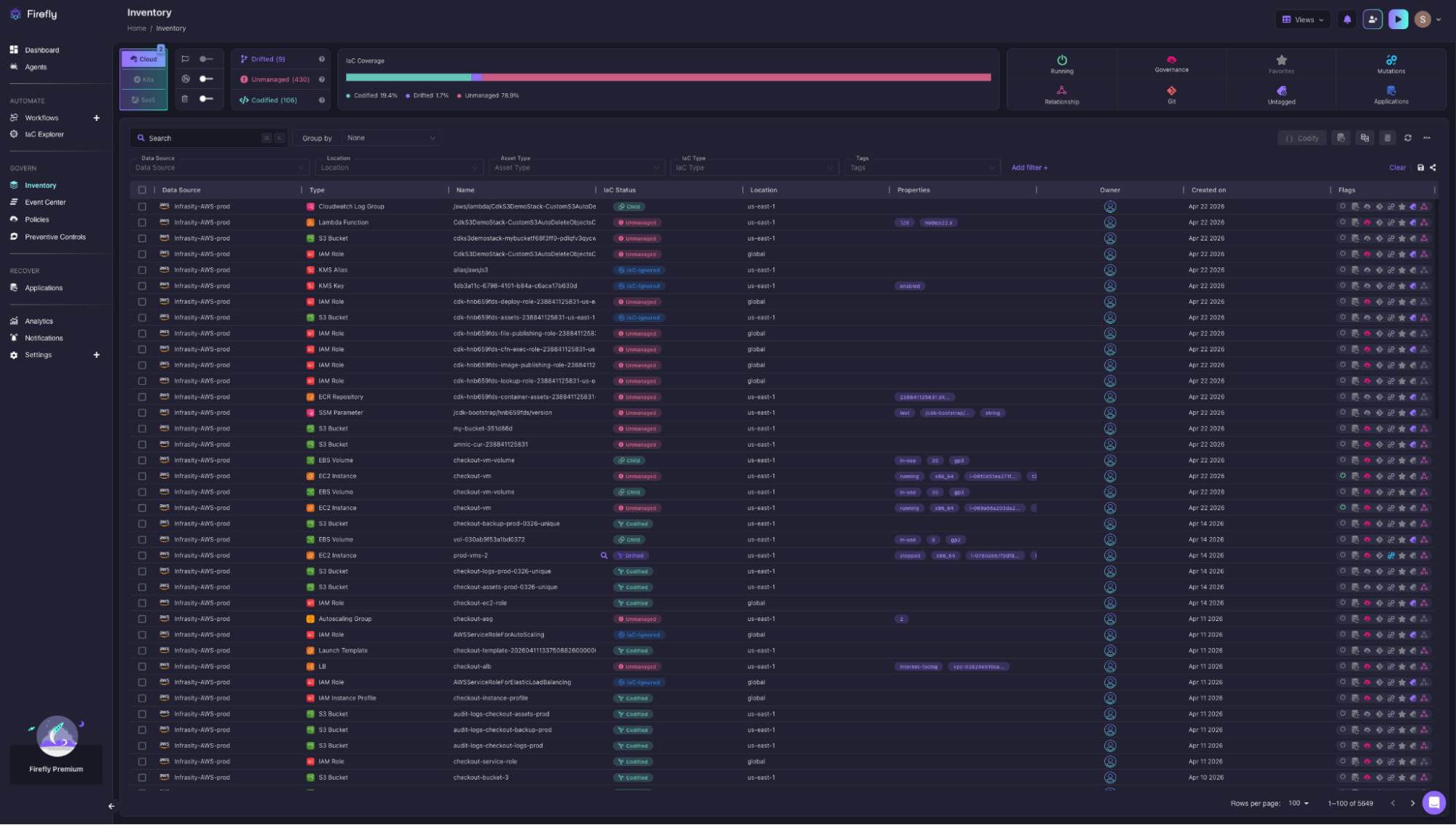
The IaC Coverage bar across Infrasity-AWS-prod breaks it down immediately:
- 78.9% Unmanaged: no IaC definition tracking these resources
- 19.4% Codified: actively managed through Terraform or Pulumi
- 1.7% Drifted: defined in code, but live config no longer matches
That's across 5,649 total resources, S3 buckets, IAM roles, EC2 instances, EBS volumes, Lambda functions, autoscaling groups, each tagged with their actual IaC status. The prod-vms-2 EC2 instance shows Drifted, meaning its live configuration no longer matches the Terraform definition. Without this view, that mismatch stays hidden until a deployment fails or a security review surfaces it.
Enforcing policy across 776 rules, from CIS and SOC 2 to custom policies, without touching CI/CD
Policy checks that only run inside CI/CD miss every resource that was never put through a pipeline, which in this account is 78.9% of what's running.
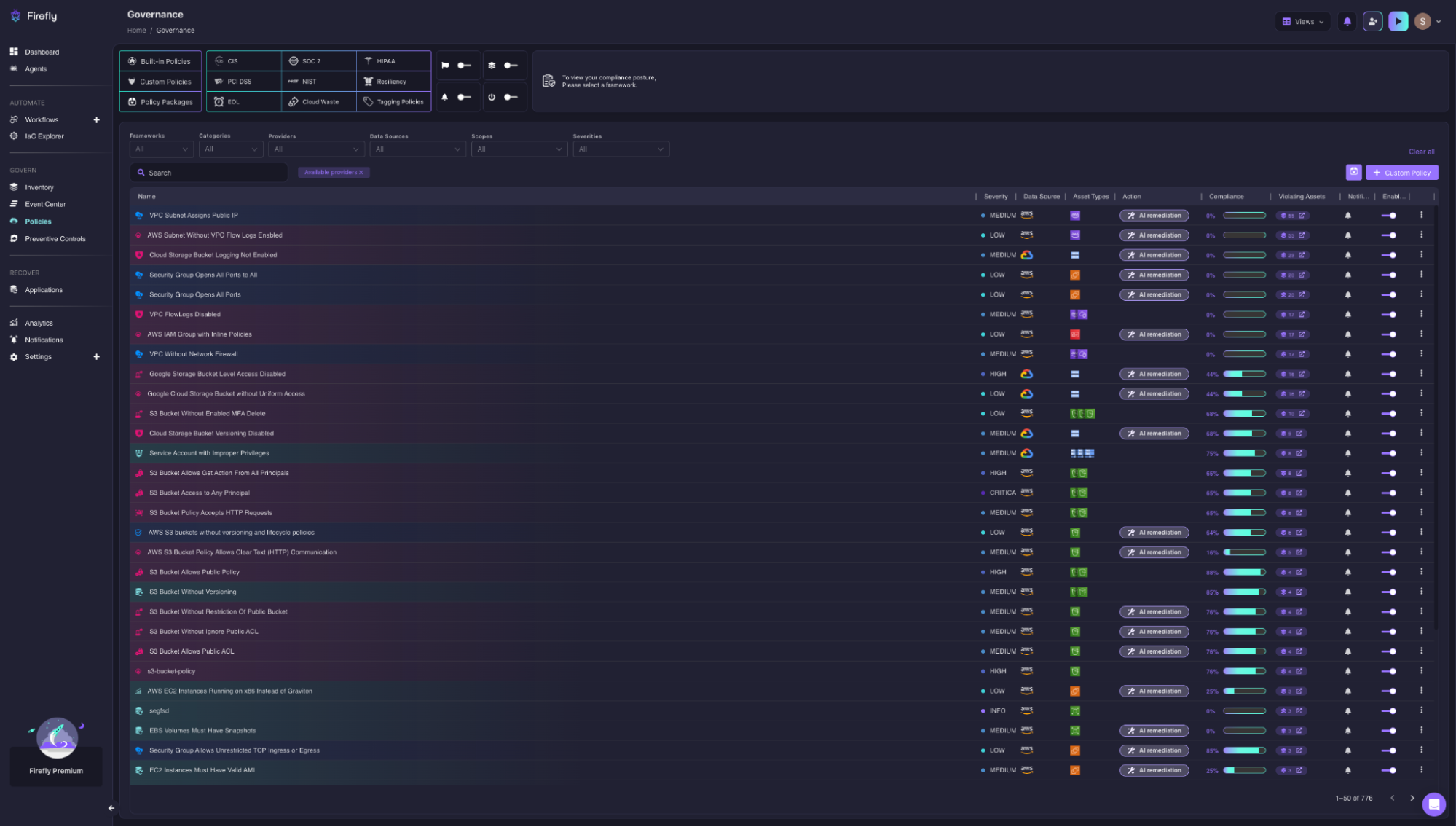
Firefly's Governance view runs 776 active policies across CIS, SOC 2, HIPAA, PCI DSS, and NIST against every resource in the account. A few violations from the list:
- S3 Bucket Access to Any Principal: CRITICAL, 85% compliance. 15% of S3 buckets are open to any principal.
- S3 Bucket Allows Public ACL: MEDIUM, 78% compliance.
- Google Storage Bucket Level Access Disabled: HIGH, with AI remediation available.
Each row shows severity, compliance percentage, the count of violating assets, and whether AI remediation is available, so the path from flagged violation to resolved issue doesn't require a separate workflow.
Where it fits: Sits on top of your cloud and IaC setup. Use it when you need to know what exists, close the gap between deployed and defined, or make environments reliably recoverable.
One-line summary: Maps your cloud to IaC, detects drift as it happens, and makes environments recoverable from tracked state.
2. Terraform (Declarative Provisioning Across Any Cloud Provider)
Terraform defines infrastructure in configuration files and applies changes by comparing those files with the current state of resources in cloud providers like Amazon Web Services, Microsoft Azure, and Google Cloud Platform. The workflow is:
- terraform plan: shows what resources will be created, updated, or destroyed
- terraform apply: executes those changes and updates the state file
The state file tracks resource IDs, attributes, and dependencies. Terraform uses it to determine what already exists and what needs to change. Because Terraform follows a declarative model, it does not execute steps sequentially. It calculates the difference between the configuration and the current state and applies only the required changes. This prevents duplicate resources and allows repeated Terraform apply. For a closer look at the broader ecosystem that's grown up around Terraform itself - providers, wrappers, testing frameworks, and more - see our roundup of Terraform tools.
Hands on walkthrough: Planning and applying three GCP VMs across dev, prod, and qa from a single configuration
The project is gcp-vms, running against GCP via the default workspace in us-west-2. terraform plan shows the full resource diff before anything is created. Every attribute marked + is being added, and values that depend on cloud-assigned IDs (like nat_ip, network_tier, stack_type) are listed as (known after apply), meaning Terraform knows they'll exist but can't determine the exact value until the resource is live.
The plan summary at the bottom is what matters before running terraform apply:
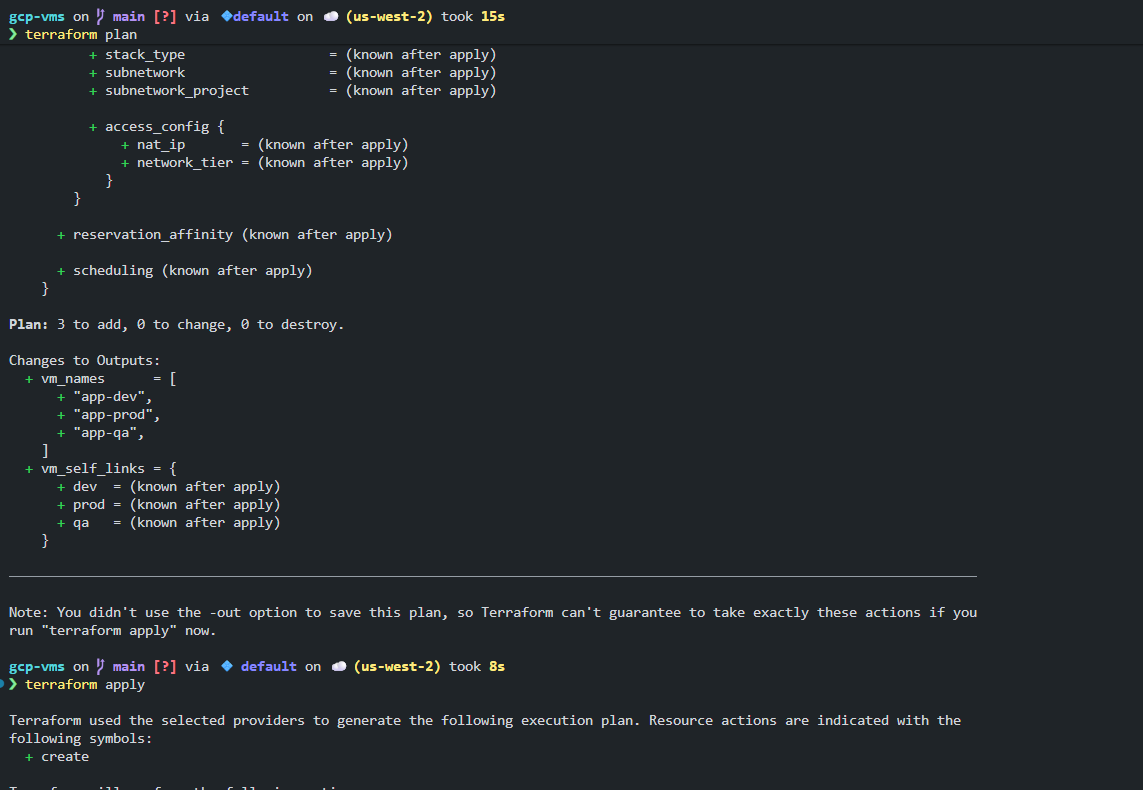
Plan: 3 to add, 0 to change, 0 to destroy. Three VMs (app-dev, app-prod, app-qa) will be created, with vm_self_links for each environment output once the apply completes. Nothing is being modified or destroyed, so it's safe to proceed.
Running terraform apply immediately after replays the execution plan and begins provisioning. Terraform generates the plan a second time from the selected providers before touching anything. What you reviewed in plan is what apply executes, not a separate recalculation.
Where it fits: Core provisioning layer for multi-cloud and AWS/Azure/GCP environments.
Use it when: You need to provision infrastructure across one or more cloud providers with a predictable, reviewable change process.
3. Ansible (Agentless Configuration for What Runs Inside Your Infrastructure)
Once Terraform provisions a VM or EC2 instance, Ansible handles what goes on it. Packages, services, runtime configs, users, cron jobs, anything at the OS or application layer that isn't managed by the cloud provider. Ansible is agentless: it connects to hosts over SSH and runs tasks defined in YAML playbooks. There's nothing to install on the target. This makes it easy to adopt in environments where you don't control what's already on the machine.
Hands-on: Running ad-hoc commands across two EC2 nodes from a single control node
The setup is a control node talking to two worker nodes at 172.31.7.129 and 172.31.10.125. The inventory file lists both IPs under a [servers] group, which is the only registration Ansible needs. Three lines in ansible.cfg defines the connection: which inventory file to use, the remote user, and SSH key checking disabled.

From there, ansible all -m ping confirms SSH access and Python availability on both nodes before anything runs. Then, ansible servers -a "uptime" executes the command across both nodes simultaneously. Both return CHANGED | rc=0 with live load averages. No loop scripts, no manual SSH into each host.
Where it fits: Configuration layer for VM-based infrastructure, on-prem systems, or anything that needs OS-level setup after provisioning.
Use it when: You need to configure instances after they're provisioned, manage application runtime setup outside containers, or run ad-hoc automation across a fleet.
4. Terragrunt (DRY Terraform Configurations Across Many Environments and Accounts)

Terraform works well for a single environment. It starts to show its limits when you're managing five environments (dev, staging, QA, prod-us, prod-eu), and each one requires the same modules with slightly different variable values.
Without Terragrunt, the typical response is to copy module blocks across environment directories. That duplication means a module update has to be applied in five places, and inconsistencies accumulate over time.
Terragrunt adds a configuration layer on top of Terraform that lets you define modules once and inherit them across environments. It handles remote state configuration, dependency ordering between modules, and multi-account setups where different environments live in different AWS accounts.
Deploying a VPC module with auto-generated remote state across environments
Now, as shown in the snapshot below:
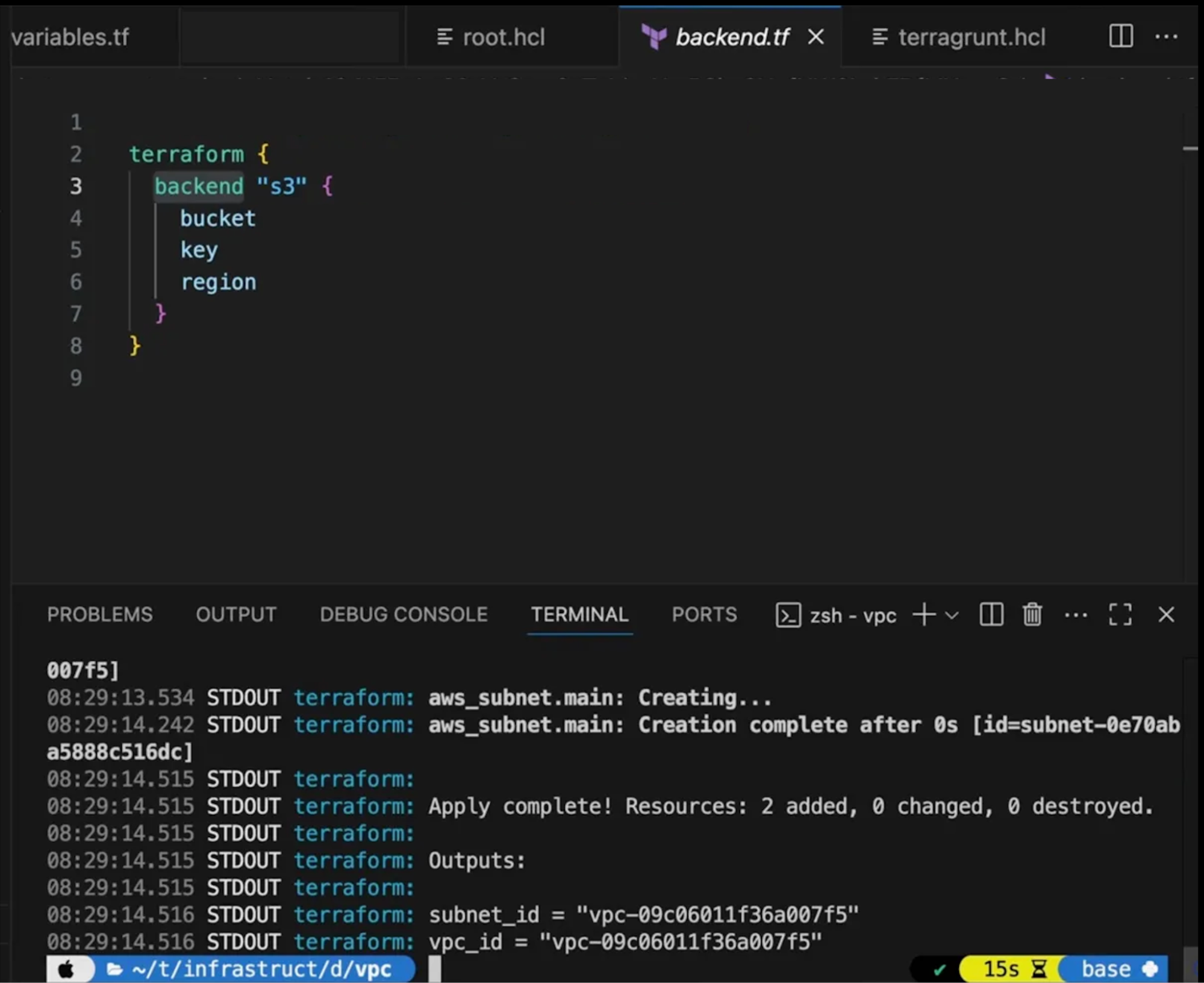
This is a vpc module inside a Terragrunt-managed repo. The key thing to notice is the backend.tf, which Terragrunt generated automatically from the root terragrunt.hcl.
It points to an S3 bucket, with the state key scoped to dev/vpc/terraform.tfstate and region set to ap-south-1. You didn't write this per environment. Terragrunt derived the correct backend config for this module from a single shared definition.
Running terragrunt apply shows Terraform executing underneath: the subnet is created in under a second, and the final output is Apply complete! Resources: 2 added, 0 changed, 0 destroyed with vpc_id and subnet_id as outputs. The working path ~/t/infrastruct/d/vpcreflects the directory-per-module structure that Terragrunt enforces, where each module consistently gets an isolated state.
Where it fits: Scaling layer for Terraform codebases that span more than two environments.
Use it when: Your Terraform repo is growing with duplicated module configurations across environments, or you need consistent remote state management and dependency ordering across accounts.
5. Puppet (Declarative Configuration Management for Large, Long-Lived Server Fleets)
Puppet takes a different approach to configuration than Ansible. Instead of running playbooks on demand, Puppet agents run on each managed node according to a schedule, pull their configuration from a central Puppet server, and apply any needed changes to match the defined state.
This agent-based model means Puppet can continuously enforce configuration. If someone manually changes a file on a server, the Puppet agent will revert it to its previous state on the next run. For environments with hundreds of long-lived servers where configuration drift is a compliance risk, continuous enforcement is more practical than scheduling Ansible runs.
Hands-on walkthrough: Bootstrapping a Puppet master node and registering the PuppetLabs repository
The screenshots below show the Puppet master bootstrap on a fresh Ubuntu Xenial node.
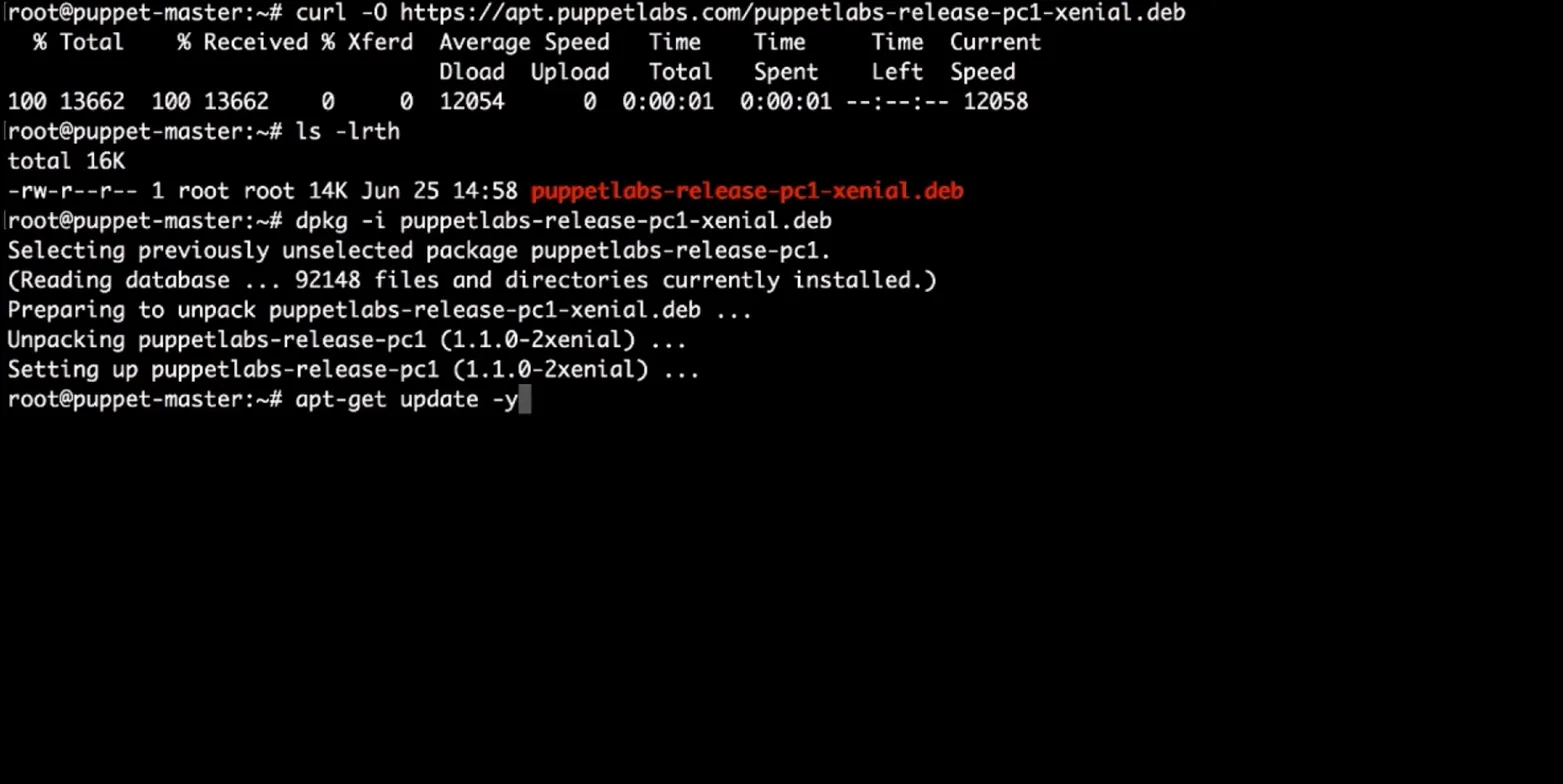
Setting up Puppet starts with registering the Puppet Labs APT repository. You pull the .deb with curl, install it with dpkg -i, then run apt-get update -y to fetch the repo indexes.
The update output confirms both apt.puppetlabs.com and the standard Ubuntu security feeds are being pulled, meaning the PuppetLabs channel is now live, and the node is ready for puppet-master installation. It's a three-step sequence, but it only happens once per master node.
Where it fits: Configuration layer for large enterprise fleets of persistent servers where continuous enforcement matters.
Use it when: You're managing 500+ long-lived servers, compliance audits require documented configuration state, or you need to guarantee that manual changes don't persist beyond the next agent run.
6. Pulumi (Cloud Infrastructure Defined in TypeScript, Python, or Go)
Pulumi solves the same provisioning problem as Terraform, but uses general-purpose programming languages instead of HCL. A Pulumi stack written in TypeScript can use real loops, conditionals, functions, and libraries to define infrastructure, things that require workarounds in Terraform.
For teams where the people writing infrastructure code are primarily software engineers, Pulumi removes the context switch of learning HCL. The infrastructure definition is just code in the same language that the rest of the codebase uses. For a head-to-head comparison against the other two major provisioning tools, see our breakdown of Pulumi vs Terraform vs CloudFormation and which one fits which team.
Hands-on walkthrough: Provisioning an S3 bucket in TypeScript from preview to deploy
The project is pulumi-s3-logs, a TypeScript stack provisioning an S3 bucket written entirely in index.ts. The bucket is defined as const bucket = new aws.s3.Bucket("logs-bucket", {...}), a TypeScript object rather than an HCL block. The project layout (Pulumi.yaml, Pulumi.dev.yaml, package.json) looks like any other Node project.
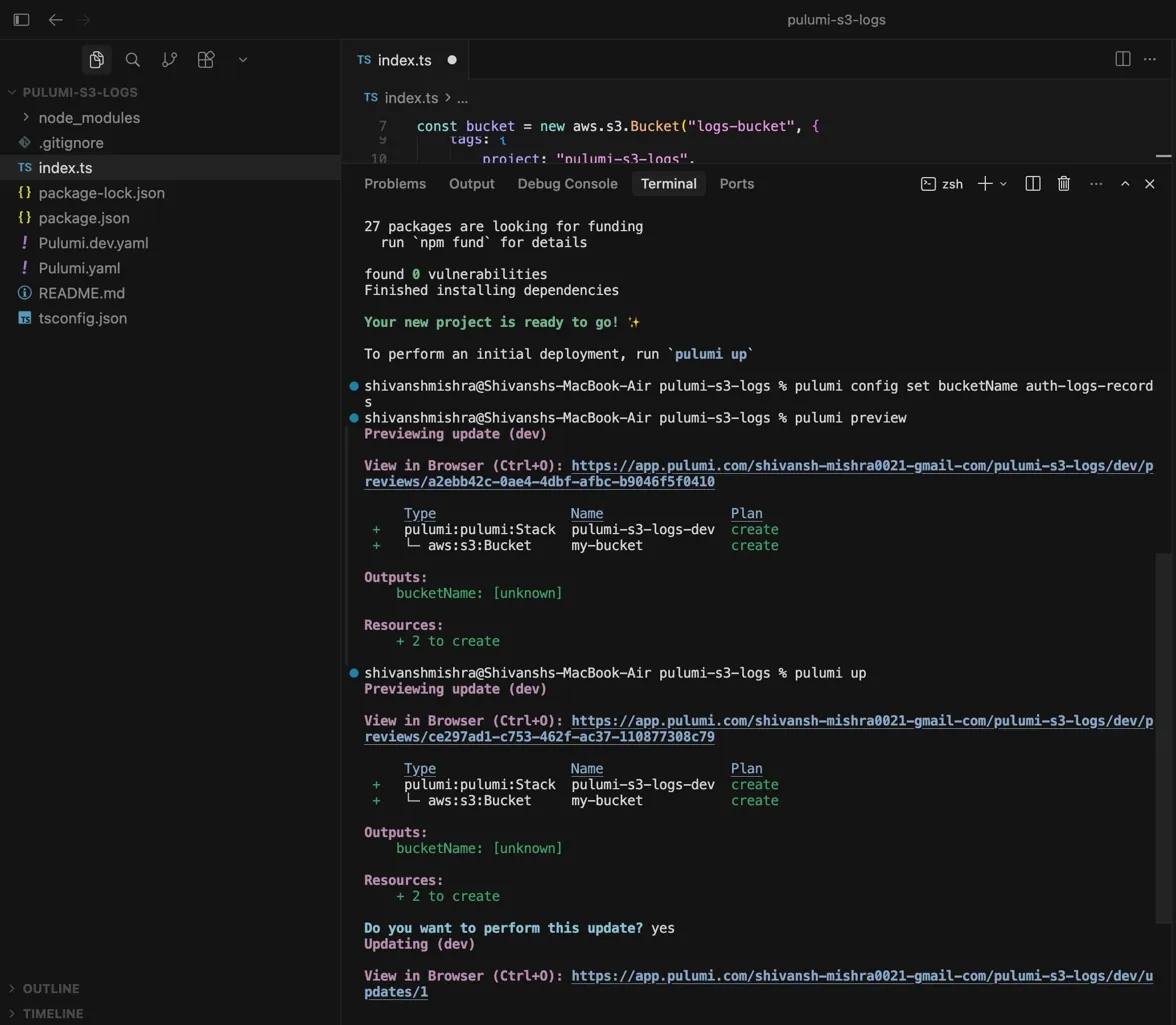
Before deploying, pulumi config set bucketName auth-logs-records scopes a config value to the dev stack. Same code, different values per environment. pulumi preview then shows the dry run: two resources to create, both marked create. Running pulumi up repeats the preview, prompts for confirmation, and on yes begins the deployment with a live Pulumi Cloud link to track it.
Where it fits: Provisioning layer as an alternative to Terraform, particularly in developer-heavy environments.
Use it when: Your team prefers TypeScript, Python, Go, or C# over HCL, or you need abstractions and reuse patterns that Terraform's configuration language makes awkward.
What to consider: Pulumi's provider ecosystem is smaller than Terraform's, and the community of shared modules is less mature. For AWS-first teams with complex requirements, AWS CDK may be a better fit.
7. AWS CDK (AWS Infrastructure Defined in Code That Compiles to CloudFormation)
AWS CDK (Cloud Development Kit) lets you define AWS infrastructure using TypeScript, Python, Java, Go, or C#. Unlike Pulumi, CDK compiles to CloudFormation templates, AWS's native infrastructure format, before deploying. This means every CDK deployment uses CloudFormation under the hood, with the rollback and drift-detection behavior It provides.
CDK's primary advantage is its Construct library: pre-built, high-level abstractions for common AWS patterns (an ECS service with an ALB, a Lambda function with an API Gateway trigger, an S3 bucket with CloudFront) that configure sensible defaults automatically. You write less boilerplate than raw CloudFormation requires.
Hands-on walkthrough: Deploying an S3 stack with CDK's IAM diff and security approval gate
The project is CDK-S3, a TypeScript CDK app. The stack is defined as a class (export class CdkS3DemoStack extends cdk.Stack) with the S3 bucket and its configuration instantiated inside the constructor. CDK synthesizes this into a CloudFormation template before anything deploys. Now based on the snapshot below:
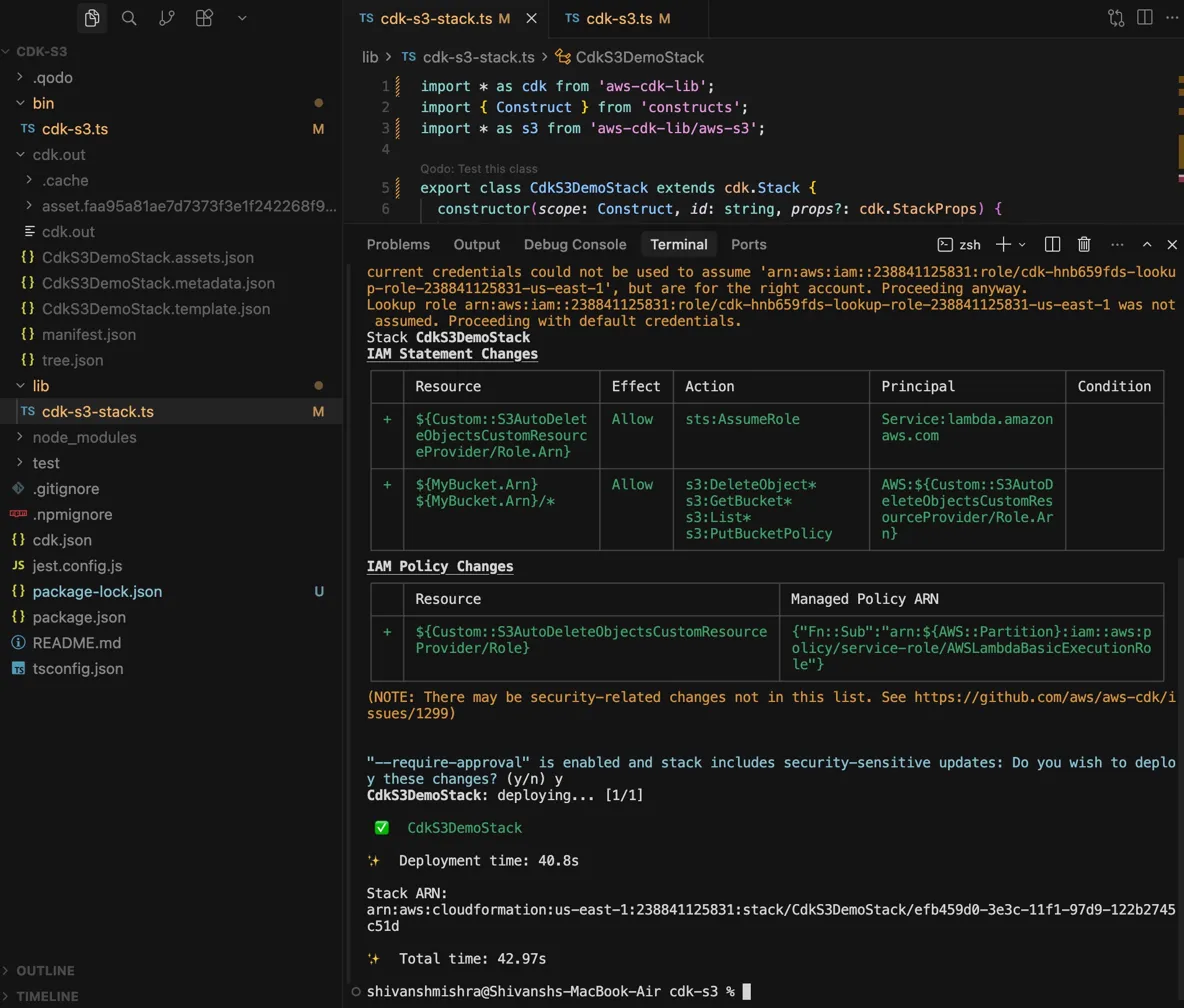
What's worth paying attention to in the deploy output is the IAM diff. Before applying, cdk deploy surfaces every IAM change in a table: which statements are being added, what actions they allow, and which principals they apply to. None of this was written manually. CDK derived it from the construct definition. With --require-approval enabled, the deploy halts and asks for confirmation before touching IAM. Once confirmed, CdkS3DemoStack deploys in 40.8 seconds and prints the full CloudFormation Stack ARN.
Where it fits: Provisioning layer for AWS-only environments where teams want to write infrastructure in a real programming language with deep AWS service integration.
Use it when: You're deploying exclusively to AWS, your team has strong TypeScript or Python experience, and you want native AWS constructs rather than a generic provider model.
8. Helm (Versioned Application Deployments on Kubernetes)
Kubernetes manifests, such as Deployments, Services, ConfigMaps, and Ingresses, are YAML. Managing them directly at scale means maintaining dozens of files per application, duplicating values across environments, and tracking which version of each manifest is actually deployed to each cluster.
Helm packages Kubernetes manifests into charts: versioned, templated bundles that accept variable values at deploy time. A single chart can deploy to dev with two replicas and a small instance size, and to production with ten replicas and a larger one, using the same templates and different values files. Helm also tracks release history, making rollbacks a single command.
Hands-on walkthrough: Installing the same chart into two namespaces independently with one command each
The same hello-helm3 chart gets installed into two namespaces (helm3-ns1 and helm3-ns2) with the exact same command, six seconds apart. Referring the snapshot below:

Both return STATUS: deployed with independent release names and their own rollback history. This is the point: one chart definition, deployed consistently wherever you need it, each instance tracked separately by Helm.
Both installs also print the same post-install NOTES block with the kubectl port-forward instructions for reaching the app at 127.0.0.1:8080. Chart authors write these once; Helm renders them with the correct values on every install.
Where it fits: Deployment layer for any team running applications on Kubernetes.
Use it when: You're deploying applications to Kubernetes and need templating, environment-specific values, and release versioning.
9. Vagrant (Reproducible Local Development Environments That Match Production Configuration)
Vagrant solves a different problem from the rest of this list. It doesn't provision cloud infrastructure or configure production servers. It creates reproducible local environments, VMs on a developer's laptop that match a defined configuration, so "it works on my machine" stops being a valid explanation for failures in CI or production.
A Vagrantfile defines what the VM should look like: base OS, memory, network config, and what provisioning runs on first boot (Ansible, shell scripts, or Puppet). Any developer on the team runs vagrant up and gets the same environment, regardless of their host OS.
Hands-on walkthrough: Spinning up three identical Ubuntu VMs from a single Vagrantfile
Now going through the snapshot below:
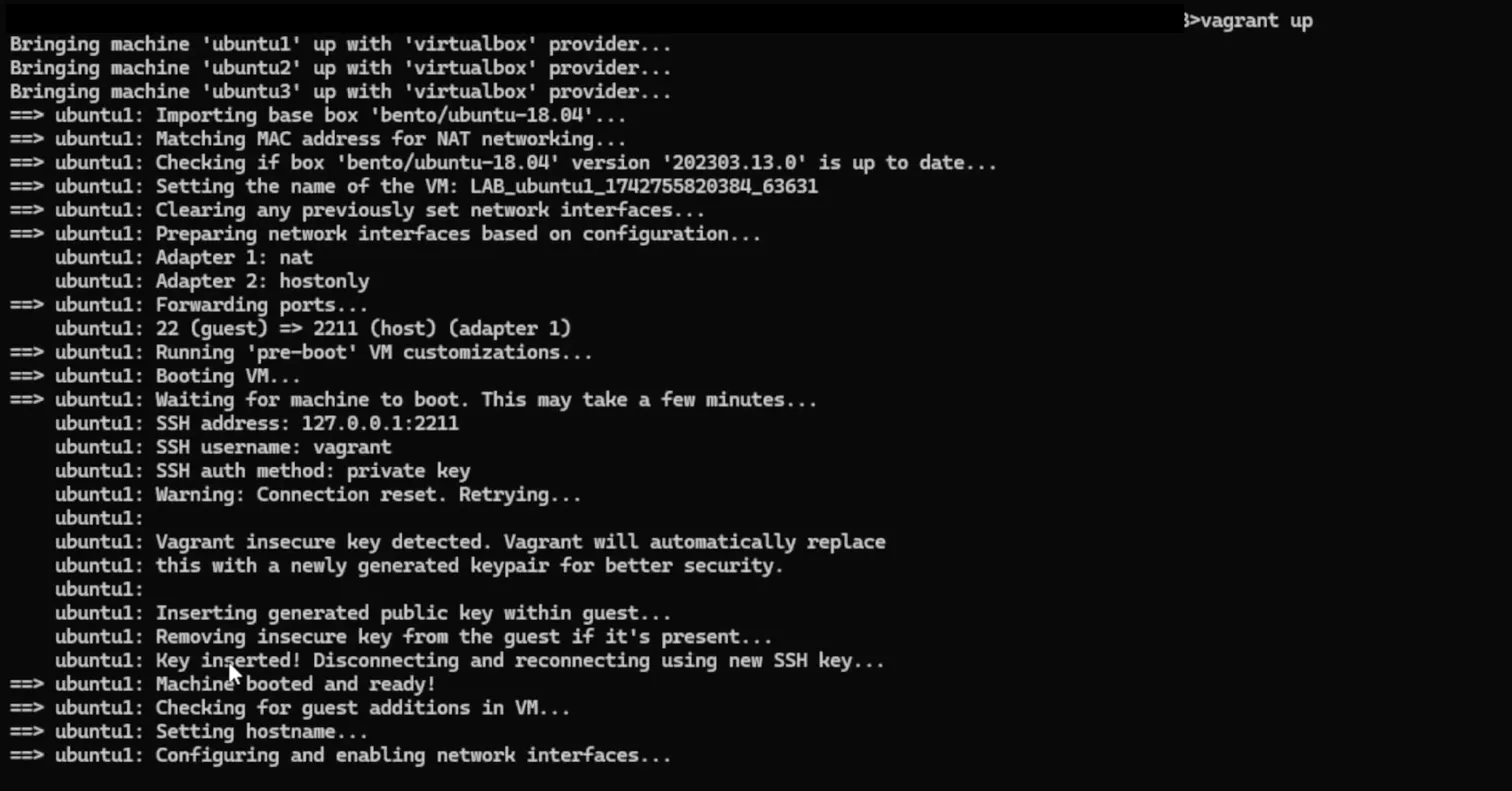
vagrant up starts three VMs (ubuntu1, ubuntu2, ubuntu3) from a single Vagrantfile. Vagrant pulls the bento/ubuntu-18.04 base box, confirms the version, then boots each machine through the full sequence: network adapters (NAT + host-only), port forwarding (guest 22 to host 2211), and SSH key rotation. The insecure default keypair gets replaced automatically with a generated one before the machine is handed over.
By the end, all three machines are up, networked, and accessible via vagrant ssh with no manual VirtualBox configuration. Every developer on the team runs the same command and gets the same result.
Where it fits: Local development and testing layer for teams that need environment parity between developer machines and production.
Use it when: Your application depends on specific OS-level configuration, your team works across different host operating systems, or you need to test provisioning scripts before applying them to real infrastructure.
How IaC Tools Work Together in the Infrastructure Stack
Reading about multiple tools can make the stack look more complex than it is. Each tool handles a specific part of the workflow and operates at different stages of the infrastructure.
A typical flow looks like this:
Provision → Configure → Deploy → Scale → Govern / Recover
Terraform provisions infrastructure such as VPCs and EC2 instances. Ansible configures packages and services on those instances. Helm deploys applications onto Kubernetes clusters. Terragrunt structures Terraform across environments and manages state.
Firefly operates continuously across all stages. It maps resources to IaC definitions, detects changes made outside Terraform, tracks which resources are not codified, and rebuilds infrastructure using captured state and dependencies.
Provisioning and configuration create infrastructure. Governance and recovery ensure that infrastructure remains consistent with code and can be recreated when needed.
These Tools Chain Together Across a Continuous Lifecycle, Not a One-Time Setup
The tools above aren't alternatives to each other. They operate at different layers and pass responsibility between them as infrastructure moves through its lifecycle.
A typical flow looks like this:
Provision → Configure → Deploy → Scale → Govern
Terraform creates the base infrastructure: the VPC, subnets, EC2 instances, RDS database, and IAM roles. Those resources exist but aren't doing anything useful yet.
Ansible runs against the provisioned instances and installs what needs to run on them: the application runtime, the agent configs, and the service definitions. Now the infrastructure is functional.
For workloads running on Kubernetes, Helm takes over the deployment layer. The cluster exists (provisioned by Terraform). The applications running on it are managed as Helm releases, versioned, rollback-capable, and environment-configurable.
As the Terraform codebase grows across environments and accounts, Terragrunt handles the structural layer. Module definitions stay DRY. State backends are configured consistently. Cross-environment dependencies are explicit.
Firefly sits across all of it, continuously. It maps every live resource in every account back to the Terraform code that manages it. It detects when something in production has drifted from what the repo says — a manually added security group rule, a changed instance type, a resource that exists in AWS but has no IaC definition. It enforces policies that apply regardless of which pipeline or engineer made the change.
The lifecycle is continuous, not linear. Infrastructure gets provisioned, configured, and deployed, and then it runs, changes, and drifts. The governance layer keeps the code and reality aligned after the initial deployment.
Each tool has a clear lane. The system works cleanly when those lanes don't overlap, and handoffs between them are explicit. The teams that get the most out of IaC are the ones that treat each layer as a distinct concern, not the ones that try to use a single tool to handle all five.
FAQs
What is an IaC tool?
An IaC tool is software that lets you define, provision, and manage infrastructure through code rather than manual processes. Instead of clicking through a cloud console or running ad-hoc scripts, you write files that describe the exact state your infrastructure should be in, compute, networking, IAM, databases, and so on. The tool reads those files, compares them against what's actually running, and makes only the changes required to close the gap. The definition lives in version control, gets reviewed like application code, and can be applied consistently across every environment.
What are the most popular IaC tools?
The most widely used IaC tools in 2026 span different layers of the infrastructure lifecycle. Terraform is the default choice for provisioning across AWS, Azure, and GCP. Ansible handles configuration management on VM-based infrastructure. Helm manages application deployments on Kubernetes. Terragrunt structures large Terraform codebases across environments. Pulumi and AWS CDK offer provisioning through general-purpose programming languages. Firefly sits across all of them as the governance and recovery layer, maintaining IaC coverage, detecting drift, and enabling full environment recovery when incidents hit.
What are IaC tools in DevOps?
In a DevOps context, IaC tools are what make infrastructure repeatable, reviewable, and automatable, the same principles DevOps applies to application code. They plug into CI/CD pipelines so infrastructure changes go through the same review and deployment process as code changes. Terraform runs in pipelines to provision cloud resources. Ansible configures what gets deployed onto those resources. Helm releases applications onto Kubernetes clusters. Firefly enforces governance policies and continuously detects drift, so changes that happen outside the pipeline don't go unnoticed. Together, they remove the manual coordination that slows deployments down and creates inconsistency between environments.
Is Jenkins an IaC tool?
No. Jenkins is a CI/CD automation server, not an IaC tool. It orchestrates pipelines, triggering builds, running tests, and deploying code, but it doesn't define or manage infrastructure state. Where Jenkins fits in an IaC workflow is as the runner: it can execute terraform apply, run Ansible playbooks, or trigger helm upgrade as pipeline steps. The infrastructure definition still lives in Terraform, Ansible, or whichever IaC tool the team uses. Jenkins is what runs those tools automatically, not a replacement for them.

.avif)
.avif)
.webp)

.webp)












