TL;DR
- Terraform doesn’t usually fail during plan; it fails during apply, when state, pipelines, and real infrastructure are out of sync.
- Common issues include concurrent applies, outdated plans, shared state across services, and manual changes made outside Terraform. These lead to unintended updates, replacements, or overwritten fixes.
- This guide outlines 11 practices to make Terraform execution predictable, focusing on how plan and apply behave in multi-cloud environments.
- As teams and pipelines scale, enforcing these practices manually becomes inconsistent, leading to drift, unmanaged resources, and missing safeguards.
- Firefly provides a centralized layer to track infrastructure, detect drift continuously, enforce policies, and standardize Terraform usage across teams.
A common question in Terraform setups is where to store the state file: S3, GCS, or another backend. At a small scale, this works, for example, you configure a remote backend, enable state locking, and run terraform apply. This breaks once multiple engineers and CI pipelines start applying changes to the same infrastructure.
In a multi-cloud setup with hundreds of resources, the problem is not where the state lives. The problem is whether the state still reflects actual resources. Teams run Terraform apply through pipelines. Shared resources like aws_vpc, aws_subnet, and aws_iam_role are used across services. Manual updates during incidents are not written back to the Terraform state.
This is where failures appear. A terraform plan shows no changes, but terraform apply updates to an existing aws_security_group because the state is outdated. A variable change in one module forces the recreation of an aws_instance used by another service. Two environments using the same module diverge because different tfvars were applied.
At this point, Terraform is no longer just provisioning resources. Every terraform apply reads state, compares it with the configuration, and updates resources based on that diff. If the state is incorrect or shared across unrelated components, Terraform apply can update unintended resources, recreate existing infrastructure, or overwrite manual fixes.
This guide focuses on structuring Terraform so that terraform plan reflects actual resources, terraform apply only updates intended resources, and state remains consistent across pipelines and environments.
The Terraform Operating Model for Large-Scale Infrastructure
Terraform best practices usually focus on module structure, variables, and provider configuration. That does not prevent failures during Terraform plan and Terraform apply. Terraform reliability depends on how terraform plan and terraform apply are executed against remote state, not just how .tf files are written.
In most setups, multiple CI pipelines operate on shared resources such as aws_vpc, aws_subnet, and aws_iam_role, all backed by the same remote state. In this setup, terraform plan calculates changes using the current state, and terraform apply executes those changes and updates the state.
For this to remain predictable, both commands must operate on the same, up-to-date state and must not run concurrently.
If this is not enforced, the plan that is reviewed in CI no longer represents what is applied. A pipeline can generate a terraform plan, another pipeline can update the state, and the original apply will still proceed using outdated assumptions. Similarly, concurrent terraform apply runs without proper locking can overwrite state changes, leading to partial or unintended updates.
To avoid this, Terraform execution must follow a consistent model:
- terraform plan runs against the latest remote state
- terraform apply runs with state locking enabled
- Only one pipeline modifies a given state backend
- The plan that is reviewed is the one that is applied
When this is enforced, terraform apply reflects exactly what was reviewed. Without it, Terraform can update resources outside the intended scope.
Controlling Terraform Apply Execution
terraform apply must be restricted to a single, consistent workflow. By default, Terraform allows direct execution. Any engineer with access to the backend can run terraform apply locally and modify resources outside CI. A controlled workflow ensures that every change follows the same path:
- Changes are committed through pull requests
- CI generates a terraform plan against the remote backend
- The plan output is reviewed before execution
- The same plan file is applied through the pipeline
This guarantees that terraform apply only executes reviewed changes. Without this control, the workflow breaks in subtle ways. A local terraform apply can introduce changes that were never reviewed. A plan generated earlier can become outdated if another apply updates the state before execution. Regenerating the plan during apply can also introduce differences between what was reviewed and what is executed. To enforce this:
- Block direct terraform apply access in shared environments
- Run Terraform plan only in CI
- require plan approval before apply
- apply the exact plan file generated during review
- prevent concurrent applies to the same state
Blocking Unsafe Terraform Changes
terraform validate ensures syntax correctness, but it does not evaluate the impact of a change. Before running plan, it is worth understanding what terraform validate actually checks, since it catches syntax issues that plan alone will miss. The actual impact appears in the terraform plan, where resource-level changes are defined.
A configuration can pass validation and still introduce unsafe infrastructure changes, such as exposing a resource publicly or replacing an existing resource. To prevent this, validation must be applied to the plan before terraform apply. This requires:
- enforcing constraints in variable blocks
- evaluating plan output for unsafe resource changes
- blocking unintended destroy or replace actions
terraform apply should only run if these checks pass. This shifts validation from syntax checking to change validation, ensuring that Terraform executes only safe and intended updates.
11 Terraform Best Practices for Managing Multi-Cloud Infrastructure

Each practice below addresses a specific failure during terraform plan and terraform apply, especially when multiple pipelines operate across AWS, GCP, and Azure using shared modules and state.
1. Split Terraform State by Service, Environment, and Layer
A state file defines what a single terraform apply can modify. When resources from different layers or providers share the same state, Terraform evaluates them together. A change in an application module can trigger updates to unrelated resources such as an aws_route_table, a google_compute_network, or an azurerm_virtual_network.
This appears in terraform plan as changes outside the module being modified. Separate state so that networking, compute, and application resources are applied independently. In multi-cloud setups, this separation should also reflect provider boundaries where shared modules exist.
This keeps terraform apply scoped to a single layer and prevents cross-provider updates.
2. Use Remote State With Locking, Encryption, and Versioning
Local state allows concurrent writes. This becomes unsafe when multiple pipelines apply changes across providers using shared infrastructure definitions. If two pipelines run terraform apply, both attempt to update the same state. One run overwrites the other, even if they target different resources, such as an AWS instance and a Google Compute Instance.
This does not always fail during execution. It shows up later as missing or inconsistent resources. Use a remote backend with locking so that only one apply updates to the state at a time, and enable versioning to recover from incorrect updates.
In multi-cloud environments, isolate state backends per layer or environment instead of sharing a single backend across all providers.
3. Enforce Pre-Apply Checks in CI
Terraform allows terraform apply to run without any validation. This becomes risky when changes are introduced across multiple providers through shared modules.
A configuration can pass terraform validate and still introduce unsafe infrastructure, such as an open firewall rule in GCP or a permissive security group in AWS. Run checks in CI before terraform plan so that invalid or unsafe configurations never reach apply.
Fail the pipeline when checks do not pass.
4. Review Terraform Plan Output Before Applying Changes
terraform plan defines exactly what will change. In multi-cloud modules, a single input change can propagate across providers. A variable update can trigger a replacement in AWS while updating a dependent resource in GCP. This is only visible in the plan output.
Review the plan for:
- replacements (-/+)
- deletes (-)
- changes outside the intended module or provider
Apply only after confirming the scope.
5. Enforce Policy-as-Code at Plan Time
Manual review does not reliably catch unsafe infrastructure changes, especially when the same module provisions resources across providers. The plan must be evaluated before apply. A configuration can allow public access in a google_compute_firewall or expose a port in an aws_security_group. Both are valid Terraform configurations.
Block the pipeline when the plan introduces unsafe resource changes.
5. Add Deep Input and Configuration Validation
Terraform accepts any value that satisfies the variable type. This can lead to unintended behavior when variables are reused across providers. A single input may control:
- EC2 instance size in AWS
- machine type in GCP
- VM size in Azure
An incorrect value can trigger replacements across multiple providers.
Validate inputs before they reach terraform plan.
6. Maintain Terraform as the Source of Infrastructure Inventory
Terraform only tracks resources present in the state. In multi-cloud environments, resources are often created outside Terraform through consoles or separate pipelines.
For example, an aws_iam_role or a google_service_account created manually is not visible in state. A later terraform apply may overwrite or conflict with it. Maintain a single source of truth by ensuring that managed resources are codified and imported into Terraform where needed. Use tagging consistently across providers to track ownership and environment.
7. Continuously Detect and Manage Infrastructure Drift
Drift occurs when infrastructure changes outside Terraform. This is common in multi-cloud environments where changes are made through different control planes.
An update to an AWS security group, a GCP firewall rule, or an Azure network configuration will appear as a diff in terraform plan. Resolve drift before apply by either updating the Terraform configuration or reverting the change. Ignoring drift leads to larger and less predictable diffs over time.
8. Restrict Terraform Execution Using Least-Privilege Access
Terraform execution roles should be scoped to the resources they manage. In multi-cloud setups, each provider requires separate access controls. A pipeline managing application resources should not modify networking or IAM resources in any provider.
Define roles per provider, environment, and layer to limit the impact of incorrect applies.
9. Secure Secrets and Sensitive Data in Terraform Workflows
Terraform state can contain sensitive data across providers, including database credentials and service account keys. If outputs are not marked as sensitive, these values appear in logs and plan output.
Restrict access to the state backend and avoid exposing secrets in outputs.
10. Version Terraform, Providers, and Modules
Different providers release updates independently. Without version constraints, the same configuration can produce different terraform plan outputs across environments.
Pin provider and module versions to ensure consistent behavior across pipelines. Now, applying these practices across Terraform workflows means handling each part separately. State is split across multiple backends, locking is configured per environment, each pipeline runs its own terraform plan, and policy checks are added per repository.
This works until pipelines start behaving differently. One pipeline blocks unsafe changes in an aws_security_group. Another pipeline provisioning a google_compute_instance runs without those checks. A resource created during an incident is never added to the state. The next terraform plan shows changes no one expects.
As more environments and providers are added, these gaps build up. State no longer reflects everything that exists, drift is detected late, and pipelines apply different rules. There is no single view of what Terraform manages and what exists outside the state.
This is where Firefly fits in. Instead of relying on each pipeline to enforce these practices independently, Firefly provides a single layer that tracks Terraform state, detects drift continuously, and applies policy checks across all environments.
How Firefly Supports Terraform Best Practices in Multi-Cloud Environments
Terraform is already in place, pipelines exist, and best practices are defined, but implementing and maintaining them consistently across environments requires significant effort. Teams end up building custom scripts, adding checks to pipelines, and still dealing with gaps in visibility and enforcement.
Firefly removes that overhead by providing these capabilities out of the box. It sits on top of Terraform and automatically handles infrastructure inventory, continuous drift detection, policy enforcement, and recovery, without requiring teams to stitch together separate tools or maintain custom logic.
Centralized Infrastructure Inventory and IaC Adoption
One of the first problems at scale is simply knowing what exists and what doesn’t exist in Terraform. Firefly builds a unified inventory across cloud providers and classifies resources based on their IaC status.
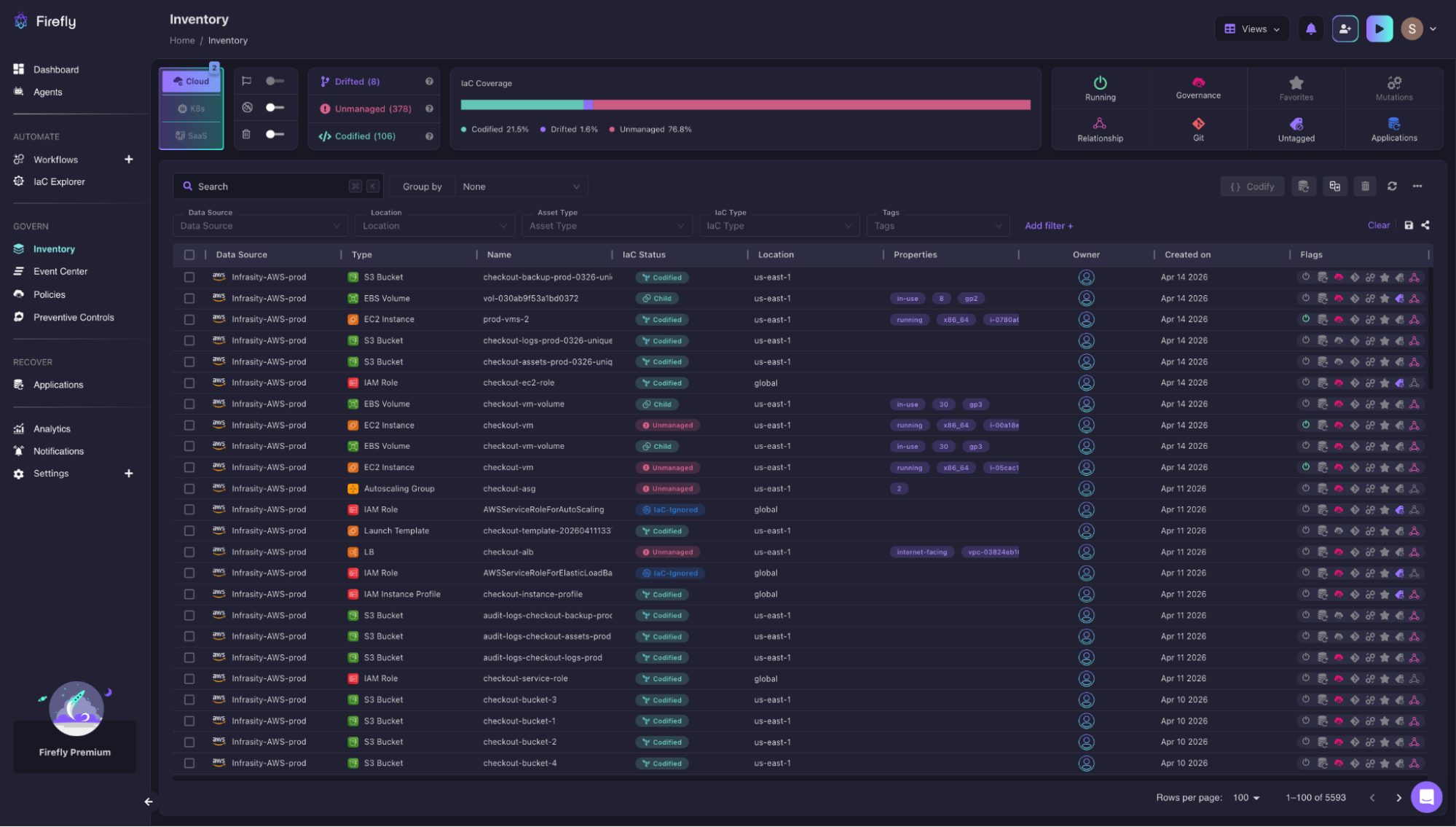
Here, infrastructure is grouped into:
- Codified: managed via Terraform
- Unmanaged: exists in the cloud but not in IaC
- Drifted: differs from Terraform state
For example, in an environment with the following resources:
- S3 buckets and EC2 instances may be codified
- An autoscaling group or instance created during an incident may show as unmanaged
- IAM roles or config changes may appear as drifted
This directly solves a limitation in Terraform: state only shows what it knows. It doesn’t tell you what’s missing. With this view, teams can:
- Identify gaps in IaC coverage
- Bring unmanaged resources into Terraform
- Understand ownership and usage across environments
Continuous Drift Detection and Remediation
Terraform detects drift only when you run a plan. In large environments, that’s too late. Firefly continuously tracks changes and flags drift as it happens.
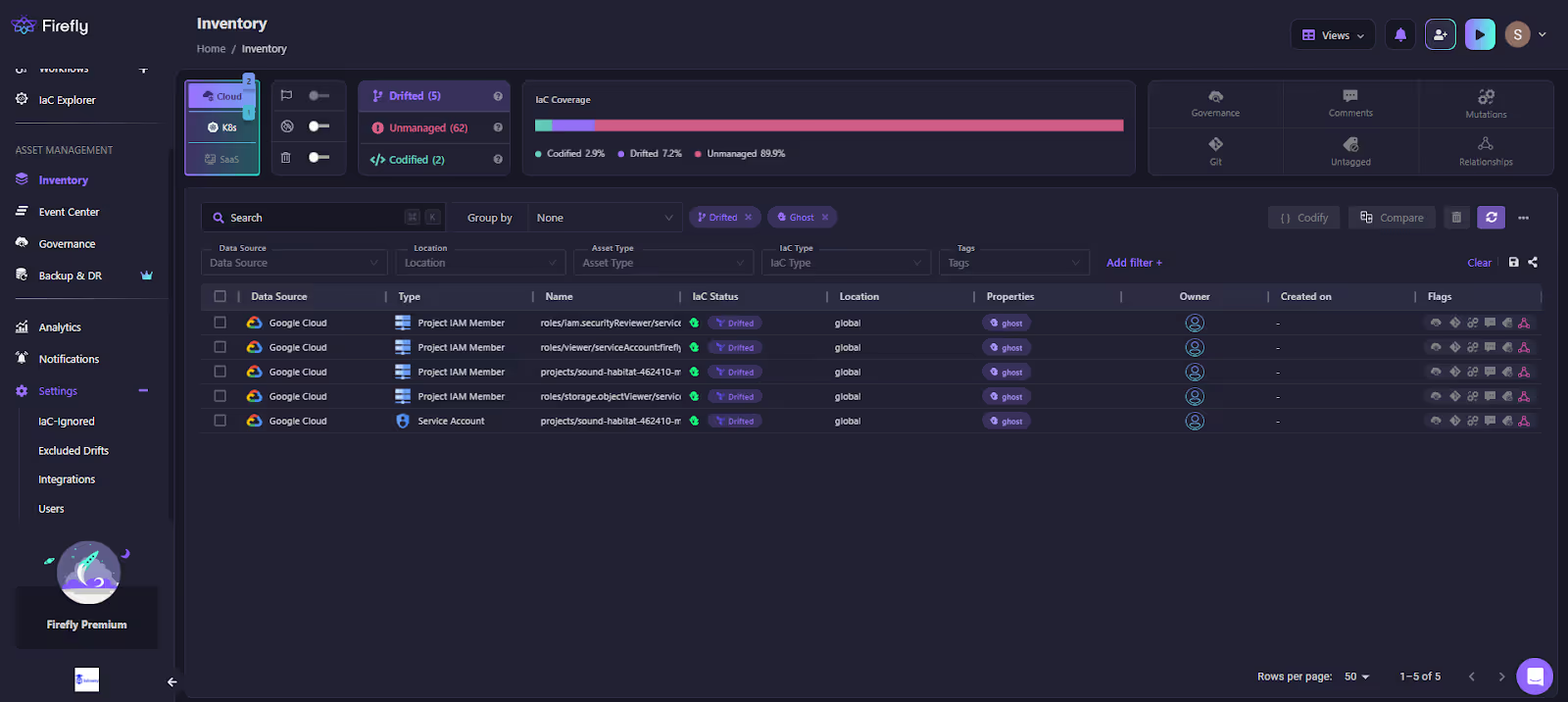
In this view:
- Resources are marked as Drifted
- changes are highlighted at the resource level
- even IAM-level changes (like role bindings) are visible
Typical scenarios this catches:
- IAM permissions updated directly in the console
- security group rules modified manually
- storage settings changed outside Terraform
Instead of discovering drift during a failed apply, it is surfaced immediately. From here, teams can:
- Reconcile the change back into Terraform
- or revert the infrastructure
This turns drift into a real-time signal rather than a delayed surprise.
Policy Enforcement and Governance Across Terraform Workflows
Firefly enforces policies at two points: when changes are being introduced and across infrastructure that’s already running.
Blocking non-compliant changes before they’re applied
In Terraform workflows, policy enforcement is handled by Guardrails. Every run starts with a terraform plan, which is evaluated against your rules such as security, cost, resource controls, and tagging. Here’s how you can define the type of guardian based on the workflow:
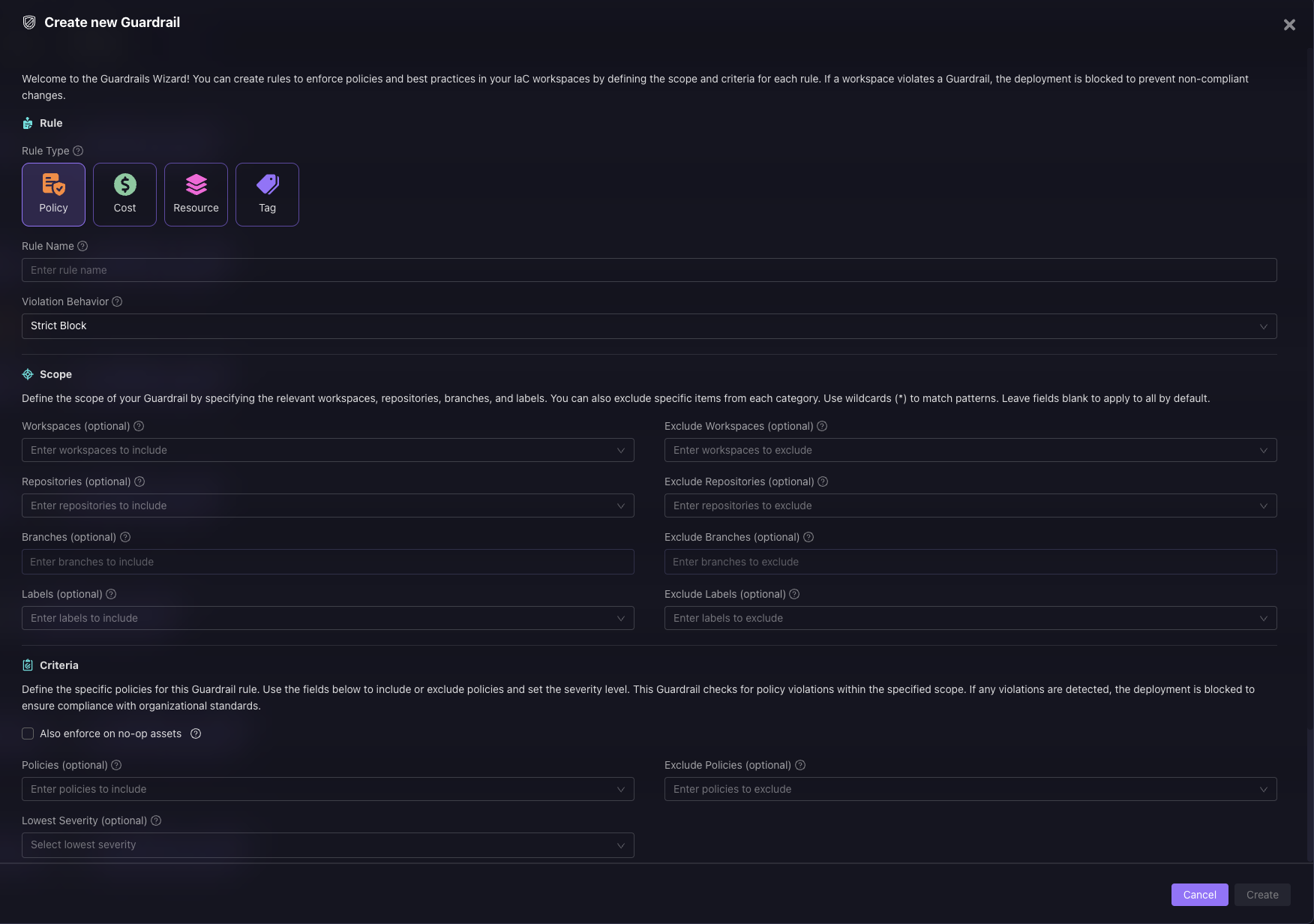
If the plan introduces violations, the run is blocked before apply is triggered. Now, in the snapshot below:
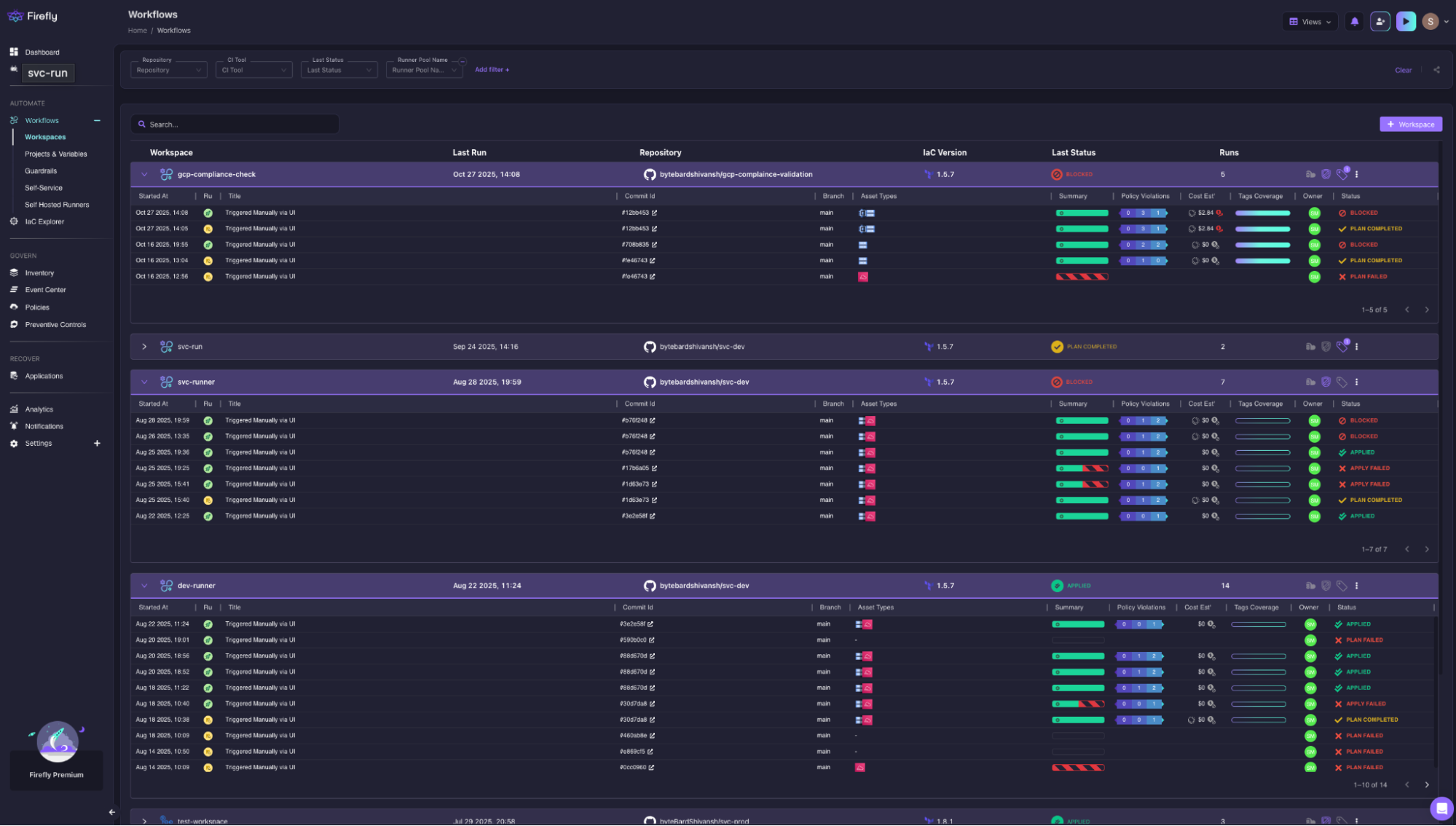
where runs are marked as Blocked, along with details on policy violations, cost impact, and tag coverage. Instead of relying on reviews or catching issues later, enforcement happens right at the point where changes are about to be applied.
Continuously checking what’s already running
Not all issues come from new changes. Infrastructure can drift, or resources can be created outside Terraform. The Governance dashboard continuously scans your environment and flags any violations across all resources, whether they’re Terraform-managed or not.
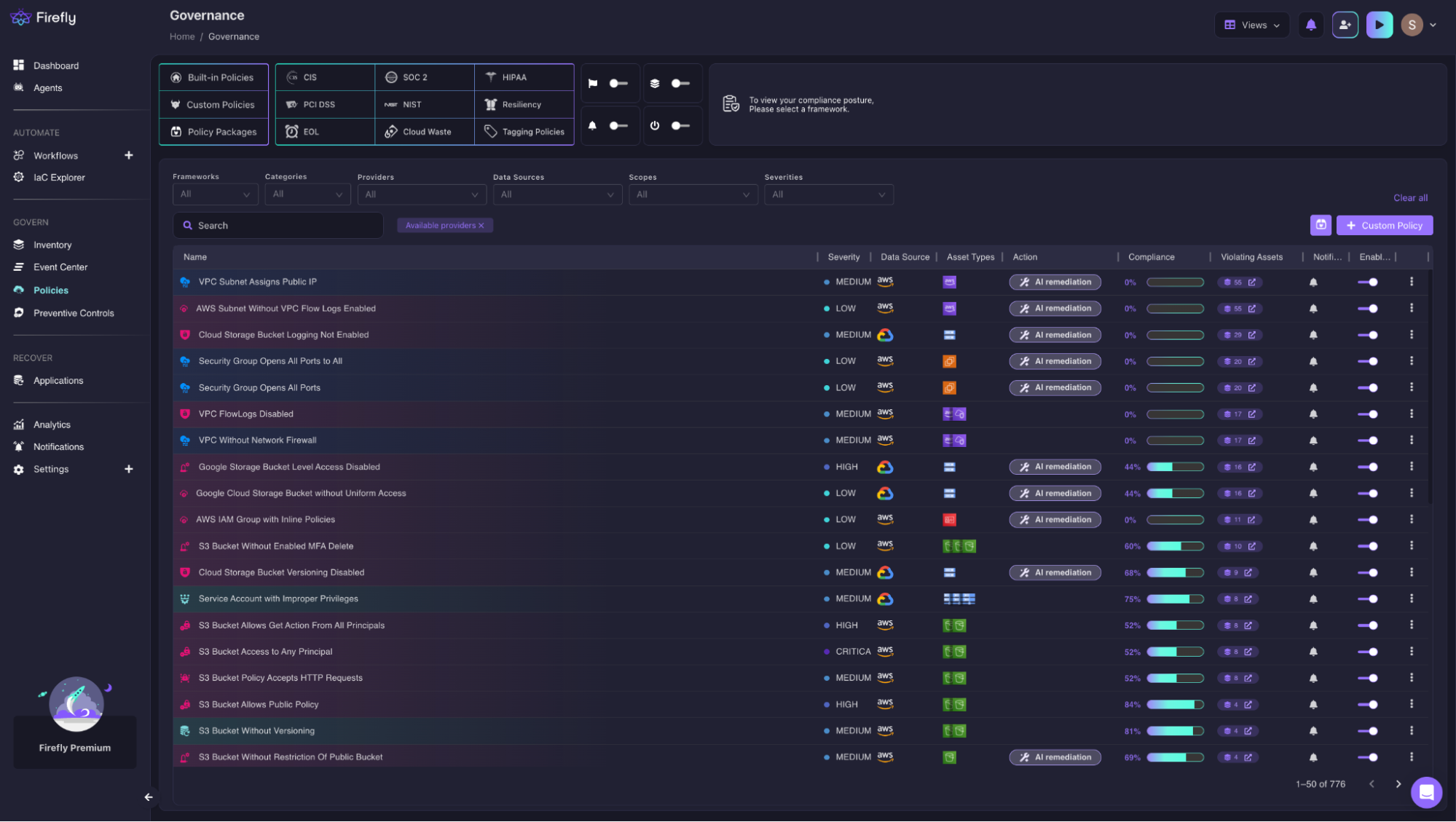
You get a clear view of what’s non-compliant, how severe it is, and which assets are affected, making it easier to prioritize fixes. For example, the dashboard above shows:
- predefined policies (CIS, SOC2, etc.)
- violations across resources
- severity levels and affected assets
Examples:
- S3 buckets without encryption
- security groups open to all ports
- storage without versioning
- IAM roles with excessive permissions
Instead of relying on Terraform code reviews, policies are enforced across:
- Terraform-managed resources
- unmanaged infrastructure
- all cloud environments
This ensures governance is not tied to individual pipelines; it’s applied everywhere.
Controlled Infrastructure Provisioning and Change Visibility
One common issue is a lack of visibility into how Terraform is being used across teams. Firefly provides a view into Terraform usage itself. This includes:
- Terraform versions in use
- backends (S3, GCS, etc.)
- modules and stacks
- last applied timestamps
This helps identify:
- outdated Terraform versions
- inconsistent backends across teams
- unused or orphaned modules
Instead of guessing how Terraform is structured, teams get a clear operational view.
Disaster Recovery and Infrastructure Rebuild Using IaC
Recovery is where most Terraform setups struggle, especially when the state is incomplete or drifted. Firefly approaches this by continuously capturing snapshots of infrastructure.
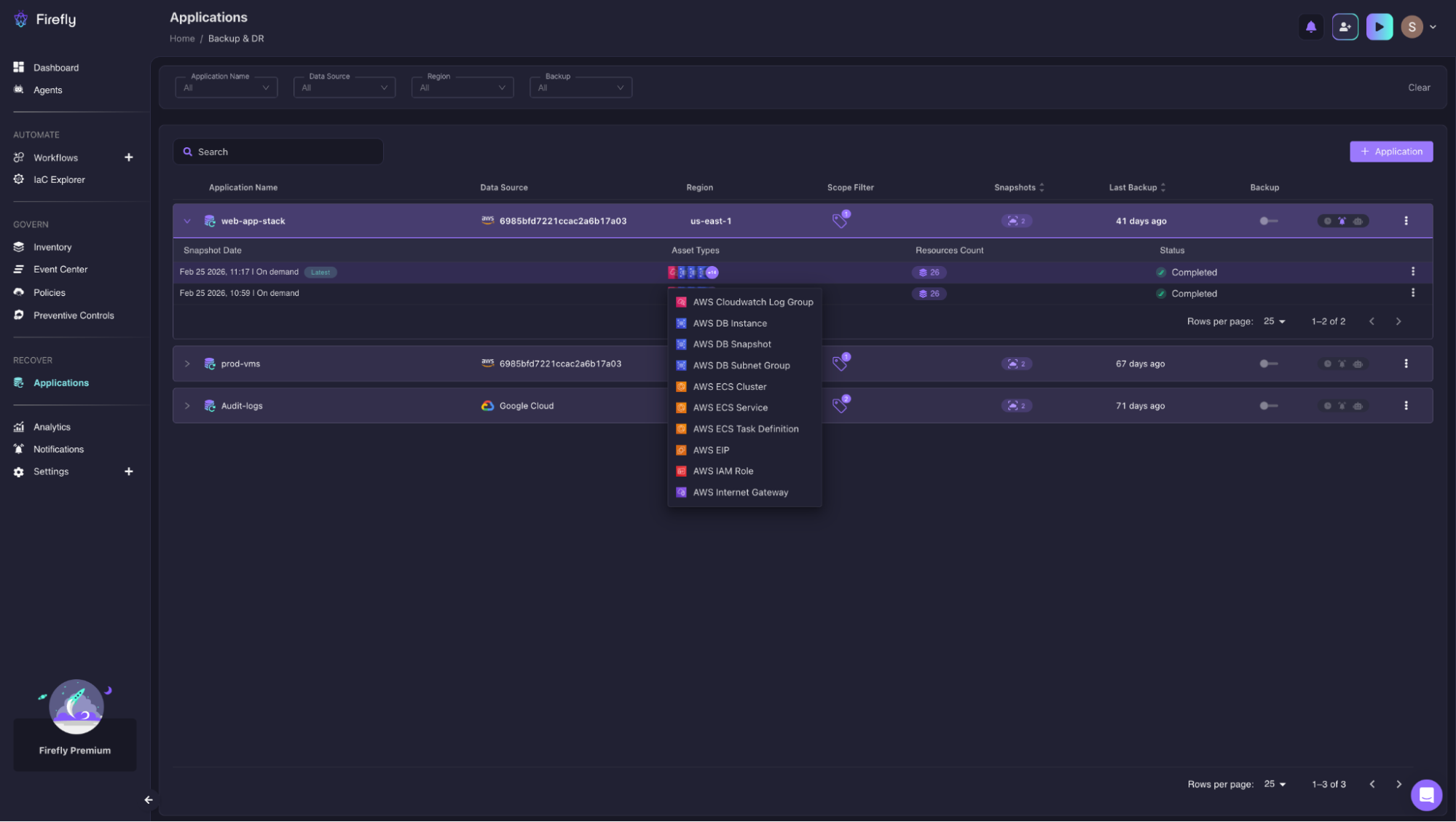
In this view:
- Applications are grouped as infrastructure units
- Snapshots capture resource state over time
- Backups can be triggered on demand or scheduled
This allows:
- Reconstruction of environments from known states
- Faster recovery during outages
- Reduced dependency on manual debugging
Instead of rebuilding infrastructure from scratch, recovery becomes structured and repeatable.
Multi-Cloud Visibility and Unified Control Plane
The biggest challenge in multi-cloud setups is fragmentation:
- different consoles
- different state backends
- different pipelines
Firefly brings this into a single operational layer by unifying inventory, drift detection, governance, Terraform usage, and recovery. Instead of piecing together information across tools and providers, everything is visible in one place, making it easier to understand and manage infrastructure as it evolves.
What to Do Next
Start by checking how these practices are applied in your current setup:
- Does every terraform apply use a reviewed plan file
- Is the state split so changes stay within one layer or service
- Are policy checks applied consistently across all pipelines
- Is drift detected before the next apply
If these are handled differently across environments or providers, that gap will show up during the next change. Firefly helps close that gap by giving you a single view of Terraform state, detecting drift as it happens, and applying policy checks across all resources, regardless of which pipeline or provider created them.
FAQs
What is the best practice for Terraform import?
Use terraform import when a resource already exists but is not tracked in state. Import the resource first, then update your .tf configuration to match its actual settings. After that, run terraform plan to confirm there are no unintended changes. Skipping import and running terraform apply directly can lead to recreation or overwriting of the resource.
What are the best practices for Terraform state management?
State should always be stored in a remote backend with locking enabled to prevent concurrent terraform apply. It should be split by service, environment, and layer so that changes remain isolated. Access to state must be restricted since it can contain sensitive data. Most failures happen when state is shared too broadly or does not reflect all managed resources.
What are the best practices for Terraform?
Terraform practices focus on controlling how terraform plan and terraform apply behave. Always review the plan before applying and ensure the same plan file is used during execution. Apply should run through CI, not local machines, and inputs should be validated to avoid unintended changes. Drift should also be checked before applying new changes.
What is the best practice for resource names in Terraform?
Resource names should be stable and consistent so that Terraform does not treat them as new resources. Include service and environment in naming to avoid collisions across deployments. Keep naming aligned across AWS, GCP, and Azure when using multi-cloud modules. Changing names later can trigger resource replacement during terraform apply.

.avif)
.avif)
.webp)

.webp)












