
TL;DR
- A production Terraform pipeline must validate, lint, format, and generate a reproducible tfplan.binary + JSON plan, then apply only after review using short-lived OIDC credentials.
- GitHub Actions and GitLab CI execute Terraform reliably but only at run time; they don’t track cloud state, detect drift, or understand infra relationships across repos and environments.
- Firefly plugs into existing pipelines via two small fireflyci steps (post-plan + post-apply), ingesting plan/apply data without changing how Terraform runs.
- With Firefly, we maintain a live inventory of all cloud resources, constantly compare them to the IaC state, and surface drift even when no pipeline is running.
- Guardrails enforce org-wide cost, security, policy, and tagging rules on every plan, and Workflows/Projects centralize visibility across all Workspaces, runs, drift events, and resource ownership.
Teams usually begin with Terraform by running it directly against a single AWS account or a small test environment. It works fine when the scope is limited, and there’s just one person applying changes. The problems start when multiple engineers, multiple modules, and multiple environments get involved. At that point, manual plan and apply runs don’t scale. You get inconsistent state operations, changes applied without review, expired credentials, and no reliable audit trail of who changed what.
Once Terraform is responsible for deploying production infrastructure, every change has to be predictable and reviewable. That means formatting, validation, linting, policy checks, plan generation, and controlled applies, all enforced automatically. CI/CD becomes the only practical way to guarantee consistent runs across environments and avoid accidental or untracked infrastructure changes.
This guide outlines how to build production-ready Terraform pipelines using GitHub Actions and GitLab, since they are the most widely adopted CI/CD platforms with strong Terraform ecosystem support, mature automation capabilities, and native integration patterns suited for scalable IaC workflows. It also covers the practical limitations these platforms still have and explains how Firefly adds drift detection, impact analysis, and governance without requiring any pipeline rewrites.
What a Good Terraform Pipeline Should Do
A solid Terraform pipeline makes infrastructure changes predictable and safe. It validates the code, produces a clear snapshot of what Terraform will change, and only applies changes that someone has reviewed and approved. These are the core pieces every production pipeline should cover.
1. Enforce formatting, validation, and linting on every commit
Before anything reaches a plan, the pipeline should catch obvious issues:
- terraform fmt keeps formatting consistent
- terraform validate catches structural problems
- tflint detects unused variables, typos, and common module mistakes
Most production pipelines run a validation step first, and where terraform validate fits in the pipeline explains what it checks and why it runs before plan.
These checks must run on every PR so broken configurations never reach the planning stage.
Example:
2. Generate a JSON plan and store it as an artifact
Terraform produces:
- a terminal-friendly plan output for humans to read
- a JSON plan that downstream tools rely on
The JSON plan is the one that matters for automation. Cost tools, security scanners, and policy engines all parse this file to understand exactly which resources will be created, changed, or destroyed.
A production pipeline should:
- Generate the binary plan
- Convert it to JSON
- Upload both as artefacts for review and reuse
This makes the plan reproducible and gives other systems a stable input for analysis.
Example:
3. Block applies unless the change is reviewed and approved
Anything that touches the state must be gated. The safest approach is:
Plan the PR; apply only after it's merged.
This ensures:
- every change is reviewed
- no one can run an apply from a fork
- apply events are tied to a specific approved commit
- state is updated only through controlled pipelines
4. Use OIDC instead of long-lived cloud keys
Long-lived AWS/Azure/GCP access keys in CI secrets are risky. Modern pipelines use OIDC-issued short-lived credentials, which:
- eliminate static keys
- reduce blast radius
- enforce least privilege per workflow
- rotate automatically
Terraform automatically picks up these temporary credentials once the OIDC step runs.
Example (AWS):
5. Keep plans, logs, and state operations traceable
Every run should leave behind enough data to answer:
- who triggered the workflow
- which commit was used
- what the plan showed
- what the apply actually changed
- why a failure happened
Traceability is essential when multiple teams share infrastructure or when debugging drift, concurrency issues, or unexpected resource changes.
6. Apply only from protected branches or explicit approvals
Terraform state must be protected. A safe pipeline will:
- apply only from main or environment branches,
- use branch protection rules to block direct pushes
- require manual approval for production environments
This ensures that every apply corresponds to an approved commit and a reviewed plan. The next step is to look at what a production pipeline looks like in our daily IaC deployments.
Terraform CI/CD on GitHub Actions
GitHub Actions is one of the most common places to run Terraform today. It integrates naturally with pull requests, OIDC, branch protection, and reusable workflows. With the right workflow layout, it becomes a reliable way to validate, plan, and apply infrastructure changes across multiple environments.
This section covers how to structure a production-ready Terraform pipeline using GitHub Actions without making it overly complex.
Pipeline Setup
A clean GitHub Actions workflow starts with a predictable repo layout and secure authentication.
Repository layout
A simple, maintainable structure is:
Each environment has its own backend configuration, variables, and state. This separates concerns and prevents accidental cross-environment changes.
GitHub OIDC setup (no static cloud keys)
Using OIDC is the safest way to authenticate. Once the IAM role/workload identity is configured, the workflow only needs:
This gives each run short-lived credentials and removes the need for stored keys.
Caching Terraform plugins and modules
Caching speeds up runs and reduces repeated downloads:
Most teams also set:
to further reduce repetitive downloads.
State locking considerations
If you’re using S3, GCS, or Azure Storage, enable state locking:
- AWS: DynamoDB
- GCP: built-in
- Azure: blob lease locking
This prevents multiple applies from corrupting the state.
A Production-Ready Terraform Pipeline for a Compute VM
Instead of showing a trivial example, this walkthrough uses a real production-style Terraform configuration: a repository that provisions a compute VM (GCE VM / EC2 / etc., depending on the provider defined in main.tf) using a standard module layout (main.tf, variables.tf, outputs.tf, backend.tf).
This matches how most enterprises actually structure their Terraform projectsand it shows how to wire it cleanly into GitHub Actions using Google Workload Identity Federation for secure, keyless authentication.
Repository Structure (What Terraform Is Operating On)
Your repo uses the canonical IaC layout:
- backend.tf - Remote backend configuration (GCS bucket / S3 bucket / etc.).
- main.tf - Providers + resources for the production compute VM.
- variables.tf Typed input variables (region, machine type, VPC IDs, SSH keys, etc.).
- outputs.tf Exposed values after apply (VM IDs, IPs, connection details).
A typical workflow looks like:
The GitHub Actions pipeline automates exactly this flow, but with a secure split between plan and apply.
The GitHub Actions Workflow: Plan on PR, Apply on Merge
This is the ideal structure for production pipelines:
- Every PR triggers a Terraform plan, reviewers see exactly what changes will happen.
- Only merges to main trigger apply no accidental infra mutation from branch builds.
- Workload Identity Federation avoids storing long-lived cloud keys in GitHub.
Your workflow achieves all of this using two coordinated jobs: plan and apply.
How the Pipeline Behaves
The workflow starts with the plan stage, so whenever a pull request is opened, or when something lands on main, the job checks out the code and installs Terraform 1.8.x to keep the CLI consistent across all runs. Authentication happens through Google Workload Identity Federation, so the job never relies on long-lived service-account keys. The pipeline gets short-lived credentials bound to the GitHub OIDC token, which is a cleaner and safer way to authenticate in CI.
This guarantees approval-based workflows and immutability: the same plan reviewers who approved it is the plan that gets applied.
How the Pipeline Executes the Plan and Apply Stages
The pipeline runs in two stages: a plan stage that executes on pull requests and any push to main, and an apply stage that runs only after a pull request has been merged. Both jobs are intentionally symmetrical, so the environment that generates the plan is the same one that applies it.
Job 1: Terraform Plan (PRs + Main Pushes)
The plan job starts as soon as a pull request is opened. It checks out the repository and installs a pinned Terraform version through hashicorp/setup-terraform@v3. Locking the CLI version avoids subtle drift caused by contributors or runners using different versions.
Authentication is handled through Google Workload Identity Federation. Instead of using service-account keys, GitHub issues an OIDC token, and Google exchanges it for short-lived credentials tied to a specific service account. The workflow uses google-github-actions/auth@v2 with the Workload Identity Provider and service account email passed through secrets. This keeps the pipeline keyless and removes any need for JSON files or rotation policies.
With authentication in place, the job runs the core Terraform steps. terraform init installs providers and configures the remote backend. terraform fmt -check and terraform validate run next, stopping the pipeline early if formatting or structural issues are detected.
When validation succeeds, the job computes the plan:
This binary output becomes the authoritative plan for the apply job. A JSON version is also generated to support tooling and automation:
Both files, the binary plan and the JSON, are uploaded using the actions/upload-artifact@v4 action. From here on, the binary plan is treated as the source of truth. Nothing will be applied unless it matches the artifact produced during this stage.
Job 2: Terraform Apply
Once the pull request is merged, the apply job runs. It is explicitly gated to only trigger on pushes to the main branch:
It depends on the plan job, ensuring apply never runs without a successfully generated plan. The setup mirrors the first job: checkout, the same pinned Terraform version, and the same Workload Identity Federation authentication. Keeping the environments aligned avoids version mismatches or changes in provider behaviour between stages.
The job downloads the previously stored plan using actions/download-artifact@v4:
Because CI jobs run in clean environments, terraform init is executed again to install providers and restore backend configuration. The final step applies the exact binary plan that reviewers approved:
No new plan is generated, no state is recalculated, and no additional changes are introduced. The plan reviewed in the pull request is the plan that gets deployed, eliminating the common race where drift appears between review and apply. Production receives precisely what was inspected and approved, with no surprises.
In the end, the workflow delivers a clean Terraform flow that plans on pull requests, applies only after merge, short-lived authentication, tightly scoped permissions, and an execution path tied directly to the reviewed artifacts. This is what a stable, production-focused Terraform pipeline looks like: simple, controlled, and transparent.
Integrating Firefly Into This GitHub Actions Workflow
This GitHub Actions pipeline already has everything Firefly needs: a deterministic plan job, a stored tfplan.binary, and a clean apply stage. To extend this workflow with Firefly, you add two lightweight steps, one after terraform plan, one after terraform apply.
After plan:
After apply:
These two additions give Firefly full visibility into every plan and apply, enabling drift detection, guardrail evaluation, and Workspace-level run history. without changing any existing pipeline logic.
With the GitHub Actions workflow covered, the next step is to map the same pattern onto GitLab CI, since many enterprise teams run Terraform there as well.
Terraform CI/CD on GitLab CI
GitLab’s model differs with stages, runner-level variables, and protected environments, but the Terraform workflow remains the same: reproducible plans, a stored tfplan.binary, and a controlled apply stage. Let’s walk through how this same production pipeline fits into GitLab. GitLab CI should act as the single control point for all Terraform changes. Standard lifecycle:
- The developer opens a Merge Request
- CI generates a plan and posts it to the MR
- Reviewers approve
- Merge to main
- CI applies exactly to the previously approved plan
Two decisions shape the pipeline:
(a) where Terraform state is stored, and
(b) where plan/apply operations run.
Backend and Locking: Use One Central State Backend
Terraform needs a backend that supports locking and consistent state handling. Pick one backend and use it for every environment; mixing backends eventually causes drift and debugging headaches.
Terraform Cloud
Terraform Cloud works well as the authoritative state store. It keeps state, handles locking automatically, and maintains run history. If remote execution is enabled, it also becomes the execution engine for plan and apply, which means GitLab CI never needs to handle cloud provider credentials.
Cloud Storage With Locking
If you prefer to run Terraform inside GitLab CI, standard cloud backends (S3 with DynamoDB locks, GCS, Azure Blob Storage) are equally valid. In that case, CI is responsible for authenticating to the cloud provider before running Terraform.
CI Stages: validate, plan, apply
The pipeline remains predictable when broken into three steps: validation, planning, and applying.
Validation runs on every branch and MR and should fail fast. Planning runs only on merge requests and produces a binary plan together with a readable diff. Applying only happens on the main branch and always uses the exact plan artifact generated earlier.
This separation guarantees that what gets reviewed is exactly what gets deployed.
Posting the Plan to the Merge Request
Teams reviewing changes should see what Terraform intends to do without digging through downloaded artifacts. After generating the binary plan, convert it into a readable diff and post it directly into the merge request discussion:
Post to the MR:
The full plan artifacts remain available for deeper inspection or automated policy checks.
Plan Artifacts and Apply
The plan job must be uploaded:
- tfplan.binary (the source of truth)
- plan.txt / plan.json (human- or machine-readable)
The apply job must:
- depend on the plan job
- Re-initialize the backend
- Apply using the provided plan
The apply job must never run terraform plan. Auditability depends on consuming the previously reviewed plan.
Authentication and Secrets
Terraform needs credentials to talk to cloud providers. How those credentials reach the pipeline directly affects security and maintenance overhead.
1. Using Terraform Cloud
When Terraform Cloud performs remote runs, GitLab CI does not handle any sensitive cloud credentials at all. All secrets stay within the Terraform Cloud workspace. Policy checks, drift detection, and run history also remain centralised.
2. Using GitLab CI with OIDC
If Terraform runs inside GitLab CI, issuing short-lived credentials through GitLab’s OIDC token is the cleanest approach. AWS, GCP, and Azure all support exchanging the GitLab OIDC token for temporary access, and this eliminates long-lived keys entirely.
3. If Static Keys Are Unavoidable
In older environments that cannot use OIDC, store static service account keys only as protected GitLab CI variables, restrict them to protected branches, and rotate them regularly. This should be treated as a transitional solution.
Concurrency Control and Deployment Protection
Terraform state locking prevents Terraform-level conflicts. GitLab should also enforce job serialisation and protected environments:
Use protected variables so credentials only appear in safe pipelines.
Runner Selection and Terraform Version Pinning
Use a consistent Terraform version everywhere.
If additional tooling is needed (tflint, checkov), use either dedicated images per job or a custom base image with everything included. Consistency prevents version drift and confusing review differences.
Integrating Firefly Into This GitLab Pipeline
This GitLab pipeline already follows the recommended validate → plan → apply structure with a binary plan artifact. Firefly plugs into this flow with two small jobs.
After plan:
After apply:
These steps send plan/apply metadata to Firefly so it can evaluate Guardrails, maintain run history, detect drift, and update the resource inventory, all without changing how Terraform runs in GitLab.
Where GitHub/GitLab Terraform Pipelines Fall Short
Both platforms can run Terraform reliably when the workflows are designed carefully, but there’s a ceiling. Once your infrastructure spans multiple workspaces, cloud accounts, and teams, CI alone stops being enough. You start running into limitations that can’t be fixed inside GitHub or GitLab, no matter how much scripting you add. They don’t understand cloud resources, Terraform state, or cross-environment dependencies. Once your infrastructure is spread across multiple repositories, multiple cloud accounts, and multiple teams, the edges of these platforms become obvious.
1. Drift Isn’t Detected Unless Someone Runs a Pipeline
Both platforms only know how to react to Git activity: a push, a pull request, or a manually triggered run. Terraform will show drift during plan, but only for that specific workspace and only at that specific moment. If a teammate changes a firewall rule in the cloud console and nobody touches the Terraform code for weeks, your pipelines remain green. There’s no continuous reconciliation between what’s running in the cloud and what your IaC defines. Drift becomes something you discover during an outage or during a deploy that suddenly wants to recreate safe resources.
2. No Central View Across Stacks, Environments, or Repositories
Each workflow or pipeline in GitHub/GitLab lives in its own silo. One repository has no idea what another repository’s Terraform did last night, or whether another environment failed halfway through an apply. There’s no consolidated run history, no shared timeline of plans and applies, and no way to ask basic questions like: “What changed in production this week?” or “Show me every Terraform run across our AWS accounts.” Teams end up scraping logs or building makeshift dashboards to stitch together the bigger picture.
3. Cost, Security, and Compliance Checks Are Not First-Class Citizens
Pipelines can run cost scanners, security scanners, and policy engines, but the responsibility is completely on you to integrate them, maintain them, and keep their configuration aligned across all repositories. Nothing in GitHub or GitLab understands the Terraform plan natively, so any analysis you want must be manually bolted on. In practice, many teams end up with inconsistent rules across repos, or outdated scanners that quietly stop enforcing the things they were meant to enforce.
4. No Native Impact or Dependency Awareness
A raw terraform plan is basically a diff. CI platforms treat it as a log file; they don’t visualise resource graphs, dependency chains, or blast radius. When a change deletes a module, it’s not always obvious that it will cascade into destroying several dependent resources or break the surrounding infrastructure. Reviewers are forced to read large JSON plans or wall-of-text diffs and mentally reconstruct dependencies. Nothing in GitHub/GitLab helps surface the risk behind a plan.
5. No Inventory or Mapping Back to IaC
Once an apply finishes, CI is done. It doesn’t track which cloud resources were created, which modules produced them, or where their source code lives. Over time, environments accumulate orphaned resources, unmanaged workloads, and legacy components that are no longer referenced anywhere in Git. Troubleshooting becomes painful because there’s no system that connects “this actual cloud resource” back to “this exact line of Terraform in that repository.”
6. Governance Stops at Code Review
Branch protection rules, required approvals, and protected environments are all helpful, but they govern Git, not your cloud environment. CI cannot enforce organisation-wide rules like “all storage buckets must be encrypted,” “no resources can be deployed in unapproved regions,” or “any cost increase over 10% must be blocked.” Terraform-specific policy enforcement simply doesn’t exist natively. Any guardrails you want require custom scripts or third-party tooling, and they tend to drift, break, or be bypassed over time.
How Firefly Complements Terraform CI/CD
Terraform pipelines in GitHub Actions and GitLab CI execute plans and applies correctly, but they operate in a blind, stateless way. Each run has no awareness of previous runs, no knowledge of Terraform state outside the current job, and no visibility into the actual cloud environment. They only process the files present in the repo and whatever the backend returns during that one execution. That’s why problems like drift, inconsistent policy enforcement, and scattered run history show up as soon as you’re running more than a few workspaces.
Firefly closes pipeline gaps in ways CI systems can’t, because it treats your IaC, state, and cloud footprint as first-class entities.
Continuous Drift Detection and a Live Inventory
The biggest gap in GitHub/GitLab pipelines is that they only evaluate infrastructure when a pipeline runs. If nobody pushes code, nothing checks whether the cloud environment still matches the Terraform state. Firefly closes this gap by maintaining a live, continuously updated inventory of cloud resources and comparing them to the IaC definitions inside each Workspace.
In Firefly terminology:
- A Workspace is the unit that represents a Terraform/OpenTofu/Terragrunt stack. It stores the IaC repo path, branch, variables, and execution settings.
- Each Workspace is nested inside a Project, which defines boundaries for access control, variable sets, guardrail policies, and environment structure.
Because Firefly always knows the IaC configuration and the actual cloud footprint, it evaluates drift on a schedule, not just when CI runs. Drift appears as a dedicated signal inside the Workspace and Project hierarchy, with resource-level diffs that show what changed, when, and whether the resource is now unmanaged.
Here in the visual below, Firefly’s Inventory view shows codified, drifted, and unmanaged resources across providers, including metadata, relationships, IaC status, and ownership:
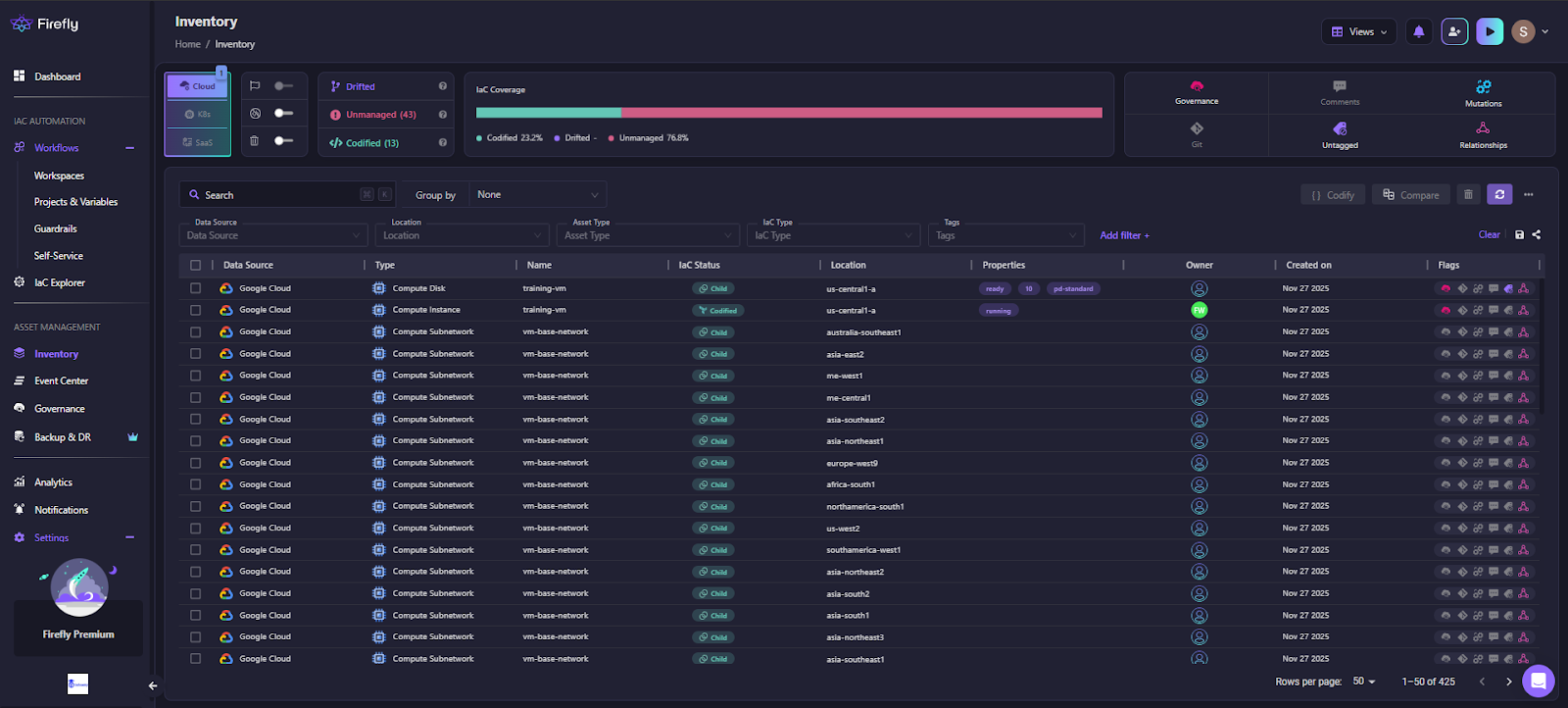
In the screenshot above, you can see Firefly classifying assets into Codified, Drifted, and Unmanaged, along with full visibility into location, type, creation time, IaC status, and flags. GitHub/GitLab cannot provide this because they don’t maintain cloud state or track IaC ownership outside a single run.
Centralised Insight Across All Plans, Applies, and Environments
Firefly organizes infrastructure the same way teams structure ownership in the real world. A Project group's Workspaces, Variable Sets, and Runners under one domain, for example,/aws/prod, /gcp/dev, or any business unit. Projects form the boundary for access control, guardrail policies, and IaC governance.
Each Workspace inside a Project becomes the system of record for a single IaC stack. When Workflows or FireflyCI ingest plan/apply events, the Workspace builds a full historical record:
- plans and applies
- Guardrail based evaluations
- IaC version and variables used
- drift events
- run logs and metadata
- cost/security/compliance findings
This gives you a consolidated, chronological view of infra changes across all Workspaces — something no native CI system offers.
In the visual below, Firefly’s Workflows view shows multiple Workspaces, their latest runs, IaC versions, guardrail violations, cost deltas, and run statuses. Workflows are Firefly’s orchestration engine; they combine IaC executions with guardrail enforcement, policy checks, and remediation logic:

In this view, each row represents a Workspace inside a Project, and each run (plan/apply) is enriched with:
- IaC version used
- Guardrail policy pass/fail results
- Cost delta estimates
- Tags coverage
- Execution logs and statuses
- Branch and commit metadata
The dashboard above shows multiple Workspaces, including production compliance checks and development compute stacks, each with its own runs, guardrail results, cost evaluations, and final statuses (APPLIED, BLOCKED, PLAN FAILED).
Guardrails: Cost, Policy, Resource, and Tag Enforcement on Every Plan
CI pipelines can run scanners, but they can’t enforce organisation-wide policies. Firefly’s Guardrails act directly on the Terraform plan produced in your pipelines or by Firefly-managed runners.
They evaluate four types of rules:
- Cost rules: Detect and optionally block plans that exceed cost thresholds (dollar or percentage-based).
- Policy rules: Enforce standards using an OPA-based engine. This covers encryption, network hardening, public exposure, forbidden resource types, and any custom organisational control. Policy rules can evaluate not just diffs but existing resources as well.
- Resource rules: Control specific actions like preventing deletion of critical databases or blocking creation of resources in unapproved regions.
- Tag rules: Ensure tagging consistency across all resources. These can evaluate both planned changes and existing resources (“no-op assets”).
Guardrail violations surface in:
- The Firefly workspaces under the run’s “Guardrails Step.”
- PR/MR comments
- Slack or email notifications
Blocking is strict by default, but authorised users can override specific violations if needed. That override is logged, giving a complete audit trail.
Impact Awareness From the Plan Itself
Instead of dumping raw terraform plan output, Firefly parses the JSON plan into a structured diff that’s easier to reason about. It highlights resource-by-resource changes and dependency relationships. This is especially useful when a change triggers downstream updates across modules or when a delete cascades into multiple resources.
Reviewers can see:
- what’s being created, changed, or destroyed
- Which dependencies are involved
- How many resources are affected
- What might be unintentionally impacted
GitHub/GitLab pipelines don’t offer any semantic understanding of the plan; they only show logs.
Linking Cloud Resources Back to Terraform Code
Firefly’s inventory maps every cloud resource it discovers to the module and workspace that created it. When resources drift or become unmanaged, you immediately see where they belong, or whether they belong anywhere at all.
This eliminates the need to manually determine where a resource originates or whether it’s safe to delete. Over time, the inventory becomes a source of truth for all managed and unmanaged assets across your cloud accounts.
Infrastructure Intelligence Added Once Firefly Monitors Your Stacks
Once Firefly is connected, the gaps left by GitHub and GitLab pipelines disappear. Drift is monitored continuously, every plan and apply is captured with full context, and PRs/MRs show cost impact, policy violations, and resource-level changes without digging through logs. Guardrails enforce organisation-wide rules, and the live inventory ties every cloud resource back to its IaC source. Your pipelines keep executing Terraform deterministically; Firefly adds the visibility, governance, and drift intelligence they can’t provide on their own.
FAQs
Which tool is best for CI/CD pipelines?
There’s no single “best” tool; it depends on where your code lives and how your infra is structured. GitHub Actions works well for repo-centric workflows, GitLab CI fits teams already invested in GitLab’s ecosystem, and Jenkins is still common in large enterprises that need custom runners or on-prem execution. The right choice is the one that integrates cleanly with your SCM, supports OIDC, and keeps pipeline logic simple.
Can Terraform be used for CI/CD?
Yes, Terraform fits cleanly into CI/CD because its plan/apply model maps directly to PR review and controlled deployment. Pipelines typically run fmt, validate, plan on pull requests, and apply only after merge. CI/CD ensures consistent runs, locked state operations, short-lived credentials, and reproducible changes across environments.
Can we use Bitbucket for CI/CD pipelines?
Yes. Bitbucket Pipelines can run Terraform the same way GitHub Actions or GitLab CI does, using containerized steps, OIDC (for AWS), and artifact passing for binary plans. The main limitation is that Bitbucket’s ecosystem is smaller, so you often wire in tooling manually, but the core Terraform workflow still works reliably.
What is an octopus pipeline?
An Octopus pipeline is a deployment workflow managed by Octopus Deploy, a tool focused on release orchestration rather than CI. It takes built artifacts from a CI system and handles environment promotion, deployment steps, variable management, and approvals. Teams often pair it with GitHub Actions, GitLab CI, or Jenkins: CI builds, Octopus deploys.

.avif)
.avif)
.webp)

.webp)












