
TL;DR
- HCP Terraform's Resources Under Management pricing bills by peak resource count, not activity. A stable 10,000-resource account can run $4,700+ per month on the Standard tier, whether or not anything actually changed that month, and roughly $23,500/month at 50,000 resources.
- The bigger structural problem is scope, not price: Sentinel and drift detection only see Terraform state, so anything deployed through Pulumi, CloudFormation, or a manual console change is entirely invisible to HCP Terraform.
- No single alternative wins on every front. Scalr and Spacelift are the closest Terraform-only, managed-execution replacements; env0 adds FinOps and broader multi-IaC support; Atlantis is the self-hosted, no-SaaS GitOps option; Firefly is the only one built as a governance and inventory layer spanning every IaC tool plus unmanaged resources.
- Firefly operates differently from the execution-first tools in this list: it's a visibility and control plane first, continuously scanning AWS, Azure, GCP, and Kubernetes to build a real-time inventory, correlating every asset back to its IaC source, and enforcing guardrails on every change regardless of which tool created it. Enterprises including JPMC, Marathon Petroleum, WPP, and AstraZeneca use it for IaC coverage posture management and continuous cloud resilience.
- Picking a replacement comes down to matching the tool to your actual operating model, not a feature checklist. This guide covers pricing models, policy placement, drift detection depth, a full breakdown of five leading alternatives, and the enterprise architecture patterns that tend to decide the choice in practice.
Choosing the Right Fit Before Comparing Feature Lists
Every Terraform Cloud alternative on the market will show up to a feature comparison with a compelling pitch: broader IaC support, better pricing, sharper governance. Read enough of these pitches back to back, and they start to blur together, because most of them are true in isolation. The problem isn't finding a capable tool; it's that "capable" depends entirely on what your team is actually running and how it operates day to day.
A team that's Terraform-only and just wants a managed backend has a completely different shortlist than one running Pulumi, CloudFormation, and a long tail of console-created resources across three clouds. Pricing that looks reasonable for a stable, predictable resource count can be punishing for an environment that scales up and down constantly. Rather than working through every platform's full feature list, it's faster to answer four questions first, since the answers do most of the narrowing before a single tool gets evaluated in depth.
- IaC tool mix. Are you Terraform/OpenTofu-only, or do teams also run Pulumi, CloudFormation, CDK, ARM, or Kubernetes manifests?
- Execution model. Do you need a managed remote-run backend, or is PR-driven plan/apply in your existing CI pipeline enough?
- Pricing predictability. Is your resource count stable and predictable, or does it fluctuate in ways that make RUM-based billing hard to forecast?
- Governance scope. Does policy and drift enforcement need to cover only Terraform, or every IaC tool plus out-of-band console changes?
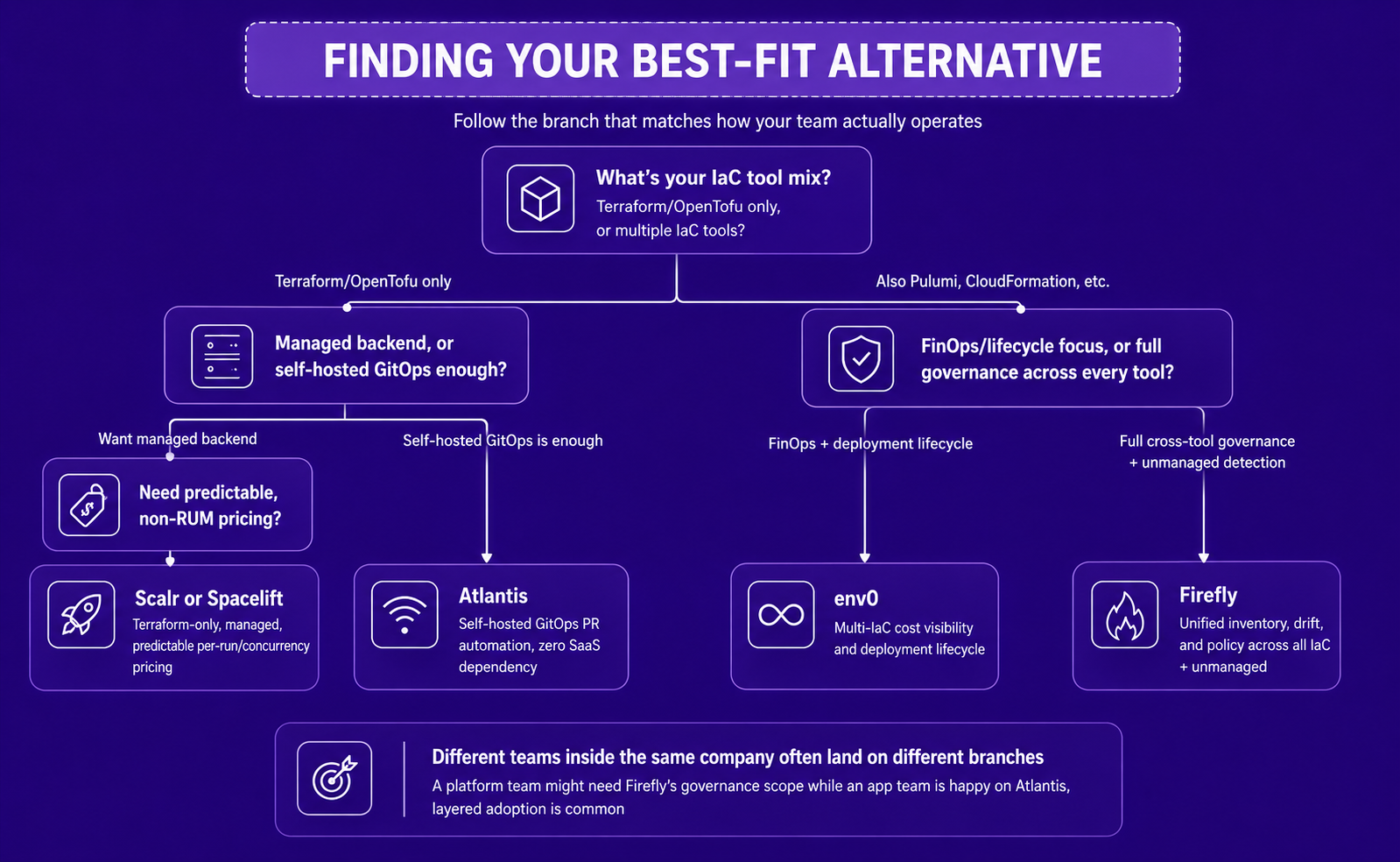
Here's the short answer based on those four branches:
Each of these mappings comes down to what the team actually needs to be true, not just what a feature list claims. A team that's Terraform-only and wants HCP Terraform's workspace/variable-set experience without RUM pricing gets the closest match from Scalr or Spacelift; both mirror that operating model directly rather than asking a team to change how it works. A team already comfortable reviewing every change as a pull request, with no interest in paying for a SaaS backend at all, is better served by Atlantis, since it's the only option here with zero vendor dependency. A team whose real pain point is cost visibility and deployment lifecycle management across Terraform and Pulumi together tends to land on env0, since that's the specific gap its FinOps tooling was built to close. And a team whose actual problem is the fintech scenario above, resources quietly existing outside any tracked IaC tool, is the one case none of the Terraform-centric options solve, which is why Firefly sits in its own row rather than competing directly with the other three on execution features.
What HCP Terraform Solves, and Where It Falls Short
HCP Terraform solved three real problems: remote state storage with proper locking, managed remote runs without exposing local credentials, and policy enforcement through Sentinel or OPA. Add workspaces, variable sets, and execution history, and it gives teams a structured place to manage Terraform at scale.
The limits appear once infrastructure grows beyond a single IaC tool. Most large enterprises run Terraform for foundational infra, Pulumi for application stacks, CloudFormation or CDK for AWS-first teams, and ARM or Bicep on Azure. HCP Terraform can't track resource state, drift, or lifecycle events for any of those tools. Its policy checks only fire on Terraform plans, so anything deployed through Pulumi, CDK, or a cloud console entirely bypasses governance.
Here's what that looks like in practice: a fintech platform team runs Terraform for its core AWS infrastructure, and inherits a set of Kubernetes-native services on Pulumi after acquiring a smaller engineering team. Six months later, a security audit turns up around 40 EC2 instances and several IAM roles that were provisioned through that Pulumi stack and never touched HCP Terraform at all. HCP Terraform's dashboard still shows 100% Sentinel compliance, because every one of its own workspaces passed every check, but Sentinel never ran against the Pulumi stack in the first place. The team believed they had full policy coverage. They actually had full coverage of half of the environment HCP Terraform could see.
The pricing model is the second friction point, and it plays out just as concretely. HCP Terraform uses a Resources Under Management (RUM) model: billing scales with the number of managed cloud resources, not with actual pipeline activity, and it's calculated off-peak hourly count, not an average. That same fintech team runs a nightly batch job that spins up roughly 2,000 temporary compute instances for a data pipeline and tears them down two hours later. RUM billing charges for that peak the moment it happens, so the team pays as though those 2,000 instances existed all month, even though the actual usage window is two hours a night. Per HashiCorp's own cost estimator documentation, Essentials runs $0.10 per resource per month, Standard $0.47, and Premium $0.99, with a free tier covering up to 500 managed resources. At 10,000 managed resources on the Standard tier, that's roughly $4,700/month before any Premium feature uplift. (Pricing confirmed against HashiCorp's own developer documentation as of July 2026; HCP Terraform's rates are subject to change, worth a quick re-check before quoting them externally in anything long-lived.)
Three specific blind spots push enterprises to evaluate alternatives:
- Resources created outside Terraform (console, scripts, other tools) are invisible to HCP Terraform entirely
- Cross-tool governance requires building and maintaining separate policy pipelines per IaC framework
- Drift detection only works against Terraform state; out-of-band changes to Pulumi or CloudFormation stacks go unnoticed
Terraform Enterprise, the self-hosted version, resolves some SaaS-dependency concerns but shares the same Terraform-only governance model. Both HCP Terraform/TFE and their alternatives are compared in detail in Terraform Cloud vs. Terraform Enterprise.
Quick comparison: where each alternative fits
The differentiator across this row isn't whether MCP exists anymore, as of mid-2026 nearly every platform on this list ships one. It's what the agent is actually allowed to write. Spacelift and env0 let an agent apply changes directly through MCP. Scalr deliberately stops short of that, an agent can set things up but a human still has to trigger the run. Firefly's approach sits closer to Scalr's: agents get real query and codification access, but applying a change still has to clear the same Guardrails a human-initiated change would, the MCP layer doesn't bypass governance, it sits on top of it.
Best Terraform Cloud Alternatives in 2026
1. Firefly
Firefly operates differently from the other four tools in this list. Spacelift, env0, Scalr, and Atlantis are fundamentally execution platforms: they run Terraform, track state, and enforce policy during runs. Firefly is a visibility and control plane first. It builds a real-time inventory by scanning cloud provider APIs directly, correlates every asset to its IaC source, and enforces guardrails on every change. Execution (via Firefly Runners) is an addition to that foundation, not the foundation itself, which is what lets it cover governance across every IaC tool in an environment, not just Terraform, more completely than any other tool on this list.
This distinction is worth being precise about for enterprises running mixed IaC environments. A platform that can only see Terraform state has structural blind spots for Pulumi stacks, CloudFormation resources, and anything provisioned through a cloud console. Firefly's agentic IaC approach continuously reads live cloud state, not just state files.
What Firefly's control plane covers:
- Real-time inventory. Firefly connects to AWS, Azure, GCP, Kubernetes, and supported SaaS providers and builds a continuously updated asset inventory. Every resource gets tagged with its IaC status: Codified, Drifted, or Unmanaged.
- IaC correlation. Each asset is mapped to its source: which Terraform workspace, which Pulumi stack, which CloudFormation stack manages it. Assets with no IaC source appear as Unmanaged.
- Drift detection. Drift is detected against live provider state, not just state file comparisons. CloudTrail and audit log correlation shows who made the out-of-band change and when. Alerts go to Slack, Teams, PagerDuty, or email. This approach catches drift across Terraform and Azure as well as other clouds.
- Codification. Unmanaged resources can be converted to IaC automatically, generating Terraform, OpenTofu, Pulumi, CloudFormation, CDK, Bicep/ARM, Crossplane, Helm, and Kubernetes manifests, capturing resource dependencies (security groups, NICs, volumes) alongside the primary resource.
- Guardrails and policy. Policy runs at four stages: on PR plans, at merge, during periodic scans, and against live inventory. OPA/Rego is fully supported alongside a no-code rule builder. Violations block deployments or generate alerts with compliance context for SLOs, DORA, ISO, and SOC 2.
Hands-on: workspaces and variable sets
Firefly organizes IaC execution through Projects (logical groupings) and Variable Sets (shared credentials and configuration inputs). Variable inheritance distributes provider credentials and shared parameters across workspaces without scattering secrets inside repos.
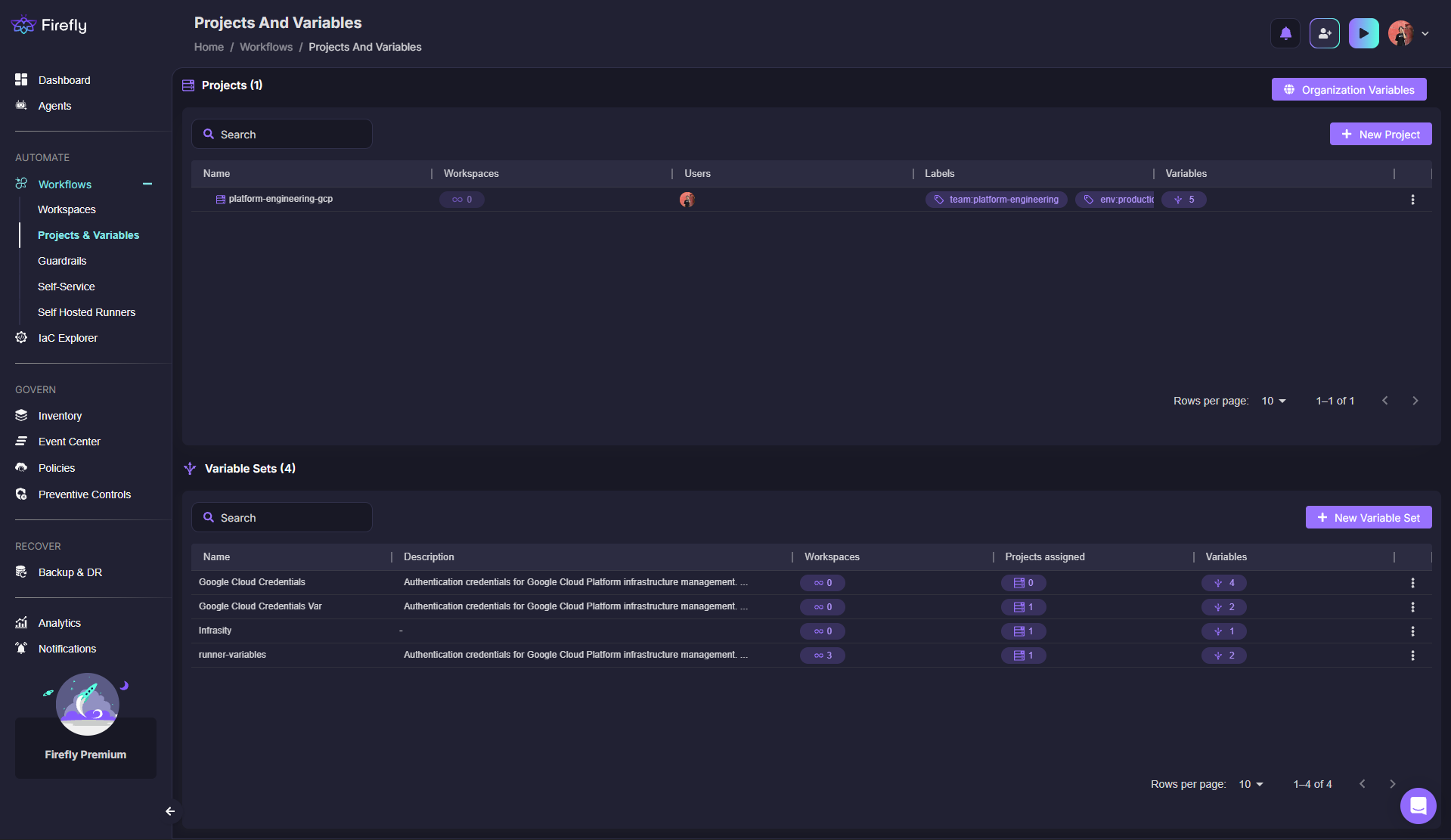
In this view, the project hosts one active workspace, variable sets are separated by function (GCP credentials, runner variables, infrastructure variables), and each variable set shows which workspaces consume it.
Workspaces map to a repo, branch, and IaC directory. Firefly detects the IaC version automatically and runs the full lifecycle (init, plan, guardrails, apply).
Execution isn't limited to Firefly's own SaaS runners. Teams can run on self-hosted runner pools to keep execution entirely inside their private network, or use local execution: a developer runs plan/apply locally, on their own machine, authenticating to Firefly rather than to a separate state backend. Firefly manages the Terraform state throughout, and a successful local apply writes the new state back to Firefly automatically, so state stays centralized and auditable even when execution never touches Firefly's infrastructure. This applies whether state itself is Firefly-managed or BYO remote state in your own S3, Azure Blob, or GCS bucket; Firefly's role as the state authority doesn't depend on where the plan/apply actually runs.
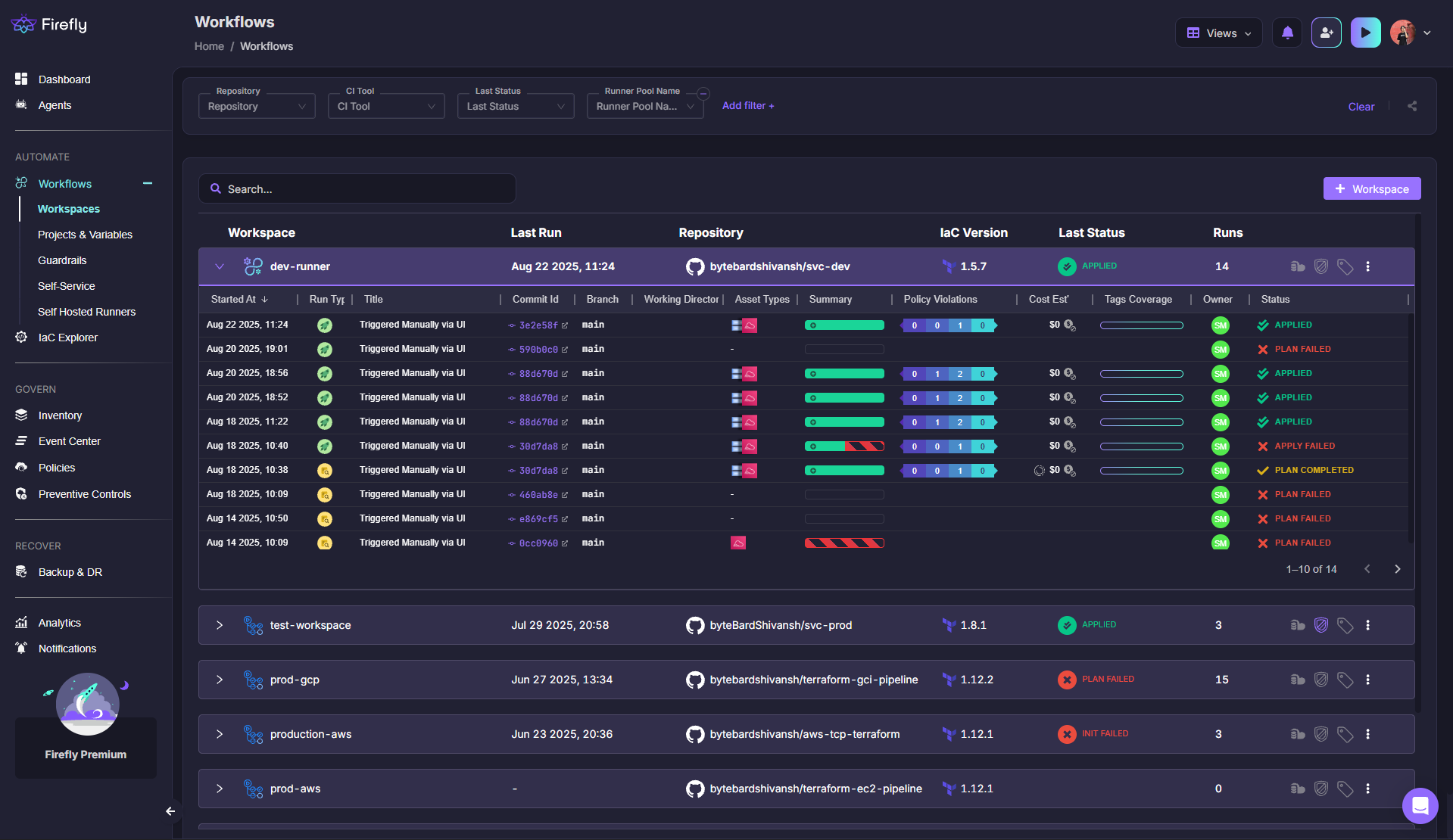
This view shows workspaces tied to different repos and branches, IaC versions (Terraform 1.5.7, 1.12.1) detected automatically, run status (plan failed, blocked, applied, completed), and historical run count for auditability.
Hands-on: guardrails in action
When a workspace run hits the guardrails phase, Firefly evaluates OPA/Rego rules and no-code policies, including cost checks, security rules, and resource-level validations.
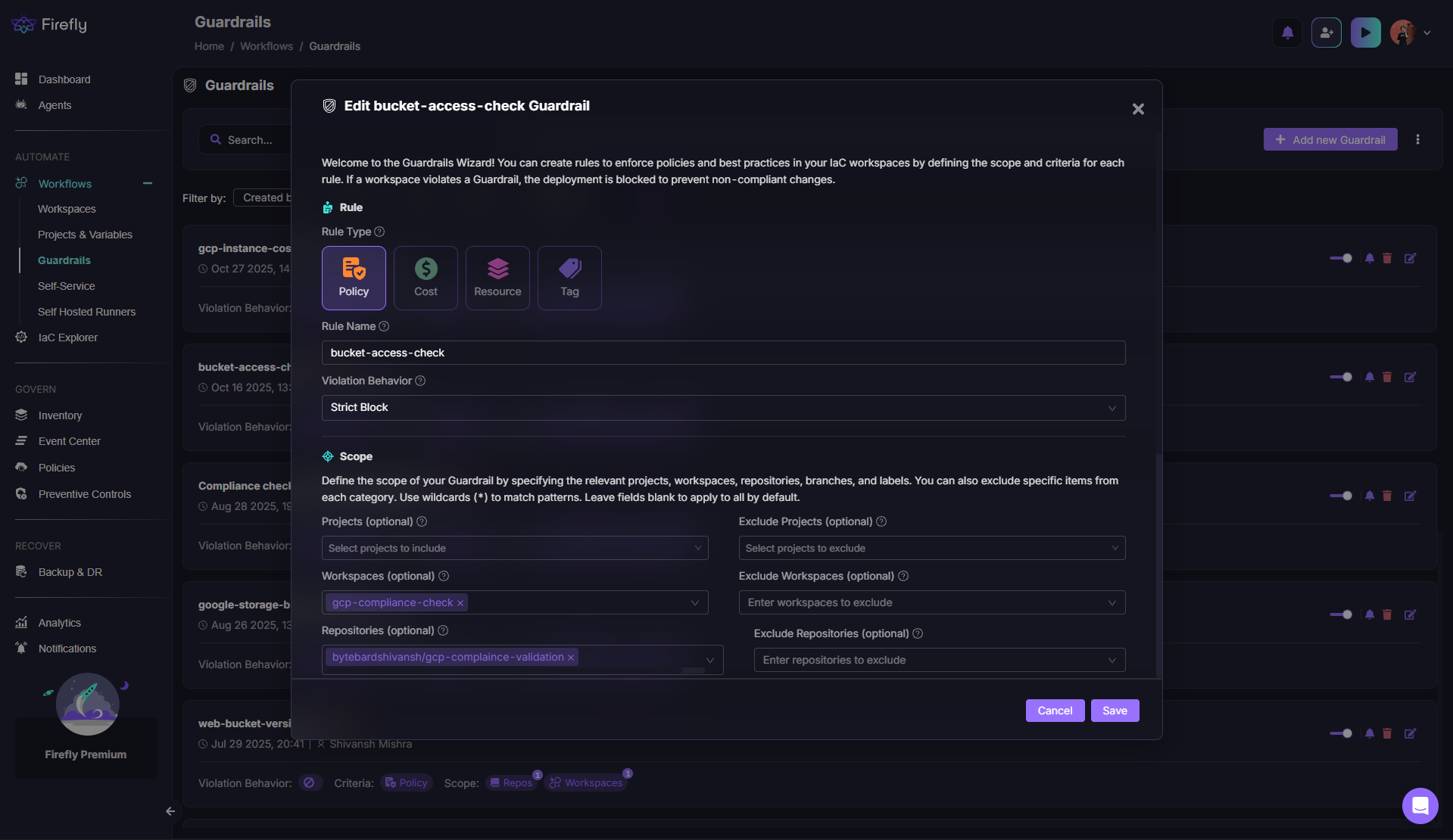
In this run, Firefly blocked deployment because a GCP VM exceeded the allowed cost delta. The bucket IAM check passed. Tag coverage, cost estimates, and violation counts appear in the left panel, deterministic, enforceable policy without building custom admission logic in CI.
Hands-on: inventory and IaC coverage
The inventory view aggregates every asset across all connected cloud accounts, grouped by data source, asset type, or IaC coverage status.
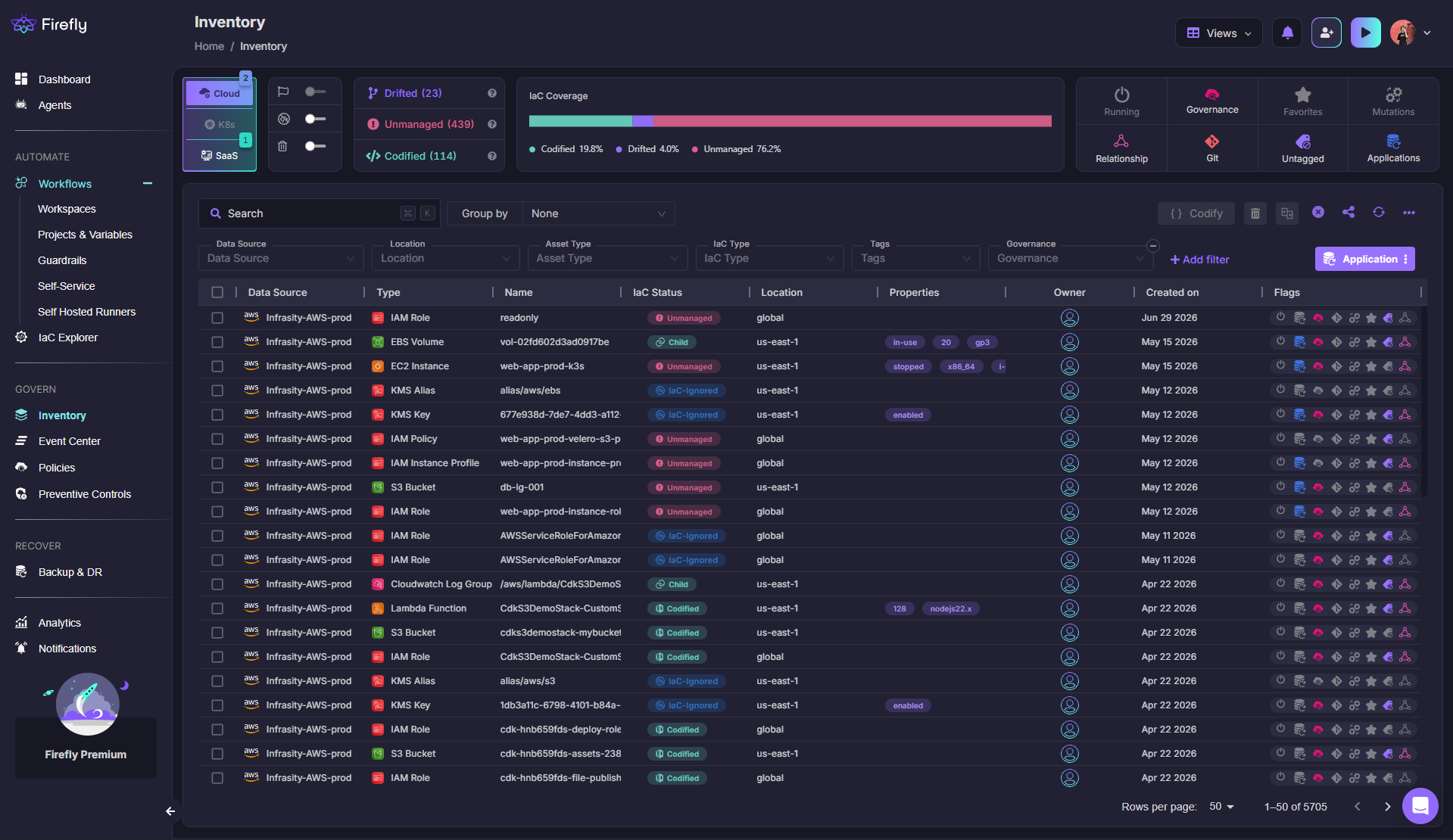
The system shows full GCP inventory (buckets, disks, instances, firewall rules), per-resource IaC status (Codified, Drifted, Unmanaged), asset owners, creation timestamps, and high-level coverage metrics (19.8% codified in this example). This makes governance gaps visible and actionable, rather than discovered during incidents.
How Firefly complements (or replaces) HCP Terraform
Firefly doesn't require ripping out HCP Terraform. For teams that want to keep remote runs in HCP Terraform, Firefly layers cross-tool inventory, unmanaged resource detection, and continuous drift monitoring on top. For teams that want to consolidate, Firefly Runners provide managed and self-hosted execution for Terraform, OpenTofu, and Terragrunt, replacing HCP Terraform's remote execution while adding the governance layer HCP Terraform never had. A side-by-side capability breakdown against env0 and Spacelift specifically is covered in Terraform Cloud vs. Firefly vs. env0 vs. Spacelift.
2. Spacelift
Spacelift is primarily an orchestrator, built for teams running more than just Terraform who still want a managed or self-hosted execution model rather than stitching one together in CI. Spacelift positions itself explicitly as a Terraform Cloud alternative with predictable, concurrency-based pricing rather than RUM.
What Spacelift covers:
- IaC coverage. Terraform, OpenTofu, Pulumi, CloudFormation, and Kubernetes, broad multi-IaC support, though not as deep as a dedicated cross-cloud inventory layer.
- Policy engine. OPA/Rego enforced during runs, no separate no-code builder.
- State model. Spacelift-managed backend or remote backends (S3, GCS, Azure Blob), flexible on where state lives.
- Drift detection. Scoped to Terraform and OpenTofu specifically; it doesn't extend to a live, cross-cloud inventory the way a dedicated visibility layer does.
- Execution model. GitOps-first, with both SaaS and self-hosted deployment options, priced on concurrency rather than resource count, predictable if run volume is stable but can spike under burst load.
What to verify before buying:
- Is pricing transparent for your expected concurrency level, or does it require a sales call?
- What does drift detection cover: Terraform state only, or cross-tool provider state?
- Does the self-hosted model require maintaining your own runner fleet?
- How deep is the inventory/unmanaged resource story beyond Terraform state?
Spacelift's landing pages are often marketing-heavy with limited technical depth or migration specifics. The Spacelift alternative comparison covers where the capability gaps appear in practice.
3. Env0
env0 focuses on cloud governance and deployment lifecycle management, built for teams that want broader multi-IaC support alongside a more predictable, tiered pricing model than RUM. env0 and other 2026 comparisons emphasize predictable tiering over RUM for large footprints.
What env0 covers:
- IaC coverage. Terraform, OpenTofu, Terragrunt, Pulumi, CloudFormation, and Kubernetes, broad support across the major frameworks.
- Policy engine. OPA/Rego enforced during deployment runs.
- State model. Remote backends supported (S3, GCS, Azure Blob), not locked into a single managed option.
- Drift detection. Available, but cross-tool inventory is limited compared to a dedicated visibility layer; drift detection is stronger on tracked stacks than on out-of-band console changes.
- Execution model. SaaS-managed, with strong FinOps and cost visibility features that many 2026 comparisons highlight as the clearest differentiator over resource-count billing.
What to verify before buying:
- Does unified inventory cover non-Terraform resources, or only stacks managed through env0?
- What's the concurrency model and queuing behavior at large scale?
- Is pricing transparent on the website, or gated behind a demo request?
- Does drift detection fire on out-of-band console changes, or only on plan execution?
For a direct capability comparison, the Terraform Cloud vs. env0 vs. Firefly page covers the governance and inventory depth differences.
4. Scalr
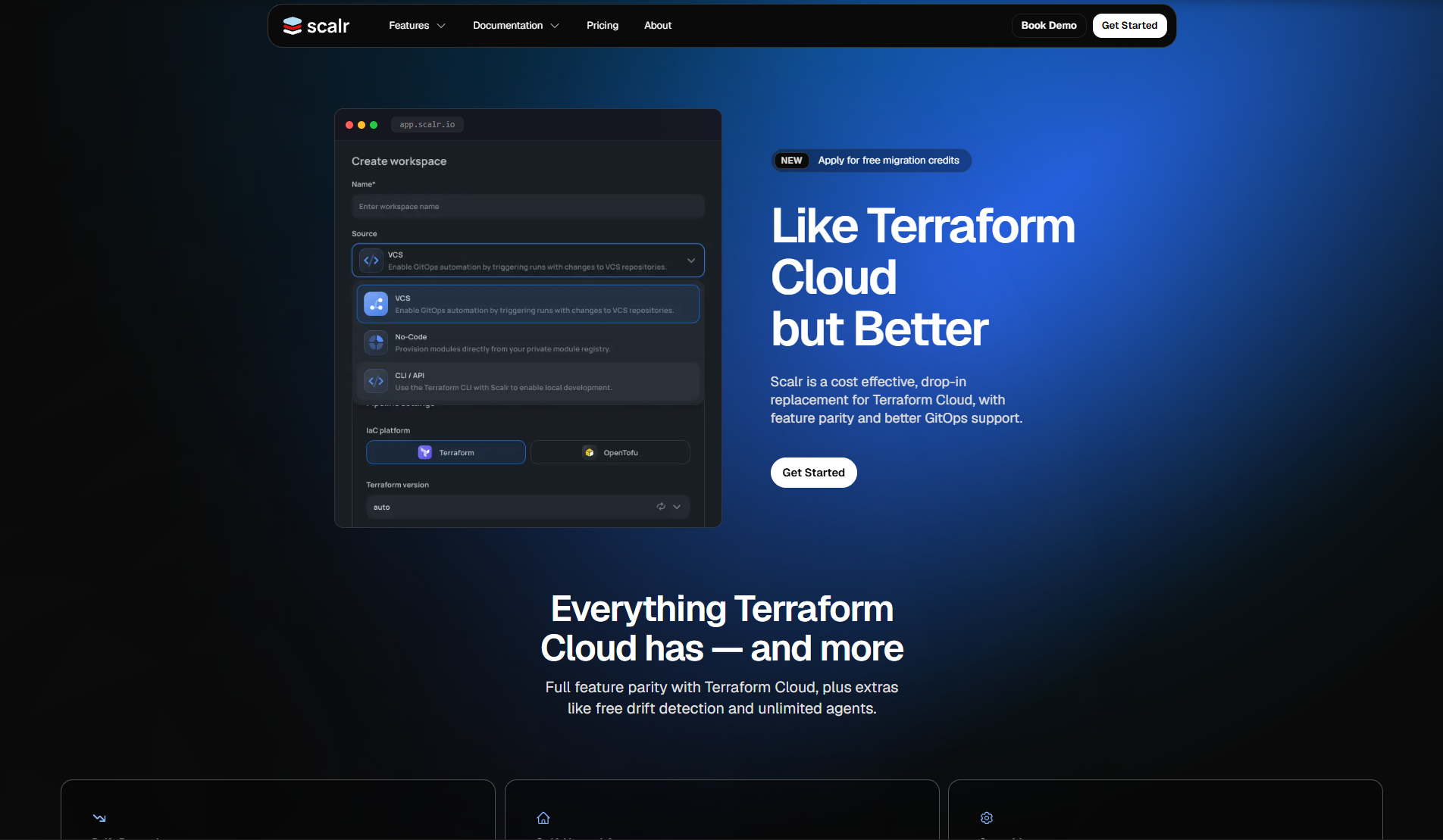
Scalr is the closest drop-in replacement for HCP Terraform's remote operations backend model, built primarily for teams that are Terraform/OpenTofu-only and want a managed execution model without RUM pricing. It mirrors HCP Terraform's workspace/variable set structure closely, which makes migration paths unusually direct.
What Scalr covers:
- IaC coverage. Terraform, OpenTofu, and Terragrunt specifically, Terraform-centric rather than broadly multi-IaC.
- Policy engine. OPA/Rego plus Sentinel support, notable since Sentinel compatibility eases migration for teams with existing HCP Terraform policy sets.
- State model. Remote backend with BYO options across S3, GCS, and Azure Blob.
- Drift detection. Detected via Terraform plan comparisons, the same mechanism HCP Terraform itself uses, not a live cross-cloud inventory.
- Execution model. Managed execution modeled closely on HCP Terraform's own workspace structure, priced per-run/apply so cost is tied to actual pipeline activity rather than resource count.
What to verify before buying:
- Can state live in your own S3/Azure Blob/GCS bucket, or is there a managed-only option?
- Is policy enforcement available at the organization, project, and workspace level?
- Does the migration path preserve workspace structure and variable sets from HCP Terraform?
5. Atlantis
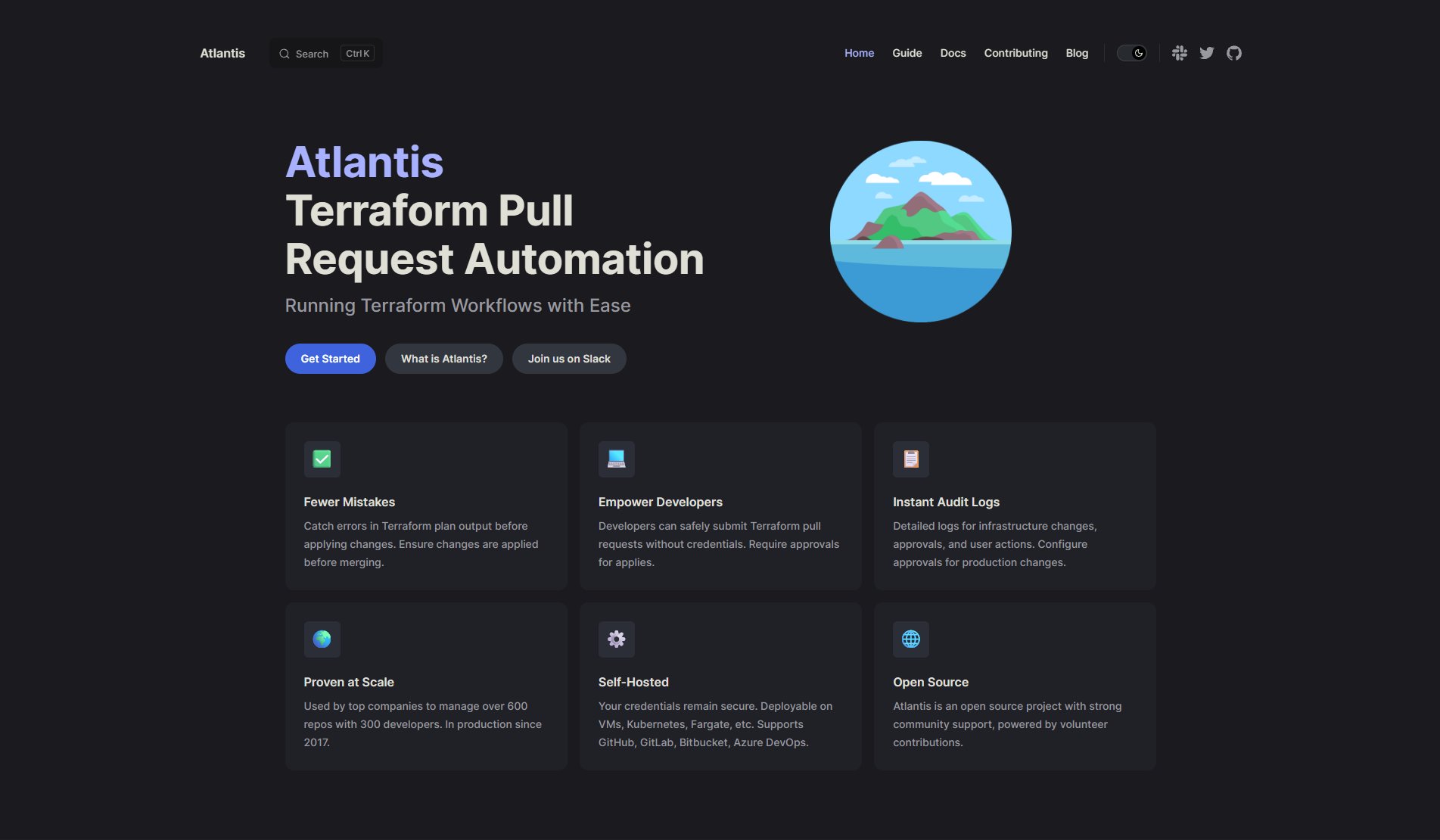
Atlantis is a self-hosted, open-source tool that runs Terraform from pull requests. It's the clearest self-hosted GitOps answer on this list, with no SaaS dependency at all. Per the Atlantis documentation, it listens to webhooks from GitHub, GitLab, or Bitbucket, automatically generates plan output as PR comments, and applies via PR comment commands (atlantis apply).
What Atlantis covers:
- IaC coverage. Terraform and OpenTofu only, no Pulumi, CloudFormation, or Kubernetes support.
- Policy engine. None built-in; OPA has to be wired in separately through CI scripts.
- State model. BYO remote backend; Atlantis doesn't manage state storage itself.
- Drift detection. None built-in beyond what a manually triggered terraform plan surfaces.
- Execution model. Self-hosted GitOps PR automation exclusively. Atlantis's own workspace locking is separate from Terraform state locking and prevents concurrent PR-level changes without conflicting with backend state locks.
Atlantis is excellent for what it does. What it does not do:
- No unified cross-tool inventory or cross-cloud asset discovery
- No drift detection beyond what terraform plan surfaces
- No built-in policy engine (OPA must be wired in separately through CI scripts)
- No visibility into resources created outside Terraform
For teams that want to extend Atlantis with governance and inventory rather than replace it outright, see how Firefly supercharges Atlantis for enterprise teams.
A note on OpenTofu
OpenTofu (the OSS fork of Terraform maintained by the Linux Foundation) is not itself a Terraform Cloud replacement; it's an execution engine, not an orchestration platform. But the OpenTofu migration question is real for enterprises evaluating any of the five tools above in 2026. Good news: Spacelift, env0, Scalr, Firefly, and most CI-based approaches all support OpenTofu natively. State files, backend configuration, and provider syntax are compatible, and policy tools (OPA/Rego, Conftest) work identically against OpenTofu plan output. For detailed migration steps, see migrating from Terraform to OpenTofu.
Evaluation Criteria for 2026: Multi-IaC, Enterprise Governance, and Cost Predictability
Each of the criteria below maps back to one of the four questions from the top of this article, worth reading with that framework in mind rather than as a fresh checklist.
Pricing and TCO
Ask every vendor to map their pricing model against your actual usage profile:
- RUM (HCP Terraform): bill scales with managed resource count, billed at peak per hour
- Concurrency (Spacelift): bill scales with simultaneous run capacity; predictable if run volume is stable
- Per-run/apply (Scalr): cost tied to actual pipeline activity, not resource count
- Tiered SaaS (env0): flat-rate tiers with concurrency and feature gates
- Self-hosted compute (Atlantis): you pay only for the VM, container, or Kubernetes pod running the server
For a concrete scenario: 10,000 managed resources at HCP Terraform Standard ($0.47/resource/month) works out to $4,700/month. If those resources are stable with low change frequency, that's a lot to pay for resources that barely moved. A concurrency or per-run model would cost a fraction of that at 200-300 applies per month.
Policy-as-Code Placement
Policy enforcement placement is worth scrutinizing as closely as the policy engine itself. The options:
- Pre-plan: check Terraform configuration before running terraform plan
- Post-plan / pre-apply: evaluate the rendered plan JSON with OPA/Rego before any changes hit the cloud
- Approval gating: require a human sign-off after policy passes
- Periodic scans: run policy checks against live cloud state on a schedule, independent of pipelines
HCP Terraform's Sentinel runs post-plan within Terraform runs only. OPA/Rego integrations in tools like Firefly, GitHub Actions, and GitLab can run at all four stages. For a practical walkthrough of wiring OPA into a Terraform pipeline, see automating Terraform security checks with OPA and Rego.
State Flexibility
Some teams need state in their own S3, Azure Blob, or GCS buckets for compliance or data residency. Others prefer a fully managed backend. Good alternatives support both. If state ownership is a hard requirement, see migrating Terraform state between backends before committing to a new platform.
Execution Model
SaaS-managed runners (HCP Terraform, Spacelift, env0) handle runner provisioning and scaling. Self-hosted runners (Atlantis, GitLab, Firefly self-hosted runners) let Terraform execute inside your private network without exposing credentials externally. CI-native execution puts IaC runs directly into the same pipeline as application code.
Drift and Unmanaged Detection
Drift detection quality varies widely. Ask vendors what the platform can actually see. Terraform-only drift (comparing plan output to state) catches changes to resources that are already managed. Cross-cloud drift (comparing live provider API state against all IaC sources) catches everything, including out-of-band console changes and resources that were never codified in the first place. This gap compounds badly at scale: enterprises frequently discover that only 60-80% of their resource base is actually codified, and the uncodified remainder is exactly where drift accumulates fastest and goes unnoticed longest. The enterprise drift management guide covers how this specific gap plays out across thousands of resources.
Pricing and Cost Model: RUM vs. Concurrency vs. Per-Run
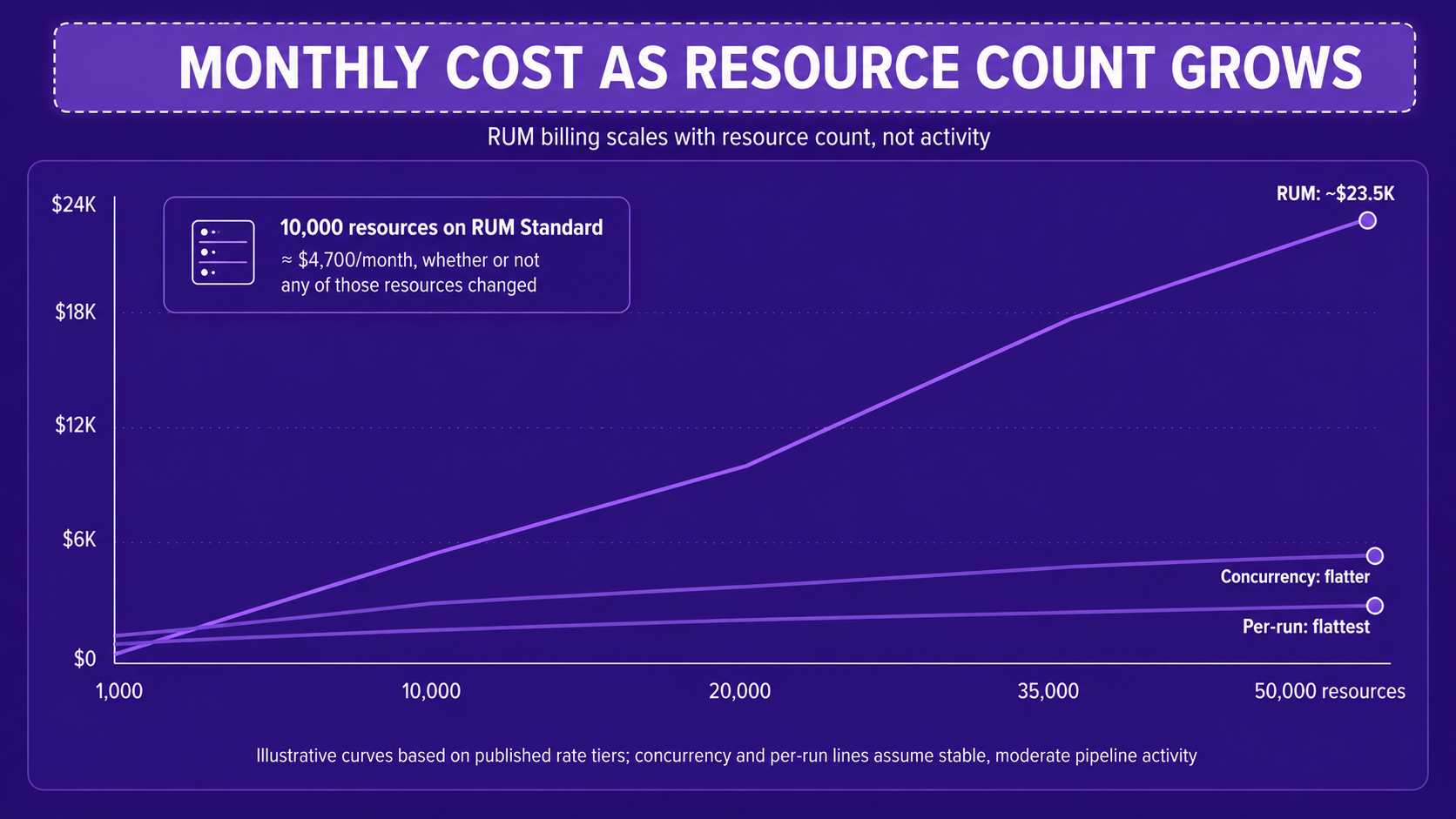
At 50,000 managed resources on HCP Terraform's Standard tier, the RUM math extends to roughly $23,500/month, billed whether or not those resources changed. This is one of the more common drivers of enterprise platform evaluations heading into 2026. The Terraform Cloud pricing guide breaks down the tier math in detail.
Buyer checklist for pricing conversations:
- Does the billing model scale with resources, runs, or seats?
- Is there a cost estimator or worked example for your resource count?
- What features are gated to higher tiers (concurrency, policy, SSO, audit logs)?
- Does the free/trial tier let you validate governance and drift features, not just runs?
- What's the overage model if resource count spikes?
Self-Hosted vs. SaaS: Security, Compliance, and Ops Tradeoffs
The choice between SaaS and self-hosted isn't only about cost. It's about what your security and compliance posture actually requires.
SaaS platforms (HCP Terraform, Spacelift, env0, Firefly SaaS) handle runner provisioning, backend scaling, and platform updates. The tradeoff: Terraform runs happen outside your network, which means credentials either leave your boundary or you use short-lived OIDC tokens. For most enterprises, OIDC solves this adequately.
Self-hosted and air-gapped options (Atlantis, GitLab self-managed, Firefly self-hosted runners, Scalr) keep execution entirely inside your private network. Terraform never touches a vendor's infrastructure. The tradeoff: you own runner scaling, secret management, state locking, and platform maintenance.
For air-gapped environments, the key infrastructure you must implement yourself:
- Secrets backend (Vault, AWS Secrets Manager, Azure Key Vault)
- State locking (DynamoDB for S3, Table Storage for Azure Blob, GCS object locking)
- Runner scaling (Kubernetes-based autoscaling or static pool)
- Audit logging (forward runner logs to your SIEM)
- Policy evaluation (OPA server or Conftest in each runner)
Atlantis running in a private Kubernetes cluster is the most common self-hosted pattern for Terraform-only shops, with workspace locking preventing concurrent PR updates to the same Terraform project without requiring special backend configuration.
Firefly's self-hosted runner option lets you keep execution inside private networks while Firefly's SaaS control plane handles inventory, drift detection, and guardrails across cloud boundaries. This means the governance layer (inventory, codification, policy, drift) doesn't require exposing Terraform state or runner credentials to a third-party execution environment.
Enterprise Architecture Patterns That Shape Platform Choices
Layered infrastructure model by change velocity
Enterprises separate IaC by change velocity:
- Foundational layer (identity, networking, org policies): Terraform/OpenTofu with strict approval workflows and controlled runners
- Shared services (databases, messaging, monitoring): managed by central teams with promotion workflows
- Application layer (compute, serverless, ephemeral): faster CI pipelines with lighter approval gates
Different layers need different execution guarantees. Foundational layers benefit from state-aware platforms with strong locking and policy controls. App layers often work fine with lighter CI pipelines or Pulumi.
PR-Driven Change Control for Regulated Environments
For regulated environments, every infrastructure change must be reviewed in a PR, have a visible plan, be approved, and produce an audit trail. Atlantis, GitHub Actions, GitLab CI, Azure DevOps, and Firefly Runners all support this model. The differentiator is what happens between runs: only platforms with continuous inventory and drift detection can tell you whether the live state still matches the last approved plan, which circles back directly to governance scope.
Multi-IaC Reality
Few large enterprises stay Terraform-only fully. The typical mix: Terraform/OpenTofu for foundational infra, Pulumi for app-centric stacks, CDK or CloudFormation for AWS-native teams, Helm or Kustomize for Kubernetes, and a long tail of console-created resources. CI/CD tools can execute anything but have no visibility into cloud state once the run finishes. Firefly gives cross-IaC visibility (drift, coverage, inventory) as an optional governance layer that sits above any execution tool, which is the pattern that breaks most Terraform-only platforms once a second or third IaC tool enters the picture.
FAQs
How do I use these four questions to actually pick a tool?
Start with governance scope, since it's the hardest thing to retrofit later: if policy and drift need to cover every IaC tool plus console changes, Firefly is the answer regardless of how the other three questions come out. If governance can stay Terraform-only, then tool mix and pricing predictability do the rest of the narrowing, toward Scalr or Spacelift for a managed, Terraform-only backend, env0 for multi-IaC with FinOps built in, or Atlantis for self-hosted GitOps with no SaaS dependency at all.
Is HCP Terraform the same as Terraform Cloud?
Yes. Terraform Cloud has been rebranded as HCP Terraform under the HashiCorp Cloud Platform. The core workflow, remote state, remote runs, workspaces, and policies remain the same. Terraform Enterprise (TFE) is the self-hosted version and shares the same Terraform-only governance model.
What's the difference between Terraform CLI and HCP Terraform?
Terraform CLI is the local engine run on a machine or CI runner. HCP Terraform is the managed control plane handling state, remote execution, policy checks, workspace permissions, and collaboration. CLI is the execution engine; HCP Terraform is the managed orchestration layer on top of it.
How much does HCP Terraform actually cost at scale?
HCP Terraform uses Resources Under Management (RUM) pricing: a free tier up to 500 resources, then roughly $0.10-$0.99 per resource per month depending on tier, billed at peak hourly count regardless of how often those resources change. At 10,000 resources on the Standard tier, that's approximately $4,700/month; at 50,000, roughly $23,500/month.
What is the best Terraform Cloud alternative for a multi-cloud enterprise?
Firefly is the strongest fit for enterprises needing unified governance across every IaC tool, not just Terraform, plus continuous drift detection and unmanaged resource discovery across AWS, Azure, GCP, and Kubernetes. Teams that are Terraform/OpenTofu-only and mainly need a managed execution backend are better served by Scalr or Spacelift specifically.

.avif)
.avif)
.webp)

.webp)












