
TL;DR
- Terraform Cloud: HashiCorp's managed platform for running Terraform remotely. Zero infrastructure to maintain.
- Terraform Enterprise: Same platform, deployed in your network. Choose this for data residency, air-gapped environments, or compliance requirements.
- Firefly: Automated cloud resilience platform. Goes beyond Terraform execution to provide IaC orchestration, drift detection, continuous governance, and instant infrastructure recovery during outages and cyberattacks. Works alongside Terraform Cloud/Enterprise or as a standalone platform.
Most teams start simple: terraform apply from a laptop, state in S3 with DynamoDB locking, maybe a GitHub Action for pull request plans. This works fine initially.
Then, two engineers run Terraform apply simultaneously. State locks get stuck. Nobody knows who changed what. Plans get reviewed via Slack screenshots. Once you manage multiple environments, shared modules, and separate teams, the problem changes. It's no longer about writing correct Terraform; it's about running Terraform consistently without depending on someone's local setup or a fragile CI job.
Terraform Cloud and Terraform Enterprise solve this by standardizing how Terraform runs. This blog explains what each platform does, where they differ, and what operational problems they don't address.
What Problem Does Terraform Cloud Solve?
Terraform Cloud replaces local execution and custom CI runners with managed remote execution. Instead of running Terraform from your laptop or a CI runner you maintain, runs happen in HashiCorp's managed environment. For the full breakdown of workspaces, VCS integration, and Sentinel policies, see our guide to Terraform Cloud.
Each Run Gets a Clean, Isolated Environment
When a run triggers, Terraform Cloud creates an ephemeral execution environment. It pulls code from your VCS, downloads providers and modules, injects credentials, and runs terraform plan or terraform apply. After completion, the environment is destroyed.
Every run starts fresh. No shared state between runs, no credential leakage between jobs, no dependency drift on long-lived runners.
Pull Requests Trigger Plans, Merges Trigger Applies
Terraform Cloud integrates directly with Git. A workspace connects to a repository and a branch. Open a pull request, and Terraform Cloud automatically runs a speculative plan; the output appears in the UI and as PR comments. Merge the PR and automatically apply the runs.
Changes are proposed in code, plans are reviewed before execution, and applies are tied to commits. No manual Terraform apply from terminals.
Workspaces Map to Environments or Infrastructure Stacks
A workspace is Terraform Cloud's core execution unit. Each workspace has:
- Its own Terraform configuration from VCS
- A dedicated state file
- Variables and credentials
- A complete run history
Teams typically map workspaces to environments: payments-dev, payments-prod, networking-core. Each runs independently.
State Management Without S3 or DynamoDB
Terraform Cloud handles state internally. State is stored remotely, versioned automatically, and locked during runs. No S3 buckets, no DynamoDB tables, no backend configuration blocks. State management is built into the platform.
Policy Enforcement Before Apply Runs
Terraform Cloud supports Sentinel for policy-as-code. After terraform plan completes, Sentinel policies evaluate the plan and either allow or block Terraform apply.
Common policies enforce tagging standards, prevent publicly exposed resources, and restrict regions or instance types. Violations are caught before changes reach your cloud environment.
What Is Terraform Enterprise?
Terraform Enterprise is Terraform Cloud deployed inside your own infrastructure. Same platform, same workflow, same APIs. The difference is execution location and data ownership.
Identical Features, Different Deployment Model
Everything in Terraform Cloud exists in Enterprise:
- VCS-driven workflows
- Remote execution
- Workspace-based state management
- Sentinel policies
The execution flow is identical:

The difference: none of it happens in HashiCorp's environment. It runs in yours.
Workers Run Inside Your Private Network
Terraform Enterprise deploys workers inside your network, typically on Kubernetes. When a run triggers, the worker:
- Pulls code from your VCS
- Runs init, plan, and apply
- Stores state internally
Workers can reach private infrastructure directly, internal load balancers, private RDS instances, and on-premises systems without VPN tunnels, agents, or public endpoints.
Why Teams Choose Enterprise: Compliance and Control
Enterprise is usually chosen for compliance requirements, not feature differences:
- Data residency: Infrastructure metadata and state must stay inside your network.
- SAML SSO: Integration with Okta, Azure AD, or internal identity providers.
- Internal audit logs: All actions logged within your environment, not HashiCorp's
- Air-gapped environments: No outbound internet access required
If your security review requires these controls, Terraform Cloud isn't an option.
Air-Gapped Deployment Support
Terraform Enterprise can run with zero outbound internet access. This is required in financial services, government systems, and highly regulated environments where the Terraform control plane itself must be isolated.
Terraform Cloud requires internet connectivity and cannot operate in an air-gapped.
Operational Overhead: You Own Platform Reliability
With Enterprise, you're responsible for:
- Installing and configuring the platform
- Upgrading to new versions
- Scaling worker capacity
- Managing backups
- Ensuring availability
If the platform goes down, runs stop, applies fail, and teams are blocked. Enterprise must be treated like any critical internal service: monitored, maintained, and scaled. This operational cost doesn't exist with Terraform Cloud.
Side-by-Side Comparison
Both platforms are functionally identical. The differences are in deployment, control, and operational responsibility.
Most teams don't choose Enterprise for features. They choose it because compliance requirements make Terraform Cloud impossible. If data residency and air-gapped deployment aren't requirements, Terraform Cloud removes a significant operational burden. Before committing either way, it's worth running the numbers against your actual resource count, see our breakdown of Terraform Cloud pricing to see how RUM billing scales at different sizes.
What Both Platforms Don't Address
Terraform Cloud and Terraform Enterprise focus on one specific moment: the Terraform run. They standardize execution and enforce policies during that run. What happens to infrastructure between runs is out of scope.
Drift Happens Between Runs
Real infrastructure doesn't stay static between applies:
- Someone modifies a security group in the AWS console
- A resource gets created outside Terraform
- A hotfix is applied to production but not committed to Git
- Two environments drift because only one received an update
Terraform detects drift only when you explicitly run plan or apply. Neither platform provides:
- Continuous drift monitoring
- Alerts when infrastructure changes outside IaC
- Cross-environment visibility into what exists vs. what's codified
Governance Beyond Plan Time
As infrastructure scales, additional requirements emerge:
- Visibility across all resources, regardless of how they were created
- Policies that apply to existing infrastructure, not just new deployments
- Workflow orchestration across multiple approval gates
- A unified view of infrastructure across all teams and environments
Neither Terraform Cloud nor Enterprise was designed for these operational problems.
Where Terraform Cloud and Enterprise Fit
Terraform Cloud and Terraform Enterprise solve execution and collaboration:
- Remote, standardized execution
- Centralized state management
- Basic policy enforcement at plan time
- Team collaboration around the Terraform plan and apply
This is a meaningful improvement over local Terraform execution or CI-based automation. But execution is only part of the infrastructure management problem.
When Infrastructure Scales, New Problems Emerge
Once you manage more than a handful of services, different questions arise:
- What's actually deployed right now?
- Where has drift occurred?
- Which changes came from Terraform, and which from manual updates?
- Are policies enforced consistently across environments?
Both platforms stay focused on execution. They don't fully answer questions about operational visibility.
How Firefly Extends Terraform Execution Platforms
Firefly approaches infrastructure management as a broader problem: execution, observation, governance, and audit. It can complement Terraform Cloud or Enterprise, or serve as an alternative when you need capabilities beyond Terraform execution. For a fuller rundown of how Firefly stacks up against other Terraform Cloud alternatives like Pulumi Service, Atlantis, and CI-native approaches, see our comparison guide.
Execution: Multiple Deployment Options
Firefly covers the full execution layer with three deployment models:
- Managed runners: Firefly runs Terraform in a managed environment, similar to Terraform Cloud. No infrastructure to operate.
- Self-hosted runners: Deploy Firefly's runner agent inside your network via Kubernetes/Helm. This gives you private network access without operating the entire control plane yourself.
Here's how you configure a self-hosted runner pool in Firefly:

The Create Runner Pool interface shows a three-step wizard. In the first step, you configure:
- Name for the runner pool
- Optional labels for runner assignment to specific workspaces
- Runner Agent Replicas to scale capacity
- Optional project assignment to scope runners to specific projects
- Kubernetes release name and namespace for deployment
This lets teams execute IaC operations within their own infrastructure while maintaining centralized control through Firefly's platform
CI/CD integration: Keep GitHub Actions, GitLab CI, or Jenkins as-is. Add the fireflyci step to send terraform plan and apply logs to Firefly for centralized visibility and policy evaluation without changing where execution happens.
Regardless of which execution model you choose, Firefly gives you unified visibility across all workspaces. Here's what the workspace management dashboard looks like:

When creating a new workspace, Firefly offers flexibility in how you want to execute:
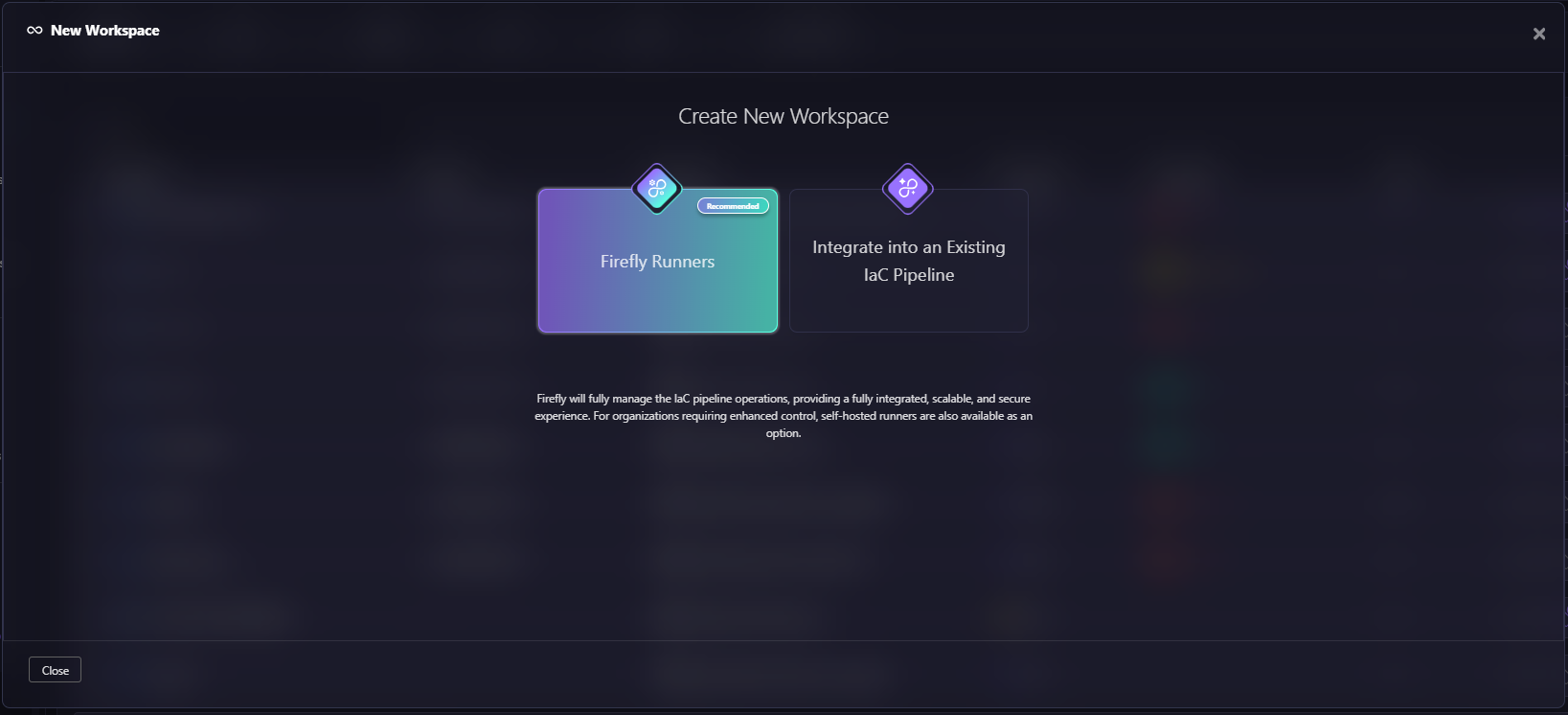
Firefly supports multiple IaC engines, not just Terraform:
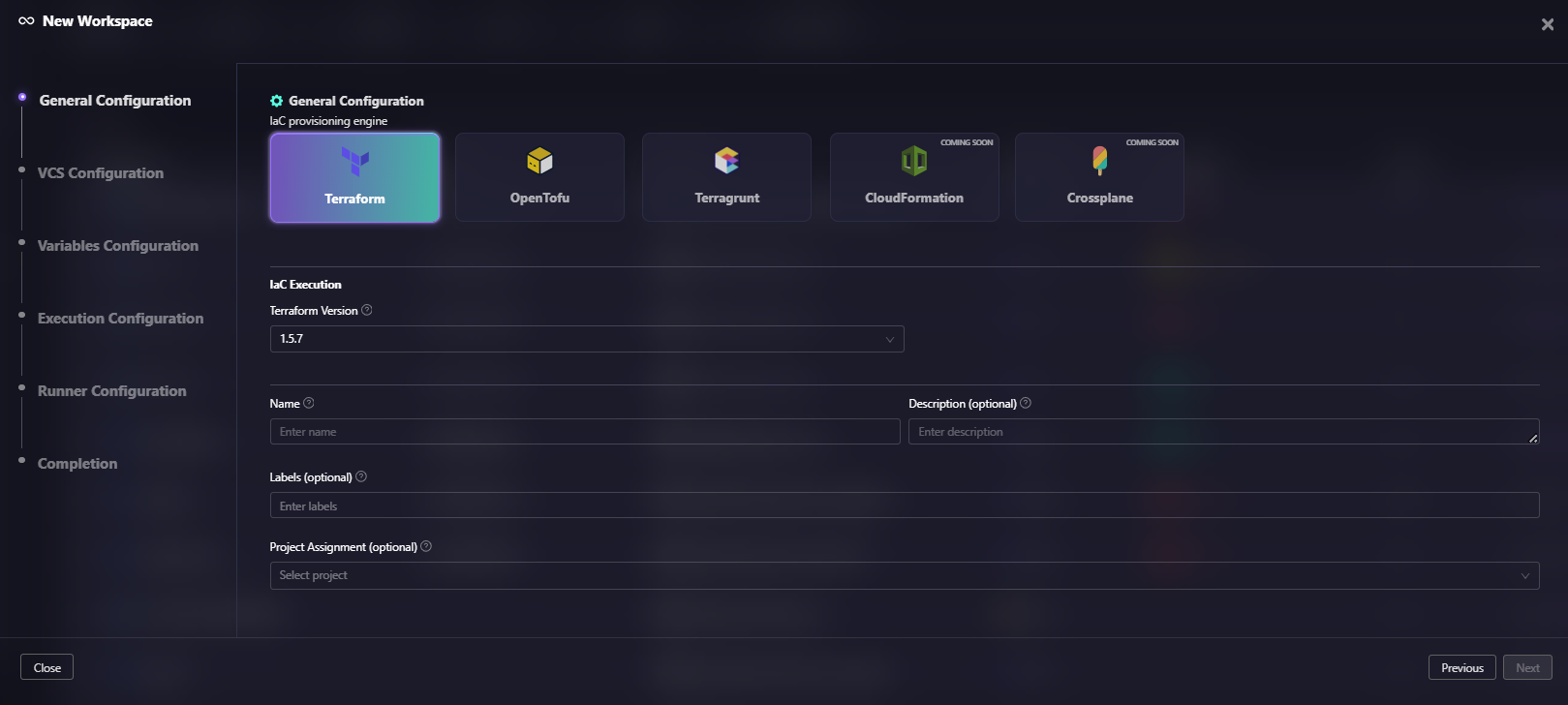
The General Configuration snapshot above shows IaC engine options: Terraform, OpenTofu, Terragrunt, CloudFormation, and Crossplane. The interface also includes a Terraform Version selector (set to 1.5.7 in this example), workspace name and description fields, labels for organization, and project assignment options. This multi-tool support means you're not locked into a single IaC platform.
For each workspace, Firefly tracks detailed run history with metrics that go beyond simple pass/fail:

The expanded workspace view for "gcp-compliance-check" shows detailed run history. Each run displays: how it was triggered (Triggered Manually via UI), commit ID and branch, which asset types were affected, summary progress bars, policy violation counts (0-3 violations shown), cost estimates ($2.64, $0), tags coverage percentage, the owner who triggered it, and final status (BLOCKED, PLAN COMPLETED, PLAN FAILED). This level of detail helps teams understand not just whether a run succeeded, but why it was blocked or what policy violations occurred.
Continuous Governance, Not Just Plan-Time Checks
Sentinel in Terraform Cloud/Enterprise evaluates policies at plan time, one checkpoint before apply.
Firefly's Guardrails operate continuously across the infrastructure lifecycle:
- Cost rules: Block deployments that exceed cost thresholds
- Policy rules: OPA-based checks for encryption, public exposure, and security standards, applied to both planned changes and existing resources
- Resource rules: Prevent deletion of critical resources or creation in non-approved regions
- Tag rules: Enforce tagging standards across new and existing infrastructure
Violations surface in the UI, as PR comments, and via Slack or webhook notifications. Policy enforcement becomes continuous, not just a pre-apply checkpoint.
Centralized Infrastructure Visibility
Instead of relying only on state files and run logs, Firefly provides:
- All stacks: Every deployed IaC stack with IaC coverage percentage and drift status.
- Modules: Which versions are in use, which stacks run outdated versions, and the blast radius of module changes.
- Backends: Where state is stored and when it was last scanned
- Drift: Resources where live configuration diverged from IaC
- Unmanaged resources: What exists in cloud accounts that Terraform doesn't manage
This shifts from "what Terraform thinks exists" to "what actually exists."
Change Tracking Beyond Terraform Runs
Infrastructure changes don't only come from Terraform. Firefly's Event Center tracks:
- ClickOps: Manual changes in cloud consoles
- CLI/SDK actions: Changes via AWS CLI, Azure CLI, or scripts
- Mutation events: Before/after configuration diffs for any resource change, whether from Terraform or not
- Deny events: Blocked actions enforced by preventative controls (like Service Control Policies), giving visibility into attempted changes that were stopped before execution
This addresses one of the biggest gaps in Terraform workflows: untracked changes that happen outside IaC.
Organizational Structure That Scales
Firefly organizes infrastructure as Organization > Project > Sub-project > Workspace (up to 5 levels), with each level controlling:
- Access permissions
- Variable inheritance
- Runner assignment
- Configuration defaults
Variables are managed through variable sets with hierarchical inheritance. Global defaults cascade down, workspace-level overrides take precedence. No duplicating configuration across dozens of workspaces.
Frequently Asked Questions
Is HCP Terraform the same as Terraform Cloud?
Yes. HashiCorp rebranded Terraform Cloud to HCP Terraform in 2024 as part of the HashiCorp Cloud Platform consolidation. Features, pricing, and functionality are identical. The names are used interchangeably.
Can Terraform Enterprise run in a Kubernetes cluster?
Yes, and that's the recommended deployment for new installations. Terraform Enterprise ships as a Helm chart for Kubernetes clusters. Older deployments used external services or mounted disk architectures on VMs. New customers should use Kubernetes deployment unless there's a specific constraint.
Does Terraform Cloud support private module registries?
Yes. Both Terraform Cloud and Terraform Enterprise include a private module registry. Teams publish and version internal modules, then reference them in workspaces with version constraints. Enterprise runs the registry entirely inside your network.
What's the difference between a speculative plan and a normal plan?
A speculative plan runs when a PR is opened. It shows what would change if that code were applied, but it doesn't lock the state and cannot be applied. It's read-only and disposable—its purpose is to preview changes before merging.
A normal plan runs as part of a workspace's apply workflow, locks the state, and can proceed to apply.
When should I use Firefly alongside Terraform Cloud instead of switching to Enterprise?
When the reason to consider Enterprise is cross-environment visibility, drift detection, or continuous governance, not data residency or air-gap requirements.
Enterprise solves deployment location: your network, your control. It doesn't add cross-environment visibility, continuous drift monitoring, or multi-step orchestration beyond the Terraform run.
If those operational capabilities are the actual requirement, Firefly, alongside Terraform Cloud addresses them without the overhead of self-hosting the control plane.

.avif)
.avif)
.webp)

.webp)












