TL;DR
- Terraform is great at creating and managing infrastructure. But once that infrastructure exists, running operations on it like migrations, credential rotations, and restarts has always lived outside Terraform in scripts and pipelines.
- Data sources are how Terraform references infrastructure it didn't create. Instead of hardcoding IDs, you query for them. Find me the VPC tagged "prod", find me the latest AMI.
- The problem is that these queries are fragile. A missing tag, multiple matches, or a resource that doesn't exist yet will fail your entire deployment.
- In CI/CD pipelines, this gets worse. Different environments have different tags, modules race against each other, and API failures break builds in ways that are hard to debug.
- Firefly adds a validation layer on top, ensuring the resources your queries return are correctly tagged, policy-compliant, and safe to use before anything gets deployed.
When you're managing infrastructure with Terraform, there's almost always existing infrastructure in the account that you didn't create and don't own: VPCs from the networking team, shared subnets, org-level IAM roles, and security-approved AMIs. You need to use these resources, but you're not the one managing them.
This is where data sources come in. Instead of hardcoding resource IDs, you query for them at runtime. Find me the VPC tagged "prod-vpc" and the latest approved AMI. It works, but it introduces a new set of problems. Your deployment now depends on tags being consistent, queries returning exactly one match, and external resources being in the right state before your plan runs.
This came up in a Reddit thread where someone had two modules in the same project. Module A creates a VPC, Module B needs that VPC ID and queries for it using a data source. Module B runs before the VPC exists, the query returns nothing, and the plan fails. They spent time debugging timing issues when the fix was simply passing the VPC ID as a module output. This is the core challenge with data sources: they tie your deployment to external state and timing that Terraform doesn't control, and the failure modes aren't always obvious.
This blog covers how data sources work, where they break in production, and how to make them reliable.
What Is a Terraform Data Source and When Should You Use It?
A data source is a read-only lookup. It queries the provider API (AWS, GCP, Azure) to fetch details about existing resources. It does not create anything, does not manage lifecycle, and it only retrieves data at runtime.
Example:
This calls the AWS API, finds VPCs with tag Name=prod-vpc, and returns attributes like data.aws_vpc.main.id and data.aws_vpc.main.cidr_block. You use data sources inside resource blocks:
Terraform resolves the data source first, then creates the subnet using that VPC ID.
How Data Sources Differ from Variables and Resources
Data sources look similar in usage to variables, but they behave very differently. A variable is a static value you pass into your config. A data source is a live API query that executes during terraform plan.
This means the data source depends on external state and API behavior. If the query fails, your plan fails. If the API returns different results, your plan changes. If multiple resources match your filter, Terraform errors out.
Think of it this way: variables are values you control, data sources are values you discover.
When to Use Data Sources vs. Resources
Use a data source when the resource already exists, you don't manage it in this Terraform config, and you need runtime discovery.
Don't use a data source when you already control the resource in Terraform (use the resource block instead), you can pass outputs between modules, or you need reproducibility.
If you own the resource, don't query it with a data source. Use resource "aws_vpc" "main" or pass outputs between modules. Data sources are for: "I don't own this, but I need to use it."
How Data Sources Execute During terraform plan
Understanding how data sources work internally is critical for debugging failures.
Data Sources Call Provider APIs, Not Local Lookups
When you write:
Terraform doesn't search locally. It calls the AWS API through the provider: "List VPCs where tag Name = prod-vpc."
The provider sends the request, gets the response, and maps it into Terraform attributes.
Data Sources Use Filters, Not Exact Lookups
Data sources aren't "Get me VPC with ID X." They're "Find resources matching these conditions."
Behavior depends on results:
- 0 matches: error
- 1 match: success
- Multiple matches: often errors
That's why loose filters break things.
Data Sources Run at Plan Time, Not Apply Time
Data sources execute during terraform plan, not after. Not during apply.
Consequences:
- They must succeed before Terraform can show a plan
- They can't depend on resources created in the same run (by default)
Problem example:
This often fails because:
- Data source runs before VPC exists
- API returns nothing
Data Sources Are Nodes in Terraform's Dependency Graph
When you write:
Terraform builds a graph: data.aws_subnet.main → aws_instance.app
Data source runs first, resource runs after.
Data sources are upstream nodes in Terraform's execution graph. They feed values into resources.
Data Sources Have No Lifecycle or State Ownership
Resources:
- Are stored in Terraform state
- Have lifecycle (create/update/destroy)
Data sources:
- Are not owned
- Are re-fetched every run
- Are not versioned
Every terraform plan:
- Hits provider APIs
- Re-evaluates queries
- May return different results
Your Terraform run now depends on API availability, correct filters, and consistent external state. Not just your code.
When to Use Data Sources: Four Scenarios
Data sources make sense in messy, shared, multi-team environments. Not in isolated examples.
1. Referencing Shared Infrastructure (VPCs, Subnets, Security Groups)
Most common case. You don't own the network layer; it's provisioned separately, sometimes in a different repo or account.
What's happening:
- You're discovering infrastructure, not defining it
- You're depending on naming/tagging conventions
- Any inconsistency there breaks your deployment
2. Dynamic Discovery (Latest AMIs, Availability Zones)
Some values change constantly. Hardcoding them isn't practical.
Another example:
data "aws_availability_zones" "available" {}
What's happening:
- You're pulling "current state" from the cloud
- Your config becomes environment-aware
- But also non-deterministic
3. Cross-Stack Integration (Remote State)
How teams connect Terraform projects.
What's happening:
- You're consuming outputs from another stack
- This is a tighter coupling than it looks
- State changes upstream can break downstream plans
4. Environment-Aware Configuration (Account ID, Region Metadata)
You don't want to hardcode account IDs or region-specific values.
What's happening:
- Config adapts based on where it runs
- Useful in multi-account setups
- But again, runtime dependency
Common Pattern Across All Use Cases
You don't control the source of truth; you query it.
Where teams get it wrong:
- Using data sources where outputs should be used
- Overusing "latest" for critical infrastructure
- Relying on weak filters (tags like prod)
- Mixing ownership (half resource, half data source)
Practical rule:
Use data sources when:
- The resource already exists
- You don't manage it in this config
- You need runtime discovery
Avoid them when:
- You control the resource
- You can pass outputs cleanly
- You need reproducibility
Why Data Sources Fail: Five Common Failure Modes
1. Plan-Time Failures from Timing Issues
Data sources run during terraform plan. If they depend on something that doesn't exist yet, they fail immediately.
Terraform tries to read subnets before the VPC exists. API returns nothing. Plan fails.
2. Fragile Queries That Break on Tag Changes
No match → hard failure. Multiple matches → ambiguous → failure. Tag changes → silent break. You're relying on conventions, not guarantees.
3. Non-Deterministic "Latest" Queries
Today → AMI A. Tomorrow → AMI B. Same code → different infrastructure. You lose reproducibility. This becomes a problem in rollbacks, debugging, and compliance audits.
4. External System Dependency and API Reliability
Every plan triggers API calls. If AWS/GCP/Azure throttles requests, has latency issues, or returns inconsistent results, your Terraform run fails. This shows up under load or in large organizations.
5. Performance Overhead at Scale
Large configs with many data sources slow down terraform plan, increase API calls, and hit rate limits. Especially bad in CI pipelines or parallel jobs.
Data sources introduce runtime uncertainty into Terraform. Instead of everything being defined in code, part of your system depends on external state, external APIs, and external ownership.
Where Data Sources Break in Production CI/CD Pipelines
Everything we've discussed becomes very real once you run Terraform in pipelines, across environments, and with multiple teams. Data sources stop being "just lookups" and start breaking builds.
1. CI/CD Failures Across Environments
Typical pipeline: PR → terraform plan → approval → apply
Now introduce a data source:
What goes wrong:
- Tag doesn't exist in staging → plan fails
- Multiple matches in prod → plan fails
- Resource renamed → pipeline breaks
Same code, different environment → different result.
This is one of the biggest sources of "it works locally but not in CI."
2. Race Conditions Between Modules
Very common in modular setups.
Example:
- Module A → creates VPC
- Module B → uses data source to fetch that VPC
Problem:
- Module B runs before A finishes
- Data source returns nothing
- Plan fails
Even worse in parallel pipelines.
3. Environment-Specific Tag Mismatches
You assume:
But reality:
- dev → dev-vpc
- staging → staging-vpc
- prod → prod-vpc
Now your data source works only in one environment. People patch this with variables, but complexity increases, and consistency decreases.
4. Drift in External Resources
Data sources depend on things you don't control.
Example: Someone modifies a subnet, replaces it, or deletes/recreates it.
Next terraform plan:
- Data source resolves differently
- Resource behavior changes
- Plan shows unexpected diffs
5. "Latest" AMI Breaks Production Deploys
Works fine until:
- New AMI released
- Your next deploy uses it
- Something breaks
Now, rollback becomes difficult, and debugging becomes messy.
6. Hidden Coupling Across Teams
You rely on:
Another team:
- Renames tag
- Restructures network
- Creates multiple VPCs
Your pipeline breaks without warning.
7. IAM Permission Issues in CI Pipelines
Data sources need read access. In CI, IAM roles might be restricted and API calls fail.
Error: AccessDenied: not authorized to describe VPCs
Your entire plan fails, not because of your code, but because of permissions.
8. Debugging Non-Obvious Failures
When a data source fails, the error is usually vague, API-level, and not tied clearly to your logic.
You end up debugging:
- Filters
- API responses
- Environment state
Not just Terraform code.
What This Boils Down To
Data sources move part of your system outside Terraform's control. You're now depending on external infrastructure, naming conventions, timing between systems, and API behavior.
In real systems, data sources are necessary, but they are a point of failure. Treat them as integration points, not simple lookups.
How Firefly Prevents Data Source Failures Through Governance
At this point, the gap should be clear:
- Terraform fetches data (data sources)
- Terraform uses that data (resources)
- But nothing checks if that data is actually safe or compliant
That's where Firefly comes in.
What Firefly Does for Data Sources
Firefly sits on top of your workflow and answers: "Given what Terraform is about to use, is this allowed?"
It doesn't replace data sources. It doesn't change how Terraform works. It adds a layer that understands your infrastructure, evaluates policies, and enforces rules.
Terraform fetches data and uses it. Firefly validates that data before you use it, enforces policies on it, and monitors it continuously.
1. Validating Data Source Lookups Before They Break
Take this example:
Terraform fetches the subnet and uses it. But there's no validation that the subnet is actually safe to use. The data source returns whatever matches the tag—whether that subnet is public, has the right security groups, or belongs to an approved VPC.
Firefly adds a validation layer. Before you use that subnet, it checks: Is this subnet private? Does it have flow logs enabled? Does it belong to an approved VPC? If the subnet violates any security policies, the deployment is blocked before the instance gets created in the wrong place.
2. Solving the Tagging Problem That Breaks Data Sources
Most data sources rely on tags to find resources:
This assumes:
- Every resource is tagged correctly
- Tags are consistent across environments
- Naming conventions are enforced
Reality:
- Some resources are missing tags
- Tags are inconsistent (prod-vpc vs production-vpc)
- Different teams follow different standards
- Multi-cloud setups make this worse
Result:
- Data source fails
- Wrong resource gets picked
- Pipelines break
Why This Is Hard to Fix Manually
You can't realistically ensure:
- Every resource across AWS, Azure, GCP is tagged properly
- Every team follows the same tagging rules
- No one creates resources outside Terraform
This becomes a governance problem, not just a Terraform problem.
How Firefly Solves This
Firefly's governance dashboard lets you define and enforce tagging policies across all your infrastructure. Here's how it works in practice
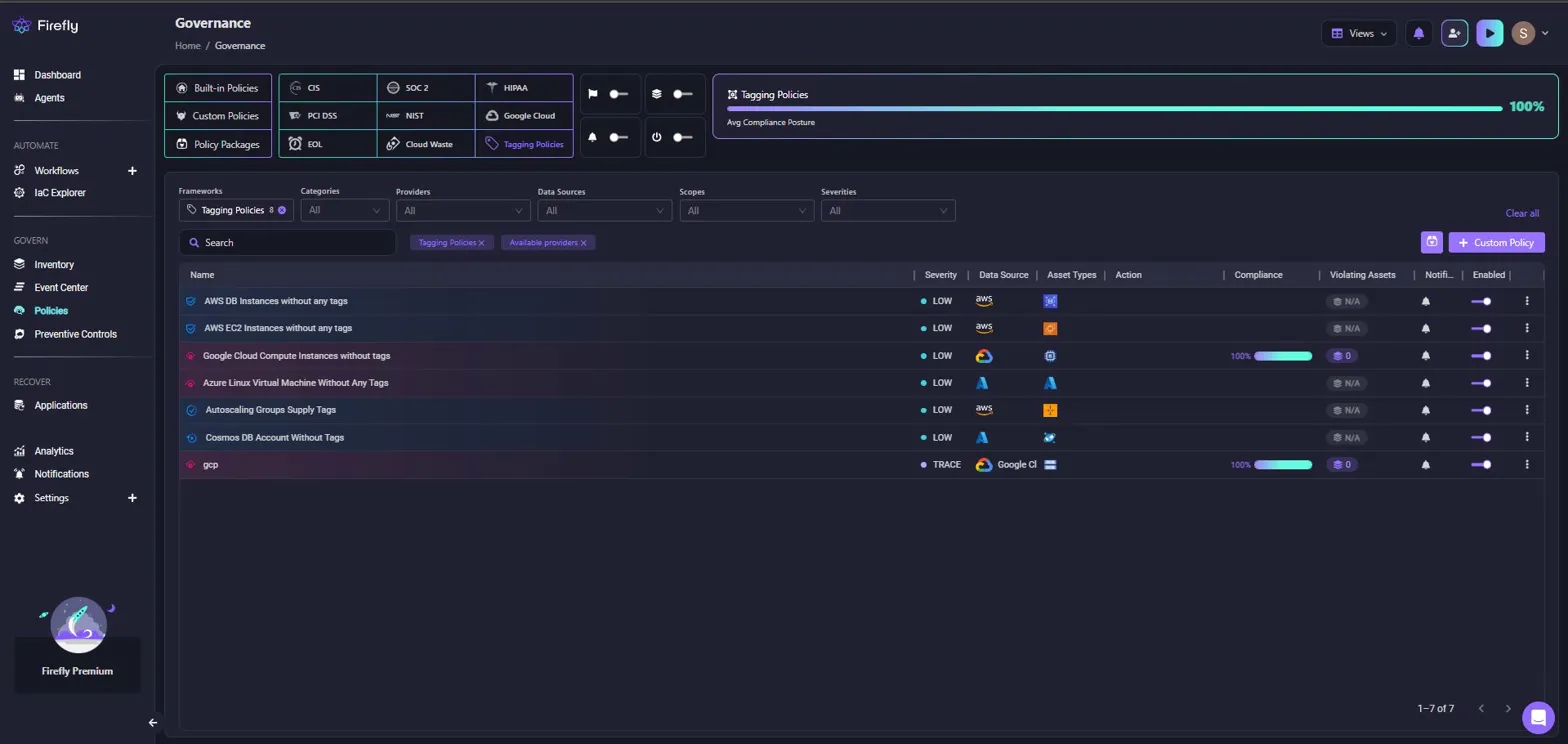
In this example, "Tagging Policies" are selected, showing policies like "AWS DB Instances without any tags", "AWS EC2 Instances without any tags", and "Google Cloud Compute Instances without tags". Each policy displays:
- Severity level (LOW, TRACE)
- Data source (AWS, Google Cloud, Azure)
- Asset types affected
- Compliance percentage (100% for passing policies, N/A for policies with no violations)
- Violating assets count
- AI remediation button for generating fixes
The dashboard shows an overall compliance posture of 100% for tagging policies across AWS, GCP, and Azure resources. Filters let you narrow down by frameworks (CIS, SOC 2, HIPAA), categories (security, cost, tagging), providers, and severity levels.
From the governance layer, Firefly lets you define policies like:
- Every resource must have Environment, Owner, Project tags
- Tag values must follow a standard format
- Missing tags are flagged automatically
The Governance page filtered for "subnet" policies shows security-focused policies:
- "VPC Subnet Assigns Public IP" (MEDIUM severity, AWS)
- "AWS Subnet Without VPC Flow Logs Enabled" (LOW severity)
- "AWS Subnet Associated With NACL That Allows All Ingress" (HIGH severity)
- "RDS Associated with Public Subnet" (CRITICAL severity)
- "Google Compute Subnetwork with Private Google Access Disabled" (LOW severity)
Each policy shows compliance percentage, violating asset counts, and remediation options. The "RDS Associated with Public Subnet" policy shows 0 violating assets and 100% compliance, meaning all RDS instances are properly placed in private subnets.
This directly solves the data source problem: when you query for a subnet with a data source, Firefly has already validated that:
- The subnet exists and is tagged correctly
- The subnet is properly configured (private, flow logs enabled, correct NACL)
- The subnet belongs to an approved VPC
What this changes:
Before:
- Data source depends on tags → tags may or may not exist → failures
After:
- Firefly ensures tags exist → data sources become reliable
3. Pre-Deployment Enforcement in CI/CD Pipelines
In a pipeline:
Firefly evaluates the plan output with Guardrails, automated policy checks that run before apply. Here's what this looks like for a Terraform run:
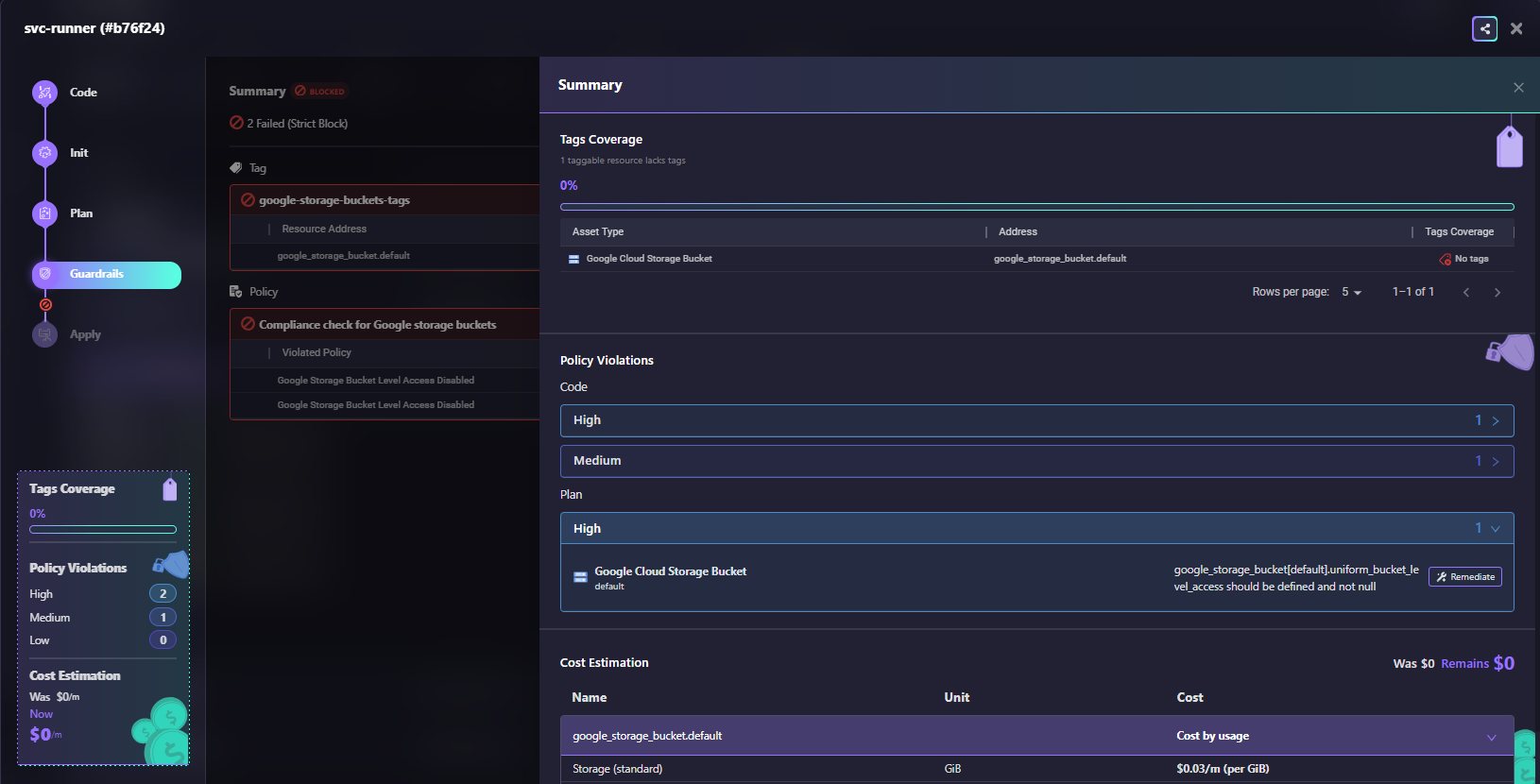
A Terraform workflow run shows the Guardrails step blocked with 2 failures:
- The left panel shows the workflow stages: Code, Init, Plan, Guardrails (blocked), and Apply
- Tags Coverage: 0% (1 taggable resource lacks tags for google_storage_bucket.default)
- Policy Violations: 2 High violations, 1 Medium violation for Code phase; 1 High violation for Plan phase
- Code violations: "google-storage-buckets-tags" (google_storage_bucket.default uniform_bucket_level_access should be defined and not null)
- Plan violation: "Compliance check for Google storage buckets" (Google Storage Bucket Level Access Disabled)
- Cost Estimation: Was $0/m, Remains $0/m
The Summary panel on the right breaks down:
- Tags Coverage: 0% with the specific resource lacking tags
- Policy Violations by severity (High: 1, Medium: 1)
- The violated resource (Google Cloud Storage Bucket) with the address and the missing tags indicator
- Remediate button available for AI-powered fix generation
This shows Guardrails in action: the deployment is blocked because the storage bucket violates tagging policy and security policy. The engineer gets immediate feedback in the PR with specific remediation steps.
Firefly evaluates:
- Terraform configuration
- Resolved data source values
- Target infrastructure
If something violates policy:
- Deployment is blocked, or
- Flagged for review
Example:
Policy: Only approved AMIs are allowed
Terraform: Fetches AMI
Firefly: Checks compliance → Blocks if needed
4. Continuous Monitoring After Deployment
Data sources don't just affect deployment—they affect future runs.
Firefly continuously evaluates:
- Existing resources
- Their configuration
- Policy compliance
Example scenario:
- Subnet was private yesterday
- Someone modifies routing today
- Firefly detects a violation immediately
Why this matters: Without this, your system depends on external state, but no one is validating that state.
What Firefly Actually Solves
If you're using data sources heavily (which most teams do), you need:
- Reliable tagging
- Consistent resource metadata
- Validation before usage
Because without that, data sources become a source of instability. With Firefly, they become predictable and safe to use at scale.
Best Practices: Making Data Sources Reliable in Production
Data sources become fragile when filters are too broad, ownership is unclear, or you're querying for values that change frequently.
Use Specific Filters, Not Broad Tags
Avoid queries that can match multiple resources:
This breaks when multiple VPCs match or tagging changes. Use specific identifiers:
Or combine multiple filters:
Data source queries must return exactly one result, every time.
Pass Module Outputs Instead of Querying
If you control both modules, pass values directly:
This removes runtime lookups, external state dependencies, and filter fragility.
Pin AMI IDs in Production
Don't use most_recent = true for production infrastructure:
Pin AMI IDs, store approved AMIs in SSM Parameter Store, or pass them via variables. Determinism matters more than convenience.
Standardize Tagging Across Teams
Most data sources rely on tags. Without consistent tagging (same keys, same values, enforced across teams), data sources become unreliable and lookups fail randomly.
Use governance tools like Firefly to enforce required tags, validate tag values, and detect inconsistencies before they break pipelines.
Frequently Asked Questions (FAQs)
What is the terraform_data resource in Terraform?
The terraform_data resource is a built-in Terraform resource used for storing values, triggering dependencies, and replacing many null_resource use cases. It does not create real cloud infrastructure but exists only in Terraform state. Teams commonly use it for workflow orchestration, input tracking, and lifecycle-based automation inside Terraform.
What is a data source in Terraform?
A data source in Terraform lets you fetch information about infrastructure that already exists outside your current Terraform configuration. It is read-only and does not create, update, or delete resources. Common examples include looking up existing VPCs, AMIs, IAM roles, or Kubernetes clusters.
What is the difference between a resource and a data source in Terraform?
A Terraform resource creates and manages infrastructure, while a data source only reads information about existing infrastructure. Resources are fully controlled through Terraform state and lifecycle operations like create, update, and destroy. Data sources are mainly used for referencing infrastructure managed elsewhere.
What is the difference between Terraform import and a data source?
Terraform import brings existing infrastructure under Terraform management by adding it to Terraform state. A data source only references existing infrastructure without managing it. Import is used when adopting unmanaged resources, while data sources are used for read-only access and integration.

.avif)
.avif)
.webp)

.webp)












