TL;DR
- Terraform lifecycle rules apply only during plan and apply, and only to resources tracked in a single state file.
- Lifecycle meta-arguments work as designed, but their scope ends at the state boundary and the execution window.
- Changes made outside Terraform bypass lifecycle rules and surface later as drift or blocked plans.
- Lifecycle guards protect critical resources but can turn routine fixes into coordination problems at scale.
- Firefly detects drift between Terraform runs and brings changes back through Terraform, keeping lifecycle behavior predictable.
Terraform defines how resources are planned, created, replaced, and destroyed within a state file. That resource lifecycle is predictable when changes can be evaluated within a single, well-scoped state.
In enterprise environments, that assumption often fails. Infrastructure is split across many Terraform states, multiple cloud accounts and regions, and provisioning paths that include Terraform, other IaC tools, Kubernetes manifests, and direct console changes. Lifecycle behavior that looks correct in code can diverge from what actually runs. A recent Reddit thread illustrates this clearly: an engineer added lifecycle { ignore_changes = [ami] } to stop instances rebuilding on vendor AMI updates, but Terraform still planned a replacement because the CI pipeline was using an older version of the module. Terraform evaluated lifecycle rules correctly for the code it executed; the failure came from drift between expected code, executed code, and state.
This blog breaks down how Terraform evaluates the resource lifecycle, what lifecycle meta-arguments actually do, where lifecycle guarantees stop at state boundaries, and the failure patterns that show up repeatedly in large environments. It also walks through a hands-on example where a routine operational fix is blocked by lifecycle rules, and explains how experienced teams reason about these situations without fighting Terraform.
What Terraform Actually Manages in the Resource Lifecycle
Terraform manages the lifecycle of individual resources within the boundary of a single state file. Lifecycle decisions are made using only what Terraform can see at plan time.
Those inputs are:
- The configuration being evaluated, including the exact module source and version
- Provider-defined behavior for each resource and attribute
- The state file associated with that configuration
If Terraform does not know about a resource through state, it does not participate in lifecycle decisions.
Resource Lifecycle Actions
For a resource recorded in state, Terraform can take one of four actions:
- Create: The resource exists in configuration but not in state.
- Update in place: The resource exists in both configuration and state, and the provider allows the attribute change without replacement.
- Replace: A configuration change affects an attribute that the provider marks as requiring replacement.
- Destroy: The resource is removed from configuration, or a replacement requires destruction.
Terraform determines the action by diffing the configuration against the last recorded state and applying provider rules. There is no cross-state evaluation.
Lifecycle Meta-Arguments in Scope
Lifecycle meta-arguments modify how Terraform executes lifecycle actions for a specific resource instance in the evaluated state. They do not expand Terraform’s visibility or coordination beyond that state.
create_before_destroy
In the above example, create_before_destroy changes the execution order during replacement. Terraform creates the new resource first and destroys the old one after. This reduces downtime. It does not coordinate consumers outside the state. References from other states remain unchanged.
prevent_destroy
Here, prevent_destroy causes Terraform to fail the plan if a destroy action is detected. It is commonly used for stateful or regulated resources.
Over time, it becomes a hard boundary. Migrations or refactors that require replacement are blocked until the rule is removed or explicitly overridden.
ignore_changes
Here, ignore_changes tells Terraform to ignore diffs for specified attributes. In this case, instance replacement is suppressed when the AMI changes. The instance continues running with the original AMI until explicitly replaced. This avoids unplanned rebuilds but introduces intentional divergence between code and runtime.
The Terraform State Defines the Lifecycle Boundary.
Terraform evaluates resource lifecycle decisions using the state file associated with the configuration being applied. That state file defines the complete scope of infrastructure Terraform manages and enforces lifecycle rules for.
A Terraform state file contains:
- Resources created or explicitly imported by that configuration
- The last recorded attributes for those resources
- Dependencies declared within the same configuration
Terraform does not manage or reason about infrastructure that is not represented in state. Resources created, modified, or replaced outside Terraform are intentionally out of scope until they are imported.
Lifecycle meta-arguments such as prevent_destroy, create_before_destroy, and ignore_changes are enforced only during Terraform execution. If a resource is protected with prevent_destroy, Terraform will block destroy or replacement actions initiated through Terraform.
If the same resource is modified or replaced directly through a cloud CLI, console, or API, Terraform does not intercept that change. The action succeeds and creates a drift between the real infrastructure and the recorded state.
Terraform detects this drift only when:
- A terraform plan or terraform refresh is run
- Against the state file that manages the resource
Lifecycle rules are evaluated against the state file, not continuously against the running environment. Until Terraform is run again and the state is refreshed, lifecycle guarantees are effectively bypassed.
This behavior is intentional. Terraform enforces lifecycle rules only for the infrastructure it manages and only within its execution loop. Lifecycle behavior remains correct as long as changes flow through Terraform and the state file remains authoritative for the managed resources.
Where Lifecycle Meta-Arguments Are Used
Lifecycle meta-arguments are used when Terraform’s default resource behavior is correct according to provider semantics, but operationally risky for how the resource is used.
Terraform plans changes based on configuration, provider rules, and state. It does not evaluate how critical a resource is, how many systems depend on it, or whether replacement is acceptable during normal change. Lifecycle meta-arguments exist to make those constraints explicit for specific resources.
They consistently appear in the same classes of infrastructure.
Long-Lived Stateful Resources
Stateful resources are not meant to be destroyed as part of routine change. Replacement may be technically valid, but the impact is often unacceptable. Here are some examples:
- Production databases
- Persistent storage volumes
- Shared encryption keys or identity primitives
Example: Protecting a Production Database
In the above example, prevent_destroy causes Terraform to fail the plan if a destroy or replacement action is detected. The change itself may still be valid, but Terraform will not apply it without explicit intervention.
In large environments, this guard ensures that refactors or module changes cannot silently destroy critical data.
Replace-Only Infrastructure
Some resources cannot be updated in place due to provider limitations. Replacement is expected behavior, but the risk is service interruption, not data loss.
Common examples:
- Virtual machines
- Load balancers
- Network interfaces
Example: Replacing a VM Without a Service Gap
Without this rule, Terraform destroys the existing instance before creating the replacement. In production systems serving traffic, that ordering is often unacceptable. create_before_destroy changes execution order. It does not coordinate traffic cutover or downstream consumers outside the state.
Resources Modified by Other Control Systems
Some resource attributes are intentionally changed by systems outside Terraform. Without lifecycle controls, Terraform repeatedly tries to revert those changes.
Common cases:
- Autoscaling systems adjusting capacity
- Monitoring or security tools adding tags
- Automated secret rotation
Example: Allowing Autoscaling to Control Capacity
Here, ignore_changes prevents Terraform from fighting a system designed to react faster than IaC should. The divergence is intentional and scoped to a specific attribute.
Resources That Must React to Related Changes
Some resources must be replaced when a related input changes, even if Terraform would not normally trigger replacement.
Example: Forcing a Redeploy on Configuration Change
This makes lifecycle coupling explicit and avoids hidden dependencies or manual redeployments. In all the above examples:
- Terraform’s default behavior is correct
- Provider semantics are correct
- The operational impact is unacceptable without guardrails
Lifecycle meta-arguments do not fix missing context across states or teams. They ensure that local correctness does not silently cause high-impact change. Now let’s go through a simple example to show how Terraform’s lifecycle rules behave when provider constraints, state, and real-world operations intersect, and why these situations require explicit coordination rather than configuration changes alone.
When a minor Fix Turns into a Blocked Production Change
This example comes from a pattern that often appears in environments: a long-lived compute resource, a small operational fix, and a lifecycle guard that turns a routine update into a blocked change.
The Setup: A “Critical” VM Managed by Terraform
A platform team manages a GCP VM that serves production traffic. The VM is created with Terraform, exposed to the internet through a firewall rule, and bootstrapped using a startup script.
The intent is simple:
- VM is long-lived
- Configuration happens at boot
- Terraform owns the lifecycle
A simplified version of the resource:
This is a common enterprise choice: the VM is marked as critical, so prevent_destroy is added to avoid accidental deletion during refactors or module changes. Terraform applies cleanly. The VM comes up.
The Operational Reality: The VM Isn’t Healthy
After deployment, the engineer logs into the VM to validate it:
Nginx isn’t running. The startup script failed silently due to timing issues during boot. This is not unusual. Cloud-init timing, network readiness, and package repositories fail often enough in environments. The fix is straightforward: harden the startup script to wait for network availability and fail fast.
The Change: A Small Script Fix
The startup script is updated to be more robust:
From an operational perspective, this is a safe change. No infrastructure redesign. No dependency changes. Just making sure the VM actually starts correctly.
The Plan: Terraform Wants to Replace the VM
On terraform apply, Terraform produces a destroy-and-recreate plan.
Why?
- metadata_startup_script is immutable on GCE
- Provider correctly marks the change as ForceNew
- Terraform is doing exactly what it should
At this point, the plan is still valid.
The Block: Lifecycle Guard Triggers
The Terraform apply fails:
Error: Instance cannot be destroyed
Resource google_compute_instance.web_vm has lifecycle.prevent_destroy set,
But the plan calls for this resource to be destroyed.
Terraform refuses to proceed. This is expected behavior.
Why This Happens in Enterprise Environments
This is where lifecycle intent and operational reality collide. From Terraform’s perspective:
- The only way to apply the fix is by replacement
- The lifecycle rule explicitly forbids replacement
- The safest action is to stop
From the platform team’s perspective:
- This is a production system
- Destroying the VM may cause downtime
- Removing prevent_destroy casually is risky
- Manual intervention is now required
The lifecycle guard did its job, but it also turned a routine fix into a coordination problem.
What This Example Actually Shows
This scenario highlights several enterprise realities:
- Lifecycle rules are blunt instruments: prevent_destroy protects against accidental deletion, but it also blocks legitimate change when replacement is unavoidable.
- “Safe” changes are not always in-place: Many providers force replacement for changes that look minor at the config level.
- Terraform cannot reason about intent: Terraform doesn’t know this is a safe operational fix.
- Human coordination becomes part of the lifecycle: Someone now has to:
- Decide whether replacement is acceptable
- Schedule downtime or cutover
- Temporarily bypass lifecycle protection
- Reapply guards afterward
At scale, these situations are constant. Databases, VMs, load balancers, and identity resources all hit this pattern eventually. Lifecycle blocks don’t eliminate risk. They move risk from runtime to decision time. That’s useful, but only if teams have:
- Clear ownership
- Visibility into impact
- A controlled way to make exceptions
Terraform enforces the rules it’s given. It does not help decide when breaking those rules is the right call. And that is exactly why Terraform alone cannot act as a lifecycle control plane in enterprise environments.
State Is the Boundary of Lifecycle Guarantees
Terraform enforces lifecycle rules only for resource instances recorded in the state file being applied. That state defines the full scope of what Terraform can protect, replace, or block.
Terraform does not:
- Merge state files
- Infer dependencies across states
- Detect shared usage outside the configuration
Lifecycle behavior is correct within the state Terraform evaluates. The hands-on example shows what happens when a state-local lifecycle rule intersects with provider constraints that require replacement.
Terraform cannot widen its lifecycle guarantees beyond the state boundary. When state-local decisions affect infrastructure that is shared, long-lived, or operationally critical, coordination must happen outside Terraform’s execution model.
How Firefly Extends Terraform Lifecycle Management
Terraform already does the hard part well: it plans and applies changes safely within a state. What teams struggle with in enterprise environments is everything around that execution. Firefly fits in that gap without changing how Terraform works.
Firefly does not replace Terraform. It adds context around Terraform’s lifecycle decisions so teams can understand the impact before they apply changes.
Continuous Infrastructure Inventory
Firefly continuously discovers infrastructure across cloud accounts, Kubernetes clusters, and connected SaaS platforms. It builds an environment-level inventory as shown in the snapshot below:
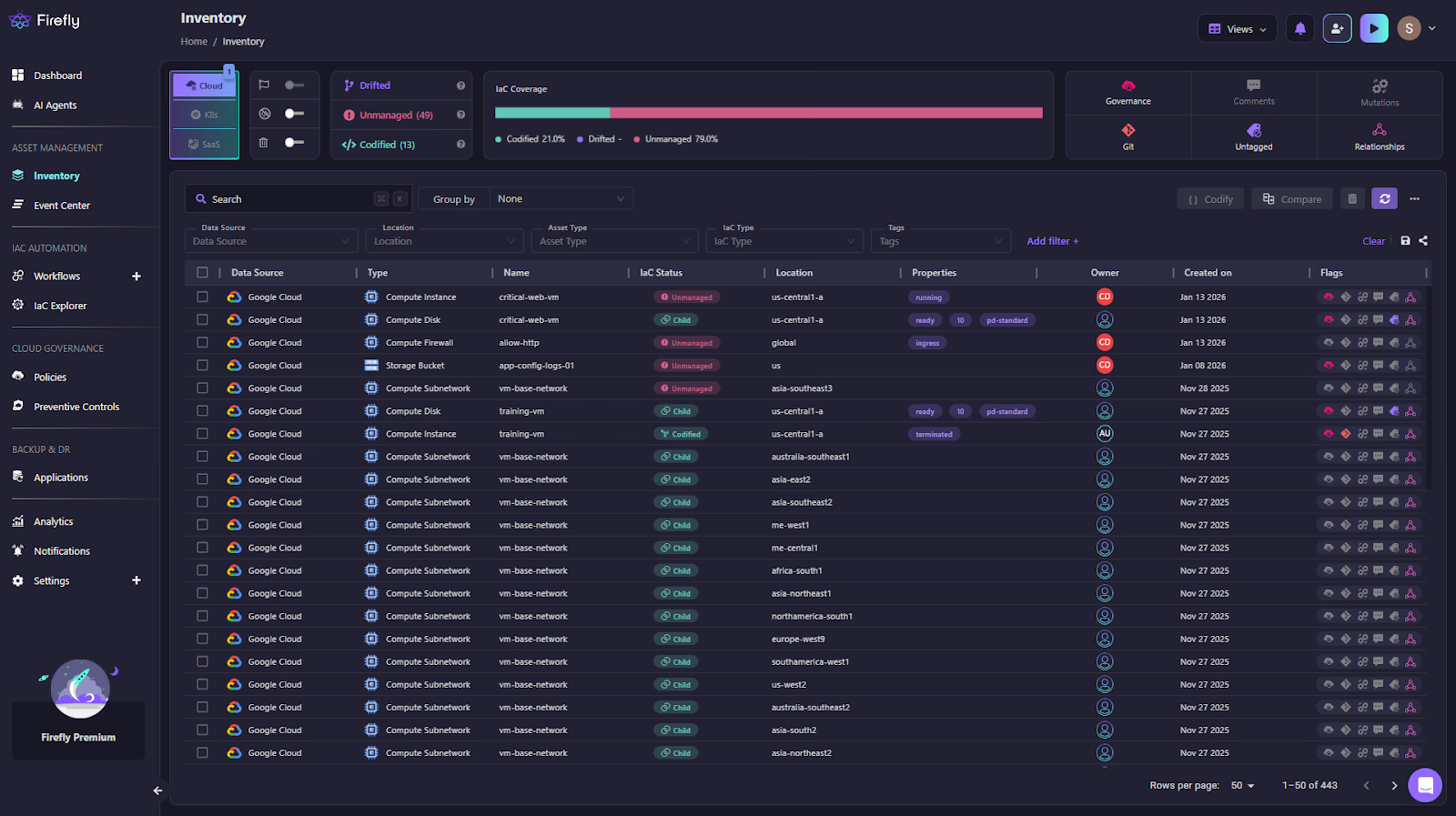
Each resource is classified as:
- Codified: created and managed through Terraform or another IaC source
- Drifted: managed by code but changed at runtime
- Unmanaged: exists in the environment but not in code
- Ghost: defined in code but missing in the environment
This gives platform teams a clear answer to questions Terraform cannot answer on its own: what exists, who owns it, and whether it is actually under lifecycle control by checking whether it is managed by Terraform or not.
Drift Detection Between Terraform Runs
Lifecycle rules such as prevent_destroy and ignore_changes only apply when Terraform executes. If a resource is modified through the cloud console or CLI, Terraform does not intercept the change. Firefly detects these changes continuously and flags them as drift.

In this view:
- The resource is marked Drifted
- Ownership, location, and runtime state are visible
- The drift is surfaced immediately, not during the next Terraform plan
This closes a core lifecycle gap: lifecycle violations are detected as they happen, not when Terraform eventually runs again.
Drift Visibility With Lifecycle Context
Firefly shows exactly what changed, side by side.

In this example:
- Desired state (IaC) expects one machine type
- The running resource uses a different machine type
From a lifecycle perspective, this answers:
- Was this change intentional?
- Does it violate lifecycle expectations?
- Should Terraform reconcile it, or should the code be updated?
Terraform alone would surface this only during a later plan, mixed in with unrelated changes. Firefly isolates the lifecycle violation and provides context immediately.
Guided Remediation Back Through Terraform
Firefly does not remediate drift by bypassing Terraform. It generates remediation paths that route changes back through Terraform, where lifecycle rules apply. For the drifted resource, Firefly provides:
- The exact Terraform command or code change required
- Targeted remediation scoped to the affected resource
- A clear reconciliation path back to the state
Remediation can be handled through pull requests, keeping lifecycle corrections:
- Auditable
- Reviewed
- Enforced through Terraform execution
Once applied, Terraform lifecycle protections are restored.
Extending Terraform Lifecycle Awareness Beyond Plan and Apply
Terraform remains the execution engine. Firefly extends lifecycle awareness to the time between executions. Together:
- Terraform enforces lifecycle rules during plan and apply
- Firefly detects when lifecycle boundaries are crossed outside Terraform
- Remediation brings infrastructure back under Terraform lifecycle control
This turns Terraform lifecycle from a point-in-time enforcement model into a continuous operational discipline, without changing Terraform’s execution model or responsibilities.
FAQs
What is the Terraform lifecycle state?
Terraform does not maintain a separate lifecycle state. Lifecycle decisions are evaluated against the Terraform state file, which records the resources Terraform manages and their last known attributes.
How do you prevent Terraform from destroying a resource?
Use lifecycle { prevent_destroy = true }. Terraform will fail the plan if a destroy or replacement is detected, but this applies only to actions run through Terraform.
What happens when a resource block is removed?
Terraform plans to destroy the resource and remove it from state. If prevent_destroy is set, the plan fails, and no changes are applied.
What is the lifecycle block in a Terraform module?
A lifecycle block inside a module applies only to the resource instances in that module and state, and only for the module version actually used during execution.


.webp)


.webp)












