
TL;DR
- Terraform applies whatever you tell it to, it has no concept of safe, compliant, or allowed. That gap needs to be filled deliberately.
- The only reliable place to enforce policy is between terraform plan and terraform apply, after variables and modules are resolved, before anything is created.
- Writing policies as code means they are versioned, tested, and run automatically — not reviewed manually and inconsistently.
- Existing approaches (OPA alone, Sentinel alone, ad-hoc scanning) leave gaps: no unified execution flow, no continuous enforcement after deployment, no IaC-linked remediation.
- Firefly closes that loop by combining workflow orchestration, plan-time Guardrails, continuous monitoring, and code-based remediation in a single system.
Terraform applies whatever you declare. It resolves dependencies, calls provider APIs, and builds exactly what is defined in your configuration, without evaluating whether that configuration is secure, compliant, or appropriate for your environment.
If your code defines a public S3 bucket, Terraform will create it. If a security group allows 0.0.0.0/0, Terraform will open it. If encryption, logging, or backups are missing, Terraform will not flag it. Valid configuration is the only requirement.
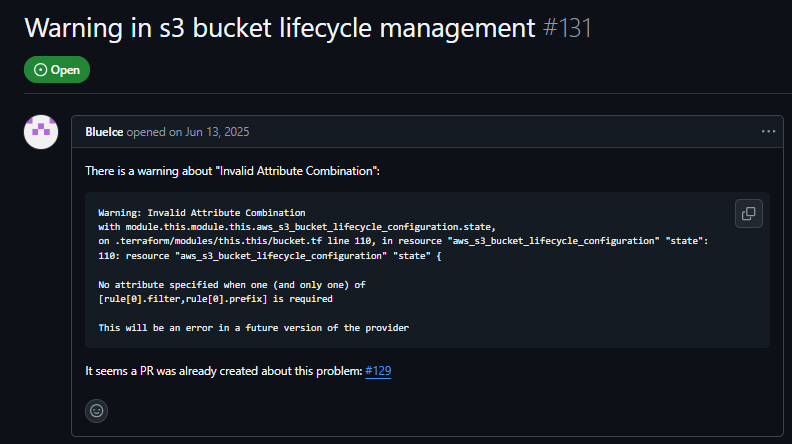
In “Warning in S3 bucket lifecycle management” (#131, 2025), users configuring an S3 backend for Terraform state encountered lifecycle and retention issues, settings that directly affect backup and recovery, yet the configuration still applies without any indication of risk.
Terraform is a provisioning tool, not a governance system, and that gap shows up in production in consistent ways:
- Public exposure: S3 buckets, security groups, or endpoints unintentionally open
- Missing safeguards: no encryption, no logs, no backups
- Cost issues: oversized instances, no limits on growth
- Inconsistency: missing tags, naming drift, environments diverging over time
Teams often rely on code review to catch these problems. That approach does not scale, eviews are inconsistent, context is limited, and issues slip through across teams and environments.
The fix is an enforcement that runs automatically on every change. Terraform is a provisioning tool, not a governance tool. But the gap it leaves is real, and it shows up in predictable ways in production:
- Unintended public exposure: public S3 buckets, open security groups, misconfigured load balancers
- Missing security baselines: no encryption at rest, no logging, no backup configuration
- Cost sprawl: wrong instance types, no limits, no controls on resource growth
- Configuration drift: tags missing, naming patterns inconsistent, environments diverging over time
Most teams try to catch these in code review. That works early on, but it breaks down at scale, reviews are inconsistent, people miss things, and edge cases slip through across multiple teams and environments.
The fix is not more careful reviewing. It's enforcement that runs automatically, every time.
Policy as Code in Terraform: How It Works
Before getting into why reviews miss these issues, first understand how this works in practice.
Policy as code means your rules run against the Terraform plan, not against documentation or raw .tf files. Instead of writing “all storage must be encrypted” and relying on someone to check it, you define a rule that inspects planned resources and verifies that encryption is enabled. The same applies to public access, security group rules, required tags, or instance sizes.
These checks run on the output of terraform plan, where Terraform has already resolved variables and expanded modules. At this stage, each resource, its attributes, and its final values are visible, so policies evaluate the exact infrastructure changes Terraform is about to apply. If a policy condition is not met, for example, an S3 bucket without encryption or a security group allowing 0.0.0.0/0, the pipeline step evaluating the plan fails, and the apply step is not executed.
This moves enforcement from manual review to a system that evaluates every change against the same set of rules, using the fully resolved infrastructure definition rather than partial code.
Why Reviews Miss Terraform Misconfigurations
You can write standards like:
"All storage must be encrypted." "No public access to sensitive resources." "Every resource must have an owner tag."
But unless those rules run automatically, they depend on someone catching every violation. That breaks down fast. The shift to policy as code changes three things:
- Deterministic outcomes. A policy written in code produces a clear pass or fail result every time it runs, regardless of who made the change or which environment it targets.
- Version-controlled governance. Policies live in Git alongside your infrastructure code. Changes are tracked, diffed, and reviewable. You know exactly when a rule changed and why, which matters for audits and incident investigations.
- Automatic enforcement in pipelines. Once policies are code, they run inside your CI/CD pipeline as a deployment gate:
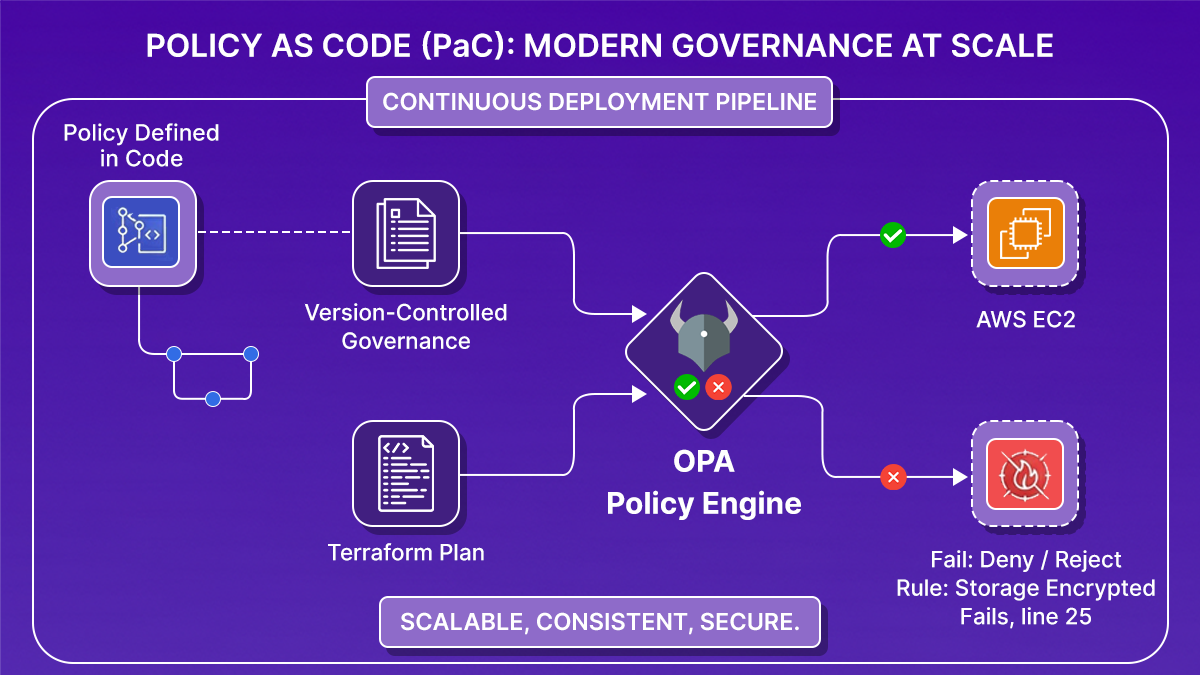
Reviews become optional. Enforcement becomes guaranteed.
Where to Run Policy Checks in Terraform?
Once you decide to enforce policies automatically, the next question is: where in the Terraform workflow should that happen? There's only one place that works: after terraform plan, before terraform apply.
Here's why the alternatives don't hold up.
- Before running terraform plan (static analysis on .tf files): At this stage, variables may not be resolved, modules are not expanded, and computed values are missing. You're evaluating intent, not the actual outcome. Policies written here miss what Terraform will actually do.
- After running terraform apply (post-deployment scanning): Too late. The resource already exists. In some cases, like a publicly exposed bucket or an open security group, the damage is already done. Post-deployment tools are useful for monitoring, but they're not enforcement.
- Between plan and apply: This is the decision boundary. The plan contains the proposed state of every resource Terraform is about to create or modify, with variables resolved, modules expanded, and exact configuration values present. It's the first point where you can ask: "If we apply this, does it comply with our rules?"
The evaluation is simple:
- All rules pass: proceed to apply
- Any rule fails: block execution
If enforcement isn't happening here, you're either relying on manual review, catching issues after deployment, or not enforcing at all.
Wiring OPA Into a Terraform Pipeline on GCP
Here's what this actually looks like when you build it yourself, a working example using Terraform, OPA, and GitHub Actions to enforce compliance on GCP resources before anything gets deployed.
The Pipeline Flow
Every time a pull request is opened, the pipeline runs this sequence:
- terraform plan: Resolves every variable, module, and dependency into a single execution plan.
- Convert to JSON: Turns the binary plan into structured JSON that OPA can parse and evaluate.
- OPA evaluation: .rego policies run against the JSON plan and return a list of violations or a clean pass.
- Allow / block: Any violation exists in the pipeline with a non-zero code. apply never runs.
- terraform apply: Executes only if every policy passes, using the exact same plan that was evaluated.
In GitHub Actions, that looks like this:
The plan output is converted to JSON first, that's what OPA actually reads. Without that step, OPA has nothing to evaluate.
Writing the Policies
Each policy is a .rego file that reads the plan JSON and returns violations. Here's the storage policy that enforces uniform bucket-level access on all GCS buckets:
If uniform_bucket_level_access is false in the plan, the rule fires. The violation message names the exact bucket, so developers know what to fix without digging through logs.
The compute policy works the same way, it reads instance configurations from the plan and flags anything that violates your rules, with an optional warn block for soft checks that don't block deployment:
Blocking the Deployment
Once both policy checks run, the pipeline reads their output and makes a single call, if either storage or compute returns a violation, the workflow fails, and terraform apply is blocked.
A non-zero exit code stops the pipeline. terraform apply never runs.
What the Feedback Looks Like
On every pull request, the pipeline posts a comment with the full compliance result:
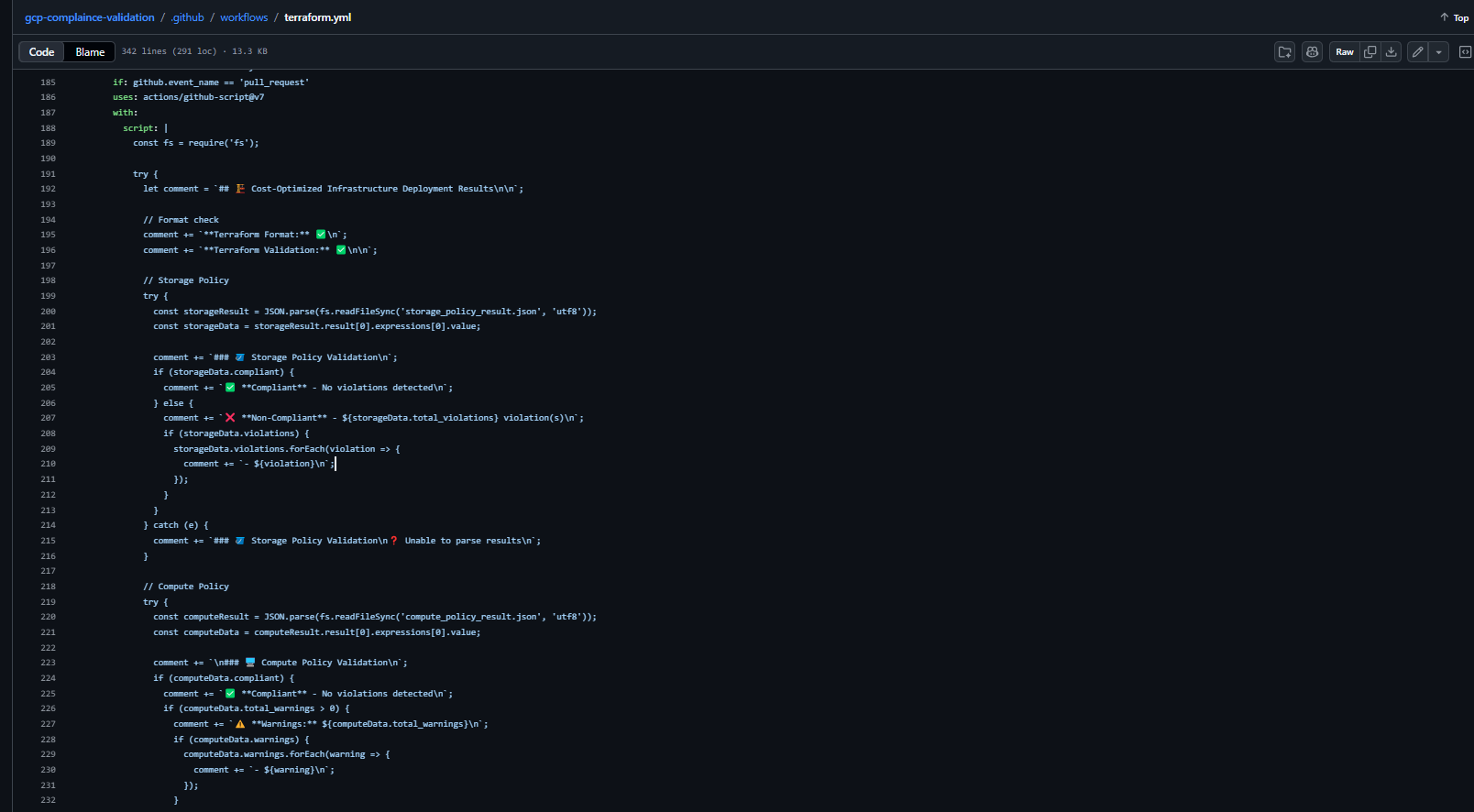
Developers see exactly what failed, which resource caused it, and what needs to change, without leaving the pull request.
What This Setup Actually Requires
This works, but notice what you had to build yourself:
- Install and configure OPA in the pipeline
- Convert the Terraform plan to JSON manually
- Write and maintain .rego files for every resource type
- Wire policy output back into the pipeline pass/fail logic
- Build the PR comment formatting from scratch
- Add separate monitoring for post-deployment drift
Each piece is straightforward on its own. At scale, across multiple teams, environments, and resource types, this is the overhead that adds up. That's the gap the next section covers.
What Breaks When You Try To implement With Existing Tools like OPA, Sentinel, and Checkov
OPA, Sentinel, Checkov, and tfsec each solve a piece of the problem. But in practice, teams using these tools in large environments run into the same set of gaps. Let's go through each of them:
1. Fragmented tooling with no unified flow
You end up stitching together a scanner for static analysis, a policy engine for plan evaluation, and a separate monitoring tool for post-deployment. Each has its own configuration format and output. There's no single system that owns the full lifecycle.
2. Enforcement that stops at deployment
Most setups focus on pre-deployment checks. But infrastructure changes after deployment, too, manual console changes, CLI updates, and auto-scaling events. Without continuous evaluation, your policies only apply at deploy time, not over the lifetime of the infrastructure.
3. No link between violations and IaC fixes
Detection is not the hard part. Fixing violations correctly is. The typical flow is: a violation is detected, someone fixes it directly in the cloud, same issue reappears on the next terraform apply because the Terraform code was never updated. That's how permanent drift starts.
4. High operational overhead
Tools like OPA are flexible, but that flexibility has a cost. You're responsible for wiring Terraform plan output into the policy engine, maintaining CI/CD integrations, handling evaluation results, and building feedback loops. That's infrastructure on top of your infrastructure.
At scale, what you need is a consistent loop:
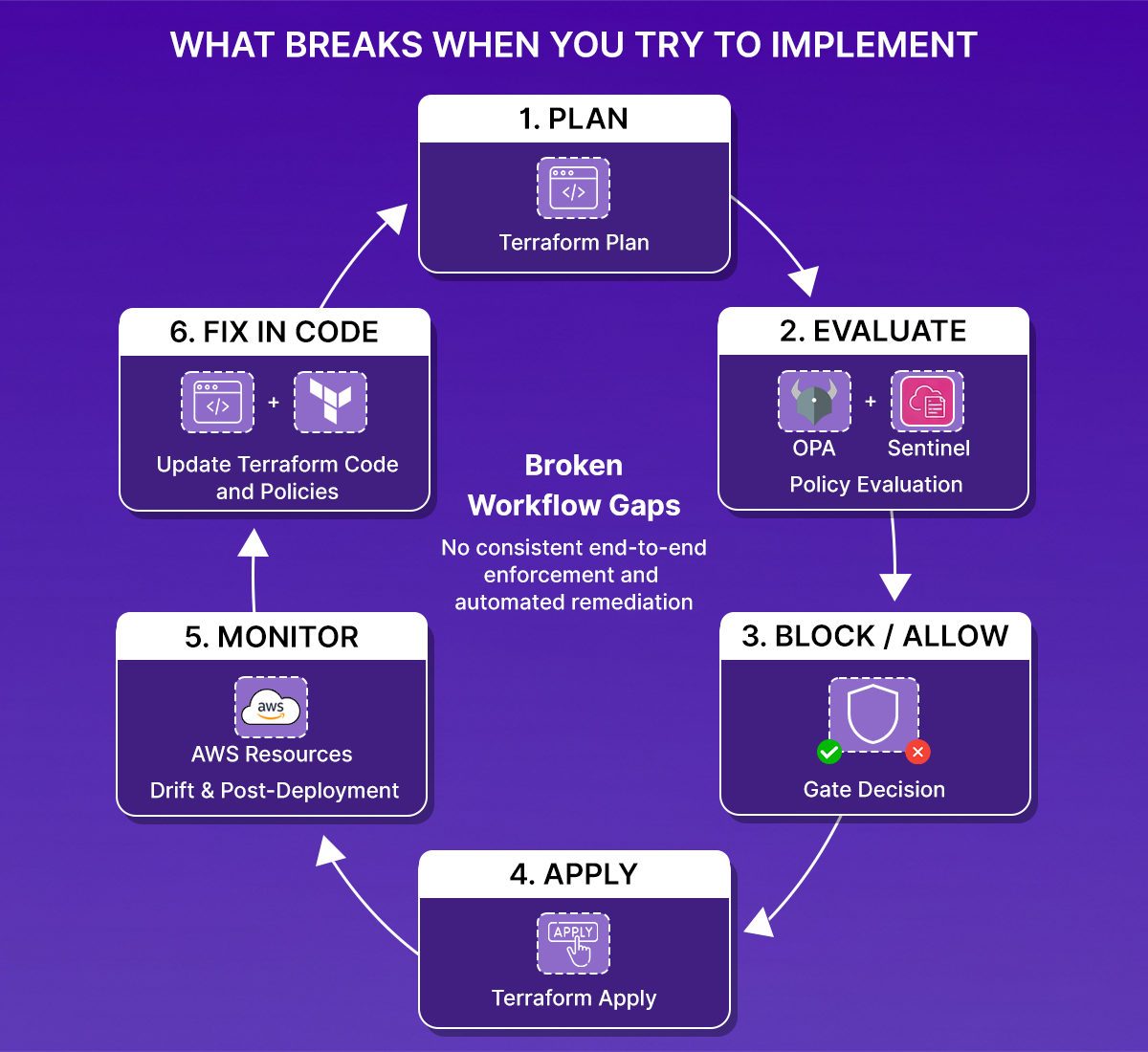
If any part of that loop requires manual stitching or is easy to skip, the system isn't reliably enforcing anything.
What a Complete Policy Enforcement System Actually Needs
Once you've tried to run Policy-as-Code at scale, a few requirements stop being optional.
- Enforcement at plan time, in the pipeline. Rules must run automatically as part of every Terraform execution. If they're manual, they'll be skipped.
- Continuous evaluation after deployment. Policies need to run against existing infrastructure, not just new changes. Resources drift. People make manual changes. Violations appear outside of Terraform runs.
- Centralized, consistent rules. Scattered policies across repos lead to different standards in different environments. Rules need to live in one place and apply everywhere.
- Remediation that goes back to code. Fixing issues directly in the cloud breaks the model. The fix needs to land in Terraform, go through review, and be applied through the normal workflow. Otherwise, the same violation comes back.
This isn't a high bar; it's the minimum for policies to actually control something rather than just report on it.
How Firefly Implements the Full Policy Enforcement Loop
Firefly is built on top of Open Policy Agent and adds the parts that OPA alone doesn't cover: workflow orchestration, plan-time enforcement, continuous monitoring, and code-based remediation, as a single system rather than components you wire together yourself.
Plan-Time Enforcement via Guardrails
In Firefly, policy enforcement at plan time is handled through Guardrails. Every time a plan is generated, Guardrails evaluate it before Terraform apply is allowed to run.
Guardrails evaluate the plan output, not the raw .tf files, which means they see resolved values, expanded modules, and the actual proposed state. There's no separate trigger or manual step. This runs as part of the execution flow.
Here's what that looks like in practice: when a plan is blocked because the expected cost change (+$2.84) exceeds the allowed threshold (+$1), while the policy check passes cleanly.
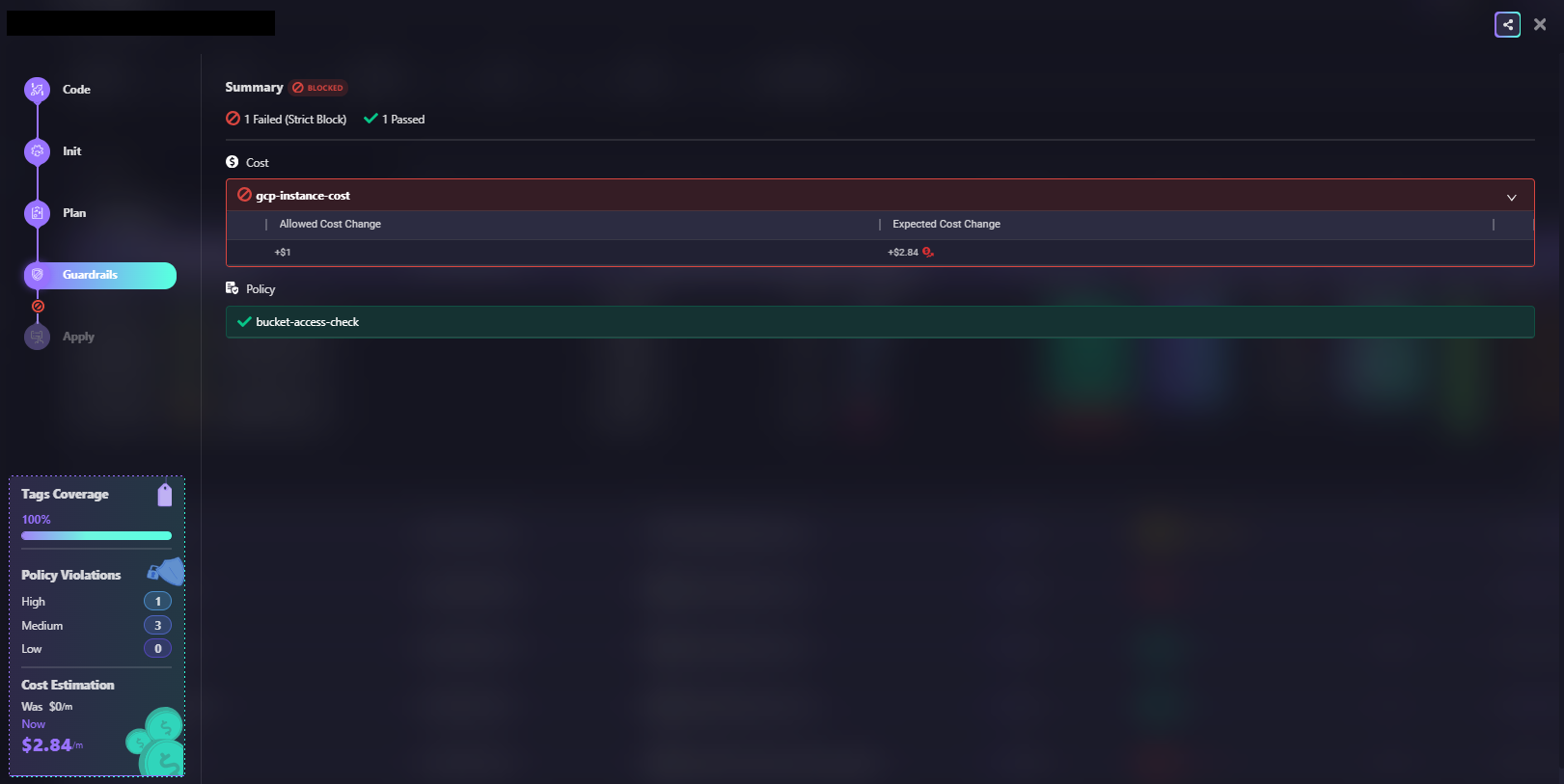
Terraform policy enforcement broken workflow gaps diagram
In the above snapshot, the cost rule (gcp-instance-cost) triggers a strict block while bucket-access-check passes. The deployment is stopped before the Terraform apply runs. Here’s how we can create custom guardrails based on the type of policies or best practices we are trying to define:
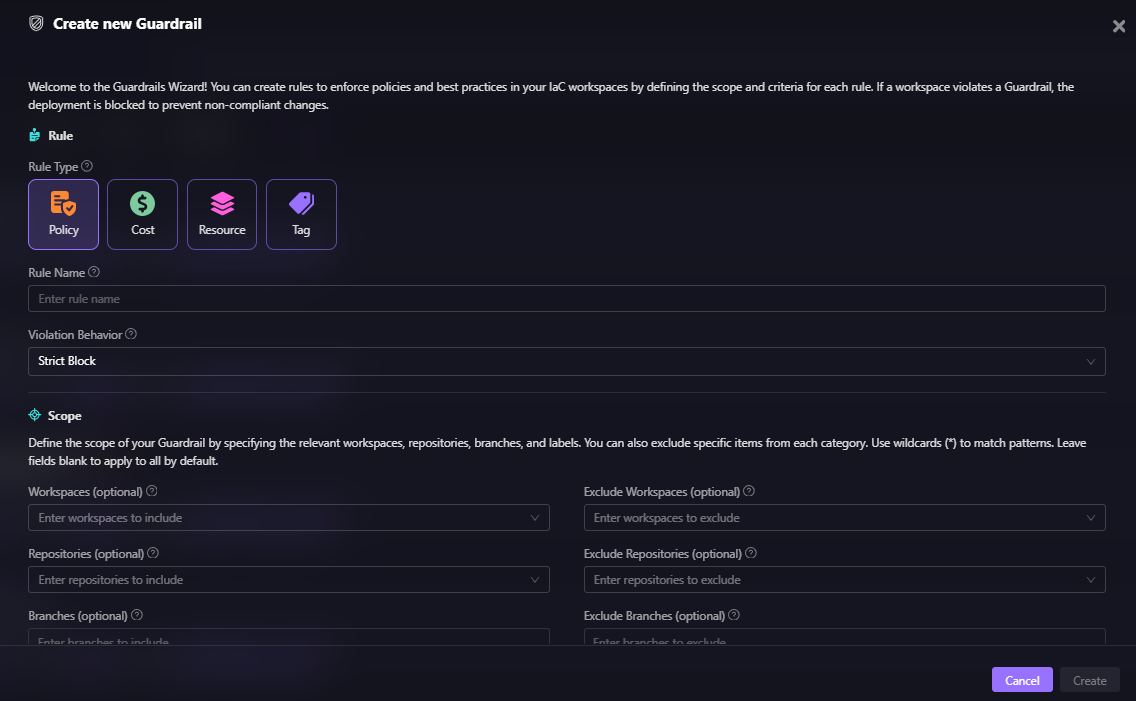
Guardrails cover four categories:
- Policy rules: OPA-based security and compliance checks. Examples: encryption required on all storage, no resources with public IP enabled, approved regions only. These can optionally evaluate existing resources that aren't being modified in the current plan, extending enforcement beyond new deployments.
- Cost rules: Evaluate the estimated cost impact of a change before it's applied. Example: block any plan that increases the monthly cost by more than a defined threshold. This catches runaway provisioning before it hits a bill.
- Resource rules: Control specific actions on specific resources. Example: prevent deletion of a production database, disallow creation of resources outside approved regions, and block modification of certain IAM roles.
- Tag rules: Enforce tagging standards across all resources. Example: require Environment, Owner, and CostCenter tags on every resource. Like policy rules, these can also evaluate existing resources, not just new ones.
When a rule is violated, the deployment is blocked. The violation appears in the Firefly UI as a PR comment and via Slack or webhook notifications. Developers get immediate feedback in their existing workflow, without a separate tool to check.
Fitting Into Your Existing Execution Model
Firefly doesn't require you to migrate your entire CI/CD setup. It gives you two ways to get started, as shown in the snapshot below:
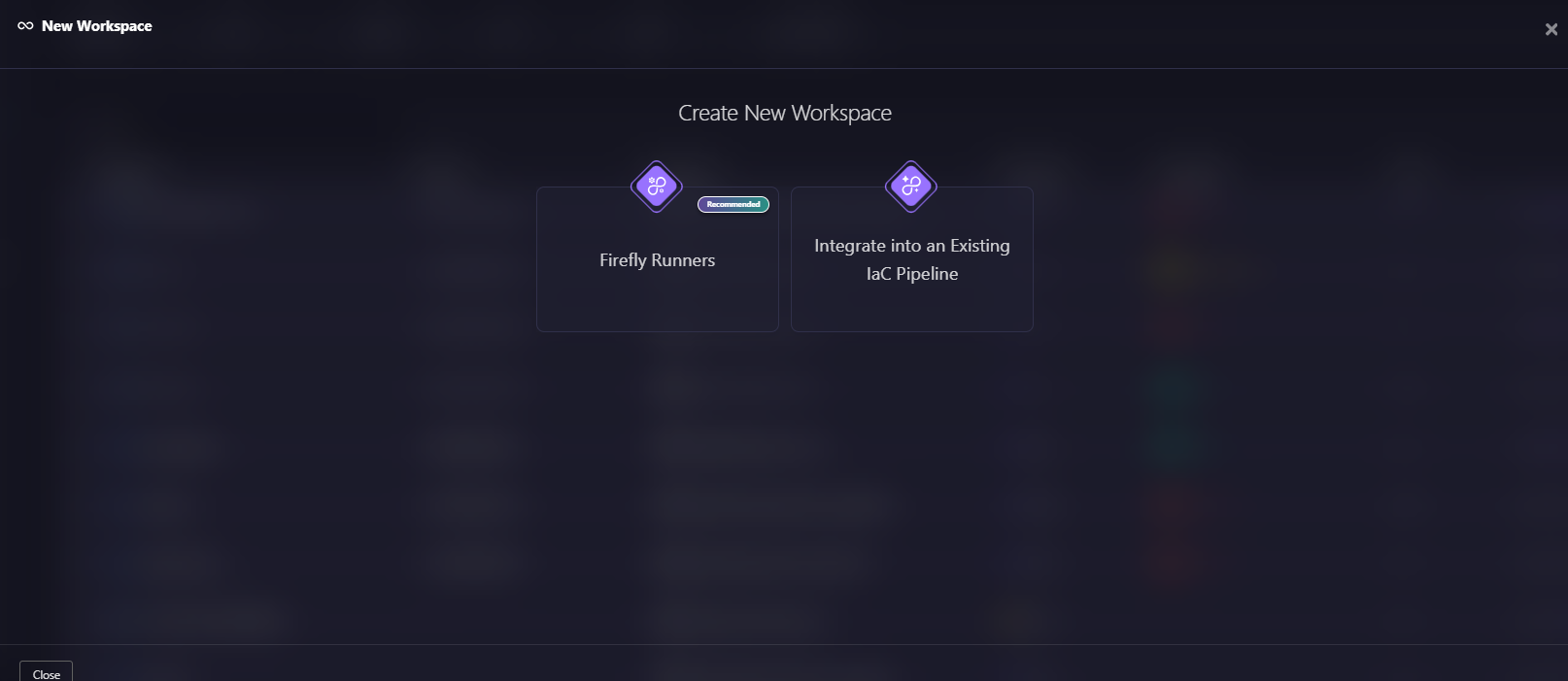
Here’s a quick explanation of both ways of creating new workspaces:
Firefly Runners: Firefly can handle Terraform plan and apply execution directly through its own Workflow system. Plans trigger automatically on pull requests, Guardrails evaluate changes in real time, and apply runs after merge only if all policies pass, so there’s no pipeline logic for you to build or maintain.
You can choose how these runners are hosted:
- Firefly-managed runners: Run on Firefly infrastructure. Firefly provisions and operates the execution environment, including running Terraform commands and handling updates and maintenance.
- Self-hosted runners: Run on the customer’s infrastructure. You provision and manage the runner environment, while Firefly orchestrates runs and applies Guardrails.
Integrate into an Existing IaC Pipeline: If you're already running GitHub Actions, GitLab CI, or Jenkins, you can keep your existing pipelines. Simply add the fireflyci step to send the plan output to Firefly. Guardrails evaluate the change, and the pipeline pass/fail reflects the policy result. Your execution stays in your pipeline; enforcement runs in Firefly.
Both models produce the same outcome: every change goes through the same evaluation, and enforcement is consistent across environments.
Continuous Monitoring After Deployment
Plan-time enforcement catches violations before they're deployed. But it doesn't catch changes that happen outside Terraform.
Firefly continuously evaluates existing infrastructure against the same policies used at deploy time. When a resource drifts, someone modifies a security group in the console, a route table gets updated via CLI, and an IAM policy is widened manually, Firefly detects the violation immediately rather than waiting for the next terraform plan.
Here's what that looks like in practice: every policy tracked in one place, with severity, compliance score, violating assets, and AI remediation available without switching tools.
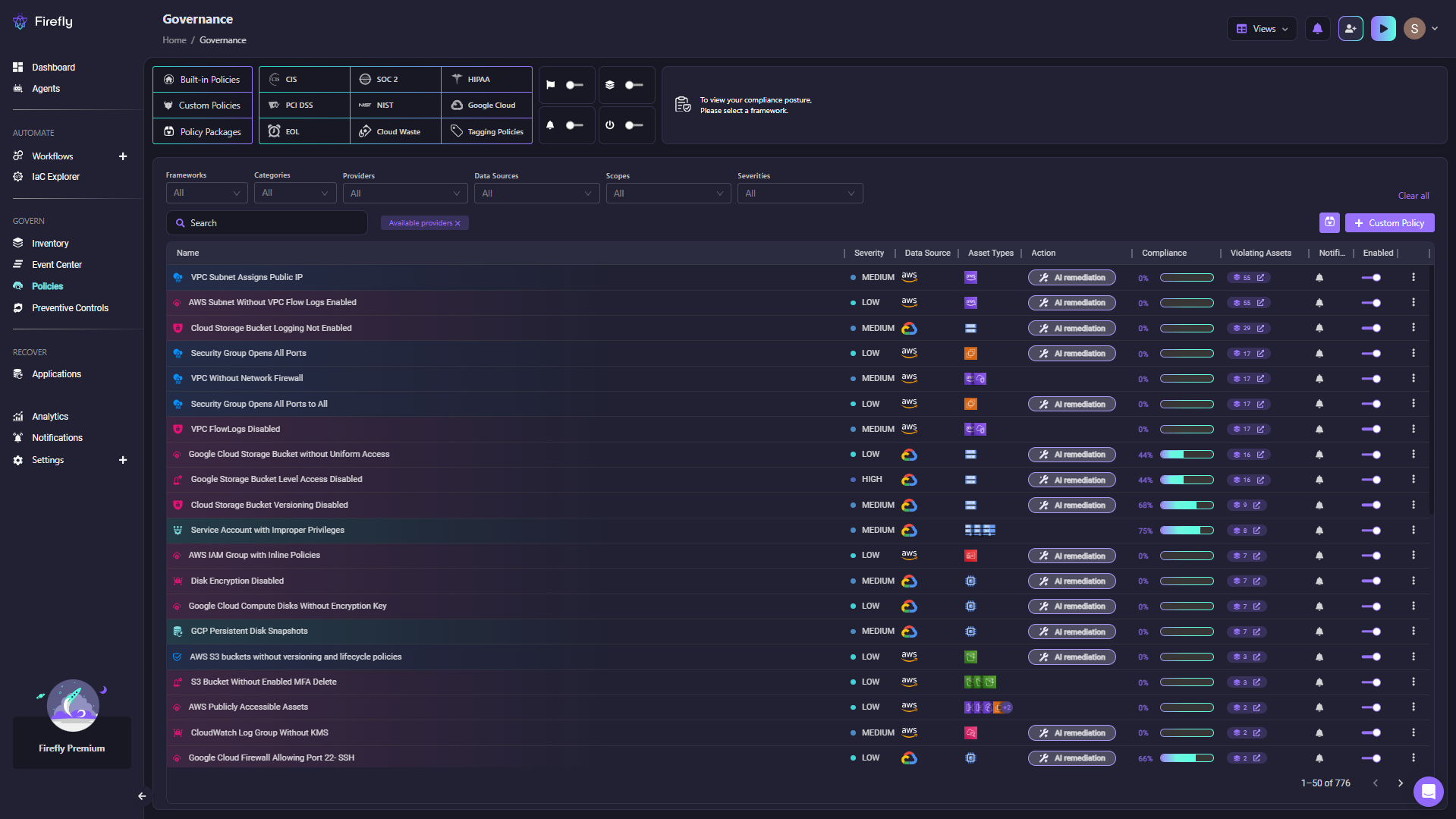
Firefly's Governance view shows 776 policies across frameworks such as CIS, SOC 2, HIPAA, and PCI DSS, each with a severity, compliance score, and a count of violating assets.
But continuous monitoring only works if the policies themselves are well defined. Firefly gives you two ways to create them, as shown in the snapshot below, depending on how your team works.
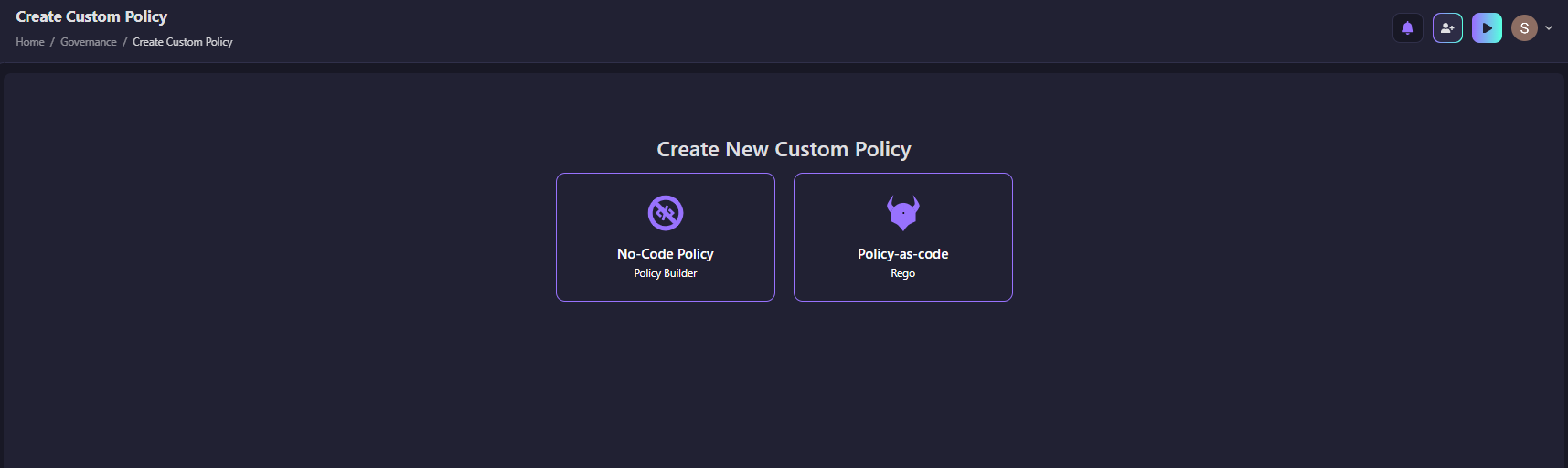
Explanations: a No-Code Policy Builder for teams that want to set up rules quickly, and Policy-as-code using Rego for teams that want full control.
For teams that prefer writing policies in code, the Rego Playground lets you write, test, and evaluate rules directly against your assets, with AI-generated starting points available if you need one. As shown in the snapshot below:
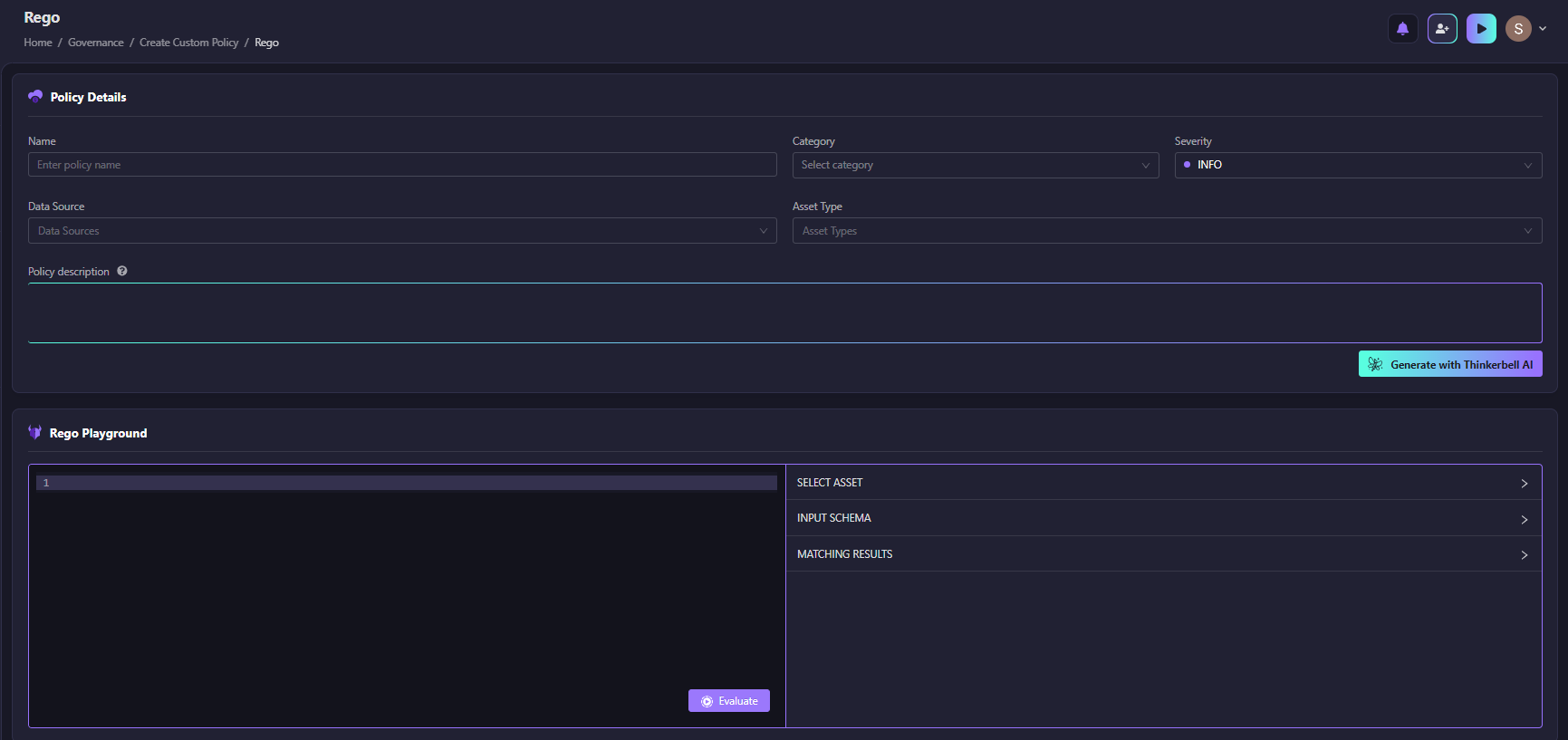
You can write your Rego policy, select an asset, and evaluate matching results before the policy goes live.
For teams that don't want to write Rego, the No-Code Policy Builder lets you define rules using attribute and tag-based criteria, no code required.
As shown in the snapshot below:
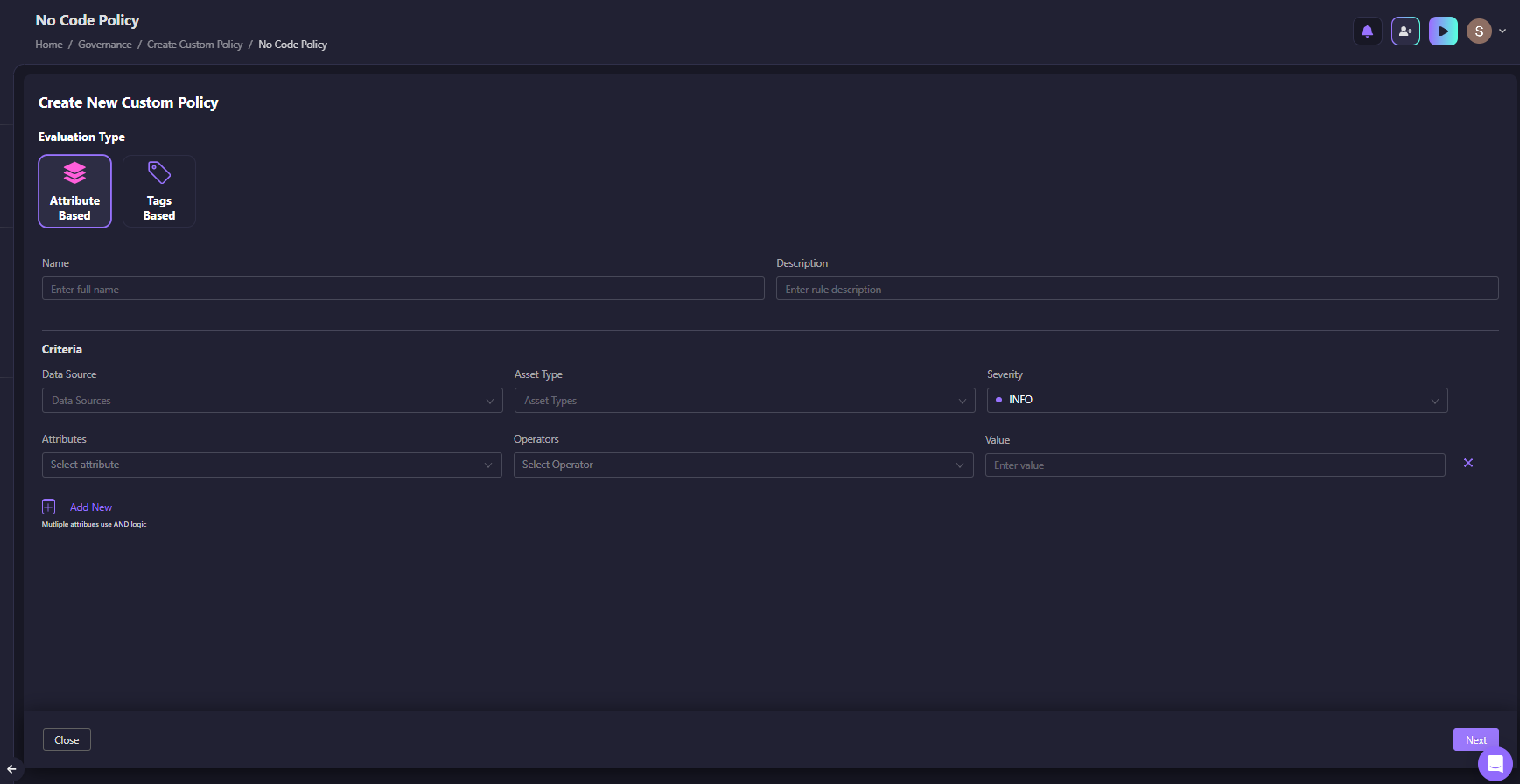
The No-Code builder supports attribute-based and tag-based evaluation, with AND logic across multiple criteria. This closes the gap between "we enforce at deployment" and "we enforce all the time."
Remediation That Goes Back to Terraform
When a violation is detected, there are two ways to fix it:
- Fix it directly in the cloud
- Fix it in Terraform
Only the second one holds. Fixing directly in the cloud resolves the issue today, but the Terraform configuration still has the old value. The next terraform apply will either revert the fix or flag it as a diff. Either way, the violation comes back.
The correct flow is:
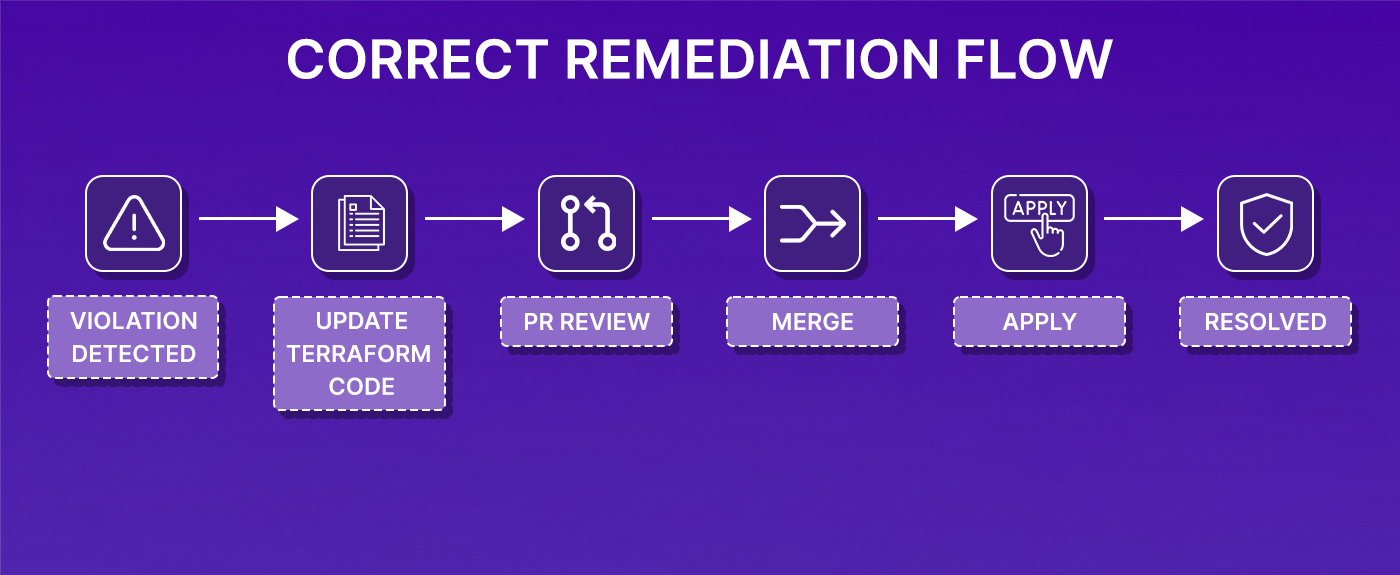
Firefly supports this by generating IaC patches for common violations, pull requests with the specific fix, ready to review and merge. The fix goes through the same workflow as any other infrastructure change: reviewed, versioned, and applied through the pipeline.
For resources that aren't managed by Terraform, Firefly provides the equivalent CLI command so the fix is applied correctly regardless of how the resource was created.
What This Changes for Teams Running Terraform at Scale
Without a complete policy enforcement system, the pattern looks like this:
- Violations are caught inconsistently, sometimes in review, sometimes after deployment, sometimes not at all
- Fixes happen directly in the cloud, creating drift
- The same violations keep reappearing
- Policies exist in documentation, but don't reliably control anything
With plan-time enforcement, continuous monitoring, and IaC-linked remediation working as a system:
- Every deployment goes through the same evaluation, regardless of team or environment
- Violations are caught before infrastructure changes, not after
- Fixes go back to code, so they stick
- Governance becomes part of the deployment process, not separate from it
The underlying Terraform workflow doesn't change. The plan and apply cycle stays the same. The change is that there's now a reliable enforcement layer sitting between those two steps, and continuously running alongside them.
FAQs
What is the difference between Sentinel and OPA for Terraform policy enforcement?
Sentinel is HashiCorp's proprietary policy framework, available in Terraform Cloud and Enterprise. It evaluates plan output using a custom language and integrates tightly with HashiCorp's execution model. OPA (Open Policy Agent) is an open-source, general-purpose policy engine that uses the Rego language. OPA is more flexible and not tied to a specific platform, but requires more setup to integrate with Terraform. Firefly builds on OPA and adds the surrounding infrastructure — workflow execution, plan-time evaluation, and remediation — without requiring you to build those integrations yourself.
Can I enforce policies on existing infrastructure, not just new Terraform changes?
Yes, but not with basic plan-time checks. Standard policy enforcement only runs when a plan is generated. Continuous enforcement requires a tool that actively monitors deployed infrastructure against policy rules outside of Terraform runs. Firefly's policy evaluation covers both: plan-time checks before deployment and continuous evaluation of existing resources.
What happens when a policy violation is flagged, can engineers override it?
It depends on the Guardrail configuration. Hard blocks prevent apply entirely until the violation is resolved. Flexible blocks allow an authorized user to override the violation and proceed, with the override logged. This is useful for exceptional cases where the violation is intentional and reviewed.
Should policy fixes happen in Terraform or directly in the cloud?
Always in Terraform. Fixing directly in the cloud solves the immediate problem but leaves the Terraform code unchanged. The next apply will either revert the fix or flag a diff. Fixing in Terraform means the change is reviewed, version-controlled, and applied through the normal workflow — which is the only way to prevent the same violation from reappearing.
How does policy as code help with compliance audits?
When policies are defined as code and enforced automatically, every deployment decision is traceable. You can show which policies were in place at any point in time, which changes were blocked, which were allowed, and what the configuration looked like when they were applied. That's a much stronger audit position than relying on manual reviews and documentation.

.avif)
.avif)
.webp)

.webp)












