
TL;DR
- Terraform solves provisioning, not operations. It declares and applies infrastructure, but it does not continuously observe live cloud environments, detect post-deployment drift, or act as a long-term system of record.
- Enterprise teams fill the gaps with a toolchain. As environments scale, teams add tooling for governance and visibility (Firefly, driftctl, Terraformer), execution control (Atlantis, Terragrunt), security and policy enforcement (Checkov, OPA/Conftest), cost awareness (Infracost), and developer hygiene (terraform-docs, TFLint).
- Execution, policy, and cost checks happen before terraform apply. Tools like Atlantis, Checkov, Conftest, Infracost, and TFLint reduce risk by catching errors, violations, and cost spikes during code review, when changes are still easy to fix.
- Visibility and drift require observing the cloud directly. State-based tools help, but at scale, teams need continuous discovery of real infrastructure, identification of unmanaged and drifted resources, and a way to bring them back under IaC.
- A control plane becomes necessary at scale. Firefly sits above Terraform execution, correlating live cloud state with IaC, workflows, and guardrails, giving platform teams a single operational view across accounts, clouds, and teams.
Terraform is the provisioning engine most teams use to create and change cloud infrastructure. It’s reliable for declaring intent and running plan/apply across AWS, Azure, and GCP.
The problems show up as environments grow. In daily configurations, you see a mix of Terraform-managed stacks and resources created or changed outside IaC, console edits, managed services, ad-hoc scripts, operators, and older resources that predate automation. Over time, the live environment drifts from what state files describe.
That’s not just theory; it’s common operational feedback. Community threads (for example, a recent r/Terraform discussion asking “What open-source Terraform management platform are you using?”) show teams hunting for a management layer. Many report using Atlantis for PR-driven runs but call out practical gaps, limited RBAC, weak UI for multi-team workflows, and no built-in post-deploy visibility or guardrails. Teams repeatedly ask for stronger cross-account visibility, policy enforcement on plans, and a way to find unmanaged or drifted resources without manual scans.
The result is a lifecycle gap: Terraform handles provisioning, but it doesn’t observe the estate continuously or act as a system of record for long-lived cloud environments. You end up needing tooling for post-deploy visibility, continuous drift detection, codification of unmanaged assets, cost checks, and guardrails that run alongside your CI/CD pipelines.
This article walks through 10 Terraform-adjacent tools that address those gaps—grouped by the lifecycle problems they solve: governance and visibility, automation, security and cost control, and developer experience. Each entry focuses on practical fit, failure modes to watch for, and how it plugs into an enterprise multi-cloud workflow.
Terraform Tools Commonly Used in Enterprise Environments
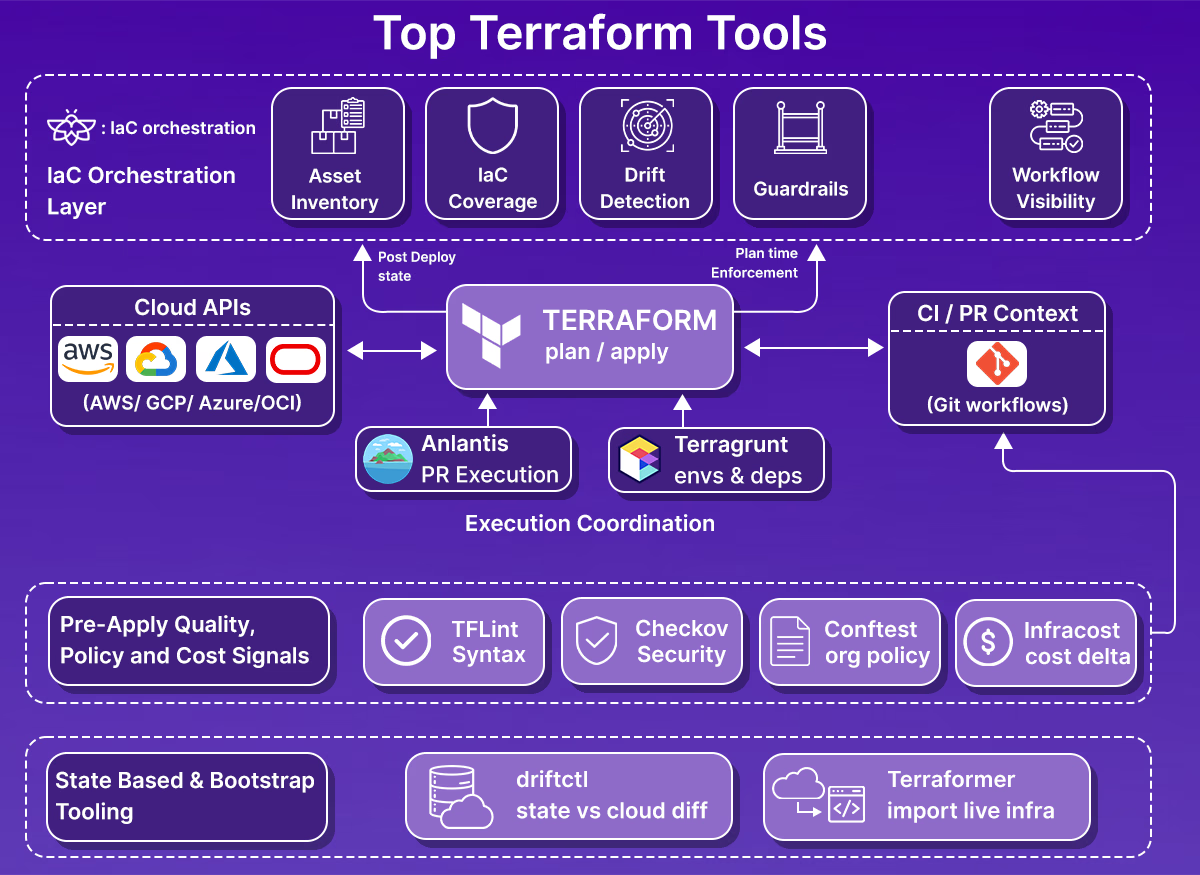
The tools covered below are not alternatives to Terraform itself. They are tools teams add once Terraform is already in use and the environment has grown beyond a handful of accounts or stacks.
Selection here is based on patterns you see repeatedly in large setups: multiple cloud accounts, shared CI/CD pipelines, separate platform and application teams, and long-lived environments where state files no longer tell the full story. Each tool addresses a specific gap Terraform leaves behind, whether that’s post-deployment visibility, execution control, policy enforcement, cost awareness, or day-to-day developer workflow issues.
The sections that follow group these tools by what part of the infrastructure lifecycle they cover, rather than by popularity or feature count. This reflects how teams actually evaluate and adopt them in production.
Next up:
Governance, Visibility, and Drift Detection
This is usually the first gap teams encounter as Terraform adoption spreads across multiple accounts and teams.
Terraform tells you what it created and what it plans to change. It does not tell you what exists outside the state, what changed after terraform apply, or how much of the environment is actually covered by IaC. In multi-cloud setups, that blind spot grows quickly.
The tools in this section focus on observing the real cloud environment, comparing it to Terraform intent, and helping teams regain control without forcing risky rewrites.
1. Firefly: Post-Deployment Visibility and IaC Codification
Firefly is useful once Terraform is no longer the single source of truth for the environment. That usually happens when you have multiple accounts, multiple teams, and more than one way to create infrastructure.
What it actually does:
Firefly connects directly to cloud provider APIs and continuously discovers resources across AWS, Azure, GCP, Kubernetes, and supported SaaS services. This gives you a live inventory of what exists, independent of Terraform state.
From there, it layers several capabilities on top of that inventory:
- IaC coverage tracking: Firefly shows which resources are fully managed by Terraform, which are drifted, and which are not managed by IaC at all as shown in the snapshot below:
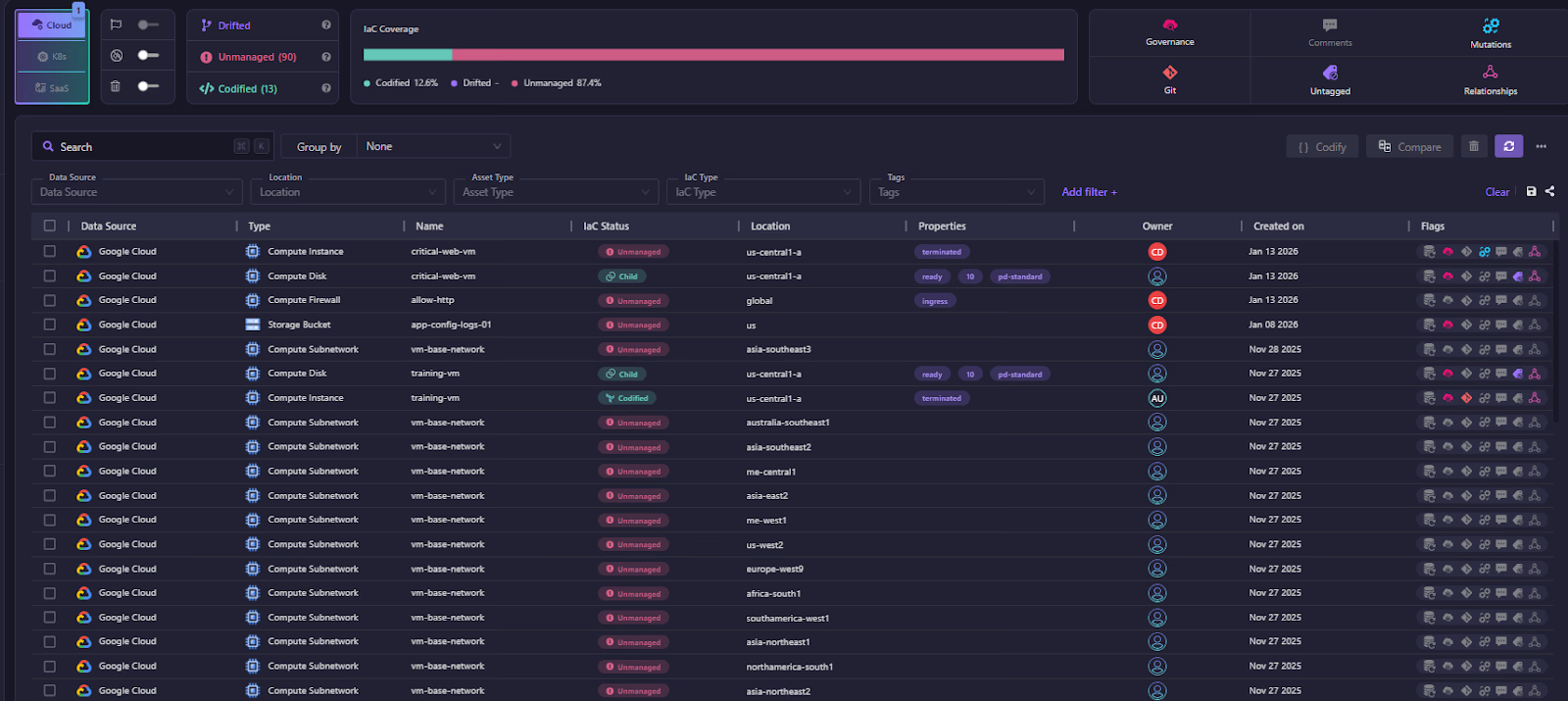
This is based on observed cloud state, not assumptions from repositories or state files.
- Drift detection after terraform apply: It detects configuration changes made outside Terraform, including console edits and automated mutations. For example, a drifted AWS EC2 instance in Firefly:

The resource is marked as Drifted, with clear metadata showing provider, region, tags, and current runtime properties. From here, engineers can inspect drift details, review mutation history, and decide whether to reconcile the cloud resource or update IaC to match reality. These show up as drift events tied to specific resources and properties, not just “changed vs unchanged.”
- Codification of unmanaged resources: For resources that exist outside Terraform, Firefly can generate Terraform code so they can be brought under IaC in a controlled way. This is useful for long-running environments where rewriting everything is not possible.
Guardrails and execution control:
Firefly is not limited to post-deployment visibility. It also enforces guardrails during Terraform execution.
- Guardrails on plans: Firefly evaluates Terraform plans against guardrail rules before terraform apply. These can cover cost thresholds, security and policy checks, tagging requirements, and resource-level controls. Violations can block terraform apply or require an explicit override.
- How guardrails are enforced: Guardrails work whether Terraform runs:
- On Firefly-managed runners
- On self-hosted runners managed by Firefly
- Inside existing CI/CD pipelines, with plan data sent to Firefly
This keeps policy enforcement consistent even when execution is distributed across teams and pipelines.
Workflows and runners
Firefly can also act as the system coordinating Terraform runs:
- Workflows are tied to workspaces that map to Terraform, OpenTofu, or Terragrunt stacks
- Runs are triggered on pull requests and merges
- Execution history, plans, applies, and guardrail results are stored centrally
Teams that already have mature CI/CD pipelines can keep them and use Firefly mainly for visibility and guardrails. Teams that want fewer moving parts can use Firefly-managed runners instead.
Where Firefly fits
Firefly does not replace Terraform, Atlantis, or existing CI systems by default. It sits above execution as a control plane that:
- Observes real cloud infrastructure
- Tracks IaC coverage and drift over time
- Enforces guardrails on Terraform plans
- Centralizes visibility into assets, changes, workflows, and compliance posture
It becomes most valuable in environments where Terraform is already widely used, but no single tool answers the question: “What is actually running in our cloud right now, and is it governed?”
2. driftctl: State-Based Drift Discovery
driftctl is a CLI tool focused on detecting drift by comparing Terraform state with actual cloud resources discovered through provider APIs. Its scope is intentionally narrow: identify differences and highlight gaps between declared and real infrastructure.
What driftctl does
At runtime, driftctl:
- Loads one or more Terraform state files (local or remote)
- Scans cloud provider APIs for existing resources
- Correlates discovered resources with what exists in the state
- Reports:
- Drifted resources (config differs from state)
- Missing resources (in state but not in cloud)
- Unmanaged resources (in cloud but not in state)
It also reports IaC coverage, which helps teams understand how much of their environment is actually tracked by Terraform.
How teams typically run it
driftctl is usually integrated as a read-only signal in existing workflows:
- Scheduled scans (daily or weekly)
- CI jobs that fail or warn on drift
- One-off audits before refactors or migrations
It does not require access to Terraform code repositories, only state and cloud credentials, which makes it useful in environments with fragmented ownership.
What it deliberately does not do
According to the docs, driftctl:
- Does not modify infrastructure
- Does not update Terraform code or state
- Does not provide remediation workflows
- Does not model ownership, tagging policies, or governance rules
It surfaces problems but leaves remediation decisions and workflows to the user.
Example: Detecting Unmanaged Resources with driftctl
This example shows how driftctl is typically used to validate Terraform coverage and detect unmanaged resources in an AWS environment.
Scenario
- Terraform state stored in an S3 backend
- Infrastructure initially fully managed by Terraform
- A resource is later created manually outside IaC
- Goal is to verify how driftctl surfaces coverage gaps
Baseline scan: infrastructure fully managed by Terraform
The first scan is run against the Terraform state stored in S3:
At this point:
- driftctl scans AWS resources in the configured region
- All discovered resources match the Terraform state
- Coverage is reported as complete
The output confirms:
- One resource found
- 100% IaC coverage
- No unmanaged or drifted resources
This establishes a clean baseline where Terraform state accurately represents the environment.
Introduce an unmanaged change
Next, a resource is created manually outside Terraform:
aws s3 mb s3://manual-bucket-for-demo
This simulates a common real-world scenario:
- A console action
- An emergency change
- A script run outside the Terraform workflow
Terraform state is not updated.
Re-run driftctl to detect coverage gaps
The same scan is run again:
This time, driftctl reports an unmanaged resource as visbie in the snapshot below:
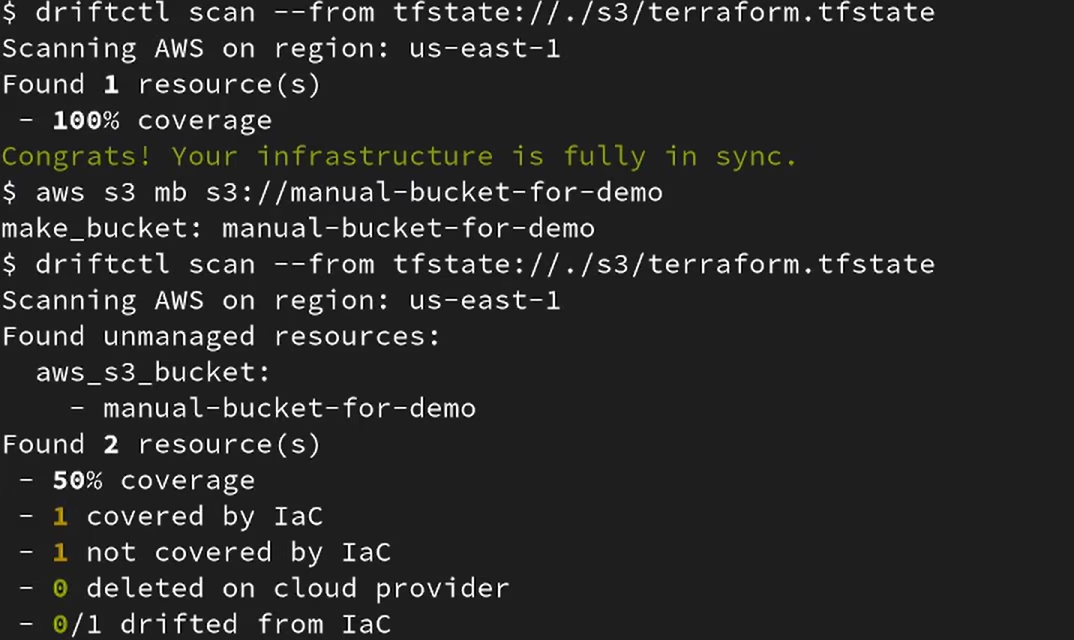
The results show:
- Two resources were discovered in total
- One covered by IaC
- One not covered by IaC
- Overall coverage dropped to 50%
- No deleted or drifted resources in this case
What this tells you operationally
Driftctl answers a very specific question: Does Terraform state still reflect what exists in the cloud?
In this case:
- Terraform state remained unchanged
- Cloud reality changed
- driftctl surfaced the discrepancy immediately
There is no remediation step built in. The output is a signal, not a workflow.
Practical limitations at scale
Because driftctl is state-driven:
- Its accuracy depends on the completeness and quality of the Terraform state
- Environments with many isolated state backends require careful orchestration
- Resources that predate Terraform adoption lack context beyond “unmanaged”
As Terraform usage becomes uneven across teams or accounts, the signal requires more manual interpretation.
Where it fits
driftctl works best when:
- Terraform state coverage is already high
- You want periodic validation rather than continuous governance
- Drift detection is a reporting requirement, not an enforcement mechanism
It complements governance and control-plane tooling but is not a replacement for them.
3. Terraformer: Bootstrapping IaC from Existing Infrastructure
Terraformer is designed for one primary task: discover existing cloud resources and generate Terraform configuration and state for them. It’s typically used when teams inherit environments that were not built with IaC or when Terraform adoption starts after infrastructure already exists.
What it does
Terraformer:
- Scans cloud provider APIs (AWS, Azure, GCP, and others)
- Discovers supported resource types
- Generates:
- Terraform .tf files
- A corresponding state file
- Uses terraform import under the hood to align discovered resources with state
The output reflects what exists in the cloud at that moment, not a curated or opinionated module structure.
Typical use cases
Teams reach for Terraformer when:
- Migrating brownfield environments into Terraform
- Bootstrapping IaC coverage quickly for legacy accounts
- Running one-time discovery before a larger refactor
It’s especially common during early platform initiatives where visibility and speed matter more than long-term structure.
What to expect from the output
The generated configuration is intentionally raw:
- Flat resource definitions
- Provider defaults surfaced explicitly
- Limited reuse or abstraction
- Minimal variable structure
Terraformer prioritizes correctness over maintainability.
Example: Bootstrapping Terraform for an Existing GCP Project with Terraformer
This example shows how Terraformer can be used to generate an initial Terraform baseline for an existing Google Cloud project that was not created using IaC.
Scenario
- Existing GCP project with live infrastructure
- Resources created manually or via non-Terraform automation
- No reliable Terraform state
- The objective is to generate an accurate snapshot of the current infrastructure
Define the import scope
Before running Terraformer, the scope must be constrained. Importing an entire project often results in excessive configuration and unsupported resources.
In this case, the scope was limited to:
- Networking primitives (VPCs, subnetworks, firewall rules)
- Load balancer components (forwarding rules, backend services, URL maps)
- Compute templates and managed instance groups
- Health checks and backend buckets
IAM, org-level configuration, and ancillary services were intentionally excluded.
Run Terraformer against the project
Terraformer was executed with an explicit resource list, project ID, and zone:
As shown in the snapshot below:
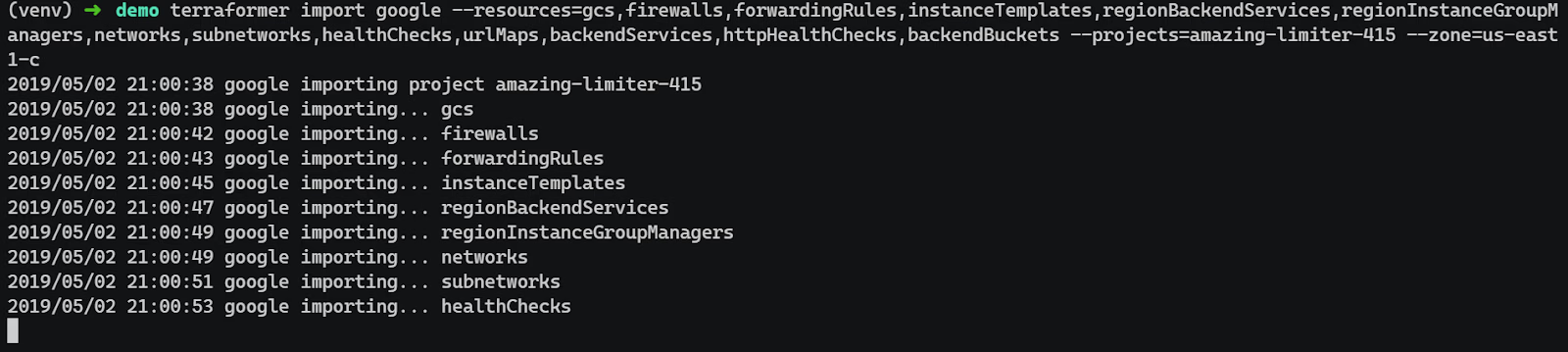
This command:
- Imports discovered resources into Terraform state
- Generates corresponding Terraform configuration files
Review the generated configuration and state
After completion, Terraformer produces:
- .tf files grouped by resource type
- A Terraform state file aligned with imported resources
- Provider configuration scoped to the project and zone
At this stage:
- Resource definitions are flat and unopinionated
- Provider defaults are explicitly set
- Naming reflects provider identifiers
This output is expected and should not be treated as production-ready code.
Validate correctness before refactoring
Before restructuring the code, validate the import:
The expected result is no planned changes. Any diffs indicate incomplete imports, unsupported attributes, or incorrect scoping and should be resolved before proceeding.
Trade-offs and limitations
Terraformer is not a governance or lifecycle tool:
- Imports are point-in-time snapshots
- No drift detection after import
- No ongoing reconciliation with live infrastructure
- Significant manual cleanup is usually required
Most teams spend time after the import:
- Refactoring into modules
- Introducing variables and naming standards
- Splitting resources across logical stacks
Where it fits
Terraformer works best as:
- A one-time accelerator for IaC adoption
- A discovery step before long-term Terraform ownership
- An input into broader governance or codification workflows
It is not meant to run continuously and does not replace drift detection or post-deployment visibility tooling.
4. Atlantis: Pull-Request–Driven Terraform Execution
Atlantis is commonly used when teams want Terraform execution to follow the same workflow as application code: changes proposed via pull requests, reviewed, and then applied in a controlled way.
What it does
Atlantis listens to pull request events and:
- Runs terraform plan automatically when a PR is opened or updated
- Posts plan output back to the PR for review
- Runs terraform apply only after approval and an explicit command or merge, depending on configuration
Execution happens in a centralized service rather than on individual developer machines.
Why teams adopt it
In practice, teams use Atlantis to:
- Enforce review-before-apply
- Prevent ad-hoc local applies
- Standardize how Terraform runs across repos
- Create a consistent audit trail tied to Git history
It works well in environments with many small Terraform repositories owned by different teams.
Operational characteristics
Atlantis is intentionally simple:
- It does not manage Terraform state
- It does not enforce policies on its own
- It relies on repository configuration (atlantis.yaml) for behavior
Because of this, it’s often paired with:
- Pre-commit hooks for local checks
- CI jobs for linting and security scanning
- External tools for policy enforcement and post-deployment visibility
Example: PR-Based Terraform Execution with Atlantis
This example shows how Atlantis is typically used to control Terraform execution through pull requests, using a simple but realistic change.
Scenario
- Terraform code stored in Git
- Atlantis configured against the repository
- Terraform runs only via pull requests
- The goal is to change the infrastructure safely without local applies
Change introduced in the Terraform code
A small but meaningful change is made to existing Terraform code. In this case, the count for a Proxmox VM resource is updated to scale a Kubernetes dev environment from one instance to three.
This kind of change is common:
- Scaling environments
- Adjusting capacity
- Rolling out infra updates incrementally
The change is committed to a branch, not directly to main.
Pull request triggers automatic planning
Once the pull request is opened, Atlantis detects the change and runs terraform plan automatically.
At this stage:
- Terraform runs in a controlled execution environment
- The plan is generated against the correct backend and workspace
- No infrastructure is modified
As shown in the merge request below:
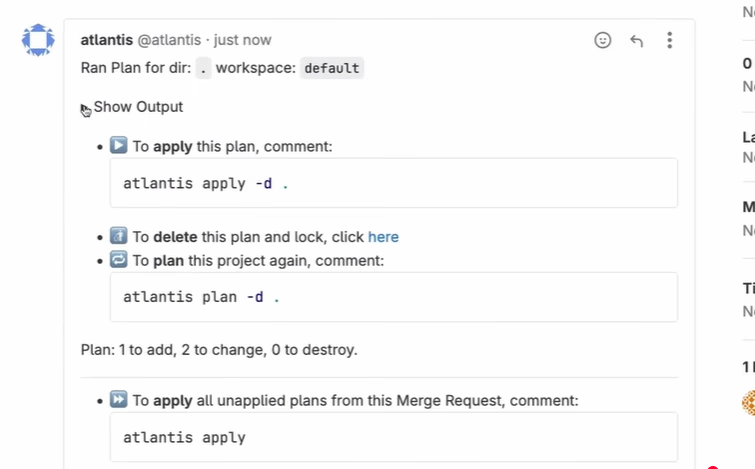
Atlantis is commenting on a pull request after running terraform plan, showing the execution context and instructions for applying the plan.
The plan output is attached to the pull request, making the impact of the change visible to reviewers:
- Resources to be created
- In-place updates
- No unexpected terraform destroy
This is where most review happens.
Explicit approval and apply
After the plan is reviewed, the change is applied by adding a comment to the pull request:
Atlantis then:
- Verifies the plan has not changed
- Acquires a lock to prevent concurrent applies
- Runs terraform apply using the previously generated plan
Execution is serialized and auditable.
Apply results tracked in Git context
Once the apply completes:
- Atlantis posts confirmation back to the pull request
- Locks are released
- Terraform state is updated centrally
At no point does a developer need to:
- Run Terraform locally
- Handle credentials manually
- Bypass review workflows
What this achieves operationally
This workflow ensures:
- Every Terraform change is reviewed
- Execution is consistent across environments
- State changes are traceable to Git commits
- Accidental local applies are eliminated
Atlantis enforces how Terraform runs, not what is allowed to run.
Where it fits
Atlantis is best suited for:
- Git-centric teams
- Organizations that want tight coupling between code review and infrastructure changes
- Environments where Terraform execution should be centralized but still lightweight
As environments grow, Atlantis usually becomes one part of a larger system rather than the final layer of control.
Automation and Terraform Execution Workflows
Once Terraform code exists and the state is under control, the next problem is execution. In larger environments, the risk is not how Terraform is written, but where and when it runs, and how changes are coordinated across teams and environments.
The tools in this section focus on standardizing execution and managing scale, not adding new provisioning logic.
5. Terragrunt: Environment and Dependency Orchestration
Terragrunt is commonly introduced when Terraform configurations start to multiply across environments and accounts, and duplication becomes hard to manage.
What it solves
Terragrunt sits on top of Terraform and addresses issues that show up in real-world layouts:
- Repeated provider and backend configuration
- Environment-specific variables scattered across repos
- Implicit dependencies between Terraform stacks
Instead of copying the same boilerplate everywhere, Terragrunt centralizes it.
How it’s typically used
A common enterprise pattern looks like this:
- One Terraform stack per domain or service (networking, compute, data, etc.)
- Separate directories for environments (dev, staging, prod)
- Terragrunt configuration (terragrunt.hcl) used to:
- Define remote state consistently
- Inject provider configuration
- Pass environment-specific variables
- Declare dependencies between stacks
This allows teams to keep Terraform modules focused and minimal.
Execution model
Terragrunt does not change how Terraform works. Under the hood:
- It still runs terraform init, plan, and apply
- It still relies on standard Terraform state backends
- It does not manage execution permissions or approvals
Execution is usually handled by CI/CD systems or tools like Atlantis, with Terragrunt acting as a thin orchestration layer.
Trade-offs to be aware of
Terragrunt introduces another abstraction:
- Debugging can be harder if teams are unfamiliar with the config model
- Dependency chains must be maintained carefully
- Poorly structured layouts can amplify the blast radius
Used well, it reduces duplication. Used poorly, it hides complexity.
Hands-on: Coordinating Terraform at Scale with Terragrunt
Terragrunt is typically introduced once teams stop running isolated Terraform stacks and start managing many environments, regions, and accounts with shared patterns.
A common setup looks like this:
- One Git repository per environment or domain (for example: prod/us-east-1/storage)
- Terraform modules defined once and reused
- Terragrunt used to:
- Inject remote state configuration
- Wire dependencies between stacks
- Control execution order
In a simple workflow, a change starts with a small module update, such as adding or modifying an S3 bucket module. Terragrunt detects which stacks are affected and generates a plan that reflects only those changes. As shown in the snapshot below:
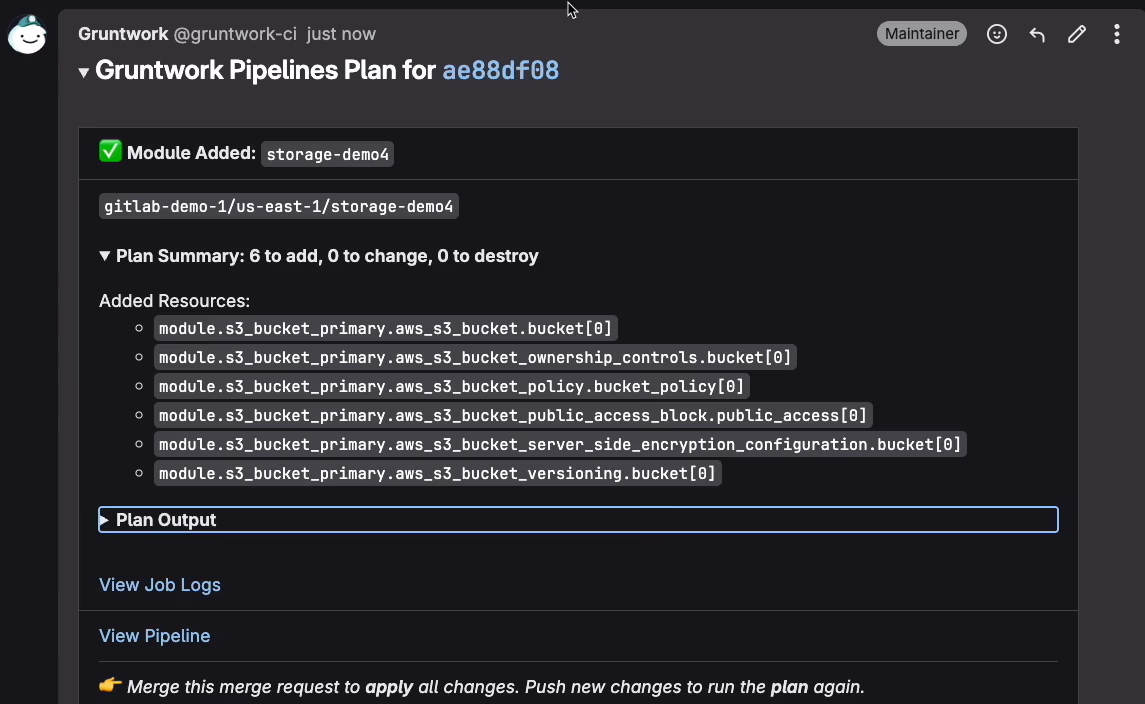
The plan output is shown directly in the CI system, showing:
- Which module was added or changed
- The exact resources affected
- A clear summary of adds, changes, and deletes
Terragrunt itself does not execute infrastructure changes. It orchestrates Terraform by:
- Injecting consistent remote state configuration across stacks
- Resolving dependencies between stacks (for example, network before compute)
- Running Terraform in the correct order without custom pipeline logic
At scale, this removes duplicated backend blocks, eliminates hand-crafted dependency scripts, and prevents accidental out-of-order deployments. Terraform still owns state and execution; Terragrunt standardizes how Terraform is invoked across hundreds or thousands of stacks.
Where it fits
Terragrunt works best when:
- Terraform code is already modular
- Multiple environments follow the same patterns
- Platform teams want consistency without forcing monorepos
It complements execution tooling but does not replace CI/CD, policy enforcement, or post-deployment governance.
Security, Compliance, and Cost Controls
Once execution is standardized, the next set of problems is about preventing bad changes from ever reaching production. At scale, security issues, policy violations, and cost spikes usually come from small, repeated mistakes that slip through reviews.
The tools in this section focus on evaluating Terraform before terraform apply, when changes are still cheap to fix.
6. Checkov: Static Security and Compliance Checks
Checkov is used to scan Terraform code and plans for security and compliance issues before anything is applied.
What it does
Checkov analyzes:
- Terraform configuration files
- Terraform plans (preferred in mature setups)
It checks them against a large set of built-in policies covering:
- Cloud security best practice
- CIS benchmarks
- Common compliance frameworks (PCI, SOC2, etc.)
Failures are reported with enough context to understand which resource and which setting caused the issue.
Where it runs
In most environments, Checkov runs:
- As part of CI on pull requests
- Before terraform apply
- Often alongside formatting and lint checks
Running it on plans instead of raw .tf files reduces false positives and reflects what Terraform will actually create.
What it does not do
Checkov:
- Does not enforce changes at runtime
- Does not observe live infrastructure
- Does not detect drift after deployment
It is a prevention tool, not a monitoring or governance layer.
Where it fits
Checkov works best when:
- Teams want early feedback on security posture
- Policy enforcement should block bad changes before merge
- Runtime governance is handled elsewhere
7. OPA + Conftest: Custom Policy Enforcement
OPA with Conftest is used when built-in scanners are not enough and teams need custom rules that reflect internal standards.
What it does
Conftest evaluates Terraform plans or JSON outputs against Rego policies defined by the organization. These policies are commonly enforced:
- Tagging and naming standards
- Network boundaries
- Region restrictions
- Environment-specific rules
Unlike scanners with fixed rule sets, this gives teams full control over policy logic.
How it’s typically used
Most teams:
- Convert Terraform plans to JSON
- Run Conftest as part of CI
- Fail builds when policies are violated
Policy ownership usually sits with platform or security teams, not application teams.
Trade-offs
OPA is powerful but not simple:
- Writing Rego requires upfront investment
- Poorly written policies can be hard to debug
- Policy sprawl is a real risk without governance
Example: Enforcing Custom Terraform Policies with Conftest
Conftest is used when teams need organization-specific rules that go beyond built-in security scanners. It evaluates Terraform plans or state files against policies written in Rego.
In this example, Terraform output is converted to JSON and evaluated locally before any apply step.
A typical execution looks like this:
conftest test terraform.tfstate.json -p policy/
This command runs all Rego policies in the policy/ directory against the Terraform state file. As visible in the scan below:

The result clearly reports:
- Number of policies evaluated
- Pass/fail status
- No ambiguity about whether the infrastructure meets the defined rules
Policy Breakdown
The deployment.rego policy enforces two rules:
- Containers must not run as root
- Checks that runAsNonRoot is explicitly set
- Prevents workloads from running with elevated privileges
- Deployments must define selector labels
- Ensures spec.selector.matchLabels.app exists
- Avoids misconfigured Deployments that break rollout behavior
These rules are not generic security checks. They encode platform-level expectations, allowing no interpretation drift across teams.
Where it fits
OPA and Conftest make sense when:
- Organization-specific rules matter more than generic best practices
- Teams need precise control over allowed infrastructure changes
- Policies must evolve independently of tooling vendors
8. Infracost: Cost Awareness During Code Review
Infracost adds cost visibility at the same point where changes are reviewed.
What it does
Infracost parses Terraform plans and:
- Estimates the monthly cost impact
- Highlights the cost deltas introduced by a change
- Comments directly on pull requests
This makes cost part of the review conversation instead of a post-deployment surprise.
How teams use it
In practice:
- Infracost runs on PRs
- Teams define thresholds for large increases
- Reviewers can question or adjust changes early
It’s especially useful for catching:
- Oversized instances
- Accidental scaling changes
- Expensive managed services were added unintentionally
Limitations
Infracost:
- Estimates cost, but it does not enforce budgets
- Depends on good tagging and ownership to be most effective
- Does not track actual spend after deployment
Example: Cost Visibility with Infracost
Infracost is typically used to understand the cost impact of Terraform changes before they’re applied, not as a full cost management system.
A simple local run looks like this:
This command estimates monthly cloud costs by combining Terraform configuration with basic usage assumptions, such as instance hours, storage size, or request volume. As visible in the breakdown below:
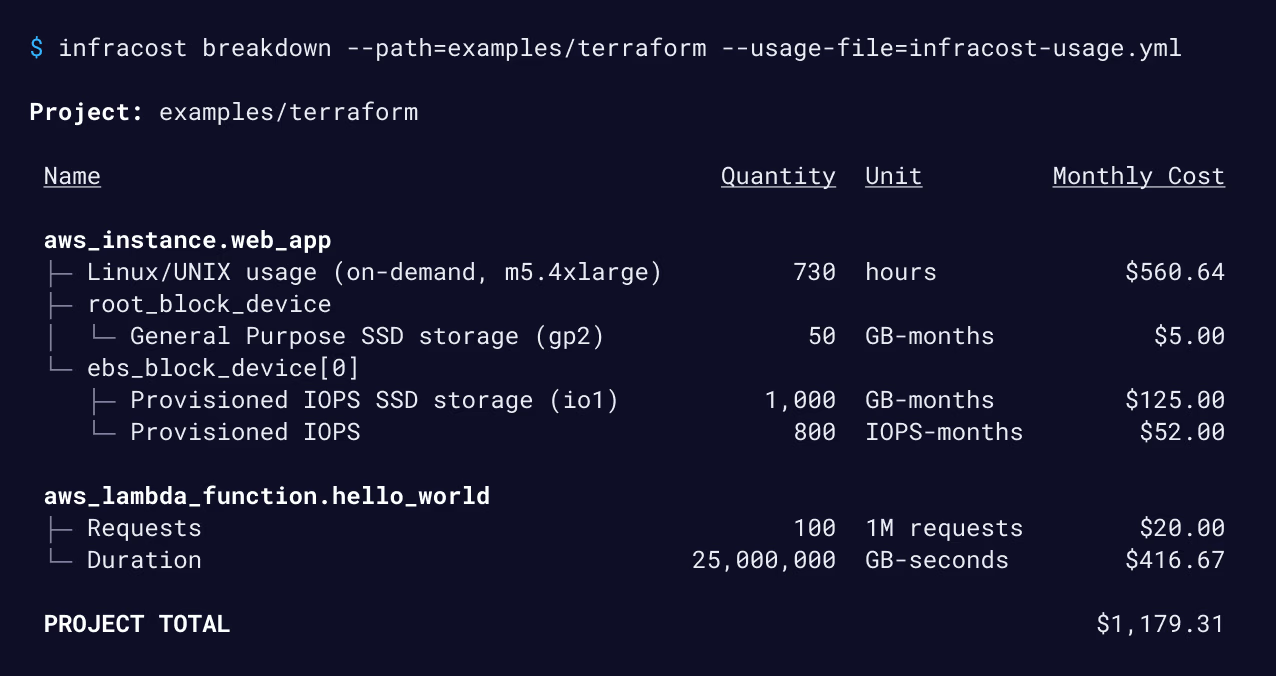
The output breaks costs down per resource and rolls them up into a project total. In practice, this is enough to spot oversized instances, expensive storage choices, or serverless usage that isn’t obvious from the code itself.
Most teams don’t run Infracost manually. It’s usually wired into pull requests so reviewers can see cost deltas alongside infrastructure changes and ask questions before anything is merged.
Infracost doesn’t enforce budgets or track actual spend. Its value is making cost a visible part of the review process, at the point where changes are still easy to adjust.
Where it fits
Infracost works best when:
- Cost accountability is shared across teams
- Reviews already happen in pull requests
- Post-deployment cost monitoring exists elsewhere
Developer Experience and Code Quality
Once governance, execution, and policy controls are in place, day-to-day friction becomes the next bottleneck. Small inconsistencies in tooling, documentation, and local workflows tend to compound quickly in large teams.
The tools in this section focus on keeping Terraform usable at scale, especially when multiple teams are contributing to shared modules and environments.
9. terraform-docs: Standardized Module Documentation
terraform-docs is used to keep Terraform module documentation accurate without relying on manual updates.
What it does
terraform-docs parses Terraform modules and generates:
- Input and output variable tables
- Descriptions pulled directly from code
- Usage examples, depending on the configuration
The output is typically written into README.md files alongside the module.
Why this matters in practice
In larger codebases:
- Modules are reused across teams
- Variables change over time
- Manual documentation drifts almost immediately
terraform-docs removes that drift by making documentation a build artifact instead of a manual task.
How teams use it
Most teams:
- Run terraform-docs as part of CI
- Fail builds if generated docs are out of sync
- Standardize the README structure across all internal modules
This keeps module usage predictable and reduces onboarding time for new contributors.
Example: Auto-Generating Terraform Module Docs with terraform-docs
Keeping Terraform module documentation up to date is mostly a losing battle if it’s done manually. terraform-docs solves this by generating documentation directly from the module code.
In a typical module repository, documentation is generated and injected into the README using a single command:
This reads the module’s providers, resources, inputs, and outputs and writes structured tables into the README between predefined markers. As shown in the readme below:
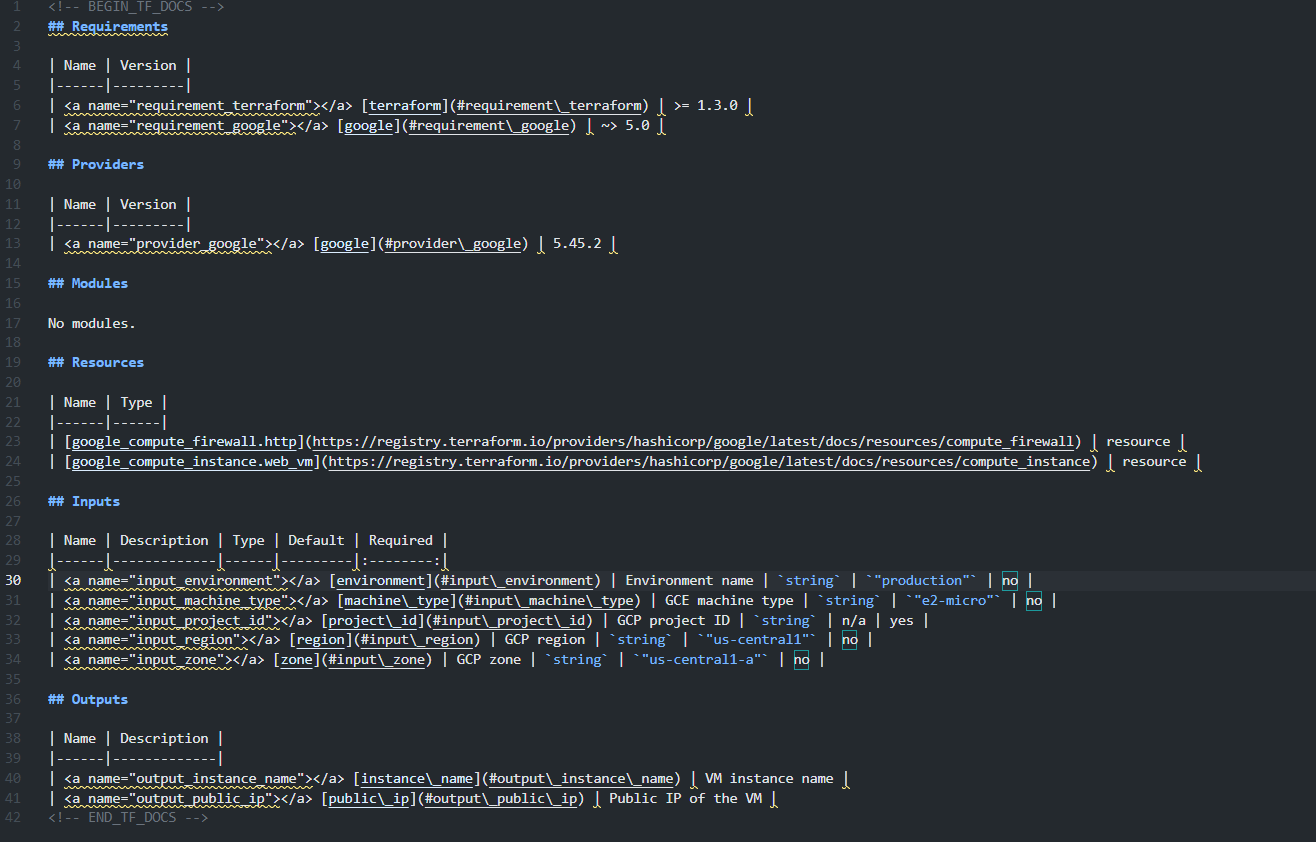
The generated output includes:
- Required Terraform and provider versions
- Providers used by the module
- Resources managed by the module
- Inputs with types, defaults, and required flags
- Outputs exposed by the module
Because the content is derived from the code, documentation stays accurate as the module evolves. Most teams run this as part of CI or a pre-commit hook and fail the build if the README is out of sync.
The value here isn’t automation for its own sake; it’s removing an entire class of drift that otherwise shows up during onboarding and reviews.
Where it fits
terraform-docs is most useful when:
- You maintain a shared module library
- Multiple teams consume the same modules
- Documentation accuracy matters more than presentation polish
10. TFLint: Terraform Static Analysis and Best-Practice Enforcement
This category focuses on catching Terraform issues early, before plans are reviewed or applied, by enforcing correctness and provider-specific best practices.
What it addresses
TFLint targets problems that Terraform itself does not reliably surface:
- Invalid or unsupported resource arguments
- Deprecated Terraform or provider attributes
- Unused variables, locals, and declarations
- Incorrect references and structural issues
- Provider-specific misconfigurations (for example, invalid instance types)
These issues often pass terraform fmt and terraform validate but still cause failed applies or unnecessary review churn.
Common setup
A typical baseline includes:
- TFLint configured at the repository level
- Core TFLint rules enabled
- Provider plugins (AWS, Azure, GCP) installed via tflint --init
- Optional project-specific rule configuration in .tflint.hcl
Most checks are static and run locally without Terraform state or cloud credentials. Some provider plugins support optional deep checks, which call provider APIs and therefore require credentials; these are usually enabled selectively.
Impact at scale
Individually, TFLint is a small tool. Used consistently, it:
- Reduces CI failures caused by basic configuration mistakes
- Keeps pull requests focused on intent instead of cleanup
- Catches provider-level issues before terraform plan or apply
- Improves Terraform code quality across teams without central policing
Hands-on: Catching Terraform Errors Early with TFLint
TFLint is used to detect Terraform-specific mistakes that terraform validate does not catch. It focuses on provider semantics, invalid arguments, deprecated fields, and configuration patterns that will fail at plan or apply time.
A simple local run looks like this:
When run against the configuration, TFLint immediately flags an invalid instance type:

In this case:
- The instance type t2x.xmicro does not exist
- Terraform syntax is valid, so terraform validate would pass
- The error would only surface during terraform plan or apply
TFLint catches this earlier by validating arguments against provider-specific rules.
What This Prevents
- Failed plans caused by typos or invalid values
- Wasted CI cycles running plans that will never succeed
- Review noise caused by errors that should have been caught locally
Where it fits
TFLint runs early in the Terraform lifecycle:
- Before planning
- Before policy checks
- Before execution
It does not enforce governance, security, or drift detection. But without it, downstream tooling often compensates for preventable issues that should have been caught much earlier.
From Fragmented Tooling to Unified Cloud Operations
As Terraform usage grows, most organizations reach a point where infrastructure visibility starts to break down.
Infrastructure exists in both Terraform-managed and unmanaged environments. Terraform state reflects declared intent, not the full cloud reality. Resources are created and modified through CI pipelines, cloud consoles, managed services, and one-off automation. Over time, ownership, tagging, and compliance standards degrade, and drift accumulates without a reliable, continuous signal.
At this stage, adding more execution tooling or CI checks does not address the core problem. CI systems and policy scanners operate on code and plans. Execution tools control how Terraform runs. None of them answers a more basic operational question: what is actually running in our cloud right now, across all accounts and providers?
What’s required instead is a centralized operational control layer that continuously observes live infrastructure and correlates it with IaC, workflows, and governance signals. This is where Firefly comes in as a complete IaC orchestration platform providing a consolidated view across AWS, GCP, Azure, Kubernetes, and SaaS integrations as shown in the dashboard below:
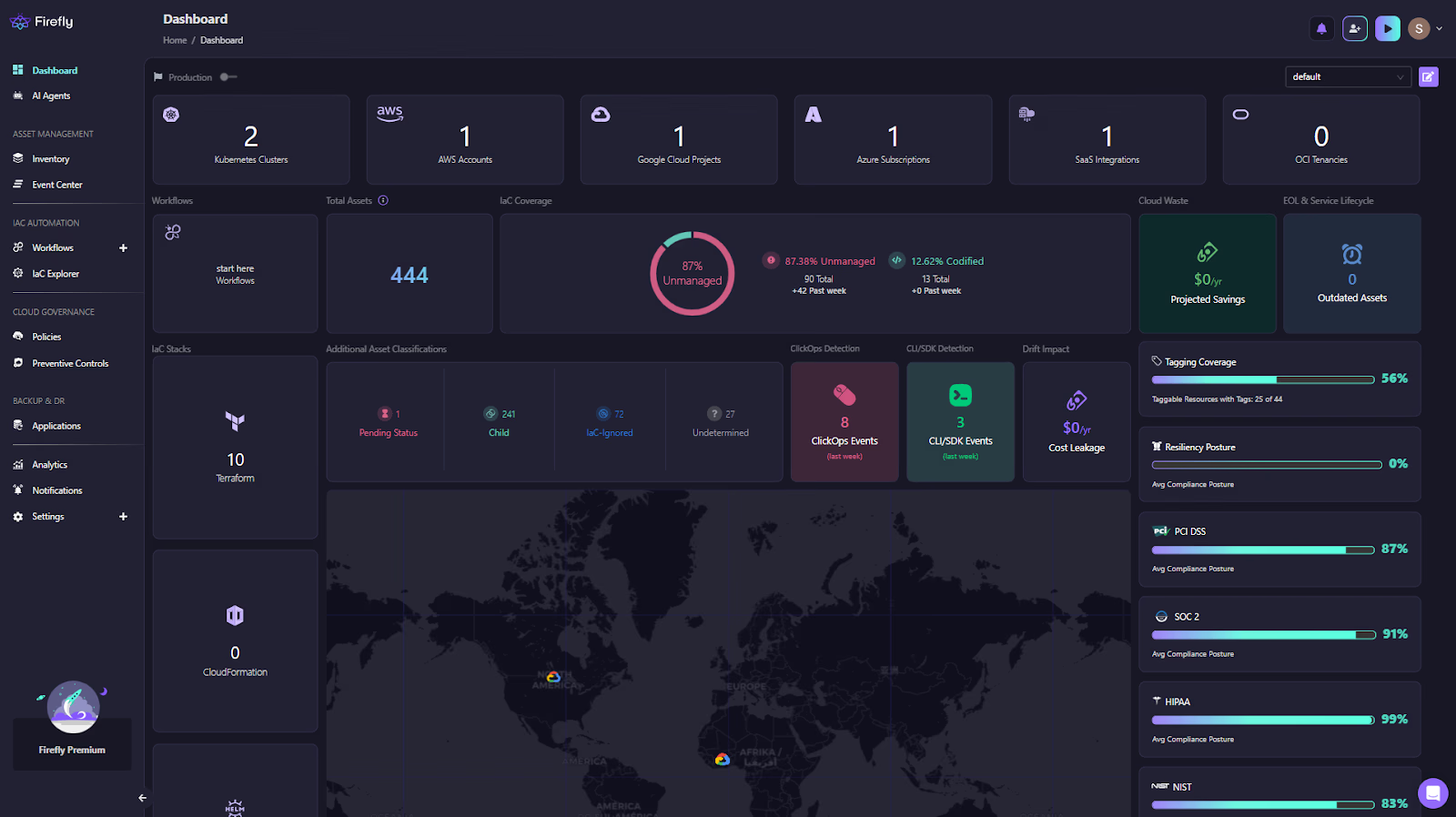
The dashboard surfaces IaC coverage, unmanaged and drifted assets, workflow activity, clickops events, cost impact, tagging coverage, and compliance posture in one place.
From an operational standpoint, this kind of dashboard matters because it collapses multiple blind spots into a single view:
- Cloud & SaaS account visibility: A clear inventory of connected cloud accounts and integrations across providers, making it obvious which environments are covered and which are not.
- IaC management at scale: Visibility into how many Terraform state files exist, how active deployments are, and whether IaC stacks are healthy. This helps platform teams understand not just what is deployed, but how infrastructure is being managed.
- IaC coverage and drift posture: A real-time breakdown of codified, drifted, and unmanaged resources. This is based on observed cloud state, not assumptions from repositories or state files.
- Drift and change detection: Identification of clickops events and configuration drift, including cost impact. This makes post-deployment changes visible without waiting for audits or incidents.
- Governance and hygiene signals: Tagging coverage, cloud waste, end-of-life services, and compliance posture across common frameworks. These are the issues that usually surface late, when they are already expensive to fix.
This is where Firefly fits in practice. It operates as a control plane above Terraform execution, continuously discovering resources via provider APIs, correlating them with IaC coverage, enforcing guardrails during plan execution, and centralizing visibility into workflows, drift, compliance, and asset inventory.
The important distinction is that Terraform remains the provisioning engine. Firefly does not replace Terraform, CI/CD pipelines, or execution tools like Atlantis. Instead, it fills the operational gap by acting as a system that can reason about what exists now, not just what was declared at apply time.
For teams operating multi-cloud environments at scale, this shift, from fragmented signals to a unified operational view, is what makes infrastructure governance sustainable over time.
FAQs
Is Terraform a CI/CD tool?
No. Terraform is not a CI/CD tool. Terraform is a provisioning tool that defines and applies infrastructure changes. CI/CD systems control when Terraform runs and under what conditions. In practice, Terraform is usually executed inside CI/CD pipelines, but it does not handle build logic, approvals, artifact flow, or deployment orchestration on its own.
Is Terraform a framework or a tool?
Terraform is a tool, not a framework. It provides a declarative language (HCL), a dependency graph engine, and a provider model to interact with APIs. It does not impose application structure, workflows, or architectural patterns. Those decisions are handled by teams through module design, repository layout, and surrounding tooling.
Is Terraform an AWS tool?
No. Terraform is cloud-agnostic. It works with AWS, Azure, GCP, and many other platforms through providers. Terraform interacts with APIs exposed by cloud providers, but it is not owned by or tied to any single cloud. This is why it’s commonly used in multi-cloud environments.
Which tool is used for Infrastructure as Code (IaC)?
Terraform is one of the most widely used IaC tools, but it’s not the only one. Other common IaC tools include CloudFormation for AWS, ARM/Bicep for Azure, and Pulumi for code-first workflows. Terraform is often chosen when teams need a consistent approach across multiple cloud providers and services.


.webp)


.webp)












