TL;DR
- CloudTrail logs the API call, not that an AI agent made it; figuring out whether an agent was responsible still requires manually cross-referencing IAM roles, pipelines, and execution logs.
- Model governance covers bias and training data. Cloud teams need governance over what the agent does in AWS, which API calls it makes, which resources it changes, and whether those actions comply with active SCPs.
- Firefly's Event Center classifies activity into AgentOps, ClickOps, CLI/SDK, Mutations, VCS, and Workflows in one timeline, with a dedicated Deny filter that surfaces blocked actions with the principal and policy rule already attributed.
- Preventive Controls ships 150+ built-in SCP and RCP templates tagged by PCI-DSS, HIPAA, and SOC2, with Policy Insights flagging misconfigurations before the policy reaches the organization.
An AI agent investigating a production incident can launch EC2 instances, modify security groups, and update scaling policies, none of which are explicitly approved. AWS CloudTrail records each API call. It does not record that an AI agent made those decisions, what it was trying to fix, or whether any of those actions were sanctioned.
A thread in r/SaaS put the enterprise version of this plainly: "Your product works great. Your customer's compliance team blocks it. Or worse, they deploy it wrong, create risk, and churn. You're selling software, but your customers need a completely safe deployment system." Cloud operations teams hit the same wall at the infrastructure layer. The agent executes. The audit log captures the call. The reasoning behind it disappears.
That gap, between what happened and who decided it should, is what an AI governance solution for cloud operations has to close. AWS, Azure, and GCP receive API calls. They do not classify whether those calls came from Terraform, a Jenkins pipeline, or an AI agent making decisions on its own.
What Is an AI Governance Solution?
Discussions about AI governance focus on models, bias, training data quality, explainability, and regulatory compliance. Those are real concerns for teams building AI-powered products. For infrastructure teams, the first concern is different and more immediate:
What can this agent do in my environment, and what happens if it does something wrong?
Consider the scenario: an AI agent is asked to investigate a failing application. Minutes later, an EC2 instance has launched, an Auto Scaling Group has been modified, a security group rule has been updated, and an IAM role has been assumed. Nobody approved those individual actions. Nobody is asking whether the model was trained on the right dataset. The questions on the table are: who approved these actions, why were they taken, were they allowed, and can the wrong ones be reversed?
An AI governance solution is a layer of visibility and control around AI-driven actions. For cloud teams, it answers the questions that CloudTrail, AWS Config, and IAM tooling leave open:
The more access an AI agent holds, ec2:*, iam:PassRole, s3:* across multiple accounts, the more critical those answers become. An agent that can provision infrastructure in any region, attach IAM roles to new resources, and modify security group rules has a large blast radius. Governing that agent means knowing what it did, why it did it, and whether it was permitted to do so.
What Is the Difference Between Model Governance and Agent Governance?
Two distinct governance problems now exist in parallel. Most organizations are prepared for the first and almost entirely unprepared for the second.
Model-Level Governance Covers Bias, Compliance, and Training Data
Model governance asks whether the AI system itself is reliable. The questions at this layer are:
- Is the model producing biased outputs?
- Is it compliant with regulatory requirements?
- Is it generating explainable, consistent results?
- Is it using approved training data?
These questions apply to teams building AI-powered products. They require model evaluation frameworks, bias audits, and explainability tooling. They are important, but they are not the questions infrastructure teams face when an AI agent starts calling production cloud APIs.
Governing What Happens After the Model Decides to Act
Once the model decides to call an AWS API, the governance problem shifts entirely from the model's internal behavior to the actions it takes in the environment:
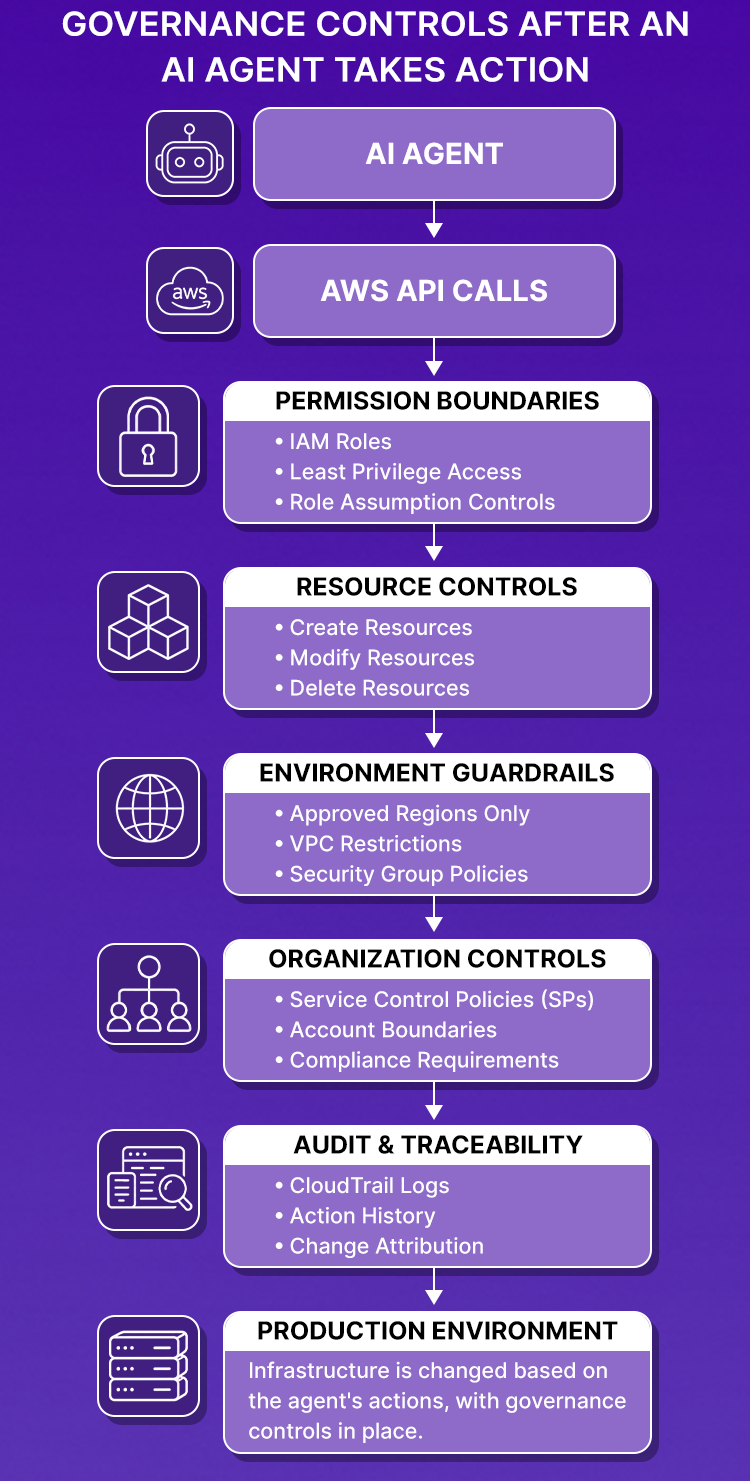
At this point, the governance questions are operational:
- Can the agent create resources? Can it delete them?
- Can it modify VPC networking or security group rules?
- Can it operate in regions not approved for production workloads?
- Can it assume IAM roles with permissions beyond its operational scope?
- Can it bypass AWS Service Control Policies?
- Can the team audit every action the agent took last week?
As AI agents take on infrastructure tasks, troubleshooting, provisioning, scaling, and credential rotation, these are the questions infrastructure teams spend their time answering. Traditional model governance frameworks don't address any of them.
Why AI Agents Create a New Governance Challenge in the Cloud
Operational governance questions are new because AI agents operate differently from every previous source of cloud change. Understanding why makes it clear what existing tools can and cannot cover.
From Human Operators to AI Operators
Infrastructure changes in cloud environments have gone through three distinct generations:
Generation 1:
Engineer -> AWS Console / CLI -> Cloud Change
Generation 2:
Engineer -> Terraform / CI/CD -> Cloud Change
Generation 3:
Engineer -> AI Agent -> Cloud APIs -> Cloud Change
In the first two generations, the change was deterministic. The engineer wrote the configuration or initiated the pipeline. The automation executed exactly what was defined. If something broke, the investigation traced back through the pipeline to the commit by the engineer.
In the third generation, the agent decides what to do. The engineer provides the objective. The agent determines the actions. AWS, Azure, and GCP receive the API calls. From the cloud provider's perspective, all three generations produce identical-looking audit log entries, an IAM principal calls a cloud API through an SDK.
The Questions Every Cloud Team Must Answer
When an EC2 instance appears in a production account, and no engineer initiated it, the team needs answers to five questions before any remediation can start:
- Which agent initiated the action?
- What objective was the agent trying to achieve?
- Was the action part of an approved workflow?
- Which IAM permissions were used, and which resources were affected?
- Did the action violate any organizational policy?
The challenge intensifies in more serious scenarios. An AI agent attempts to create infrastructure in eu-west-1, a region restricted for production workloads. An AWS SCP blocks the request. CloudTrail records an AccessDeniedException. Now the team needs four more answers: which SCP triggered the denial, whether the denial was expected behavior, whether the agent's permission scope needs narrowing, and whether the original action was legitimate. Without tooling that attributes agent-driven activity and surfaces policy denials with context, each of those questions starts a separate manual investigation.
Why Cloud Audit Logs Cannot Govern AI Agent Activity
Traditional cloud audit logs do not miss data; they record exactly what they were designed to record. The gap is that they were designed before AI agents became operational actors in cloud environments.
Scenario: An EC2 Instance Appears With No Engineer Behind It
A new EC2 instance is running in a production account. No engineer remembers creating it. No Terraform deployment was triggered. No CI/CD workflow is in progress.
The investigation starts with CloudTrail. The relevant event looks like this:
{
  "eventName": "RunInstances",
  "userIdentity": {
    "type": "AssumedRole",
    "arn": "arn:aws:sts::123:assumed-role/devops-agent-role"
  },
  "userAgent": "aws-sdk-go/..."
}
The role name includes "agent." But role names are not proof. That exact AssumedRole + AWS SDK pattern is produced by Terraform running in Jenkins, a GitHub Actions workflow, a scheduled Lambda, a custom Python script, and an AI agent. CloudTrail does not distinguish between them.
How Teams Investigate Without an AI Governance Solution
Without dedicated governance tooling, determining whether an AI agent was responsible runs through six sequential steps:
- Inspect the IAM role's trust policy to identify which services can assume it
- Cross-reference against active CI/CD pipelines to rule out pipeline-driven changes
- Review automation platform logs to rule out scheduled jobs
- Pull agent execution logs, if agent logging is configured, to find matching timestamps
- Correlate timestamps across all four systems to narrow down the source
- Identify the original request or ticket that prompted the agent activity
A question that should take seconds, "Did an AI agent create this instance?", takes hours when the evidence is spread across four separate systems. In environments where agents execute dozens of actions per day across multiple accounts, that investigation cycle runs repeatedly for every unexpected change.
What CloudTrail Can Tell You?
CloudTrail can tell you:
- An EC2 instance was launched at a specific timestamp
- An IAM role was assumed by an AWS SDK client
- A security group rule was modified in us-east-1
CloudTrail cannot tell you:
- Whether the action was performed by an AI agent or a Terraform pipeline
- Which agent performed it, and from which execution context
- What operational objective prompted the agent to take the action
- Whether the action was expected or anomalous, given the agent's configuration
- Whether the action complied with active organizational guardrails
- Whether the same agent has performed similar actions across other accounts in the same window
As AI agents become regular operators in cloud environments, the second list drives every incident investigation and compliance review. Raw audit logs cover the first list. An AI governance solution has to cover the second.
4 Capabilities Every AI Governance Solution Must Provide
The gaps above map directly to four capabilities every AI governance solution must deliver. Each one addresses a different point in the lifecycle of an agent action: before it executes, at event ingestion, at the point of denial, and across historical records.
Agent Identification: Know Which Source Made Each Cloud Change
Every API call in a cloud environment needs source classification at ingestion by a human operator, an IaC pipeline, automation, or an AI agent. Without that classification, every investigation involving an AI agent starts with manual cross-referencing rather than with the relevant event.
An EC2 instance can be created by an engineer through the console, Terraform running in Jenkins, a Lambda function, a custom automation script, or an AI agent. From the cloud provider's perspective, all five produce similar-looking CloudTrail entries. Source classification at ingestion is what makes them immediately distinguishable, so the first step of an investigation is filtering, not guessing.
Policy Enforcement: Stop Non-Compliant Agent Actions Before They Execute
Visibility into what an agent did after the fact is useful. Stopping the agent from taking a non-compliant action before the API call dispatches eliminates the violation entirely.
An organization requires that SageMaker workloads run only on approved Graviton instance types. Without pre-execution enforcement, an AI agent with SageMaker permissions can launch a p3.16xlarge training job. That violation surfaces during a cost review or compliance audit, not during the agent's request. With enforcement at the governance layer, the request is evaluated against the instance type policy before the API call leaves the agent's execution environment. A non-compliant request is blocked, a Deny Event is generated, and the API call never reaches AWS.
Explainability: Understand Why an Agent Took Each Action
Knowing that an AI agent called UpdateService on an ECS cluster is not sufficient for postmortem analysis. The investigation needs to know what prompted the call.
An AI agent scales an ECS service from 20 tasks to 100. The UpdateService event appears in CloudTrail. The p99 latency alert that triggered the agent, the CloudWatch metric values the agent evaluated, and the scaling threshold the agent was configured to respond to are absent from the entry. The team reviewing the change in a postmortem cannot determine whether the fivefold scaling response was correctly sized for the traffic increase, whether the agent was reacting to a transient spike that shouldn't have triggered a response at all, or whether the agent's threshold configuration needs adjustment.
An AI governance solution surfaces the operational context alongside the action, the objective the agent was pursuing, the telemetry it evaluated, and the decision that produced the API call. That context is what turns a raw CloudTrail entry into an actionable postmortem record.
Auditability: Maintain a Searchable Record of Every Agent Action
A single AI agent can execute hundreds of actions per day across multiple cloud accounts. Without a centralized, searchable audit trail, answering basic operational questions requires manually aggregating logs across accounts and providers.
When an incident postmortem asks what the agent did between 14:00 and 18:00 UTC across all accounts, that question should return a filtered view in seconds, not a multi-hour CloudTrail export-and-correlation exercise. When a compliance review asks which agent actions were denied by policy in the last 30 days, that answer should come from a single searchable record spanning AWS, Azure, and GCP. The difference between a five-minute investigation and a five-hour one is whether that centralized record exists.
How Firefly Delivers AI Governance for Cloud Operations
Firefly addresses each of those four capabilities through four dedicated features: AgenticOps Events for agent identification, Event Center for a unified view of cloud and code activity, Deny Events for policy visibility, and Preventive Controls for pre-execution enforcement on AWS.
AgentOps Events: Identifying AI-Driven Activity
The Firefly Event Center classifies all operational activity into source types at ingestion. Under the Cloud filter, four source types appear: ClickOps, AgenticOps, CLI/SDK, and Mutations. Filtering to AgenticOps surfaces only agent-driven actions, each row recording the timestamp, data source, region, asset type, event name, asset name, and owner.
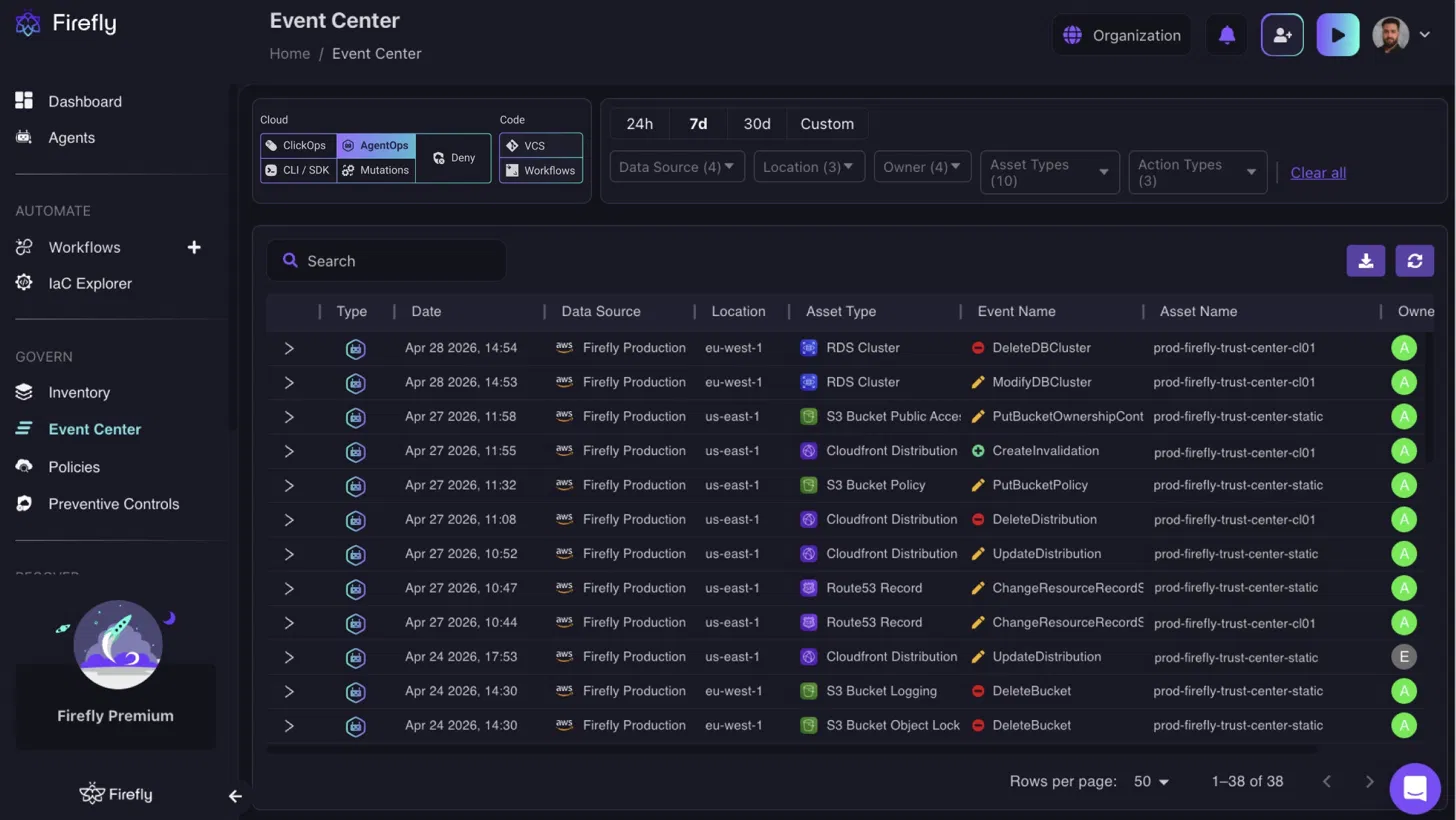
In a production AWS account, that filtered view returns entries like DeleteDBCluster against prod-firefly-trust-center-cl01 in eu-west-1, PutBucketPolicy against prod-firefly-trust-center-static in us-east-1, and ChangeResourceRecordSets against a Route53 record, each attributed to the agent that executed it. The same 7-day window that shows 38 agent-driven events in this view would otherwise require pulling assumed IAM role entries from CloudTrail across each account and cross-referencing them manually.
Event Center: A Unified Audit Trail for Cloud Operations
The Event Center groups events into two filter categories. Under Cloud, you can filter for ClickOps, AgenticOps, CLI/SDK, Mutation, and Deny events. Under Code, you can filter for VCS and Workflow events. Time range filters (24h, 7d, 30d, or Custom) apply across both categories, alongside filters for Data Source, Location, Owner, Asset Type, and Action Type, making it easy to narrow investigations to a specific time window, resource, or actor.
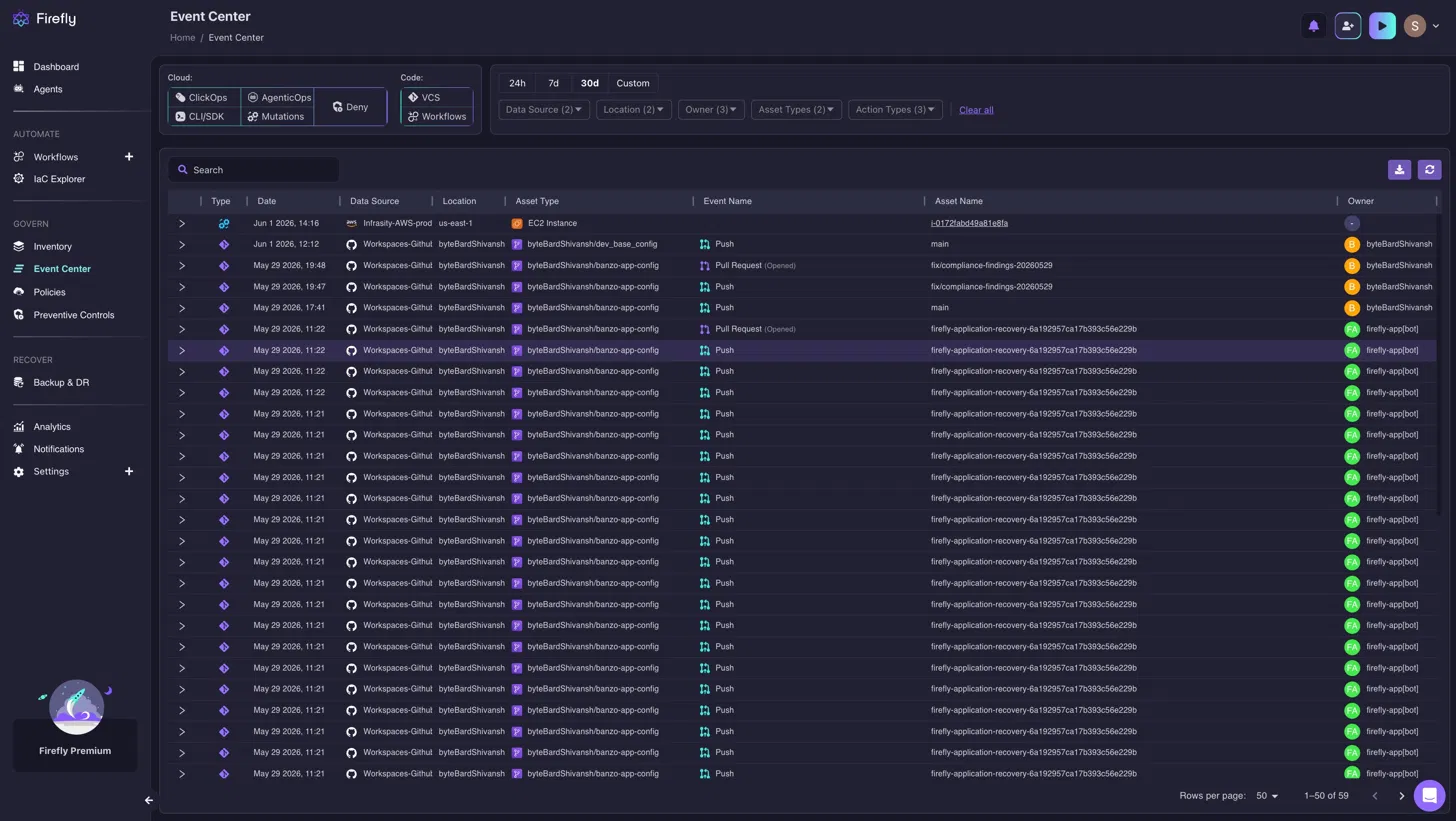
This unified timeline lets you correlate activity across both your cloud infrastructure and development workflows. For example, a Push performed by firefly-app[bot] to the firefly-application-recovery-6a192957ca17b393c56e229b repository can appear alongside an EC2 infrastructure event in us-east-1. During an investigation, you can view these related events in chronological order from a single interface instead of manually correlating Git activity with cloud audit logs, making it easier to reconstruct the sequence of changes that led to an incident.
Deny Events: Making Governance Controls Observable
The Event Center's Deny filter isolates every blocked action across ClickOps, AgenticOps, CLI/SDK, and Mutations. When an AWS SCP or Resource Control Policy blocks an API call, Firefly records the denial as an event in the same table, with the same columns of data source, location, asset type, event name, asset name, and owner, rather than as a silent AccessDeniedException buried in a CloudTrail stream.
The team does not trace a failed API call from CloudTrail back through the SCP list to the agent. They filter the Event Center to Deny, set the relevant time window, and every blocked action appears attributed, timestamped, and searchable alongside the rest of the account's activity.
Preventive Controls: Defining Guardrails Before Problems Occur
Deny Events records what was blocked. Preventive Controls stop non-compliant actions before they reach the AWS API.
Firefly's Preventive Controls currently support AWS, GCP, Azure, and OCI and are listed as coming soon. Within AWS, two policy types are available: Service Control Policies (SCPs) and Resource Control Policies (RCPS). Firefly ships with a library of 150+ built-in policy templates, each tagged by compliance framework: PCI-DSS, HIPAA, SOC2, COST-OPTIMIZATION, or OS.
Now referring to the snapshot below:
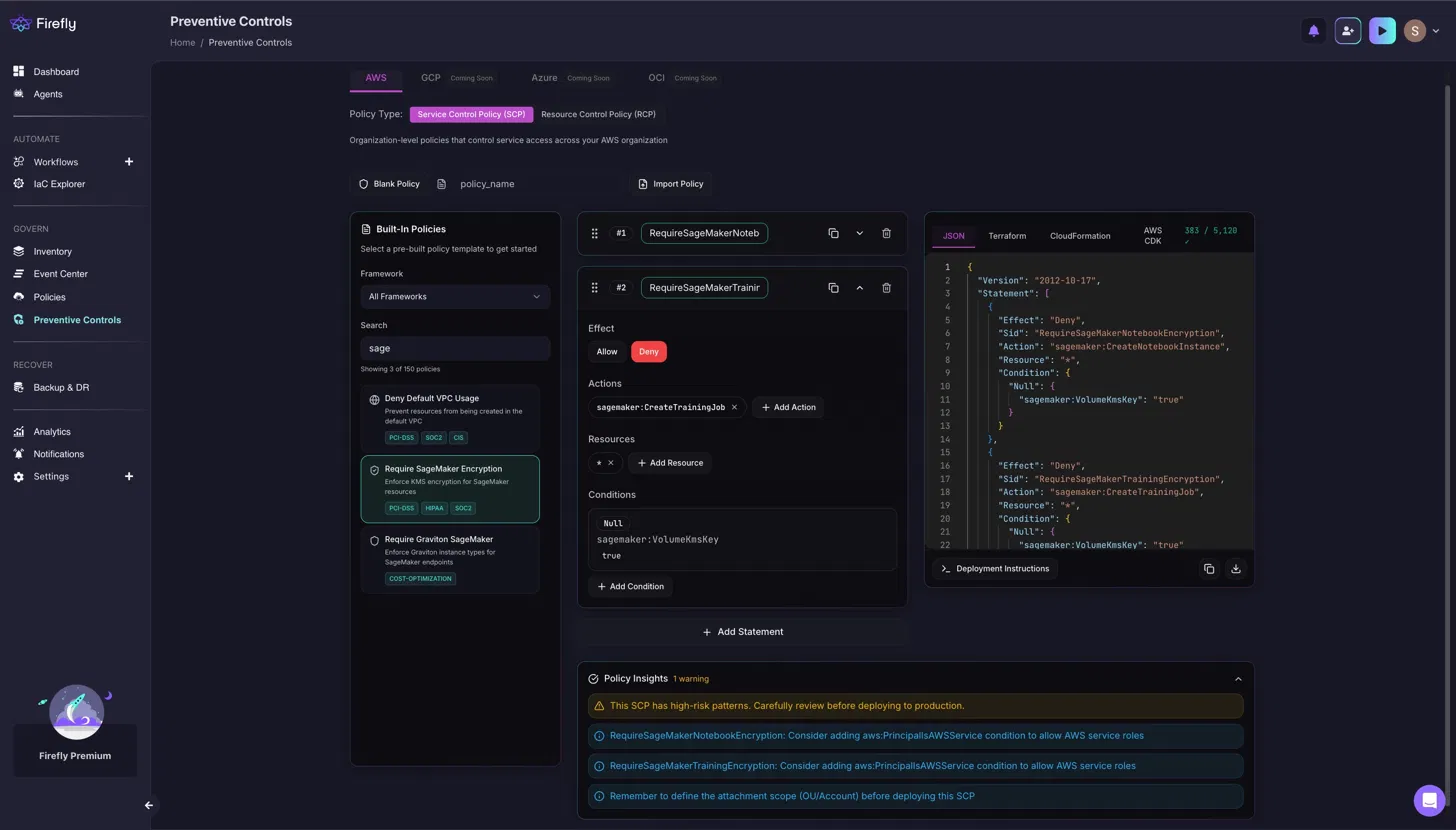
Searching "sage" in the built-in library returns three policies: "Deny Default VPC Usage," "Require SageMaker Encryption," and "Require Graviton SageMaker." Selecting "Require SageMaker Encryption" opens a policy with two Deny statements. The first, RequireSageMakerNotebookEncryption, blocks sagemaker: CreateNotebookInstance when sagemaker: VolumeKmsKey is null. The second, RequireSageMakerTrainingEncryption, blocks sagemaker: CreateTrainingJob under the same condition. Both statements deny the action unless a KMS key is explicitly provided, forcing encryption on every SageMaker notebook and training job. The completed policy exports in JSON, Terraform, CloudFormation, or AWS CDK format directly from the editor.
Before the policy goes live, Firefly's Policy Insights runs automatically. For the SageMaker encryption policy, it surfaces three issues: a high-risk pattern warning, a recommendation to add aws:PrincipalIsAWSService conditions to both statements to prevent blocking AWS service roles, and a reminder to define the OU/Account attachment scope before deploying the SCP. These checks run before the policy reaches the organization, catching gaps that would otherwise block legitimate AWS service operations in production.
Bringing It All Together: The AI Governance Lifecycle
Each of those four capabilities addresses a specific gap. The operational value comes from running them as a connected sequence across every agent action, from the moment a request is made through audit and review.
The Governance Lifecycle in Practice
An AI agent responsible for ML infrastructure attempts to deploy a new SageMaker endpoint in eu-west-1 using a p3.16xlarge instance. The deployment request reaches AWS, where an AWS Service Control Policy (SCP) attached to the organization's AWS Organization denies the API call because deployments are only permitted in approved regions.
Firefly ingests the resulting cloud audit event and surfaces it as a Deny Event in the Event Center. The event records when the denial occurred, the principal that attempted the action, the denied API operation, the target resource, the affected region, and, where available, the SCP responsible for the denial. An AI Recommendation explains why the request was blocked and suggests possible remediation, such as deploying in an approved region or updating the policy if the restriction is no longer appropriate.
The ML platform team reviews the Deny Event and determines that the organization's policy should allow SageMaker deployments in an additional region. After updating the SCP, the agent retries the deployment in us-east-1 using an approved Graviton instance type. This time, the API call succeeds, and Firefly records the successful infrastructure change as an Event Center entry alongside the earlier denial.
Three weeks later, during a postmortem, the team filters the Event Center for SageMaker-related activity across a four-day window. They can see the original denied deployment attempt, the subsequent successful deployment, and other infrastructure changes, including actions performed by both AI agents and human operators—in a single chronological timeline.
That illustrates the governance lifecycle in practice: preventative guardrails enforce organizational policies, Firefly makes those policy denials observable through Deny Events, successful infrastructure changes are recorded alongside them, and the Event Center provides a unified audit trail for investigation, troubleshooting, and compliance.
From Visibility to Enforcement
Most organizations begin their AI governance journey with visibility, understanding which agents are active, which resources they are modifying, and how frequently changes occur. Visibility answers "what is happening." It does not prevent the next non-compliant action from executing.
Governance becomes durable when it shifts from observation to control:
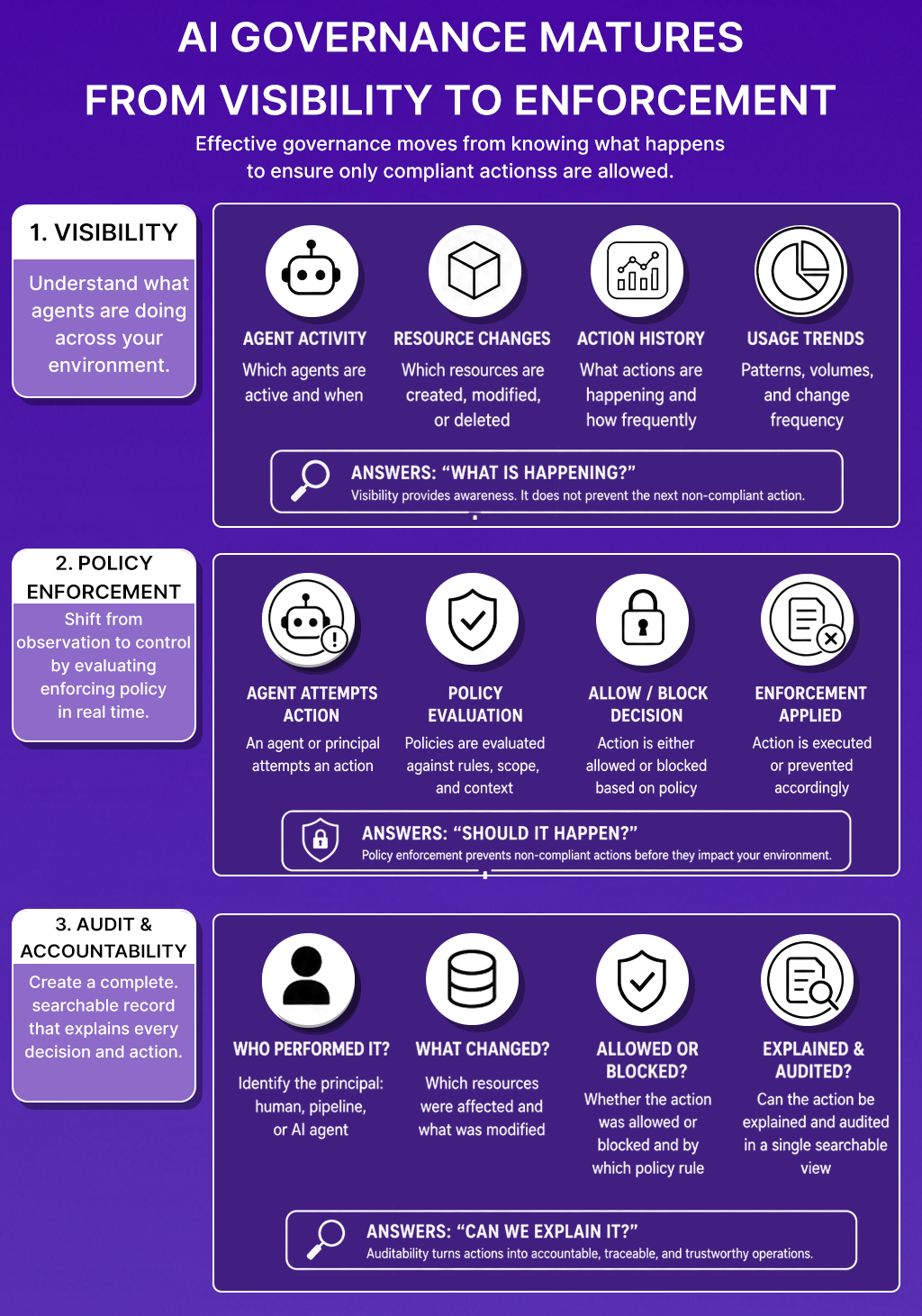
At scale, where dozens of agents interact with infrastructure, security controls, observability systems, and deployment pipelines across multiple accounts, governance cannot rely on manual reviews and post-incident investigations. Every AI governance solution must continuously answer four questions:
- What happened, and which resources were affected?
- Which principal, human, pipeline, or AI agent performed the action?
- Was the action allowed or blocked, and by which policy rule?
- Can the action be explained and audited in a single searchable view?
When those four questions resolve in seconds rather than hours, AI agents become a traceable operational component rather than an ungoverned source of production risk.
Conclusion
AI agents are now active operators in cloud environments. The governance model that worked for human engineers and Terraform pipelines, where every change traced back to a commit, a pipeline, and a named service account, does not carry over to agents that independently decide which API calls to make in pursuit of an operational goal.
AWS CloudTrail, Azure Activity Logs, and GCP Audit Logs record that an API call occurred. They do not record whether an AI agent made the decision, what objective the agent was pursuing, whether the action was blocked by an organizational policy, or how the action relates to other changes in the environment that day.
Effective AI governance for cloud operations requires four capabilities working together: agent identification that classifies the source of every cloud event at ingestion, policy enforcement that evaluates agent requests before they reach the cloud API, explainability that surfaces the operational context behind each action, and auditability that maintains a searchable record across accounts and providers.
Firefly delivers those capabilities through AgenticOps Events, Event Center, Deny Events, and Preventive Controls, turning disconnected audit log entries into a continuous governance lifecycle that covers every AI agent action from the moment it is attempted through postmortem and compliance review.
FAQs
What is an AI governance solution?
An AI governance solution is a layer of visibility and control around AI-driven actions in cloud environments. For cloud operations teams, it classifies the source of every cloud event, human, pipeline, or AI agent, enforces organizational policies before agent actions execute, surfaces policy denials as named events with attributed policy rules, and maintains a centralized audit trail of all agent activity across accounts and cloud providers.
Why aren't traditional cloud audit logs enough to govern AI agents?
AWS CloudTrail, Azure Activity Logs, and GCP Audit Logs record API calls, the IAM principal that made each call, and the affected resource. They do not classify whether the principal was acting on behalf of an AI agent, what objective the agent was pursuing, or how the action relates to active organizational policies. When an unexpected change appears, determining agent involvement requires manually cross-referencing IAM roles, CI/CD pipelines, automation logs, and agent execution records, a process that does not scale when agents execute dozens of actions per day across multiple accounts.
What is the difference between model governance and operational AI governance?
Model governance covers the AI system's internal behavior, training data quality, output bias, regulatory compliance, and model explainability. Operational AI governance covers the actions the AI system takes in external environments, which cloud APIs it can call, which resources it can modify, whether its requests comply with organizational policies, and whether those actions are recorded and attributable. A team using an AI agent to manage AWS infrastructure needs operational governance. Model governance frameworks don't address which instance types the agent can provision or whether its IAM role is scoped correctly.
How do you enforce guardrails on AI agents in cloud environments?
Guardrails on AI agents operate at two layers. The first is IAM, restricting the agent's IAM role to the minimum permissions required for its operational scope. The second is a governance layer upstream of the cloud API that evaluates agent requests against organizational policies before they are dispatched. That upstream layer catches violations that IAM alone cannot prevent, for example, restricting which instance types an agent can request for specific workload types, or blocking deployments to regions outside the approved list, and generates a Deny Event for every blocked request.
What should an AI agent's audit trail include?
An AI agent audit trail should include the agent identity for every action, the target resource ARN, the operation executed, the operational objective the agent was pursuing when it made the request, the timestamp, and whether the action was allowed or denied. For denied actions, the trail should record the specific policy rule that caused the denial. The trail should be searchable across accounts and cloud providers and should place each agent action in the context of other operational events, ClickOps changes, pipeline deployments, and infrastructure mutations that occurred in the same time window.

.avif)
.avif)
.webp)

.webp)












