TL;DR
- Manual changes (instance termination, security group edits, bucket updates) bypass Terraform and CI/CD pipelines, leading to drift between the declared state and the actual infrastructure.
- When drift causes an incident, engineers have to manually correlate terraform plan (what changed), audit logs (who changed it), and CLI output (current state) to understand why a service is failing.
- None of these tools connects changes to the affected service path; you’re reconstructing impact across resources and dependencies by hand during the incident.
- That manual investigation cost is rising: SRE toil has increased from 25% to 30% (Catchpoint 2025), meaning more engineering time is spent on correlation rather than resolution.
- Firefly eliminates that step by mapping drift, dependencies, and service impact in one view, reducing noise (80%+) and improving MTTR (up to 50%), while Terraform and CI/CD remain unchanged.
A recent r/sre thread asked: "Is SRE more AI-proof than other fields, or are we just behind?" The core concern wasn't job security; it was that AI tools exist in the space but don't visibly change how incidents get diagnosed day to day.
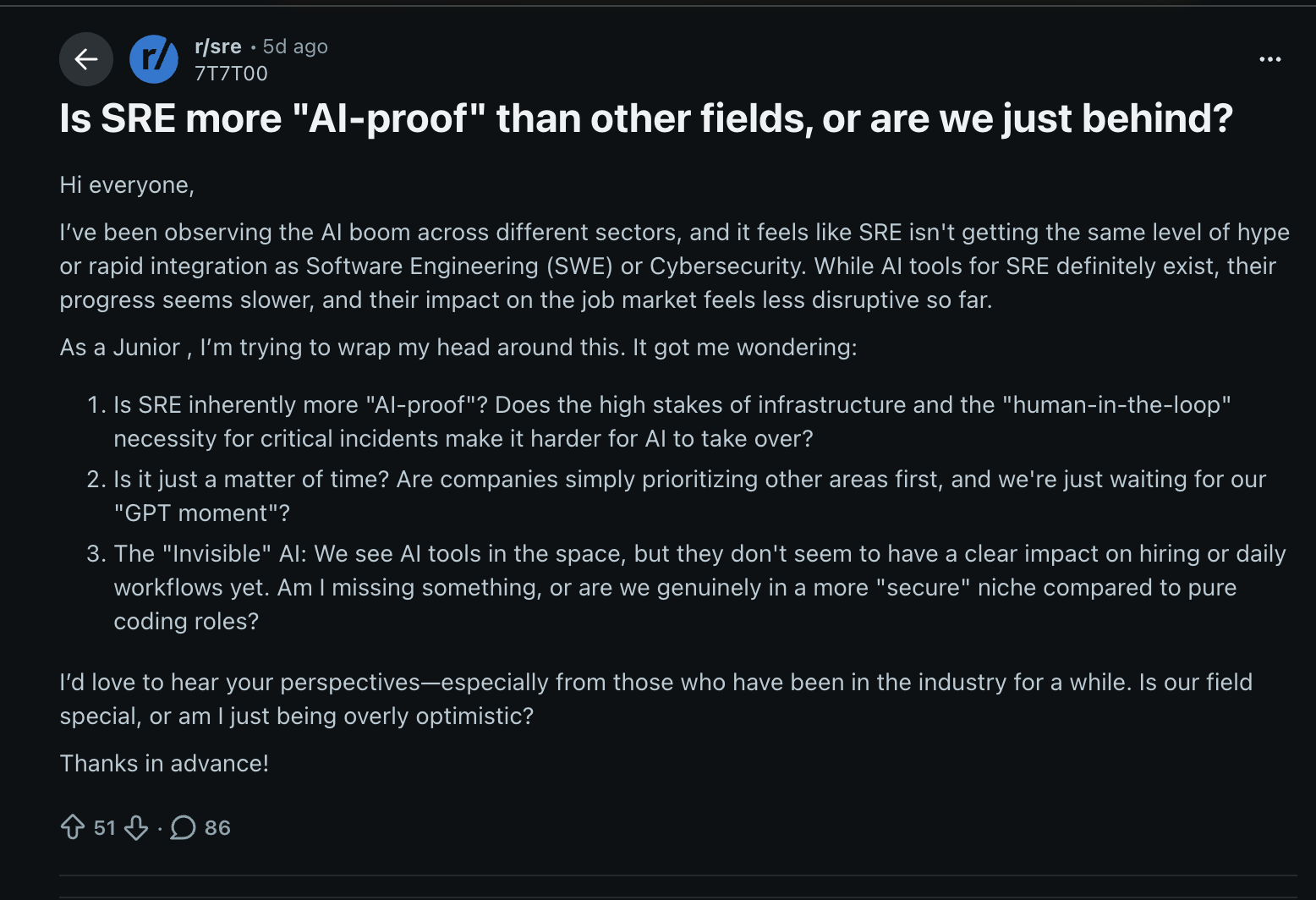
That's accurate. The reason is specific: tooling has improved individual steps, better Terraform plan output, and faster log queries, but nobody has solved the correlation layer between them. The hard part of incident work isn't running the commands. It's assembling what they return into a coherent picture while something is on fire.
This post reproduces that problem in an AWS environment, with a clean Terraform baseline, three intentional out-of-band mutations, full CLI investigation, and shows exactly where the manual loop breaks down.
What an AI SRE Agent Is
An AI SRE agent is not a query interface that searches your infrastructure data. It is an autonomous investigator that mimics how a senior SRE thinks through a production incident, forming hypotheses about what caused the failure, testing each one against live telemetry, and following the evidence until it reaches a root cause.
For example, an SRE receives a PagerDuty alert that an RDS instance is causing query timeouts. They open Grafana to check CPU and connection metrics, switch to the logs dashboard to find the slow queries, then manually trace them back to a schema migration that dropped an index. An AI SRE agent receives the same alert, correlates the metric spike, the slow query logs, and the recent deployment in one pass, and returns the root cause with a remediation recommendation before the engineer has finished navigating dashboards.
Earlier approaches to AI-assisted incident response worked by pulling data from logs, metrics, and traces all at once and asking an LLM to summarize everything. The problem: the more data you pull in, the more irrelevant signals get mixed in with the real ones, and the model ends up pointing at the wrong cause. An unrelated error in an upstream service looks just as loud as the actual bug that triggered the alert.
Instead, an AI SRE agent starts with the specific incident signal, say, 5xx responses from the checkout service, and asks: what in this service's request path could cause this? It runs targeted checks against that hypothesis. If the evidence confirms it, the agent goes one level deeper. If it doesn't, it moves on to the next hypothesis. This is why it finds the right root cause instead of the loudest signal.
AIOps surfaces anomalies. An AI SRE agent finds the cause and acts on it.
AIOps correlates data, it surfaces patterns, groups alerts, and reduces noise. An AI SRE agent goes further: it forms a hypothesis, tests it, decides whether the evidence supports it, and takes the next investigative step on its own. AIOps tells you what looks anomalous. An AI SRE agent tells you what caused it and what to do about it.
In practice, the difference between a human SRE and an AI SRE agent shows up across every stage of the incident lifecycle:
| Task | Human SRE | AI SRE Agent |
|---|---|---|
| Alert triage | Reads every PagerDuty alert manually, decides what to act on | Filters noise at ingestion, surfaces only actionable signals, e.g., distinguishes a DB connection spike from a flapping monitor |
| Root cause analysis | Opens Grafana, queries CloudTrail, runs Terraform plan across separate tabs, and correlates outputs manually | Forms hypotheses from the incident signal, queries targeted sources, follows evidence, e.g., links an RDS timeout to a dropped index from a recent migration |
| Incident remediation | Looks up runbook, decides whether to restart/rollback, executes manually | Recommends or executes the runbook, e.g., triggers a service restart or security group revert, with engineer approval before any destructive action |
| Change impact | Manually cross-references recent deploys in CI/CD with Grafana metric anomalies | Automatically connects a deployment or config change to the degradation, e.g., flags that a Terraform apply 10 minutes before the spike modified the load balancer config |
| Post-incident analysis | Writes post-mortem from memory and Slack history after the incident | Generates structured post-mortem from incident timelines and audit logs, e.g., produces a full RCA with timeline, affected resources, and contributing changes |
How an AI SRE Agent Works With an Infrastructure Component
When an incident involves infrastructure drift, EC2 instances terminated outside Terraform, security group rules injected via CLI, S3 versioning disabled directly through the console, the investigation has to span three systems that don't talk to each other.
Terraform state declares what should exist. Cloud audit logs, CloudTrail on AWS, Cloud Audit Logs on GCP, Azure Monitor Activity Logs on Azure, record every API call that touched the infrastructure, whether or not Terraform was involved. Cloud provider APIs return the current live state of each resource. None of these cross-references the others.
An engineer investigating that kind of incident, a checkout service returning 5xx with a clean pipeline, has to run each tool separately and then manually figure out: which of these changes caused the outage, which security group rule was injected after Terraform ran, which EC2 instance termination removed half the service's compute capacity. That connection between the raw output and the actual failure doesn't exist in any system. It gets assembled in the engineer's head, under pressure, while the incident is still live. And doing all of
The manual investigation typically runs in this sequence:
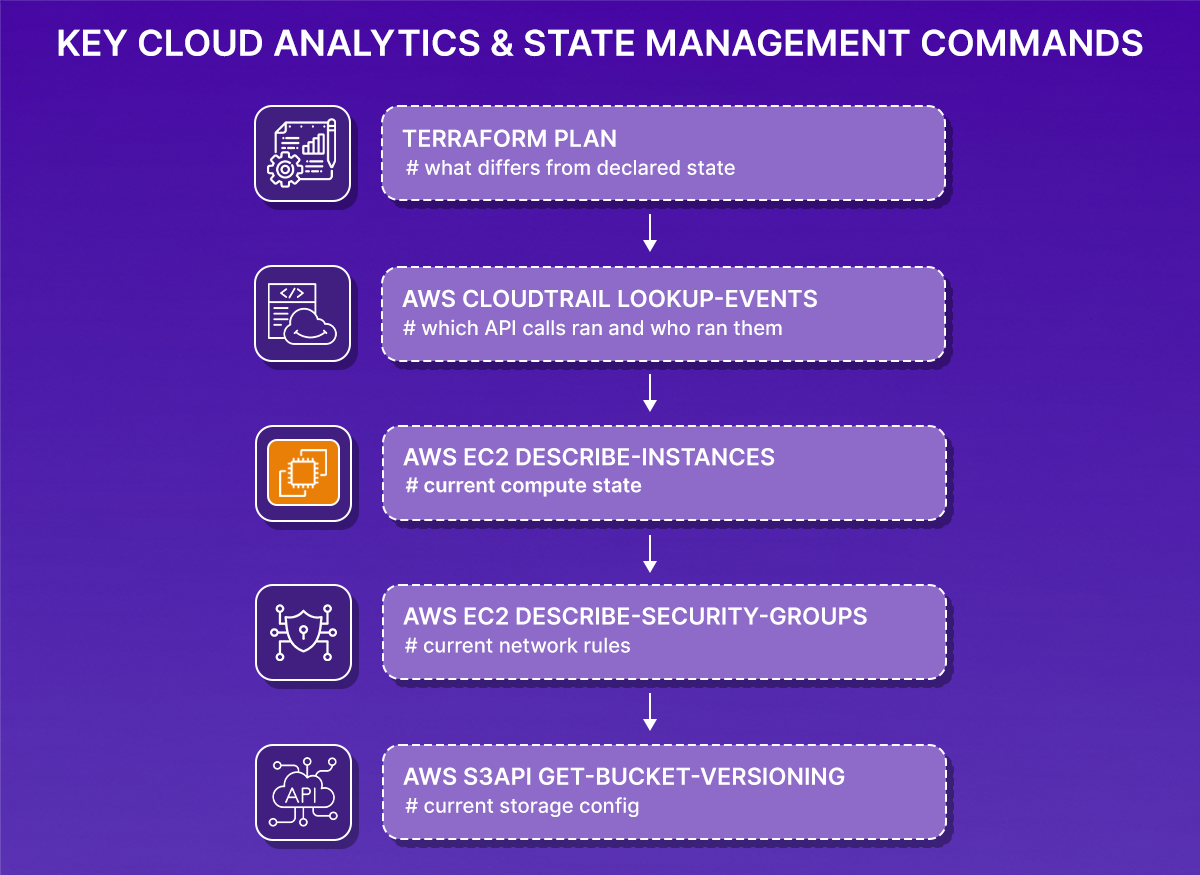
Terraform plan tells you which resources drifted. CloudTrail tells you which API calls ran. The AWS CLI tells you the current config. But none of them tell you which drifted resource is responsible for the 5xx responses, which change to investigate first, or what else in the checkout service depends on the affected resources. You have to build that picture yourself from five separate outputs.
This is exactly where an AI SRE agent changes the course of the investigation. Instead of returning five separate outputs for the engineer to correlate, it reads Terraform state, processes audit log events, queries live resource configuration, and maps the dependency chain across compute, network, IAM, and storage in one pass. When it finds a state mismatch, say, prod-vms-1 terminated but still declared in Terraform, it doesn't just flag the diff. It determines where prod-vms-1 sits in the checkout service's request path, what security group it sits behind, what S3 buckets it accesses, and ranks it against the other drifted resources by how much traffic it affects. The engineer gets a prioritized list of what broke, not a list of what changed.
Terraform remains the system of record. CI/CD pipelines still control how changes are applied. Engineers still review and approve before anything is committed.
The incident: checkout service returning 5xx, pipeline clean, three resources silently drifted
At 2:10 PM, the checkout service began returning 5xx responses. The pipeline had nothing to show, no failed builds, no failed deployments, no recent commits. From a release perspective, everything looked fine. The first check: list running EC2 instances.
prod-vms-1 (i-0ac55ccc817b7cb35) had been terminated. Terraform state still listed it as a running instance. One of two EC2 instances handling checkout traffic was gone, terminated directly via aws ec2 terminate-instances, with no PR raised or terraform apply, leaving nothing in the pipeline history.
The security group check added a second finding: aws ec2 describe-security-groups --group-ids sg-01889d4ef223873af
Terraform defined checkout-sg with two ingress rules, port 80 and port 22. The live security group had three. Port 8080 was added directly via:
No description field on that rule, the port 80 and 22 rules both carry descriptions set at creation time through Terraform. The 8080 rule has none. That is the fingerprint of a manual addition.
The S3 check confirmed a third: checkout-backup-prod-0326-unique versioning had been suspended via aws s3api put-bucket-versioning, while Terraform declared Status=Enabled.
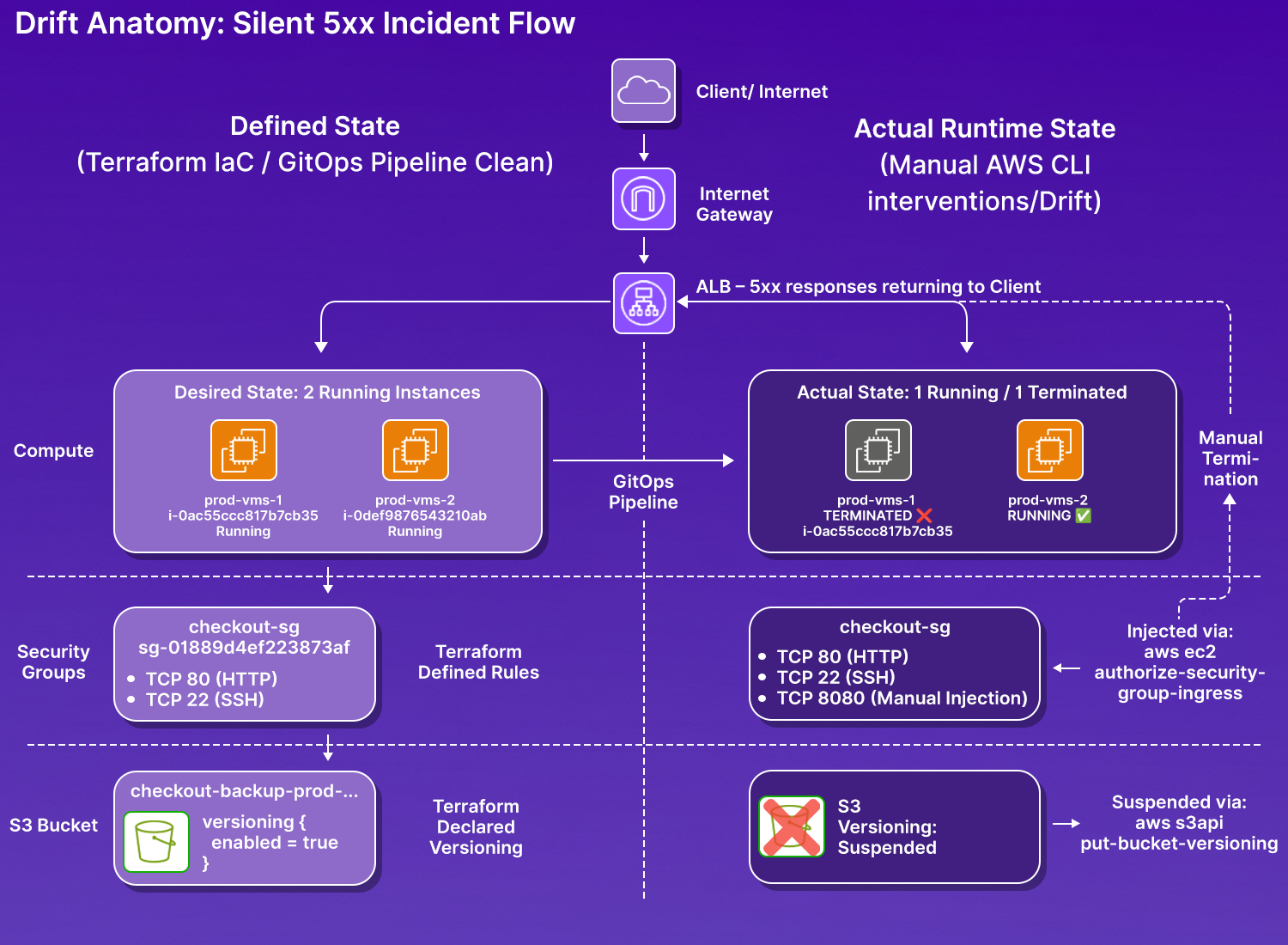
Three resources, three layers, all changed directly via AWS CLI, none through git commit, then raising the PR, and then triggering Terraform apply. Running terraform plan flagged the state mismatches, but it couldn't tell you who made the changes, when they were made, or what else in the environment depended on those resources.
Reproducing the incident: clean terraform apply, three AWS CLI mutations, full investigation
This is the exact sequence run against a live AWS environment; the Terraform output, the mutation commands, and the investigation steps are all real.
Step 1: Baseline, Clean Apply
Infrastructure provisioned cleanly through Terraform. Two EC2 instances, three S3 buckets, one security group, all state-aligned.
At this point: Terraform state = live infrastructure. No drift. Checkout service is operational.
Step 2: Three Intentional Mutations Outside the Pipeline
Three changes were made directly via AWS CLI, none committed to Git, none run through the pipeline.
Mutation 1: EC2 instance terminated:
prod-vms-1 (i-0ac55ccc817b7cb35, 98.93.17.119) is now in shutting-down state. Terraform state still declares it as a running instance. No pipeline alert fired.
Mutation 2: Security group rule injected:
Port 8080 is now open on checkout-sg outside of Terraform's declared ingress rules. The security group now has three ingress rules: port 80, port 22 (both Terraform-managed), and port 8080 (manual, untracked).
Mutation 3: S3 versioning suspended:
Terraform declared Status=Enabled for checkout_backup_ver. The actual state is now suspended. Verified using the command:
Step 3: The Investigation, What Terraform Plan Flags
Running terraform plan after the mutations produces the first concrete evidence of drift:
Terraform sees the deletion and plans to recreate prod-vms-1. But it reports nothing about the security group rule or the versioning change at this point; those surface as separate diffs, with no indication of which one is affecting live traffic or in what order to investigate them. This is the first concrete demonstration of what an AI SRE agent replaces: a Terraform plan tells you a resource drifted, not what that drift is doing to your service right now.
Step 4: Manually verifying each drifted resource, three separate commands, no shared context
aws ec2 describe-instances --filters "Name=tag:Name,Values=prod-vms-*"
i-0ac55ccc817b7cb35 (prod-vms-1) is terminated. i-0780a667f0dfd7e8e (prod-vms-2) is running and handling all traffic alone. One command confirmed the EC2 state. But this output tells you nothing about the security group that prod-vms-2 sits behind, or whether that group's rules are still what Terraform declared.
Running describe-security-groups separately surfaces the second finding: Terraform plan flagged an ingress rule diff, but didn't tell you why port 8080 appeared, when it was added, or whether it was intentional.
Three ingress rules. Terraform defined two. The 8080 rule has no description field — the port 80 and port 22 rules both carry "Description": "HTTP" and "Description": "SSH" respectively, set at creation time through Terraform. The 8080 rule has none. That is the fingerprint of a manual addition.
Root Cause, Reconstructed
09:41:54 terraform apply completes — all resources created, state aligned
09:45:56 aws ec2 terminate-instances i-0ac55ccc817b7cb35 — prod-vms-1 shutting down
aws ec2 authorize-security-group-ingress --port 8080 — untracked rule added
aws s3api put-bucket-versioning Status=Suspended — backup versioning disabled
~10:00 terraform plan run — drift detected across all three resources
Root cause: Three out-of-band mutations were made directly via AWS CLI, all bypassing the Terraform pipeline. The checkout service degraded because compute capacity dropped by 50% with no autoscaling to compensate, and the security group carries an untracked ingress rule that no Terraform configuration accounts for.
Resolution path: terraform apply would recreate prod-vms-1, revert checkout-sg to its declared ingress rules (removing the 8080 rule), and re-enable versioning on checkout-backup-prod. None of that is automated; it requires an engineer to run the plan, review it, and approve it.
The gap this exposes: The investigation above required four separate CLI commands across three resource types, manual correlation of their outputs, and knowledge that a missing Description field on a security group rule is a signal of manual origin. That knowledge exists in the engineer's head. It is not encoded anywhere in the toolchain.
How Firefly's AI SRE Agent Handled This Investigation
The incident above, where the virtual machine named prod-vms-1 terminated, port 8080 was injected into checkout-sg, and checkout-backup-prod versioning was suspended, required four CLI commands, three separate outputs, and manual reasoning about which change mattered most. That's the exact problem Firefly's AI SRE agent is built for.
Firefly holds a live model of the environment: Terraform declared state, AWS resource inventory, CloudTrail events, and the dependency graph across compute, network, IAM, and storage. It doesn't wait to be handed a resource name or told where to look. When something breaks, it maps the affected service's request path, checks each resource against Terraform state, traces the CloudTrail events that caused the drift, and ranks the findings by blast radius.
For the checkout incident, the agent maps the request path automatically:
prod-vms-1 (EC2)
→ checkout-sg (security group)
→ checkout-backup-prod (S3)
→ IAM instance profile: checkout-ec2-role
With that graph in place, it can answer a question no single CLI tool can:
The agent scans CloudTrail for API calls against those resources, compares the current state against Terraform declarations, and ranks findings by where they sit in the dependency chain:
| Resource | Detected change | AI SRE assessment |
|---|---|---|
| checkout-sg |
Port 8080 rule injected via
authorize-security-group-ingress
|
Highest impact, untracked ingress rule affects every instance behind the group; port mismatch breaks all inbound traffic |
| prod-vms-1 |
Terminated via
terminate-instances, state still shows running
|
Direct availability impact, 50% compute capacity lost with no autoscaling; remaining instance handling full load |
| checkout-backup-prod |
Versioning suspended via
put-bucket-versioning
|
Data risk does not affect live request routing, but it eliminates the recovery path for object deletions |
That's the output a senior SRE would produce after 20–30 minutes of investigation. The AI SRE agent returns it in one pass before the engineer opens a second terminal tab.
Firefly's AI SRE Agent: from ClickOps drift to service interruption root cause
Here, Firefly's AI SRE agent was queried with two prompts against the same environment: one to prevent the next incident and one to investigate the current one.
Query 1: Which unmanaged resources are most likely to cause the next incident?
An on-call engineer doesn't have time to audit 271 unmanaged resources and rank them by risk during an incident. That's exactly what Firefly's AI SRE agent did autonomously: it scanned the GCP project sound-habitat-*****-m4 for recent manual changes, cross-referenced each resource against Terraform coverage and its position in the dependency graph, and returned a ranked list of what to codify first to prevent the next outage, not just what exists outside Terraform.
As shown in the snapshot below from the Firefly’s AI SRE agent’s chat:
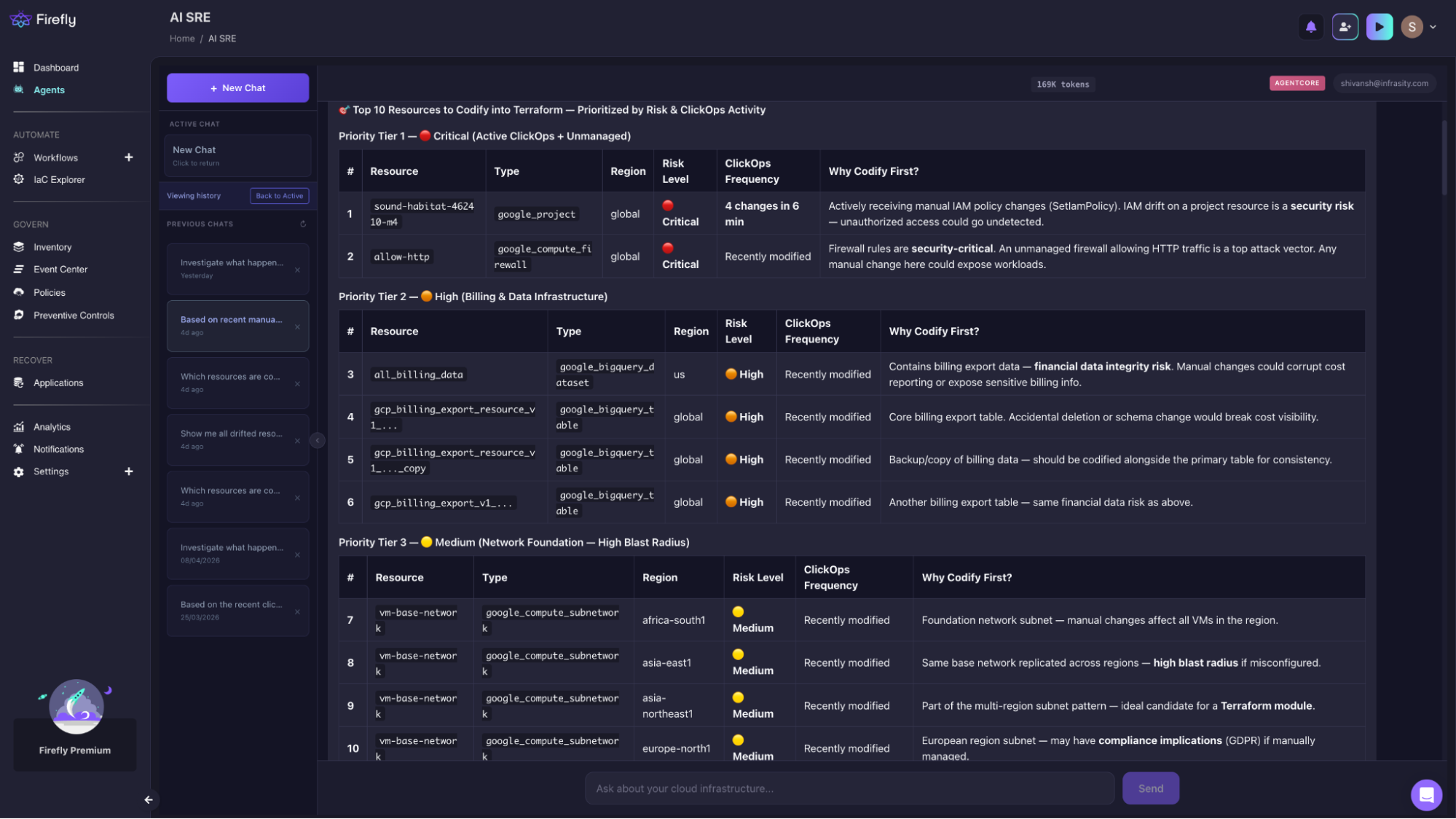
The agent ranked sound-habitat-xxxxx-m4 first, not because it appeared most frequently in logs, but because IAM mutations at project scope have the widest blast radius in the environment, and a single untracked SetIamPolicy call silently affects every resource in the project with no pipeline record. Four calls in six minutes on an unmanaged resource is the highest-risk pattern in the audit.
allow-http ranked second for the same reason it caused the incident above. The agent connected the ClickOps signal on that firewall rule to its position in the dependency graph; it sits in front of every EC2 instance in checkout-sg, and flagged it as a repeat-incident risk, not just a codification backlog item.
For the vm-base-network findings, the agent didn't return 20 separate subnet entries. It identified the repetition as a single structural problem, the same configuration applied manually across regions with no module, and recommended codifying it once. On request, it generated the full Terraform module: main.tf, variables.tf, outputs.tf, provider.tf, and example.tfwith import blocks pre-filled for the africa-south1 baseline.
Total unmanaged resources surfaced: 271, none visible to Terraform plan until one of them causes a production incident.
"Investigate what happened in the last 3 days that caused the service interruption."
The agent ran this investigation autonomously across the April 11–14, 2026 window, pulling CloudTrail events, checking resource state against Terraform declarations, and scanning S3 bucket policies in parallel. It returned three findings ranked by severity, without being told which resource types to check. As visible from the chat with the SRE agent:
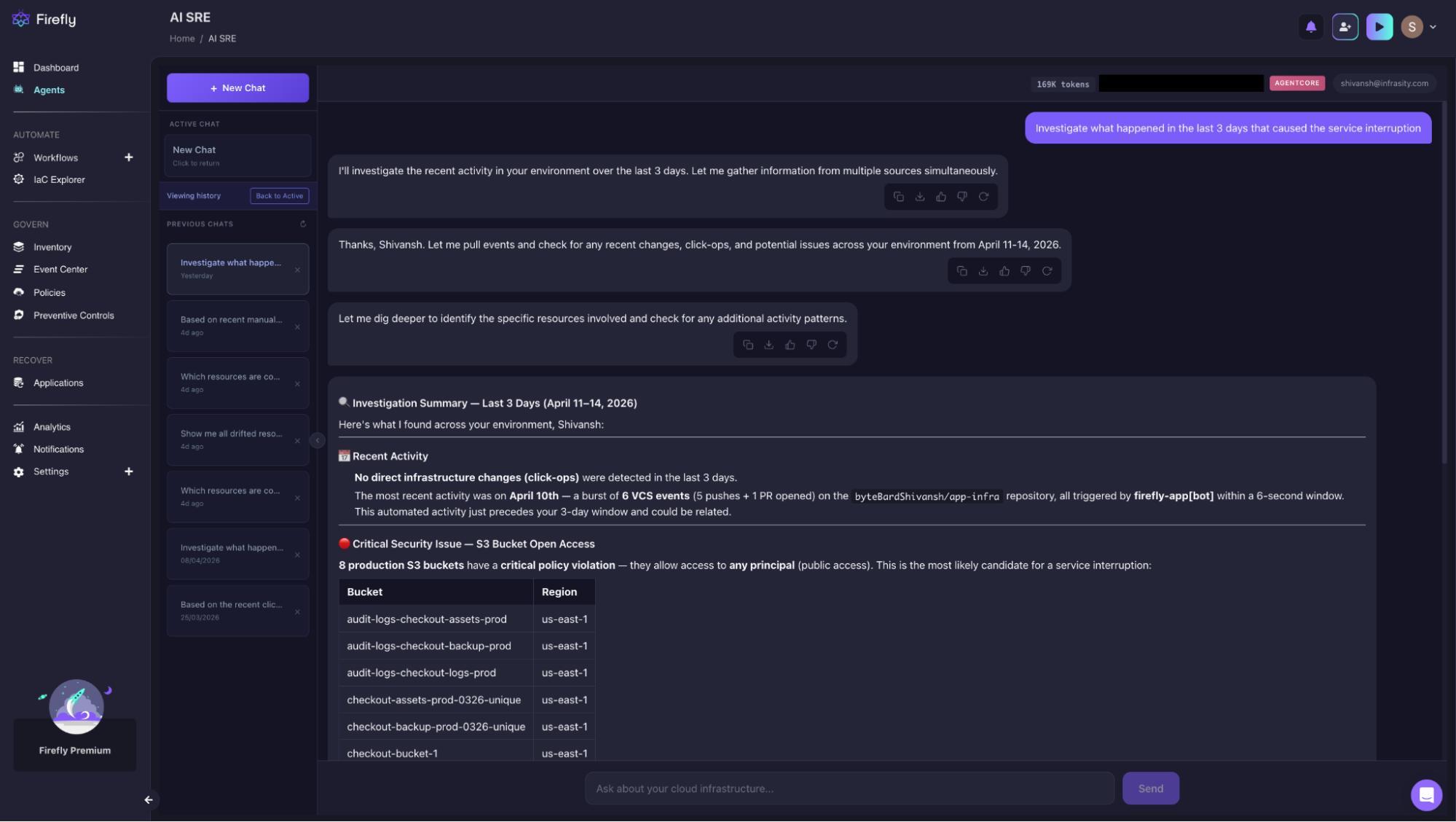
No direct ClickOps in the 3-day window, but the agent flagged a cluster of 6 VCS events on April 10th, 5 pushes and 1 PR on app-infra, all triggered by firefly-app[bot] within a 6-second window. Automated activity immediately preceding the incident window is a signal worth tracing.
The agent's highest-severity finding was 8 production S3 buckets with open access policies, all allowing any principal, none introduced through Terraform:
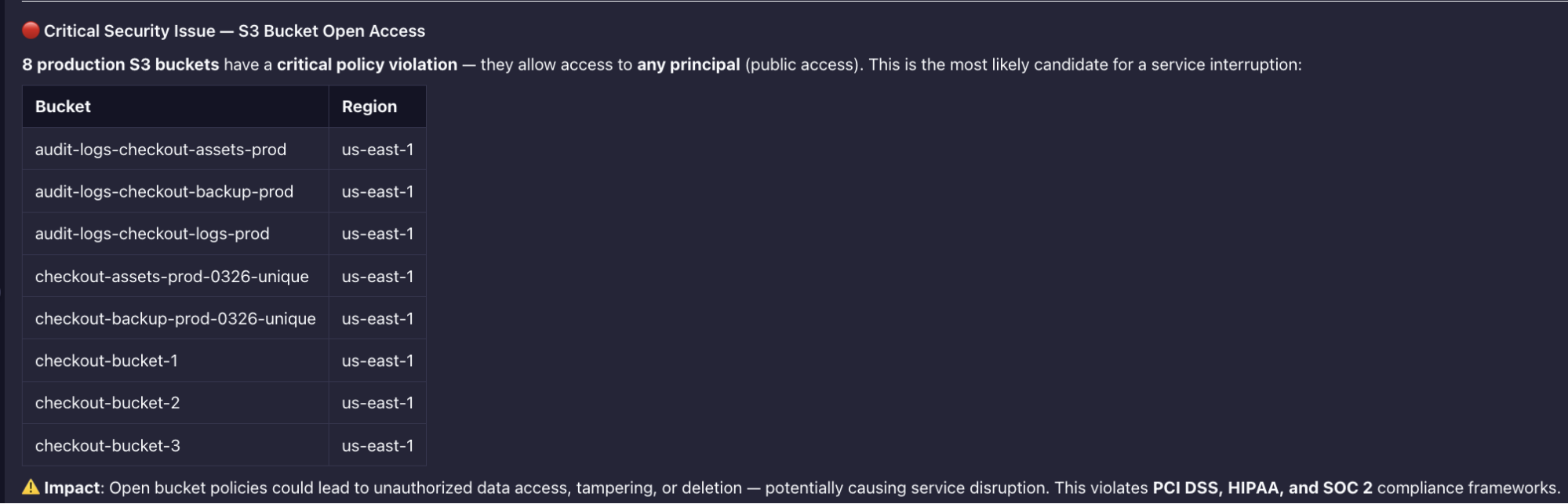
Public bucket access across the full checkout storage layer does not surface in Terraform plan without a targeted policy check. The agent caught it while scanning bucket policies as part of the investigation scope, not because they were told to. PCI DSS, HIPAA, and SOC 2 violations across all eight.
The agent also identified 6 ghost resources, present in Terraform state, deleted from the cloud:
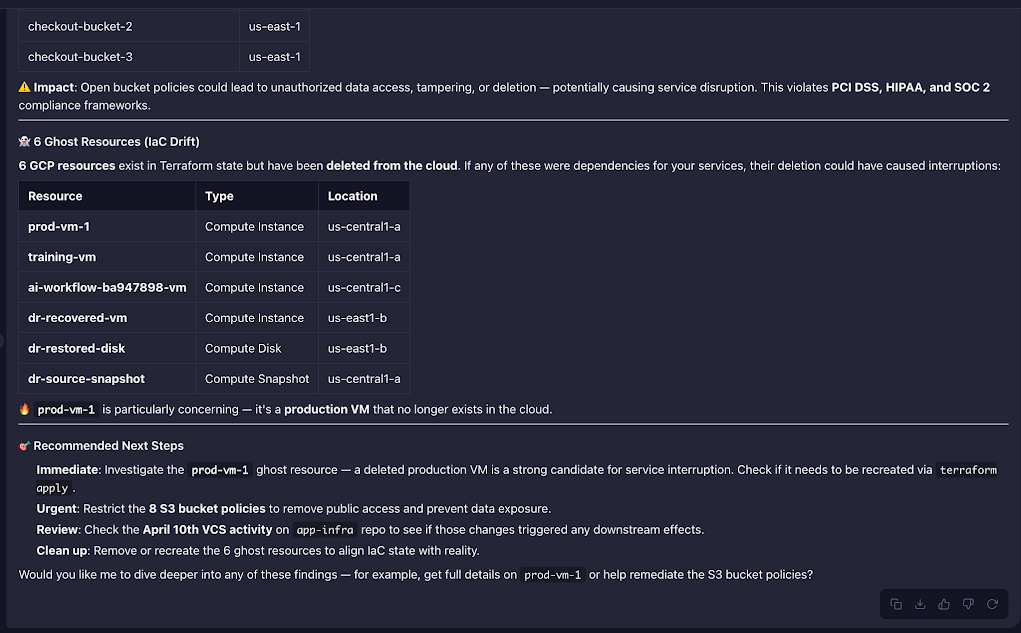
prod-vm-1 is the critical entry. A production compute instance deleted outside Terraform, the state file still declares it as live. The agent flagged it as the primary candidate for the service interruption; if the checkout service had a dependency on it, the termination would be the direct cause. It surfaced this in the same response as the S3 findings and the VCS cluster, ranked. A manual investigation covering the same scope means separate CloudTrail queries per deletion, per-bucket policy checks across 8 buckets, and a Terraform state diff done by hand.
Terraform still applies every infrastructure change. CI/CD still gates every deployment. Engineers still review any configuration the agent generates before committing it. What the Firefly AI SRE agent removes is the 20–30 minutes between "something is broken" and knowing exactly what changed, where, and what depends on it.
Getting Started with Firefly
Firefly connects to your AWS or GCP environment, Terraform state backend, and CloudTrail or audit logs without requiring changes to your existing pipeline. Setup takes under 30 minutes for most environments.
What you need to connect Firefly:
- AWS account with CloudTrail enabled, or GCP project with audit logging enabled
- Terraform state accessible via S3, GCS, Terraform Cloud, or Atlantis
- Read-level IAM role for cloud resource inventory
Once connected, Firefly automatically builds the dependency graph for your environment. Engineers can query it at the service level immediately, no manual tagging or resource mapping required.
FAQ
Can SRE be replaced by AI?
No. The judgment calls, blast radius assessment, architectural trade-offs, and incident ownership stay with the engineer. What AI takes over is the mechanical correlation work: running multiple CLI commands, reading the outputs, and assembling the picture under pressure. The engineer still decides. The agent handles the context gathering.
How to use AI in SRE role?
Start with the incident investigation. Give the agent access to Terraform state, CloudTrail, and your resource inventory, and it surfaces drift, out-of-band changes, and ghost resources in one pass instead of four separate commands. The same capability applies to ClickOps audits and post-incident root cause analysis.
What is the SRE agent platform?
A system that gives an AI agent persistent access to your infrastructure sources, Terraform state, cloud APIs, audit logs, and dependency graph, so it can reason over all of them at once. The difference from a dashboard: you query at the service level, not the resource level. "What changed in the checkout service in the last 24 hours?" instead of checking each resource individually. Prominent platforms in this space include Firefly AI SRE, Datadog Bits AI SRE, and PagerDuty Copilot, each connecting to cloud environments and telemetry sources to investigate incidents autonomously rather than surfacing alerts for engineers to triage manually.
What is an AI SRE agent?
An autonomous system that investigates production incidents the way a senior SRE would, forming hypotheses, testing them against live telemetry, and following the evidence to a root cause, without waiting to be told where to look. Unlike AIOps, which surfaces anomalies, an AI SRE agent takes the next step: it identifies the cause, assesses the blast radius, and recommends or executes remediation. The engineer stays in control of the decision. The agent handles the investigation.

.avif)
.avif)
.webp)

.webp)