
TL;DR
- Arpio handles full-application AWS and Azure recovery well; these alternatives step in when the gap is infrastructure rebuild, ransomware containment, unified endpoint security, or broad hybrid workload coverage.
- Firefly rebuilds the full cloud stack covering IAM, networking, and dependencies, as Terraform code, not just restoring data snapshots.
- Rubrik, Druva, and Acronis each protect data with immutable backups and ransomware recovery, with Acronis adding active cybersecurity and patch management in the same agent.
- Veeam covers the widest workload footprint, such as VMware, Hyper-V, physical servers, cloud, and SaaS, from a single backup platform.
- Where cloud DR is heading in 2026, recovery is moving beyond AWS-only snapshots toward continuous posture validation across multi-cloud, Kubernetes, and SaaS, with compliance evidence for DORA, SOC 2, ISO 27001, and HIPAA built in, and 100% IaC coverage as the new recovery baseline.
A recent r/devops thread on where the cloud ecosystem is heading in 2026 put it plainly: Kubernetes is the engine under the hood now, absorbed into Crossplane, kro, and Kratix abstractions. AI inference services are in production. And the "just add AI" honeymoon is over; teams are hitting Day 2 questions around operations, security, and recovery that nobody planned for during the rollout.
Those recovery questions are harder than they look. A production AWS workload now depends on:
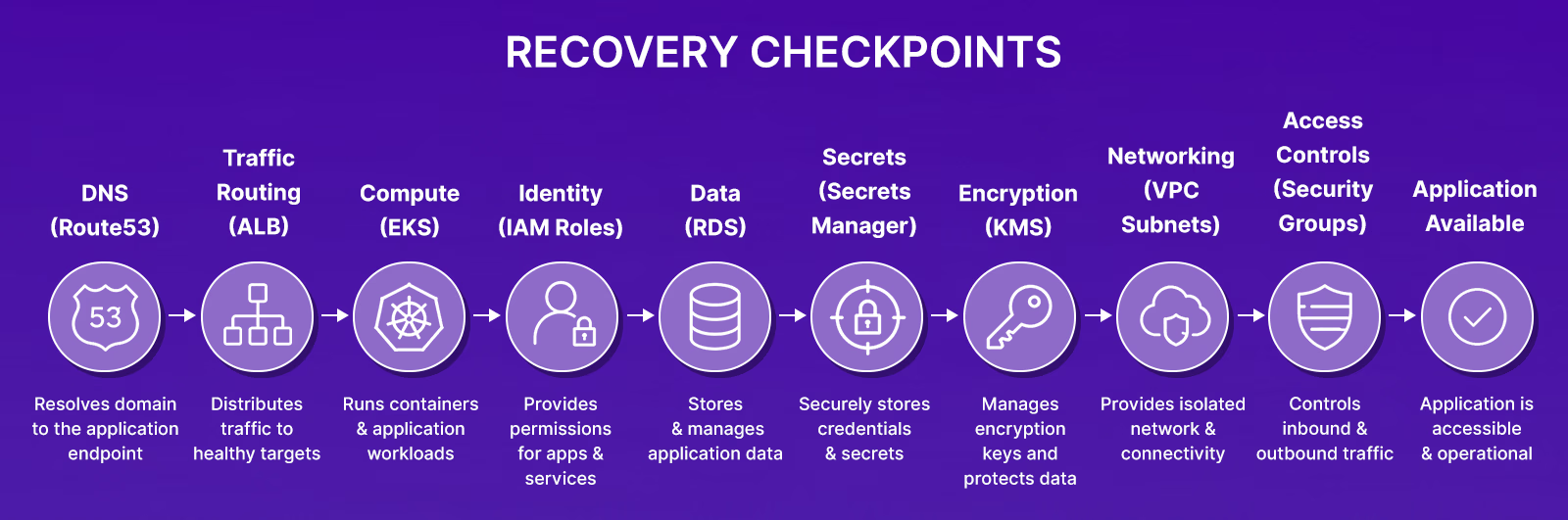
That's before adding the Crossplane composites, AI inference endpoints, vector databases seeded from one-time pipelines, and model-scoped IAM roles sitting on top. Restore the RDS snapshot without the correct IAM role, and the app cannot authenticate. Restore the database without the EKS security group rule, and pod-to-database traffic is blocked at the VPC layer. The backup succeeded. The application is still down.
Neither outage is caused by missing data. The outage exists because the application's dependencies were not recovered alongside the database. The database can be online while IAM policies, security group rules, Kubernetes resources, KMS permissions, DNS records, or service configurations remain absent or inconsistent. From an operational perspective, the database recovery completed successfully. The application recovery did not.
Most teams have snapshot coverage, such as RDS automated backups, EBS snapshots, and S3 versioning. The gap is not the backups. The gap is whether the networking, IAM policies, Kubernetes configurations, and encryption keys can be rebuilt when production is gone, and whether the recovery plan from January still reflects the infrastructure that exists in June. This guide covers the leading Arpio alternatives in 2026, how each approaches recovery, and where each fits.
How to Evaluate Arpio Alternatives Beyond Backup and RTO/RPO Claims
DR platforms market themselves around RPO and RTO numbers. What those numbers don't capture is whether the platform rebuilds a full application stack, not just an RDS instance, in a separate account after an attack, and whether that recovery still works after the environment has changed since the last DR test.
1. Full Application Stack Failover: Whether the Platform Rebuilds the Dependency Graph or Just the Database
When us-east-1 goes down, and a team needs to fail over a multi-tier EKS application to us-west-2, an RDS snapshot in the target region is not enough. The VPC, subnets, security groups, ALB target groups, IAM roles for EKS pod identities, Secrets Manager entries, and KMS keys must all exist in us-west-2 before the database is usable. Ask specifically: which of those resources does the platform provision automatically, and which require manual steps from the on-call engineer?
2. Recovery Plan Drift: Whether the Plan Still Covers the Application Running in Production Today
A production AWS environment diverges from a DR plan within weeks of the last test. An engineer adds an ElastiCache cluster for session caching. Another adds a Transit Gateway attachment. A Lambda now runs at startup to seed a feature flag cache from DynamoDB. None of those are in the DR plan. Platforms that continuously scan the production account and compare running resources against the DR configuration will surface those gaps before an incident forces the team to find them mid-recovery.
3. IaC State Consistency: Whether Recovered Infrastructure Ends Up Inside or Outside Terraform State
If the DR platform provisions VPCs, security groups, and IAM roles directly into the recovery AWS account during failover, bypassing Terraform, those resources are orphaned: present in AWS, absent from the state file. The next terraform apply may create duplicates; Terraform destroy will miss them entirely. Platforms that generate Terraform or OpenTofu as the recovery output keep recovered infrastructure inside version control from day one.
4. Resource Dependency Mapping: Whether the Platform Knows Which Resources Must Exist Before Others Can Start
An RDS instance restored without its KMS key or the security group that allows port 5432 from the application subnet will reject every connection attempt. An EKS workload restored without the IAM role, its service account annotation references fail at the token exchange step, before it ever reaches the database. The platform needs to track these relationships and restore them in dependency order, not independently.
5. Ransomware Recovery Architecture: Whether the Recovery Environment Is Reachable by Compromised Credentials
A recovery environment in the same AWS account as the compromised production account is reachable by the attacker's IAM role or access key. Restoring into a separate region within the same account adds geographic distance but no credential isolation; the same IAM identities that were compromised authenticate to both regions. Platforms that support cross-account recovery on AWS, or cross-subscription recovery on Azure, with no shared IAM trust between source and target block the attacker from accessing the recovery environment even if they hold valid admin credentials in production.
That framework maps to five distinct recovery platforms, each with different strengths depending on where your primary recovery concern sits.
Best Arpio Alternatives in 2026
1. Firefly: Recovery Readiness and IaC-Driven Rebuild for Multi-Cloud Environments

Firefly approaches disaster recovery from the infrastructure visibility layer. The platform continuously discovers cloud resources across AWS, GCP, Azure, and Nebius, maps relationships between them, tracks IaC coverage, and detects configuration drift between declared Terraform state and what is actually running in production. Gartner recognized Firefly in the 2025 Hype Cycle for Backup and Data Protection Technologies under the emerging Cloud Application Infrastructure Recovery Solutions (CAIRS) category, addressing the gap between protecting data and being able to rebuild the full application stack after an incident.
How Does Firefly Improve Recovery Readiness?
- CAIRS (Cloud Application Infrastructure Recovery Solution): Recovers complete applications by generating deployment-ready Terraform or OpenTofu rather than directly restoring cloud resource snapshots. The recovery artifact is versioned, reviewable code that applies through existing CI/CD pipelines.
- CRPM (Cloud Resilience Posture Management): Continuously evaluates whether the current environment is actually recoverable, identifying resources with no backup coverage, IaC gaps, cross-region replication holes, and dependency paths that would block recovery before they cause an outage.
- Drift Detection and Rollback: Detects when production has diverged from IaC definitions due to manual console changes, emergency IAM edits, or parameter adjustments, and can roll infrastructure back to a versioned known-good state.
- Multi-Cloud Discovery: Single governance and recovery layer spanning AWS, GCP, Azure, and Nebius with relationships and IaC coverage tracked across all providers.
Hands-on example: What the Recovery Workflow Actually Looks Like
The best way to understand what makes Firefly's approach different is to walk through how a recovery is initiated, not abstractly, but through the actual interface. Now referring the dashboard below:

The applications dashboard is the starting point. Each row in the Backup & DR view represents an application, not an individual resource, but a full workload. In the screenshot below, nginx-app is running on Infrasity-AWS-prod in us-east-1 with 19 snapshots on record, last backed up 14 hours ago. Web and Audit logs both pull from Google Cloud in us-central1. Firefly handles multi-cloud applications in the same dashboard without separate workflows per provider.
Applications are scoped using tags, key-value pairs that define which cloud resources belong to a workload. When nginx-app is tagged, and a policy runs, Firefly does not just snapshot the tagged EC2 instance. It follows the dependency graph automatically: VPC, subnets, IAM instance profile, and all other resources required to make that application run are included in the snapshot. Resources implicitly created as part of those relationships are not backed up separately; they get recreated during restoration.
Opening a snapshot is where the IaC-first model becomes concrete. The nginx-app snapshot from June 2, 2026, at 20:35 covers 18 AWS assets in Infrasity-AWS-prod.
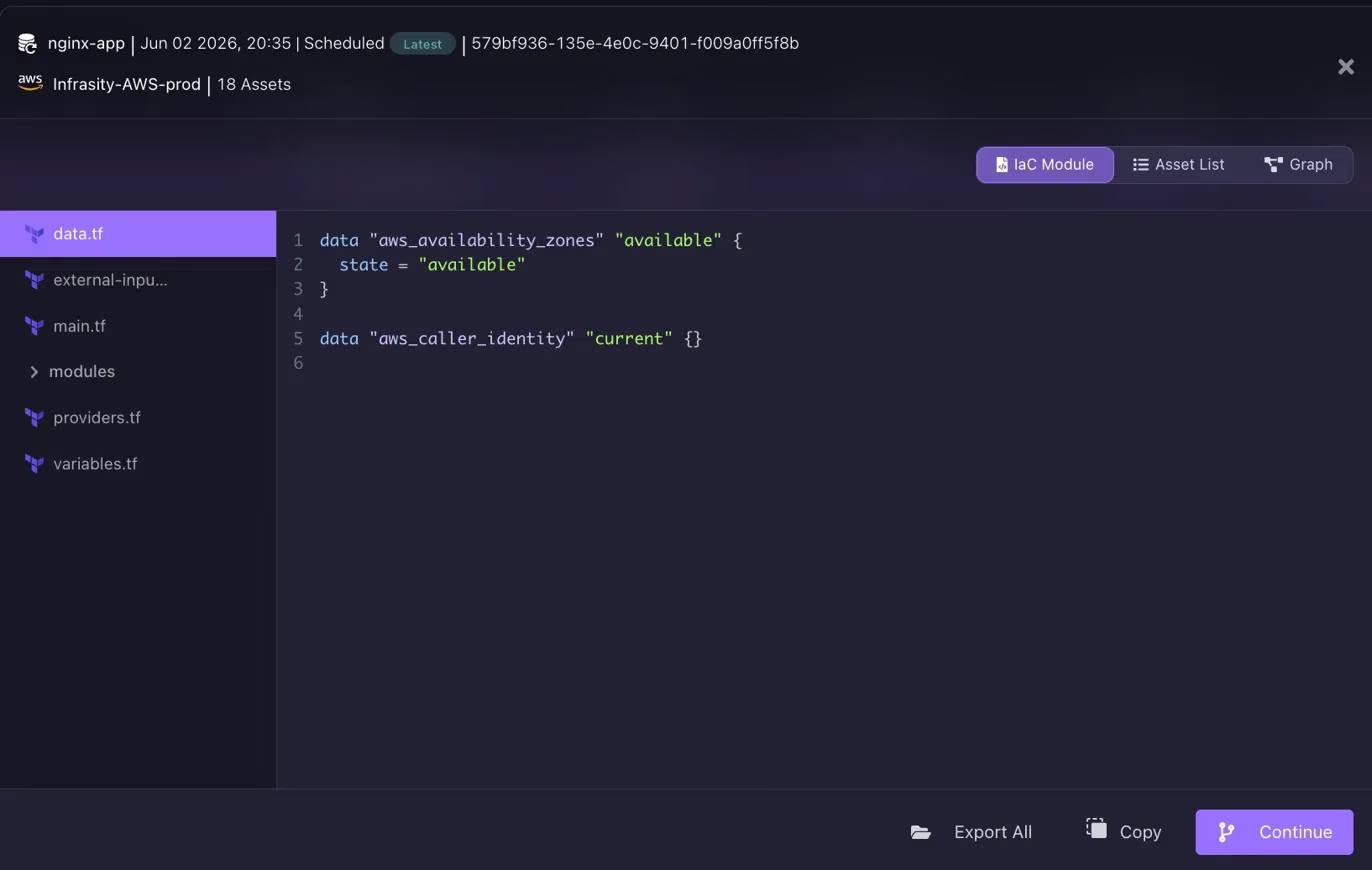
What Firefly generates from that snapshot is not a restore script or a backup archive. It is a structured Terraform module: data.tf, main.tf, variables.tf, providers.tf, and a modules directory, all visible in the file tree.
Three views are available: IaC Module (the generated Terraform code), Asset List (the individual resources included), and Graph (the dependency map as shown in the snapshot below).
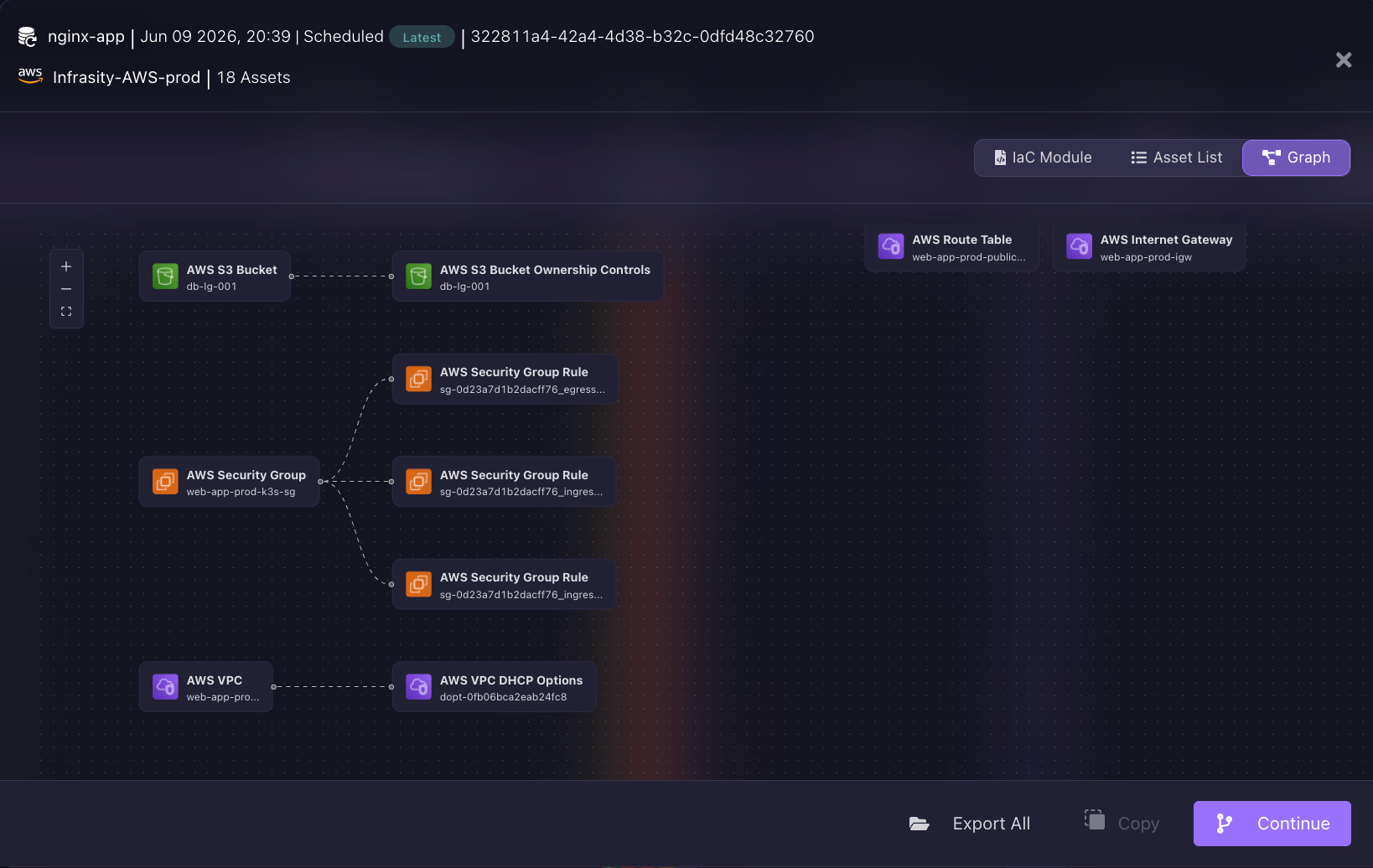
The engineer can inspect exactly what will be recreated before committing to the restore. The final step is where this diverges completely from traditional DR platforms. Firefly does not apply Terraform directly. Instead, it asks where to open a Pull Request with the generated recovery infrastructure code.
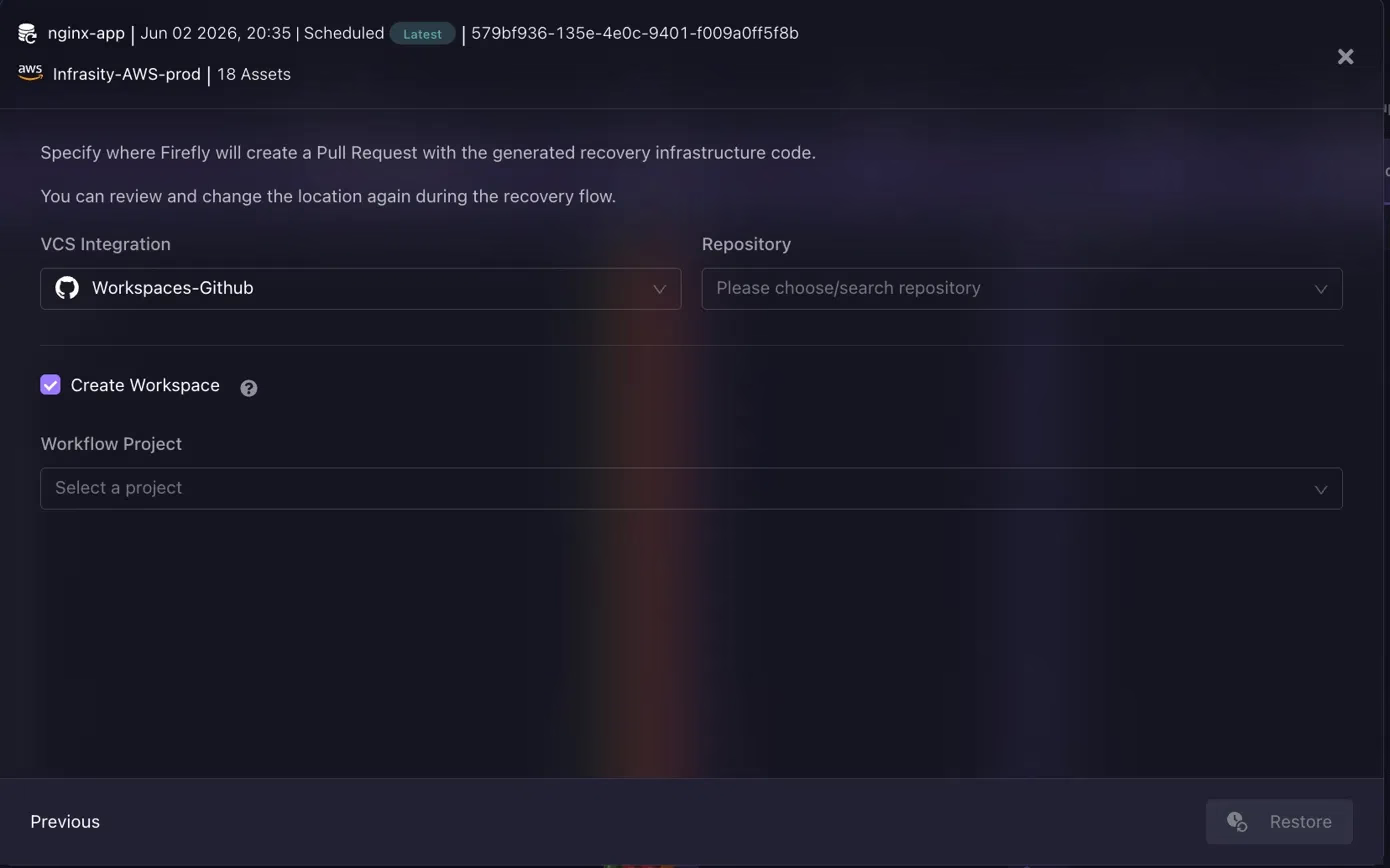
The VCS integration points to GitHub (Workspaces-GitHub in the screenshot). The engineer selects the target repository, and Firefly creates the PR. The recovery then follows the same review and approval workflow as any other infrastructure change. It lands inside Terraform state, has a commit history, and can be validated in a staging environment before reaching production.
If teams want Firefly to manage the deployment as well, Firefly can automatically create a workspace configured for the appropriate repository, branch, and working directory. Once the PR is approved and merged, a Firefly-managed Runner can execute the deployment pipeline, applying the recovered infrastructure without requiring engineers to run Terraform manually in their own environments.
The infrastructure that comes back through this flow is owned by the team's version control system from the moment it exists, not an orphaned set of AWS resources that need to be imported into Terraform after the fact.
Best For
- Teams running Terraform or OpenTofu as the primary infrastructure layer who want recovery aligned with those workflows
- Organizations that want recovery readiness measured continuously rather than validated once a year
- Multi-cloud environments that need a single governance and recovery layer across providers
Pros
- Recovery artifact is Terraform or OpenTofu code, not a black-box provisioning operation.
- CRPM surfaces recovery gaps before an incident rather than during one
- Drift detection catches IaC coverage gaps caused by manual changes
- Multi-cloud coverage across AWS, GCP, Azure, and Nebius
Cons
- Organizations without existing IaC practices will not get full value until IaC coverage is established
- Teams that need push-button failover without any automation in place will get more immediate value from Arpio
2. Rubrik: Immutable Backup Architecture Built for Ransomware Containment and Clean Recovery
Rubrik Security Cloud protects data across cloud workloads, SaaS applications, virtual machines, on-premises databases, and enterprise applications from a single management interface. Listed as a Leader furthest in vision in the 2025 Gartner Magic Quadrant for Backup and Data Protection Platforms and as a Leader in the IDC MarketScape for Cyber Recovery 2025, Rubrik's primary differentiation is its ransomware recovery architecture, the ability to recover into a clean point in time from backup storage that compromised credentials cannot modify or delete.
How Does Rubrik Improve Recovery Readiness?
- Preemptive Recovery Engine: Pre-builds and validates recovery plans continuously, scanning backup data, identifying clean recovery points, and pre-positioning the plan so recovery activates autonomously when ransomware strikes, without the scanning delays that add hours of downtime.
- Microsoft Defender Integration (2026): Rubrik Identity Resilience rolls back Active Directory and cloud identity changes attackers made to establish persistence, automating what was previously a days-long manual investigation.
- Google Cloud SQL Support (2026): Immutable, air-gapped backups for managed PostgreSQL databases alongside existing coverage for Google Workspace, GCE, and GKE.
- Immutable Backup Storage: Ransomware tools and compromised admin credentials cannot modify or delete backup data. Recovery targets a pre-compromise point from storage that the attacker cannot reach, even with valid admin credentials in the primary account.
Hands-on section: How Does Rubrik Track Protection Coverage
The dashboard shown in the snapshot below is running against a live environment, with 11,598 backup jobs completed in the last 24 hours, 427 failed, a normal ratio at enterprise scale.

Active jobs are running across AWS (am2-timnorga-l1, am2-oscawahi-l1 on the 4hr-30d-AWS SLA domain) and Azure (Ale-DB1, am2-ryandora-w1 on 4hr-30d-Azure) simultaneously. The SLA domain name encodes the policy, 4-hour backup frequency, and 30-day retention, with no separate configuration to cross-reference.
SLA Domains are how Rubrik organizes everything. The environment has 51 in total; the three visible on screen each define a backup frequency, retention period, and archival behavior. Assign a workload to an SLA Domain, and Rubrik handles scheduling, retention, and archival. The vSphere VM panel makes coverage gaps immediate: of 238 total VMs, 209 are Protected, 9 have No SLA, and 20 are set to Do Not Protect. Those 9 unassigned VMs surface on the main dashboard rather than in a buried compliance report.
Live Mounts (1 active) and Cloud Mounts (6 active) are visible in the middle panel. A Live Mount brings a snapshot online as a running workload without copying it to new storage. For ransomware recovery, this means mounting a pre-compromise snapshot to validate it is clean before committing to the full restore, rather than restoring blindly into what may still be an infected state.
Best For
- Enterprises where ransomware recovery, data immutability, and security compliance are the primary DR requirements
- Organizations running hybrid environments across cloud, SaaS, and on-premises that need unified data protection
- Security teams that need forensic audit trails for SOC 2, ISO 27001, or GDPR compliance
Pros
- Preemptive recovery plans eliminate post-attack scanning delays
- Immutable storage prevents ransomware from corrupting backup data
- Broad workload coverage across cloud, SaaS, VMs, and on-premises
- Strong compliance and audit trail capabilities
Cons
- More data-centric than application-stack-aware, it does not orchestrate IAM, networking, or Kubernetes dependency rebuilds in sequence.
- Limited native IaC integration for Terraform-first teams
3. Druva: Fully Managed SaaS Backup That Removes Backup Infrastructure from the Equation

Druva's Data Security Cloud is a backup and recovery platform hosted on AWS. The customer manages policy configuration and recovery operations; Druva manages the backup infrastructure, applies updates, and maintains availability. As of 2026, Druva protects approximately 7,500 customers, including 75 Fortune 500 companies, across AWS workloads, Azure VMs, on-premises servers, endpoints, and SaaS applications, including Microsoft 365, Salesforce, and Google Workspace.
How Does Druva Simplify Backup Operations?
- Air-Gapped Immutable Backups: Dual-envelope encryption in transit and at rest, with a data lock that prevents snapshots from being modified or deleted by ransomware tools or compromised credentials.
- Global Deduplication: Compares backup data across all protected workloads, reducing storage consumption by up to 40% compared to per-account snapshot approaches.
- Anomaly Detection: Flags unusual data deletion patterns, backup policy violations, and unexpected access events, signaling ransomware activity before full recovery is required.
- DRaaS Add-On: Available on the Phoenix Enterprise tier, enabling failover to AWS for critical server workloads without requiring customers to manage DR infrastructure.
Hands-on section: How Does Druva Manage Protection Across Different Workloads?

The Data Protection Summary covers 82.36 TB across 777 data resources in three workload categories, all in one console: Enterprise Workloads (17 VMware VMs, 4 File Servers, 3 MS-SQL across Hybrid, Azure, and AWS tabs), Endpoints (463 Windows, 3 Android, 3 Mac), and Microsoft 365 (45 Exchange Online, 45 SharePoint, 40 OneDrive). No separate product consoles per workload type.
Sensitive Data Governance (163 active violations, 32 non-compliant users) and eDiscovery (39 legal holds, 26 custodians) run in the same dashboard as backup scheduling, Druva scans backup data for sensitive content, and manages legal holds without a separate compliance tool. The Ransomware Recovery panel shows 1 quarantined resource: when anomaly detection flags unusual deletion or access patterns, that resource is isolated before recovery runs, blocking an infected workload from contaminating the restore target.
Best For
- Organizations that want cloud-native backup and recovery without owning or operating backup infrastructure
- Environments spanning cloud, SaaS, and endpoints that need unified data protection from a single managed console
- Security and compliance teams that need audit-ready records across multiple workload types
Pros
- No backup infrastructure to deploy, maintain, or update
- Air-gapped immutable backups with data lock protection against ransomware
- Up to 40% storage reduction through global deduplication
- Covers cloud, SaaS, endpoints, and on-premises from one console
Cons
- Rebuilding application stacks, such as IAM, networking, and Kubernetes configurations, is outside Druva's scope
- DRaaS is a paid add-on limited to server workloads on the Enterprise tier
- Organizations with strict data residency requirements should verify Druva's AWS-hosted infrastructure meets their compliance obligations
4. Acronis: Unified Backup, Disaster Recovery, and Endpoint Security in One Agent and Console

Acronis Cyber Protect Cloud combines backup, disaster recovery, threat prevention, endpoint detection and response, email security, and remote monitoring and management into a single platform with one agent and one console. Where most DR platforms in this comparison are purpose-built for backup or recovery execution, Acronis is built around the idea that backup and active cybersecurity belong in the same tool , eliminating the gap between the security layer that detects a ransomware attack and the backup layer that recovers from it. The platform is delivered through 50,000 MSP partners across 150+ countries and targets MSPs managing multi-tenant environments alongside enterprise IT teams.
How Does Acronis Combine Backup and Cybersecurity?
- Integrated Backup and Active Cybersecurity: A single agent handles both backup policy enforcement and AI-based anti-malware detection. The same console that schedules backups runs vulnerability scans, applies patches, and detects threats , with April 2026 updates adding new XDR capabilities that previously required a separate security tool.
- Instant Restore for Near-Zero RTO: Restores workloads instantly by mounting backup images directly rather than waiting for a full data copy to complete , compressing recovery time for servers, VMs, and endpoints from hours to minutes.
- Universal Restore: Recovers workloads across dissimilar hardware and platforms, including physical-to-virtual and virtual-to-cloud migrations. A server backed up on VMware can be restored to Hyper-V or a cloud environment without requiring a separate migration tool.
- Immutable Backup Storage: Backup data is stored in a format that ransomware tools and compromised credentials cannot modify or delete, with January 2026 platform updates adding enhanced identity and access management controls to the backup policy layer.
- Multitenant Management: A single console manages backup policies, security scans, patch deployment, and DR workflows across all customer environments , built for MSPs running dozens or hundreds of tenants from one interface.
Hands-on: How Does Acronis Manage Backup and Security from a Single Policy?

Two VMs selected, WIN-A4O152GDP4B and WIN-Q1O5K1HTE2J from the dr customer11 account. The DR standard plan applied to both contains eight components in a single policy object: Backup, Disaster Recovery, Antivirus & Antimalware, URL Filtering, Windows Defender, Vulnerability Assessment, Patch Management, and Data Protection Map, all green. Backup and DR sit in the same plan as antivirus and patch schedules. Any change propagates to every machine the plan covers without touching each device individually.
The #CyberFit Score of 550/850 and 450/850 shows that both VMs are below the recommended threshold. The score rolls backup recency, antimalware status, and patch coverage into one number, surfacing which machines need attention across the entire fleet at a glance.
Best For
- MSPs managing backup, security, and endpoint protection for multiple customers and needing a single platform to replace three or four separate tools
- SMBs and mid-market organizations that want backup and active ransomware detection in one agent, rather than integrating separate products
- Hybrid environments covering physical servers, VMware, Hyper-V, endpoints, and Microsoft 365 that need unified data protection and security
Pros and Cons
Pros
- Backup and active cybersecurity (EDR, XDR, anti-malware) run from a single agent and console
- Universal Restore enables cross-platform recovery without a separate migration tool
- Instant Restore compresses server recovery from hours to minutes
- Multitenant architecture purpose-built for MSP service delivery
- Flexible licensing, per GB, per workload, or solution-based
Cons
- Cloud-native application stack recovery, rebuilding IAM roles, VPC networking, and Kubernetes configurations, is outside Acronis's primary scope
- IaC integration for Terraform-managed environments is not a native capability
- The depth of cloud-native AWS and Azure DR orchestration is weaker than platforms built specifically for cloud workload recovery
5. Veeam: Broad Workload Coverage Across Hypervisors, Cloud, SaaS, and Physical Infrastructure

Veeam Data Platform is one of the most widely deployed backup and recovery products in enterprise IT, named Customers' Choice in the 2026 Gartner Peer Insights report for Backup and Data Protection Platforms. Data Platform v13.1, previewed at VeeamON 2026 in New York City and scheduled for GA in Q3 2026, extends coverage to mixed hypervisor environments and AI-driven workloads through the Universal Hypervisor API, automated AD Forest Recovery, and Intelligent ResOps.
How Does Veeam Support Recovery Across Different Platforms?
- Universal Hypervisor API: An open integration framework where hypervisor vendors build and maintain their own Veeam integrations. VMware, Nutanix, OpenShift, and future hypervisors become protectable through a single platform without switching backup tools at each migration stage.
- Automated AD Forest Recovery: Replaces the manual domain controller sequencing process , previously hours or days , with a wizard-driven workflow: select a point-in-time, define domain controllers per domain, specify source backups.
- Intelligent ResOps: Links backup and recovery operations with contextual intelligence about data, identity, and AI agent activity, targeting environments where AI-driven automation changes data faster than traditional backup windows can account for.
- Ransomware Protection: Immutable backup storage, built-in threat detection across AWS, Azure, NAS, and Microsoft 365 workloads, and cleanroom recovery validation.
Hands-on: How Does Veeam Configure VM Replication for Disaster Recovery?
Unlike a backup job, which creates recovery archives, a replication job maintains a live powered-off VM replica at the DR site, continuously synchronized and ready to come online in minutes during failover. The screenshot shows the Name step of a new DR-To-DC replication job in Veeam Backup & Replication v13.0 (Build 13.0.1.2067, Premium edition).

Three advanced controls are checked at this first step; each one unlocks a specific step later in the 11-step wizard and solves a different network failure mode at the DR site.
Replica seeding avoids shipping a 500 GB+ initial VM image over a limited WAN link. The team ships a seed copy to the DR site on physical media, restores it there, and Veeam synchronizes only the delta going forward.
Network remapping fixes the "VM boots with no network access" problem. If production is on VLAN 10 and the DR site is on VLAN 20, Veeam's mapping table reattaches the replica to the correct virtual switch, applied automatically on every job run.
Replica re-IP changes the VM's OS-level IP address during failover. If the production network is 192.168.1.x and the DR subnet is 10.0.0.x, the VM won't route without a new IP address. Veeam applies the re-IP rules automatically when failover initiates.
Best For
- Large organizations running mixed VMware, Hyper-V, physical servers, cloud workloads, and SaaS applications that need a single backup platform covering all of them
- Teams with Active Directory environments where forest-level compromise or failure is a real operational risk
- Organizations already standardized on Veeam and want to extend coverage to new hypervisors or AI workloads without introducing a second platform
Pros
- Widest workload coverage of any platform in this comparison
- Universal Hypervisor API future-proofs coverage across platform migrations
- Automated AD Forest Recovery compresses a days-long manual process into a wizard-driven workflow
- Intelligent ResOps addresses AI workload data protection gaps
Cons
- Backup-first architecture does not orchestrate application-level dependency rebuilds for cloud-native AWS or Azure stacks
- Limited IaC generation or GitOps-integrated recovery workflows
Comparing the Best Arpio Alternatives for 2026
The five platforms above cover different parts of the recovery problem. Before narrowing down which one fits your environment, here is how they compare across the capabilities that determine real recovery outcomes.
| Capability | Firefly | Rubrik | Druva | Acronis | Veeam |
|---|---|---|---|---|---|
| Cloud app stack rebuild | Yes, via CAIRS (IAM, networking, Terraform) | No, data restore only | No, data protection only | No, backup and security focus | No, backup-first |
| Continuous recovery readiness | Yes, CRPM scans IaC and dependency gaps continuously | Partial, backup health validation only | No | No | No |
| IaC / Terraform output | Yes, generates Terraform or OpenTofu modules | No | No | No | No |
The table makes the differentiation clear: Firefly is the only platform in this comparison that addresses infrastructure and dependency recovery as a first-class capability. Every other platform protects data well, but none of them rebuild the configuration and dependency layer that data backups leave unrecovered.
Which Platform Covers Which Recovery Gap
The difference between platforms shows up in whether the platform can recover the full application stack, such as IAM, networking, dependencies, and data, before the RTO window closes.
If data backups exist but the infrastructure and dependencies needed to run the application do not: Firefly. CAIRS generates deployment-ready Terraform or OpenTofu configurations that cover IAM, networking, and dependencies across regions and accounts. CRPM identifies IaC gaps and dependency paths that would block a recovered application from starting before an incident forces the team to find them.
If ransomware has encrypted production data and recovery must target an account the attacker cannot reach, Rubrik pre-validates clean recovery points before an attack runs, so recovery activates without post-attack scanning delays. Arpio and Druva both provide credential-isolated recovery targets: Arpio into a separate AWS account or Azure subscription with no shared IAM trust, Druva into air-gapped SaaS storage, where the customer's credentials cannot be modified.
If backup and active endpoint security must run from the same agent: Acronis. A single protection plan covers backup, antivirus, patch management, vulnerability assessment, and DR across VMs, endpoints, and SaaS workloads from one console.
If VMware, Hyper-V, and physical server DR coverage must hold through a hypervisor migration, Veeam. The Universal Hypervisor API covers VMware, Nutanix, and OpenShift through a single platform, so DR does not break when the team migrates between hypervisors.
If the team needs full backup coverage without running backup infrastructure, Druva. 100% SaaS with Druva managing the backup platform. One console covers AWS, Azure, on-premises servers, endpoints, and Microsoft 365.
Where Disaster Recovery Is Heading in 2026
Three shifts are reshaping how cloud-native teams approach DR planning. Understanding them clarifies why the platforms above are evolving the way they are.
Recovery readiness is replacing periodic DR testing as the primary measurement.
Annual DR exercises expose recovery gaps after months of infrastructure changes have accumulated. Teams shipping to production daily cannot wait six months to discover that a new service dependency was never added to the recovery plan. Firefly's CRPM and Rubrik's pre-validated recovery plans address this by continuously measuring recovery posture rather than testing it on a fixed schedule. The shift is from "we tested in January" to "recovery coverage is measured alongside cost and performance."
IaC is becoming part of the recovery artifact, not a separate track.
In environments where Terraform manages networking, IAM, and compute configuration, restoring a database snapshot without restoring the infrastructure that the database depends on does not produce a running application. Recovery platforms that generate Terraform or integrate with GitOps workflows let teams treat recovery as a code deployment, not a manual rebuild sequence. Firefly's CAIRS approach is the clearest example of this shift.
Ransomware recovery is driving separate-account architectures as a default design decision.
The pattern of maintaining recovery infrastructure in separate AWS accounts or separate Azure subscriptions, with no shared IAM trust or credential boundaries with the production environment, is now a baseline expectation for any organization evaluating DR platforms. Arpio, Rubrik, and Druva all address this with cross-account, cross-subscription, or air-gapped recovery architectures.
The underlying direction is that disaster recovery is becoming a continuously measured property of the infrastructure itself, not an isolated process that activates during an outage. The gap between organizations that can answer "can this application be rebuilt today?" with evidence and those that answer with assumptions is becoming one of the clearest differentiators in cloud operational maturity.
FAQs
What should I look for in an Arpio alternative for AWS recovery?
Arpio handles recovery execution well, replicating application state and orchestrating failover across AWS accounts. The gap it leaves is infrastructure: IAM roles, VPC networking, and Kubernetes dependencies are not part of the data restore. The strongest Arpio alternatives address this by generating Terraform or OpenTofu as the recovery artifact, rebuilding the full application stack rather than just restoring snapshots. If your team manages infrastructure through Terraform, look for an alternative that integrates recovery into that workflow directly.
Do Arpio alternatives require IaC or Terraform to already be in place?
Not all of them. Arpio itself drives recovery from the production environment state without requiring any IaC. Druva, Rubrik, Acronis, and Veeam work with or without Terraform. Firefly produces the most value in Terraform-managed environments because its recovery artifact is code applied through CI/CD. Teams with no IaC practice will get faster time-to-recovery from Arpio or Druva without a prerequisite setup step.
Which Arpio alternative is best for ransomware recovery?
Rubrik is the most purpose-built. Its Preemptive Recovery Engine pre-validates clean recovery points before an attack runs, so recovery activates autonomously without post-attack scanning delays. Arpio recovers into a separate AWS account or Azure subscription with no shared IAM trust. Druva stores backups in air-gapped SaaS storage the customer's own credentials cannot modify or delete.
How do I choose the right Arpio alternative for multi-cloud AWS and Azure?
Identify where recovery most likely fails first. If the risk is infrastructure loss, deleted IAM roles, broken VPC networking, or missing Kubernetes configurations, Firefly covers AWS, GCP, Azure, and Nebius in one governance layer. If the risk is ransomware, Arpio handles both AWS cross-account and Azure cross-subscription recovery from a single platform. If the risk is broad workload coverage across endpoints and SaaS, Veeam and Acronis both span cloud and on-premises environments.


.webp)


.webp)












