
TL;DR
- Cyber resilience best practices are the discrete, repeatable habits that make an organization's stated strategy and recovery plan actually hold in practice, not the strategy or the plan document themselves.
- Most resilience gaps trace back to the same root cause: something exists in the environment that nobody's actively watching, an unmanaged resource, a drifted config, an unattributed change, a backup sharing credentials with the production account it's meant to protect.
- Each practice below pairs a concrete "why this is worth doing" with an exact "how to do this in Firefly" walkthrough, not just a description of the principle.
- Policy enforcement, drift detection, and backup isolation only work if they run continuously against live infrastructure; a point-in-time check or an annual audit is stale the moment it's finished.
- The same governance has to extend to AI agents now touching infrastructure through tools like Claude Code and Cursor, not just to human-initiated changes, since a change's risk depends on what it does, not who or what requested it.
Getting Started: What Cyber Resilience Best Practices Actually Cover
"Best practices" gets used loosely enough to blur into two things it isn't. It's not a strategy, the overall framework an organization builds toward, covered in more depth in this site's guide to building a cyber resilience strategy. And it's not a recovery plan, the governing document naming who's in charge during an incident, covered in this site's guide to a ransomware recovery plan. Best practices sit underneath both: the specific, repeatable habits that make a strategy real and a recovery plan executable, rather than aspirational.
This piece covers nine of them, and it's structured differently from most best-practices lists on this topic. Each one gets a "why this is worth doing" explanation, grounded in a specific failure mode rather than a general principle, followed immediately by an explanation of exactly how to implement it on Firefly's platform. Not a feature mention, an actual walkthrough.
1. Maintain a Complete, Continuously Updated Asset Inventory
Every other practice on this list depends on this one being true first. A policy can't enforce against a resource nobody knows exists. A backup plan can't cover infrastructure that was never inventoried. Drift detection can't flag a change to something outside its field of view. Resilience gaps concentrate almost entirely in the resources an organization doesn't have accurate visibility into, and most environments carry a meaningfully larger share of those than anyone assumes going in.
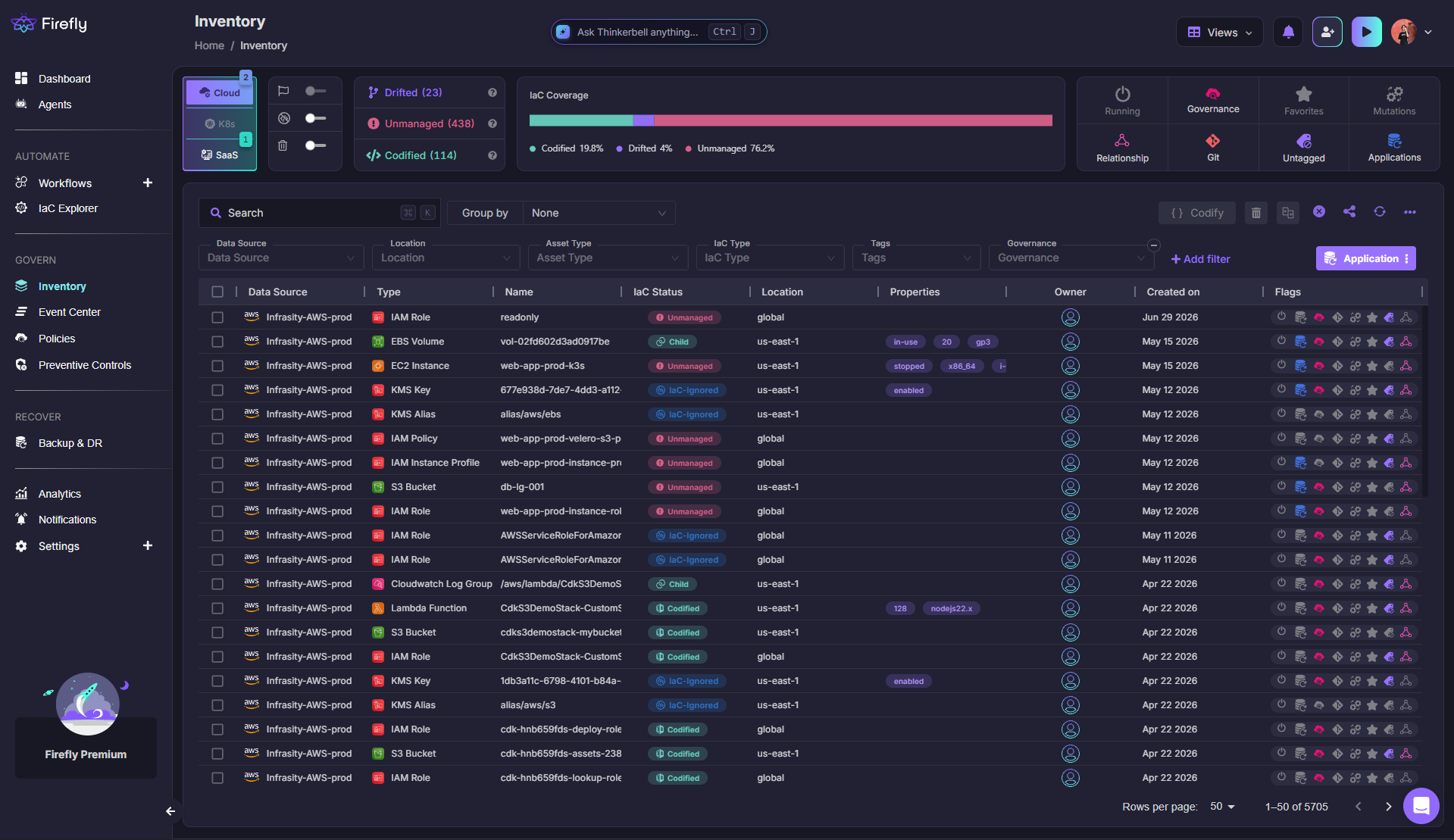
How to do this in Firefly: the Cloud Asset Inventory scans AWS, Azure, GCP, Kubernetes, and connected SaaS integrations continuously, not on a scheduled interval, building a live record of every resource regardless of how it was created. Each asset gets tagged by IaC status: Codified, Drifted, or Unmanaged, and the Inventory view surfaces an IaC coverage percentage for the whole environment, giving a concrete starting number to work from rather than an assumption.
2. Codify Everything, Including What's Already Unmanaged
A resource created directly through a console during an incident, or spun up for a one-off migration and never revisited, doesn't announce itself as a gap. It just sits there, outside every policy check and every backup plan built around what's declared in code. The practice isn't "write better Terraform going forward"; it's closing the backlog of what already exists outside IaC, since that backlog is exactly where resilience assumptions quietly stop being true.
How to do this in Firefly: unmanaged resources identified during inventory scanning can be automatically codified to generate Terraform, OpenTofu, Pulumi, CloudFormation, CDK, Bicep/ARM, or Kubernetes manifests, depending on the target format. Codification captures dependencies alongside the primary resource, security groups, attached volumes, and network interfaces, rather than producing an incomplete definition that looks codified but omits what the resource actually depends on.
3. Enforce Policy as Code at Multiple Stages, Not Just at Deploy
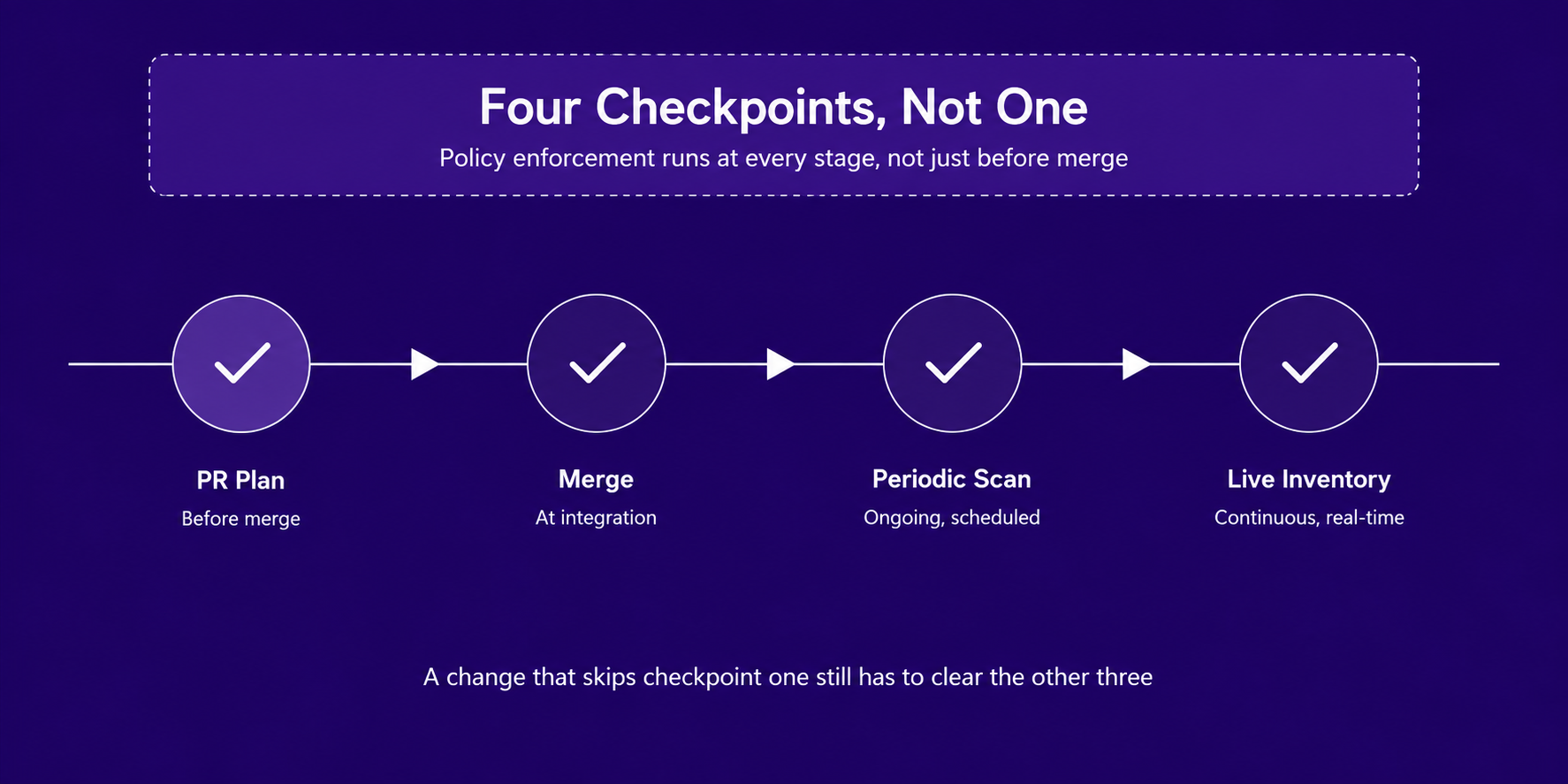
A policy check that only runs pre-merge catches what a pull request proposes. It says nothing about a change made directly through a cloud console an hour after that PR merged, or a resource that drifted out of compliance six months later with no PR involved at all. Single-stage enforcement is the most common reason an organization believes it has strong policy coverage, even though a meaningful share of its actual environment was never checked against any policy.
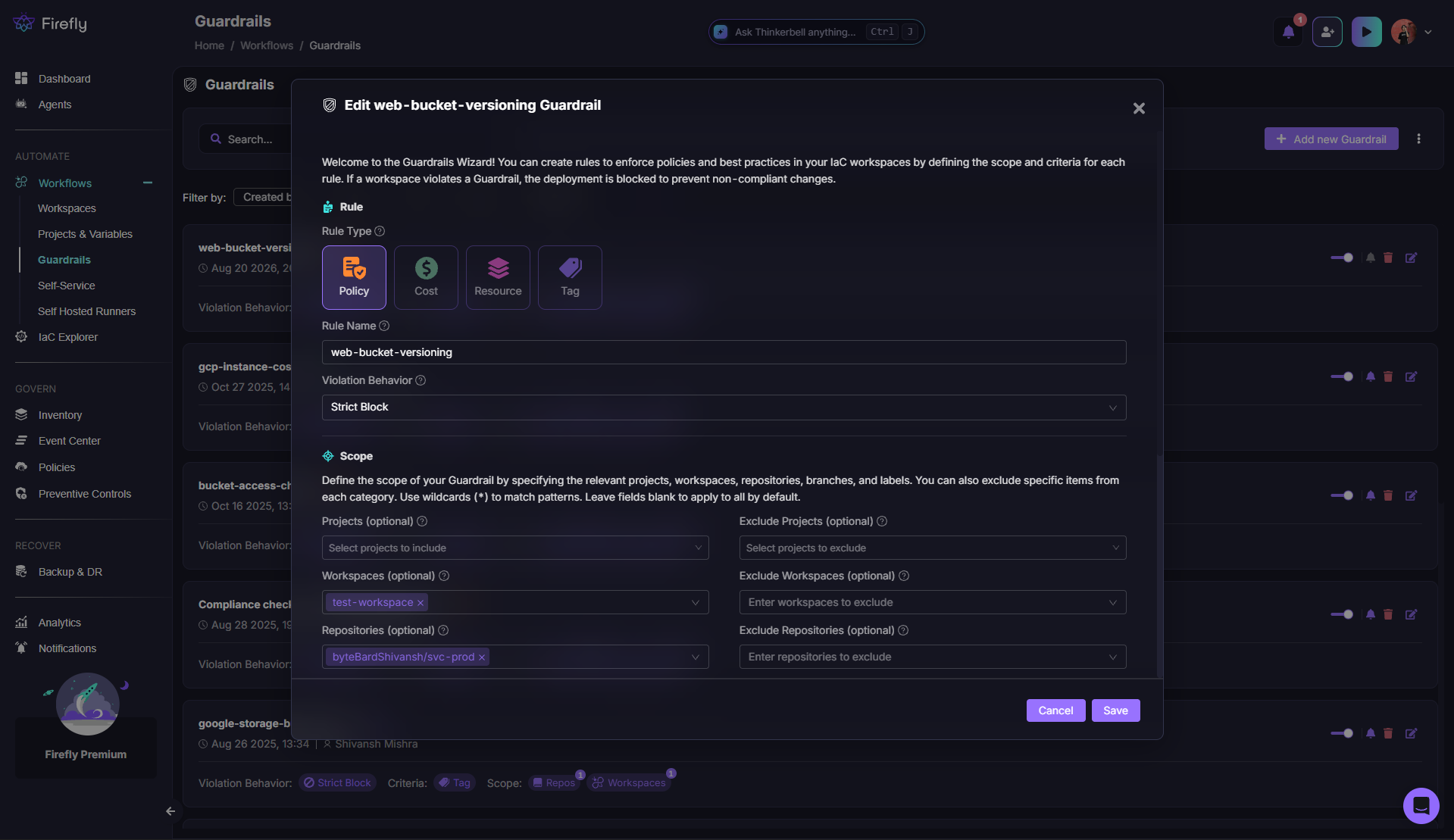
How to do this in Firefly: Guardrails evaluate changes at three points before and during deployment, on PR plans, at merge, and during periodic scans, so coverage doesn't stop the moment a change is approved. Rules come in four types: Policy, Cost, Resource, and Tag, and each can be scoped by repository, branch, workspace, or label, with violation behavior set to block the deployment outright, alert without blocking, or allow an override for authorized users. Policies extend that same coverage further: once a resource is live, Policies continuously evaluate against the live inventory, so a resource that passed every Guardrail at deployment can still be caught later if it drifts out of compliance.
4. Detect Drift Against Live State, Not Just Plan Output
terraform plan compares a proposed change against the state file. It's a genuinely useful check, and it has a structural blind spot: it never looks at what's actually running in the cloud. A resource can drift from its declared configuration through a manual change, and every subsequent plan can come back clean, because the comparison is state-file-to-config, not live-infrastructure-to-config. That gap is exactly where a compromised credential or a well-intentioned emergency fix quietly becomes a permanent, unmonitored deviation.
How to do this in Firefly: drift detection compares the live provider state directly against the declared IaC, regardless of whether a plan was ever run. When drift is detected, Event Center correlates the change with CloudTrail, Azure Activity Logs, or Google Cloud Audit Logs to identify exactly who or what caused it, and alerts are routed to Slack, Teams, or email the moment it's flagged, not at the next scheduled review.
5. Isolate Backup and Recovery Infrastructure From Production
A backup that uses the same IAM role as the production account it's meant to protect isn't really a fallback; it's another asset the same compromised credential can reach. This is one of the most consistently cited gaps in real ransomware incident data: the control existed on paper, isolation was never verified, and both the primary environment and its backup were compromised in the same incident.
How to do this in Firefly: a Resiliency check enforcing this isolation directly, catching a backup vault that shares an IAM role with the production account it protects, looks like this in Firefly's policy schema:
package Cx

import data.generic.terraform as tf_lib

CxPolicy[result] {
	resource := input.document[i].resource.aws_backup_vault[name]
	resource.iam_role_arn == input.production_account_role_arn

	result := {
		"documentId": input.document[i].id,
		"resourceType": "aws_backup_vault",
		"resourceName": tf_lib.get_resource_name(resource, name),
		"searchKey": sprintf("aws_backup_vault[%s].iam_role_arn", [name]),
		"issueType": "IncorrectValue",
		"keyExpectedValue": sprintf("aws_backup_vault[%s].iam_role_arn should differ from the production account role", [name]),
		"keyActualValue": sprintf("aws_backup_vault[%s].iam_role_arn matches the production account role, defeating isolation if that account is compromised", [name]),
		"remediation": json.marshal({
			"before": "shared IAM role with production",
			"after": "dedicated IAM role scoped to backup vault only",
		}),
		"remediationType": "replacement",
	}
}
That rule can be written by hand in the Rego editor, built through the no-code Policy Builder for teams that want the same check without writing Rego directly, or generated from a plain-English description and validated against live resources in the testing playground before it goes live.
6. Build Immutable, Rebuildable Recovery Paths
Restoring data into the same account that was just compromised assumes the attacker's access was fully removed during containment. That assumption fails more often than incident reports suggest; a backdoor account, a modified scheduled task, or a quietly altered IAM policy can survive a cleanup pass that looked thorough. Recovery that rebuilds somewhere the compromised credentials never had access to removes that risk structurally, rather than relying on containment to have caught everything.
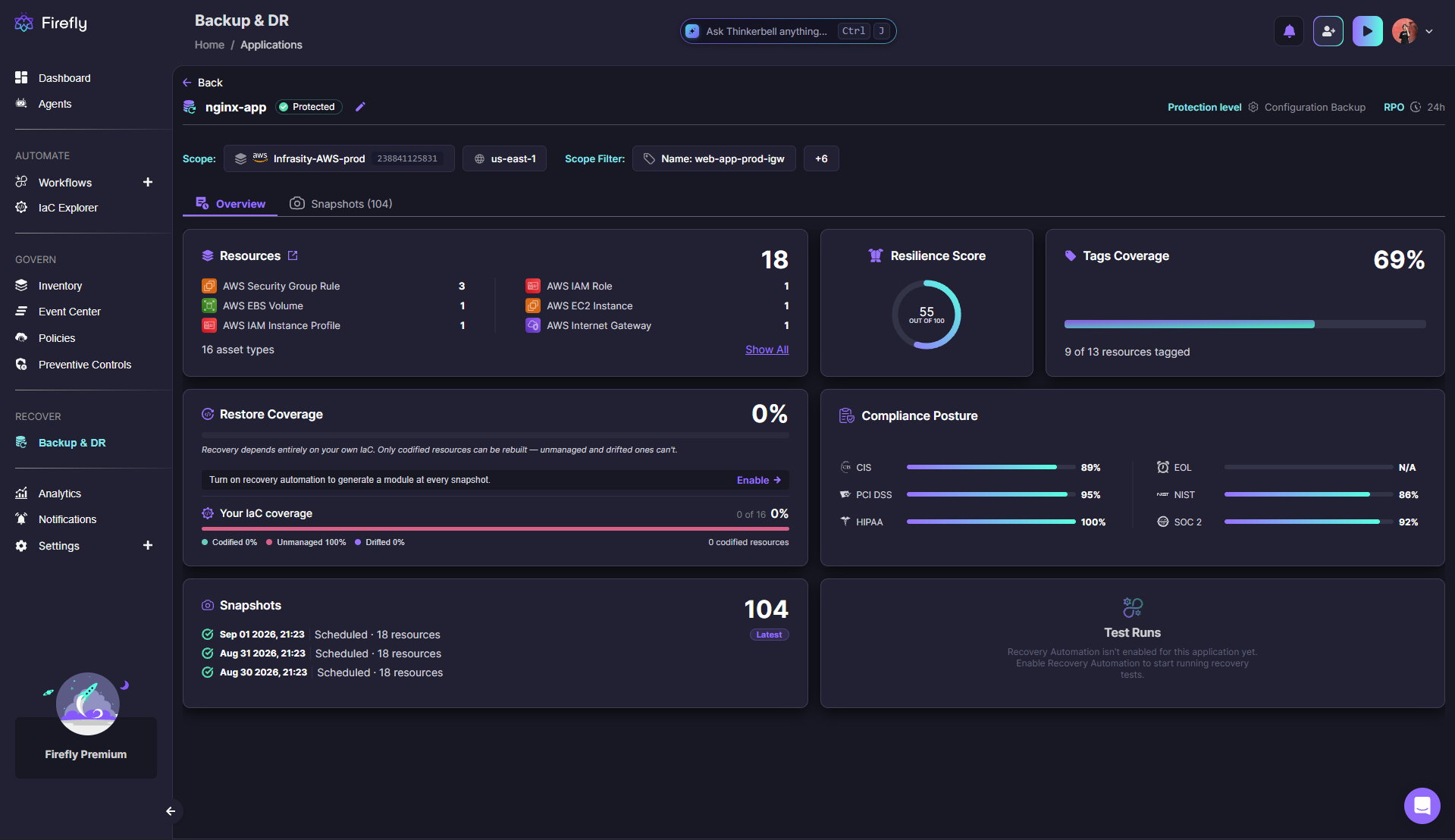
How to do this in Firefly: Backup & DR rebuilds into a clean, isolated region or account using immutable, versioned IaC snapshots. The immutability has a specific mechanical effect: a snapshot stored this way can't be modified or deleted by the same credentials that manage production, so a fully compromised production account still has no path to reach or corrupt the recovery snapshot sitting outside that blast radius. Every restore generates Terraform and routes it through a pull request rather than a direct cloud API call, so the rebuilt environment is reviewable before it goes live, not a black-box emergency action.
7. Attribute Every Change to a Person, Pipeline, or Agent
An incident review that starts with "we're not sure what changed or who changed it" is starting from the worst possible position. Attribution gaps compound specifically during the moments that matter most: a fast-moving incident, a compressed disclosure deadline, a board asking exactly what happened and when, all of which depend on a record that was captured automatically rather than reconstructed from memory afterward.
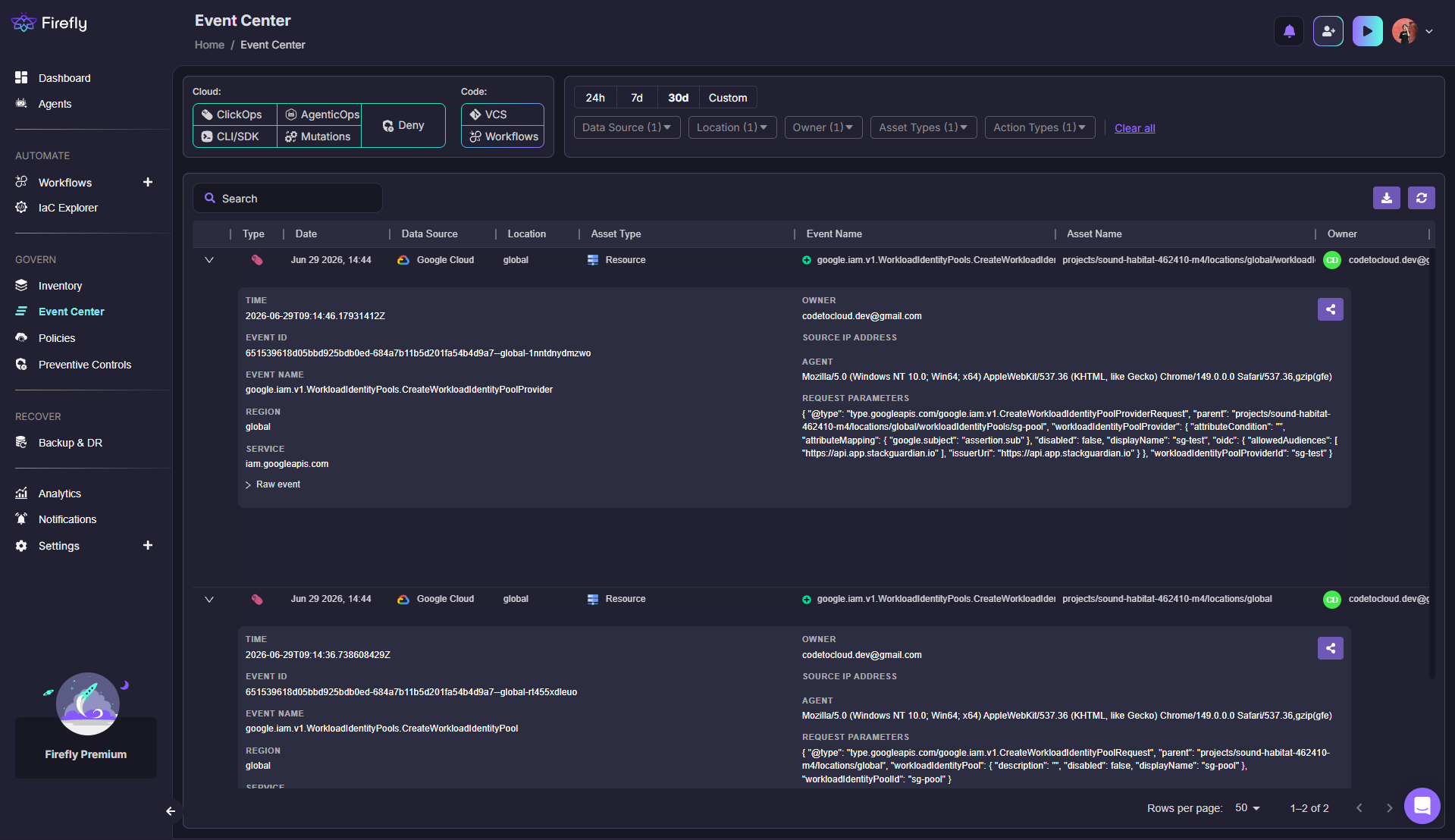
How to do this in Firefly: Event Center logs and attributes every mutation regardless of source, a manual console change (ClickOps), a CLI or pipeline-driven change, or a change proposed by an AI agent connected through MCP (AgentOps), with the responsible identity and a timestamp attached the moment it happens.
8. Score Resilience Posture Continuously, Not Annually
An annual audit is accurate on the day it's conducted and increasingly wrong after that. Infrastructure changes constantly; a backup policy that applied to a resource in January can silently stop applying in March, and the gap between "audited compliant" and "actually compliant right now" is exactly where an incident finds the plan's assumptions were already false before anyone noticed.
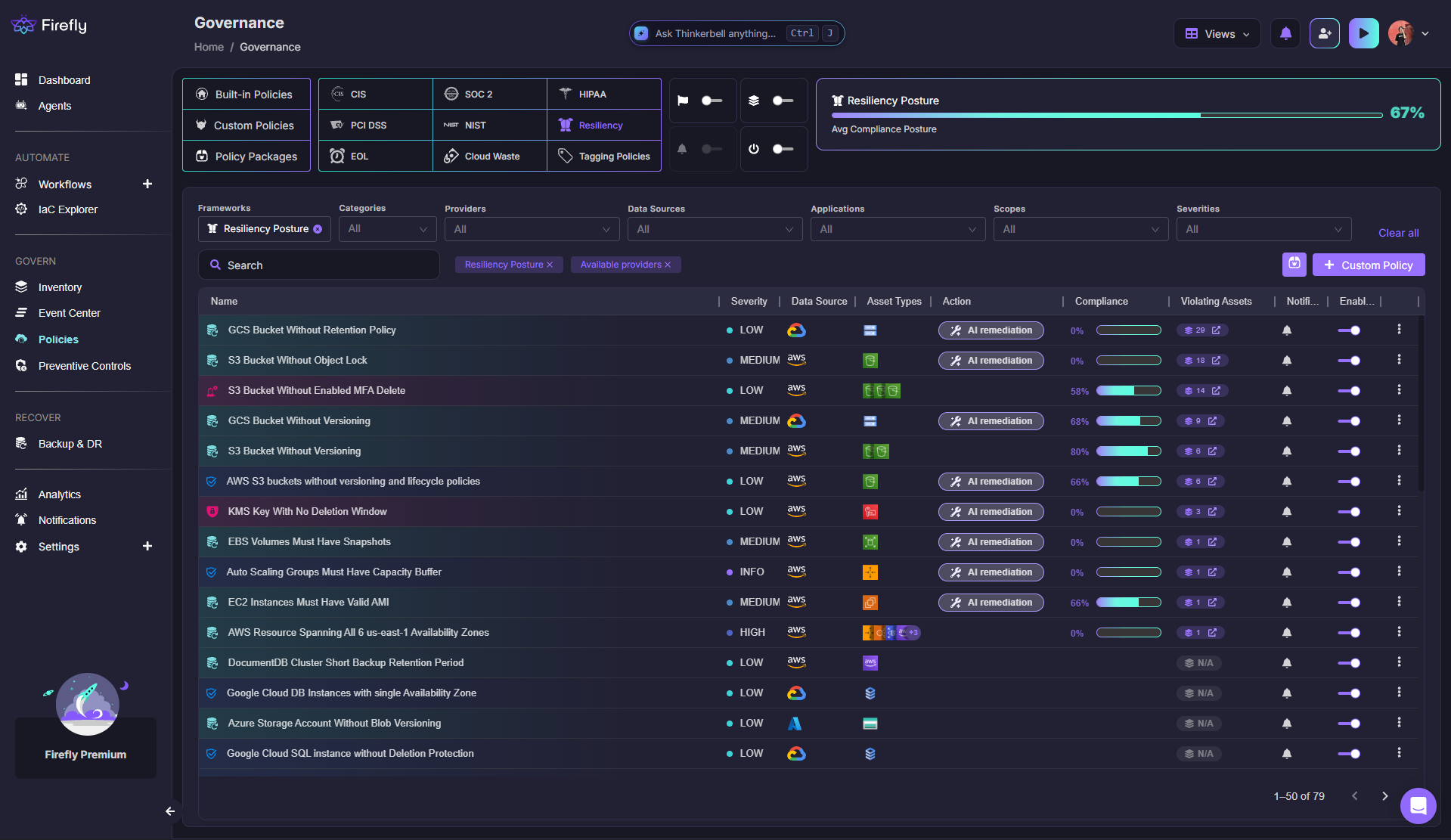
How to do this in Firefly: Cloud Resilience Posture Management (CRPM) continuously scores an environment against built-in resiliency policies, missing snapshot policies, S3 buckets without Object Lock, RDS clusters that skip final snapshots on deletion, and updates in real time rather than at the next scheduled review. For teams that want that status without opening the dashboard, AI SRE answers direct questions like "which of our production applications would fail to recover cleanly right now," cross-referencing Inventory, Governance, and Backup & DR data in a single response.

9. Extend Governance to AI Agents, Not Just Humans
AI coding agents with live cloud context are already embedded in real infrastructure workflows, and a governance model built solely around human-initiated changes has a blind spot the moment an agent starts proposing or making changes. The risk isn't the agent itself; it's a change evaluated on trust in the requester rather than on what the change actually does.
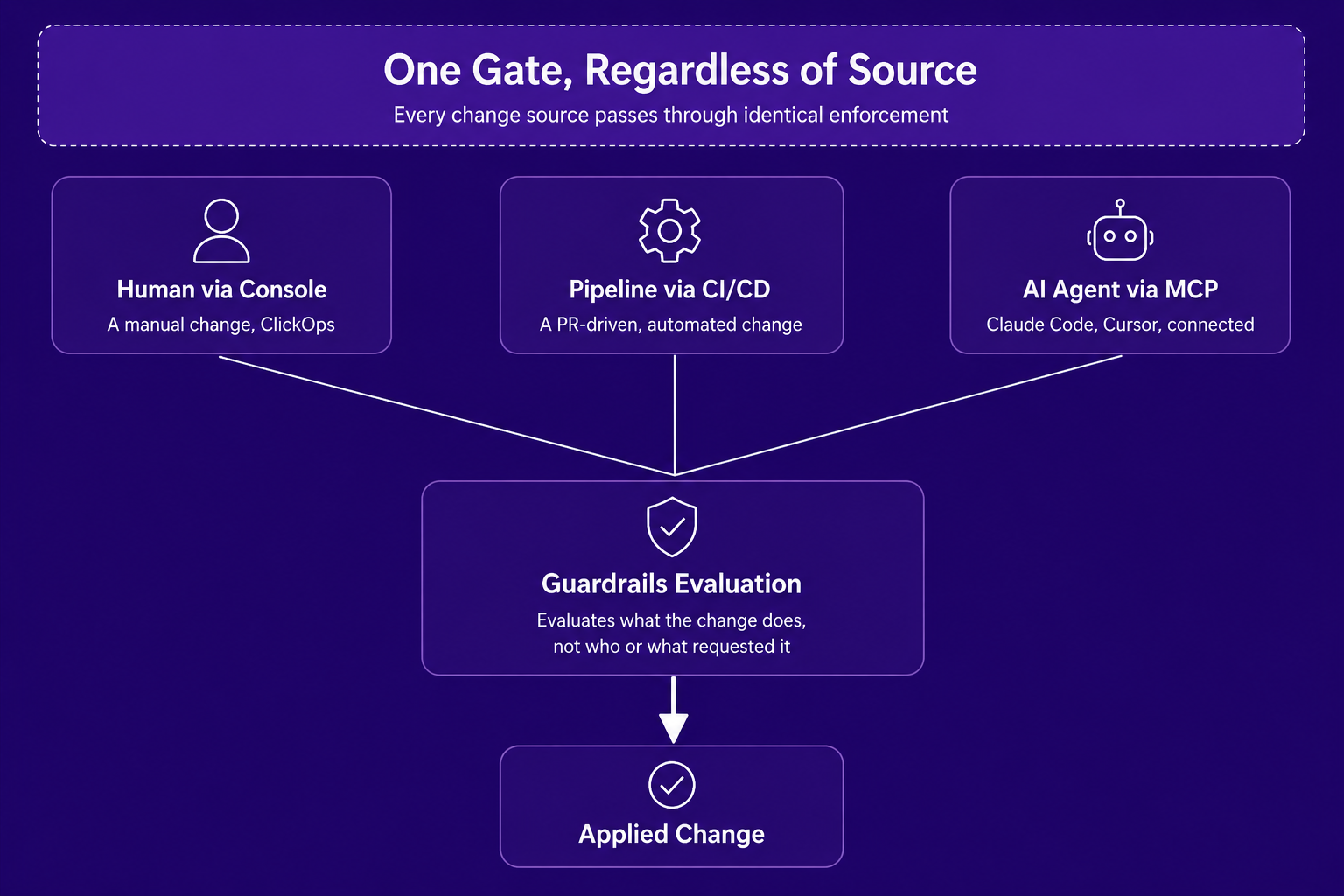
How to do this in Firefly: MCP support connects tools like Claude Code and Cursor to Firefly's live inventory and codification data, so an engineer can query infrastructure or propose a fix directly from their IDE. Applying that change still routes through the same Guardrails evaluation and pull request review as any human-initiated change. The governance layer evaluates the change itself, not who or what asked for it. This is the practical answer to a concern that this piece's earlier practices already cover: policy enforcement and attribution don't need a separate model for agent-driven changes; they need the same one applied consistently.
Where Should You Start With This
Not every practice on this list needs to be adopted at once, and trying to implement all nine simultaneously usually means none of them get done properly. Start with the first one: an accurate, continuously updated inventory, since every other practice on this list depends on knowing what actually exists before policy drift detection or backup isolation can be meaningfully checked against it.
From there, explore Firefly's Governance dashboard to see how many of these nine practices are already covered when a cloud account connects, or read the companion guides on cyber resilience strategy and cyber resilience frameworks to understand how these practices fit into a broader program.
FAQs
What's the difference between cyber resilience best practices and a cyber resilience strategy?
A strategy is the overall framework an organization builds toward, the capabilities it needs, and the order in which it needs them. Best practices are the specific, repeatable habits, inventory accuracy, policy enforcement, drift detection, that make that strategy actually true in a live environment rather than a document describing an intention.
What's the single most important cyber resilience best practice to start with?
An accurate, continuously updated asset inventory, since every other practice depends on it. Policy enforcement, drift detection, and backup isolation are only as good as the organization's knowledge of what actually exists, and most environments carry a meaningfully larger share of unmanaged resources than assumed.
Why does policy enforcement need to run at multiple stages instead of just at deployment?
Because a pre-merge check only covers changes that go through a pull request. A manual console change made after deployment, or drift that accumulates over months with no PR involved, never gets evaluated by a deploy-only policy check, which is exactly the gap that lets an environment's real compliance posture diverge from what a point-in-time review shows.
How is drift detection different from what terraform plan already does?
terraform plan compares a proposed change against the state file, not against live infrastructure. Drift detection compares the live provider state directly against the declared IaC, which catches changes that plan-based checks can't structurally detect, since a plan run after an out-of-band change can come back clean if the state file itself was never updated to reflect it.
Does extending governance to AI agents require a different policy model than the one used for humans?
No, and that's the point. The same Guardrails evaluation applies regardless of whether a change came from a human, a CI/CD pipeline, or an AI agent connected through MCP, since the risk a policy is meant to catch depends on what the change does, not who or what initiated it.
How does Firefly support implementing these nine practices together rather than as separate tools?
Cloud Asset Inventory, Guardrails, drift detection, Event Center, Backup & DR, and CRPM all run against the same underlying inventory and policy engine, so adopting one practice doesn't require a separate integration for the next. That's a meaningfully different starting point than stitching together Infracost, OPA, custom drift scripts, and separate audit logging by hand.

.avif)
.avif)
.webp)


.webp)