
TL;DR:
- Gambit Security validates whether existing backups can actually recover a production application, checking dependency coverage, IaC drift, and RPO/RTO gaps. It doesn't store backups; it audits whether the ones you have are sufficient.
- Firefly AI is the only platform here that executes recovery through Terraform, generating IaC from application snapshots and applying it through CI/CD, so recovered infrastructure enters version control instead of creating state drift.
- Rubrik, Cohesity, Veeam, and Wiz each solve different resilience challenges: Rubrik focuses on ransomware recovery and immutable backups, Cohesity on consolidating enterprise backup operations, Veeam on fast hybrid workload recovery, and Wiz on cloud security posture and attack path analysis rather than disaster recovery.
- In 2026, the right evaluation question is no longer which platform has the most features; it's whether the platform's recovery model fits how your team actually deploys infrastructure.
Disaster recovery platforms target different failure scenarios; backup and replication, ransomware-triggered rollback, Active Directory forest recovery, and recovery plan validation are separate problems that rarely share a toolset.
A recent r/sysadmin thread flagged exactly this fragmentation: an engineer building a DR strategy across Oracle Cloud, Azure, and AWS couldn't find a single platform that handled backup scheduling, ransomware rollback, and runbook validation together. The thread stalled on the comparison question because each engineer was solving a different gap: one needed multi-cloud backup coverage, another was recovering an AD forest post-ransomware, and a third couldn't confirm that any of their runbooks would actually restore production under real failure conditions.
Which Gambit Security alternative fits depends on whether the gap is backup coverage, ransomware recovery, AD restoration, or validating that recovery runbooks work before an incident forces the test.
The five platforms below are grouped by the recovery problem they solve, starting with the one that best matches your most critical gap.
What is Gambit Security?
Gambit Security is a Cyber Resilience Posture Management (CRPM) platform, a category that sits above traditional backup platforms and focuses on continuous recovery validation rather than backup execution. Where backup platforms measure whether jobs ran, CRPM measures whether those jobs produce an environment that can actually recover. The category treats disaster recovery not as a quarterly test but as a continuous state that can degrade silently as infrastructure changes, new resources get added, IAM roles drift from Terraform, and security groups change, without a single backup job failing.
Traditional backup platforms answer questions about backup operations:
- Was the job completed?
- How many recovery points are available?
- Can I restore this specific VM or database?
Gambit answers questions about recovery outcomes:
- Does this application's dependency graph have complete backup coverage?
- Will a recovery operation finish within the defined RTO and RPO?
- Has production infrastructure drifted from the Terraform config that defines the recovery baseline?
- Which specific component, missing or misconfigured, will block the application from starting?
The distinction matters operationally. A backup platform confirms that a snapshot exists. Gambit confirms that a snapshot exists for every resource the application needs and that those resources haven't changed in ways that would make the snapshot unusable.
How Gambit Security Approaches Cloud Disaster Resilience
Specifically, Gambit tracks five failure vectors: backup coverage gaps at the dependency level, recovery readiness drift, incomplete dependency maps, RPO/RTO violations, and infrastructure drift away from IaC definitions.
Backup validation against the full application dependency graph
Gambit identifies workloads with no snapshot, snapshots that violate retention policy, missing cross-region copies, and resources added to production after the backup policy was last updated, and coverage gaps that backup job completion logs don't expose.
Recovery readiness scoring that reflects the current infrastructure state
A policy set three months ago may have been accurate when it was defined. Since then, an engineer added a new Lambda function, changed security group rules, and deployed an RDS Read Replica. Gambit detects those changes, re-evaluates coverage against the updated dependency graph, and flags new gaps without waiting for the next quarterly DR test.
Dependency mapping across compute, storage, networking, and IAM
Gambit builds a relationship graph between every component that an application depends on. During recovery planning, the graph identifies which missing resource will prevent the application from starting and what sequence of components need to come back online.
RPO and RTO gap detection before the recovery window closes
For a four-hour RTO to be achievable, the backup needs to be recent enough to restore within that window, the restore target needs to be in the right region, and the recovery data needs to be accessible from that region. Gambit flags when those conditions aren't met, before an active incident exposes them.
Infrastructure drift detection between deployed resources and IaC definitions
Out-of-band changes to production resources create discrepancies between what Terraform describes and what AWS actually contains. Gambit surfaces those discrepancies continuously so they can be resolved in Git before they cause a failed recovery.
Those six scenarios map directly to the platforms below. Knowing which one fits your environment narrows the field before you get into feature comparisons.
The 5 Best Gambit Security Alternatives
1. Firefly AI
Firefly treats DR as an IaC workflow rather than a backup-and-restore operation. When most backup platforms recover infrastructure through direct API calls, the restored resources don't appear in Terraform state, and the next Terraform plan conflicts with what was manually restored. Firefly generates Terraform from application snapshots instead, so recovered infrastructure runs through the same CI/CD pipeline as production deployments and enters version control from day one.
How Firefly Works
1. Connect via read-only APIs. Firefly links to AWS, Azure, and GCP using a CloudFormation stack or Terraform module- no agents, no elevated permissions beyond read access.
2. Discover resources and map relationships. Firefly scans all accounts and regions to build a live inventory, then maps how resources relate to each other, which EC2 instances connect to which RDS cluster, and which IAM roles those instances require.
3. Compare deployed infrastructure against IaC. The live inventory is continuously compared against Terraform or OpenTofu configurations in Git to detect any changes made outside the normal deployment pipeline.
4. Flag drift and generate remediation Terraform. When an engineer modifies an RDS instance class directly in the AWS console, Firefly flags it and generates updated Terraform to bring the IaC definition back in sync with what's actually deployed.
5. Define applications as tagged resource groups. Applications are identified by resource tags rather than manually selected VMs; a tag like app: payments-api automatically pulls in the ALB, EC2 instances, RDS database, IAM roles, security groups, and storage dependencies as a single protection unit.
6. Generate Terraform on restore. When recovery is triggered, Firefly generates a Terraform plan from the selected snapshot. Engineers review it as a PR, merge it through CI/CD, and the recovered stack enters version control with no manual state manipulation required.
Hands-on: Scanning resiliency policy gaps, reviewing the application dependency graph, and triggering a Terraform-based restore
Connect Firefly to an AWS account by granting read-only API access through a CloudFormation stack, with no agents to deploy. Within minutes, Firefly begins scanning resources across all accounts and regions and immediately evaluates them against the built-in Resiliency Posture policy framework. The Governance view shows each policy as a compliance percentage, an S3 bucket without object lock, an EBS volume with no snapshot policy, a KMS key without a deletion window, alongside how many assets are violating it and whether AI-generated remediation is available.
Here's the Governance view filtered to Resiliency Posture policies across a live AWS environment:
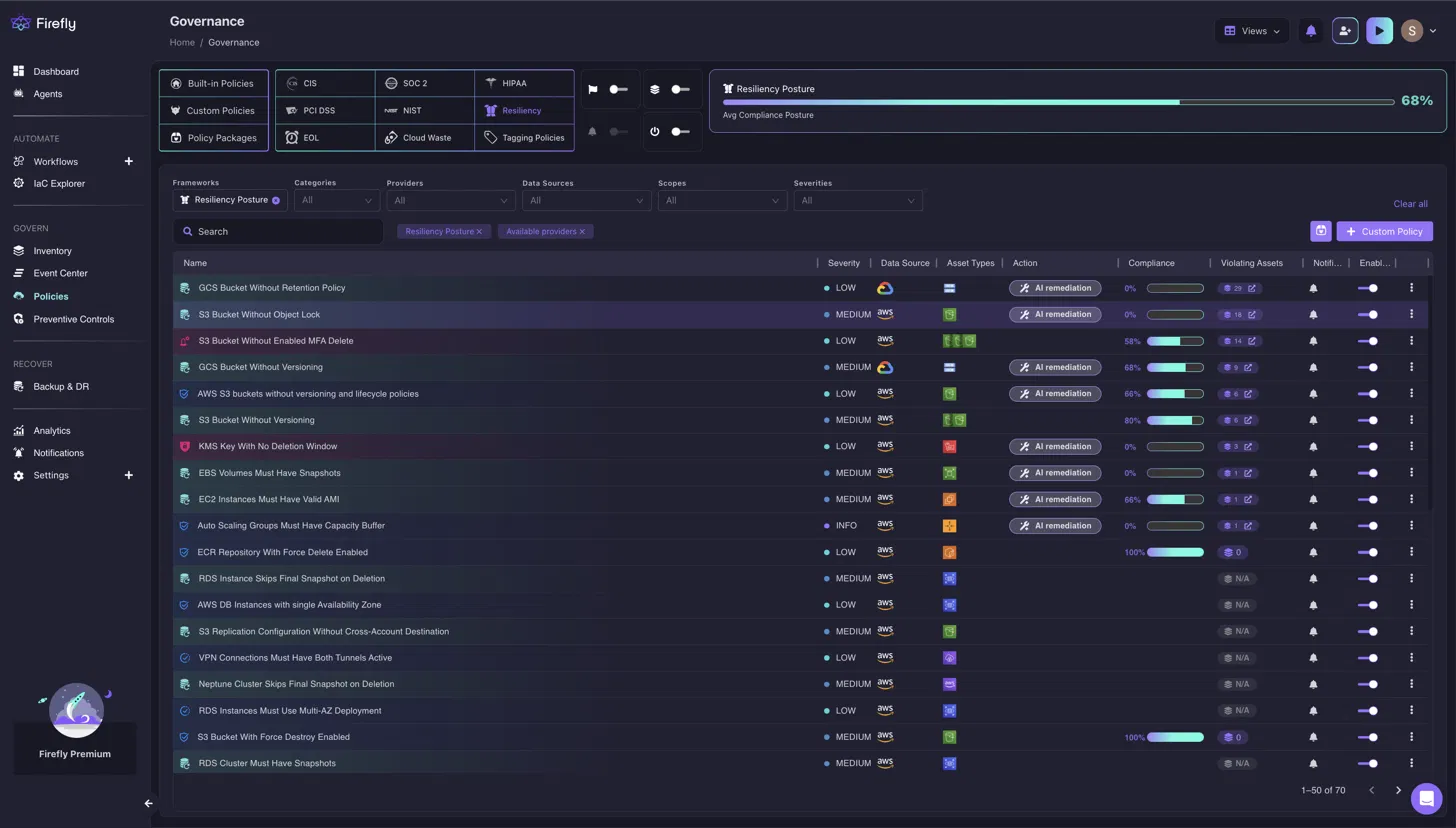
The Resiliency Posture score of 68% reflects aggregate compliance across 70 active policies. The ones showing 0%, S3 Bucket Without Object Lock with 18 violating assets and EBS Volumes Must Have Snapshots, are the highest-priority gaps, because both directly block a clean recovery if an incident hits before they're remediated.
Once policies are in place, navigate to Backup & DR to see the application registry. Each row shows the data source, region, snapshot count, and when the last backup ran. Here's the application list for a multi-cloud environment spanning AWS us-east-1 and Google Cloud us-central1:
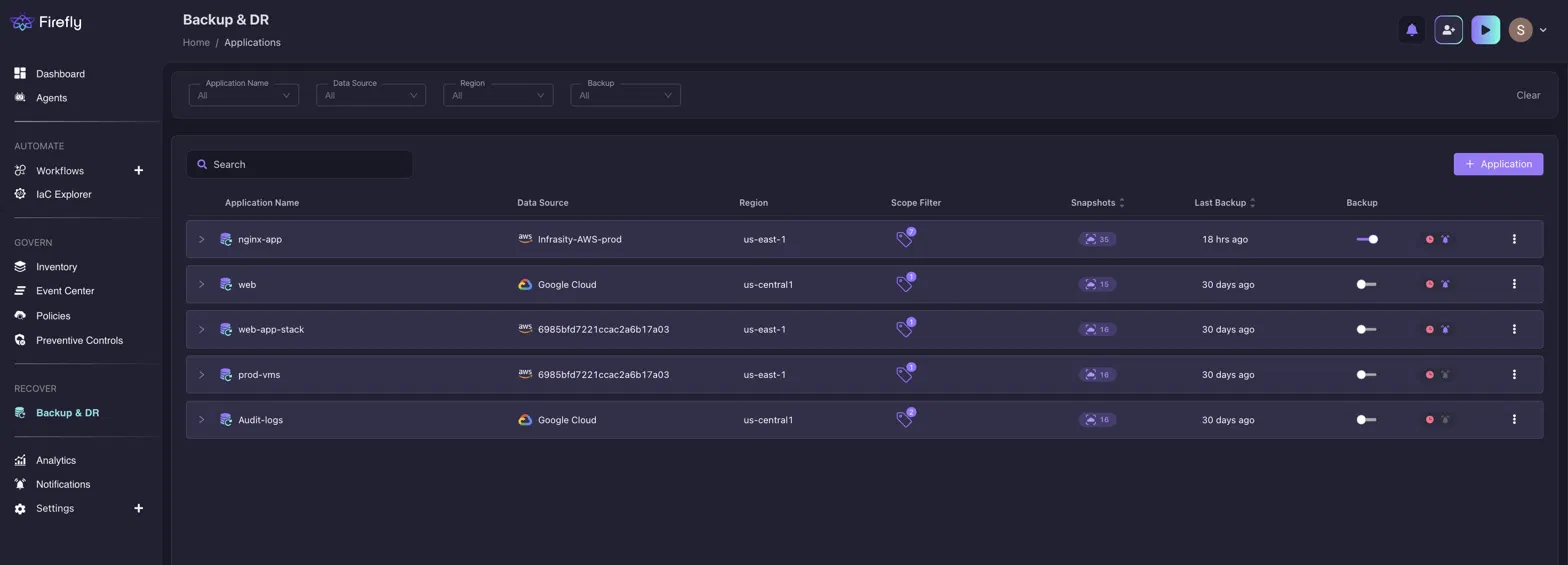
The nginx-app row shows 35 snapshots with a last backup 18 hours ago, within most RTO windows. The web, prod-vms, and other rows show the last backup 30 days ago, which would fail most RPO requirements for production workloads and would surface immediately as a resiliency gap in the Governance view above.
Click any application row and select a snapshot to open its full dependency graph. Firefly renders every AWS resource captured in that snapshot, the EC2 instance, EBS volume, KMS key, IAM instance profile, IAM role, subnets, route table, and internet gateway, as a connected graph.
Here's the dependency graph for the nginx-app snapshot taken June 11, 2026, across 18 assets:
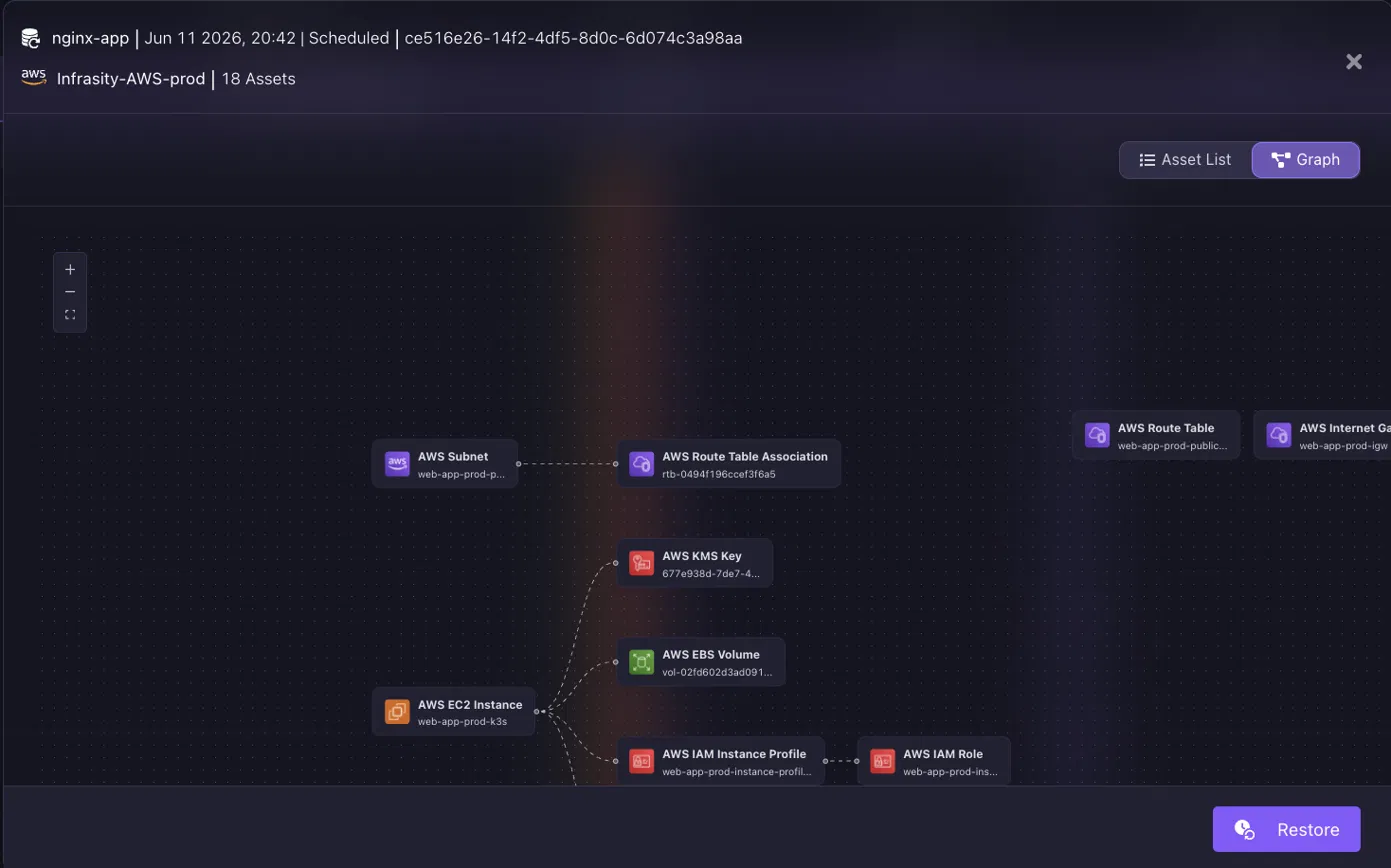
The AWS KMS Key node connects to both the EBS Volume and the EC2 Instance, meaning recovery without that key in the target region fails before the instance even boots. Firefly surfaces this relationship in the graph so it's visible before restore begins, not after. Clicking Restore from this view kicks off the Terraform generation: Firefly processes the 18-asset snapshot and produces locals.tf, main.tf, outputs.tf, provider.tf, and variables.tf are ready to export or push directly through your CI/CD pipeline without touching Terraform state manually.
Pros
- Terraform and OpenTofu recovery integrate with existing CI/CD pipelines, and the recovered infrastructure is version-controlled.
- Continuous drift detection between deployed resources and IaC definitions flags out-of-band changes before they break recovery
- Application-aware backup captures dependencies, not just compute resources
- Cloud governance policy engine with automated remediation for storage versioning, object lock, and deletion protection
- Multi-cloud support across AWS, Azure, and GCP
Cons
- Organizations that need immutable backup repositories still need a separate platform alongside Firefly
- Teams without established Terraform workflows need to build IaC practices before the IaC-based recovery model becomes usable.
Best fit: Organizations where Terraform or OpenTofu is the primary infrastructure deployment mechanism, GitOps workflows are in place, and DR is version-controlled and CI/CD-driven.
2. Rubrik
Rubrik owns the full backup lifecycle, scheduling, immutable storage, ransomware detection, recovery orchestration, and restore. It doesn't validate whether backups exist; it creates, stores, monitors, and orchestrates recovery from those backups. It also continuously analyzes backup data for ransomware indicators, so when an attack is detected, administrators identify clean recovery points rather than restoring from data that was already encrypted.
How Rubrik Works
1. Connect workloads via native connectors. Rubrik links directly to VMware, Hyper-V, AWS, Azure, GCP, Kubernetes clusters, Microsoft 365, SQL Server, Oracle, and NAS storage through platform-specific connectors.
2. Apply protection policies per workload group. Administrators define backup frequency, retention periods, replication targets, and recovery objectives at the policy level. One policy covers every workload assigned to it without per-resource configuration.
3. Write backups to immutable repositories. Backup copies land in storage that blocks modification and deletion, and compromised production IAM credentials can't reach or delete these copies, even with admin-level access.
4. Scan backup data continuously for ransomware indicators. Rubrik monitors every backup set for encryption spikes, mass file deletions, and abnormal modification rates, and detection runs against backup data, not just production systems, so threats surface before they contaminate recovery points.
5. Identify the last clean recovery point. When a threat is confirmed, Rubrik displays a timeline of clean vs. compromised snapshots. Administrators select the last clean point without manually auditing individual backup sets.
6. Orchestrate multi-application recovery sequencing. Rubrik restores databases before application servers, validates connectivity at each stage, and surfaces failures automatically. The recovery sequence runs without an engineer managing the order step by step.
Hands-on: Connecting workloads, monitoring for ransomware anomalies, and running Clean Room Recovery
After deploying the Rubrik cluster (on-premises appliance or cloud-native), you connect workloads via the Rubrik connector and assign protection policies, frequency, retention, and replication target. Once connected, the central dashboard shows protection status across all clusters, data centers, and workload types in a single view.
Here's the Rubrik Data Protection dashboard for an environment with 10 connected data centers and 1.4k protected objects:
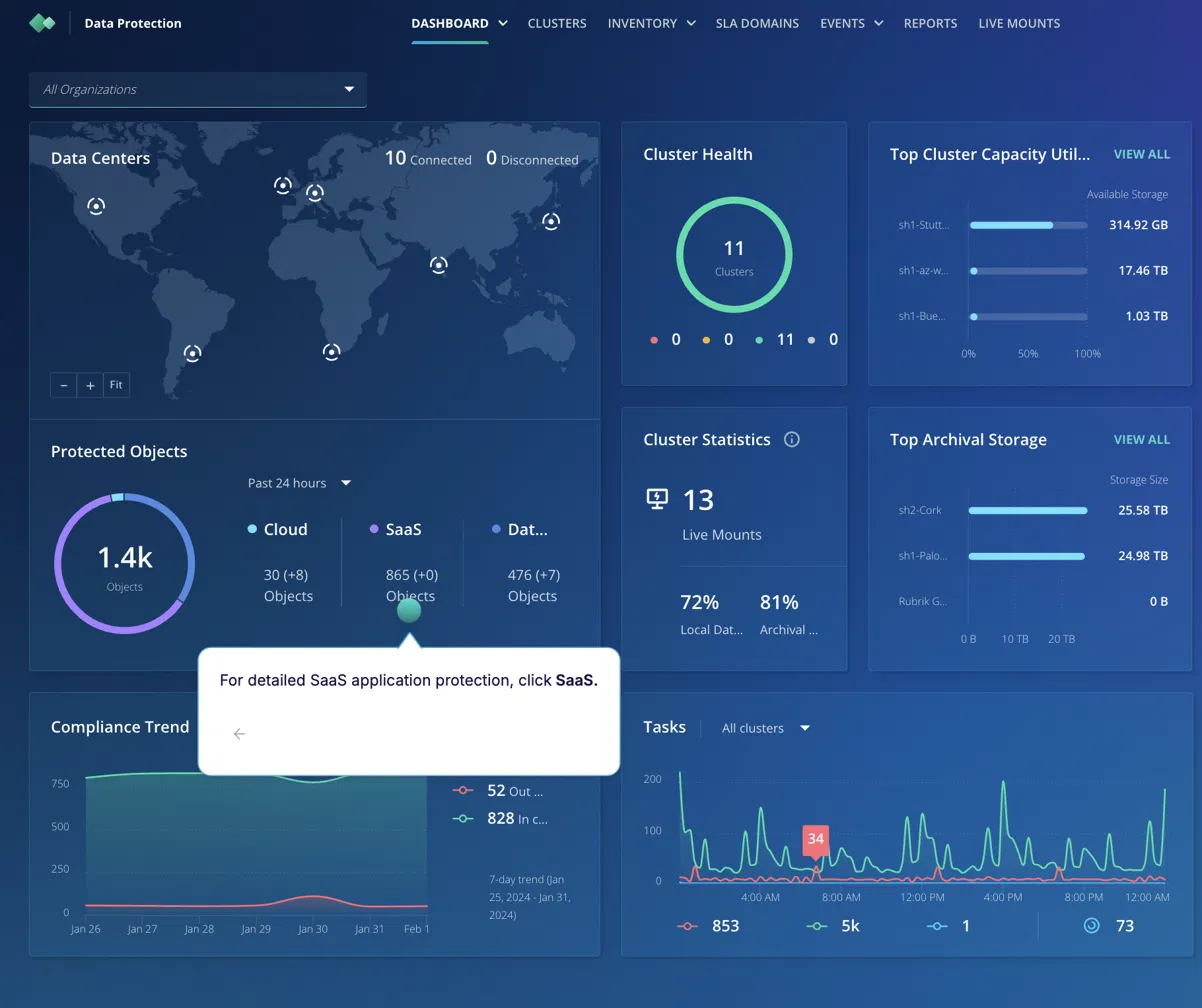
The Compliance Trend panel is the key operational signal; 828 objects are meeting their SLA policy against 52 that aren't. Those 52 are the ones that miss their RPO window if a recovery event happens today. The threat monitoring view shows backup anomalies in real time: unexpected encryption spikes, mass deletions, and abnormal modification rates. When a ransomware event is confirmed, the Clean Room Recovery workflow displays a timeline of clean vs. compromised snapshots. You select the last clean point, kick off recovery, and Rubrik orchestrates the restore sequence, databases first, then application servers, without requiring an engineer to manage the order manually.
Pros
- Immutable backups block deletion or modification during active ransomware attacks, even by compromised admin credentials
- Ransomware detection runs against backup data continuously, not just at restore time.
- Recovery orchestration automates sequencing across a large-scale multi-application incident.s
- Identity protection covering Active Directory and Entra ID reduces recovery failures caused by identity infrastructure damage.
- Mature hybrid environment support across VMware, Hyper-V, and public cloud
Cons
- Restored resources don't integrate with Terraform state; IaC recovery isn't a design goal
- Cloud governance and infrastructure drift detection are outside Rubrik's scope
- Recovery readiness doesn't continuously evaluate application-level dependency coverage at the same depth as Gambit
Best fit: Organizations that need enterprise backup infrastructure with immutable storage, ransomware detection against backup data, and orchestrated recovery across hybrid environments.
3. Cohesity, Consolidated Backup Management Across Hybrid Infrastructure
Cohesity's primary design goal is consolidation, replacing separate backup products that protect different infrastructure silos with a single management layer across VMs, cloud workloads, Kubernetes clusters, databases, file shares, and SaaS platforms. For organizations managing hundreds of workloads across on-premises and cloud environments, maintaining separate backup tools per platform creates administrative overhead that compounds as infrastructure grows.
How Cohesity Works
1. Connect all infrastructure types through one console. Cohesity links to VMware, Hyper-V, AWS, Azure, GCP, Kubernetes, SQL Server, Oracle, NAS storage, and SaaS platforms, all managed from a single interface rather than separate backup tools per platform.
2. Define one protection policy and assign it to workload groups. A policy specifies backup frequency, retention periods, replication targets, archive destinations, and recovery objectives. Assigning it to a workload group applies it to every member automatically, and adding a new workload to the group inherits the policy without manual reconfiguration.
3. Store backups in immutable repositories with continuous anomaly detection. Backup data lands in immutable storage and is monitored for ransomware indicators, mass file deletion, rapid encryption, and abnormal modification patterns without requiring an administrator to run a manual scan.
4. Replicate to a secondary site or cloud region for DR. On-premises workload backups can be replicated to AWS or Azure on the configured schedule, enabling cloud-based recovery without building a separate backup infrastructure in the cloud.
5. Search and restore across all workload types from one interface. Recovery search spans VMs, databases, file shares, and cloud workloads. Type the workload name or file path, select a recovery point, and restore using the same workflow regardless of which platform the workload was running on.
Hands-on: Defining one protection policy across VMware, AWS, and SQL Server and recovering across workload types
Cohesity connects to VMware vCenter, AWS, and SQL Server through a single console. You define a protection policy once, backup window, retention, archive destination, and assign it to a workload group.
Adding a new workload to an existing group applies the policy automatically without reconfiguring individual jobs. The main dashboard flags backup health, anomaly detection, and security risk simultaneously, so a paused protection job or malware detection event doesn't require navigating to a separate tool.
Here's the Cohesity NetBackup dashboard showing the security and anomaly monitoring view after policies are applied:
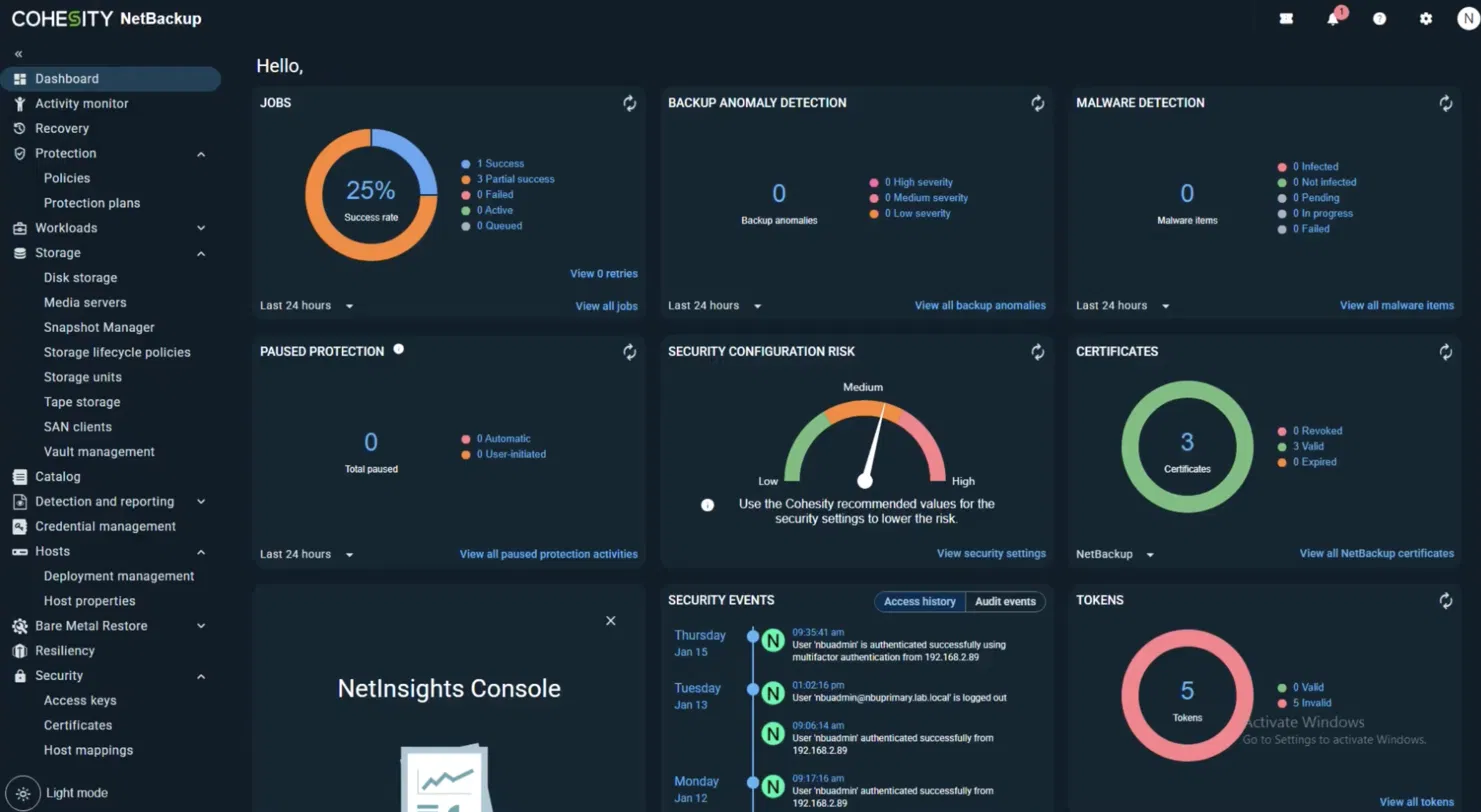
The Security Configuration Risk gauge at Medium indicates the NetBackup security settings don't yet match Cohesity's recommended baseline. Clicking View security settings shows exactly which settings to change.
The Tokens panel showing 5 invalid tokens is another gap the dashboard surfaces proactively, before a failed authentication during recovery exposes it. For DR, you set up a replication target (a secondary Cohesity cluster or cloud region), and Cohesity replicates on the configured schedule. Recovery search works across all workload types: type the VM name, database name, or file path, and pick a recovery point. The same workflow applies whether you're restoring a VMware VM or an S3-backed application.
Pros
- Single backup platform for VMs, databases, cloud, Kubernetes, and SaaS replaces multiple per-platform tools
- .Cross-cloud DR without requiring separate backup products per cloud provider
- Immutable storage and continuous anomaly detection for ransomware protection
- Centralized policy management reduces per-team backup administration
- Mature enterprise integrations and recovery automation
Cons
- IaC integration is not a design priority, and restored resources don't appear in Terraform state.
- Application-level dependency mapping is less granular than Gambit or Firefly.
- Recovery readiness doesn't continuously assess the RPO/RTO gap at the application dependency level.
Best fit: Organizations consolidating multiple backup tools into a single platform with consistent policies across VMware, cloud, Kubernetes, databases, and SaaS.
4. Veeam, Fast Workload Recovery with Instant Recovery Across Hybrid Infrastructure
Veeam's focus is reliable backup, replication, and fast recovery across VMware, Hyper-V, cloud services, physical servers, Kubernetes, Microsoft 365, and NAS storage. Its Instant Recovery capability is its clearest differentiator: instead of waiting for a full VM or database restore, Veeam starts the workload directly from backup storage while restoration runs in the background. In environments where downtime is measured in per-hour revenue impact, the difference between a two-hour restore and a five-minute start-from-backup is operationally significant.
How Veeam Works
1. Add infrastructure sources to the console. Veeam connects to vCenter, Hyper-V hosts, AWS accounts, physical servers, Kubernetes clusters, Microsoft 365, and NAS storage through the Backup & Replication console, all managed from one interface.
2. Configure backup jobs with retention and repository. Administrators define frequency, retention period, backup repository location, replication targets, and recovery objectives per workload. Jobs run on schedule without per-incident configuration.
3. Verify every recovery point automatically after each job.b After each backup completes, Veeam tests the recovery point and confirms the protected workload can boot correctly from it. A failed verification sends an alert before a real recovery event exposes the problem.
4. Keep standby copies live through replication. Replication jobs maintain a live copy of protected workloads in a secondary data center or cloud region. When a primary site goes down, the standby is promoted without waiting for a full restore to complete.
5. Start failed workloads with Instant Recovery in under five minutes. Right-clicking a failed VM in the console and selecting Instant Recovery starts it directly from backup storage while the full restore runs in the background. Traffic migrates to the recovered VM once restoration completes, and the application is available throughout.
Hands-on: Creating backup jobs, running automated verification, and starting a VM with Instant Recovery
After installing Veeam Backup & Replication, you add infrastructure sources, vCenter, AWS accounts, and physical servers, and create backup jobs with frequency, retention, and repository settings. Backup verification runs automatically after each job and sends a report if a recovery point fails the boot test. For SaaS workloads like Salesforce, Veeam Data Cloud tracks Data, File, and Metadata backup coverage separately with last-run timestamps for each. Here's the Veeam Data Cloud dashboard for a Salesforce environment after a full backup cycle:
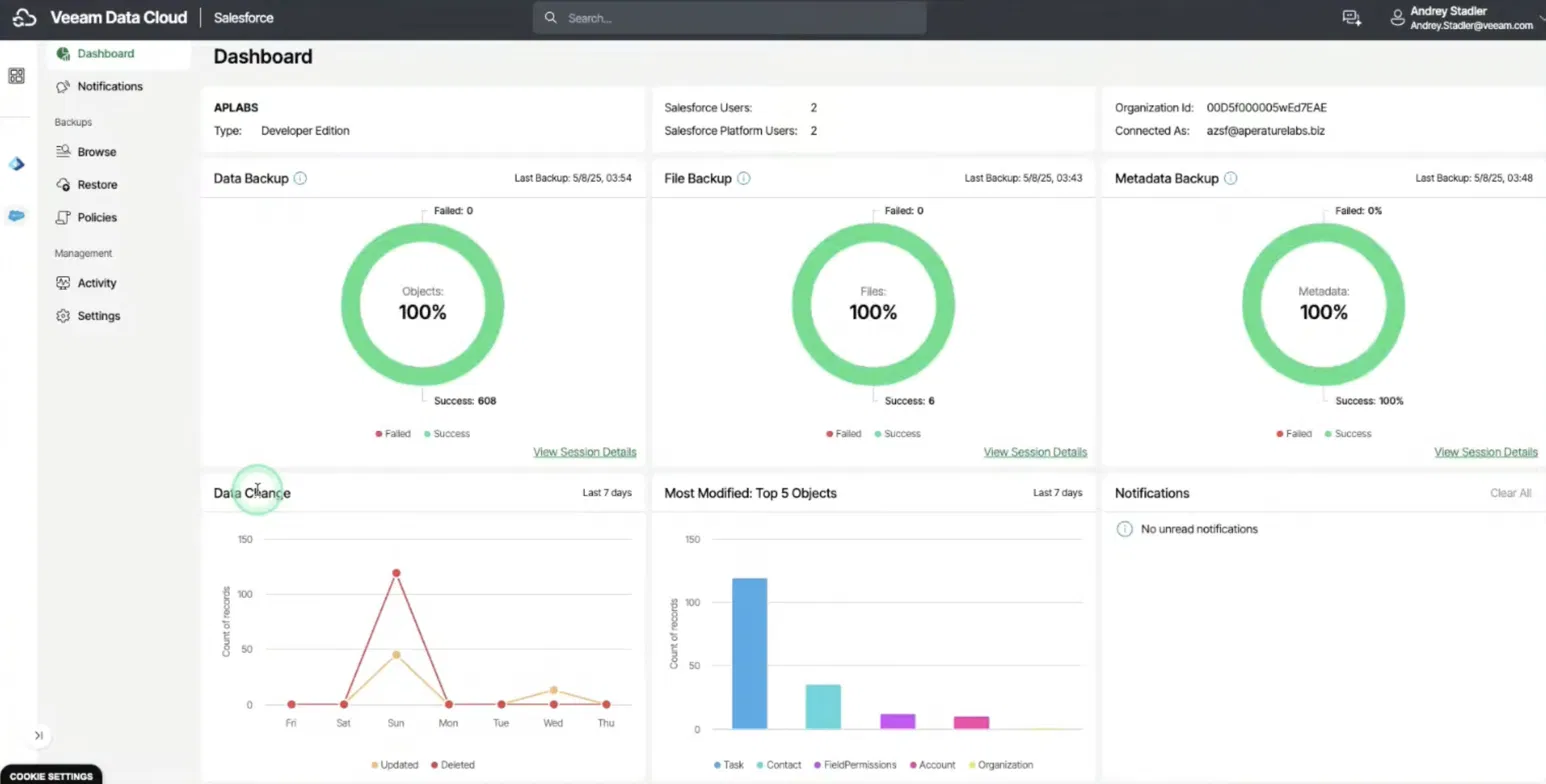
All three coverage rings show 100%, 608 Salesforce objects, all files, and all metadata backed up with zero failures at the last run. The Data Change graph below shows which object types changed most over the last 7 days, Tasks and Contacts at the top, which are the data sets most at risk if the next backup misses its window. When a VM or workload goes down, right-clicking it in the Veeam console and selecting Instant Recovery starts it from backup storage in under five minutes. The full restore continues in the background and migrates traffic once complete; failover to a replicated standby in a secondary site or cloud region is a single-click operation from the same console.
Pros
- Instant Recovery starts VMs from backup storage within minutes, while full restoration continues in the background
- Automated backup verification confirms recovery point integrity after each backup job
- Broad hybrid workload support across VMware, Hyper-V, cloud, and Kubernetes
- Mature replication for standby environments reduces recovery time after site failures
- Flexible deployment across on-premises and cloud environments
Cons
- Recovered resources don't integrate with Terraform state; IaC recovery isn't supported as a native workflow.
- Infrastructure drift detection and cloud governance are outside Veeam's scope
- Backup verification confirms that VMs can boot, not that the application's full dependency graph can recover and serve traffic
Best fit: Organizations with existing VMware or Hyper-V environments, hybrid infrastructure, or established backup operations that need proven workload protection and fast recovery.
5. Wiz
Wiz is not a backup platform and doesn't perform disaster recovery. Both Wiz and Gambit continuously analyze cloud environments, but for different failure modes: Gambit identifies recovery gaps, missing backups, dependency holes, and IaC drift. Wiz identifies security exposure, misconfigurations, excessive permissions, publicly accessible resources, and attack paths that chain individual risks into breach scenarios. Organizations often deploy both because preventing incidents and recovering from them are separate operational problems.
How Wiz Works
1. Connect to cloud accounts without agents. Wiz links to AWS, Azure, GCP, and Kubernetes through a read-only API; a CloudFormation stack or Terraform module handles the IAM role. No agents to deploy on individual workloads or containers.
2. Build a Security Graph across the full environment. As resources are discovered, Wiz constructs a graph connecting infrastructure, identities, workloads, storage, networking, and vulnerabilities, a relational model of the cloud environment rather than an isolated asset list.
3. Identify attack paths across connected findings. Instead of surfacing thousands of individual findings, Wiz connects them into sequences: a publicly exposed EC2 instance with a critical CVE that also holds an IAM role with write access to a production S3 bucket is a single prioritized attack path, not three separate alerts.
4. Rank findings by attack path severity, not CVSS score. The Issues view orders findings by the business impact of the full path; a medium-severity misconfiguration on a route to production data ranks above a critical CVE on an isolated dev instance with no network access to sensitive resources.
5. Surface remediation guidance linked to the affected resource. Each finding links directly to the resource in the AWS, Azure, or GCP console with specific remediation steps, a misconfigured security group rule, an overly permissive IAM policy, or an unencrypted storage bucket.
Hands-on: Connecting agentlessly, navigating the Security Graph, and prioritizing findings by attack path over CVSS score
Connect Wiz to an AWS organization using a CloudFormation stack or Terraform module; a read-only IAM role is all it needs. Wiz scans all accounts within a few hours, no agents required. The Security Graph renders your environment as an interactive node map: click any resource to see its connections, attached vulnerabilities, and IAM permissions. Beyond the Issues view, the Threats page surfaces active threats generated by Wiz's cloud-native detection engine, each one correlated across log sources and grouped by incident rather than individual log lines. Here's the Wiz Threats view for a 30-day window across a live environment:
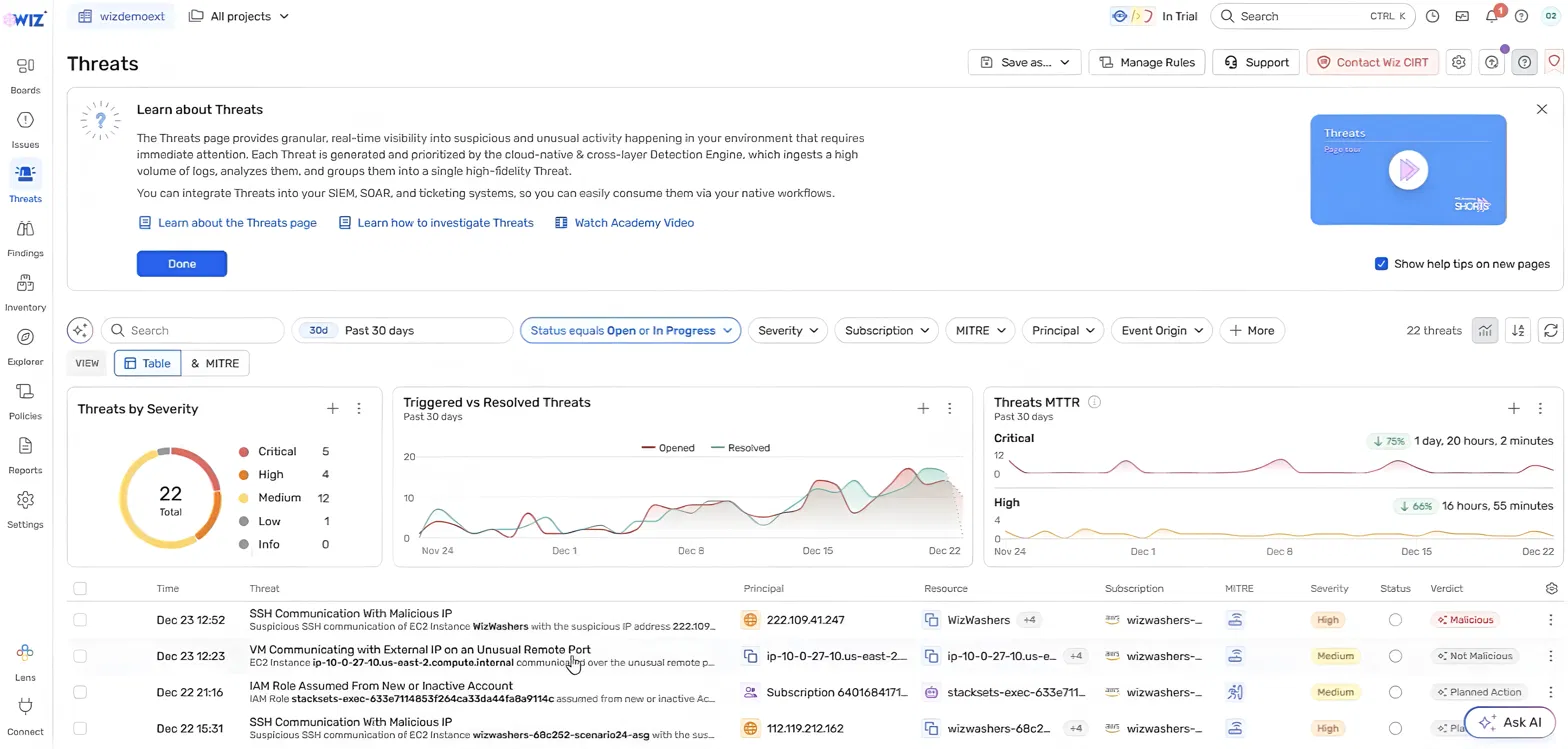
The Threats MTTR panel is the clearest signal of operational tightening, critical threats now resolve 75% faster (down to 1 day, 20 hours) and high-severity threats 66% faster compared to the prior period.
The IAM Role Assumed From New or Inactive Account entry in the list is the type of lateral movement indicator that typically precedes ransomware deployment. Wiz surfaces it as a correlated threat, not buried as a raw misconfiguration finding.
The Issues view prioritizes findings by attack-path severity rather than by CVSS score alone; a medium-severity finding on a route to a production S3 bucket ranks above a critical CVE on an isolated dev instance with no network exposure. Remediation guidance links directly to the affected resource in the AWS console.
Pros
- Agentless cloud security across AWS, Azure, GCP, and Kubernetes reduces deployment overhead at scale
- Attack path analysis connects individual findings into prioritized breach scenarios rather than generating thousands of unranked alerts
- Cloud asset inventory includes identity, vulnerability, runtime context, and configuration in a single graph
- Strong support for cloud-native and containerized workloads
- Multi-cloud security visibility from a single platform
Cons
- Does not create, store, or manage backups
- Does not perform disaster recovery or workload restoration
- Does not generate IaC or integrate with Terraform state
- Does not validate RPO/RTO objectives or application dependency coverage
Best fit: Organizations that need continuous cloud security visibility, misconfiguration detection, and attack surface analysis across multi-cloud environments, deployed alongside a backup platform, not instead of one.
Feature Comparison
Each platform below covers a distinct slice of the resilience stack; this table shows where capabilities overlap and where they don't.
How These Platforms Fit a 2026 Infrastructure Stack
In 2026, the default deployment model for most engineering teams is Infrastructure as Code. Terraform or OpenTofu defines what runs in production. CI/CD pipelines apply to every change. GitOps workflows enforce that no resource exists outside version control. That shift changes what disaster recovery actually means in practice.
Recovering infrastructure by making direct API calls, the model most backup platforms use produces resources that don't appear in Terraform state. The next Terraform plan generates conflicts, state drift accumulates, and the recovered environment quietly diverges from what the codebase describes. For teams that have invested in GitOps, that's a recovery operation that creates a new class of operational debt even as it fixes the immediate outage.
A resilience stack built for 2026 reflects that reality. Rubrik or Veeam handles the backup infrastructure layer, immutable storage, ransomware detection, and orchestrated restore across hybrid environments. Wiz monitors cloud security posture and surfaces misconfigurations before they lead to incidents. Gambit sits above both, continuously validating that backup coverage, dependency completeness, and RPO/RTO targets are achievable given the current state of the environment. Firefly handles recovery itself, generating Terraform from application snapshots and running restore through the same CI/CD pipeline that deployed to production, so recovered infrastructure enters version control from day one rather than existing as untracked state.
No single platform covers all four layers at equal depth. The evaluation question has shifted: it's no longer just "Does this platform protect my workloads?", it's "Does this platform's recovery model fit the way my team deploys and manages infrastructure today?"
FAQs
What is Gambit Security?
Gambit Security is a Cyber Resilience Posture Management (CRPM) platform. It connects to your cloud accounts, existing backup platforms (Rubrik, Veeam, Cohesity, or native snapshots), and IaC repositories, then continuously validates whether your applications can actually recover, checking backup coverage at the dependency level, detecting infrastructure drift from Terraform, and flagging workloads that would miss their RPO or RTO targets if an incident happened today. It doesn't store backups; it validates whether the ones you have are sufficient.
What is the difference between Gambit Security and a backup platform like Rubrik or Veeam?
Rubrik and Veeam create, store, and restore backups. Gambit assumes those backup systems already exist and operates above them as a validation layer. A backup platform tells you that a job has been completed successfully. Gambit tells you whether that job, combined with every other dependency the application needs, is sufficient to recover the full application within its defined recovery objectives. Many enterprise teams run both Rubrik or Veeam for backup operations, and Gambit for continuous validation that recovery will actually work when tested.
Which platform should teams using Terraform choose for disaster recovery?
Firefly AI is the only platform in this comparison that executes recovery through Infrastructure as Code. When most backup platforms recover infrastructure by making direct API calls, the restored resources don't appear in Terraform state, and the next Terraform plan generates conflicts. Firefly generates Terraform from application snapshots and applies it through your existing CI/CD pipeline, so recovered infrastructure is version-controlled and consistent with production from day one. For teams where Terraform or OpenTofu is the deployment standard, this is a significant operational advantage.
Can Gambit Security work alongside existing backup platforms, or does it replace them?
Gambit complements existing backup platforms rather than replacing them. It has no backup storage of its own; it reads from Rubrik, Veeam, Cohesity, or native cloud snapshots through APIs. The typical deployment is Rubrik or Veeam handling backup operations, while Gambit continuously validates that the coverage, dependency graph, and infrastructure state are in a condition that can actually meet recovery objectives. If you already have a mature backup platform and want visibility into whether it would succeed during an actual incident, Gambit is designed for that use case.

.avif)
.avif)
.webp)

.webp)