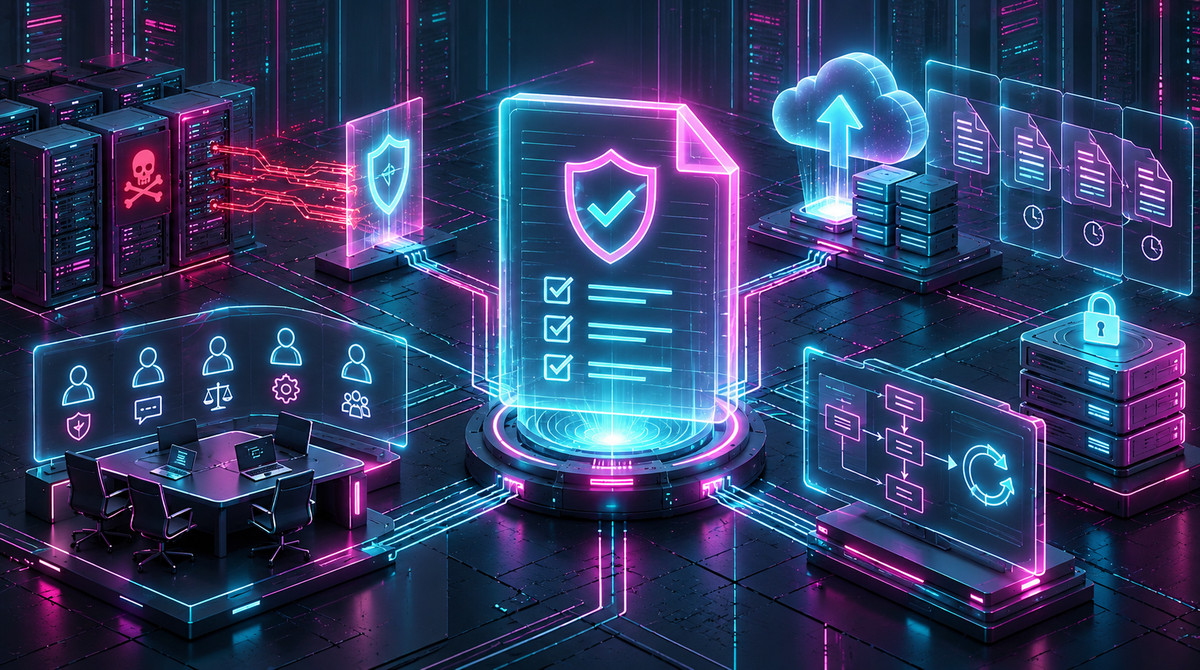
TL;DR
- 79% of IT leaders now cite attacker access to backups as their top concern, according to Object First's 2026 World Backup Day survey, which is why DR planning must assume the attacker is hunting for backups specifically, not just the primary environment.
- The classic 3-2-1 backup rule has a documented gap: no immutability or isolation requirement, exactly what modern ransomware exploits before it ever encrypts production.
- The industry's answer is the 3-2-1-1-0 framework: 3 copies, 2 media types, 1 offsite, 1 immutable or air-gapped, 0 restore errors, each digit closing a specific gap the older rule left open.
- Retention windows matter as much as immutability. Since dormant malware can sit inside a backup for weeks before detonating, a recovery plan needs a window wide enough to restore from before the compromise, not just before the encryption event.
- Firefly's Backup & DR maps directly onto the "+1" and "+0" digits: immutable, versioned snapshots that sit outside the reach of compromised production credentials, with every restore generated as reviewable Terraform rather than a black-box action.
Getting Started: The Basics of Ransomware Disaster Recovery
A disaster recovery plan and a backup are not the same thing, and conflating them is where many ransomware DR plans quietly fail. A backup is a copy of data. A DR plan is the whole capability built around that copy: defined recovery time and recovery point objectives, assigned roles for who executes the restore, a runbook that's actually been read by the people expected to follow it, and a testing cadence that proves the plan works before an incident forces the question. An organization can have excellent backups and still have no real DR plan, because nobody's ever rehearsed using them under pressure.
Ransomware breaks an assumption on which traditional DR planning was built. DR for a natural disaster or a hardware failure assumes the backup itself remains intact; the threat is to the primary environment, not to the copy sitting elsewhere. Ransomware doesn't play by that assumption. Modern ransomware operators actively hunt for backup infrastructure before they ever trigger encryption, specifically because a working backup is the one thing that lets a victim recover without paying. A DR plan built for fire, flood, or a failed disk array isn't automatically a DR plan built for an adversary trying to make sure that plan can't work.
Why the Classic 3-2-1 Rule Isn't Enough Anymore
The 3-2-1 backup rule has been the standard for decades, and for the failure modes it was designed around, it still works: three copies of the data, on two different types of storage, with one copy offsite. That combination genuinely protects against hardware failure, accidental deletion, and a localized disaster taking out a single site. What it doesn't address, because it predates the threat, is an adversary who can reach every copy the rule describes.
The gap is specific: nothing in the classic 3-2-1 rule requires immutability or isolation. If all three copies are reachable from the same network, using credentials an attacker can compromise, an attacker doesn't need to defeat the rule; they just need domain admin. That's exactly the scenario 79% of IT leaders now say worries them most, per Object First's 2026 World Backup Day survey: not whether a backup exists, but whether the attacker can reach it the same way they reached everything else. A backup strategy built entirely on the classic rule can satisfy every clause of it and still get fully encrypted in the same incident as production, because the rule never asked the one question this specific threat actually turns on: can the attacker touch it too?
The 3-2-1-1-0 Framework, Digit by Digit
The industry's response to that gap is the 3-2-1-1-0 framework, which keeps the original rule intact and adds two requirements specifically aimed at an adversary already inside the network.

Diagram of the 3-2-1-1-0 backup framework: 3 copies, 2 media types, 1 offsite, 1 immutable, 0 errors
3 copies. The production data plus two backups, so no single failure or attack can eliminate every version of the data at once. This part is unchanged from the classic rule: redundancy against loss.
2 different media or storage types. Reduces the likelihood that a single vulnerability or misconfiguration compromises every copy simultaneously. A flaw in one storage platform's access controls doesn't automatically take out a copy stored somewhere architecturally different.
1 copy offsite. Protects against physical and site-level disasters, but also against network-wide compromise if the offsite copy sits on infrastructure the attacker's foothold doesn't extend to.
+1 immutable or air-gapped copy. This is the digit that actually answers the ransomware-specific threat. An immutable copy can't be modified or deleted, even by compromised admin credentials, for a defined retention period. Object Lock in cloud storage is a common way to enforce this at the storage layer: once a write occurs, no delete or overwrite operation succeeds until the retention window expires, regardless of the permissions the requesting credential has. An air-gapped copy achieves the same outcome differently: by being offline or logically isolated from the network, so there's no network path an attacker can use to establish a foothold in the first place.
+0 errors. A backup job that completes successfully isn't the same claim as a backup that restores successfully. The zero-error requirement means automated, regular restore verification, actually booting the backup in an isolated environment and confirming it works, rather than trusting a green checkmark on a job log. A server can look perfectly backed up while the underlying database was already partially corrupted or quietly encrypted by dormant malware before the job ever ran.
Designing an Isolated Recovery Environment Properly
The "+1" digit isn't only about the backup copy itself; it's about the credentials and network path that could reach it. An immutable backup sitting in the same account and using the same IAM roles as production is still exposed to a specific risk: a fully compromised production account can still direct traffic to it, request it, or attempt operations against it, even if immutability blocks destructive actions. A properly isolated recovery environment closes that path entirely rather than relying only on the storage layer's protections.
The practical version of this is dedicated, separate credential management for backup infrastructure. Backup systems should use service accounts and IAM roles that are isolated from the credentials used to manage production, so that compromising a domain admin account doesn't automatically grant backup system access. This is the same logic that makes clean-region recovery meaningfully different from restoring into the same compromised account: isolation isn't a single control; it's a boundary that has to hold across the credential, network, and storage layers, not just one of the three.
The rebuild-versus-clean question follows directly from this. When a system is heavily compromised, cleaning it in place, removing the obvious malware, patching the exploited vulnerability, carries a real risk of leaving a persistence mechanism behind: a backdoor account, a modified scheduled task, something the incident investigation didn't catch. Rebuilding from a known-good image within the isolated environment provides a genuinely clean starting point rather than a system that's merely no longer showing obvious symptoms.
Setting RTO and RPO Tiers by Application Criticality
Not every system in an environment needs the same recovery target, and treating them as if they do usually means either overspending on recovery infrastructure for systems that don't need it, or underprotecting the systems that actually matter most. A tiered approach ties RTO and RPO directly to business impact: a payments processing system might warrant an RTO measured in minutes and an RPO near zero, while an internal reporting tool might reasonably tolerate a day of downtime and a day of data loss without materially affecting the business.
Retention windows deserve the same tiered thinking, and this is where ransomware DR planning diverges from generic backup retention guidance. A retention window sized only to cover accidental deletion or a short outage is usually far too short to outlast dormant malware. If an attacker has been inside an environment for weeks before triggering encryption, and industry data on dwell time before encryption regularly shows a window measured in days to weeks, a retention policy that only reaches back a few days may not include a single backup taken before the compromise began. A general guideline worth working from: a minimum of 30 days of retention for standard environments and 90 days for higher-risk or higher-criticality systems, specifically to ensure "restore from backup" actually means restoring from a point in time before the attacker arrived, not just before the ransom note appeared.
Testing the DR Plan: What "Zero Errors" Actually Requires
A backup that's never been restored is a hypothesis, not a recovery capability, and the "+0" digit in the framework above exists precisely to close that gap. Regular, automated restore testing, actually booting a backup in an isolated sandbox and confirming the system comes up cleanly and the data is intact, is what turns "we have backups" into a claim that's actually been verified rather than assumed.
What a real recovery test validates that a documented runbook alone can't: whether the backup itself is intact and not silently corrupted, whether the restore process actually completes within the RTO the plan claims, and whether the team executing the restore can do it correctly under realistic conditions rather than an idealized walkthrough. Testing at the frequency the criticality tiers above call for, more often for higher-tier systems, is what makes "zero errors" an operational discipline instead of an aspirational label on a policy document nobody's checked against reality.
How Firefly Supports Ransomware Disaster Recovery Architecture
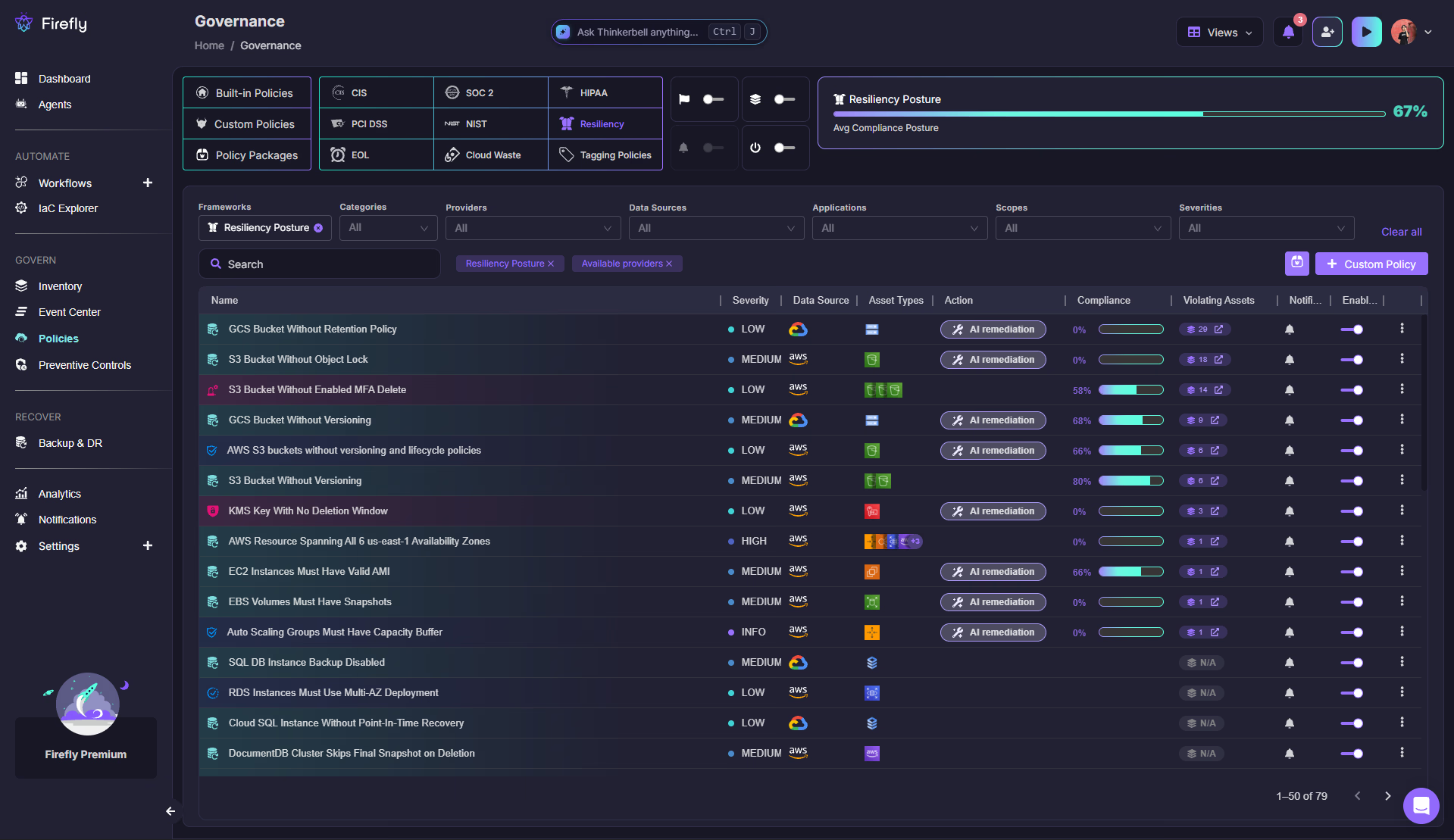
Firefly's Cloud Resilience Posture Management (CRPM) addresses the framework above before an incident ever happens, scoring an environment continuously against built-in resiliency policies under the Governance page (still labeled Governance once you're inside it, accessed via Policies in the left nav): missing snapshot policies, S3 buckets without Object Lock, RDS clusters skipping final snapshots on deletion, the exact configuration gaps that would silently defeat the "+1" and "+0" digits without anyone noticing until an incident forces the discovery.
When recovery is actually needed, Firefly's Backup & DR feature rebuilds into a clean, isolated region or account using immutable, versioned IaC snapshots, the operational answer to the isolated recovery environment described above. The immutability has a specific mechanical effect: a snapshot stored this way can't be modified or deleted by the same credentials that manage production, so a fully compromised production account, including its IAM roles and admin access, still has no path to reach or corrupt the recovery snapshot sitting outside that blast radius. Every restore generates Terraform and routes it through a pull request rather than making direct cloud API calls, giving the "+0" testing discipline an actual reviewable artifact to check against rather than a claim that recovery happened correctly.
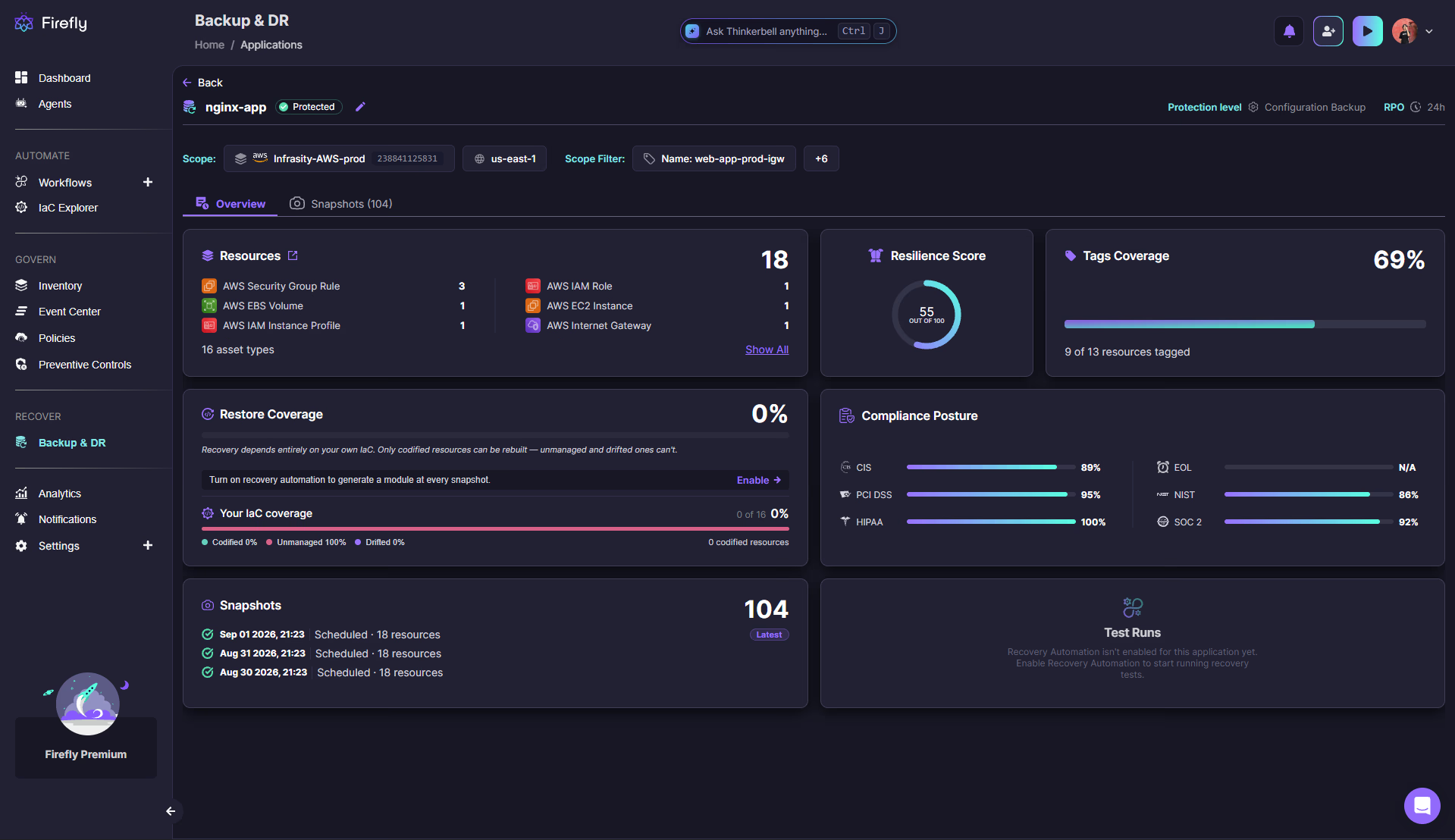
That same recovery readiness is also directly visible at the application level. The Application Overview shows a Resilience Score for each application, calculated by running the Resiliency Posture framework against every resource that the application manages, rather than reporting a single environment-wide number. That's a meaningfully more actionable view for the "+1" and "+0" digits covered earlier: instead of asking whether the whole environment is resilient in the abstract, the question becomes whether this specific application, the one actually being planned around, would survive a clean recovery today.
A Guardrail check enforcing exactly the credential-isolation requirement covered above, catching a backup vault that shares an IAM role with the production account it's meant to protect, looks like this in Firefly's policy schema:
package Cx

import data.generic.terraform as tf_lib

CxPolicy[result] {
	resource := input.document[i].resource.aws_backup_vault[name]
	resource.iam_role_arn == input.production_account_role_arn

	result := {
		"documentId": input.document[i].id,
		"resourceType": "aws_backup_vault",
		"resourceName": tf_lib.get_resource_name(resource, name),
		"searchKey": sprintf("aws_backup_vault[%s].iam_role_arn", [name]),
		"issueType": "IncorrectValue",
		"keyExpectedValue": sprintf("aws_backup_vault[%s].iam_role_arn should differ from the production account role", [name]),
		"keyActualValue": sprintf("aws_backup_vault[%s].iam_role_arn matches the production account role, defeating isolation if that account is compromised", [name]),
		"remediation": json.marshal({
			"before": "shared IAM role with production",
			"after": "dedicated IAM role scoped to backup vault only",
		}),
		"remediationType": "replacement",
	}
}
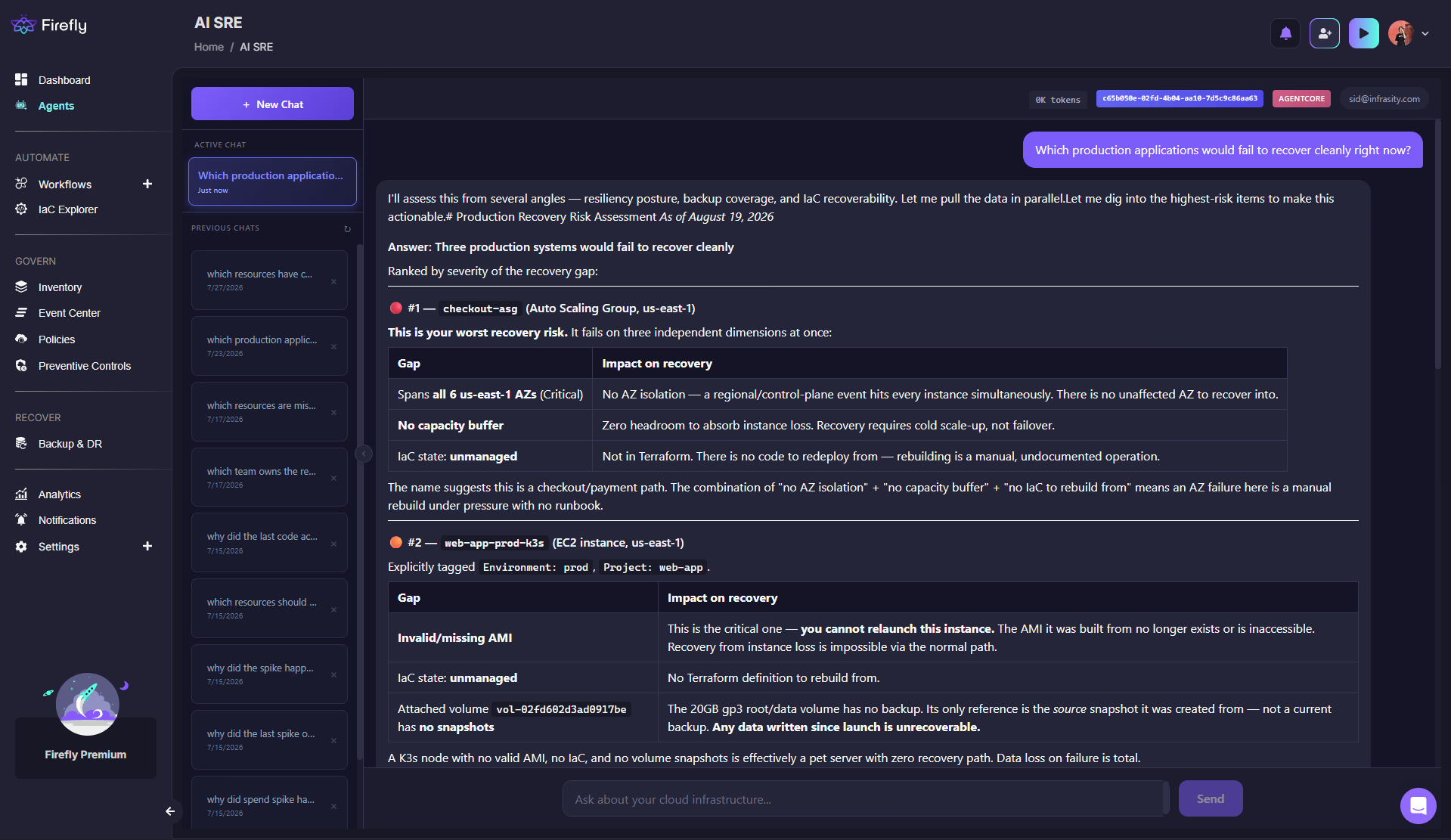
For teams that want to check DR readiness against this framework without waiting for an incident to force the question, AI SRE answers queries like "which of our production applications would fail to recover cleanly right now" by cross-referencing Inventory, Governance, and Backup & DR data directly, turning "is our DR plan actually sound" from an assumption into a number checked continuously.
Where Should You Start With This
Auditing the current backup architecture against the 3-2-1-1-0 framework, specifically the "+1" and "+0" digits, is a faster and more honest starting point than assuming last year's DR plan still holds. Most environments already have the "3-2-1" part covered; the gap is almost always in immutability, credential isolation, and whether anyone has actually tested a restore recently. Explore Firefly's Governance page to see how a live environment scores against that specific gap.
FAQs
What is the difference between a backup and a disaster recovery plan?
A backup is a copy of data. A disaster recovery plan is the full capability built around that copy: defined RTO and RPO targets, assigned roles for executing a restore, a runbook, and a tested cadence proving the plan actually works. An organization can have solid backups and still have no functioning DR plan if the surrounding supporting structure does not exist or has never been tested.
What is the 3-2-1-1-0 backup rule?
It's an evolution of the classic 3-2-1 backup rule (3 copies, 2 media types, 1 offsite) built specifically for ransomware. It adds a fourth requirement: at least one immutable or air-gapped copy that can't be modified even by compromised admin credentials, and a fifth: zero restore errors, meaning backups are regularly tested and verified to actually restore, not just assumed to work because the backup job completed.
Why isn't the classic 3-2-1 rule enough against ransomware?
Because it has no immutability or isolation requirement. If all three copies described by the rule are reachable using the same credentials an attacker can compromise, the rule can be fully satisfied and still result in every copy being encrypted in the same incident as production.
How long should backup retention windows be, specifically for ransomware recovery?
Long enough to reach back before the attacker's dwell time began, not just before the encryption event. A general guideline is a minimum of 30 days for standard environments and 90 days for higher-risk or higher-criticality systems, since dormant malware can remain in an environment and in backups taken during that window for an extended period before detonating.
What does an isolated recovery environment actually require?
Isolation at three layers together, not just one: dedicated credentials for backup infrastructure, separate from production credentials; network isolation so a compromised production account has no path to reach backup systems; and immutable storage so even a compromised credential that does reach the backup can't modify or delete it.
How does Firefly support ransomware disaster recovery planning?
Firefly's CRPM continuously scores an environment against the resiliency gaps that would defeat a 3-2-1-1-0 strategy, and Backup & DR rebuilds into a clean, isolated environment using immutable IaC snapshots that compromised production credentials structurally cannot reach, with every restore generated as reviewable Terraform rather than an unauditable direct mutation.


.webp)


.webp)