.png)
TL;DR
- The Terraform Google Provider is a plugin that translates your .tf configuration files into actual Google Cloud API calls
- There are two providers: google for stable features and google-beta for preview features (use beta carefully in production)
- Terraform only tracks resources in its state file; it cannot detect manual console changes or resources created outside Terraform until you run plan
- Firefly adds continuous visibility across your entire GCP environment, showing which resources are managed by Terraform, which have drifted from code, and which exist but are completely unmanaged
Let's say you're running a financial services platform on Google Cloud. You start with a simple setup: a few Cloud SQL databases for customer data, a GKE cluster running your transaction processing services, Cloud Storage buckets for document uploads, and Pub/Sub for event streaming. Everything is defined in Terraform.
Six months later, your infrastructure has grown. You now have separate projects for production, staging, and development. Multiple teams are deploying services independently. The compliance team needs audit logging across all projects. The security team is managing IAM policies. During a recent incident, someone manually scaled up a Compute Engine instance and forgot to scale it back down.
A Reddit user recently shared their experience deploying a complete GCP setup using Terraform, load balancer, artifact registry, Cloud Run, Firestore, and GCS, without touching the console once. That's the ideal state: infrastructure completely defined in code.
But then reality sets in. Someone tweaks an IAM binding directly in the console during an incident. A bucket gets created outside Terraform for a quick test. A VM is resized during peak load and never reverted. Tags drift across environments. Manual changes happen, and Terraform has no way to detect them until you explicitly run terraform plan.
This blog explains what the Terraform Google Provider actually is, how it differs from Terraform Core, why drift becomes a problem at scale, and how to maintain visibility across your entire GCP environment.
What Is the Terraform Google Provider (And Why It's Not Just "Terraform")
Let's clear this up first, because a lot of people mix these pieces together.
When you write Terraform for Google Cloud, you are not "using Terraform alone." You are using:
- Terraform Core: The engine (plan, apply, state management)
- Google provider: The layer that actually talks to Google Cloud APIs
The correct term is Terraform Google provider (or just Google provider). It is a plugin that Terraform loads at runtime. Its job: take your configuration and translate it into real API calls against Google Cloud.
What the Provider Actually Does
At a practical level, the flow looks like this:
- You define infrastructure in .tf files
- Terraform builds an execution plan
- The Google provider converts that plan into API requests
- Google Cloud executes those requests
When you run terraform apply, Terraform itself is not creating anything. The provider is making calls to Compute Engine API, IAM API, Cloud Storage API, GKE / Cloud Run APIs, etc.
Basic example:
This block defines the execution context: which project Terraform operates in and which region to default to. Every resource you define will use this context unless overridden.
Keep These Layers Separate
Understanding which layer does what helps you debug faster when things break:
- Terraform Core: Builds the plan, handles state, resolves dependencies
- Google Provider: Knows how to talk to GCP APIs, implements resource behavior, handles API edge cases, and responds
- Resources: Your actual infrastructure definitions
When something fails, it's often due to the provider layer: unsupported arguments, API changes, permission issues, or version mismatches. Not Terraform itself.
Why This Becomes Important Later
As your setup grows, provider versions start to matter (breaking changes happen), some features only exist in certain provider versions, API inconsistencies show up across services, and debugging means understanding provider behavior, not just HCL.
This directly impacts drift correction, IAM fixes, partial applies, and beta vs GA features.
Two Google Providers: google (Stable) vs google-beta (Preview)
Now that you understand the provider is what actually talks to Google Cloud APIs, here's where it gets confusing: there isn't just one Google provider. There are two, and choosing the wrong one can cause unexpected drift or break your deployments.
There are two providers:
- google for stable (GA) features and google-beta for beta/preview features. Both talk to Google Cloud and manage the same types of resources, but they don't expose the same fields or capabilities.
The google provider uses generally available APIs with stable behavior and predictable backward compatibility, safe for production. The google-beta provider includes beta and preview features, exposes fields not yet in GA, and can change behavior between versions. It's less predictable over time.
| Aspect | google (stable) | google-beta (preview) |
|---|---|---|
| API surface | GA only | GA + Beta |
| Stability | High | Medium |
| Breaking changes | Rare | More frequent |
| Production usage | Default choice | Use with caution |
| Feature availability | Limited to released APIs | Early access to new features |
You don't use google-beta because it's "better." You use it when the feature you need doesn't exist in google yet, like a new GKE feature still in beta, a specific field not available in GA, or early access to something not fully released.
Here's where teams run into trouble: they mix google and google-beta without realizing it. A resource works in beta but breaks when moved to GA. Provider upgrades change behavior unexpectedly. Drift appears because API responses differ between versions.
For example, you create a resource using google-beta, then someone switches it to google, Terraform now sees differences and triggers unexpected changes. That's not drift from the cloud, it's drift from provider behavior.
Default to google. Use google-beta only when required. Scope beta usage per resource, not globally. Track where beta is used, don't let it spread silently across your codebase.
Provider choice directly affects what Terraform can manage, how resources are interpreted, and whether changes are detected correctly. If you're using beta features without visibility, drift detection becomes inconsistent, reproducibility suffers, and compliance checks get unreliable. This becomes very visible once you introduce a system like Firefly, because it shows you what exists, what is codified, and what is behaving differently than expected. Sometimes, the root cause traces back to provider differences, not the infrastructure itself.
How the Provider Block Configures Google Cloud Access
This is where Terraform actually "connects" to Google Cloud. If the provider is the execution layer, the provider block is the configuration for that execution. It defines where Terraform runs (project, region), how it authenticates, and what default resources inherit.
Two Blocks, Two Different Responsibilities
provider block: How to connect resource block: What to create
If the provider is wrong, everything downstream is wrong, even if your resources are perfectly defined.
Basic Provider Configuration
This sets the default execution context. Every resource without an explicit override will be created in my-project-id and use us-central1 where applicable.
Authentication: What Actually Happens
Terraform itself doesn't handle auth logic. The provider does. In most real setups, authentication comes from one of these:
Application Default Credentials (ADC):
gcloud auth application-default login
Common for local development.
Service account key:
Used in CI/CD (though keyless is preferred now).
Workload Identity/Impersonation: Standard for production pipelines. No long-lived keys. If auth is misconfigured, you'll see provider errors, not Terraform errors.
How Resources Inherit Provider Config
By default, every resource uses the provider implicitly:
This resource inherits project, region, and credentials from the provider block.
Multiple Providers in Real-World Setups
In non-trivial setups, you rarely have just one provider.
Multiple projects:
Mixing google and google-beta:
What Actually Happens During Execution
When you run terraform apply:
- Terraform loads provider config
- Provider initializes (auth + API clients)
- Terraform builds a dependency graph
- Provider executes API calls per resource
The provider is maintaining API sessions, handling retries, mapping Terraform fields, API payloads, and interpreting API responses back into state.
Where Things Go Wrong (Practical Cases)
Wrong project: Resources created in an unexpected place. Wrong credentials: Permission denied Region mismatch: Resource errors. Multiple providers: Resource tied to the wrong context. Implicit inheritance: Hard-to-track behavior. These are not "Terraform problems." They are provider configuration problems.
Why This Matters for Drift and Governance
The provider defines what Terraform can see and control. If your provider is scoped incorrectly, Terraform may not even "see" certain resources, drift may go undetected, and resources may exist outside the provider's context entirely. This is exactly where tools like Firefly add value: they operate outside Terraform's provider scope, scan the entire environment across projects, and show you what Terraform is missing. While the provider defines your execution boundary, Firefly shows you everything beyond it.
What Terraform and the Google Provider Actually Do (and What They Don't)
By this point, it's clear the Google provider is doing a lot of heavy lifting. Let's be precise about what it actually does.
How Terraform + Google Provider Works
You define infrastructure in code. The Google provider executes API calls against Google Cloud. Terraform tracks what it manages in state.
This model works well for provisioning resources from scratch, updating existing infrastructure based on config changes, deleting resources cleanly, and managing dependencies between resources. Terraform builds an execution graph and applies changes in the right order while keeping a record of what it manages.
This works extremely well when everything is defined in code, changes go through Terraform, and the state is accurate and complete.
What Actually Happens in Real GCP Setups
Over time, your environment evolves. New resources get created outside Terraform. Someone spins up a test VM from the console for debugging. Existing resources get modified during incidents, IAM roles are granted manually, and VMs are resized to handle load spikes. Different teams run different Terraform versions and provider versions. Some infrastructure is codified, some isn't.
Now your environment looks like this:
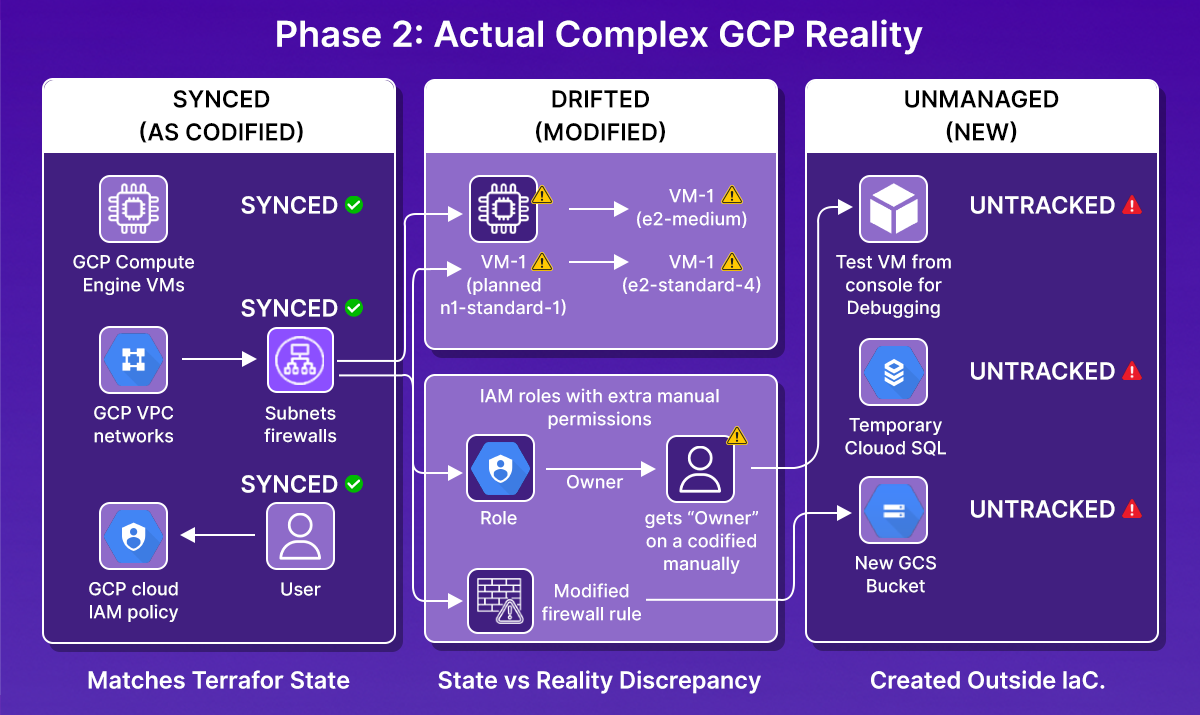
But Terraform shows you only what exists in the state instead of the complete picture.
Where the Gap Shows Up
At this point, you start asking operational questions:
- What is actually deployed in GCP right now?
- Which resources are managed vs unmanaged?
- What has drifted from Terraform?
- Which Terraform runs introduced these changes?
- Are we even using consistent provider versions across teams?
Terraform + Google provider cannot answer these directly. Provider API calls are targeted, not exploratory. The state is partial, not complete. Terraform doesn't scan your entire environment; it only knows about what you've defined in code and tracked in state.
How to See What Exists Beyond Terraform State
Terraform tracks only what's in its state file. If someone creates a resource in the GCP console, modifies an existing resource manually, or deploys infrastructure through a different tool, Terraform has no way to know about it until you explicitly run terraform plan against that resource.
This is not a limitation of the Google provider; it's how Terraform fundamentally works. The provider executes the operations you define in code. It doesn't scan your environment looking for changes. Firefly connects directly to your GCP organization and queries the Google Cloud APIs independently of Terraform. It builds a complete inventory of what actually exists, then maps those resources back to your infrastructure-as-code.
How Firefly Provides Visibility Beyond Terraform State
1. Complete inventory across your GCP organization
Firefly queries the Google Cloud APIs across all projects, regions, and services. It builds a complete inventory of what actually exists: Cloud SQL databases, GKE clusters, storage buckets, IAM policies, Compute Engine instances, and networking resources. This inventory includes resources Terraform manages and resources it doesn't.
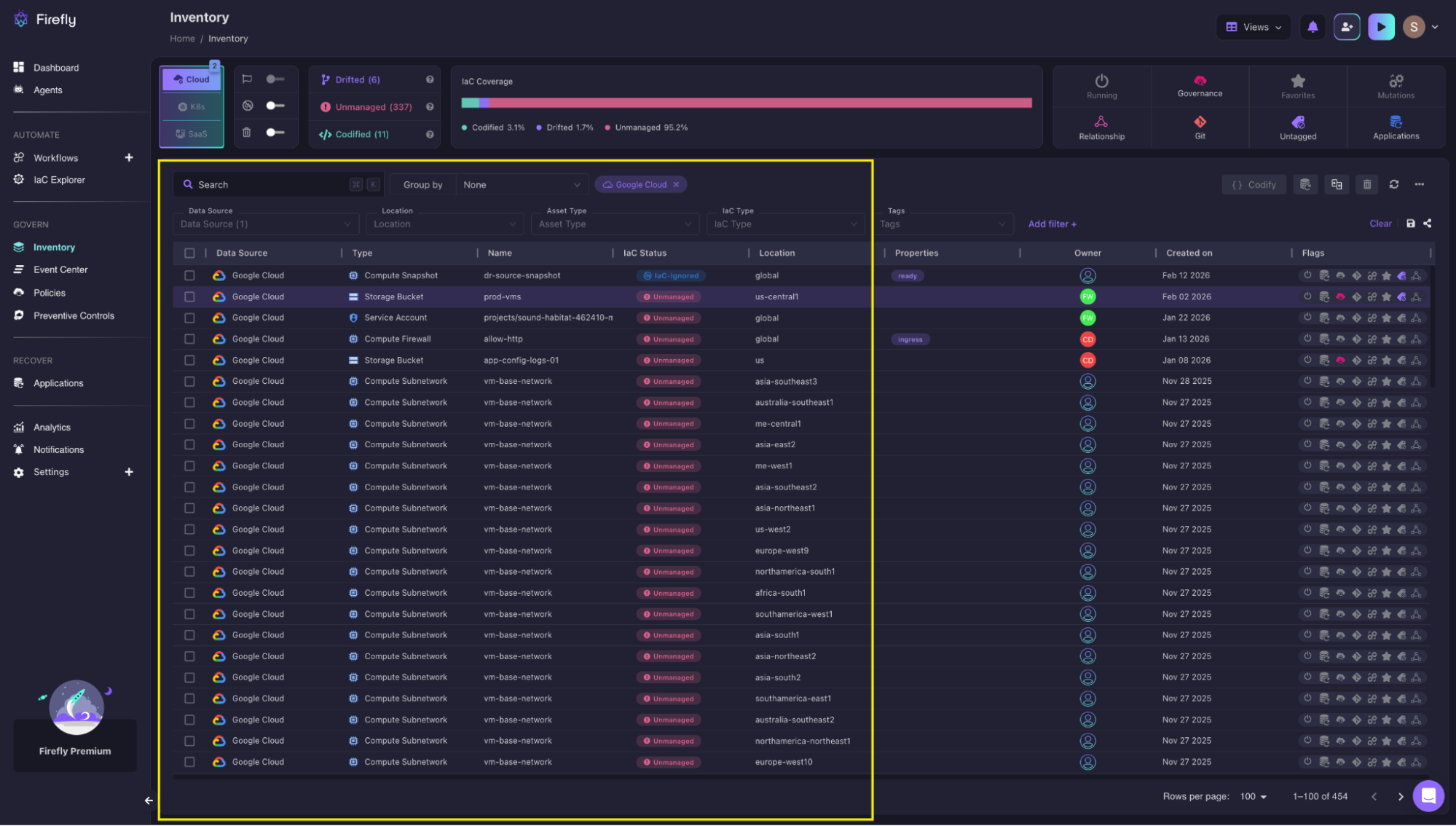
The Inventory page shows all discovered resources with their IaC status. The top bar shows coverage: Codified 3.1%, Drifted 1.7%, Unmanaged 95.2%. Each row displays the resource type (S3 Bucket, Lambda Function, IAM Role), name, status badge, location, and creation date.
2. Classification: codified, drifted, or unmanaged
Once it has the full inventory, Firefly compares each resource against your Terraform code and state files. Resources that match your Terraform configuration are classified as codified. Resources that exist but have different configurations are classified as drifted. Resources with no corresponding Terraform code are classified as unmanaged.
Terraform cannot do this classification. It only knows about resources in its state file. If a Cloud Storage bucket was created through the console, Terraform has no way to discover it exists. Firefly finds it immediately, like for example as shown in ths snapshot below:
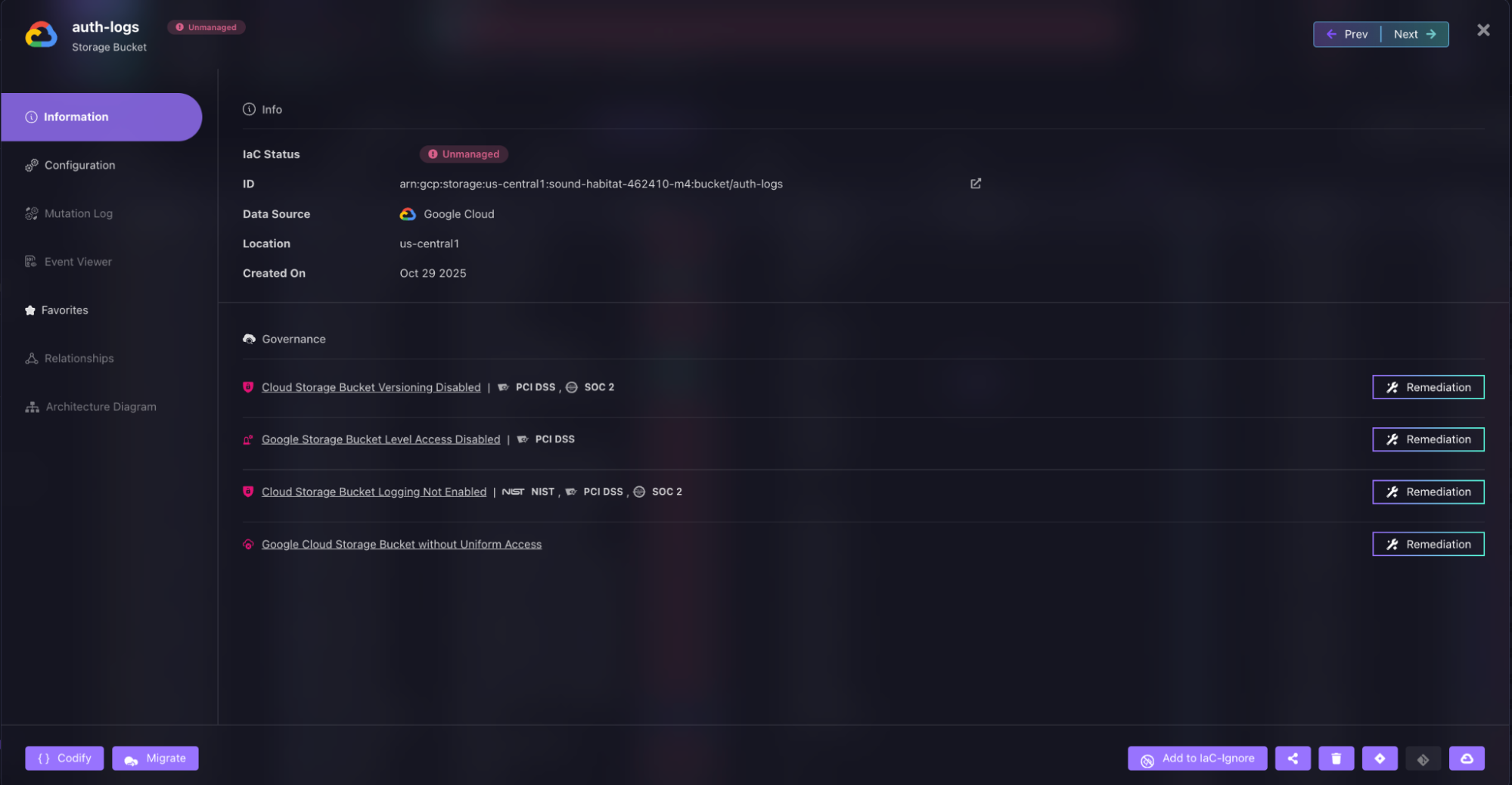
An unmanaged Google Cloud Storage bucket (auth-logs) is identified with IaC Status marked as Unmanaged. The Governance section highlights multiple policy violations, including disabled versioning, a lack of bucket-level access controls, logging not enabled, and the absence of uniform bucket-level access. Remediation options are available to codify the resource into Terraform and enforce required compliance and security controls.
3. Deployment history and change timeline
Beyond the current state of resources, Firefly tracks your Terraform deployment history. Every time you run Terraform, whether through Firefly's workflow engine or your own CI/CD pipeline, Firefly records which run was executed, what changes were introduced, whether the run succeeded or failed, and what triggered it. This gives you a timeline of how your infrastructure evolved. You can see that a specific IAM policy was added three weeks ago during run #247, or that a VM was resized last Tuesday during an incident response.
4. Terraform and provider version tracking
Firefly tracks which Terraform version was used for each run (1.5.7, 1.8.1, etc.) and which Google provider version (google 5.10.0, google-beta 5.15.0). When you have multiple teams deploying to different projects, this version tracking becomes critical. You can immediately see if teams are using inconsistent versions, which often explains unexpected behavior or drift. This matters because the provider + Terraform version together define how infrastructure is applied. Firefly makes that visible across all runs.
Tying It Back to the Provider
The Google provider executes infrastructure changes using specific versions and configurations. Firefly gives you visibility into what those executions produced across your entire environment.
Terraform and the Google provider define and apply infrastructure. Firefly shows what was actually deployed, what is managed, what has drifted, and how those changes were introduced over time.
Why Teams Adopt This
Because without this layer, you're operating blind between Terraform runs. And in large GCP environments with multiple teams and projects, that gap is where drift accumulates, costs grow unnoticed, and compliance breaks quietly. Firefly removes that blind spot.
How Firefly and Terraform Google Provider Work Together
The Google provider translates your Terraform configuration into GCP API calls and tracks the result in state. Firefly independently queries the Google Cloud APIs across your entire organization, not just what's in Terraform state, and maps the results back to your infrastructure-as-code.
These are two separate data flows:
Terraform with the Google provider:
- You write the configuration
- The provider makes API calls to GCP
- Results get stored in the state
- This shows you what you manage
Firefly:
- Queries GCP APIs directly across all projects
- Builds a complete inventory
- Maps those resources back to your IaC
- This shows you what actually exists
The workflow combines both: Firefly identifies gaps (drift, unmanaged resources, policy violations), you fix them in Terraform code, you run terraform apply (the Google provider executes the API calls), and Firefly validates the updated state.
The Operational Loop
Firefly continuously scans your GCP organization, all projects, regions, and services. It classifies every resource as codified (managed in Terraform), drifted (changed outside Terraform), or unmanaged (not in Terraform at all).
You prioritize what to fix based on risk, cost, or compliance. You update your Terraform configuration. Run terraform apply. The Google provider executes the API calls to create, update, or delete resources. Firefly reflects the changes in its next scan cycle.
Example 1: Unmanaged Bucket
Someone creates a Cloud Storage bucket directly from the console during testing. It's not in Terraform, not in state, has no lifecycle policy, and no labels. Terraform has no idea it exists.
Firefly scans your GCP projects and flags them as unmanaged resources. You see it immediately in the Firefly inventory. Now you can decide: delete it, or bring it into Terraform.
You add it to your Terraform config:
Run terraform apply. The Google provider imports the existing bucket and applies your lifecycle rules. Now the bucket is codified, lifecycle rules are enforced, and config is versioned.
Example 2: IAM Drift
During an incident, an engineer manually grants roles/storage.admin to a user to troubleshoot an access issue. The incident gets resolved, but the permission stays. Terraform won't catch this until you run terraform plan on that specific IAM resource, and even then, only if that resource is managed in Terraform.
Firefly detects the drift immediately. The IAM binding was changed outside Terraform. You see it in the drift report.
You update your Terraform IAM config to reflect the correct least-privilege access:
Apply the change. The Google provider updates the IAM policy back to what's defined in code. Firefly shows the drift as resolved. Access is now least privilege and version-controlled.
Example 3: Overprovisioned VM
A VM gets scaled up from e2-small to e2-standard-4 during a traffic spike. The issue passes, but no one scales it back down. Terraform state still shows e2-standard-4 because that's what was last applied. There's no drift from Terraform's perspective—but the cost is higher than needed.
Firefly flags the VM as overprovisioned based on actual usage metrics. You see it in the cost optimization report.
You update Terraform to right-size the instance:
Apply the change. The Google provider resizes the instance. Cost and config are aligned again, and Firefly validates the change.
What This Model Solves
This loop closes the biggest gaps in Terraform-only setups. Unmanaged resources get brought into code. Drift gets corrected quickly. Cost issues get identified and fixed. Governance gets enforced continuously.
The Technical Relationship
Firefly continuously scans your cloud accounts and builds a complete asset inventory across AWS, Azure, Google Cloud, Kubernetes clusters, and SaaS services. It connects to your cloud accounts and discovers resources in real time, updating their information as changes occur.
How resources get classified:
- Codified: Managed by IaC and in sync
- Drifted: Was managed by IaC but has deviated
- Unmanaged: Created outside IaC
- Ghost: Exists in code or state file but is missing in the cloud
Firefly maps each resource back to your infrastructure-as-code by comparing resource attributes and linking them to Terraform modules, state files, and Git repositories. This classification happens independently of Terraform's state file; Firefly scans the actual cloud environment, not just what Terraform tracks.
The Google provider executes infrastructure changes based on your Terraform configuration and specific provider version. Firefly shows you what those changes produced, which resources remain outside Terraform's control, and traces each resource back to the exact Terraform run and Git commit that created it.
When Multiple Teams Use Different Terraform and Provider Versions
When you have multiple teams deploying to different GCP projects, consistency breaks down quickly:
- Team A uses Terraform 1.5.7 with google provider 5.10.0
- Team B uses Terraform 1.8.1 with google-beta provider 5.15.0
- Manual changes happen during incidents
- Resources get created outside Terraform for testing
The gap:
Terraform state files only show what each team manages. Firefly shows the complete picture across all projects, all teams, and all deployment methods.
The Workflows dashboard shows every workspace with deployment details: which Terraform version is running (1.5.7, 1.8.1, 1.11.2), repository paths, run status (BLOCKED, APPLIED, PLAN FAILED), and run counts.
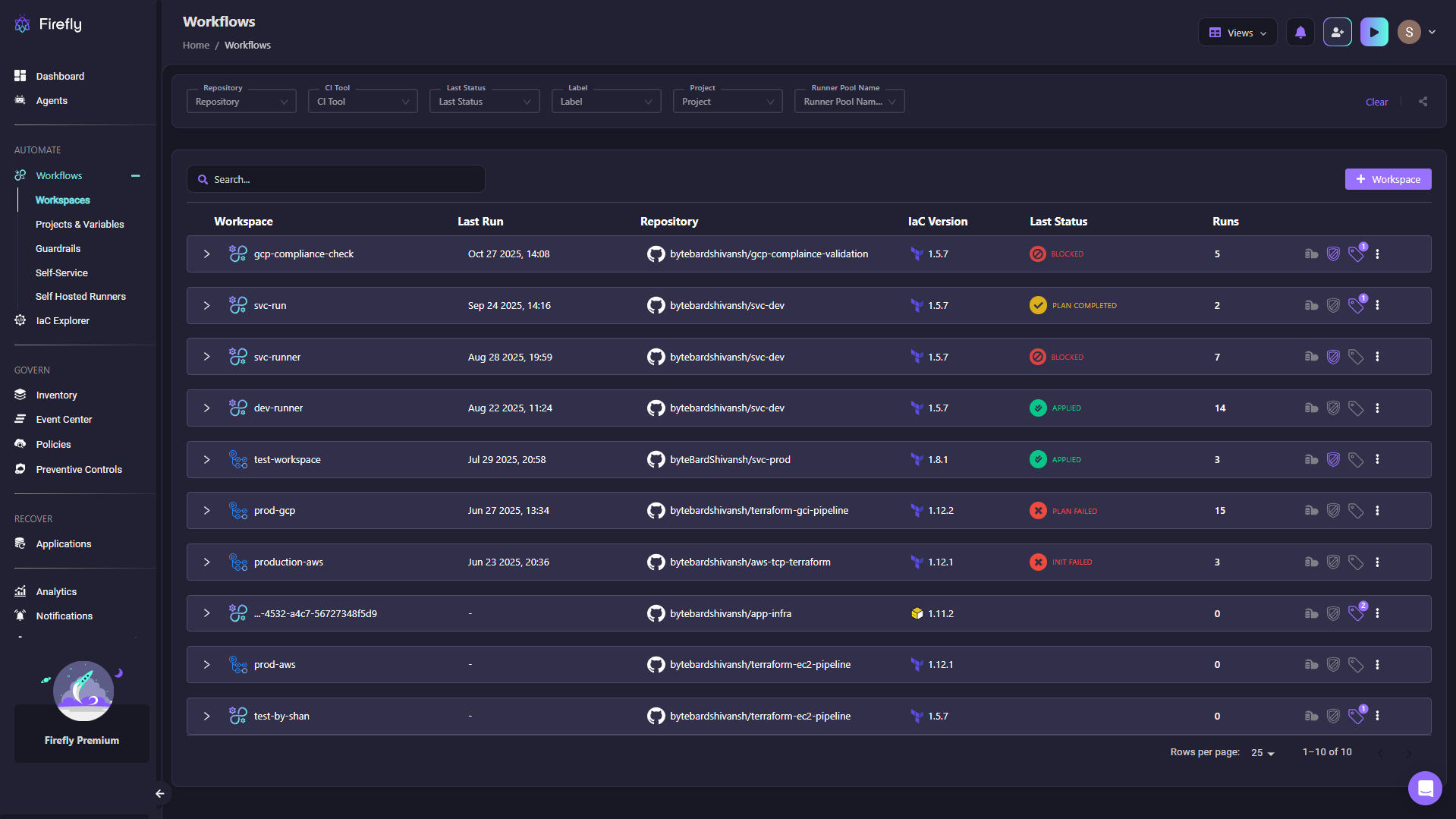
From the snapshot, you can see version inconsistencies immediately, that gcp-compliance-check runs 1.5.7 while test-workspace runs 1.8.1.
What you get:
- Which resources are managed vs unmanaged
- Which Terraform and provider versions are in use
- Where inconsistencies exist across teams
The Google provider gives you control over execution. Firefly gives you operational visibility. You need both to run GCP infrastructure reliably at scale.
FAQs
What is the provider in Terraform?
A provider is a plugin that translates your Terraform configuration into API calls for a specific platform. The provider handles authentication, executes create/update/delete operations against cloud APIs, and translates API responses back into Terraform state. Terraform Core orchestrates the workflow, but the provider does the actual execution.
How to connect Terraform with GCP?
Configure the Google provider block in your Terraform code with your project ID and region. Authentication happens through Application Default Credentials (run gcloud auth application-default login for local dev), service account keys, or Workload Identity for production pipelines. The provider uses these credentials to authenticate all API calls to Google Cloud.
How to make a Terraform provider?
Build a plugin using the Terraform Plugin SDK or Plugin Framework in Go. You implement CRUD operations (Create, Read, Update, Delete) that map to your target API, handle authentication and error handling, and compile it as a binary that Terraform loads at runtime. HashiCorp provides detailed documentation in its Provider Development guide.
What is the purpose of a Terraform provider?
The provider bridges Terraform's declarative configuration language with the imperative API calls that cloud platforms understand. It translates resource definitions into API requests, manages authentication and retry logic, and interprets API responses back into state. Without providers, Terraform couldn't interact with actual infrastructure.

.avif)
.avif)
.webp)

.webp)












