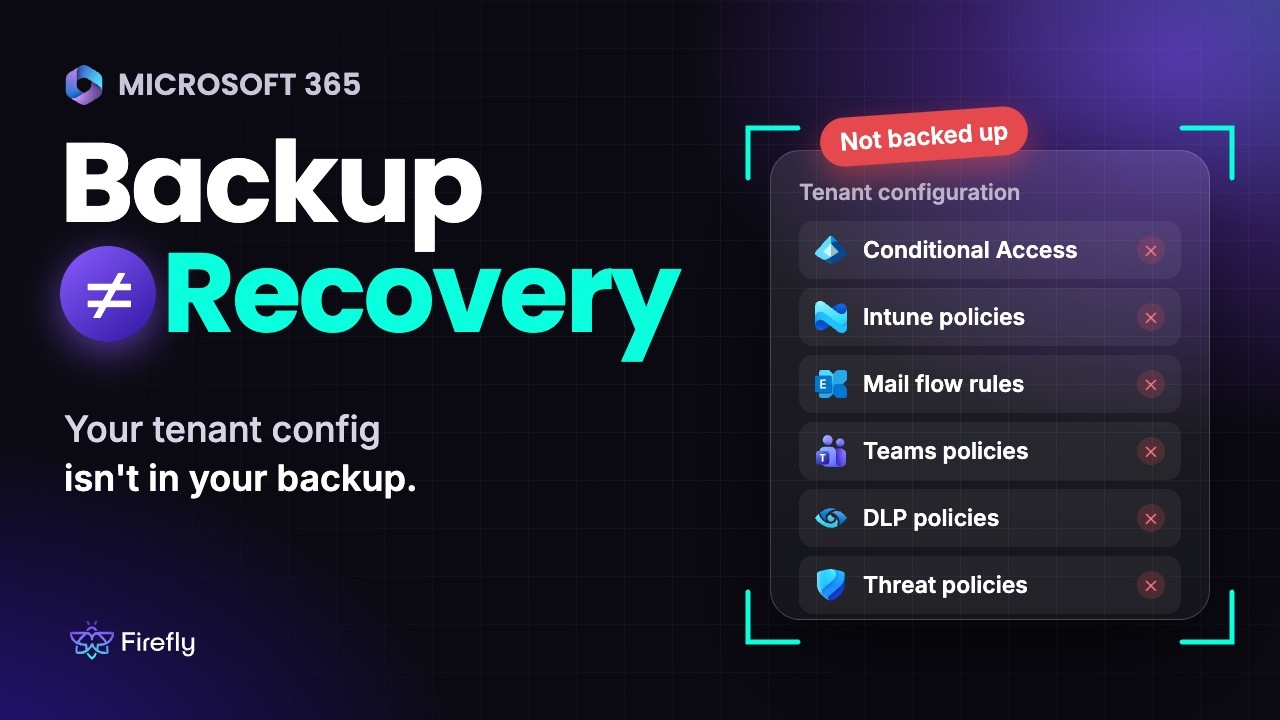
Most IT teams will tell you Microsoft 365 is backed up. Fewer could restore last week's Conditional Access policies, mail flow rules and Intune compliance settings exactly as they were.
Most Microsoft 365 backup tools protect data: mailboxes, OneDrive, SharePoint and Teams chats. The policies that decide who can sign in, which devices are trusted, how mail flows and how sensitive data is handled sit outside that backup. Those policies are the control plane of your workplace. If they're wrong or gone, your data is still there, but nobody can safely get to it.
One wrong change can lock out admins, stop mail or open a compliance gap. Without a saved copy of the last known good state, you're rebuilding from memory and old screenshots.
Firefly backs up that configuration the same way it backs up cloud infrastructure: as versioned code you can compare and redeploy.
What Firefly covers across Microsoft 365
Firefly covers tenant admin configuration plus six Microsoft 365 workloads. Your existing backup keeps doing its job on mailboxes and files. Firefly picks up everything that controls how the tenant behaves.
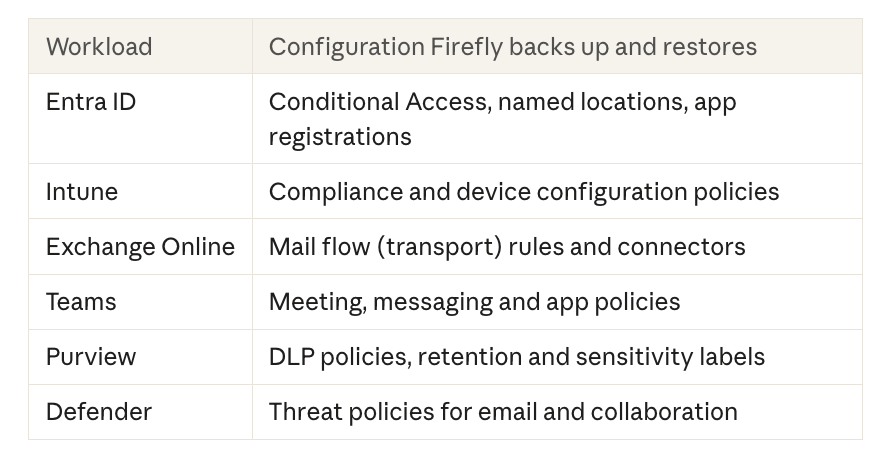
Firefly discovers each policy along with its dependencies. Very little in a tenant stands on its own. A Conditional Access policy points at named locations and groups. An Intune compliance policy feeds the access decisions Entra ID makes. If you back up a policy without what it references, the restore fails.
How tenant configuration goes wrong
An attacker who lands an admin account doesn't need to touch your data right away. Changing the rules is quieter. They can add an exclusion to a Conditional Access policy, create a mail flow rule that copies messages to an outside address, register an app with broad permissions or loosen a DLP policy so nothing gets flagged. Each change looks like routine admin work in the logs.
Teams external access is a good example. In 2023, Microsoft Threat Intelligence reported that Midnight Blizzard sent credential-phishing lures as Teams chats from compromised tenants, posing as tech support. Microsoft's mitigations included tightening external collaboration settings. If that setting quietly loosens later, you want to know what it was before.
Plenty of changes come from inside, too. Admins open things up for a one-off partner call and never close them. Scripts and AI agents with Graph permissions can change tenant settings faster than anyone reviews them, and one bad prompt can rewrite a policy for every user.
During an incident, you need to know which policy changed and what it said before. Firefly compares snapshots to show drift, and Git keeps the history of every change.
How it works
Here's what Firefly does with your tenant once it's connected.
- Discover. Firefly maps each policy in the tenant and what it references, so a backup includes the named locations, groups and connectors a policy can't work without.
- Snapshot. Firefly snapshots each workload on a schedule, so you have point-in-time versions to choose from.
- Codify. The configuration is written to your Git as Infrastructure-as-Code, so tenant policies have a commit history like the rest of your stack.
- Compare. Compare two snapshots and see what changed in each policy.
- Restore. Pick the version you trust and bring it back. It takes minutes, with no policies rebuilt by hand.
- Prove it. Firefly keeps audit-ready evidence that the tenant can be recovered.
Three ways to restore your tenant
A bad change to one mail flow rule needs a different fix than a fully compromised tenant. Firefly has a restore path for each.
1. Granular rollback
Revert a single policy, or a whole workload, to any snapshot, in place. If someone loosened a DLP policy on Tuesday, put back Monday's version and leave everything else alone.
2. Clean tenant rebuild
After a catastrophic compromise, you may not trust the tenant at all. Firefly redeploys your full configuration into a new tenant and remaps references automatically, so your workplace is back up and running in minutes.
3. Tenant replication
Test a policy change in a dev tenant first, then push the same configuration to production. The same approach lines up tenants after M&A, when two companies bring two sets of policies.
Restore order matters
Bring back a Conditional Access policy before the named locations and groups it depends on, and you can block the admins running the restore. Firefly works out the sequence from the dependencies it discovered, then restores in that order, so the admins doing the recovery stay signed in.
See it in Firefly
Recovery starts with the tenant
If your tenant policies change without anyone noticing, or disappear in a compromise, restoring mailboxes and files won't get your workplace running again. You need the configuration back too.
With Firefly, your Microsoft 365 configuration lives in Git with its full change history, and you can restore any version of it in dependency order.
Already using Firefly? Connect your Microsoft 365 tenant and start backing up its configuration. New to Firefly? Book a 30-minute demo and see how it works on your tenant.
Learn more about Firefly for Microsoft 365: firefly.ai/m365

.svg)