TL;DR
- Business continuity solutions span five categories: backup and recovery, disaster recovery, cyber resilience, cloud infrastructure resilience, and operational continuity. No single platform covers all five.
- Each failure scenario hits a different layer: a ransomware attack needs immutable backups; a regional outage needs automated failover; an accidental terraform destroy needs infrastructure reconstruction, not data restore.
- When ransomware encrypts both production systems and backup repositories, standard backups can't restore the business, which is why cyber resilience is one of the five required business continuity solution categories, not a separate security concern.
- The five tools covered: Firefly (cloud infrastructure recovery via IaC), Zerto (continuous replication and failover), Rubrik (ransomware-resistant backups), Druva (100% SaaS backup), and Acronis (backup + endpoint security in one agent).
- Start with RTO and RPO requirements before selecting tools; your acceptable downtime and data loss window determine which solution categories you actually need.
A Terraform destroy hits the wrong workspace. A cloud region drops networking mid-deployment. An engineer deletes a production Kubernetes namespace. The infrastructure failure itself is the smaller problem; the hours your engineering team spends reconstructing which cloud resources existed, whether the Terraform state is current, and in what order dependencies need to come back online, is what turns a 15-minute failure into a 4-hour outage. By the time you've figured that out, your customer has already told you the app is down.
The r/vibecoding community put actual numbers to it. A 2-hour outage at a 10-person SaaS company with $50K monthly revenue costs over $2,100 when you factor in productivity loss, revenue leak, and recovery overhead:

Those numbers are for a micro-SaaS. For a payment API going down during peak traffic, or a SaaS platform breaching enterprise SLA thresholds, the damage compounds fast across failed transactions, customer credits, and support escalations that last long after the incident is closed.
Five failure patterns drive most serious production incidents:
- Cloud provider outages that take down regional networking, load balancers, or Kubernetes control planes
- Ransomware attacks that encrypt production systems and then target backup repositories to eliminate recovery options
- Human errors: an engineer runs terraform destroy against the wrong workspace, or deletes a production namespace via kubectl delete ns
- Infrastructure failures: corrupted database clusters, failed storage volumes, broken network routes
- Deployment failures that introduce widespread service instability across dependent services
Each demands a different recovery capability. This guide covers the five types of business continuity solutions, how to evaluate them, and the leading platforms across each layer of the recovery stack.
What Are Business Continuity Solutions?
In infrastructure terms, business continuity comes down to what happens when your cloud infrastructure breaks. A Kubernetes cluster goes down, does it take your entire product with it, or does traffic fail over to another region without most customers noticing? Someone runs terraform destroy on the wrong workspace, does the team spend a week manually rebuilding, or redeploy in 30 minutes from a current IaC snapshot? Ransomware hits production, does it take the backups with it too, or are those locked in immutable storage that the attacker can't reach?
Business continuity solutions are the tools that make the second outcome possible, platforms that protect data, automate recovery, and keep infrastructure definitions current enough to rebuild from. No single tool does all of this. A database backup doesn't help when the VPC it needs to run in has been deleted. A disaster recovery platform doesn't help when ransomware has encrypted the backup repositories it relies on.
The table below shows why each scenario requires a different solution:
Each scenario requires a different tool, which is why production environments need solutions from multiple categories working together.
5 Types of Business Continuity Solutions
Different failure scenarios hit different layers of the recovery stack, data, infrastructure, and service availability. No single platform covers all three, which is why most mature continuity architectures combine tools from several of these categories.
1. Backup and Recovery Solutions
Backup platforms create recoverable copies of critical data and are the foundation of every continuity strategy. Modern systems go beyond daily snapshots, combining scheduled full backups, continuous incrementals, WAL archiving for PostgreSQL, and snapshot-based Kubernetes persistent volume protection. Without reliable backups, no other recovery layer has anything to restore.
2. Disaster Recovery Solutions
Disaster recovery platforms minimize downtime during large-scale failures by continuously replicating workloads to secondary environments and automating the failover sequence. Without orchestration, promoting a database replica, updating Kubernetes ConfigMaps, rerouting DNS, and validating service health require cross-team coordination, adding 30–90 minutes to incidents that the infrastructure could technically recover from much faster.
3. Cyber Resilience Solutions
Ransomware attacks increasingly target backup repositories before launching the main encryption event, rendering standard backups unusable when they're most needed. Cyber resilience platforms address this with immutable storage that cannot be modified regardless of credential access and with timeline analysis to identify clean recovery points before the compromise began.
4. Cloud Infrastructure Resilience Solutions
When terraform destroy removes a production VPC or months of manual changes have drifted infrastructure far from the IaC repository, restoring database backups doesn't unblock recovery; the infrastructure must be rebuilt first. Cloud infrastructure resilience platforms discover deployed resources, generate IaC definitions, and detect drift, enabling environments to be reconstructed from version-controlled configurations.
5. Operational Continuity Solutions
Technical recovery is only half the problem. A 15-minute recovery becomes two hours when engineers don't know who owns the failed database, runbooks are outdated, and status updates scatter across three Slack channels. Operational continuity tools route alerts to the right people, surface active runbooks, and track recovery progress in real time.
The platforms in the next section represent the leading tools across these five categories, each solving a specific layer of the recovery problem that the others don't cover.
Top Business Continuity Solutions in 2026

No single platform addresses every layer of business continuity. The solutions below represent different categories within the recovery landscape. Many organizations deploy multiple tools together as part of a broader strategy rather than selecting one platform and expecting full coverage.
1. Firefly: Cloud Infrastructure Resilience

Firefly is a cloud infrastructure automation platform that gives DevOps and platform teams a real-time System of Record for every cloud resource, codified, unmanaged, drifted, or deleted, across AWS, Azure, GCP, and OCI. Its AI agents continuously scan the cloud footprint, detect configuration drift between live infrastructure and IaC repositories, and automatically rebuild full environments, including all dependencies, when incidents occur.
The platform is built around three capabilities: Automate (IaC delivery through GitOps with built-in guardrails and self-service provisioning blueprints), Govern (continuous drift detection and policy enforcement across 600+ compliance checks covering SOC 2, PCI DSS, HIPAA, ISO 27001, and DORA), and Recover (rebuild entire environments from a clean, last-known-good state with automated cross-region failover). It supports Terraform, OpenTofu, Pulumi, CloudFormation, and Crossplane.
Key Capabilities
- Discovers deployed cloud resources across accounts without requiring prior IaC coverage
- Generates Terraform, CloudFormation, or Pulumi from discovered resources to reconstruct environments
- Detects drift between live infrastructure and IaC repositories before that drift blocks recovery
- Captures full application dependency graphs on a schedule, VPCs, subnets, IAM roles, EBS volumes, KMS keys, not just tagged resources
- Restores by generating Terraform and opening a PR against your Git repo rather than making direct cloud API calls
- Supports multi-account cloud governance across AWS, Azure, and GCP
Considerations
- Does not protect data, database backups, DR replication, and ransomware recovery require dedicated platforms
- Best deployed alongside a backup platform and disaster recovery solution, not as a standalone continuity tool
- IaC generation covers infrastructure reconstruction; it does not restore database contents or application state
Hands-on section: Resiliency Policies, Application Snapshots, Dependency Graph, and IaC-Based Restore
Firefly's Governance module includes a built-in Resiliency Posture framework that surfaces cloud resource configurations known to block recovery before an incident exposes them. Selecting the Resiliency Posture filter in Govern -> Policies reveals the full policy list, each row showing the policy name, severity, affected asset types, compliance percentage, violating asset count, and an AI remediation button where Firefly can generate a Terraform fix directly from the violation:

The Avg Compliance Posture reads 68% across 70 policies, with S3 Bucket Without Object Lock (18 violating assets) and EBS Volumes Must Have Snapshots both at 0% compliance, two configurations that will block a clean restore if unresolved during an incident.
The Backup & DR -> Applications view shows every application-level backup policy, its cloud account, region, snapshot count, and last backup timestamp. Each row expands to list individual snapshots with their date, trigger type, resource count, and completion status:
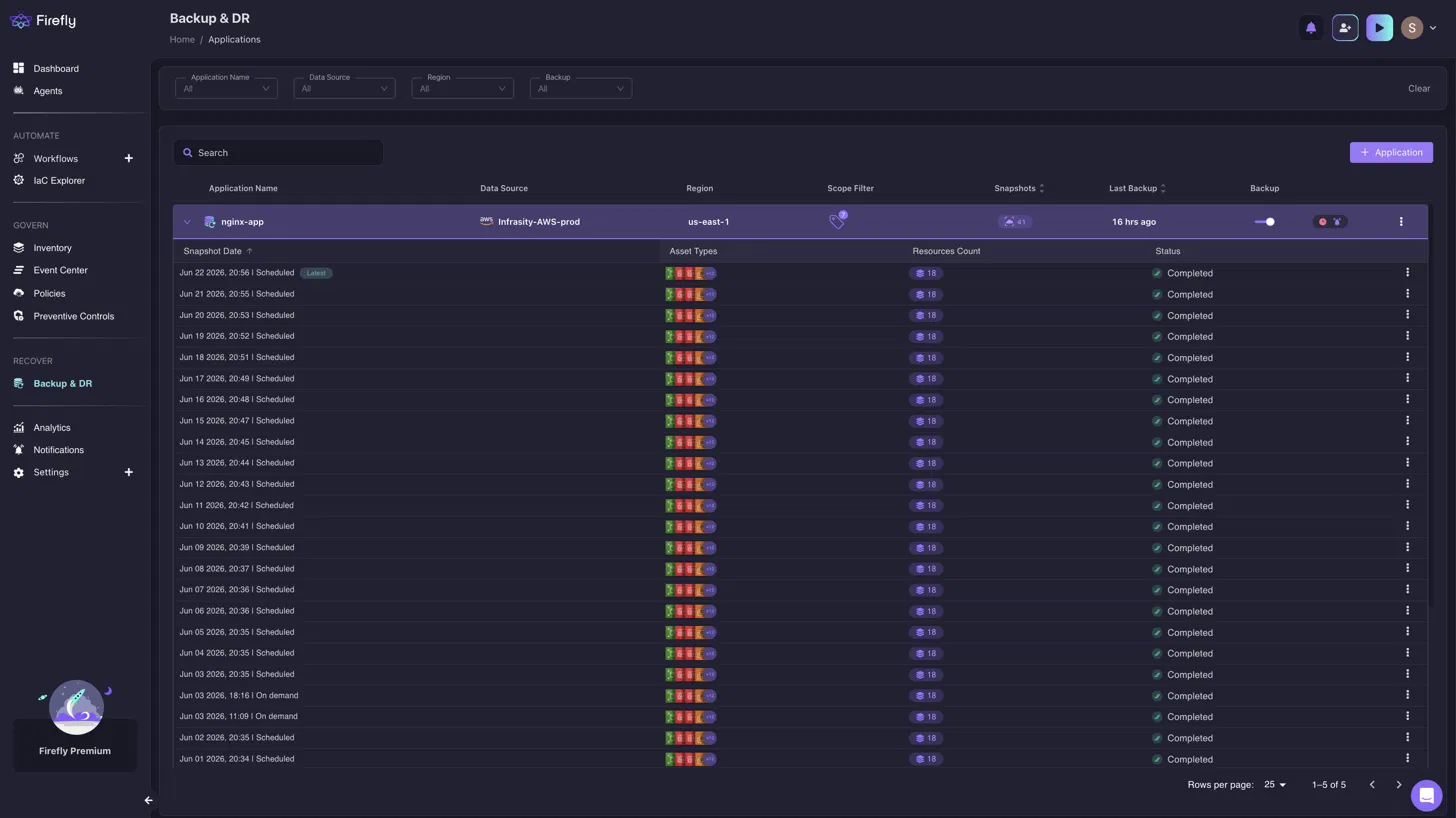
The nginx-app policy shows 41 snapshots, all completed with 18 assets each. The log contains both Scheduled and on-demand entries, with three on-demand snapshots on Jun 3, confirming that engineers captured the application before high-risk changes on that date, in addition to the regular daily schedule.
Clicking any snapshot and switching to the Graph tab renders the full infrastructure dependency structure captured at that point in time, not just the tagged resources but every cloud resource Firefly traced as a dependency:

The graph shows the AWS EC2 Instance (web-app-prod-k3s) at the center, connecting to its EBS Volume, KMS Key, IAM Instance Profile (which links to an IAM Role), and Key Pair. The AWS Subnet connects through a Route Table Association to the Route Table and Internet Gateway, and an S3 Bucket with its Ownership Controls appears at the bottom. The dashed lines show dependency relationships; all connected resources must exist for the application to function during a restore.
When a restore is initiated from a snapshot, Firefly generates Terraform and routes it through a VCS pull request rather than making direct cloud API calls. The VCS configuration screen asks for the destination repository and branch before any infrastructure code is pushed:

The restore targets the bytebardshivansh/app-infra repository on the main branch, with Create Workspace checked, ensuring recovered infrastructure lands in its own named Terraform workspace rather than being applied against an existing state file. Clicking Restore opens a pull request with the generated code, routing recovery through the same review and CI pipeline as any other infrastructure change.
2. Zerto: Disaster Recovery

Zerto, now part of HPE, is a software-only continuous data protection (CDP) platform for disaster recovery, ransomware resilience, and workload mobility across on-premises, hybrid, and cloud environments. Rather than snapshot-based backups that create hour-long recovery gaps, Zerto continuously replicates changes at the hypervisor level, creating thousands of recovery points just seconds apart via a journal-based architecture. This lets engineers recover to a point seconds before a ransomware attack rather than hours before it.
The platform is storage- and hypervisor-agnostic, running across VMware, Microsoft Hyper-V, Azure, AWS, IBM Cloud, and 350+ other cloud platforms. It handles orchestrated failover and failback through a single software interface without requiring dedicated DR hardware at the recovery site.
Key Capabilities
- Streams data changes continuously to recovery environments, delivering sub-second RPO targets that snapshot schedules cannot match
- Groups VMs into Virtual Protection Groups (VPGs) that replicate and fail over together as a unit
- Orchestrates multi-service failover as a dependency-aware workflow, database promotion, app redeployment, DNS update, and health validation without manual cross-team coordination
- Supports test failovers in an isolated network without interrupting the live replication stream
- Provides Auto-commit and Manual-commit failover modes. Manual-commit holds recovered VMs in a pre-committed state, allowing rollback before the failover is finalized
- Covers multi-region and hybrid cloud recovery across on-premises and cloud environments
Considerations
- Focused on disaster recovery; does not rebuild cloud infrastructure from IaC after accidental resource deletion
- Does not protect backup repositories from ransomware; a dedicated cyber resilience platform is needed alongside it
- Most effective when infrastructure is intact, and the goal is failover speed, not environment reconstruction
Hands-on section: VPG Health, RPO, SLA Status, and Recent Failover Test Results on the Dashboard
Zerto's Dashboard is organized into three areas that together confirm whether a DR environment is actively replicating and ready to fail over. The left column shows live charts of IOPS, Throughput, and WAN Traffic over the last four hours. The center panel shows VPG Health and VPG Status. The right panel shows active alerts, running tasks, the events log, and Site Topology. Here is the Dashboard for a production environment with five VPGs replicating to a DR site:

The top metric bar shows 5 VPGs, 5 VMs, 79 GB protected, 91% compression, and an Average RPO of 6 seconds, the DR site trails production by at most 6 seconds. The VPG Status donut is fully green with all five VPGs Meeting SLA, confirming no VPG has drifted past its configured RPO threshold. The Site Topology shows the Prod site sending 3 Outgoing VPGs to the DR Site with 0 Incoming, confirming Prod is the replication source and the DR site is the passive target. The Events panel logs a Test Failover completed 6 minutes prior and a Stop Failover Test 4 minutes prior; the DR environment was actively validated against a real recovery point within the last 10 minutes.
3. Rubrik: Cyber Resilience

Rubrik is a data security and cyber resilience platform built on the principle that backup infrastructure is itself a ransomware target and should be architected accordingly. Its backup layer uses an immutable file system, called Atlas, where snapshots can only be expired by Rubrik's own policy engine, not by any external process or credential. An attacker with full domain admin access to the production environment has no pathway to modify or delete data stored in Atlas.
The management layer runs as SaaS (Rubrik Security Cloud), separated from the on-premises data plane by design, so even a fully compromised on-premises environment cannot reach the control plane. Rubrik protects VMware, Hyper-V, Nutanix, AWS, Azure, GCP, and SaaS applications, including Microsoft 365, under a single policy framework, and has been positioned as a Leader in Gartner's Magic Quadrant for backup and data protection for six consecutive years.
Key Capabilities
- Stores backups in immutable storage that cannot be modified, encrypted, or deleted before a defined retention period, even by accounts with cloud admin credentials
- Detects anomalies in backup data (encryption spikes, mass file deletions) before ransomware activity surfaces in production monitoring
- Surfaces a threat timeline to pinpoint when the compromise began, enabling restoration from a pre-compromise point rather than the most recent snapshot
- Restores into an isolated environment for validation before workloads return to production traffic
- Protects virtual machines, databases, Kubernetes, cloud-native applications, and SaaS platforms
- Integrates with security operations workflows so threat detection and recovery planning share the same incident timeline
Considerations
- Focused on data protection and cyber recovery; does not orchestrate multi-region failover
- Cloud infrastructure reconstruction after resource deletion requires a separate infrastructure resilience platform
- Most organizations deploy Rubrik alongside a disaster recovery platform for scenarios where uptime, not backup integrity, is the primary concern
Hands-on section: Protection Coverage, Anomaly Events, and Recovery Plan Status on the Global Dashboard
Rubrik's Global Dashboard is split into two halves. The left covers Data Protection, total protected objects broken down by Cloud, SaaS, and Data Center; a connected data center map; and a 24-hour task completion chart. The right covers Data Threat Analytics with a pipeline health score and anomaly event count, and Orchestrated Recovery with recovery plan status. Here is the Global Dashboard for a live environment protecting 288 objects:

The Data Threat Analytics panel shows Pipeline health at 82% and 7 Anomaly events flagged with a red INVESTIGATE button. Rubrik's ML pipeline has detected patterns in backup data that deviate from the established baseline. The Tasks panel shows 1.7k Failed alongside 5k completed, indicating coverage gaps on specific workloads. Orchestrated Recovery shows 6 Recovery Plans Ready out of 9 total, with 3 Recovery Plans with errors; those three will not execute correctly under a live failover. Clicking INVESTIGATE opens threat hunting, where Rubrik surfaces the anomaly event timeline across snapshots, identifies impacted files and directories, and flags the most recent clean recovery point before the detected activity began.
4. Druva: Backup and Recovery

Druva is a 100% SaaS data security platform; there are no backup appliances to rack, no software to install, and no maintenance windows to plan. The Druva Data Security Cloud runs on AWS and delivers air-gapped, immutable backup for endpoints, VMware, NAS, AWS/Azure/GCP workloads, and Microsoft 365 from a single console. Druva is the only vendor in the 2025 Gartner Magic Quadrant for Backup and Data Protection Platforms positioned as a pure SaaS Leader, with nearly 7,500 customers, including 75 of the Fortune 500.
Beyond backup, the platform includes ransomware recovery (curated clean restore points, quarantine of compromised snapshots), eDiscovery with legal hold management, and sensitive data governance, all managed from the same interface without integrating separate point solutions.
Key Capabilities
- Delivered as SaaS, no backup servers, storage arrays, or management infrastructure to deploy or maintain
- Backs up hybrid workloads (VMware, NAS, File Servers), endpoints (Windows, Mac, Android), and Microsoft 365 (SharePoint, Exchange Online, OneDrive) from a single platform
- Detects unusual data activity in backup cycles, deviations in deletion rates, encryption ratios, or file type distributions, and quarantines affected snapshots
- Provides curated, clean restore points validated through anomaly detection, separate from quarantined snapshots
- Tracks backup data trends over 90 days to surface both storage capacity issues and ransomware-driven growth spikes
- Supports eDiscovery holds and sensitive data governance alongside backup operations
Considerations
- Covers backup and recovery; does not orchestrate multi-region failover or automate infrastructure reconstruction
- Teams with sub-hour RTO targets typically add a dedicated disaster recovery platform alongside Druva
- No infrastructure resilience or IaC drift detection capabilities
Hands-on section: Workload Coverage, Ransomware Recovery Panel, and Unusual Data Activity Alerts
Druva's main dashboard organizes backup and compliance health across three workload categories in a single view. The top row of the Data Protection Summary shows total backup volume and resource counts for Hybrid Workloads, Endpoints, and Microsoft 365, each as a donut chart with workload type breakdown. The middle row surfaces governance signals alongside a Ransomware Recovery panel. The bottom half shows the Critical Alerts tabbed by workload type and a 90-day Backup Data Trend chart. Here is the full dashboard for an environment protecting 64.52 TB across 765 resources:

The Hybrid Workloads donut shows 10 VMware, 3 NAS, and 2 File Server resources. Endpoints show 461 Windows devices. Microsoft 365 covers 49 SharePoint, 45 Exchange Online, and 39 OneDrive resources. The Ransomware Recovery panel shows 1 Curated Snapshot and 6 Quarantined Resources, six workloads isolated due to anomalous backup activity, leaving only one validated clean restore point across the environment. The Critical Alerts panel is open on the Cyber Resilience tab, showing multiple Unusual Data Activity events from Aug 30–31, each flagging a backup cycle where file change patterns deviated from the workload's historical baseline. The Backup Data Trend shows 66.32 TB growing at 7.67% over 90 days, a consistent baseline that a sudden storage spike would cross-reference against those Cyber Resilience alerts.
5. Acronis: Integrated Cyber Protection

Acronis Cyber Protect Cloud combines backup and recovery, anti-malware and behavioral threat detection, patch management, and email security in a single agent and console. Where most cyber protection stacks require separate vendors for each function, Acronis installs one agent per protected machine that handles backup, anti-malware scanning, and patch management simultaneously, making backup failures and security gaps visible in the same dashboard rather than separate tools.
The platform supports physical machines, VMware, Hyper-V, cloud workloads, and Microsoft 365, and its multi-tenant architecture is built for MSPs managing protection across multiple customer environments. Acronis Cyber Protect Cloud is available as a cloud-delivered service without requiring on-premises backup infrastructure.
Key Capabilities
- Combines backup, anti-malware, patch management, and email security in a single console, and backup failures and security gaps are visible in the same view
- Protects physical machines, VMware, Hyper-V, cloud workloads, and Microsoft 365 environments
- Shows unprotected and discovered workloads alongside failed backup tasks and active security alerts in the same Protection status panel
- Deploys patches directly from the platform; no separate patch management tool needed
- Filters phishing, spam, malware, and business email compromise (BEC) threats through integrated email security
- Multi-tenant architecture supports MSPs managing protection across multiple customer environments
Considerations
- Does not provide disaster recovery orchestration, cross-region failover, or IaC-based infrastructure reconstruction
- Teams that only need backup without endpoint security may find the combined platform adds management overhead without proportional value
- Best suited for environments where backup and cyber protection need to be managed from a single console
Hands-on section: Protection Status, Backup Failures, Patch Gaps, and Email Threats in One View
Acronis Cyber Protect Cloud's Overview dashboard displays six panels simultaneously: Protection status, Missing updates, Active alerts summary, Activities, Patch installation status, and Email security. This combined view is what separates Acronis from backup-only platforms: backup failures and security gaps appear in the same interface rather than requiring separate tools. Here is the Overview for an environment managing 40 workloads:
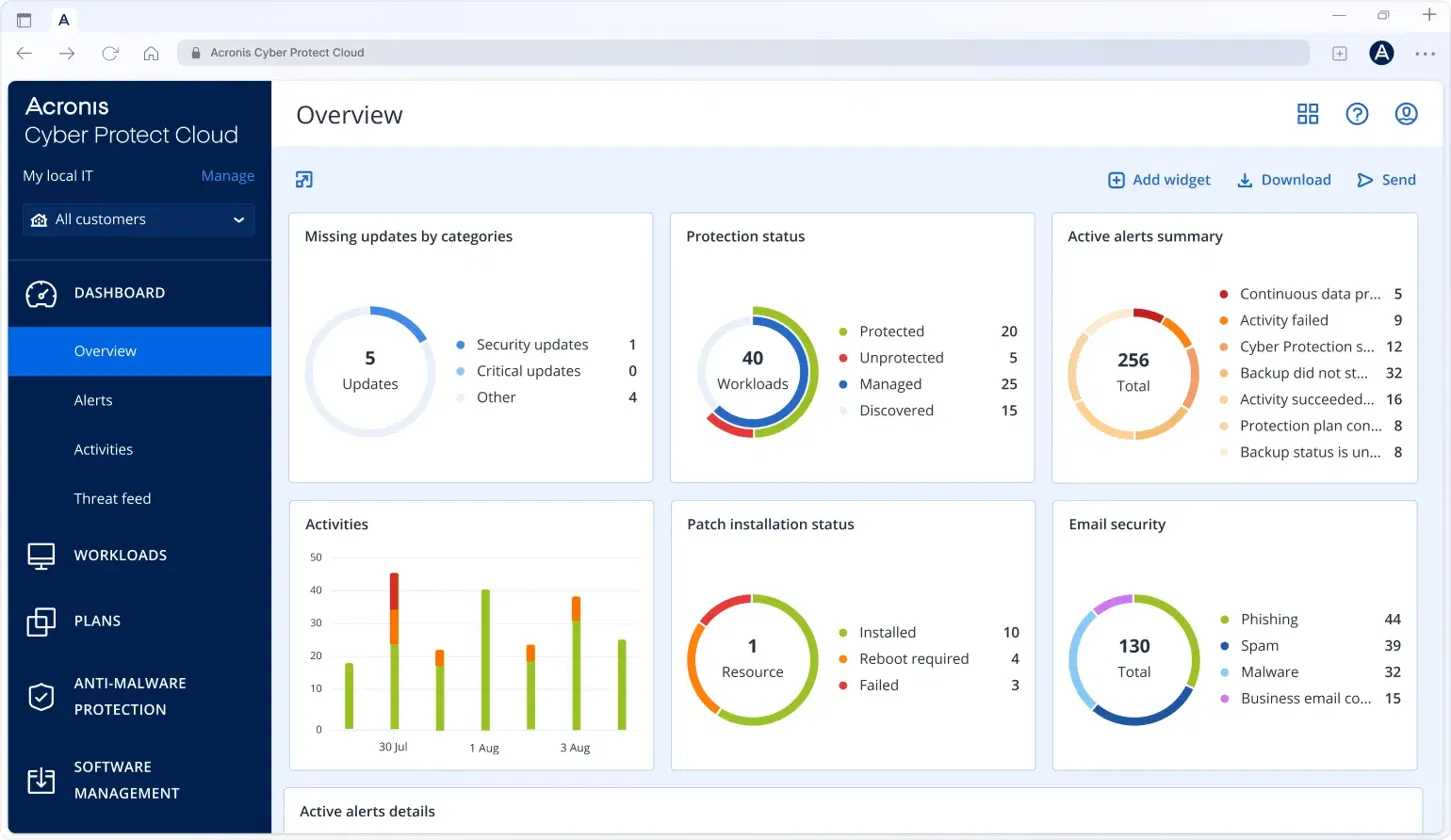
The Protection status donut shows 20 Protected, 5 Unprotected, 25 Managed, and 15 Discovered across 40 workloads, 20 machines with no active backup or protection plan. Active alerts summary shows 256 total, with 32 "Backup did not start" as the single largest category, meaning backup failures are driving more alert volume than security events. Missing updates show 5 total, including 1 security update outstanding on a managed workload. Patch installation status shows 10 installed, 4 requiring reboot, and 3 failed. Email security has caught 130 threats, 44 phishing, 39 spam, 32 malware, and 15 business email compromise attempts. All six panels are visible together, making the connection between an unpatched workload, failing backup jobs, and active phishing attempts explicit without navigating between separate tools.
Comparison of Leading Business Continuity Solutions in 2026
These solutions are not competing to solve the same problem. Comparing Firefly against Rubrik is similar to comparing Terraform against a database backup platform; there may be broad continuity overlap, but each addresses a distinct layer of the recovery stack. The table below compares them across the dimensions that matter for platform teams selecting a combination.
A production continuity architecture that needs to cover all major failure scenarios might combine Firefly for infrastructure recovery and IaC reconstruction, Zerto for disaster recovery orchestration, Rubrik for ransomware resilience, Druva or Acronis for backup and data protection, and an incident management platform for operational coordination. The right combination depends on which failure scenarios represent the greatest risk and which recovery objectives the current architecture cannot meet.
Choosing the Right Business Continuity Solution
The right combination of business continuity solutions depends on workload characteristics, RTO and RPO requirements, team size, and which failure scenarios would cause the most business damage. Start with recovery requirements, not products; the answers determine which solution categories close the largest gaps.
For Startups and Small Teams
The highest-risk scenarios are accidental deletion, failed deployments, and single-region outages. A baseline stack of automated database backups, infrastructure managed through Terraform in a Git repository, and quarterly-validated recovery runbooks addresses these without requiring complex disaster recovery architecture. Multi-region active-active setups introduce operational overhead that most small teams cannot sustain.
For SaaS Companies
SaaS platforms require automated failover alongside backup. A two-hour manual recovery during a regional outage consumes an entire month's error budget on a 99.9% SLA. A mature SaaS continuity stack combines backup and recovery for databases and persistent storage, disaster recovery for automated regional failover, infrastructure resilience tooling to close IaC drift gaps, and incident response workflows with tested recovery runbooks.
For Enterprise Organizations
Enterprise environments need layered continuity architecture: centralized backup covering all workload types, automated DR orchestration for RTO-sensitive services, IaC governance and drift detection for cloud-native workloads, immutable backup and isolated recovery for ransomware scenarios, and standardized incident management across business units. The challenge at scale is consistency; recovery processes must produce the same results across teams, cloud providers, and infrastructure types.
For Highly Regulated Industries
Financial services, healthcare, and government organizations must document recovery evidence, not just achieve recovery outcomes. Auditors verify that recovery was tested on specific dates by authorized identities. Continuity architectures for regulated industries require audit logs for every backup and recovery action, compliance reporting against retention and encryption standards, documented recovery test schedules, and data sovereignty controls where regulations restrict cross-border data movement.
FAQs
What is a Business Continuity Plan (BCP) Solution?
A Business Continuity Plan (BCP) solution is a platform or set of tools that keeps critical services running during disruptions and restores them when they fail. BCP solutions span five categories: backup and recovery, disaster recovery, cyber resilience, cloud infrastructure resilience, and operational continuity. No single platform covers all fivel, most organizations combine tools from multiple categories depending on which failure scenarios carry the most risk.
What are the 5 business continuity plans?
The five core plans each address a different failure layer: a data recovery plan covers backup and restore after deletion or corruption; a disaster recovery plan covers failover to secondary environments during regional outages; a cyber resilience plan covers recovery from ransomware that targets both production and backup systems; an infrastructure recovery plan covers rebuilding cloud environments after accidental deletion or severe drift; and an operational continuity plan covers how teams coordinate incident response so technical recovery doesn't stall on communication failures.
What is the main purpose of BCP?
The main purpose of a business continuity plan is to define how an organization responds to disruptions before an incident occurs, so recovery doesn't depend on improvised decisions made under pressure. A BCP converts "what do we do when X fails?" into a pre-answered workflow with tested procedures, validated restore points, defined RTO and RPO targets, and clear service ownership. Its value is determined entirely by whether it has been tested against real infrastructure before it is needed.
What are BCP best practices?
- Define RTO and RPO first: acceptable downtime and data loss tolerance determine which solution categories you need before you evaluate vendors
- Test recovery before incidents: a failover that's never been exercised under production conditions has an unknown actual recovery time
- Keep IaC current: drift between live infrastructure and version-controlled definitions causes recovery workflows to rebuild the wrong environment
- Protect backups like production: ransomware attacks target backup repositories before production systems; immutable storage closes that gap
- Automate the recovery sequence: a 15-minute technical recovery becomes a two-hour incident when teams coordinate manually with outdated runbooks

.avif)
.avif)
.webp)


.webp)