TL;DR
- Terraform drift occurs when a resource in your cloud provider no longer matches what your .tf files or terraform.tfstatedescribes, typically from a manual console change, external script, or third-party tool that bypassed the IaC workflow entirely.
- terraform plan does not catch this by default because it compares your configuration against the state file, not against the actual cloud. Running terraform refresh first syncs the state file with reality, after which terraform plan shows the exact attribute that diverged.
- Existing approaches, PR-triggered plan checks and scheduled scans, only detect drift when triggered. Any console change made between pipeline runs sits undetected until the next one fires.
- Firefly closes that gap with event-driven detection that flags drift the moment it occurs, identifies who made the change, and generates both remediation paths: revert the cloud to match IaC, or codify the change into IaC through a pull request.
A platform engineer was debugging a production incident at 11 pm. An EC2 autoscaling group was not launching new instances fast enough. She logged into the AWS Console, found the launch template, and increased the instance type from t3.medium to t3.large. The situation stabilized.
Four days later, a junior engineer ran terraform apply as part of a routine configuration update. Terraform compared the state file, which still recorded t3.medium, saw no change in the .tf configuration, and applied it. The launch template reverted to t3.medium. The scaling issue returned. Nobody connected it to the terraform apply immediately. The incident ran for two hours before someone traced the regression back to the apply.
The terraform.tfstate file said t3.medium. The .tf configuration said t3.medium. Every tool that reads Terraform as the source of truth would have shown zero issues. The problem only existed in the cloud, where the launch template had been running t3.large since the incident four days earlier, and Terraform had no record of it because nobody ran terraform plan in the window between the console change and the apply.
What is Terraform Drift, and Why Doesn't Terraform Plan Always Catch It?
Terraform works with two representations of your infrastructure. The first is the desired state, the configuration defined in your .tf files that describes exactly which resources should exist and how they should be configured. The second is what Terraform believes the actual state to be, recorded in terraform.tfstate every time you run terraform apply.
Drift occurs when what is running in your cloud provider no longer matches what either of those two sources describes.
Here is the mechanism that makes drift invisible: terraform plan does not query your cloud provider by default. It compares the .tf configuration against the terraform.tfstate file, and if nobody has touched the state file, it reflects the last terraform apply, not the current cloud reality. So when an engineer logs into the AWS Console and switches an S3 bucket from private to public-read, the state file still says private, the .tf file still says private, and running terraform plan returns no changes. The bucket is publicly accessible. Terraform reports nothing to fix. Both are simultaneously true.
This is why drift does not surface through normal development workflows. A team can go through an entire sprint, opening PRs, reviewing plans, running applies, and never encounter any indication that a production resource has been sitting in a misconfigured state for a week. The checks they are running compare .tf against the state file. The actual cloud is not part of that comparison unless someone explicitly runs terraform refresh first.
The causes of drift vary; some are manual, some automated, some outside the team's control entirely. Each one creates a different kind of gap, and knowing which kind you are dealing with changes how you fix it.
Root Causes of Configuration Drift in Terraform-Managed Infrastructure
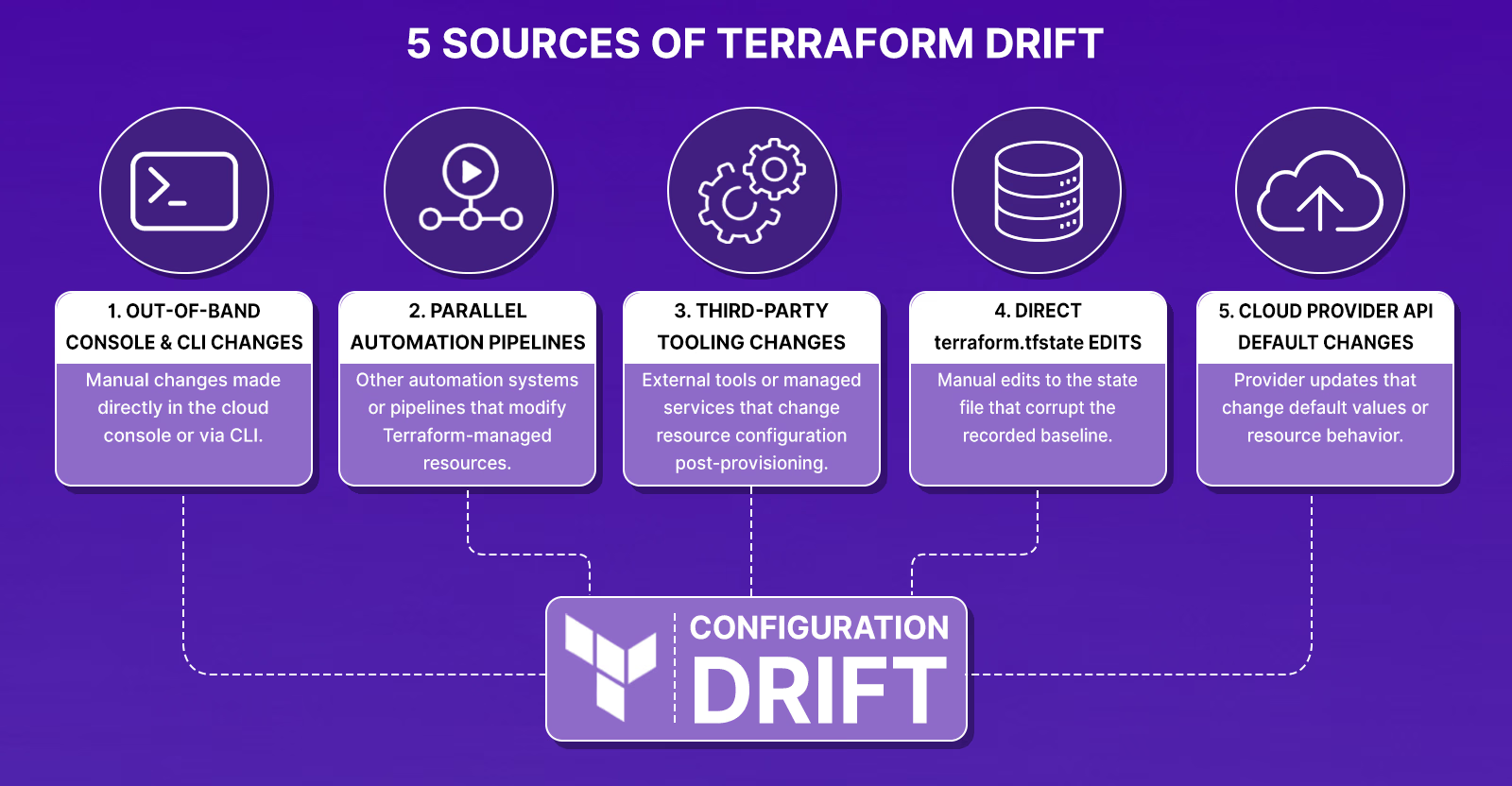
Understanding where drift originates matters because each cause produces a different kind of gap, and some are harder to surface than others.
Out-of-Band Console and CLI Changes That Bypass the IaC Workflow
This is the most common source. An engineer opens a security group inbound rule to debug connectivity. An ops team member switches an S3 bucket from private to public-read to test a presigned URL flow. A DBA increases RDS allocated_storage during a capacity crunch. These are legitimate operational decisions made under pressure; none of them touch the .tf files, and none of them update the state file. Each one leaves a gap between what Terraform last recorded and what the cloud provider is actually running.
Parallel Automation Pipelines That Write to Terraform-Owned Resources
This category creates drift that looks intentional, which makes it harder to detect. A CI/CD pipeline that sets a Lambda ENVIRONMENT variable directly via aws lambda update-function-configuration. A Pulumi stack managing a shared VPC that also writes route table entries Terraform expects to own. A shell script that rotates an IAM access key and updates the corresponding secret value. These systems make legitimate changes to real resources, changes Terraform neither requested nor recorded.
Third-Party Tooling That Modifies Resources Post-Provisioning
Tools like Ansible, Chef, or cloud-native managed services can modify resource configuration after Terraform has provisioned it. An Ansible playbook that updates system packages on an EC2 instance changes the instance's runtime state without touching the Terraform resource block. A cloud provider's managed patching service that updates an RDS minor version modifies an attribute Terraform tracks, without writing to the state file. Terraform continues operating as if the original configuration is still in place.
Direct terraform.tfstate Edits That Corrupt the Baseline
Teams occasionally edit terraform.tfstate directly to unstick a failed apply, remove a resource reference, or force Terraform to re-create a specific resource. If the manual edit does not accurately reflect the actual cloud configuration, the state file becomes a false baseline. Every subsequent terraform plan compares the .tf configuration against that corrupted record, producing diffs that appear clean while the actual infrastructure has diverged, or flagging changes that do not need to happen.
Cloud Provider API Updates That Change Resource Attribute Defaults
AWS, GCP, and Azure periodically update default values for resource attributes, changing default encryption behavior for S3 buckets, updating IAM policy evaluation logic, and modifying the default http_tokens setting for EC2 instance metadata. When these changes take effect, the attribute value that the cloud API now returns no longer matches what the state file recorded at the time of provisioning. The drift was not caused by anyone on the team; it was introduced by the provider, but terraform plan will still flag it as a change that needs to be applied.
What terraform refresh and terraform plan Actually Compare, and Why the Order Matters
Terraform doesn't watch your cloud environment continuously. It only knows about drift when you ask it to look. That lookup happens through two commands used in sequence.
terraform refresh queries the cloud provider APIs for the current configuration of every resource in the state file and rewrites terraform.tfstate to reflect what the cloud actually reports today. Without this step, the state file still holds whatever Terraform last wrote to it, which may be weeks out of date if manual changes have happened since.
Once the state file is current, terraform plan compares it against the .tf configuration and produces a diff. The ~ prefix in the output marks a resource that will be modified, and the lines prefixed with - and + show exactly which attribute changed and what it will be reverted to:
~ aws_s3_bucket.example_bucket
    acl: "private" => "public-read"
The line is what exists in the cloud right now. The + line is what Terraform will apply from the .tf configuration when you run terraform apply. Running apply closes the gap; the drifted resource is brought back in line with the desired state.
The security group example below walks through all four steps in this sequence: the Terraform configuration that defines the desired state, the console change that introduces drift without touching the state file, the terraform plan output showing the exact cidr_blocks attribute that diverged, and the terraform apply that corrects it. Each screenshot in that section maps to one step in this flow.
Security Group Drift: How a Console Change Bypasses Terraform and How terraform plan Catches It
This is the most common form of drift in AWS environments: a security group modified directly in the Console during a debugging session, never reverted, and left sitting open until the next terraform apply silently fixes it, or the next terraform plan flags it.
Start with the main.tf definition. The security group restricts inbound HTTP traffic to the internal IP range 192.168.1.0/24 only:
provider "aws" {
  region = "us-east-1"
}

resource "aws_security_group" "web_sg" {
  name        = "web_sg"
  description = "Allow inbound HTTP and HTTPS traffic"

  ingress {
    from_port   = 80
    to_port     = 80
    protocol    = "tcp"
    cidr_blocks = ["192.168.1.0/24"]
  }

  egress {
    from_port   = 0
    to_port     = 0
    protocol    = "-1"
    cidr_blocks = ["0.0.0.0/0"]
  }
}
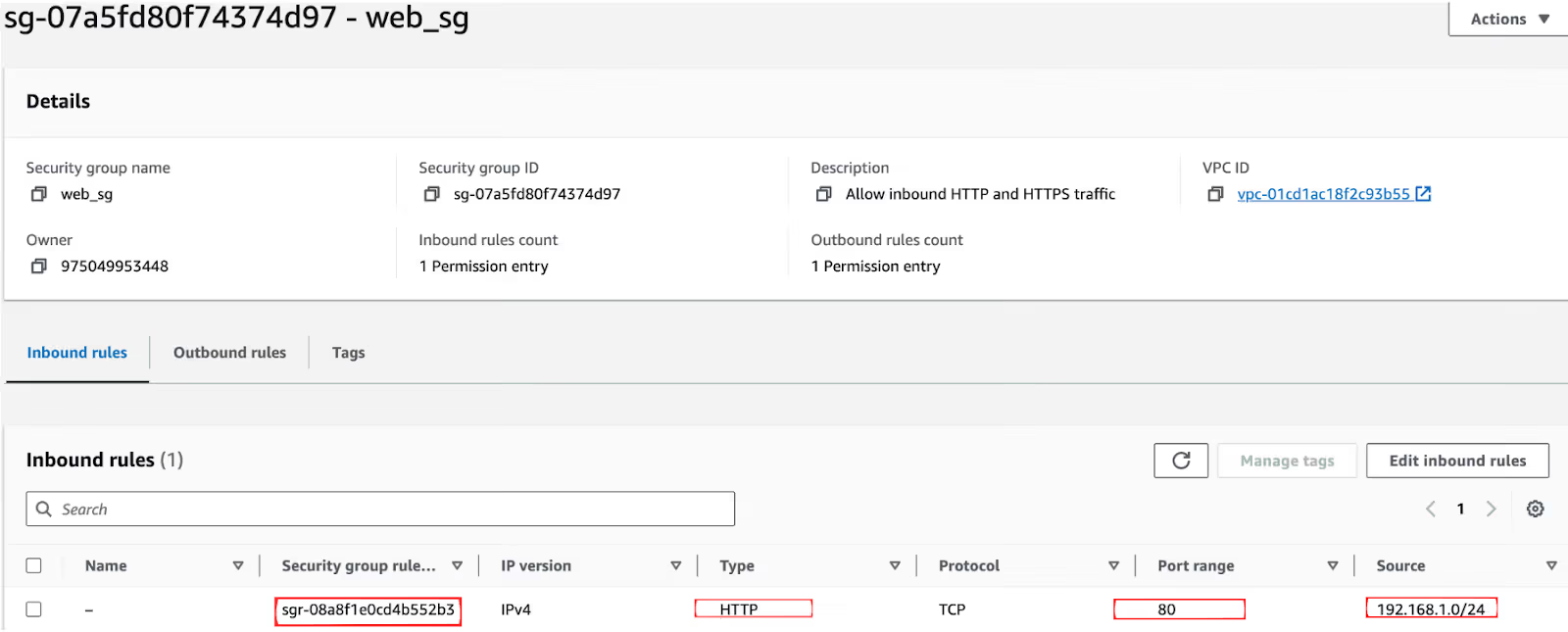
After terraform apply, the security group in the AWS Console reflects exactly what the code defines, port 80 is open to 192.168.1.0/24, nothing else. You can verify this in the AWS Console snapshot below, where the inbound rule source shows 192.168.1.0/24 as expected.
Now an engineer needs to test connectivity from an external machine during an incident. They open the AWS Console, edit the inbound rule on web_sg, and change the source from 192.168.1.0/24 to 0.0.0.0/0. Port 80 is now open to the entire internet. Refer to the snapshot below. The rule ID sgr-08a8f1e0cd4b552b3 is unchanged, but the source has silently flipped to 0.0.0.0/0.
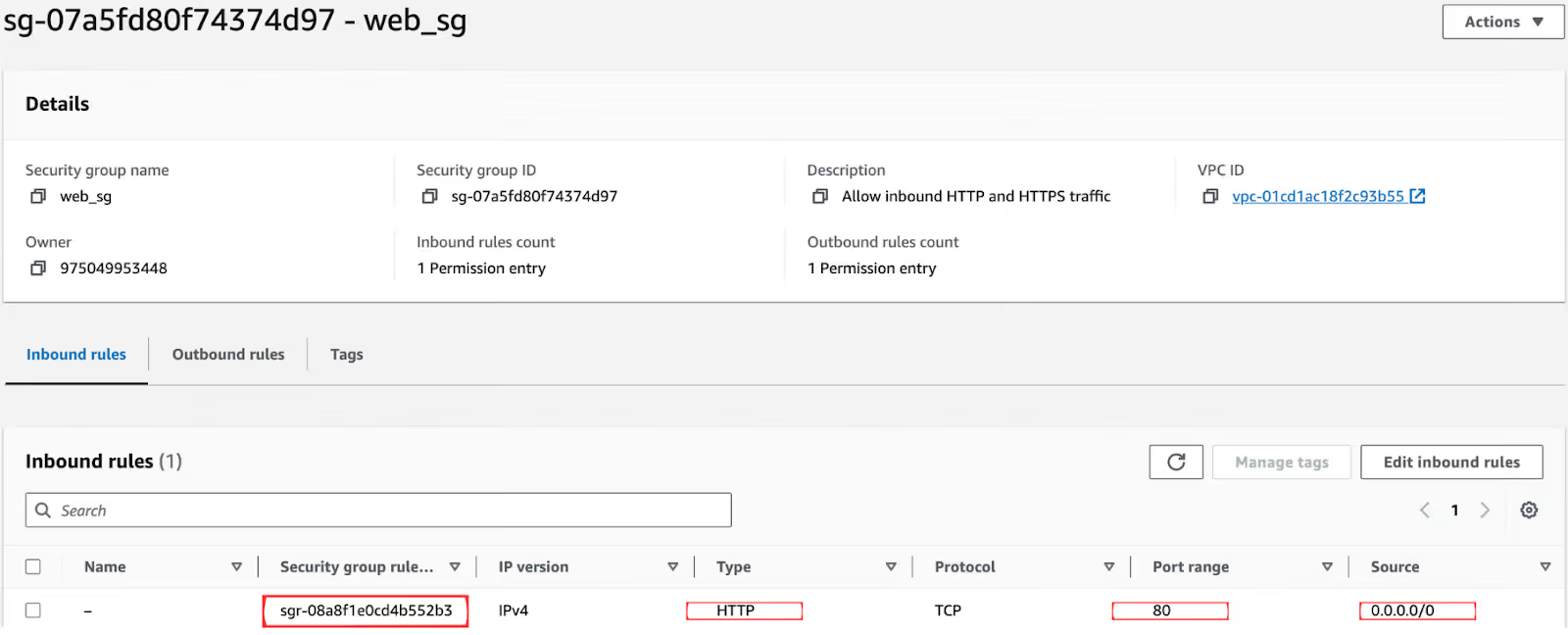
The terraform.tfstate file still records 192.168.1.0/24. The .tf configuration still defines 192.168.1.0/24. Terraform has no record of the console change. Any compliance tooling that reads Terraform state to assess security posture would see no issue; the exposure exists entirely in the gap between the state file and the live resource.
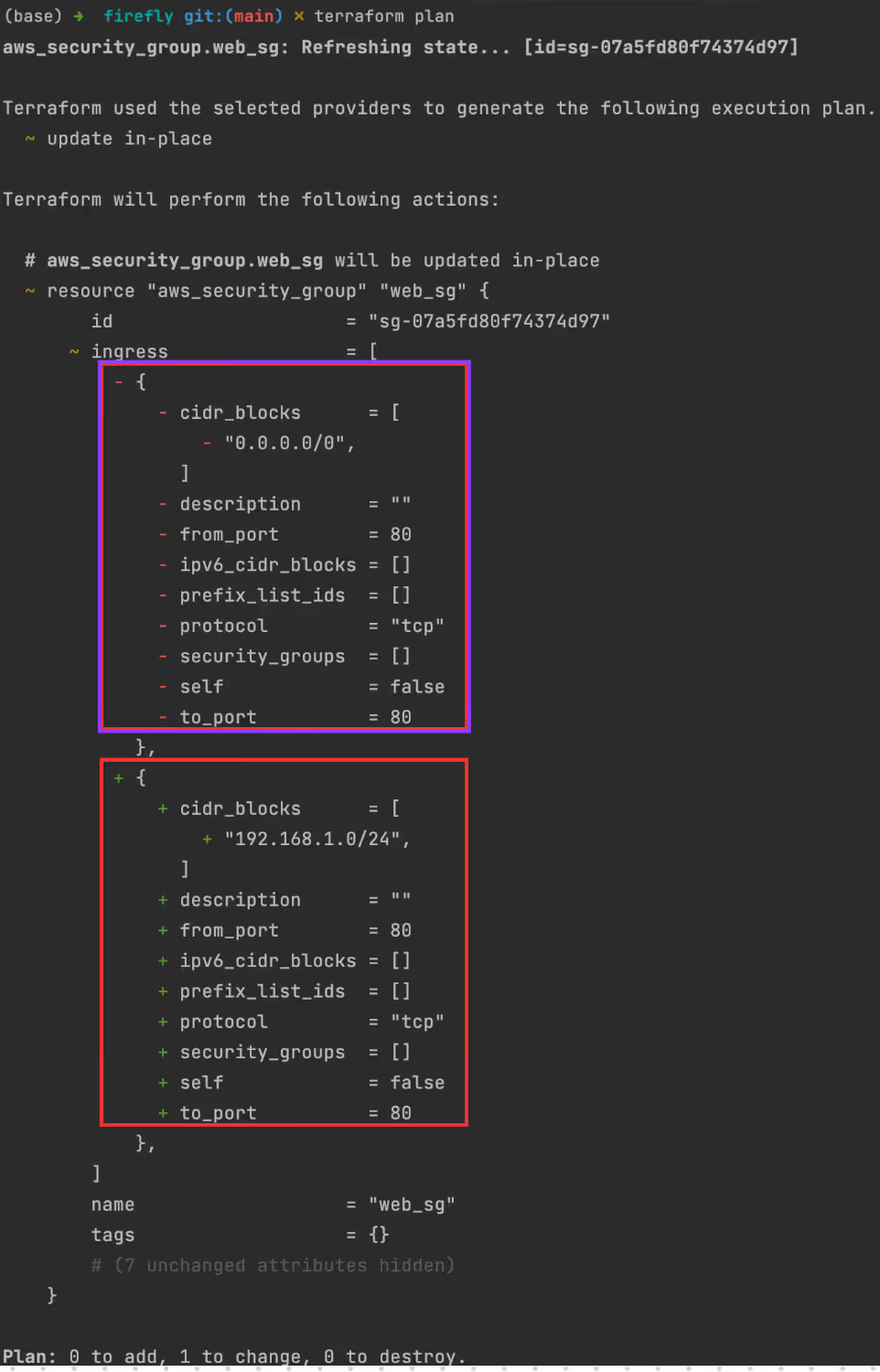
Running terraform plan after a terraform refresh surfaces it immediately. Take a look at the terminal output in the snapshot below. The - block (purple) shows what the cloud currently has (0.0.0.0/0) and the + block (red) shows what Terraform will restore (192.168.1.0/24). The final line confirms: Plan: 0 to add, 1 to change, 0 to destroy.
Running terraform apply executes the correction. As you can see in the terminal output below, Terraform modifies aws_security_group.web_sg in place in 3 seconds, the console change is reverted, the security group is restored to 192.168.1.0/24, and the state file is updated to match.
The security group is now aligned with the desired state. The entire window of exposure, from the console edit to the terraform apply, happened without any automated alert. If no one had run terraform plan, the security group would have stayed open to 0.0.0.0/0 indefinitely.
Why Drift Compounds Faster Than Teams Expect
A single drifted resource is manageable. The problem is that drift rarely stays isolated.
An engineer opens an inbound port on a security group to fix an incident. The fix works, but the rule now allows traffic from 0.0.0.0/0. A week later, a second engineer deploys a new service behind the same security group, not knowing the inbound rules have changed. The new service inherits the open rule. Now two services are exposed. The original console change that caused the exposure is buried in CloudTrail from a week ago, disconnected from the current deployment.
This is how drift accumulates into inconsistency. Each individual change is traceable in isolation. The interaction between a drifted resource and new infrastructure built on top of it is not, because Terraform has no awareness of either the original drift or the dependency the new deployment created against it.
The risk compounds hardest in three specific situations: when multiple engineers share infrastructure without a central inventory of what owns what, when console changes made during incidents are never cleaned up after the incident resolves, and when multiple tools, Terraform, CDK, Ansible, and manual console operations, all have write access to the same resources. In each case, Terraform's view of the infrastructure diverges from reality faster than routine terraform plan runs can catch it.
5 Best Practices That Reduce Drift Before It Reaches Production
The five practices below cover the full drift lifecycle, preventing it from entering the state file in the first place, detecting it between deployment cycles, and correcting it without breaking stateful resources in production.
1. Automate terraform plan on a Schedule, Not Just Before Deployments
The most common mistake is treating terraform plan as a pre-deployment check only. Drift that enters the infrastructure on a Tuesday does not get caught until the next pipeline run, which may be Thursday or next week. Running terraform plan on a scheduled basis, hourly for critical IAM resources, daily for compute and networking, catches divergence between pipeline cycles before new infrastructure gets deployed on top of a drifted baseline. In CI/CD terms, this means adding a scheduled job that runs terraform plan across every environment independently of whether a deployment is pending, and alerting on any non-empty diff.
2. Enforce GitOps, Every Infrastructure Change Through a Pull Request and Version-Controlled in GitHub
The only way to prevent out-of-band console changes from becoming drift is to make the pull request the only permitted path for infrastructure modifications. Every .tf change goes through a PR. The PR triggers terraform plan automatically, via Atlantis, GitHub Actions, or Terraform Cloud, and the plan output is posted as a PR comment before any reviewer approves the merge. GitHub becomes the audit trail: every infrastructure change has a commit hash, an author, a timestamp, a reviewer, and the exact diff that was applied. When drift occurs despite this process, the Git history is the first place to look, because if the change is not in a commit, it did not go through the approved workflow. Teams that enforce this consistently eliminate the most common source of drift before it can enter the state file.
3. Ingest CloudTrail and Cloud Audit Logs to Catch Out-of-Band Changes in Real Time
Every manual change made through the AWS Console, Azure Portal, or GCP Cloud Console generates an audit log entry, AWS CloudTrail, Azure Activity Logs, or GCP Cloud Audit Logs, respectively. Ingesting these into a SIEM or log aggregation platform and alerting on write operations against Terraform-managed resources catches out-of-band changes at the moment they happen, not when the next terraform plan runs. For example, a CloudTrail event for AuthorizeSecurityGroupIngress on a Terraform-managed security group is an immediate signal that a manual rule change has been made, one that has not gone through the IaC workflow and has not updated the state file.
4. Enforce Least Privilege to Prevent Console Changes on Terraform-Managed Resources
Restricting who has write permissions on Terraform-managed resources through IAM policies removes the most common source of drift before it can happen. Engineers who need to debug a connectivity issue should not have the IAM permissions to modify a production security group directly; they should raise a PR. This is not about blocking engineers; it is about making the IaC workflow the path of least resistance. In practice, this means scoping production IAM roles to read-only for most engineers, reserving write access for the service account that runs terraform apply in the CI/CD pipeline, and using IAM permission boundaries to prevent privilege escalation that would allow console changes to bypass that control.
5. Apply Automated Remediation Through Your Pipeline, With Guardrails for Stateful Resources
For simple, stateless drift, a security group rule that was opened during an incident, an S3 bucket ACL that was flipped for a test, automated remediation via terraform apply in the CI/CD pipeline is safe and efficient. The pipeline detects the non-empty diff from the scheduled terraform plan, opens a PR with the corrective change, and applies it after approval. For stateful resources, RDS instances, EBS volumes, and DynamoDB tables, automated remediation requires explicit guardrails. A terraform apply that reverts an RDS allocated_storage increase done during a capacity crunch could cause a service disruption. The remediation workflow for stateful resources should require human approval before apply, and should include a prevent_destroy = true lifecycle rule in the Terraform configuration to block accidental deletion during automated correction runs.
What Do Current Drift Detection Solutions Actually Cover, and Where Do They Fall Short?
Two approaches are commonly used alongside Terraform for drift detection, not because either solves the full problem, but because understanding exactly where each stops clarifies what still needs to be handled manually.
PR-triggered plan checks run terraform plan automatically when a pull request is opened and post the diff into the code review workflow. Engineers see the plan output before merging, which is genuinely useful for catching drift before a deployment goes out. The limit is the trigger: these checks only fire when a PR is opened. A console change made on Monday in an environment where no PR is opened until Friday is invisible for that entire window. No PR, no check. Drift that enters the infrastructure between pull requests does not get caught until the next one.
Scheduled state comparison tools take a different angle; they compare live cloud state against the Terraform state file and surface resources that exist in the cloud but have no state file entry at all. These are unmanaged resources that terraform plan cannot flag because Terraform has no record that they exist. For environments with a backlog of manually-created resources that were never codified, this fills a real gap in native tooling. The limit here is scope and continuity: these tools need to be run on a schedule, do not continuously monitor drifted managed resources, have no actor attribution, and offer no remediation path. They tell you what is unmanaged, not who changed a managed resource, when, or what to do about it.
What is still manual after both approaches:
Even with both running, an engineer still has to set up and maintain the detection schedules, cross-reference CloudTrail logs to find who made the out-of-band change, decide for each drifted resource whether to revert or codify, write the corrective .tf change if codifying, open the PR, and get it reviewed. There is no single view showing what percentage of the cloud estate is cleanly managed, what has drifted, and what is unmanaged; that picture has to be assembled by hand from multiple tool outputs.
Both approaches solve specific, bounded problems. The investigation, attribution, remediation decision, and corrective IaC authoring that follow a detected drift are left entirely to the engineer. That is the workflow Firefly replaces.
How Firefly Replaces the Manual Investigation Workflow That Existing Tools Leave Behind
The gap left by the tools above is not just about detection speed; it is about what happens after detection. Finding the diff, tracing it back to a specific person and a specific console action, deciding whether to revert or codify, writing the corrective IaC change, opening the PR, all of that is manual. Firefly handles each of those steps.
Firefly uses event-driven detection. When a resource configuration changes in the cloud provider, Firefly detects the divergence from the Terraform state in real time, not at the next scheduled scan, not when a PR is opened, but at the moment the change happens. Mechanically, this is the same as terraform refresh and terraform plan perform: running cloud configuration checks against the Terraform state file, just continuously instead of on-demand. Firefly's Inventory maintains a live view of every resource's actual configuration by polling cloud provider APIs continuously, rather than only when someone triggers a refresh. The moment that the live configuration no longer matches what the connected terraform.tfstate records, Firefly flags it as drift.
Attribution comes from a second, parallel source. Firefly's Event Center ingests the same audit trail a team would otherwise cross-reference by hand, AWS CloudTrail, Azure Activity Logs, or Google Cloud Audit Logs, and matches the mutation event to the drift the moment both land. That's how the platform can name the exact IAM user or service account responsible without anyone opening a CloudTrail console.
For the security group example above, the moment an engineer changes the inbound rule from 192.168.1.0/24 to 0.0.0.0/0 in the AWS Console, Firefly flags the drift immediately, before the next terraform plan has any chance to run and before the change gets buried in CloudTrail history.
The drift alert does not just tell you that something changed; it tells you exactly what changed, which field was modified, and who made the change. Full actor attribution across every account, region, and resource type means the on-call engineer reviewing the alert can see immediately that the web_sg inbound rule was edited via the AWS Console at 11:47 pm by a specific IAM user, not as part of a Terraform pipeline run. That context is the difference between a five-minute investigation and a two-hour one. Firefly's Event Viewer for each resource shows the exact API call, the timestamp, and the identity that triggered it, without needing to dig through CloudTrail manually:
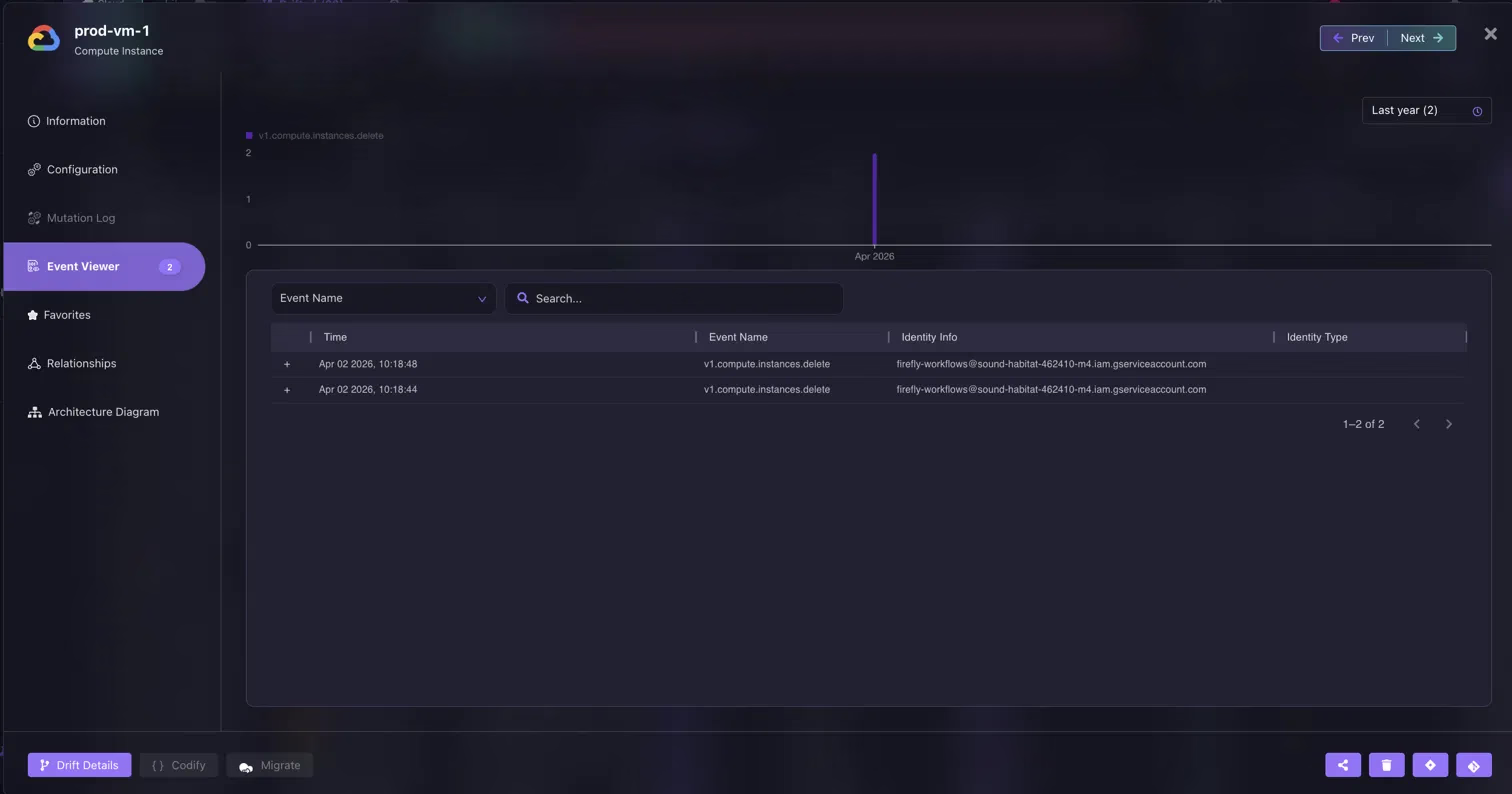
The Event Name column records v1.compute.instances.delete, the Time column pins it to Apr 02 2026 at 10:18:44 and 10:18:48, and the Identity Info column names the exact service account that made the deletion, firefly-workflows@sound-habitat-462410-m4.iam.gserviceaccount.com. That is the attribution information that would otherwise require manually cross-referencing GCP Cloud Audit Logs against a timestamp from the diff output.
When you filter the Firefly inventory by drifted resources, every affected asset is surfaced across all connected accounts and providers in a single view:
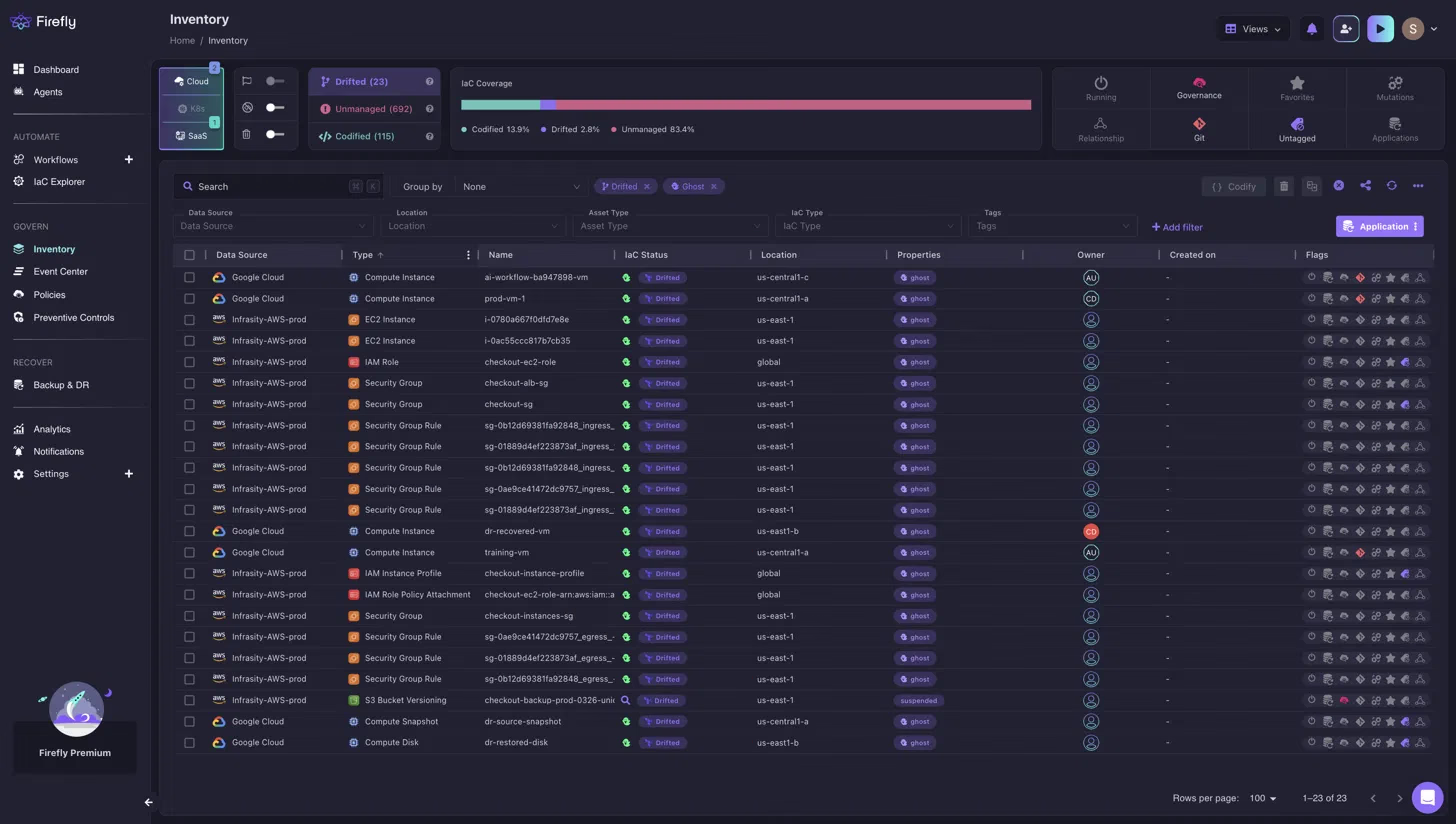
The IaC Status column marks each resource as Drifted, the Data Source column identifies the account it belongs to, Infrasity-AWS-prod or Google Cloud, and the Owner column surfaces who is accountable, all without cross-referencing CloudTrail logs manually. The IaC Coverage bar at the top shows the live split: Codified 13.9%, Drifted 2.8%, Unmanaged 83.4%.
For every drifted resource, Firefly shows a side-by-side field-by-field diff between the running cloud configuration and the desired IaC state, and it adds the cost impact alongside it. The financial delta between the drifted configuration and the desired state is calculated automatically, so teams can prioritize remediation by business impact, not just by severity label.
When a drifted resource needs to be corrected, Firefly offers two paths, and this is the capability that separates it from running terraform apply directly. The first path reconciles the cloud resource back to the IaC-defined state: Terraform wins, and the manual change is reverted. The second path aligns the IaC to match the live cloud configuration: the manual change was actually right, so Firefly codifies it into the Terraform configuration through a pull request in the connected VCS. Both remediation paths are generated automatically, and the exact commands and IaC diffs are pre-written. Here is what that looks like for prod-vm-1, a Google Cloud Compute Instance flagged as a ghost drift, a resource that exists in the Terraform state file but was not found in the cloud environment:
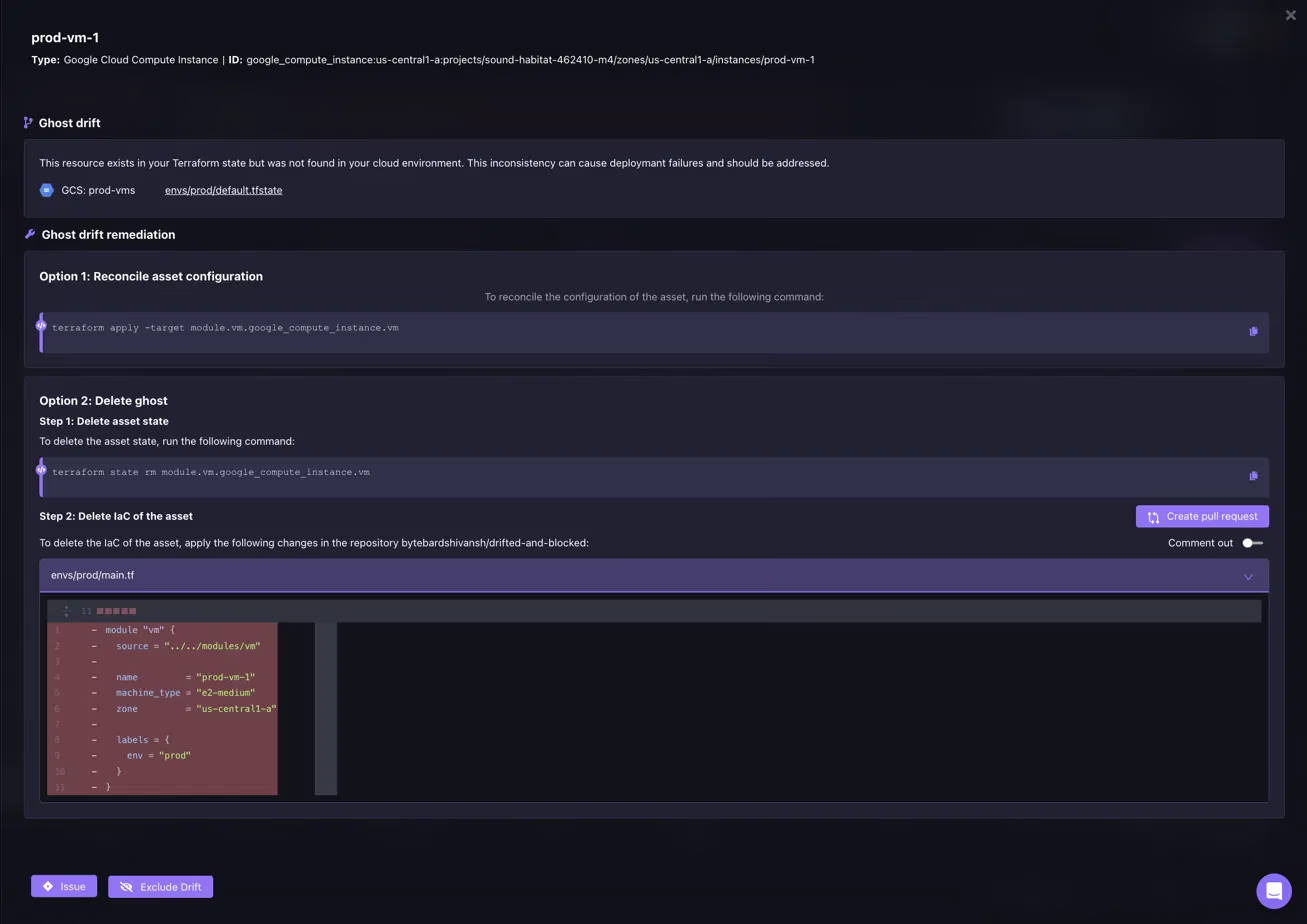
Option 1 provides the exact terraform apply -target module.vm.google_compute_instance.vm command to reconcile the resource back to its IaC-defined state. Option 2 provides the terraform state rm command and a Create pull request button that opens a PR in the connected repository with the IaC deletion already written and the diff shown inline, the reviewer sees exactly what will be removed before approving. The engineer chooses which path reflects the actual intent.
Every fix goes through version control. Firefly opens a pull request with the exact IaC changes needed, reviewed, approved, and merged through the normal Git workflow. No fix ever bypasses code review. The change that caused the drift, the decision about how to resolve it, and the resulting IaC update are all tracked in a single audit-ready history.
Alerts fire via Slack, PagerDuty, or webhook the moment drift is detected, so engineers hear about a drifted production security group within minutes of the console change, not during the next deployment review. The same drift data is also queryable directly from an engineer's own tooling: Firefly's MCP server exposes live drift status to Claude Code, Cursor, and Claude Desktop, so a question like 'which resources have drifted in the last 24 hours' returns an answer without leaving the IDE or opening the Firefly dashboard at all.
The centralized dashboard shows what percentage of the cloud estate is Terraform-managed, what is unmanaged, and what has drifted, giving platform teams a continuous read on infrastructure coverage without manually running terraform plan across every module. Here is what that coverage looks like on the Firefly dashboard:
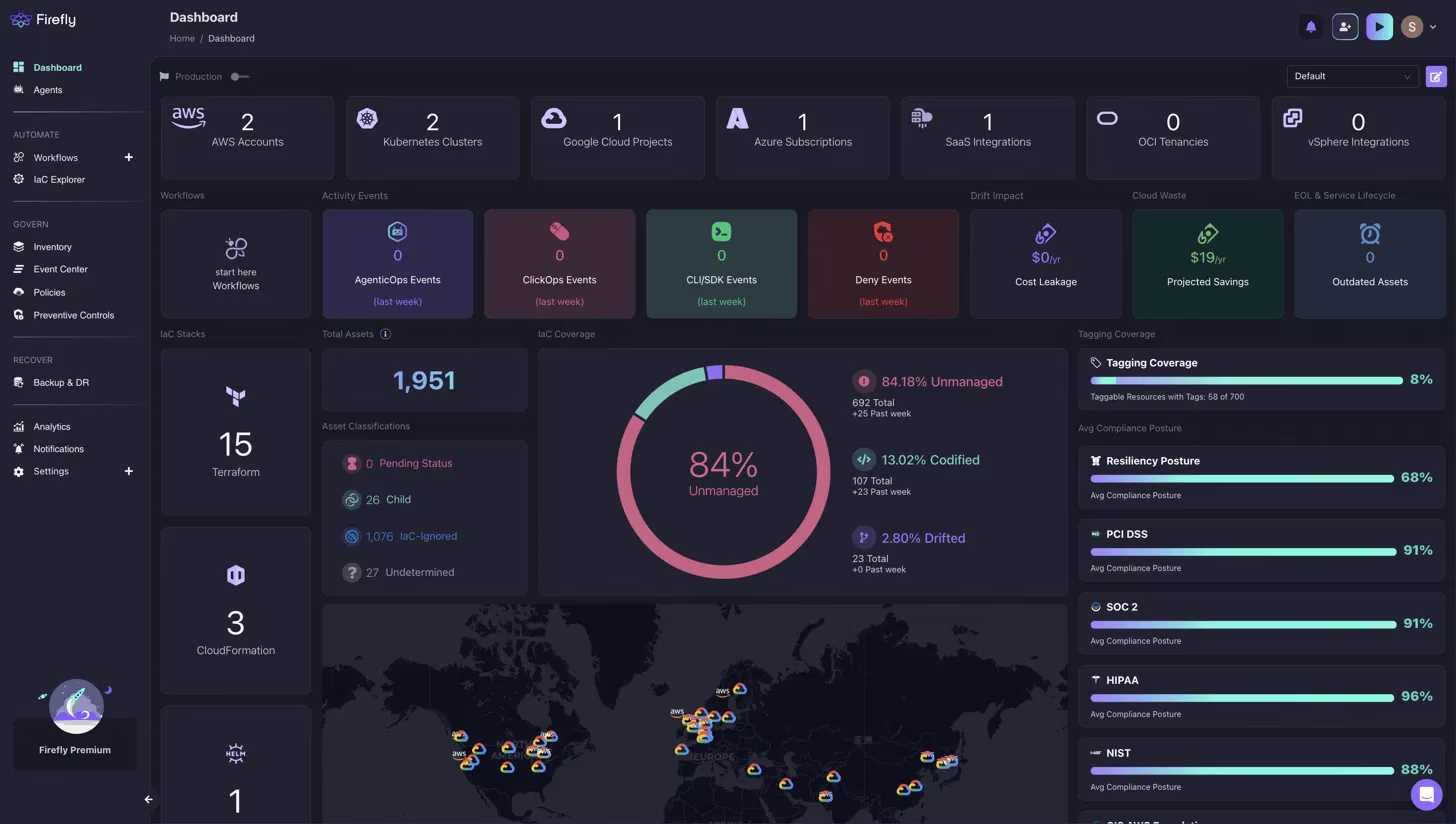
The IaC Coverage donut gives platform teams a live read on the full estate, not just what Terraform manages. The compliance posture scores for SOC 2 (91%), HIPAA (96%), NIST (88%), and PCI DSS (91%) are derived directly from the current infrastructure state, not from a manually assembled report.
Every drift event and every fix is automatically logged, tamper-proof, timestamped, and always current. When a SOC 2, ISO 27001, HIPAA, DORA, or NIS2 audit asks for evidence that infrastructure changes are tracked and controlled, that log is already there.
Conclusion
Terraform drift does not announce itself. It accumulates between deployments, compounds as new infrastructure gets built on drifted baselines, and surfaces during incident response when the cost of finding and fixing it is highest.
The core workflow, terraform refresh to sync the state file, terraform plan to surface the diff, terraform apply to correct it, is the right foundation. Running it consistently, automating it inside pipelines, and restricting out-of-band console access eliminates the most common sources of drift before they reach production.
Where that foundation breaks down is in the window between pipeline runs. Drift that enters the infrastructure on a Tuesday does not get caught until the next terraform plan on Thursday, and in environments with active incident response, that window is exactly when the most consequential manual changes happen.
Firefly closes that window by detecting drift at the moment it occurs, attributing it to the engineer or process that caused it, and generating both remediation paths so teams can choose whether to revert the change or codify it, without bypassing version control either way.
FAQs
What is infrastructure drift in Terraform?
Infrastructure drift occurs when the actual configuration of a cloud resource differs from what Terraform expects based on the state file or the .tf configuration. For example, a security group that allows 0.0.0.0/0 inbound traffic in AWS while the Terraform state file still records 192.168.1.0/24 is a drifted resource. Terraform will not flag this automatically; it requires running terraform refresh followed by terraform plan to surface the difference.
How does terraform plan detect drift?
terraform plan compares the .tf configuration files against the terraform.tfstate file and outputs a diff. To detect drift from manual console or CLI changes, run terraform refresh first; this updates the state file with the actual resource configuration from the cloud provider. Then terraform plan shows the difference between what the state file now records (actual cloud state) and what the .tf configuration defines (desired state). Without terraform refresh, the plan only compares the configuration against Terraform's last recorded state, which may not reflect the current cloud reality.
What is the difference between terraform refresh and terraform plan?
terraform refresh queries the cloud provider APIs and updates the state file to reflect the actual current configuration of every resource. terraform plan reads the state file and compares it to the .tf configuration to produce a diff. Running terraform plan without terraform refresh means the diff is between the configuration and Terraform's last known state, not between the configuration and what is actually running in the cloud today.
Can Terraform automatically fix drift?
Running terraform apply after detecting drift reverts drifted resources to the desired state in the .tf configuration. However, this requires a human to review the terraform plan output and confirm the apply. Auto-applying drift corrections in production carries risk; a resource changed during incident response may have been modified intentionally, and reverting it automatically could reintroduce the original problem.
What is the difference between a drifted resource and an unmanaged resource?
A drifted resource exists in the Terraform state file, but its actual configuration has diverged from what the state file or .tf files describe. An unmanaged resource exists in the cloud but does not appear in any Terraform state file; Terraform is entirely unaware it exists. terraform plan detects drifted resources. It does not surface unmanaged resources. Tools like Driftctl or Firefly are needed to identify the full inventory of what exists outside Terraform's awareness.
How does Firefly differ from running terraform plan on a schedule?
Scheduled terraform plan runs catch drift at fixed intervals, hourly, daily, or tied to pipeline execution. Drift that occurs between those intervals sits undetected until the next run. Firefly uses event-driven detection and surfaces drift the moment a resource configuration changes in the cloud provider. It also adds actor attribution (who made the change), cost impact (the financial delta between drifted and desired state), and two-way remediation, the option to align the IaC to the live cloud state rather than always reverting the change.


.webp)


.webp)